ECU TOYOTA 4RUNNER 1996 Owner's Manual
[x] Cancel search | Manufacturer: TOYOTA, Model Year: 1996, Model line: 4RUNNER, Model: TOYOTA 4RUNNER 1996Pages: 217, PDF Size: 4.49 MB
Page 111 of 217

108
Cleaning the security code
1. Turn off the audio system.
Turn the ignition key to ACCº.Simultaneously push and hold in 1º, 6º,
and PWR/VOLº until SECº appears on
the display.2. While you are holding in the ~º side of
TUNEº, push 1º. The display will read - - -º.On some models, º and º will also
turn on.3. Input the existing three-digit code.
You have 10 seconds to enter each digit. For example, 209º:
To set the first digit: Push 1º until the digit
you want appears on the display.
To set the second digit: Push 2º until the
digit you want appears on the display.
To set the third digit: Push 3º until the digit
you want appears on the display.
Page 112 of 217

109
4. The three-digit code should be on the
display. Push SCANº.The display will read - - -.
5. Wait for 10 seconds until the security
system is deactivated and the display
goes dark.If you pushed any wrong buttons, Errº and the number of errors you have made will appear on the display
before SECº does. Go back to step 2and try again. If the display returns to
- - -º while you are entering the code,
go back to step 3.
NOTICE
A tenth error will activate the anti- theft system and HELPº will ap-
pear on the display. The audio sys- tem will be completely inoperable.At this time, the anti-theft light also comes on. If this occurs, contactyour Toyota dealer.
Reactivating a disabled audio system
1. Turn the ignition switch to ACCº.
2. While you are holding in the ~º side of
TUNEº, push 1º. The display will read - - -º.
On some models, º and º will also
turn on.
Page 113 of 217

11 0
3. Input the existing three-digit code.
You have 10 seconds to enter each digit. For example, 209º:
To set the first digit: Push 1º until the digit
you want appears on the display.
To set the second digit: Push 2º until the
digit you want appears on the display.
To set the third digit: Push 3º until the digit
you want appears on the display.4. The three-digit code should be on the
display.
Push and hold in SCANº until the display
goes dark. (At first, SECº will appear on
the display.)If you pushed any wrong buttons, Errº and the number of errors you have made will appear on the display
before SECº does. Go back to step 2and try again. If the display returns to
- - -º while you are entering the code,
go back to step 3.
To make sure the security code has been accepted, turn the ignition to LOCKº andthen
back to ACCº. SECº should appear
on the display.
NOTICE
A tenth error will activate the anti- theft system and HELPº will ap-
pear on the display. The audio sys-tem will be completely inoperable. At this time, the anti-theft light alsocomes on. If this occurs, contact your Toyota dealer.
Page 127 of 217
124The cup holder is designed for holding
cups or drink-cans fit snugly in its holes.
To use the cup holder, pull it out.
Do not place anything else on the
cup holder, as such items may be
thrown about and possibly injure people in the vehicle during sud-
den braking or an accident.
Keep the cup holder shut when
not in use. CAUTION
!
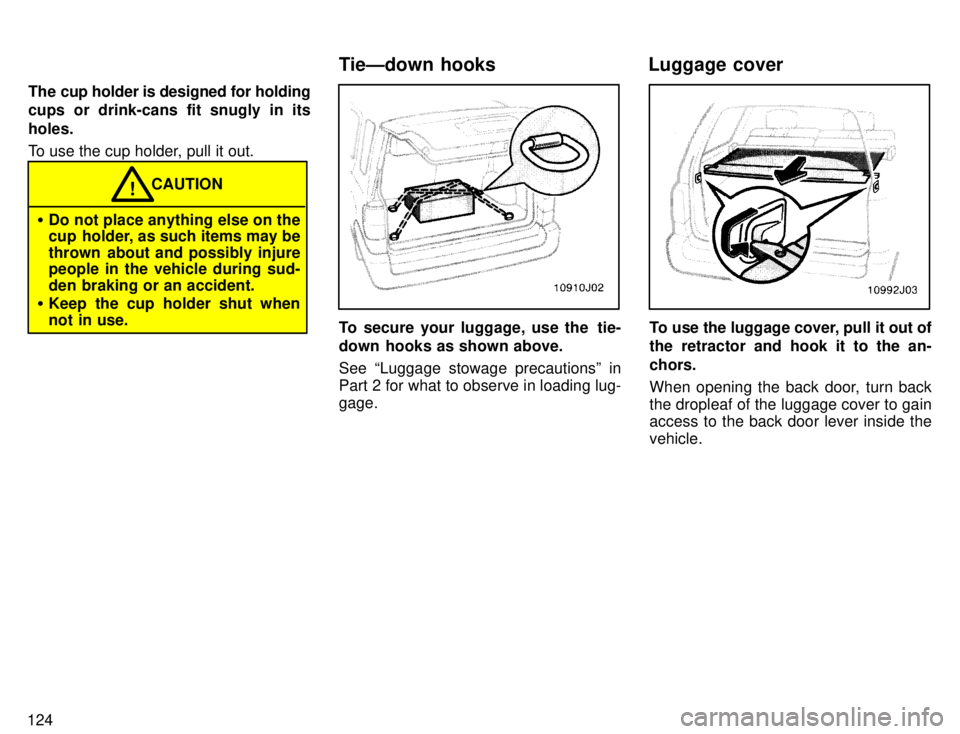
To secure your luggage, use the tie-
down hooks as shown above. See Luggage stowage precautionsº in
Part 2 for what to observe in loading lug-gage.To use the luggage cover, pull it out of
the retractor and hook it to the an- chors.
When opening the back door, turn back the dropleaf of the luggage cover to gain
access to the back door lever inside the vehicle.
TieÐdown hooks Luggage cover
Page 138 of 217
135
ABSº warning light
This light comes on when the ignition key is turned to the ONº position. After about
3 seconds, the light will go off.
When the light is on with the rear dif
feren-
tial locked, it indicates the anti-lock brake
system will not operate.
If either of the following conditions occurs, this indicates a malfunction somewhere inthe parts monitored by the warning light
system. Contact your Toyota dealer as
soon as possible to service the vehicle. The light does not come on as de-
scribed above, or remains on.
The light comes on while driving with
the rear differential unlocked.
The light does not come on with the
rear differential locked.
The light comes on while driving.
Even if the anti-lock brake system should
fail, the brake system will still operate con-
ventionally. Have your vehicle checked by
your Toyota dealer as soon as possible.
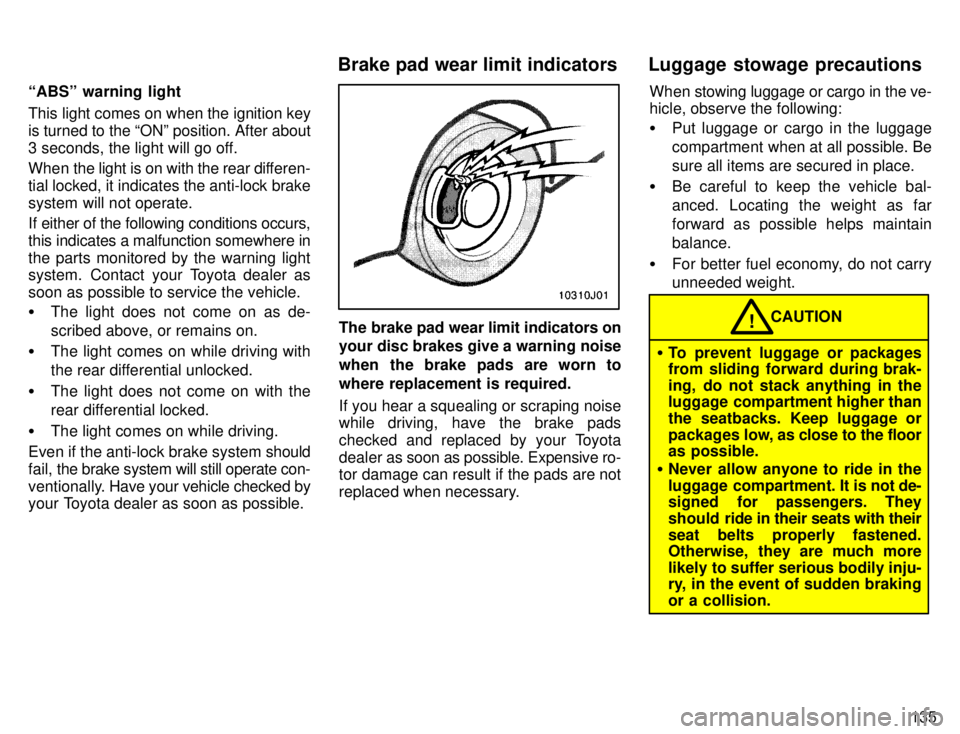
The brake pad wear limit indicators on your disc brakes give a warning noise
when the brake pads are worn to
where replacement is required.
If you hear a squealing or scraping noise
while driving, have the brake pads
checked and replaced by your Toyota
dealer as soon as possible. Expensive ro-
tor damage can result if the pads are not
replaced when necessary. When stowing luggage or cargo in the ve-
hicle, observe the following:
Put luggage or cargo in the luggage
compartment when at all possible. Besure all items are secured in place.
Be careful to keep the vehicle bal-anced. Locating the weight as far
forward as possible helps maintainbalance.
For better fuel economy, do not carry
unneeded weight.CAUTION!
To prevent luggage or packages
from sliding forward during brak-
ing, do not stack anything in the
luggage compartment higher than
the seatbacks. Keep luggage or
packages low, as close to the floor
as possible.
Never allow anyone to ride in the
luggage compartment. It is not de-
signed for passengers. They
should ride in their seats with their
seat belts properly fastened.
Otherwise, they are much more
likely to suffer serious bodily inju-
ry, in the event of sudden braking or a collision.
Brake pad wear limit indicators Luggage stowage precautions
Page 139 of 217
136
Do not place anything on the filler
panel or luggage cover. Such
items may be thrown about and
possibly injure people in the ve-
hicle during sudden braking or an
accident. (secure all items in a
safe place.)
Do not drive with objects left on
top of the instrument panel. They
may interfere with the driver's field
of view. Or they may move during
sharp vehicle acceleration or turn-
ing, and impair the driver's control
of the vehicle. In an accident theymay injure the vehicle occupants.
NOTICE
Do not load the vehicle beyond the vehicle capacity weight specified in
Part 8.
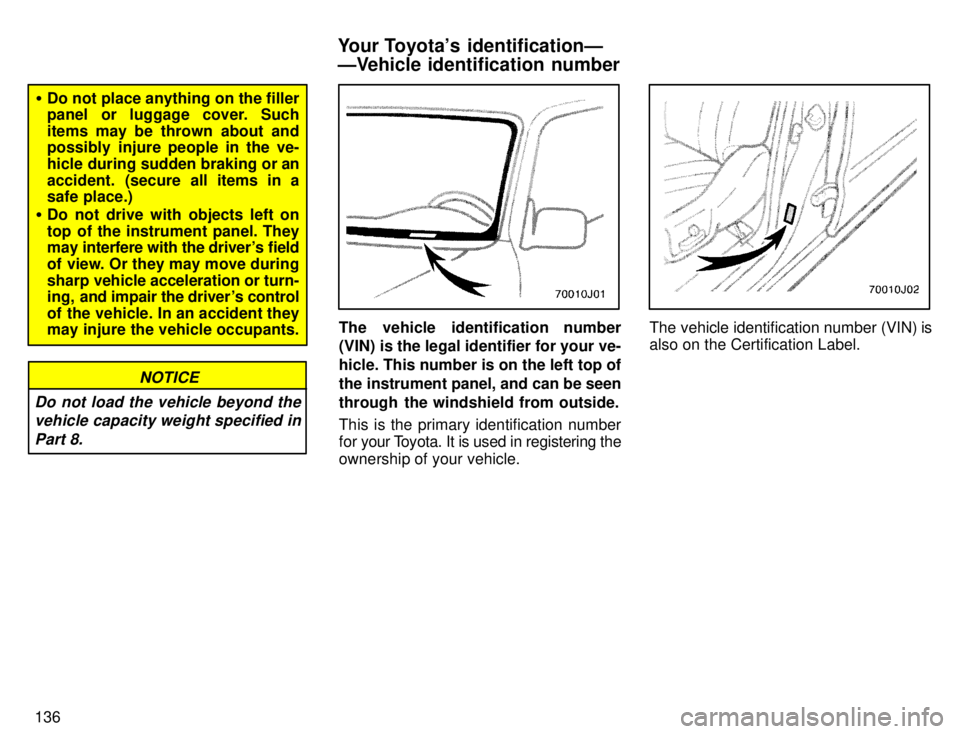
The vehicle identification number
(VIN) is the legal identifier for your ve- hicle. This number is on the left top of
the instrument panel, and can be seen
through the windshield from outside.
This is the primary identification number
for your T oyota. It is used in registering the
ownership of your vehicle.The vehicle identification number (VIN) is
also on the Certification Label.
Your Toyota's identificationÐ
ÐVehicle identification number
Page 148 of 217
145
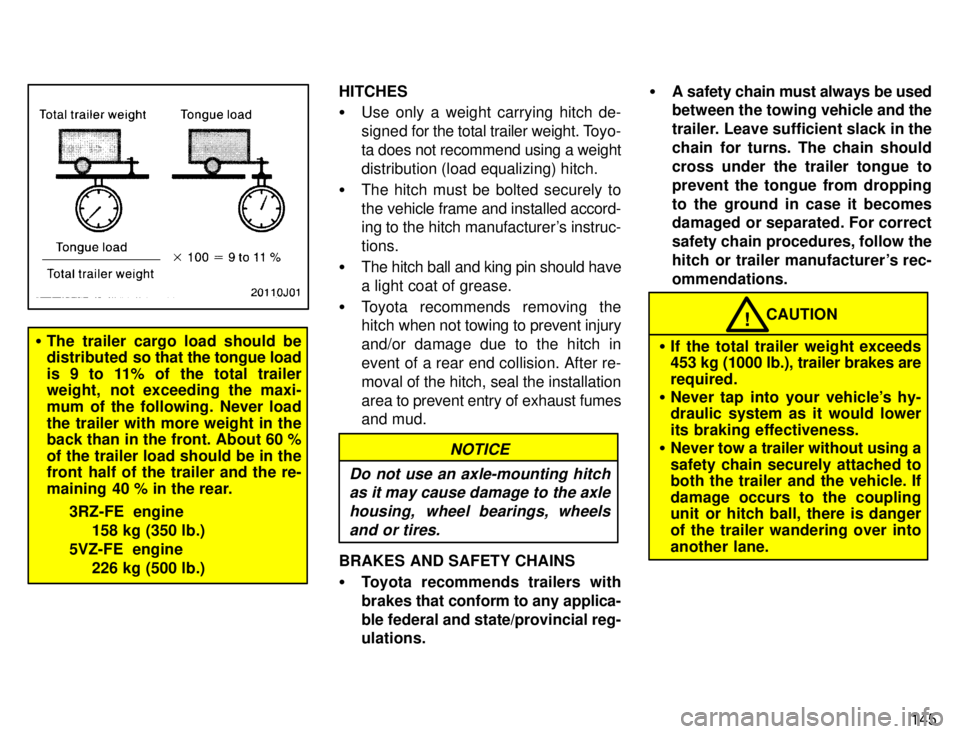
The trailer cargo load should be
distributed so t hat the tongue load
is 9 to 11% of the total trailer
weight, not exceeding the maxi-
mum of the following. Never load
the trailer with more weight in the back than in the front. About 60 % of the trailer load should be in the
front half of the trailer and the re-
maining 40 % in the rear.
3RZ-FE engine158 kg (350 lb.)
5VZ-FE engine 226 kg (500 lb.) HITCHES
Use only a weight carrying hitch de-
signed for the total trailer weight. Toyo-
ta does not recommend using a weight
distribution (load equalizing) hitch.
The hitch must be bolted securely to
the vehicle frame and installed accord-
ing to the hitch manufacturer's instruc- tions.
The hitch ball and king pin should havea light coat of grease.
Toyota recommends removing the hitch when not towing to prevent injury
and/or damage due to the hitch in
event of a rear end collision. After re-moval of the hitch, seal the installation
area to prevent entry of exhaust fumes
and mud.
NOTICE
Do not use an axle-mounting hitch as it may cause damage to the axle
housing, wheel bearings, wheelsand or tires.
BRAKES AND SAFETY CHAINS Toyota recommends trailers with
brakes that conform to any applica-
ble federal and state/provincial reg- ulations.
A safety chain must always be used
between the towing vehicle and the
trailer. Leave sufficient slack in the
chain for turns. The chain shouldcross under the trailer tongue to
prevent the tongue from dropping
to the ground in case it becomes
damaged or separated. For correct
safety chain procedures, follow the
hitch or trailer manufacturer's rec-ommendations.
CAUTION!
If the total trailer weight exceeds
453 kg (1000 lb.), trailer brakes are required.
Never tap into your vehicle's hy- draulic system as it would lower
its braking effectiveness.
Never tow a trailer without using a
safety chain securely attached to
both the trailer and the vehicle. If
damage occurs to the coupling
unit or hitch ball, there is danger of the trailer wandering over into
another lane.
Page 149 of 217

146TIRES
Ensure that your vehicle's tires are
properly inflated. See Chapter 7-2 forinstructions.
The trailer tires should be inflated to
the pressure recommended by the
trailer manufacturer in respect to the
total trailer weight.
TRAILER LIGHTS Trailer lights must comply with federal,
state/provincial and local regulations. See your local recreational vehicle
dealer or rental agency for the correct type of wiring and relays for your trail-
er. Check for correct operation of the
turn signals and stop lights each time
you hitch up. Direct splicing may dam-
age your vehicle's electrical system
and cause a malfunction of your lights.
BREAK-IN SCHEDULE Toyota recommends that you do not
tow a trailer with a new vehicle or a ve-
hicle with any new power train compo-
nent (engine, transmission, differen- tial, wheel bearing, etc.) for the first
800 km (500 miles) of driving. MAINTENANCE
If you tow a trailer, your vehicle will re-
quire more frequent maintenance due
to the additional load. For this informa-
tion, please refer to the scheduled
maintenance information in the Own-
er 's Manual Supplement/Maintenance Scheduleº.
Retighten all fixing bolts of the towing
ball and bracket after approximately
1000 km (600 miles) of trailer driving.
PRE-T OWING SAFETY CHECK Check that your vehicle remains level
when a loaded or unloaded trailer is
hitched. Do not drive if the vehicle has
an abnormal nose-up or nose-down
condition, and check for improper
tongue load, overload, worn suspen-
sion or other possible causes.
Make sure the trailer cargo is securely
loaded so that it cannot shift.
Check that your rear view mirrors con-
form to any applicable federal, state/
provincial or local regulation. If not,
install the rear view mirrors required
for towing purpose. TRAILER TOWING TIPS
When towing a trailer, your vehicle will
handle differently than when not tow-
ing.
The three main causes of vehicle-
trailer accidents are driver error, ex-
cessive speed and improper trailer
loading. Keep these in mind when tow-
ing: Before starting out, check operation of
the lights and all vehicle-trailer con-
nections. After driving a short dis-
tance, stop and recheck the lights and
connections. Before actually towing a
trailer, practice turning, stopping and
backing with a trailer in an area away
from traffic until you learn the feel.
Backing w ith a trailer is difficult and re-
quires practice. Grip the bottom of thesteering wheel and move your hand to
the left to move the trailer to the left.Move your hand to the right to move
the trailer to the right. (This procedureis generally opposite to that when
backing without a trailer). Also, just
turn the steering wheel a little at a time,
avoiding sharp or prolonged turning.Have someone guide you when back-
ing to reduce the risk of an accident.
Page 160 of 217

157
Turn the jack joint by hand.
To remove: Turn the joint in direction 1 un- til the jack is free.
To store: Turn the joint in direction 2 until the jack is firmly secured to prevent it fly-
ing forward during a collision or suddenbraking.To remove the spare tire:
1. Insert the end of the jack handle into the lowering screw and turn it counter-clockwise.
2. After the tire is lowered completely to the ground, remove the holding bracket.
When storing the spare tire, put it in place with the outer side of the wheel facing up.
Then secure the tire, taking care that thetire goes straight up without catching on
any other part, to prevent it from flying for- ward during a collision or sudden braking.2. Block the wheel diagonally oppo-
site the flat tire to keep the vehicle from
rolling when it is jacked up. When blocking the wheel, place a wheel
block from the front for the front wheels or
from the rear for the rear wheels.
ÐBlocking the wheel
Page 164 of 217
161
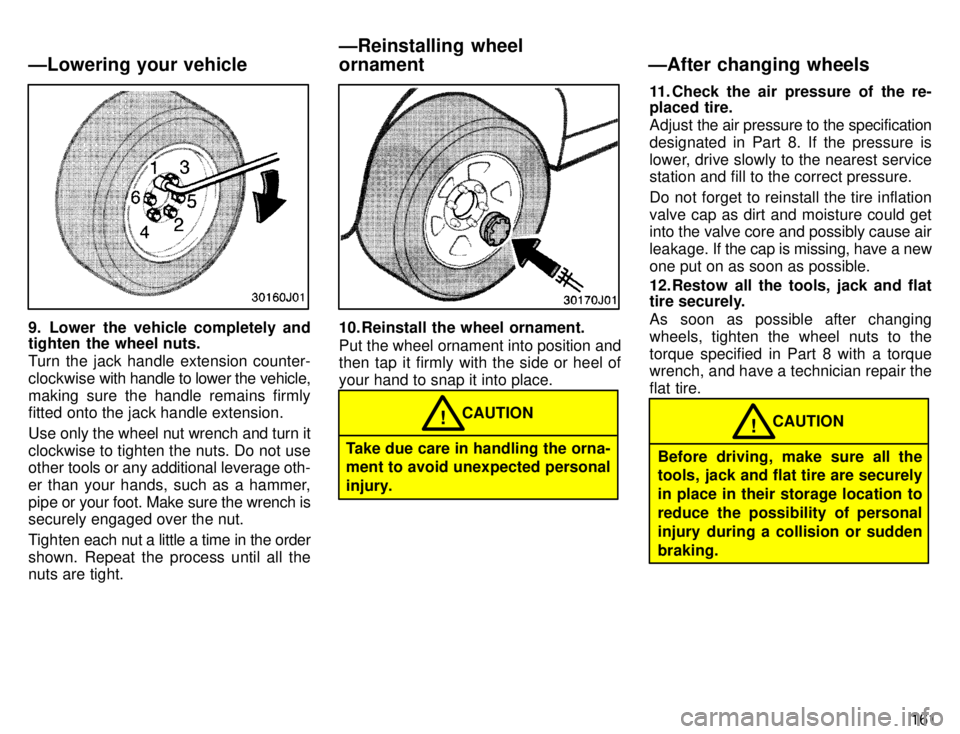
9. Lower the vehicle completely and
tighten the wheel nuts.
Turn the jack handle extension counter-
clockwise with handle to lower the vehicle,
making sure the handle remains firmly
fitted onto the jack handle extension.
Use only the wheel nut wrench and turn it
clockwise to tighten the nuts. Do not use other tools or any additional leverage oth-
er than your hands, such as a hammer,
pipe or your foot. Make sure the wrench is
securely engaged over the nut.
Tighten each nut a little a time in the order
shown. Repeat the process until all the
nuts are tight.10. Reinstall the wheel ornament.
Put the wheel ornament into position and
then tap it firmly with the side or heel of your hand to snap it into place.
Take due care in handling the orna- ment to avoid unexpected personal
injury. CAUTION
! 11. Check the air pressure of the re-
placed tire.
Adjust
the air pressure to the specification
designated in Part 8. If the pressure is
lower, drive slowly to the nearest service station and fill to the correct pressure.
Do not forget to reinstall the tire inflation valve cap as dirt and moisture could get into the valve core and possibly cause air
leakage. If the cap is missing, have a new
one put on as soon as possible.
12. Restow all the tools, jack and flat
tire securely.
As soon as possible after changing
wheels, tighten the wheel nuts to thetorque specified in Part 8 with a torque wrench, and have a technician repair the flat tire.
Before driving, make sure all the
tools, jack and flat tire are securely in place in their storage location to
reduce the possibility of personal
injury during a collision or suddenbraking. CAUTION
!
ÐLowering your vehicle
ÐReinstalling wheel
ornament ÐAfter changing wheels