Start TOYOTA 4RUNNER 1997 User Guide
[x] Cancel search | Manufacturer: TOYOTA, Model Year: 1997, Model line: 4RUNNER, Model: TOYOTA 4RUNNER 1997Pages: 223, PDF Size: 4.66 MB
Page 87 of 223

90On vehicles with automatic transmission,
even if you turn off the overdrive switch with the cruise control on, engine braking
will
not be applied because the cruise con-
trol is not cancelled. To decrease the ve-
hicle speed, reset to a slower speed with
the cruise control lever or depress the brake pedal. If you use the brake pedal, cruise control is cancelled. RESUMING THE PRESET SPEED
If the preset speed is cancelled by pulling
the control lever or by depressing the
brake pedal or clutch pedal, pushing the
lever up in the RES/ACCº direction will
restore the speed set prior to cancellation.
However, once the vehicle speed falls be-
low about 40 km/h (25 mph), the preset
speed will not be resumed.
CRUISE CONTROL FAILURE WARN- ING
If the CRUISEº indicator light in the in-
strument cluster flashes when using the
cruise control, press the CRUISE ON-
OFFº button to turn the system off and then press it again to turn it on. If any of the following conditions then oc-
curs, there is some trouble in the cruise control system.
The indicator light does not come on.
The indicator light flashes again.
The indicator light goes out after it
comes on.
If this is the case, contact your Toyota
dealer and have your vehicle inspected.
To crank the engine without depress- ing the clutch pedal, push the switch
with the ignition on.
The switch stays on as long as the ignition
is on. And it will automatically turn off
when the ignition is off.
This switch cancels the clutch start sys-
tem, which is designed to keep the starter
motor from operating if the clutch pedal is
not depressed all the way down.
The switch allows the vehicle to be driven
out of difficult situations by cranking the
engine with the clutch engaged.
Clutch start cancel switch (four-wheel drive models with manual transmission)
Page 88 of 223

91
Never use the switch for normal engine
starting. Be sure to follow the sta
rting pro-
cedure instructed in How to start the en- gineº in Part 3.
Page 104 of 223

107
If you have pushed the track button more than
you wanted to, push the other side of
the button. The track number will be re- duced.
The track number you select is not valid if it is higher than the number of tracks re-
maining on the current cassette side. After the beginning of the tape is reached, the player will automatically
start playing the same side.
After the end of the tape is reached,
the player will automatically revers
sides and start playing the other side.
There must be at least 3 seconds of blank
space between tracks for the track button
to work correctly. In addition, the feature
may not work well with some spokenword, live, or classical recordings. Compact Disc Player Push either side of the track button until
the number of the track you want to listen
to appears on the display. If you want to return the beginning of the current track,
push the down side of the button one time,
quickly.
/ (Reverse/Fast forward but-
tons)
Cassette Player Push the fast forward button to fast for-
ward a cassette tape. FFº will appear on
the display. Push the revers button to re-
wind a tape. REWº will appear on the dis-
play.
To stop the tape while it is fast forwarding,
push on the up side of the track down/up
button or TAPEº; to stop the tape while it
is rewinding, push on the down side of the
track down/up button or TAPEº.
If a tape side rewinds completely, the ca-
sette player will stop and then play that
same side. If a tape fast forwards com-
pletely, the cassette player will play the
other side of the tape, using the auto-re- verse feature. Compact Disc Player
If you want to fast forward or reverse
through a compact disc track, push and
hold in the fast forward or reverse button.
When you release the button, the com-
pact disc player will resume playing. AM
VFM
Push AM VFMº to switch between the AM
and FM bands. AMº, FM1º or FM2º will
appear on the display. These systems al- low you to set twelve FM stations, two for
each button.
If the audio system is off, you can turn on
the radio by pushing AM VFMº. Also, push
the AM VFMº button to switch from cas-
sette operation to radio operation. BAL (Balance)
This knob lets you adjust the balance be- tween the right and left speakers. Push MID/BALº so that it pops out of its
retracted position. Pull out the knob. Turn
the knob to adjust the balance. Push theknob back into its retracted position. BASS This knob lets you adjust the bass level.
Push BASSº so that it pops out of its re-
tracted position. Turn the knob to adjust
the bass. Push the knob back into its re-tracted position.
Page 133 of 223
136
CAUTION!
When driving off-road or in rugged
terrain, do not drive at excessive
speeds, jump the vehicle, or strike
objects, etc. This may cause loss of
control or vehicle rollover. You are
also risking expensive damage to
your vehicle's suspension and chassis. Drive gently and avoid high speeds.
Your vehicle does not need an elaborate
break-in. But following a few simple tips
for the first 1600 km (1000 miles) can add
to the future economy and long life of your vehicle:
Do not drive over 88 km/h (55 mph).
Run the engine at moderate speed be- tween 2000 and 4000 rpm.
Avoid full-throttle starts.
Try to avoid hard stops during the first
300 km (200 miles).
Do not drive slowly with the manual
transmission in a high gear.
Do not drive for a long time at any
single speed, either fast or slow.
Do not tow a trailer during the first 800
km (500 miles) FUEL TYPE
Your new vehicle must use only un-
leaded gasoline.
To help prevent gas station mixups, your
Toyota has a new smaller fuel tank opening.
The special nozzle on pumps with unleaded
fuel will fit it, but the larger standard nozzle
on pumps with leaded gas will not.
Do not use leaded gasoline. Use of
leaded gasoline will cause the
three-way catalytic converter tolose its effectiveness and the emis- sion control system to function im-properly. Also, this can increase maintenance costs.
NOTICE
OCTANE NUMBER
Select Research Octane Number 91 (Oc-
tane Rating 87) or higer.
Use of unleaded fuel with an octane num- ber or rating lower than stated above will
cause persistant heavy knocking. If se-
vere, this will lead to engine damage.
Break-in period Fuel
Page 134 of 223

137
If your engine knocks...
If you detect heavy knocking even when
using the recommended fuel, or if you
hear steady knocking while holding a
steady sp
eed on level roads, consult your
Toyota dealer.
However, now and then, you may notice
light knocking for a short time while accel-
erating or d riving up hills. This is no cause
for concern.
GASOLINES CONTAINING DETER-
GENT ADDITIVES
Toyota recommends use of gasolines
that contain detergent additives to
avoid build-up of engine deposits.
For further details, ask your Toyota dealer
or a local gasoline retailer.
GASOLINES CONTAINING MTBE
Gasolines that contain MTBE (Methyl
Tertiary-Butyl Ether) are available in
the market. If you use a gasoline mixed
with MTBE, make certain that it does
not contain more than 15% of MTBE.
If the use of gasolines containing MTBE causes poor driveability and/or poor fuel
economy, you should discontinue the use
of fuels containing MTBE. GASOLINES CONTAINING ALCOHOL
If the use of gasohol in your T
oyota, be
sure that it is u nleaded, has an octane
rating no lower than 87 and does not
contain more than 10% ethonol.
Gasohol is a mixture of gasoline and etha-
nol.
Toyota does not recommend the use of
gasolines containing m ethonol. If you use
gasoline containing methonol, use only
gasoline meeting the requirements above
and also containing less than 5% metha-
nol with cosolvents and corrosion inhibi-
tors for methanol.
Do not use gasohol other thanstated above. It will cause fuel
system damage or vehicle perfor- mance problems.
If driveability problems are en-
countered (poor hot starting, va-porizing, engine knock, etc.), dis-continue the use.
Take care not to spill gasohol dur-
ing refueling. Gasohol may causepaint damage.
NOTICE
FUEL TANK CAPACITY
70 L (18.5 gal., 15.4 Imp. gal.)
Page 135 of 223
138
If you plan to drive your Toyota in
another country... First,
comply with the vehicle registration
laws. Second, confirm the availability of the
correct fuel (unleaded and minimum oc- tane number).
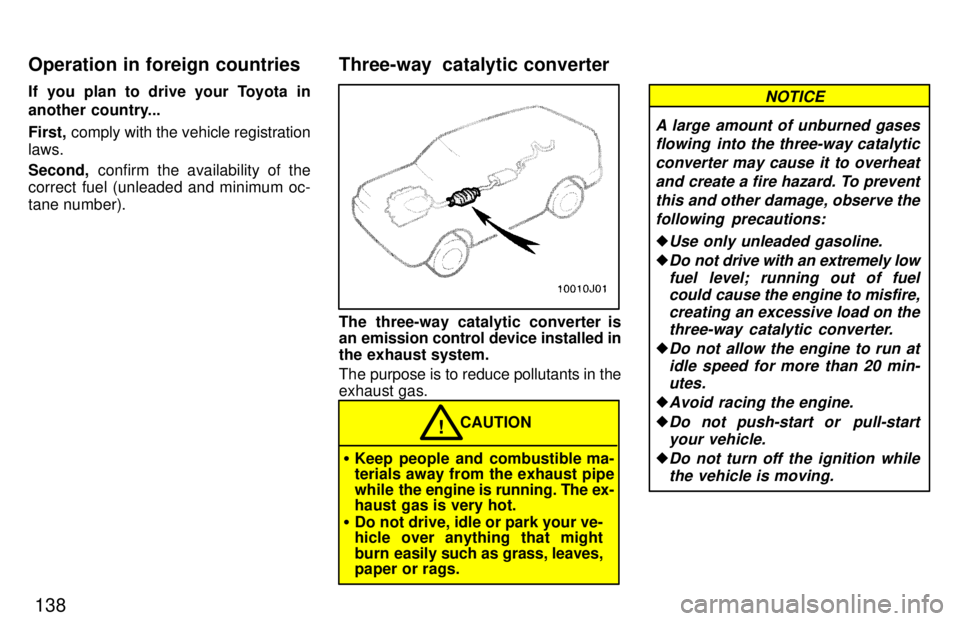
The three-way catalytic converter is
an emission control device installed in
the exhaust system.
The purpose is to reduce pollutants in the exhaust gas.
CAUTION!
Keep people and combustible ma- terials away from the exhaust pipe
while the engine is running. The ex-
haust gas is very hot.
Do not drive, idle or park your ve-
hicle over anything that might
burn easily such as grass, leaves,
paper or rags.
A large amount of unburned gases
flowing into the three-way catalytic
converter may cause it to overheat and create a fire hazard. To preventthis and other damage, observe the following precautions:
Use only unleaded gasoline.
Do not drive with an extremely lowfuel level; running out of fuelcould cause the engine to misfire,
creating an excessive load on the
three-way catalytic converter.
Do not allow the engine to run atidle speed for more than 20 min-
utes.
Avoid racing the engine.
Do not push-start or pull-start your vehicle.
Do not turn off the ignition whilethe vehicle is moving.
NOTICE
Three-way catalytic converter
Operation in foreign countries
Page 136 of 223
139
Keep your engine in good running
order. Malfunctions in the engine
electrical system, electronic igni-tion system/distributor ignitionsystem or fuel systems could
cause an extremely high three- way catalytic converter tempera-ture.
If the engine becomes difficult to
start or stalls frequently, take your
vehicle in for a check-up as soon
as possible. Remember, your To-yota dealer knows your vehicleand its three-way catalytic con-
verter system best.
To ensure that the three-way cata-lytic converter and the engine
emission control system operateproperly, your vehicle must re-ceive the periodic inspections re-
quired by the Toyota Maintenance
Schedule. For scheduled mainte- nance information, refer to the
separate Owner's Manual Sup-
plement/Maintenance Scheduleº.
CAUTION!
Avoid inhaling the engine ex-
haust. It contains carbon monox-
ide, which is a colorless and odor-
less gas. It can cause uncon-
sciousness or even death.
Make sure the exhaust system
has no holes or loose connec-
tions. The system should be
checked from time to time. If you
hit something, or notice a change
in the sound of the exhaust, have
the system checked immediately.
Do not run the engine in a garage
or enclosed area except for the
time needed to drive the vehicle in
or out. The exhaust gases cannot escape, making this a paticularly
dangerous situation.
Do not remain for a long time in a
parked vehicle with the engine
running. If it is unavoidable, how-
ever, do so only in an unconfined
area and adjust the heating or
cooling system to force outside air into the vehicle.Keep the back door and back win-
dow closed while driving. An open
or unsealed back door and back
window, may cause exhaust gases to be drawn into the vehicle. If you
must drive with the trunk lid open
to accommodate a large object,
close the windows, open all the in- strument panel vents and have the
heating or cooling system deliver fresh air into the vehicle by turning
the fan to high speed with the air
intake control set at the outside air position.
To allow proper operation of your
vehicle's ventilation system, keep
the inlet grilles in front of the wind-
shield cl ear of snow, leaves, or oth-
er obstructions.
If you smell exhaust fumes in the
vehicle, drive with the windows
open and the back door and back
window closed. Have the cause im-
mediately located and corrected.
Engine exhaust cautions
Page 138 of 223
141
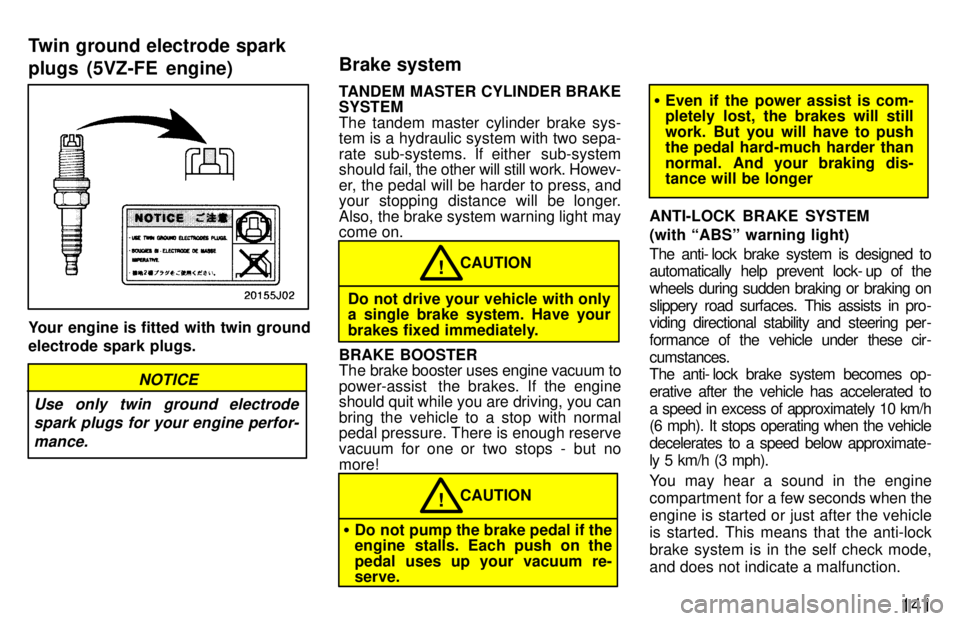
Your engine is fitted with twin ground electrode spark plugs.
NOTICE
Use only twin ground electrode spark plugs for your engine perfor-
mance.
TANDEM MASTER CYLINDER BRAKE SYSTEM
The tandem master cylinder brake sys-
tem is a hydraulic system with two sepa-
rate sub-systems. If either sub-system
should fa il, the other will still work. Howev-
er, the pedal will be harder to press, and
your stopping distance will be longer.
Also, the brake system warning light may come on.
CAUTION!
Do not drive your vehicle with only a single brake system. Have your
brakes fixed immediately.
BRAKE BOOSTER
The brake booster uses engine vacuum to
power-assist the brakes. If the engine
should quit while you are driving, you can
bring the vehicle to a stop with normal
pedal pressure. There is enough reserve
vacuum for one or two stops - but nomore!
CAUTION!
Do not pump the brake pedal if the
engine stalls. Each push on the
pedal uses up your vacuum re- serve.
Even if the power assist is com-
pletely lost, the brakes will still
work. But you will have to push
the pedal hard-much harder than
normal. And your braking dis- tance will be longer
ANTI-LOCK BRAKE SYSTEM (with ABSº warning light)
The anti- lock brake system is designed to
automatically help prevent lock- up of the
wheels during sudden braking or braking on
slippery road surfaces. This assists in pro-
viding directional stability and steering per -
formance of the vehicle under these cir -
cumstances.
The anti- lock brake system becomes op-
erative after the vehicle has accelerated to
a speed in excess of approximately 10 km/h
(6 mph). It stops operating when the vehicle
decelerates to a speed below approximate-
ly 5 km/h (3 mph).
You may hear a sound in the engine
compartment for a few seconds when the
engine is started or just after the vehicle is started. This means that the anti-lock
brake system is in the self check mode,
and does not indicate a malfunction.
Twin ground electrode spark plugs (5VZ-FE engine)
Brake system
Page 146 of 223
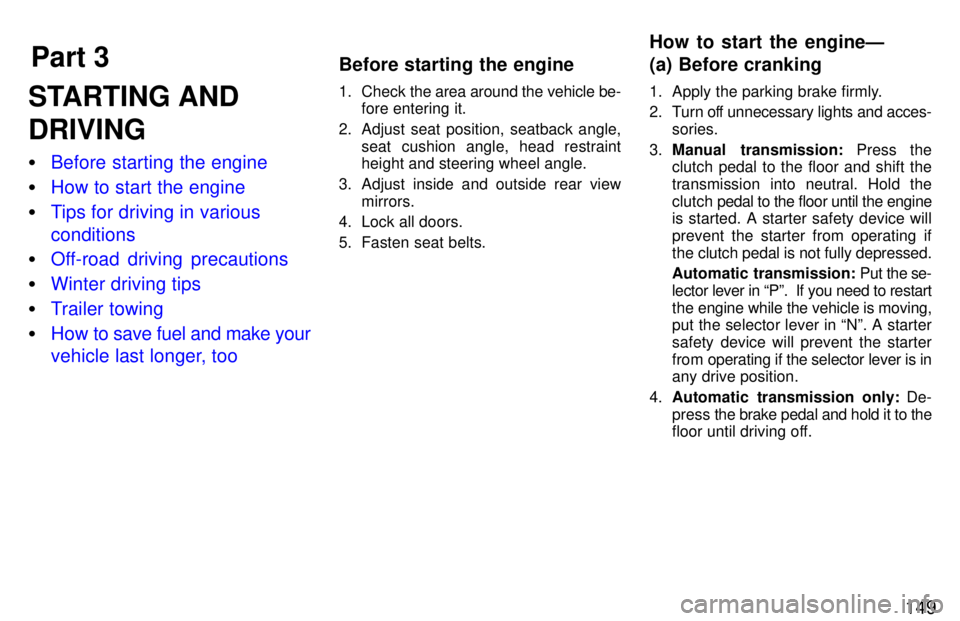
Part 3How to start the engineÐ
(a) Before cranking
Before starting the engine
149
STARTING AND DRIVING
Before starting the engine
How to start the engine
Tips for driving in various conditions
Off-road driving precautions
Winter driving tips
Trailer towing
How to save fuel and make your
vehicle last longer, too
1. Check
the area around the vehicle be-
fore entering it.
2. Adjust seat position, seatback angle, seat cushion angle, head restraint
height and steering wheel angle.
3. Adjust inside and outside rear view mirrors.
4. Lock all doors.
5. Fasten seat belts. 1. Apply the parking brake firmly.
2. Turn off unnecessary lights and acces-
sories.
3. Manual transmission: Press the
clutch pedal to the floor and shift the
transmission into neutral. Hold theclutch pedal to the floor until the engine
is started. A starter safety device willprevent the starter from operating if
the clutch pedal is not fully depressed.
Automatic transmission: Put the se-
lector lever in Pº. If you need to restart
the engine while the vehicle is moving, put the selector lever in Nº. A starter
safety device will prevent the starter
from operating if the selector lever is in
any drive position.
4. Automatic transmission only: De-
press the brake pedal and hold it to the
floor until driving off.
Page 147 of 223
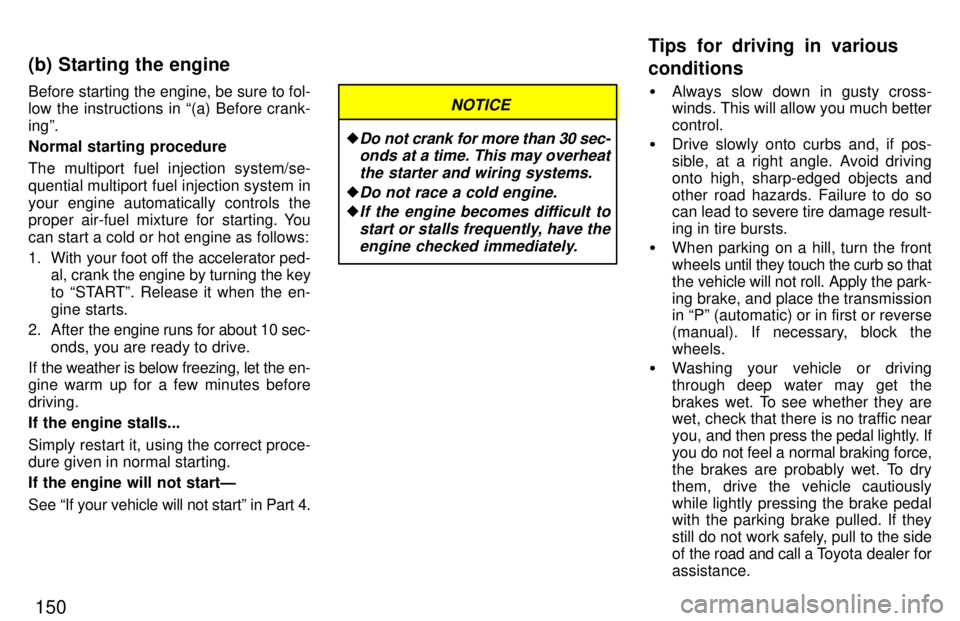
150
Before starting the engine, be sure to fol-
low the instructions in (a) Before crank- ingº.
Normal starting procedure
The multiport fuel injection system/se-
quential multiport fuel injection system in
your engine automatically controls the
proper air-fuel mixture for starting. You can start a cold or hot engine as follows:
1. With your foot off the accelerator ped-
al, crank the engine by turning the key
to STARTº. Release it when the en-
gine starts.
2. After the engine runs for about 10 sec-
onds, you are ready to drive.
If the weather is below freezing, let the en-
gine warm up for a few minutes before driving.
If the engine stalls...
Simply restart it, using the correct proce- dure given in normal starting. If the engine will not startÐ
See If your vehicle will not startº in Part 4.
Do not crank for more than 30 sec-
onds at a time. This may overheat
the starter and wiring systems.
Do not race a cold engine.
If the engine becomes difficult to
start or stalls frequently, have theengine checked immediately.
NOTICE Always slow down in gusty cross- winds. This will allow you much better control.
Drive slowly onto curbs and, if pos-
sible, at a right angle. Avoid drivingonto high, sharp-edged objects and
other road hazards. Failure to do so
can lead to severe tire damage result-
ing in tire bursts.
When parking on a hill, turn the front
wheels until they touch the curb so that
the vehicle will not roll. Apply the park-
ing brake, and place the transmission in Pº (automatic) or in first or reverse
(manual). If necessary, block thewheels.
Washing your vehicle or driving
through deep water may get the
brakes wet. To see whether they are
wet, check that there is no traffic near
you, and then press the pedal lightly. If
you do not feel a normal braking force,
the brakes are probably wet. To dry
them, drive the vehicle cautiously
while lightly pressing the brake pedal
with the parking brake pulled. If they
still do not work safely, pull to the side
of the road and call a T oyota dealer for
assistance.
(b) Starting the engine
Tips for driving in various conditions