radio TOYOTA 4RUNNER 1997 User Guide
[x] Cancel search | Manufacturer: TOYOTA, Model Year: 1997, Model line: 4RUNNER, Model: TOYOTA 4RUNNER 1997Pages: 223, PDF Size: 4.66 MB
Page 103 of 223

106Your audio system shows three different
button displays that changes in accor-
dance with the audio mode you have se-lected. Radio display (display 1) Cassette player display (display 2)Compact disc player display (display 3)
Details of specific buttons, controls, and
features are described in
the alphabetical
listing that follows. 1 2 3 4 5 6 (Preset buttons)
These buttons are used to preset and tune in radio stations.
To preset a station to a button: Tune in the
desired station (see TUNEº). Push and
hold down the button until you hear abeepÐthis will set the station to the but-
ton.
The button number will appear on the
display.
To tune in to a preset station: Push the
button for the station you want. The button
number and station frequency will appear
on the display.
These systems can store one AM and two
FM stations for each button. (The display
will show AMº, FM1º, or FM2º when you
push AM VFMº) To cancel out the preset
station memory, push 1º, 2º, and 3º atthe same time and hold them in until you hear a beep.
(Eject Button)
Push the cassette tape eject button to eject a cassette. Push the compact disc eject button to eject a compact disc.
After you turn the ignition to LOCKº, you
will be able to eject a cassette or disc but you will not be able to reinsert it. l / l(Track down/up button)
By using this button, you can skip up or
down to a different track. Cassette Player
You can skip up to nine tracks at a time. Push the up or down side of the button. 1.
FFº or 1. REWº will appear on the display.
Next, push either side of the track button
until the number of tracks you want to
skip. If you push the button ten times, the
skip feature will be turned off.
When counting the number of tracks you want to rewind, remember to count the
current track as well. For example, if you
want to rewind to a song that is two before
the song you are listening to, push on the
down side of the button until 3. REWº ap-
pears on the display.
Page 104 of 223

107
If you have pushed the track button more than
you wanted to, push the other side of
the button. The track number will be re- duced.
The track number you select is not valid if it is higher than the number of tracks re-
maining on the current cassette side. After the beginning of the tape is reached, the player will automatically
start playing the same side.
After the end of the tape is reached,
the player will automatically revers
sides and start playing the other side.
There must be at least 3 seconds of blank
space between tracks for the track button
to work correctly. In addition, the feature
may not work well with some spokenword, live, or classical recordings. Compact Disc Player Push either side of the track button until
the number of the track you want to listen
to appears on the display. If you want to return the beginning of the current track,
push the down side of the button one time,
quickly.
/ (Reverse/Fast forward but-
tons)
Cassette Player Push the fast forward button to fast for-
ward a cassette tape. FFº will appear on
the display. Push the revers button to re-
wind a tape. REWº will appear on the dis-
play.
To stop the tape while it is fast forwarding,
push on the up side of the track down/up
button or TAPEº; to stop the tape while it
is rewinding, push on the down side of the
track down/up button or TAPEº.
If a tape side rewinds completely, the ca-
sette player will stop and then play that
same side. If a tape fast forwards com-
pletely, the cassette player will play the
other side of the tape, using the auto-re- verse feature. Compact Disc Player
If you want to fast forward or reverse
through a compact disc track, push and
hold in the fast forward or reverse button.
When you release the button, the com-
pact disc player will resume playing. AM
VFM
Push AM VFMº to switch between the AM
and FM bands. AMº, FM1º or FM2º will
appear on the display. These systems al- low you to set twelve FM stations, two for
each button.
If the audio system is off, you can turn on
the radio by pushing AM VFMº. Also, push
the AM VFMº button to switch from cas-
sette operation to radio operation. BAL (Balance)
This knob lets you adjust the balance be- tween the right and left speakers. Push MID/BALº so that it pops out of its
retracted position. Pull out the knob. Turn
the knob to adjust the balance. Push theknob back into its retracted position. BASS This knob lets you adjust the bass level.
Push BASSº so that it pops out of its re-
tracted position. Turn the knob to adjust
the bass. Push the knob back into its re-tracted position.
Page 105 of 223

108CD (Compact Disc)
Push CDº to switch from radio or cas-
sette
operation to compact disc operation.
If the audio system is off, you can turn on
the compact disc player by pushing CDº.
In both cases, a disc must already be
loaded in the player.
When the audio is set into compact disc
operation, the display shows the track
number currently being played. Pushing CDº changes the display to show the
length of the current program being
played so far. By pushing the button once
again, the display returns to that of track
number. Dolby )
B VC*
If you are listening to a tape that was re- corded with Dolby )
B or C Noise Reduc-
tion, push the button marked with the
double-D symbol until the appropriatesymbol appears on the display. To turn off
Dolby, push the button until the symbol
disappears fro mt he display. The Dolby B NR mode reduces tape noise by about 10 dB. The Dolby C NR mode re- duces tape noise by another 10 dB, or
about 20 dB total. For best sound repro-
duction, select the same NR mode that was used to record the tape.
*: Dolby noise reduction manufactured under license from Dolby
Laboratories Licensing Corporation. DOLBYº and the
double-D symbol are trademark of Dolby Laboratories Licens- ing Corporation.
Five EQ settings
Page 107 of 223

11 0RM (Radio Monitor)
The radio monitor feature allows you to
listen to
the radio while a cassette is being
rewound or fast forwarded. Push RMº. RMº will appear on the dis-
play. Any time you are rewinding or fast
forwarding a cassette tape, the radio will
play the station that was set most recent-
ly. (You can not change the radio station
unless you switch out of the cassette play-
er function.)
Push RMº again to turn off the RM fea- ture.
RPT (Repeat)
The repeat feature automatically replays the current cassette or compact disctrack. Push RPTº while the track is playing.
RPTº will appear on the display. When
the track ends, it will automatically be re-
wound (cassette) and replayed. This pro-
cess will be continued until you push the button again to turn off the repeat feature.
CassettesÐThere must be at least 3 sec- onds of blank space between tracks in or-
der for the repeat feature to work correct-
ly. Scan Radio
You can either scan all the frequencies on a band or scan only the preset stations for
that band.
To scan the preset stations: Quickly push
and release SCANº. If you hear a beep,
you held the button too long, and the radio will scan all the frequencies. The radio willtune in the next preset station up the
band, stay there for a few second, and
then move to the next preset station. To
select a station, push SCANº a second time.
To scan all the frequencies: Push SCANº
until you hear a beep. The radio will find
the next station up the station band, Stay there for a few seconds, and then scan
again. To select a station, push SCANº a
second time. Cassette player
The cassette player scan feature is similar
to the radio scan feature and uses the same button.
Push SCANº. SCANº will appear on the
display. The player will fast forward to the
next cassette track,
play it for 12 seconds,
and then scan again. To select a track,
push SCANº a second time. If the player reaches the end of one side of a cassette
tape, it will continue scanning on the other
side.
Compact disc player
The compact disc player scan feature is
similar to the radio scan feature.
Push SCANº. SCANº will appear on the
display. The compact disc player will play the next track for 10 seconds, then scan
again. To select a track, push SCANº a
second time. If the pl ayer reaches the end
of the disc, it will continue scanning at
track 1. SKIP
The skip feature allows you to fast forward
past long stretches off blank tape. This is
especially useful at the end of cassettes.
Page 108 of 223

111
Push
SKIPº. SKIPº will appear on the dis-
play. The cassette player will keep track of
how much blank space it plays. Any time it has played about 10 seconds of blank
tape, it will automatically fast forward to
the next track and begin to play.
Push the button a second time to turn off the skip feature. ST (Stereo reception) display
Your radio automatically changes to ste- reo reception when a stereo broadcast is
received. STº appears on the display. Ifthe signal becomes weak, the radio re-
duces the amount of channel separation to prevent the weak signal from creating
noise. If the signal becomes extremely weak, the radio switches from stereo to mono reception.
TAPE
Push T APEº to switch from radio or com-
pact disc operation to cassette operation.
If the audio system is off, you can turn on
the cassette player by pushing TAPEº. In both cases, a cassette must already be
loaded in the player. TREB (Treble)
This knob lets you adjust the treble level.
Push TREB/FADEº so that it pops out of
its retracted position. Turn the
knob to ad-
just the treble. Push the knob back into its
retracted position. TUNE
Tuning
Your Toyota has an electronic tuning radio
(ETR). Push and release the ~º (up) or
! º (down) side of TUNEº to set up or
down the station band. (If you hear a
beep, you held the button too long and the
radio willgo into the seek mode.) Seeking
In the seek mode, the radio finds and plays the next station up or down the sta- tion band.
To seek a station, push and hold the ~º or
vº side of TUNEº until you hear a beep. Do this again to find another station. The anti-theft system prevents the audio
system f
rom working after it has been dis-
connected. To activate the system, you
must set a three-digit security code. After the system is set, SECº will appear in the
display each time the ignition is turned
form LOCKº to ACCº or ONº. Also, the
anti-theft light flashes every few seconds
while the ignition key is in the LOCKºposition.
You will need to know your security code
to reactivate your radio after electrical ser-vice is performed on your vehicle.
Choose a security code that is easy to re-
member and keep a copy of it (not in your
Toyota).
NOTICE
If you pushed any wrong buttons on the anti-theft system, the following
messages will appear on thedisplay.
ErrºÐYou have pushed wrongbuttons.
ÐAnti-theft system
(Type 2-2 and 3 only)
Page 116 of 223

11 9
NOTICE
To ensure the correct audio system operation:
Be careful not to spill beveragesover the audio system.
Do not put anything other than acassette tape or Compact Disc
into the slot.
ILLUMINATION CONTROL LOGIC
On some audio-units, when the instru-
ment panel lights are on, the letters on op-
erable buttons of the mode in current use
light up together with the mode selectionand eject buttons. RADIO RECEPTION
Usually, a problem with radio reception
does not mean there is a problem with
your radioÐit is just the normal result of
conditions outside the vehicle.
For example, nearby buildings and terrain
can interfere with FM reception. Power
lines or telephone wires can interfere with
AM signals. And of course, radio signals
have a limited range, and the farther you are from a station, the weaker its signal
will be. In addition, reception conditions
change constantly as your vehicle moves. Here are some common reception prob-lems
that probably do not indicate a prob-
lem with your radio: FM
Fading and driving stationsÐGenerally,
the effective range of FM is about 40 km
(25 miles). Once outside this range, you
may notice fading and drifting, which in- crease with the distance from the radio
transmitter. They are often accompanied by distortion.
Multi-pathÐFM signals are reflective,
making it possible for two signals to reach
your antenna at the same time. If this hap-
pens, the signals will cancel each other
out, causing a momentary flutter or loss of
reception.
Static and flutteringÐThese occur when
signals are blocked by buildings, trees, or other large objects. Increasing the bass
level may reduce static and fluttering.
Station swappingÐIf the FM signal you are listening to is interrupted or weak-
ened, and there is another strong station
nearby on the FM band, your radio may
tune in the second station until the original
signal can be picked up again. AM FadingÐAM broadcasts are reflected by the upper atmosphere-especially atnight. These reflected signals can inter-
fere with those received directly from the radio station, causing the radio station tosound alternately strong and weak.
Station interferenceÐWhen a reflected
signal and a signal received directly from a radio station are very nearly the same
frequency, they can interfere with each
other,
making it difficult to hear the broad-
cast.
StaticÐAM is easily affected by external sources of electrical noise, such as high
tension power lines, lightening, or electri-cal motors. This results in static.
CARING FOR YOUR CASSETTE PLAY-
ER AND TAPES
For high performance from your cassette
player and tapes:
Clean the tape head and other parts regu-
larly. A dirty tape head or tape path can de-
crease sound quality and tangle your
cassette tapes. The easiest way to
clean them is by using a cleaning tape.
(A wet type is recommended.)
ÐCar audio system operating hints
Page 192 of 223
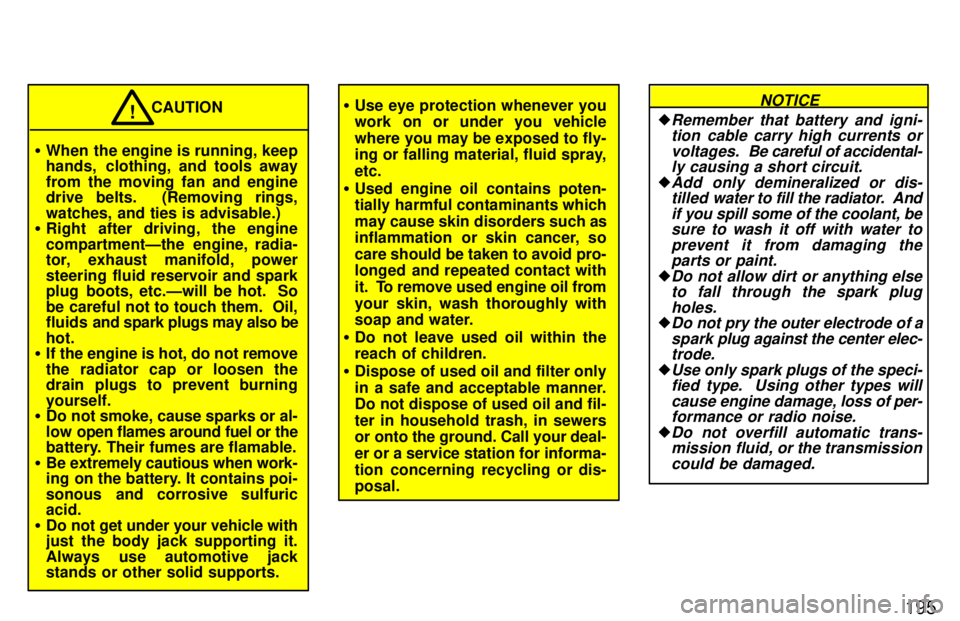
195
When the engine is running, keep
hands, clothing, and tools away
from the moving fan and engine
drive belts. (Removing rings,
watches, and ties is advisable.)
Right after driving, the engine
compartmentÐthe engine, radia-
tor, exhaust manifold, power
steering fluid reservoir and spark
plug boots, etc.Ðwill be hot. So
be careful not to touch them. Oil,
fluids and spark plugs may also be
hot.
If the engine is hot, do not remove
the radiator cap or loosen the
drain plugs to prevent burning yourself.
Do not smoke, cause sparks or al-
low open flames around fuel or the
battery. Their fumes are flamable.
Be extremely cautious when work-
ing on the battery. It contains poi-
sonous and corrosive sulfuric acid.
Do not get under your vehicle with
just the body jack supporting it.
Always use automotive jack
stands or other solid supports. CAUTION
!
Use eye protection whenever you
work on or under you vehicle
where you may be exposed to fly-
ing or falling material, fluid spray, etc.
Used engine oil contains poten-
tially harmful contaminants which
may cause skin disorders such as
inflammation or skin cancer, so
care should be taken to avoid pro-
longed and repeated contact with
it. To remove used engine oil from
your skin, wash thoroughly with
soap and water.
Do not leave used oil within thereach of children.
Dispose of used oil and filter only
in a safe and acceptable manner.
Do not dispose of used oil and fil-
ter in household trash, in sewers
or onto the ground. Call your deal- er or a service station for informa-
tion concerning recycling or dis- posal. Remember that battery and igni-
tion cable carry high currents or
voltages. Be careful of accidental-
ly causing a short circuit.
Add only demineralized or dis- tilled water to fill the radiator. And
if you spill some of the coolant, be sure to wash it off with water to
prevent it from damaging theparts or paint.
Do not allow dirt or anything else
to fall through the spark plug
holes.
Do not pry the outer electrode of a
spark plug against the center elec-
trode.
Use only spark plugs of the speci- fied type. Using other types will
cause engine damage, loss of per-
formance or radio noise.
Do not overfill automatic trans-
mission fluid, or the transmission
could be damaged.
NOTICE