ignition TOYOTA 4RUNNER 1997 Owner's Manual
[x] Cancel search | Manufacturer: TOYOTA, Model Year: 1997, Model line: 4RUNNER, Model: TOYOTA 4RUNNER 1997Pages: 223, PDF Size: 4.66 MB
Page 98 of 223

101
1 2 3 4 5 6 (Preset buttons)
These buttons are used to preset and tune in radio stations.
To preset a station to a button: Tune in the
desired station (see TUNEº). Push and
hold down the button until you hear abeepÐthis will set the station to the but-
ton.
The button number will appear on the
display.
To tune in to a preset station: Push the
button for the station you want. The button
number and station frequency will appear
on the display.
Type 2-1ÐThese systems can store one
AM and on FM station for each button.The preset station memory will be can-
celed out if the power source is inter- rupted (battery disconnected or fuseblown).
Type 2-2ÐThese systems can store one
AM and two FM stations for each button.
(The display will show AMº, FM1º, or
FM2º when you push AM VFMº.) To can-
cel out the preset station memory, push
1º, 2º, and 3º at the same time and hold
them in until you hear a beep.
(Eject Button)
Push this button to eject a cassette.
After you turn the ignition to LOCKº, you
will be able to eject a cassette but you will
not be able to reinsert it. AM VFM
Push AM VFMº to switch between the AM
and FM bands.
Type 2-1кAMº or FMº will appear on
the display.
Type 2-2ÐAMº, FM1º or FM2º will ap-
pear on the display.
If the audio system is off, you can turn on
the radio by pushing AM VFMº. Also, push
the AM VFMº button to switch from cas-
sette operation to radio operation. APS (Automatic program selection)
Type 2-2 only
The automatic program selection (APS) feature allows you to program you cas-
sette player to skip forward or backward
to locate the song you want to hear. You can skip up to nine tracks at a time. Push APSº. APSº and 1º will appear on
the display. Next, push APSº until the number on the display reaches the number of tracks you want to skip. If you push APSº ten times,
the APS feature will be turned off.
If you choose the number 1º, the play- er will rewind to the beginning of the
current track.
When counting the number of tracksyou want to rewind, remember to count the current track as well. For ex-
ample, if you want to rewind to a song
that is two before the song you are lis-
tening to, push APSº until 3º appears
on the display.
Finally, push REWº or FFº to choose the
direction you want to skip. The player will
rewind or fast forward the selected num-
ber of tracks and play.
The APS number you select can be higher
than the number of tracks remaining on
the current casette side. After the begin-
ning or end of the tape is reached, the
player will automatically reverse sides
and rewind or fast forward the additional
number of tracks.
Page 103 of 223

106Your audio system shows three different
button displays that changes in accor-
dance with the audio mode you have se-lected. Radio display (display 1) Cassette player display (display 2)Compact disc player display (display 3)
Details of specific buttons, controls, and
features are described in
the alphabetical
listing that follows. 1 2 3 4 5 6 (Preset buttons)
These buttons are used to preset and tune in radio stations.
To preset a station to a button: Tune in the
desired station (see TUNEº). Push and
hold down the button until you hear abeepÐthis will set the station to the but-
ton.
The button number will appear on the
display.
To tune in to a preset station: Push the
button for the station you want. The button
number and station frequency will appear
on the display.
These systems can store one AM and two
FM stations for each button. (The display
will show AMº, FM1º, or FM2º when you
push AM VFMº) To cancel out the preset
station memory, push 1º, 2º, and 3º atthe same time and hold them in until you hear a beep.
(Eject Button)
Push the cassette tape eject button to eject a cassette. Push the compact disc eject button to eject a compact disc.
After you turn the ignition to LOCKº, you
will be able to eject a cassette or disc but you will not be able to reinsert it. l / l(Track down/up button)
By using this button, you can skip up or
down to a different track. Cassette Player
You can skip up to nine tracks at a time. Push the up or down side of the button. 1.
FFº or 1. REWº will appear on the display.
Next, push either side of the track button
until the number of tracks you want to
skip. If you push the button ten times, the
skip feature will be turned off.
When counting the number of tracks you want to rewind, remember to count the
current track as well. For example, if you
want to rewind to a song that is two before
the song you are listening to, push on the
down side of the button until 3. REWº ap-
pears on the display.
Page 108 of 223

111
Push
SKIPº. SKIPº will appear on the dis-
play. The cassette player will keep track of
how much blank space it plays. Any time it has played about 10 seconds of blank
tape, it will automatically fast forward to
the next track and begin to play.
Push the button a second time to turn off the skip feature. ST (Stereo reception) display
Your radio automatically changes to ste- reo reception when a stereo broadcast is
received. STº appears on the display. Ifthe signal becomes weak, the radio re-
duces the amount of channel separation to prevent the weak signal from creating
noise. If the signal becomes extremely weak, the radio switches from stereo to mono reception.
TAPE
Push T APEº to switch from radio or com-
pact disc operation to cassette operation.
If the audio system is off, you can turn on
the cassette player by pushing TAPEº. In both cases, a cassette must already be
loaded in the player. TREB (Treble)
This knob lets you adjust the treble level.
Push TREB/FADEº so that it pops out of
its retracted position. Turn the
knob to ad-
just the treble. Push the knob back into its
retracted position. TUNE
Tuning
Your Toyota has an electronic tuning radio
(ETR). Push and release the ~º (up) or
! º (down) side of TUNEº to set up or
down the station band. (If you hear a
beep, you held the button too long and the
radio willgo into the seek mode.) Seeking
In the seek mode, the radio finds and plays the next station up or down the sta- tion band.
To seek a station, push and hold the ~º or
vº side of TUNEº until you hear a beep. Do this again to find another station. The anti-theft system prevents the audio
system f
rom working after it has been dis-
connected. To activate the system, you
must set a three-digit security code. After the system is set, SECº will appear in the
display each time the ignition is turned
form LOCKº to ACCº or ONº. Also, the
anti-theft light flashes every few seconds
while the ignition key is in the LOCKºposition.
You will need to know your security code
to reactivate your radio after electrical ser-vice is performed on your vehicle.
Choose a security code that is easy to re-
member and keep a copy of it (not in your
Toyota).
NOTICE
If you pushed any wrong buttons on the anti-theft system, the following
messages will appear on thedisplay.
ErrºÐYou have pushed wrongbuttons.
ÐAnti-theft system
(Type 2-2 and 3 only)
Page 110 of 223

11 3
3. Input the three digit code.
You have 10 seconds to enter each digit. For example, 209º:
To set the first digit: Push 1º until the digit
you want appears on the display.
To set the second digit: Push 2º until the
digit you want appears on the display.
To set the third digit: Push 3º until the digit
you want appears on the display.4. The three-digit code should be on thedisplay.
Push and hold in SCANº until the display
goes dark. (At first, SECº will appear on
the display.) If you pushed any wrong buttons, Errº and the number of errors you have made will appear on the display
before SECº does. Go back to step 2and try again. If the display returns to
Ð while you are entering the code,
go back to step 3.
To make sure the security code has been accepted, turn the ignition to LOCKº andthen
back to ACC.º SECº should appear
on the display.
Choose a security code that is easy to re-
member and keep a copy of it (not in your
Toyota).
Page 111 of 223

11 4
Changing the security code
1. Turn off the audio system.
Turn the ignition key to ACCº.Simultaneously push and hold in 1º, 6º,
and PWR/VOLº until SECº appears in
the display.2. While you are holding in the ~º side of
TUNEº push 1º.
The display will read к. On some models, º and º will also
turn on.3. Input the existing three-digit code.
You have 10 seconds to enter each digit. For example, 209º:
To set the first digit: Push 1º until the digit
you want appears on the display.
To set the second digit: Push 2º until the
digit you want appears on the display.
To set the third digit: Push 3º until the digit
you want appears on the display.
Page 112 of 223

11 5
4. The three-digit code should be on thedisplay.
Push SCANº.
5. Repeat steps 2 and 3, this time enter- ing your new code. You can use digits 0º through 9º.6. The new three-digit code should be onthe display.
Push and hold in SCANº until the display
goes dark. (At first, SECº will appear on
the display.) If you pushed any wrong buttons, Errº and the number of errors you have made will appear on the display
before SECº does. Go back to step 2and try again. If the display returns to
Ð while you are entering the code,
go back to step 3.
To make sure the security code has been accepted, turn the ignition to LOCKº andthen
back to ACCº. SECº should appear
on the display.
NOTICE
A tenth error will activate the anti-theft system and HELPº will
appear on the display. The audiosystem will be completely inoperable. At this time, theanti-theft light also comes on. If this
occurs, contact your Toyota dealer.
Page 113 of 223

11 6
Cleaning the security code
1. Turn off the audio system.
Turn the ignition key to ACCº.Simultaneously push and hold in 1º, 6º,
and PWR/VOLº until SECº appears on
the display.2. While you are holding in the ~º side of
TUNEº, push 1º.
The display will read к. On some models, º and º will also
turn on.3. Input the existing three-digit code.
You have 10 seconds to enter eahc digit. For example, 209º:
To set the first digit: Push 1º until the digit
you want appears on the display.
To set the second digit: Push 2º until the
digit you want appears on the display.
To set the third digit: Push 3º until the digit
you want appears on the display.
Page 114 of 223
11 7
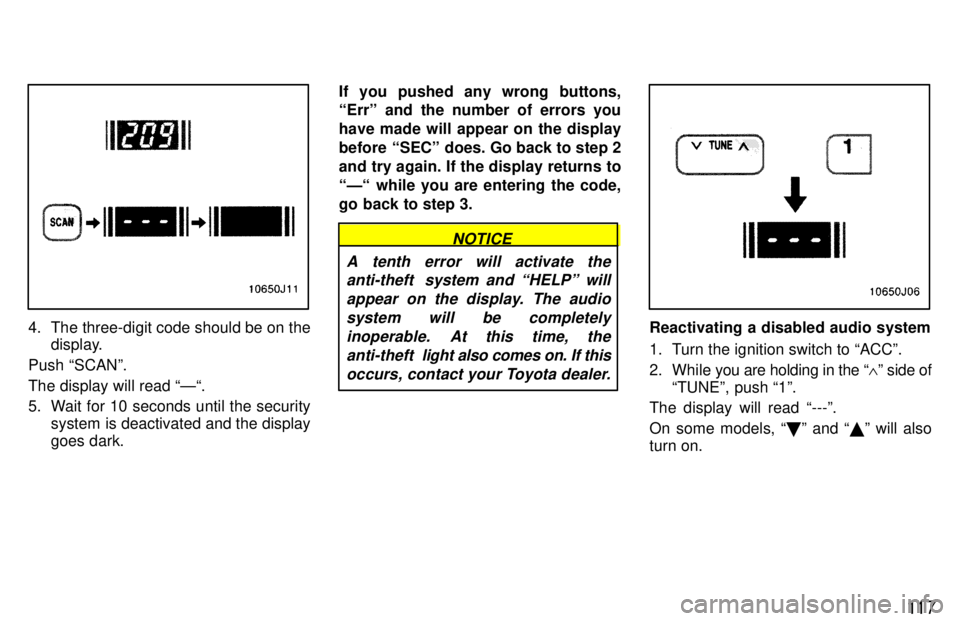
4. The three-digit code should be on thedisplay.
Push SCANº. The display will read Ð.
5. Wait for 10 seconds until the security system is deactivated and the display goes dark. If you pushed any wrong buttons, Errº and the number of errors you have made will appear on the display
before SECº does. Go back to step 2and try again. If the display returns to
Ð while you are entering the code,
go back to step 3.
NOTICE
A tenth error will activate the anti-theft system and HELPº will
appear on the display. The audiosystem will be completely inoperable. At this time, theanti-theft light also comes on. If this
occurs, contact your Toyota dealer.
Reactivating a disabled audio system
1. Turn the ignition switch to ACCº.
2. While you are holding in the ~º side of
TUNEº, push 1º.
The display will read ---º.
On some models, º and º will also
turn on.
Page 115 of 223

11 8
3. Input the existing three-digit code.
You have 10 seconds to enter each digit. For example, 209º:
To set the first digit: Push 1º until the digit
you want appears on the display.
To set the second digit: Push 2º until the
digit you want appears on the display.
To set the third digit: Push 3º until the digit
you want appears on the display.4. The three-digit code should be on thedisplay.
Push and hold in SCANº until the display
goes dark. (At first, SECº will appear on
the display.) If you pushed any wrong buttons, Errº and the number of errors you have made will appear on the display
before SECº does. Go back to step 2and try again. If the display returns to
--- while you are entering the code,
go back to step 3.
To make sure the security code has been accepted, turn the ignition to LOCKº andthen
back to ACCº. SECº should appear
on the display.
NOTICE
A tenth error will activate the anti-theft system and HELPº will
appear on the display. The audiosystem will be completely inoperable. At this time, theanti-theft light also comes on. If this
occurs, contact your Toyota dealer.
Page 135 of 223
138
If you plan to drive your Toyota in
another country... First,
comply with the vehicle registration
laws. Second, confirm the availability of the
correct fuel (unleaded and minimum oc- tane number).
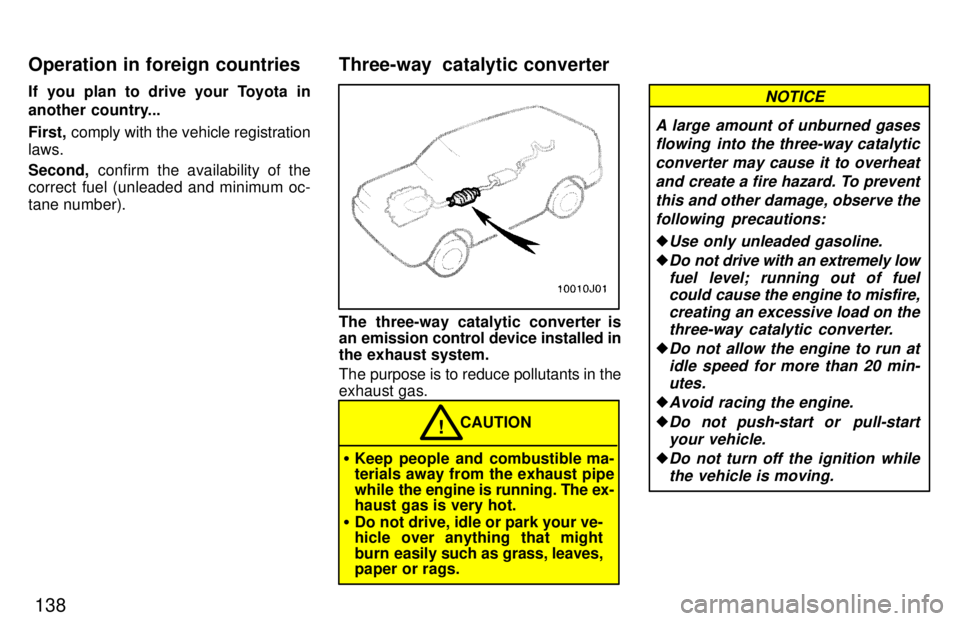
The three-way catalytic converter is
an emission control device installed in
the exhaust system.
The purpose is to reduce pollutants in the exhaust gas.
CAUTION!
Keep people and combustible ma- terials away from the exhaust pipe
while the engine is running. The ex-
haust gas is very hot.
Do not drive, idle or park your ve-
hicle over anything that might
burn easily such as grass, leaves,
paper or rags.
A large amount of unburned gases
flowing into the three-way catalytic
converter may cause it to overheat and create a fire hazard. To preventthis and other damage, observe the following precautions:
Use only unleaded gasoline.
Do not drive with an extremely lowfuel level; running out of fuelcould cause the engine to misfire,
creating an excessive load on the
three-way catalytic converter.
Do not allow the engine to run atidle speed for more than 20 min-
utes.
Avoid racing the engine.
Do not push-start or pull-start your vehicle.
Do not turn off the ignition whilethe vehicle is moving.
NOTICE
Three-way catalytic converter
Operation in foreign countries