brake light TOYOTA 4RUNNER 1998 User Guide
[x] Cancel search | Manufacturer: TOYOTA, Model Year: 1998, Model line: 4RUNNER, Model: TOYOTA 4RUNNER 1998Pages: 350, PDF Size: 2.25 MB
Page 143 of 350
4RUNNER (1998)
Your automatic transmission has a
shift lock system to minimize the pos-
sibility of incorrect operation. This
means you can only shift out of ºPº
position when the brake pedal is de-
pressed (with the ignition switch in
ºONº position and the lock release
button depressed).
(a) Normal driving
1. Start the engine as instructed in
ºHow to start the engineº in Part 3.
The transmission must be in ºPº or
ºNº.
When the front drive control lever is
in ºL4º (low- speed position, four-
wheel drive), the driving pattern selec-
tor setting has no effect on gear shift
timing. (See ºFour- wheel drive sys-
temº in this Chapter for information of
the front drive control lever.)
2. With your foot holding down the
brake pedal, shift the selector lever to
ºDº.
In ºDº position, the automatic trans-
mission system will select the most
suitable gear for running conditions
such as normal cruising, hill climbing,
hard towing, etc. Always turn the overdrive switch on
for better fuel economy and quieter
driving. If the engine coolant tempera-
ture is low or when the front drive
control lever is in ºL4º (low- speed
position, four- wheel drive), the trans-
mission will not shift into
the overdrive gear even with the over-
drive switch on. (See ºFour- wheel
drive systemº in this Chapter for in-
formation of the front drive control le-
ver.)
CAUTION
Never put your foot on the accel-
erator pedal while shifting.
3. Release the parking brake and
brake pedal. Depress the accelerator
pedal slowly for smooth starting.
(b) Using engine braking
To use engine braking, you can down-
shift the transmission as follows:
Turn off the overdrive switch. The
ºO/D OFFº indicator light will come
on and the transmission will down-
shift to the third gear.
Shift into the º2º position. The
transmission will downshift to the
second gear when the vehicle
speed drops down to or lower than
the following speed, and more pow-
erful engine braking will be ob-
tained.
Front drive control lever in ºH2º or
ºH4º
3RZ- FE engine.....105 km/h (65
mph)
5VZ- FE engine.....114 km/h (70
mph)
Front drive control lever in ºL4º
3RZ- FE engine.....38 km/h (23
mph)
5VZ- FE engine.....41 km/h (25
mph)
Shift into the ºLº position. The
transmission will downshift to the
first gear when the vehicle speed
drops down to or lower than the
following speed, and maximum en-
gine braking will be applied.
Front drive control lever in ºH2º or
ºH4º
3RZ- FE engine.....51 km/h (31
mph)
5VZ- FE engine.....55 km/h (34
mph)
Page 146 of 350
4RUNNER (1998)
CAUTION
While the vehicle is moving, nev-
er attempt to move the selector
lever into ºPº position under any
circumstances. Serious mechani-
cal damage and loss of vehicle
control may result.
(f) Good driving practice
If the transmission is repeatedly
upshifted and downshifted between
third gear and overdrive when
climbing a gentle slope, the over-
drive switch should be turned off.
Be sure to turn the switch on im-
mediately afterward.
When towing a trailer, in order to
maintain engine braking efficiency,
do not use overdrive.
CAUTION
Always keep your foot on the
brake pedal while stopped with
the engine running. This prevents
the vehicle from creeping.
NOTICE
Do not hold the vehicle on an
upgrade with the accelerator pe-dal. It can cause the transmissionto overheat. Always use the brake
pedal or parking brake.
(g) Rocking your vehicle if stuck
CAUTION
To rock your vehicle if it becomes
stuck in snow, mud, sand, etc.,
first check that there are no ob-
jects or people around the ve-
hicle. During the rocking opera-
tion the vehicle may suddenly
move forward or backward as it
becomes unstuck, causing injury
or damage to nearby people or
objects.
NOTICE
If you rock your vehicle, observe
the following precautions to pre-vent damage to the transmissionand other parts.
Do not depress the accelerator
pedal while shifting the selectorlever or before the transmissionis completely shifted to forward
or reverse gear.
Do not race the engine andavoid spinning the wheels.
If your vehicle remains stuck af-ter rocking the vehicle several
times, consider other ways suchas towing.
(h) Driving in ºPWRº(Power) mode
In the ºPWRº mode, the transmission
is shifted up and down at a higher
vehicle speed than in the
ºNORMº(Normal) mode and a more
powerful acceleration is achieved. To
set the ºPWRº mode, push in the driv-
ing pattern selector button. The ºPWRº
mode indicator light comes on.
For ordinary driving, Toyota recom-
mends using the ºNORMº mode to im-
prove fuel economy.
Page 154 of 350
4RUNNER (1998)
SHIFTING BETWEEN ºH2º AND ºH4º
To shift from ºH2º to ºH4º, move
the front drive control lever.
This can be done when the vehicle is
stopped, or moving straight ahead at
speeds of 40 km/h (25 mph) or less.
If you have trouble shifting, depress
or release the accelerator pedal mo-
mentarily while pushing the front drive
control lever.
CAUTION
Never move the front drive con-
trol lever if wheels are slipping.
Stop the slipping or spinning be-
fore shifting.
To shift from ºH4º to ºH2º, simply
move the front drive control lever.
This can be done at any vehicle
speed.
If the indicator light does not go off
when you shift the transfer into ºH2º,
drive straight ahead while accelerating
or decelerating, or drive in reverse. With A.D.D.
To shift from ºH2º to ºH4º,
reduce
your speed to less than 80 km/h (50
mph) and move the front drive control
lever.
If you have trouble shifting in cold
weather, reduce your speed or stop
the vehicle and reshift.
CAUTION
Never move the front drive con-
trol lever if wheels are slipping.
Stop the slipping or spinning be-
fore shifting.
To shift from ºH4º to ºH2º, simply
move the front drive control lever.
This can be done at any vehicle
speed.
If the indicator light does not go off
when you shift the transfer into ºH2º,
drive straight ahead while accelerating
or decelerating, or drive in reverse.
SHIFTING BETWEEN ºH4º ANDºL4º
To shift between ºH4º and ºL4º, stop
the vehicle and put the transmission
in ºNº. With your foot holding down
the brake pedal, move the front drive
control lever. SHIFTING BETWEEN ºH2º AND ºH4º
To shift from ºH2º to ºH4º,
reduce
your speed to less than 100 km/h (62
mph) and push in the º4WDº button.
If the indicator light does not come on
when you push in the º4WDº button,
drive straight ahead while accelerating
or decelerating.
If the indicator light flashes and the
buzzer sounds when you push in the
º4WDº button, reduce your speed or
stop the vehicle and reset.
CAUTION
Never push the º4WDº button if
wheels are slipping. Stop the slip-
ping or spinning before shifting.
(c) Shifting procedure (lev
type with automa
t
transmission) (c) Shifting procedure
(lever/button type)
Page 155 of 350

4RUNNER (1998)
To shift from ºH4º to ºH2º, push the
º4WDº button again to turn it off.
This can be done at any vehicle
speed.
If the indicator light does not go off
when you shift the transfer into ºH2º,
drive straight ahead while accelerating
or decelerating, or drive in reverse.
SHIFTING BETWEEN ºH2º OR ºH4º
AND ºL4º
To shift from ºH2º or ºH4º to ºL4º,
stop the vehicle and put the trans-
mission in ºNº. With your foot holding
down the brake pedal, move the front
drive control lever.
To shift from ºL4º to ºH2º or ºH4º,
stop the vehicle and put the trans-
mission in ºNº. With your foot holding
down the brake pedal, move the front
drive control lever. When the º4WDº
button is pushed in, the transfer shifts
into ºH4º; when the button is left out,
the transfer shifts into ºH2º.
If the indicator light does not go off
when you shift the transfer into ºH2º,
drive straight ahead while accelerating
or decelerating, or drive in reverse. Rear differential lock system
Page 157 of 350
4RUNNER (1998)
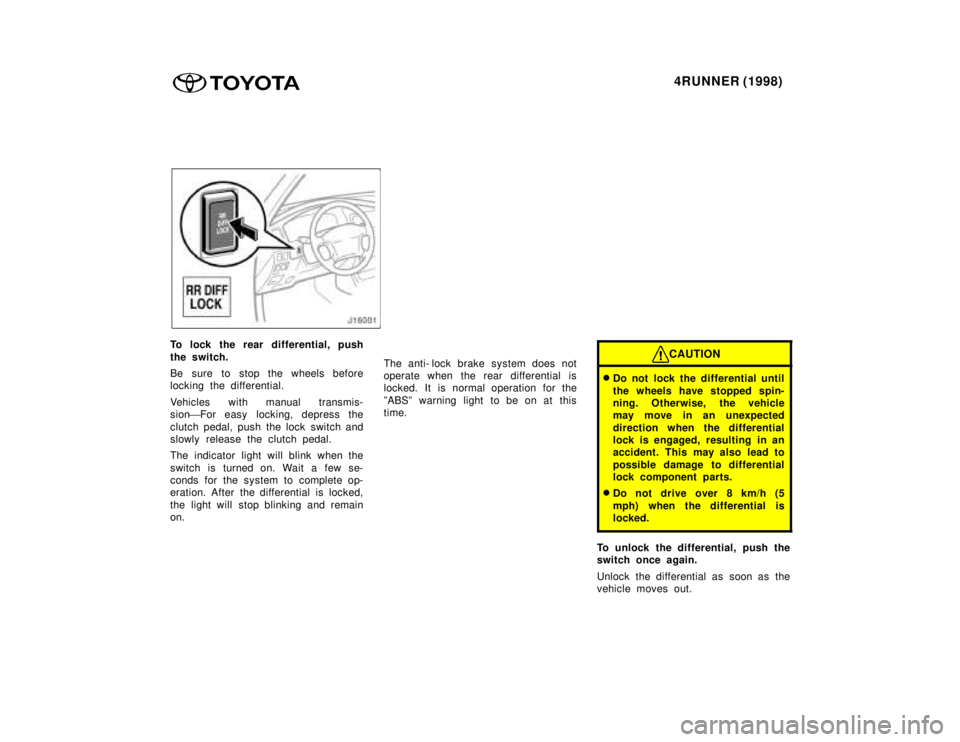
To lock the rear differential, push
the switch.
Be sure to stop the wheels before
locking the differential.
Vehicles with manual transmis-
sion'For easy locking, depress the
clutch pedal, push the lock switch and
slowly release the clutch pedal.
The indicator light will blink when the
switch is turned on. Wait a few se-
conds for the system to complete op-
eration. After the differential is locked,
the light will stop blinking and remain on. The anti- lock brake system does not
operate when the rear differential is
locked. It is normal operation for the
ºABSº warning light to be on at this
time.CAUTION
Do not lock the differential until
the wheels have stopped spin-
ning. Otherwise, the vehicle
may move in an unexpected
direction when the differential
lock is engaged, resulting in an
accident. This may also lead to
possible damage to differential
lock component parts.
Do not drive over 8 km/h (5
mph) when the differential is
locked.
To unlock the differential, push the
switch once again.
Unlock the differential as soon as the
vehicle moves out.
Page 158 of 350
4RUNNER (1998)
For easy unlocking, slightly turn the
steering wheel in either direction while
the vehicle is in motion.
When the differential lock is disen-
gaged, the indicator light will go out. The differential will also unlock if you
shift the front drive control lever out
of ºL4º. Never forget to turn off the
switch after using this feature.
To check the indicator bulb, turn the
ignition key to the ºONº position, but
do not start the engine.
CAUTION
Do not keep driving with the dif-
ferential lock switch on.
Parking brake
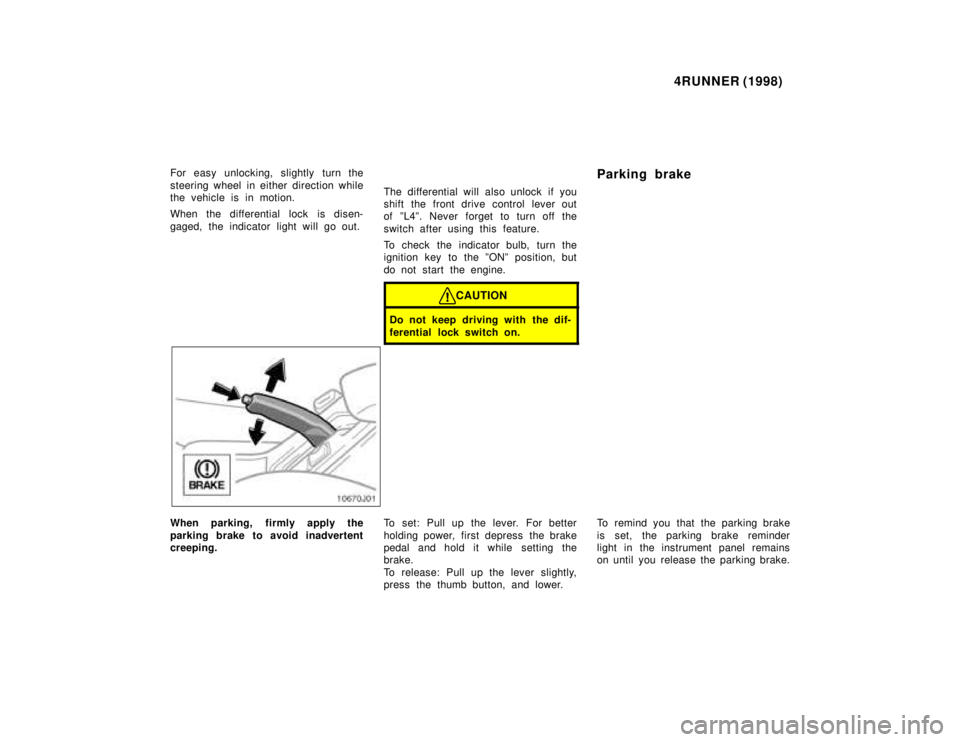
When parking, firmly apply the
parking brake to avoid inadvertent
creeping.
To set: Pull up the lever. For better
holding power, first depress the brake
pedal and hold it while setting the
brake.
To release: Pull up the lever slightly,
press the thumb button, and lower.To remind you that the parking brake
is set, the parking brake reminder
light in the instrument panel remains
on until you release the parking brake.
Page 159 of 350
4RUNNER (1998)
CAUTION
Before driving, be sure the park-
ing brake is fully released and
the parking brake reminder light
is off.
Cruise control
The cruise control allows you to
cruise the vehicle at a desired
speed over 40 km/h (25 mph) even
with your foot off the accelerator
pedal.
Your cruising speed can be maintained
up or down grades within the limits of
engine performance, although a slight
speed change may occur when driving
up or down the grades. On steeper
hills, a greater s peed change will oc-
cur so it is better to drive without the
cruise control.
CAUTION
To help maintain maximum con-
trol of your vehicle, do not use
the cruise control when driving
in heavy or varying traffic, or
on slippery (rainy, icy or snow-
covered) or winding roads.
Avoid vehicle speed increases
when driving downhill. If the ve-
hicle speed is too fast in rela-
tion to the cruise control set
speed, cancel the cruise control
then downshift the transmission
to use engine braking to slow down.
Page 162 of 350

4RUNNER (1998)
If the preset speed automatically can-
cels out other than for the above
cases, have your vehicle checked by
your Toyota dealer at the earliest op-
portunity.
RESETTING AT A FASTER SPEED
Push the lever up in the ºRES/ACCº
direction and hold it. Release the le-
ver when the desired speed is at-
tained. While the lever is held up, the
vehicle will gradually gain speed.
However, a faster way to reset is to
accelerate the vehicle and then push
the lever down in the ºSET/COASTº
direction.
RESETTING AT A SLOWER SPEED
Push the lever down in the ºSET/
COASTº direction and hold it. Release
the lever when the desired speed is
attained. While the lever is held down,
the vehicle speed will gradually de-
crease.
However, a faster way to reset is to
depress the brake pedal and then
push the lever down in the ºSET/
COASTº direction. On vehicles with automatic transmis-
sion, even if you turn off the overdrive
switch, with the cruise control on, en-
gine braking will not be applied be-
cause the cruise control is not can-
celled. To decrease the vehicle speed,
reset to a slower speed with the
cruise control lever or depress the
brake pedal. If you use the brake ped-
al, cruise control is cancelled.
RESUMING THE PRESET SPEED
If the preset speed is cancelled by
pulling the control lever or by de-
pressing the brake pedal or clutch
pedal, pushing the lever up in the
ºRES/ACCº direction will restore the
speed set prior to cancellation.
However, once the vehicle speed falls
below about 40 km/h (25 mph), the
preset speed will not be resumed.
CRUISE CONTROL FAILURE WARN-
ING
If the ºCRUISEº indicator light in the
instrument cluster flashes when using
the cruise control, press the ºCRUISE
ON- OFFº button to turn the system
off and then press it again to turn it on.If any of the following conditions then
occurs, there is some trouble in the
cruise control system.
The indicator light does not comeon.
The indicator light flashes again.
The indicator light goes out after it
comes on.
If this is the case, contact your Toyo-
ta dealer and have your vehicle in-
spected.
Page 227 of 350
4RUNNER (1998)
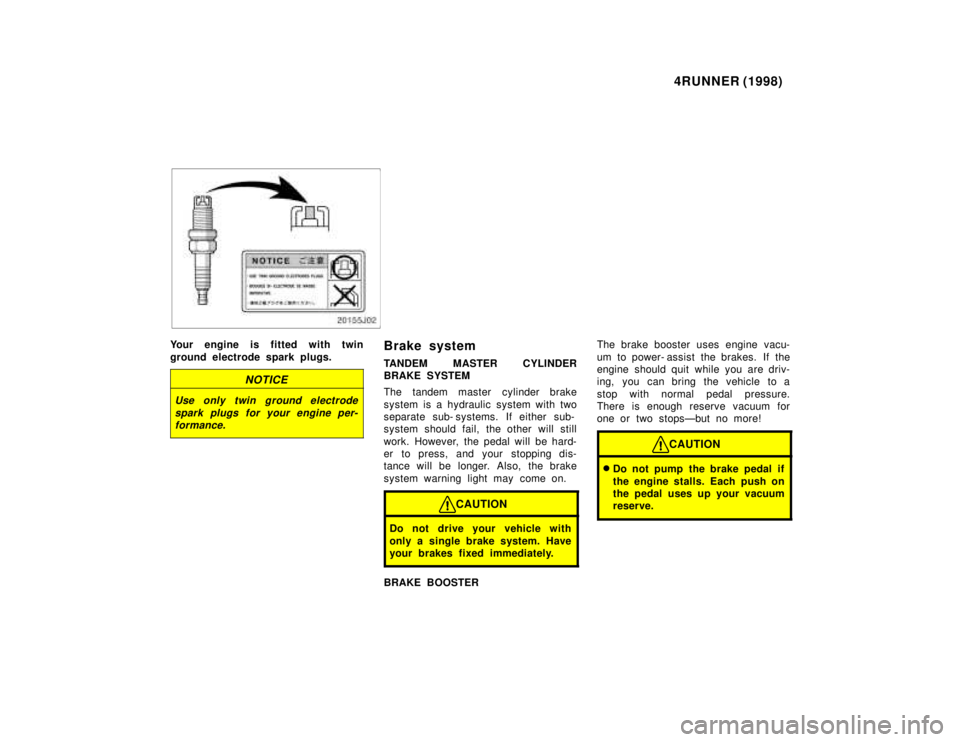
Your engine is fitted with twin
ground electrode spark plugs.
NOTICE
Use only twin ground electrode
spark plugs for your engine per-formance.
Brake system
TANDEM MASTER CYLINDER
BRAKE SYSTEM
The tandem master cylinder brake
system is a hydraulic system with two
separate sub- systems. If either sub-
system s hould fail, the other will still
work. However, the pedal will be hard-
er to press, and your stopping dis-
tance will be longer. Also, the brake
system warning light may come on.
CAUTION
Do not drive your vehicle with
only a single brake system. Have
your brakes fixed immediately.
BRAKE BOOSTER The brake booster uses engine vacu-
um to power- assist the brakes. If the
engine should quit while you are driv-
ing, you can bring the vehicle to a
stop with normal pedal pressure.
There is enough reserve vacuum for
one or two stopsÐbut no more!
CAUTION
Do not pump the brake pedal if
the engine stalls. Each push on
the pedal uses up your vacuum
reserve.
Page 228 of 350
4RUNNER (1998)
Even if the power assist is
completely lost, the brakes will
still work. But you will have to
push the pedal hardÐmuch
harder than normal. And your
braking distance will be longer.
ANTI- LOCK BRAKE SYSTEM
(with ºABSº warning light)
The anti- lock brake system is de-
signed to automatically help prevent
lock- up of the wheels during sudden
braking or braking on slippery road
surfaces. This assists in providing
directional stab ility and steering per-
formance of the vehicle under these
circumstances.
The anti- lock brake system becomes
operative after the vehicle has accel-
erated to a speed in excess of
approximately 10 km/h (6 mph). It
stops operating when the vehicle de-
celerates to a speed below approxi-
mately 5 km/h (3 mph).
You may hear a sound in the engine
compartment for a few seconds when
the engine is started or just after the
vehicle is started. This means that the
anti- lock brake system is in the self
check mode, and does not indicate a
malfunction. Effective way to press the ºABSº
brake pedal: When the anti- lock brake
system function is in action, you may
feel the brake pedal pulsating and
hear a noise. In this situation, to let
the anti- lock brake system work for
you, just hold the brake pedal down
more firmly. Do not pump the brake.
This will result in reduced braking per-
formance.
The brake pedal pulsation caused by
the anti- lock brake system may indi-
cate hazardous road surface condi-
tions. Although the anti- lock brake
system assists in providing vehicle
control, it is still important to drive
with all due care, because the anti-
lock brake system cannot overcome
the laws of physics that act on your
vehicle:
Braking capab ility is dependent on
tire friction with the road surface.
Even though the anti- lock brake
system is operating, a driver can-
not maintain full control on certain
slippery road surfaces, when cor-
nering at high speeds, or in violent
maneuvers.
Avoid high speeds on wet roads.
The anti- lock brake system cannot
eliminate the risk of hydroplaning
and loss of tire friction. Always maintain a safe distance from
the vehicle in front of you. Compared
with vehicles not fitted with an anti-
lock brake system, your vehicle may
require a longer stopping distance in
the following cases:
Driving on rough, gravel or snow-
covered roads.
Driving with tire chains installed.
Driving on roads where the road
surface is pitted or has other differ-
ences in surface height.
CAUTION
Do not use tires other than the
manufacturer 's designated tires,
and do not mix tires or wheels of
different sizes. You may prevent
the antilock brake system from
operating at full effectiveness.
Vehicles with rear differential lock sys-
tem 'The anti- lock brake system does
not operate when the rear differential
is locked. It is normal operation for
the ºABSº warning light to be on at
this time.