ignition TOYOTA 4RUNNER 1999 Owner's Guide
[x] Cancel search | Manufacturer: TOYOTA, Model Year: 1999, Model line: 4RUNNER, Model: TOYOTA 4RUNNER 1999Pages: 268, PDF Size: 2.63 MB
Page 127 of 268

4RUNNER ()127
1 2 3 4 5 6 (Preset buttons)
These buttons are used to preset and
tune in radio stations.
To preset a station to a button: Tune in
the desired station (see ºTUNEº or ºSEEKº
button). Push and hold down the button
until you hear a beepÐthis will set the
station to the button. The button number
will appear on the display.
To tune in to a preset station: Push the
button for the station you want. The but-
ton number and station frequency will ap-
pear on the display.
These systems can store one AM and two
FM stations for each button (The display
will show ºAMº, ºFM1º or ºFM2º when you
push ºAMº or ºFMº).
(Eject button)
Push this button to eject a cassette.
After you turn the ignition to ºLOCKº, you
will be able to eject a cassette but you
will not be able to reinsert it.
(Reverse/Fast forward buttons)
Cassette Player
Push the fast forward button to fast for-
ward a cassette tape. ºFFº will appear on
the display. Push the reverse button to
rewind a tape. ºREWº will appear on the
display.
To stop the tape while it is fast forward-
ing, push the fast forward button or
ºTAPEº; to stop the tape while it is re-
winding, push the reverse button or
ºTAPEº.
If a tape side rewinds completely, the cas-
sette player will stop and then play that
same side. If a tape fast forwards com-
pletely, the cassette player will play the
other side of the tape, using the auto- re-
verse feature.
Compact Disc Player
If you want to fast forward or reverse
through a compact disc track, push and
hold in the fast forward or reverse button.
When you release the button, the compact
disc player will resume playing. AM
Push ºAMº to switch the AM band. ºAMº
will appear on the display.
If the audio system is off, you can turn
on the radio by pushing ºAMº. Also, push
ºAMº to switch from cassette or compact
disc operation to radio operation.
AUDIO CONTROL / MODE
Manual tone adjustment functionÐ
This knob is used to adjust the tone
manually.
For low- pitch tone adjustment, push
ºAUDIO CONTROL / MODEº repeatedly
until ºBASº appears on the display. Then
turn the knob to suit your preference.
The display will show the range from
ºBAS -5º to ºBAS 5º.
For middle- pitch tone adjustment, push
ºAUDIO CONTROL / MODEº repeatedly
until ºMIdº appears on the display. Then
turn the knob to suit your preference.
The display will show the range from ºMId
- 5º to ºMId 5º.
Page 134 of 268

4RUNNER ()
134
1 2 3 4 5 6 (Preset buttons)
These buttons are used to preset and
tune in radio stations.
To preset a station to a button: Tune in
the desired station (see ºTUNEº button).
Push and hold down the button until you
hear a beepÐthis will set the station to
the button. The button number will appear
on the display.
To tune in to a preset station: Push the
button for the station you want. The but-
ton number and station frequency will ap-
pear on the display.
These systems can store one AM and two
FM stations for each button (The display
will show ºAMº, ºFM1º or ºFM2º when you
push ºAM´FMº).
(Eject button)
Push this button to eject a compact disc.
After you turn the ignition to ºLOCKº, you
will be able to eject a disc but you will
not be able to reinsert it.
(Reverse/Fast forward buttons)
If you want to fast forward or reverse
through a compact disc track, push and
hold in the fast forward or reverse button.
When you release the button, the compact
disc player will resume playing.
AM´FM
Push ºAM´FMº to switch between the AM
and FM bands. ºAMº, ºFM1º or ºFM2º will
appear on the display. These systems al-
low you to set twelve FM stations, two for
each button.
If the audio system is off, you can turn
on the radio by pushing ºAM´FMº. Also,
push ºAM´FMº to switch from compact
disc operation to radio operation. AUDIO CONTROL / MODE
Manual tone adjustment functionÐ
This knob is used to adjust the tone
manually.
For low- pitch tone adjustment, push
ºAUDIO CONTROL / MODEº repeatedly
until ºBASº appears on the display. Then
turn the knob to suit your preference.
The display will show the range from
ºBAS -5º to ºBAS 5º.
With middle- pitch toneÐ
For middle- pitch tone adjustment, push
ºAUDIO CONTROL / MODEº repeatedly
until ºMIdº appears on the display. Then
turn the knob to suit your preference.
The display will show the range from ºMId
- 5º to ºMId 5º.
For high- pitch tone adjustment, push
ºAUDIO CONTROL / MODEº repeatedly
until ºTREº appears on the display. Then
turn the knob to suit your preference.
The display will show the range from
ºTRE -5º to ºTRE 5º.
Page 139 of 268

4RUNNER ()139
1 2 3 4 5 6 (Preset buttons)
These buttons are used to preset and
tune in radio stations.
To preset a station to a button: Tune in
the desired station (see ºTUNEº or ºSEEKº
button). Push and hold down the button
until you hear a beepÐthis will set the
station to the button. The button number
will appear on the display.
To tune in to a preset station: Push the
button for the station you want. The but-
ton number and station frequency will ap-
pear on the display.
These systems can store one AM and two
FM stations for each button (The display
will show ºAMº, ºFM1º or ºFM2º when you
push ºAM´FMº).
(Eject button)
Push the cassette tape eject button to
eject a cassette. Push the compact disc
eject button to eject a compact disc.
After you turn the ignition to ºLOCKº, you
will be able to eject a cassette or disc but
you will not be able to reinsert it.
(Reverse/Fast forward buttons)
Cassette Player
Push the fast forward button to fast for-
ward a cassette tape. ºFFº will appear on
the display. Push the reverse button to
rewind a tape. ºREWº will appear on the
display.
To stop the tape while it is fast forward-
ing, push the fast forward button or
ºTAPEº; to stop the tape while it is re-
winding, push the reverse button or
ºTAPEº.
If a tape side rewinds completely, the cas-
sette player will stop and then play that
same side. If a tape fast forwards com-
pletely, the cassette player will play the
other side of the tape, using the auto- re-
verse feature.
Compact Disc Player
If you want to fast forward or reverse
through a compact disc track, push and
hold in the fast forward or reverse button.
When you release the button, the compact
disc player will resume playing. AM´FM
Push ºAM´FMº to switch between the AM
and FM bands.ºAMº, ºFM1º or ºFM2º will
appear on the display. These systems al-
low you to set twelve FM stations, two for
each button.
If the audio system is off, you can turn
on the radio by pushing ºAM´FMº. Also,
push ºAM´FMº to switch from cassette or
compact disc operation to radio operation.
AUDIO CONTROL / MODE
Manual tone adjustment functionÐ
This knob is used to adjust the tone
manually.
For low- pitch tone adjustment, push
ºAUDIO CONTROL / MODEº repeatedly
until ºBASº appears on the display. Then
turn the knob to suit your preference.
The display will show the range from
ºBAS -5º to ºBAS 5º.
For middle- pitch tone adjustment, push
ºAUDIO CONTROL / MODEº repeatedly
until ºMIdº appears on the display. Then
turn the knob to suit your preference.
The display will show the range from ºMId
- 5º to ºMId 5º.
Page 175 of 268
4RUNNER ()175
The three- way catalytic converter is an
emission control device installed in the
exhaust system.
The purpose is to reduce pollutants in the
exhaust gas.
CAUTION
Keep people and combustible mate-
rials away from the exhaust pipe
while the engine is running. The
exhaust gas is very hot.
Do not drive, idle or park your ve-
hicle over anything that might burn
easily such as grass, leaves, paper
or rags.
NOTICE
A large amount of unburned gases
flowing into the three- way catalyticconverter may cause it to overheat and create a fire hazard. To prevent
this and other damage, observe thefollowing precautions:
Use only unleaded gasoline.
Do not drive with an extremely lowfuel level; running out of fuel could
cause the engine to misfire, creat-ing an excessive load on the three- way catalytic converter.
Do not allow the engine to run atidle speed for more than 20 min-
utes.
Avoid racing the engine.
Do not push- start or pull- start yourvehicle.
Do not turn off the ignition while
the vehicle is moving.
Keep your engine in good runningorder. Malfunctions in the engineelectrical system, electronic ignitionsystem/distributor ignition system
or fuel systems could cause an ex-tremely high three- way catalyticconverter temperature.
If the engine becomes difficult to start or stalls frequently, take yourvehicle in for a check- up as soon
as possible. Remember, your Toyotadealer knows your vehicle and itsthree- way catalytic converter sys-
tem best.
To ensure that the three- way cata- lytic converter and the entire emis-sion control system operate proper-ly, your vehicle must receive the
periodic inspections required by theToyota Maintenance Schedule. Forscheduled maintenance information,
refer to the separate ºScheduledMaintenance Guideº or ºOwner'sManual Supplementº.
Page 179 of 268
4RUNNER ()179
Avoid high speeds on wet roads. The
anti- lock brake system cannot elimi-
nate the risk of hydroplaning and loss
of tire friction.
Always maintain a safe distance from the
vehicle in front of you. Compared with
vehicles not fitted with an anti- lock brake
system, your vehicle may r equire a longer
stopping distance in the following cases:
Driving on rough, gravel or snow- cov-
ered roads.
Driving with tire chains installed.
Driving on roads where the road sur-
face is pitted or has other differences
in surface height.
CAUTION
Do not use tires other than the
manufacturer 's designated tires, and
do not mix tires or wheels of differ-
ent sizes. You may prevent the anti-
lock brake system from operating at
full effectiveness.
Vehicles with rear differential lock sys-
tem 'The anti- lock brake system does not
operate when the rear differential is
locked. It is normal operation for the
ºABSº warning light to be on at this time.
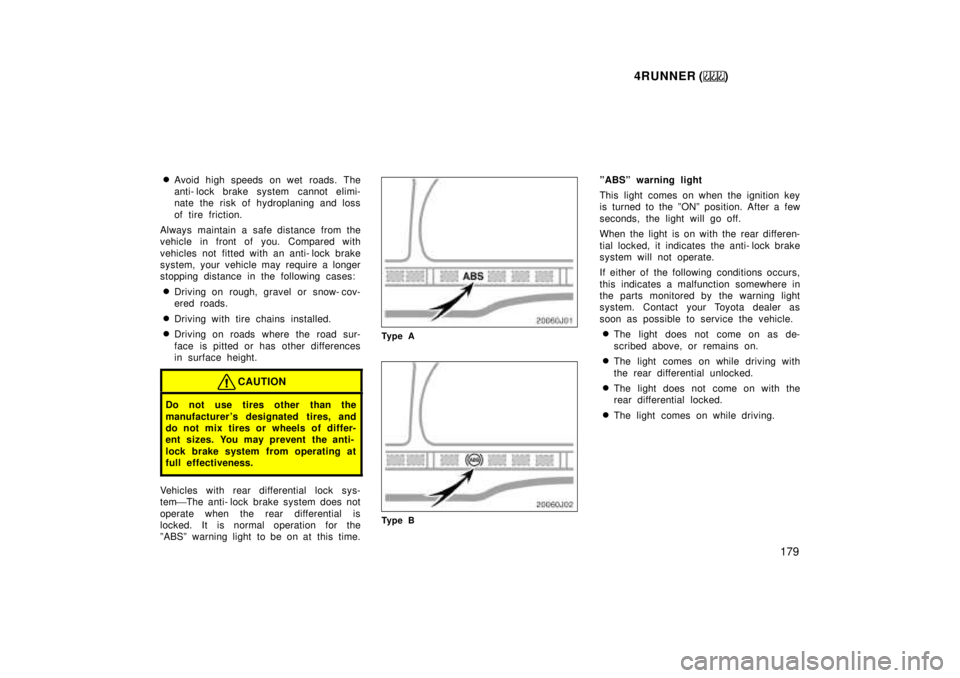
Ty p e A
Ty p e B ºABSº warning light
This light comes on when the ignition key
is turned to the ºONº position. After a few
seconds, the light will go off.
When the light is on with the rear differen-
tial locked, it indicates the anti- lock brake
system will not operate.
If either of the following conditions occurs,
this indicates a malfunction somewhere in
the parts monitored by the warning light
system. Contact your Toyota dealer as
soon as possible to service the vehicle.
The light does not come on as de-
scribed above, or remains on.
The light comes on while driving with
the rear differential unlocked.
The light does not come on with the
rear differential locked.
The light comes on while driving.
Page 197 of 268
4RUNNER ()197
Part 4
IN CASE OF AN
EMERGENCY
If your vehicle will not start
If your engine stalls while
driving
If your vehicle overheats
If you have a flat tire
If your vehicle needs to be
towed
If you cannot shift automatic
transmission selector lever
If you lose your keys
If you lose your wireless
remote control transmitter
Before making these checks, make sure
you have followed the correct starting pro-
cedure given in ºHow to start the engineº
in Part 3 and that you have sufficient fuel.
If your vehicle is equipped with the engine
immobiliser system, also check whether
the other keys will start the engine. If
they work, your key may be broken. Have
the key checked at your Toyota dealer. If
none of your keys work, the system is
possibly broken. Call your Toyota dealer.
(See ºKeys (with engine immobiliser sys-
tem)º in Chapter 1- 2.)
If the engine is not turning over or is
turning over too slowlyÐ
1. Check that the battery terminals are tight and clean.
2. If the battery terminals are O.K., switch on the interior light.
3. If the light is out, dim or goes out when the starter is cranked, the battery
is discharged. You may try jump start-
ing. See º(c) Jump startingº for further
instructions.
If the light is O.K., but the engine still will
not start, it needs adjustment or repair.
Call a Toyota dealer or qualified repair
shop.NOTICE
Do not pull- or push- start the ve- hicle. It may damage the vehicle orcause a collision when the engine starts. Also the three- way catalytic
converter may overheat and become afire hazard.
If the engine turns over at its normal
speed but will not startÐ
1. Check that all the push- on connectors are tight. (For example, connections at
the spark plugs, ignition coil and/or dis-
tributor)
2. If the connectors are O.K., the engine may be flooded because of repeated
cranking. See º(b) Starting a flooded
engineº for further instructions.
If your vehicle will not startÐ
(a) Simple checks
Page 210 of 268
4RUNNER ()
210
From rearÐ
Place the ignition key in the
ºACCº position.
NOTICE
When lifting wheels, take care to
ensure adequate ground clearancefor towing at the opposite end of the raised vehicle. Otherwise, the
bumper and/or underbody of thetowed vehicle will be damaged dur-ing towing.
Do not tow with the key removed orin the ºLOCKº position, as the steering lock mechanism is not
strong enough to hold the frontwheels straight while towing.
(b) Using flat bed truck Four- wheel drive modelsÐ
(a) Towing with wheel lift type truck
From frontÐ
Manual transmission:
We recommend using a towing dolly
under the rear wheels. If you do not
use a towing dolly, release the parking
brake, put the transmission in neutral
and the transfer in ºH2º.
Automatic transmission:
Use a towing dolly under the rear
wheels.
NOTICE
Never tow a vehicle with an automatic
transmission from the front with therear wheels on the ground, as this
may cause serious damage to the
transmission.
From rearÐ We recommend using a tow-
ing dolly under the front wheels. If you do
not use a towing dolly, place the ignition
key in the ºACCº position, put the trans-
mission in neutral and the transfer in
ºH2º.
NOTICE
Do not tow with the key removed or
in the ºLOCKº position when towingfrom the rear without a towing dolly. The steering lock mechanism is not
strong enough to hold the frontwheels straight.
(b) Using flat bed truck
Page 214 of 268
4RUNNER ()
214
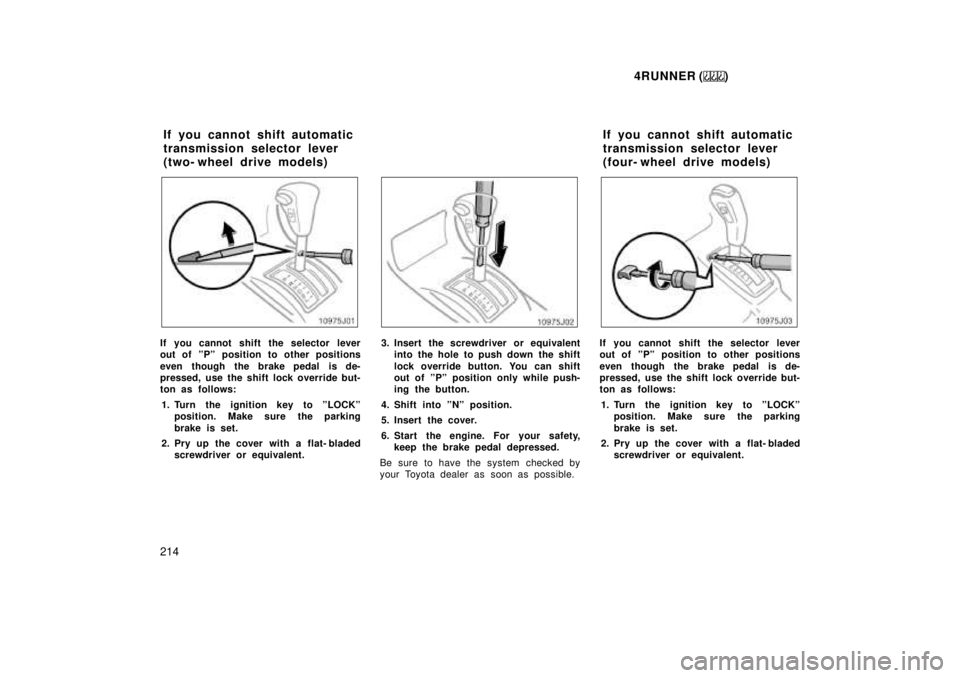
If you cannot shift the selector lever
out of ºPº position to other positions
even though the brake pedal is de-
pressed, use the shift lock override but-
ton as follows: 1. Turn the ignition key to ºLOCKº position. Make sure the parking
brake is set.
2. Pry up the cover with a flat- bladed screwdriver or equivalent.3. Insert the screwdriver or equivalent into the hole to push down the shift
lock override button. You can shift
out of ºPº position only while push-
ing the button.
4. Shift into ºNº position.
5. Insert the cover.
6. Start the engine. For your safety, keep the brake pedal depressed.
Be sure to have the system checked by
your Toyota dealer as soon as possible.If you cannot shift the selector lever
out of ºPº position to other positions
even though the brake pedal is de-
pressed, use the shift lock override but-
ton as follows: 1. Turn the ignition key to ºLOCKº position. Make sure the parking
brake is set.
2. Pry up the cover with a flat- bladed screwdriver or equivalent.
If you cannot shift automatic
transmission selector lever
(two- wheel drive models)
If you cannot shift automatic
transmission selector lever
(four- wheel drive models)
Page 233 of 268
4RUNNER ()233
CAUTION
When the engine is running, keep
hands, clothing, and tools away
from the moving fan and engine
drive belts. (Removing rings,
watches, and ties is advisable.)
Right after driving, the engine
compartmentÐthe engine, radiator,
exhaust manifold, power steering
fluid reservoir and spark plug
boots, etc.Ðwill be hot. So be care-
ful not to touch them. Oil, fluids
and spark plugs may also be hot.
If the engine is hot, do not remove
the radiator cap or loosen the drain
plugs to prevent burning yourself.
Do not smoke, cause sparks or al-
low open flames around fuel or the
battery. Their fumes are flammable.
Be extremely cautious when work-
ing on the battery. It contains poi-
sonous and corrosive sulfuric acid.
Do not get under your vehicle with
just the body jack supporting it. Al-
ways use automotive jack stands or
other solid supports.
Use eye protection whenever you
work on or under your vehicle
where you may be exposed to flying
or falling material, fluid spray, etc.
Used engine oil contains potentially
harmful contaminants which may
cause skin disorders such as in-
flammation or skin cancer, so care
should be taken to avoid prolonged
and repeated contact with it. To re-
move used engine oil from your
skin, wash thoroughly with soap
and water.
Do not leave used oil within the
reach of children.
Dispose of used oil and filter only
in a safe and acceptable manner.
Do not dispose of used oil and fil-
ter in household trash, in sewers or
onto the ground. Call your dealer or
a service station for information
concerning recycling or disposal.NOTICE
Remember that battery and ignition
cables carry high currents or volt-ages. Be careful of accidentallycausing a short circuit.
Add only demineralized or distilled water to fill the radiator. And if youspill some of the coolant, be sure
to wash it off with water to preventit from damaging the parts or paint.
Do not allow dirt or anything elseto fall through the spark plug holes.
Do not pry the outer electrode of a
spark plug against the center elec-trode.
Use only spark plugs of the speci-fied type. Using other types willcause engine damage, loss of per-
formance or radio noise.
Do not overfill automatic transmis-sion fluid, or the transmissioncould be damaged.
Page 250 of 268

4RUNNER ()
250
If the headlights or other electrical
components do not work, check the
fuses. If any of the fuses are blown,
they must be replaced.
See ºFuse locationsº in Chapter 7- 1 for
locations of the fuses.
Turn the ignition switch and inoperative
component off. Pull a suspected fuse
straight out and check it.
Determine which fuse may be causing the
problem. The lid of the fuse box shows
the name of the circuit for each fuse. See
Part 8 of this manual for the functions
controlled by each circuit. Type A fuses can be pulled out by using
the pull- out tool. The location of the pull-
out tool is shown in the illustration.
If you are not sure whether the fuse has
blown, try replacing the suspected fuse
with one that you know is good.
If the fuse has blown, push a new fuse
into the clip.
Only install a fuse with the amperage rat-
ing designated on the fuse box lid.
If you do not have a spare fuse, in an
emergency you can pull out the ºPWR
OUTLETº or ºA.Cº fuse, which may be
dispensable for normal driving, and use it
if its amperage rating is the same.
If you cannot use one of the same amper-
age, use one that is lower, but as close
as possible to the rating. If the amperage
is lower than that specified, the fuse
might blow out again but this does not
indicate anything wrong. Be sure to get
the correct fuse as soon as possible and
return the substitute to its original clip.
It is a good idea to purchase a set of
spare fuses and keep them in your ve-
hicle for emergencies.
If the new fuse immediately blows out,
there is a problem with the electrical sys-
tem. Have your Toyota dealer correct it as
soon as possible.
CAUTION
Never use a fuse with a higher am-
perage rating, or any other object, in
place of a fuse. This may cause ex-
tensive damage and possibly a fire.