window TOYOTA 4RUNNER 2010 N280 / 5.G User Guide
[x] Cancel search | Manufacturer: TOYOTA, Model Year: 2010, Model line: 4RUNNER, Model: TOYOTA 4RUNNER 2010 N280 / 5.GPages: 665, PDF Size: 11.96 MB
Page 35 of 665
35
1-2. Opening, closing and locking the doors
1
Before driving
4RUNNER_U
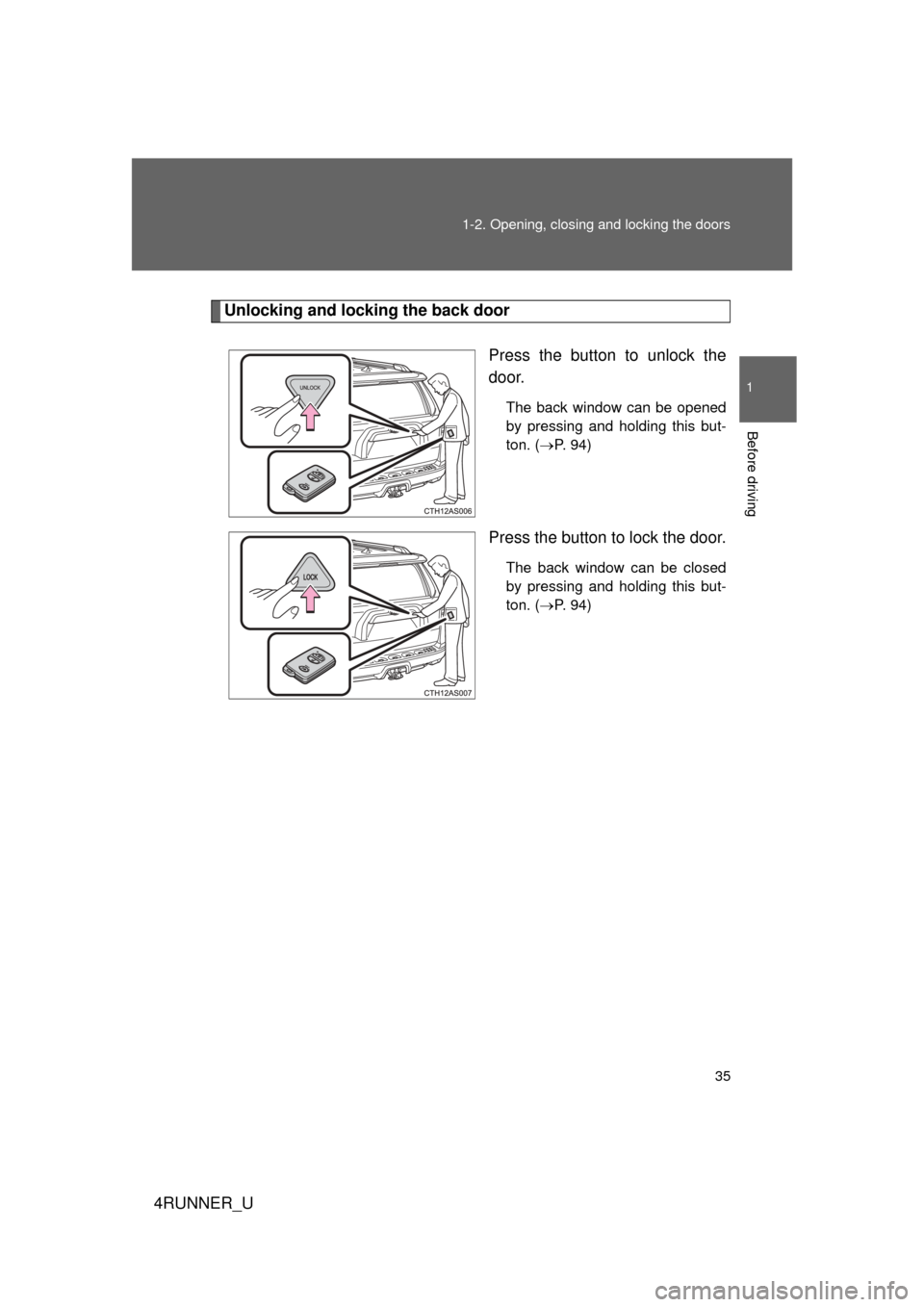
Unlocking and locking the back door
Press the button to unlock the
door.
The back window can be opened
by pressing and holding this but-
ton. (P. 94)
Press the button to lock the door.
The back window can be closed
by pressing and holding this but-
ton. ( P. 94)
Page 41 of 665
41
1-2. Opening, closing and locking the doors
1
Before driving
4RUNNER_U
■
Conditions aff ecting operation
The smart key system uses weak radio waves. In the following situations,
the communication between the electronic key and the vehicle may be
affected, preventing the smart key system, wireless remote control and
immobilizer system from operating properly. (Way of coping P. 596)
● When the electronic key battery is depleted
● Near a TV tower, electric power plant, gas station, radio station, large dis-
play, airport or other facility that generates strong radio waves or electri-
cal noise
● When carrying a portable radio, mobile phone, cordless phone or other
wireless communication device
● When the electronic key is in contact with, or is covered by the following
metallic objects
• Cards to which aluminum foil is attached
• Cigarette boxes that have aluminum foil inside
• Metallic wallets or bags
• Coins
• Hand warmers made of metal
• Media such as CDs and DVDs
● When multiple electronic keys are in the vicinity
● When other wireless keys (that emit radio waves) are being used nearby
● When carrying the electronic key together with the following devices that
emit radio waves
• Another vehicle's electronic key or a wireless key that emits radio
waves
• Personal computers or personal digital assistants (PDAs)
• Digital audio players
• Portable game systems
● If window tint with a metallic content or metallic objects are attached to
the back window
Page 42 of 665

42 1-2. Opening, closing and locking the doors
4RUNNER_U
■Note for the entry function
● Even when the electronic key is within the effective range (detection
areas), the system may not operate properly in the following cases:
• The electronic key is too close to the window or outside door handle,
near the ground, or in a high place when the doors are locked or
unlocked.
• The electronic key is on the instrument panel or floor, in the glove box, or in the auxiliary box of the instrument panel.
● As long as the electronic key is within the effective range, the doors may
be locked or unlocked by anyone. However, only the doors detecting the
electronic key can be used to unlock the vehicle.
● The doors may lock or unlock if the electronic key is within the effective
range and a large amount of water splashes on the door handle, such as
in the rain or in a car wash. The doors will automatically be locked after
approximately 60 seconds if a door is not opened and closed.
● If the wireless remote control is used to lock the doors when the elec-
tronic key is near the vehicle, there is a possibility that the door may not
be unlocked by the entry function. (Use the wireless remote control to
unlock the doors.)
■ Notes for locking the doors
● Touching the door lock sensor while wearing gloves may delay or prevent
lock operation. Remove the gloves and touch the lock sensor again.
● When the lock operation is performed using the lock sensor, recognition
signals will be shown up to two consecutive times. After this, no recogni-
tion signals will be given.
● If the door handle becomes wet while the electronic key is within the
effective range, the door may lock and unlock repeatedly. Place the key
in a position 6 ft. (2 m) or more separate from the vehicle while the vehi-
cle is being washed. (Take care to ensure that the key is not stolen.)
● If the electronic key is inside the vehicle and a door handle becomes wet
during a car wash, a buzzer will sound outside the vehicle. To turn off the
alarm, lock all the doors.
Page 47 of 665
47
1
1-2. Opening, closing and locking the doors
Before driving
4RUNNER_U
Wireless remote control
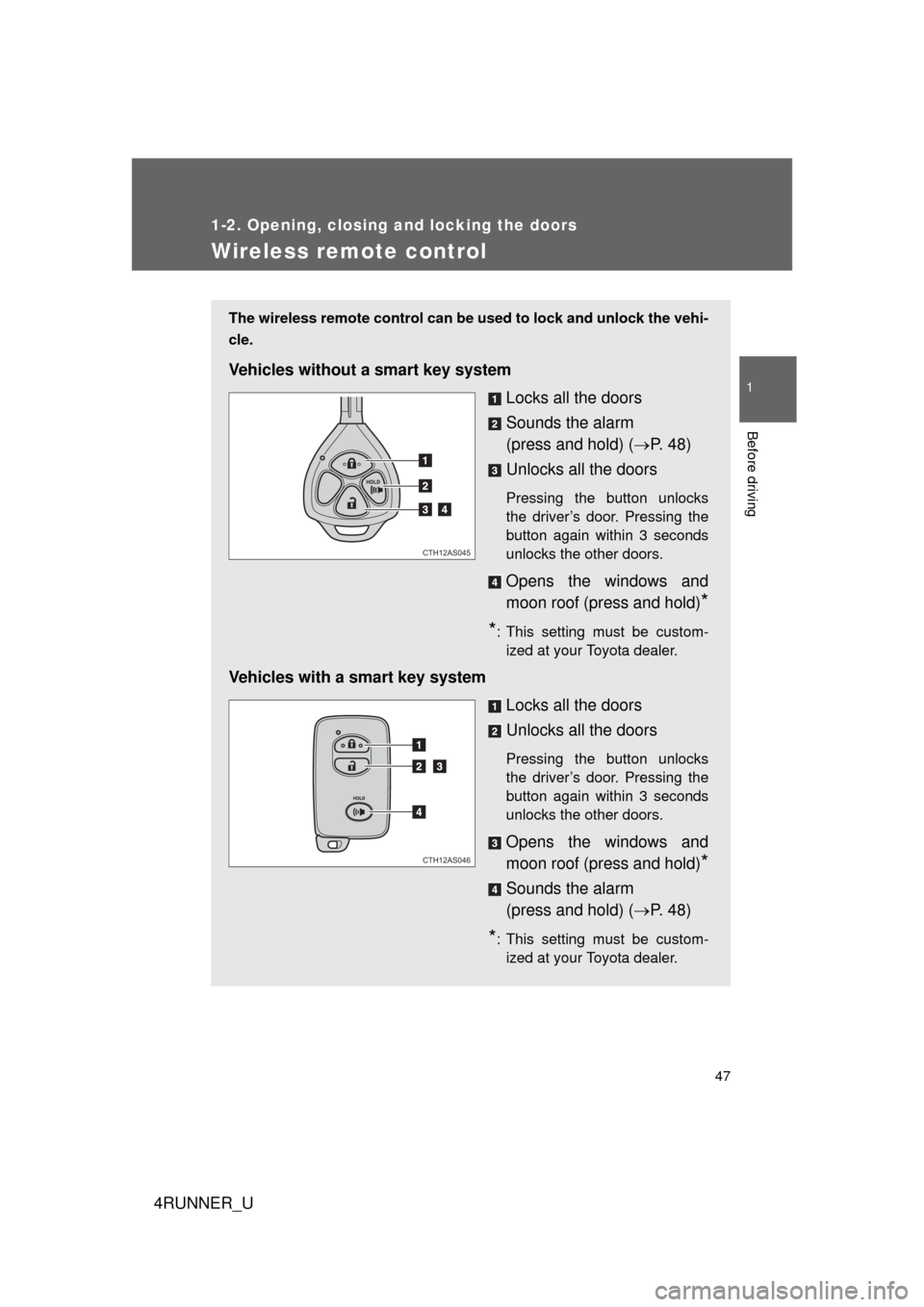
The wireless remote control can be used to lock and unlock the vehi-
cle.
Vehicles without a smart key system
Locks all the doors
Sounds the alarm
(press and hold) (P. 4 8 )
Unlocks all the doors
Pressing the button unlocks
the driver’s door. Pressing the
button again within 3 seconds
unlocks the other doors.
Opens the windows and
moon roof (press and hold)
*
*
: This setting must be custom- ized at your Toyota dealer.
Vehicles with a smart key system
Locks all the doors
Unlocks all the doors
Pressing the button unlocks
the driver’s door. Pressing the
button again within 3 seconds
unlocks the other doors.
Opens the windows and
moon roof (press and hold)
*
Sounds the alarm
(press and hold) (P. 4 8 )
*: This setting must be custom-
ized at your Toyota dealer.
CTH12AS045
CTH12AS046
Page 56 of 665
56
1-2. Opening, closing and locking the doors
4RUNNER_U
Back door
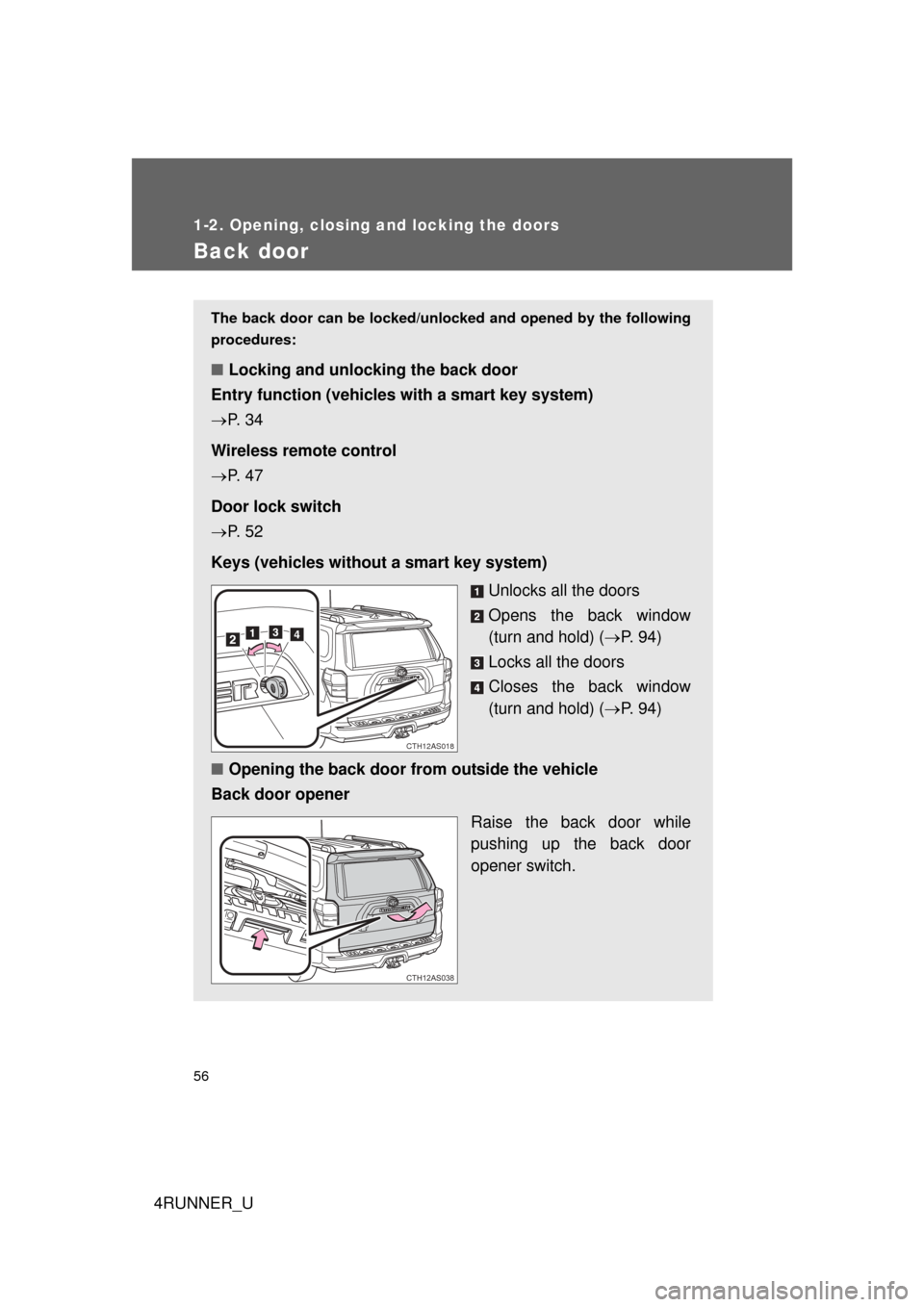
The back door can be locked/unlocked and opened by the following
procedures:
■ Locking and unlocking the back door
Entry function (vehicles with a smart key system)
P. 3 4
Wireless remote control
P. 4 7
Door lock switch
P. 5 2
Keys (vehicles without a smart key system) Unlocks all the doors
Opens the back window
(turn and hold) (P. 9 4 )
Locks all the doors
Closes the back window
(turn and hold) ( P. 9 4 )
■ Opening the back door from outside the vehicle
Back door opener
Raise the back door while
pushing up the back door
opener switch.
CTH12AS018
CTH12AS038
Page 91 of 665
91
1
Before driving
4RUNNER_U
1-4. Opening and closing the windows and moon roof
Power windows
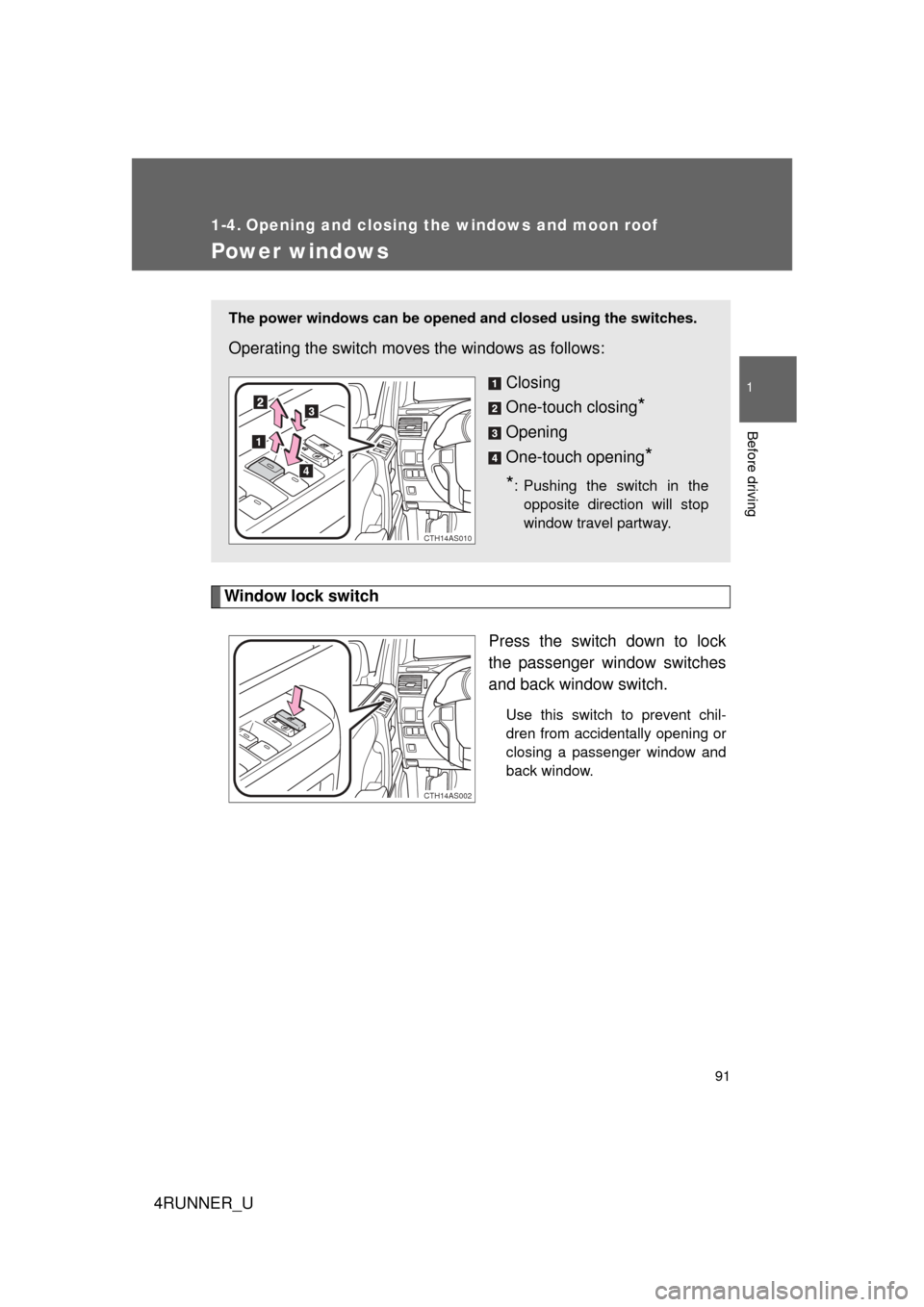
Window lock switchPress the switch down to lock
the passenger window switches
and back window switch.
Use this switch to prevent chil-
dren from accidentally opening or
closing a passenger window and
back window.
The power windows can be opened and closed using the switches.
Operating the switch moves the windows as follows:
Closing
One-touch closing
*
Opening
One-touch opening
*
*
: Pushing the switch in the opposite direction will stop
window travel partway.
CTH14AS010
CTH14AS002
Page 92 of 665

92 1-4. Opening and closing the windows and moon roof
4RUNNER_U
■The power windows can be operated when
Vehicles without a smart key system
The engine switch is in the “ON” position.
Vehicles with a smart key system
The “ENGINE START STOP” switch is in IGNITION ON mode.
■ Operating the power windows af ter turning the engine off
Vehicles without a smart key system
The power windows can be operated for approximately 45 seconds even
after the engine switch is turned to the “ACC” or “LOCK” position. They can-
not, however, be operated once either front door is opened.
Vehicles with a smart key system
The power windows can be operated for approximately 45 seconds even
after the “ENGINE START STOP” switch is turned to ACCESSORY mode or
turned off. They cannot, however, be operated once either front door is
opened.
■ Jam protection function
If an object becomes caught between the window and the window frame,
window travel is stopped and the window is opened slightly.
■ Customization that can be co nfigured at Toyota dealer
Settings (e.g. linked door lock operation) can be changed.
(Customizable features P. 638)
Page 93 of 665
93
1-4. Opening and closing the windows and moon roof
1
Before driving
4RUNNER_U
CAUTION
■
Closing the windows
Observe the following precautions.
Failure to do so may result in death or serious injury.
● Check to make sure that all passengers do not have any part of their body
in a position where it could be caught when a window is being operated.
● Do not allow children to operate the power windows.
Closing a power window on someone can cause serious injury, and in
some instances, even death.
■ Jam protection function
● Never use any part of your body to intentionally activate the jam protection
function.
● The jam protection function may not work if something gets caught just
before the window fully closes.
Page 94 of 665
94
1-4. Opening and closing the windows and moon roof
4RUNNER_U
Power back window
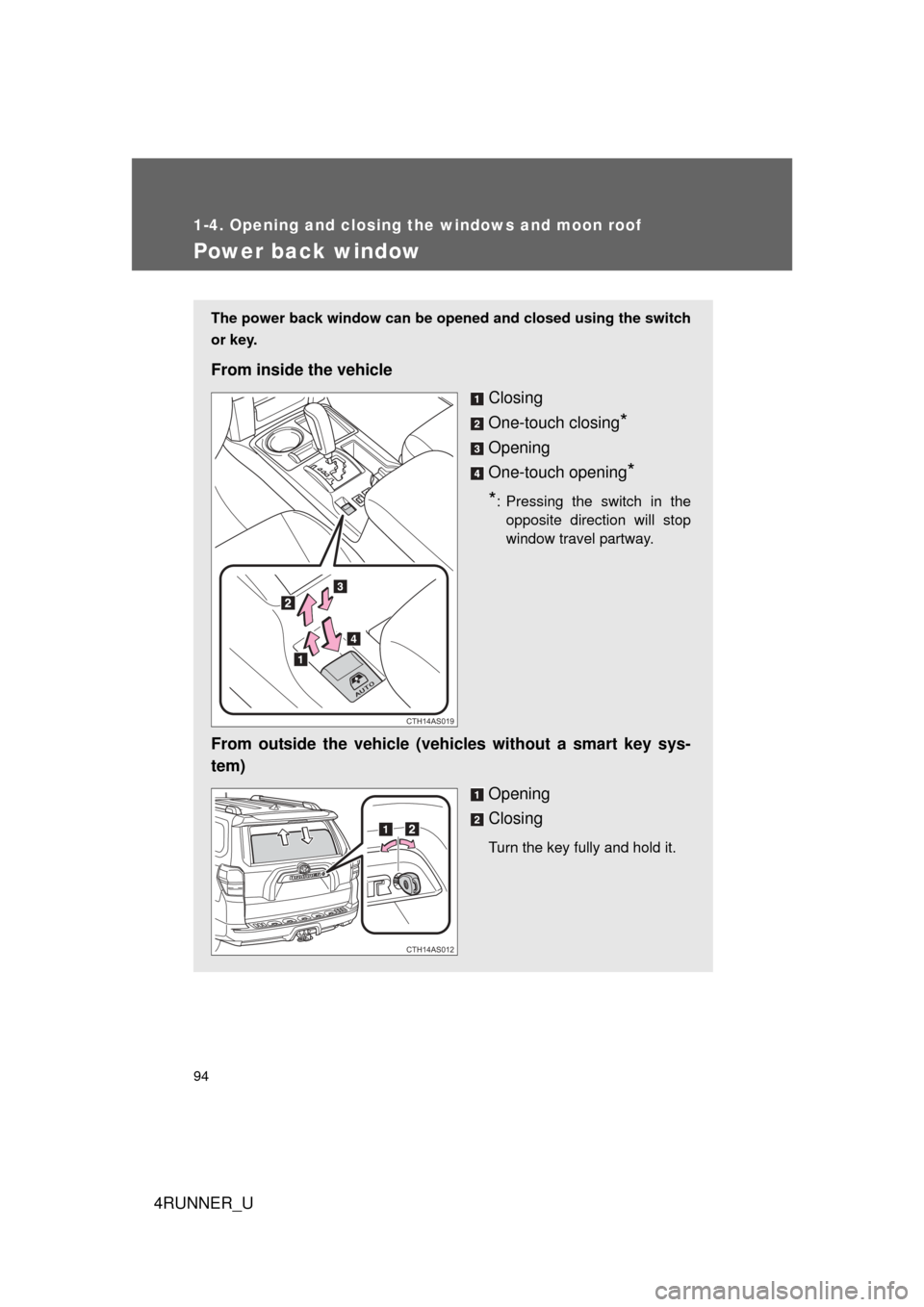
The power back window can be opened and closed using the switch
or key.
From inside the vehicleClosing
One-touch closing
*
Opening
One-touch opening
*
*
: Pressing the switch in the opposite direction will stop
window travel partway.
From outside the vehicle (veh icles without a smart key sys-
tem)
Opening
Closing
Turn the key fully and hold it.
CTH14AS019
CTH14AS012
Page 95 of 665
95
1-4. Opening and closing the windows and moon roof
1
Before driving
4RUNNER_U
■
The power back window can be operated from inside the vehicle when
Vehicles without a smart key system
The engine switch is in the “ON” position.
Vehicles with a smart key system
The “ENGINE START STOP” switch is in IGNITION ON mode.
● The power back window can be opened when the rear window wiper is
working, but the wiper stops working until the window is closed again.
If the power back window is not fully closed, the rear window wiper,
washer, and defogger will not work.
● If the back door is not fully closed, the power back window cannot be
opened using the switch located in the cabin. (It is still possible to close
the window.)
● If the back door is opened while the power back window is opening or
closing, window operation will stop.
■ The power back window can be op erated from outside the vehicle
when (vehicles with a smart key system)
● The “ENGINE START STOP” switch is off.
● The back door is closed.
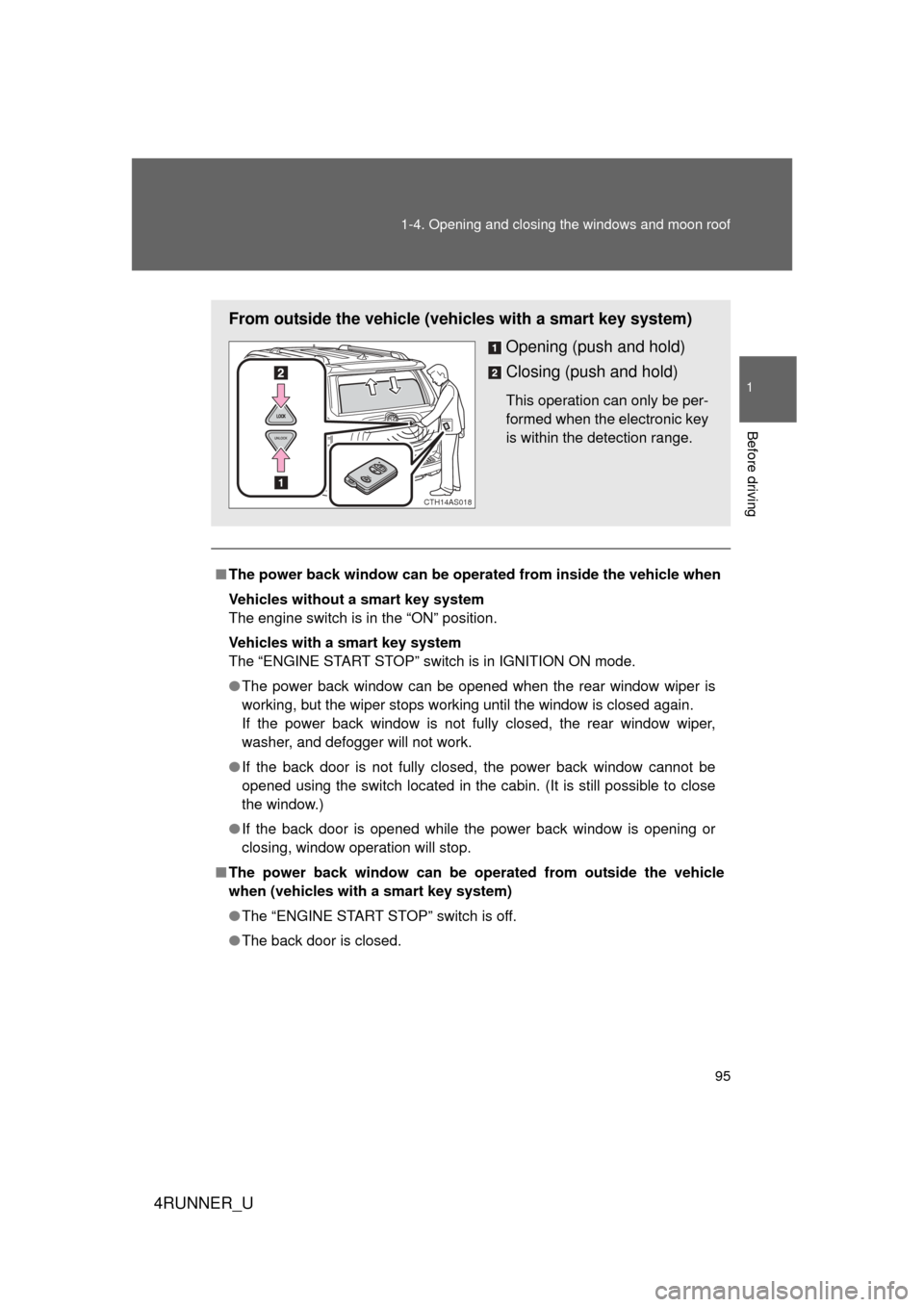
From outside the vehicle (vehicles with a smart key system)
Opening (push and hold)
Closing (push and hold)
This operation can only be per-
formed when the electronic key
is within the detection range.
CTH14AS018