four wheel drive TOYOTA 4RUNNER 2010 N280 / 5.G Owners Manual
[x] Cancel search | Manufacturer: TOYOTA, Model Year: 2010, Model line: 4RUNNER, Model: TOYOTA 4RUNNER 2010 N280 / 5.GPages: 665, PDF Size: 11.96 MB
Page 3 of 665

1
2
3
4
5
6
7
4RUNNER_U
3
2-2. Instrument clusterGauges and meters ............ 182
Indicators and warning lights ................................. 189
Accessory meter ................. 194
2-3. Operating the lights and wipers
Headlight switch .................. 198
Fog light switch ................... 204
Windshield wipers and washer .............................. 205
Rear window wiper and washer .............................. 207
2-4. Using other driving systems
Cruise control ...................... 209
Intuitive parking assist......... 213
Rear view monitor system (rear view mirror-attached
type) .................................. 218
Four-wheel drive system (part-time 4WD models).... 223
Four-wheel drive system (full-time 4WD models) ..... 226
Active traction control system .............................. 230
AUTO LSD system (2WD models) ................... 232
Rear differential lock system .............................. 235
Downhill assist control system .............................. 238
Crawl Control ...................... 241
Multi-terrain Select .............. 245
Driving assist systems ........ 253 2-5. Driving information
Off-road precautions........... 262
Cargo and luggage ............. 267
Vehicle load limits............... 273
Winter driving tips ............... 275
Trailer towing ...................... 280
Dinghy towing ..................... 293
3-1. Using the air conditioning system and defogger
Manual air conditioning system .............................. 296
Automatic air conditioning system .............................. 302
Rear window and outside rear view
mirror defoggers ............... 310
Windshield wiper de-icer .... 312
3-2. Using the audio system Audio system types ............ 313
Using the radio ................... 317
Using the CD player ........... 324
Playing MP3 and WMA discs ................................. 333
Operating an iPod
®............ 341
Operating a USB memory ............................ 348
Optimal use of the audio system .............................. 355
Using the AUX adapter....... 360
Using the steering wheel audio switches.................. 361
3Interior features
Page 19 of 665
4RUNNER_U
19
D
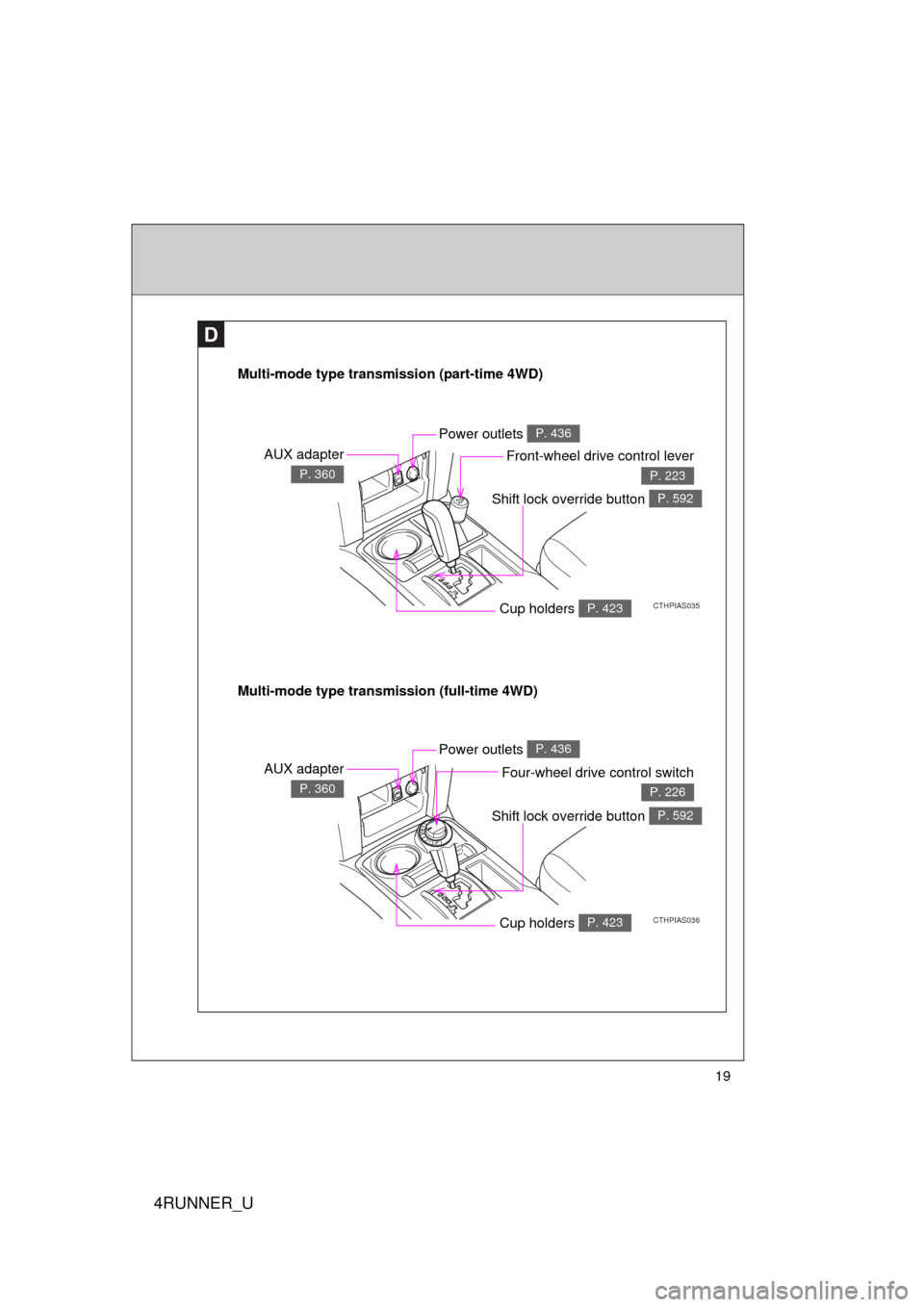
Multi-mode type transmission (part-time 4WD)
CTHPIAS035
AUX adapter
P. 360
Power outlets P. 436
Front-wheel drive control lever
P. 223
Multi-mode type transmission (full-time 4WD)
CTHPIAS036
AUX adapter
P. 360
Power outlets P. 436
Four-wheel drive control switch
P. 226
Cup holders P. 423
Cup holders P. 423
Shift lock override button P. 592
Shift lock override button P. 592
Page 153 of 665
When driving2
153
4RUNNER_U
2-1. Driving proceduresDriving the vehicle............ 154
Engine (ignition) switch (vehicles without a
smart key system).......... 164
Engine (ignition) switch (vehicles with a smart
key system).................... 167
Automatic transmission .... 173
Turn signal lever .............. 179
Parking brake ................... 180
Horn ................................. 181
2-2. Instrument cluster Gauges and meters ......... 182
Indicators and warning lights .............................. 189
Accessory meter .............. 194
2-3. Operating the lights and wipers
Headlight switch ............... 198
Fog light switch ................ 204
Windshield wipers and washer ........................... 205
Rear window wiper and washer ........................... 207 2-4. Using other driving
systems
Cruise control ................... 209
Intuitive parking assist...... 213
Rear view monitor system (rear view
mirror-attached type) ..... 218
Four-wheel drive system (part-time 4WD
models) .......................... 223
Four-wheel drive system (full-time 4WD
models) .......................... 226
Active traction control system ........................... 230
AUTO LSD system (2WD models) ................ 232
Rear differential lock system ........................... 235
Downhill assist control system ........................... 238
Crawl Control ................... 241
Multi-terrain Select ........... 245
Driving assist systems ..... 253
2-5. Driving information Off-road precautions ........ 262
Cargo and luggage .......... 267
Vehicle load limits ............ 273
Winter driving tips ............ 275
Trailer towing ................... 280
Dinghy towing .................. 293
Page 191 of 665
191
2-2. Instrument cluster
2
When driving
4RUNNER_U
■
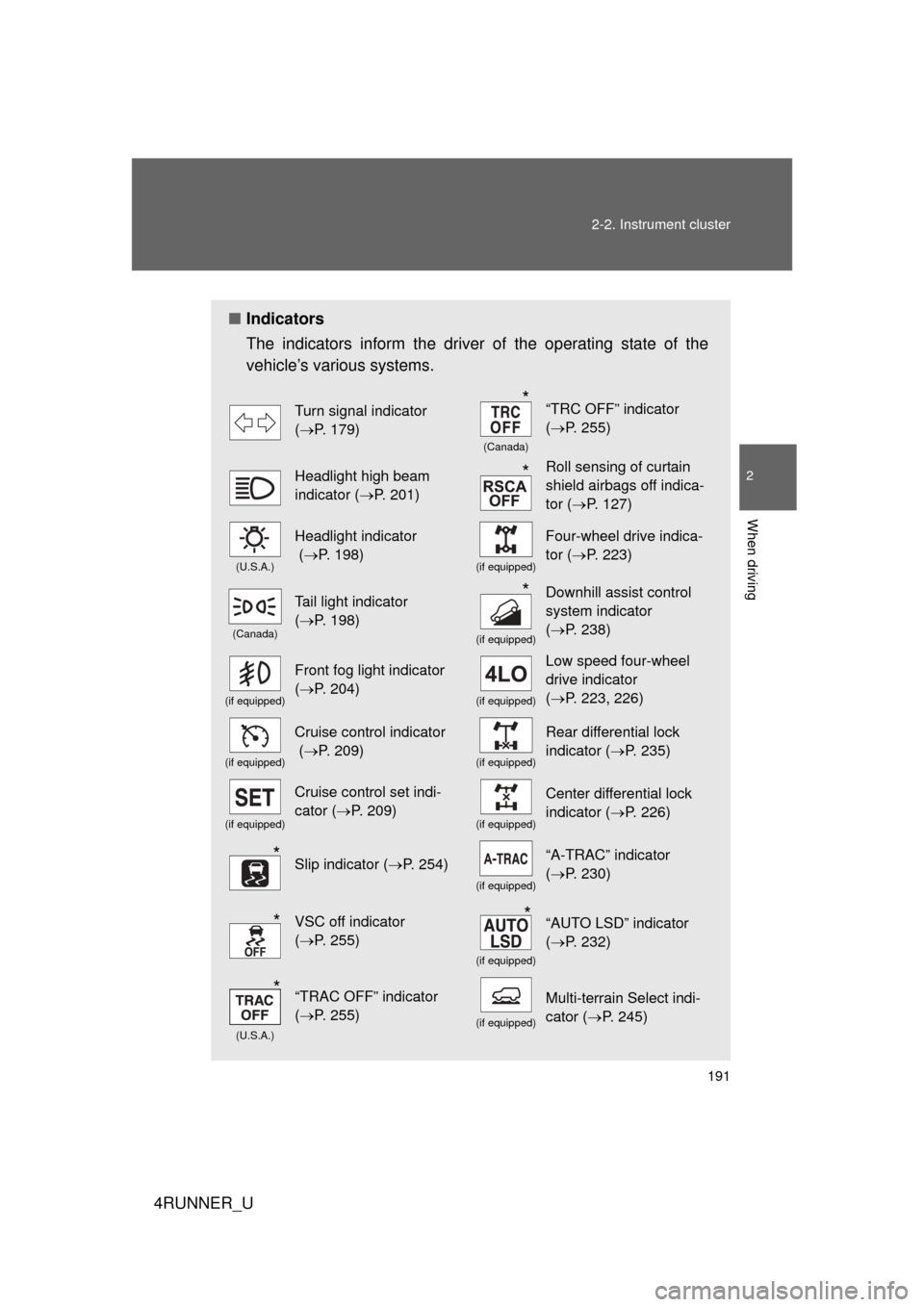
Indicators
The indicators inform the driver of the operating state of the
vehicle’s various systems.
Turn signal indicator
(P. 179)
(Canada)
“TRC OFF” indicator
(P. 255)
Headlight high beam
indicator ( P. 201)Roll sensing of curtain
shield airbags off indica-
tor (P. 127)
(U.S.A.)
Headlight indicator
(P. 198)
(if equipped)
Four-wheel drive indica-
tor ( P. 223)
(Canada)
Tail light indicator
(P. 198)
(if equipped)
Downhill assist control
system indicator
(P. 238)
(if equipped)
Front fog light indicator
(P. 204)
(if equipped)
Low speed four-wheel
drive indicator
(P. 223, 226)
(if equipped)
Cruise control indicator
( P. 209)
(if equipped)
Rear differential lock
indicator ( P. 235)
(if equipped)
Cruise control set indi-
cator (P. 209)
(if equipped)
Center differential lock
indicator ( P. 226)
Slip indicator ( P. 254)
(if equipped)
“A-TRAC” indicator
(P. 230)
VSC off indicator
(P. 255)
(if equipped)
“AUTO LSD” indicator
(P. 232)
(U.S.A.)
“TRAC OFF” indicator
(P. 255)
(if equipped)
Multi-terrain Select indi-
cator ( P. 245)
*
*
*
*
**
*
Page 223 of 665
223
2-4. Using other driving systems
2
When driving
4RUNNER_U
Four-wheel drive system (par t-time 4WD models)
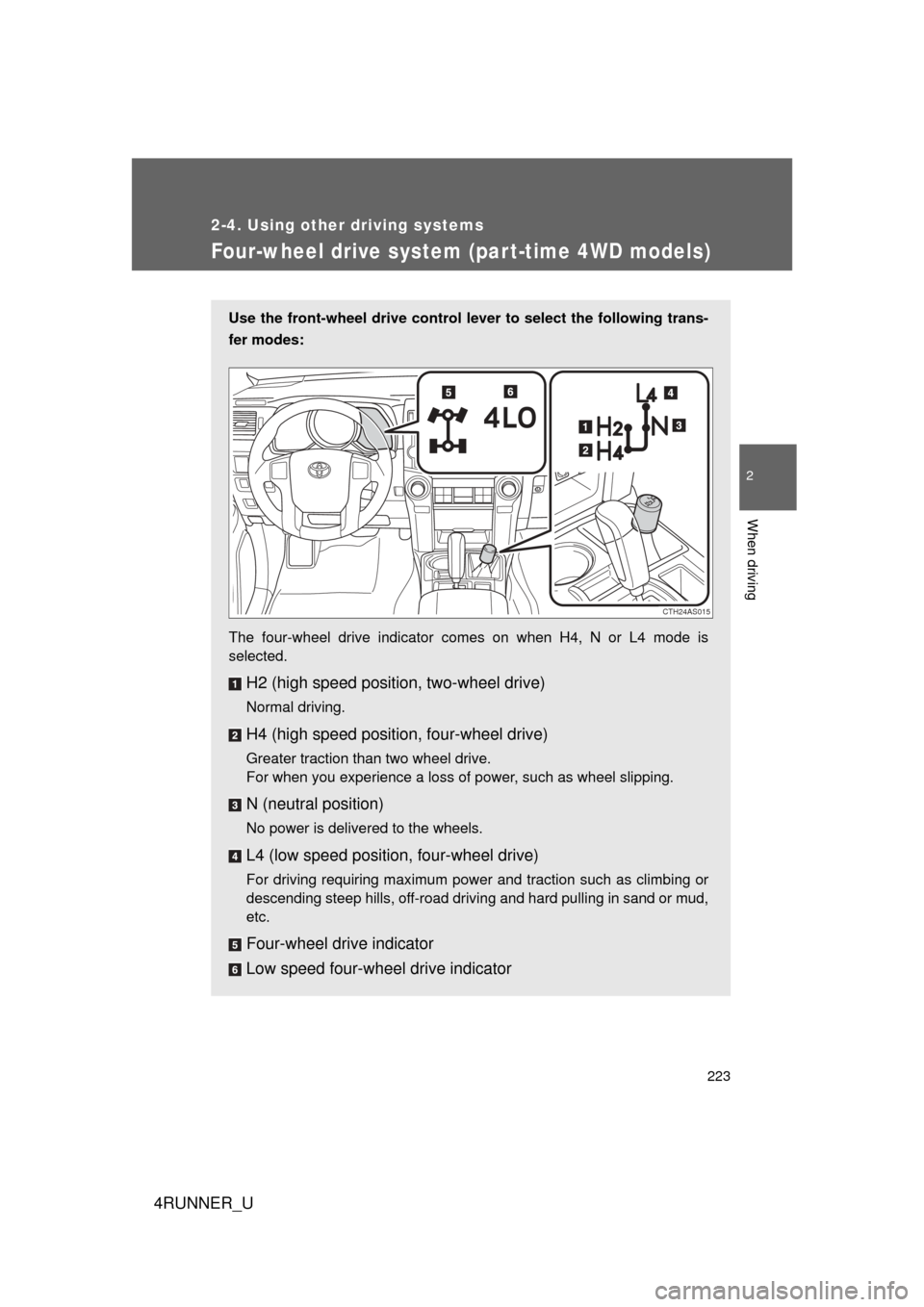
Use the front-wheel drive control lever to select the following trans-
fer modes:
The four-wheel drive indicator comes on when H4, N or L4 mode is
selected.
H2 (high speed position, two-wheel drive)
Normal driving.
H4 (high speed position, four-wheel drive)
Greater traction than two wheel drive.
For when you experience a loss of power, such as wheel slipping.
N (neutral position)
No power is delivered to the wheels.
L4 (low speed position, four-wheel drive)
For driving requiring maximum power and traction such as climbing or
descending steep hills, off-road driving and hard pulling in sand or mud,
etc.
Four-wheel drive indicator
Low speed four-wheel drive indicator
CTH24AS015
Page 224 of 665
224 2-4. Using other driving systems
4RUNNER_U
Shifting between H2 and H4■ Shifting from H2 to H4
Reduce vehicle speed to less than 50 mph (80 km/h).
Shift the front-wheel drive control lever to H4.
The four-wheel drive indicator will turn on.
■Shifting from H4 to H2
Shift the front-wheel drive control lever to H2.
This can be done at any speed.
The four-wheel drive indicator will go off.
Shifting between H4 and L4
Stop the vehicle completely.
Shift the shift lever to N.
Shift the front-wheel drive control lever to L4 or H4.
The low speed four-wheel drive indicator will turn on (L4) or go off
(H4).
■When the front-wheel drive c ontrol lever is shifted to L4
VSC and TRAC (TRC) are automatically turned off.
■ If the four-wheel drive indicator flashes
The transfer mode may not successfully change. Drive straight ahead while
accelerating or decelerating, or drive in reverse.
■ If the four-wheel drive or low speed four-wheel drive indicator flashes
rapidly
There may be a malfunction in the four-wheel drive system. Have the vehicle
inspected by your Toyota dealer immediately.
■ Four-wheel drive usage frequency
You should drive in four-wheel drive for at least 10 miles (16 km) each
month.
This will assure that the front drive components are lubricated.
STEP 1
STEP 2
STEP 1
STEP 2
STEP 3
Page 226 of 665
226
2-4. Using other driving systems
4RUNNER_U
Four-wheel drive system (full-time 4WD models)
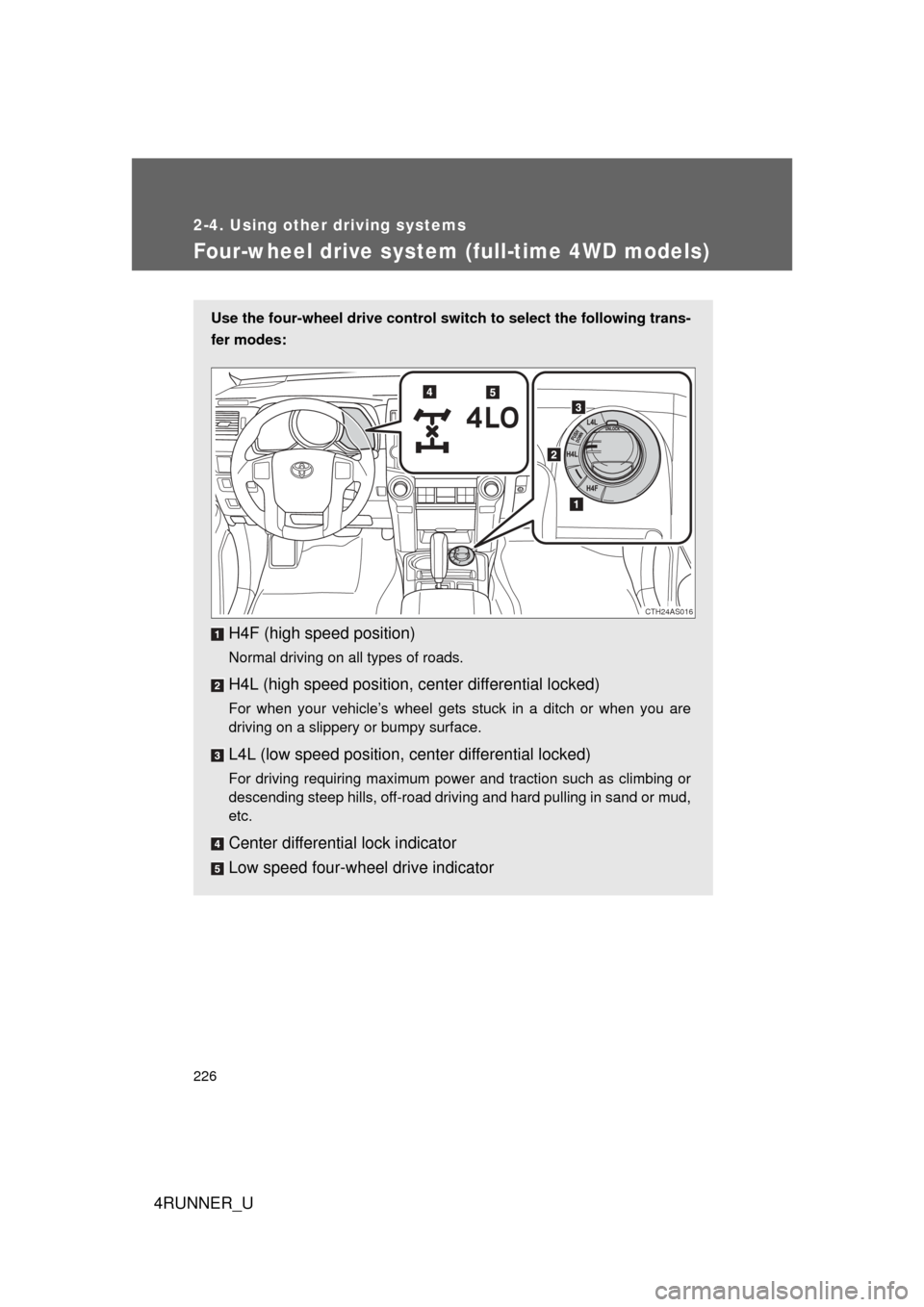
Use the four-wheel drive control switch to select the following trans-
fer modes:
H4F (high speed position)
Normal driving on all types of roads.
H4L (high speed position, c enter differential locked)
For when your vehicle’s wheel gets stuck in a ditch or when you are
driving on a slippery or bumpy surface.
L4L (low speed position, center differential locked)
For driving requiring maximum power and traction such as climbing or
descending steep hills, off-road driving and hard pulling in sand or mud,
etc.
Center differential lock indicator
Low speed four-wheel drive indicator
CTH24AS016
Page 227 of 665
227
2-4. Using other
driving systems
2
When driving
4RUNNER_U
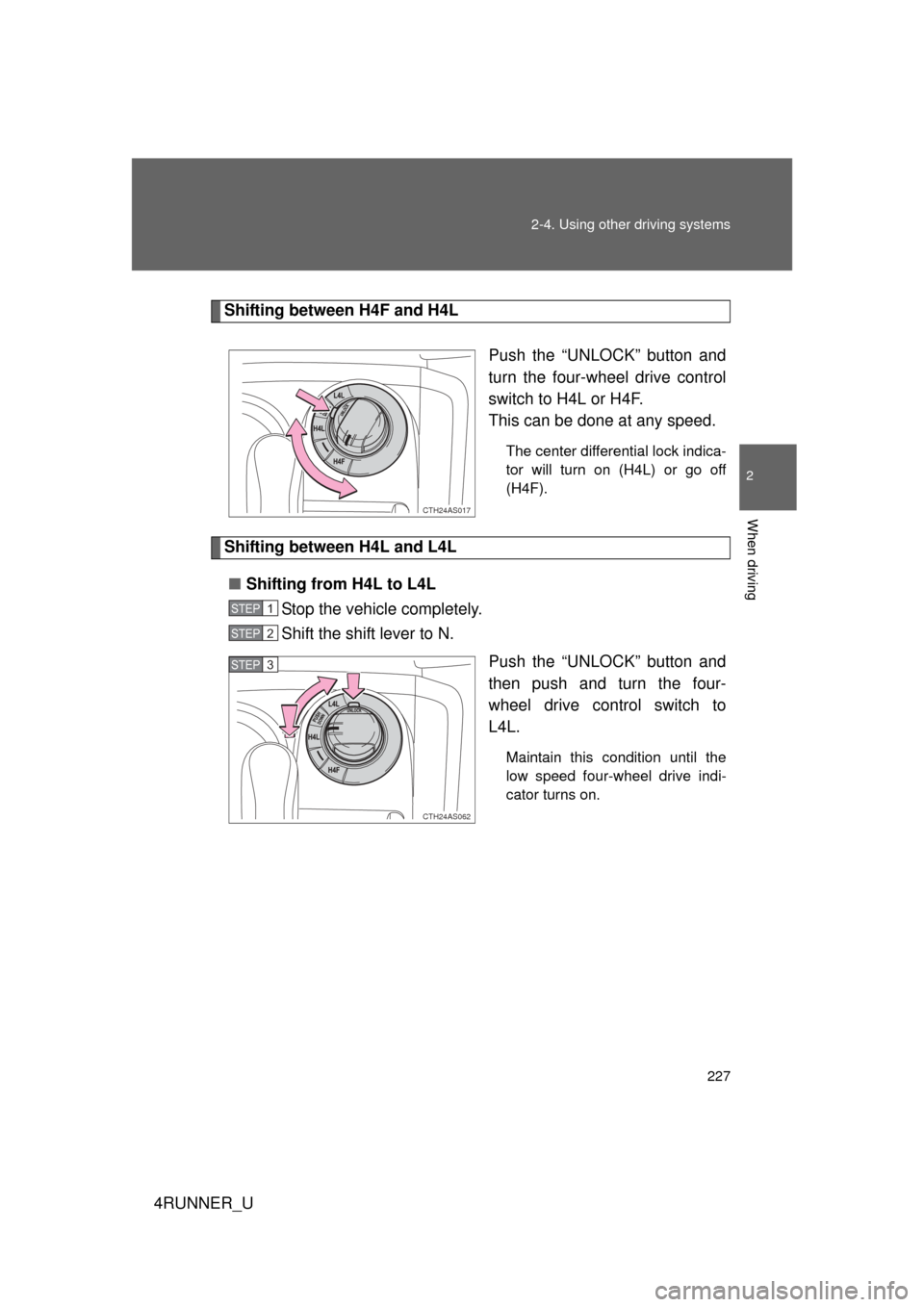
Shifting between H4F and H4L
Push the “UNLOCK” button and
turn the four-wheel drive control
switch to H4L or H4F.
This can be done at any speed.
The center differential lock indica-
tor will turn on (H4L) or go off
(H4F).
Shifting between H4L and L4L■ Shifting from H4L to L4L
Stop the vehicle completely.
Shift the shift lever to N.
Push the “UNLOCK” button and
then push and turn the four-
wheel drive control switch to
L4L.
Maintain this condition until the
low speed four-wheel drive indi-
cator turns on.
CTH24AS017
STEP 1
STEP 2
CTH24AS062
STEP 3
Page 228 of 665
228 2-4. Using other driving systems
4RUNNER_U■
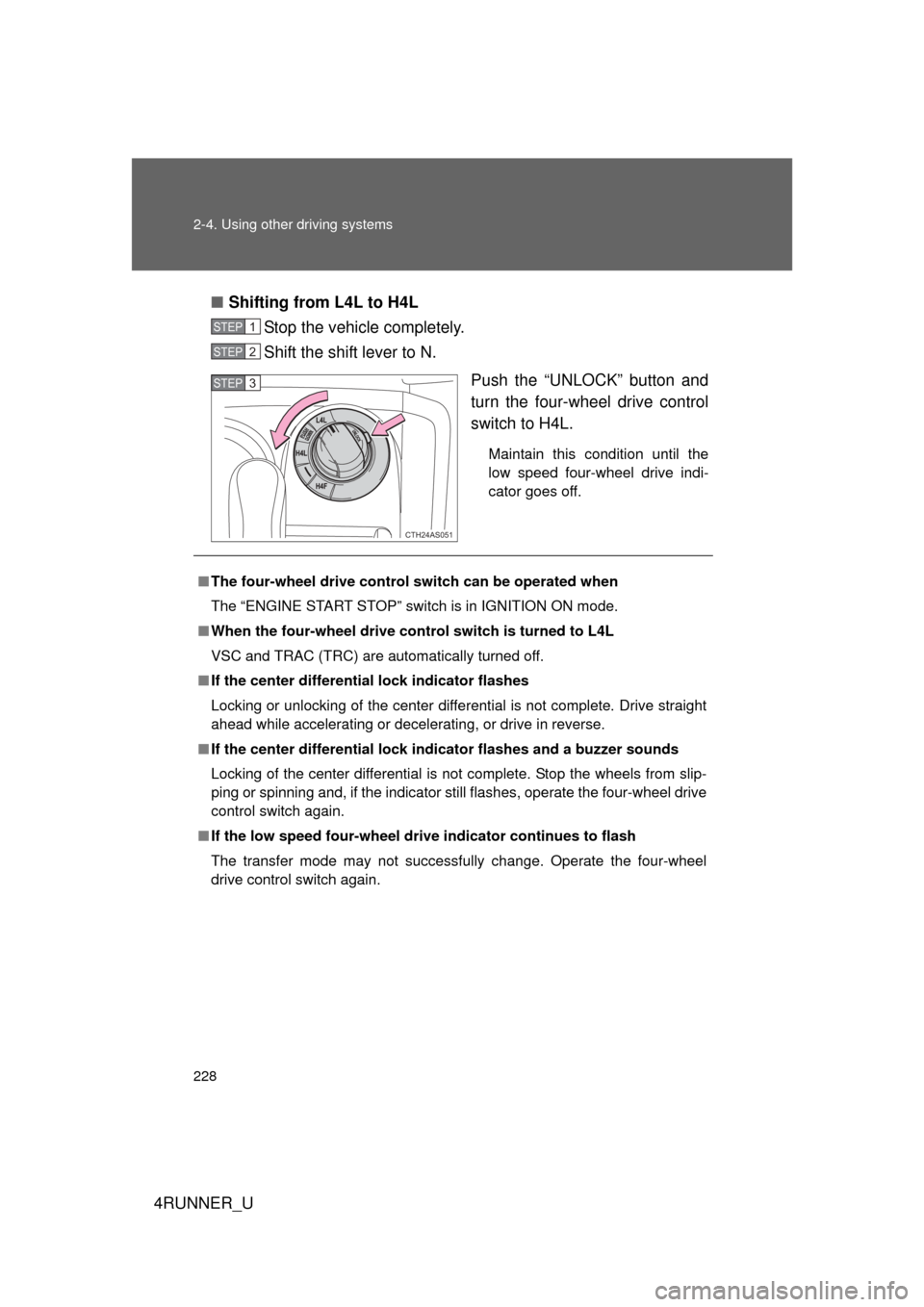
Shifting from L4L to H4L
Stop the vehicle completely.
Shift the shift lever to N.
Push the “UNLOCK” button and
turn the four-wheel drive control
switch to H4L.
Maintain this condition until the
low speed four-wheel drive indi-
cator goes off.
STEP 1
STEP 2
CTH24AS051
STEP 3
■The four-wheel drive control switch can be operated when
The “ENGINE START STOP” switch is in IGNITION ON mode.
■ When the four-wheel drive cont rol switch is turned to L4L
VSC and TRAC (TRC) are automatically turned off.
■ If the center differential lock indicator flashes
Locking or unlocking of the center differential is not complete. Drive straight
ahead while accelerating or decelerating, or drive in reverse.
■ If the center differential lock in dicator flashes and a buzzer sounds
Locking of the center differential is not complete. Stop the wheels from slip-
ping or spinning and, if the indicator still flashes, operate the four-wheel drive
control switch again.
■ If the low speed four-wheel drive indicator continues to flash
The transfer mode may not successfully change. Operate the four-wheel
drive control switch again.
Page 229 of 665
229
2-4. Using other
driving systems
2
When driving
4RUNNER_U
■If the low speed four-wheel drive indicator continues to flash and a
buzzer sounds
The shift lever is not in N and/or the vehicle is moving. Stop the vehicle com-
pletely, shift the shift lever to N and make sure that the indicator stops flash-
ing.
■ If the low speed four-wheel drive indicator or the center differential
lock indicator flashes rapidly
There may be a malfunction in the four-wheel drive system. Have the vehicle
inspected by your Toyota dealer immediately.
CAUTION
■ Operating the four-wheel drive control switch
Never operate the four-wheel drive control switch if the wheels have lost
traction. Doing so may cause an accident resulting in death or serious injury.
Stop the wheels from slipping or spinning before operating the switch.
NOTICE
■ To prevent damage to the center differential
● For normal driving on dry and hard surface roads, unlock the center differ-
ential.
● Unlock the center differential after the wheels are out of the ditch or off the
slippery or bumpy surface.
● Do not lock or unlock the center differential when the vehicle is turning or
when its wheels are spinning freely off the ground.