light TOYOTA 4RUNNER 2011 N280 / 5.G User Guide
[x] Cancel search | Manufacturer: TOYOTA, Model Year: 2011, Model line: 4RUNNER, Model: TOYOTA 4RUNNER 2011 N280 / 5.GPages: 680, PDF Size: 12.58 MB
Page 20 of 680
4RUNNER_U
20
CTHPIAS089
Pictorial indexLuggage compartment
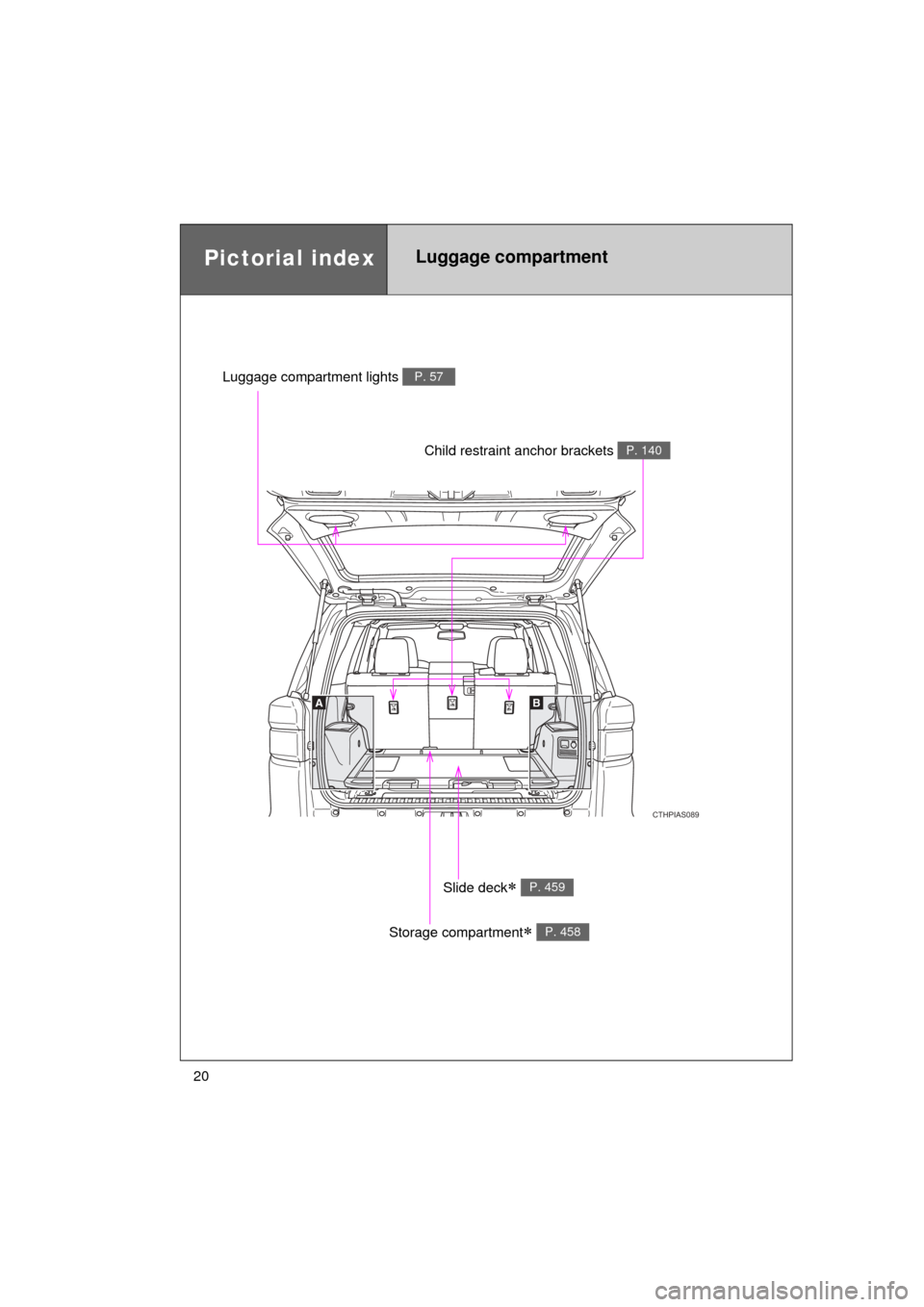
Slide deck P. 459
Storage compartment P. 458
Child restraint anchor brackets P. 140
Luggage compartment lights P. 57
Page 38 of 680
38 1-2. Opening, closing and locking the doors
4RUNNER_U
■Operation signals
A buzzer sounds and the emergency flashers flash to indicate that the doors
have been locked/unlocked. (Locked: once; Unlocked: twice)
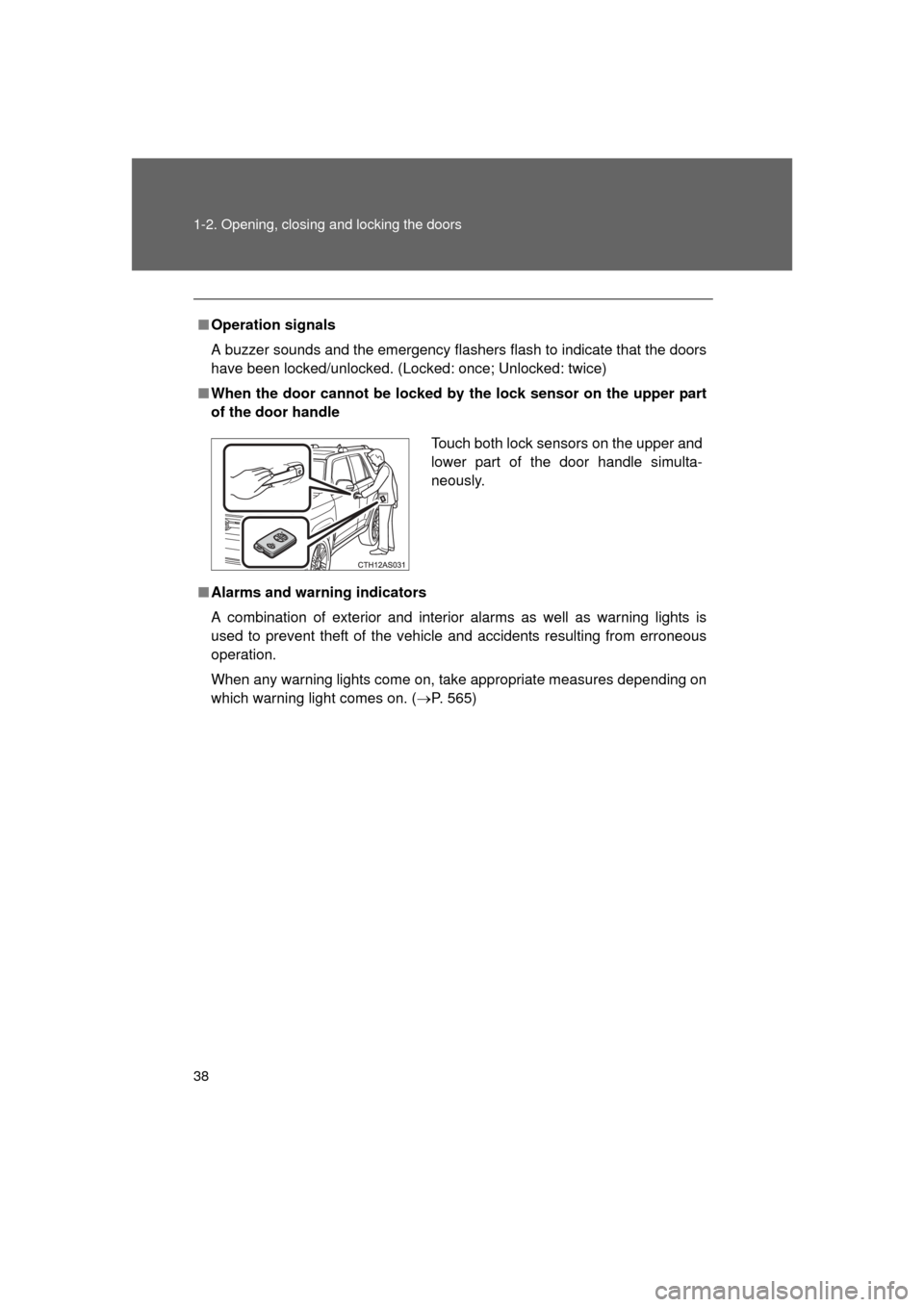
■ When the door cannot be locked by the lock sensor on the upper part
of the door handle
■ Alarms and warning indicators
A combination of exterior and interior alarms as well as warning lights is
used to prevent theft of the vehicle and accidents resulting from erroneous
operation.
When any warning lights come on, take appropriate measures depending on
which warning light comes on. ( P. 565)
Touch both lock sensors on the upper and
lower part of the door handle simulta-
neously.
Page 43 of 680
43
1-2. Opening, closing and locking the doors
1
Before driving
4RUNNER_U
●
The lock sensor may not work properly if it comes into contact with ice,
snow, mud, etc. Clean the lock sensor and attempt to operate it again, or
use the lock sensor on the lower part of the door handle.
● Fingernails may scrape against the door during operation of the door
handle. Be careful not to injure fingernails or damage the surface of the
door.
■ Notes for the unlocking function
● Gripping the door handle when wearing a glove may not unlock the door.
● A sudden approach to the effective range or door handle may prevent the
doors from being unlocked. In this case, return the door handle to the
original position and check that the doors unlock before pulling the door
handle again.
● If there is another electronic key in the detection area, it may take slightly
longer to unlock the doors after the door handle is gripped.
■ When the vehicle is not dr iven for extended periods
To prevent theft of the vehicle, do not leave the electronic key within 6 ft. (2
m) of the vehicle.
■ To operate the system properly
Make sure to carry the electronic key when operating the system. Do not get
the electronic key too close to the vehicle when operating the system from
the outside of the vehicle.
Depending on the position and holding condition of the electronic key, the
key may not be detected correctly and the system may not operate properly.
(The alarm may go off accidentally, or the door lock prevention function may
not operate.)
■ If the smart key system does not operate properly
● Locking and unlocking the doors: Use the mechanical key. ( P. 597)
● Starting the engine: P. 598
Page 48 of 680
48 1-2. Opening, closing and locking the doors
4RUNNER_U
■Operation signals
A buzzer sounds and the emergency flashers flash to indicate that the doors
have been locked/unlocked. (Locked: once; Unlocked: twice)
■ Door lock buzzer
If an attempt to lock the doors is made when a door is not fully closed, a
buzzer sounds continuously. Fully close the door to stop the buzzer, and lock
the vehicle once more.
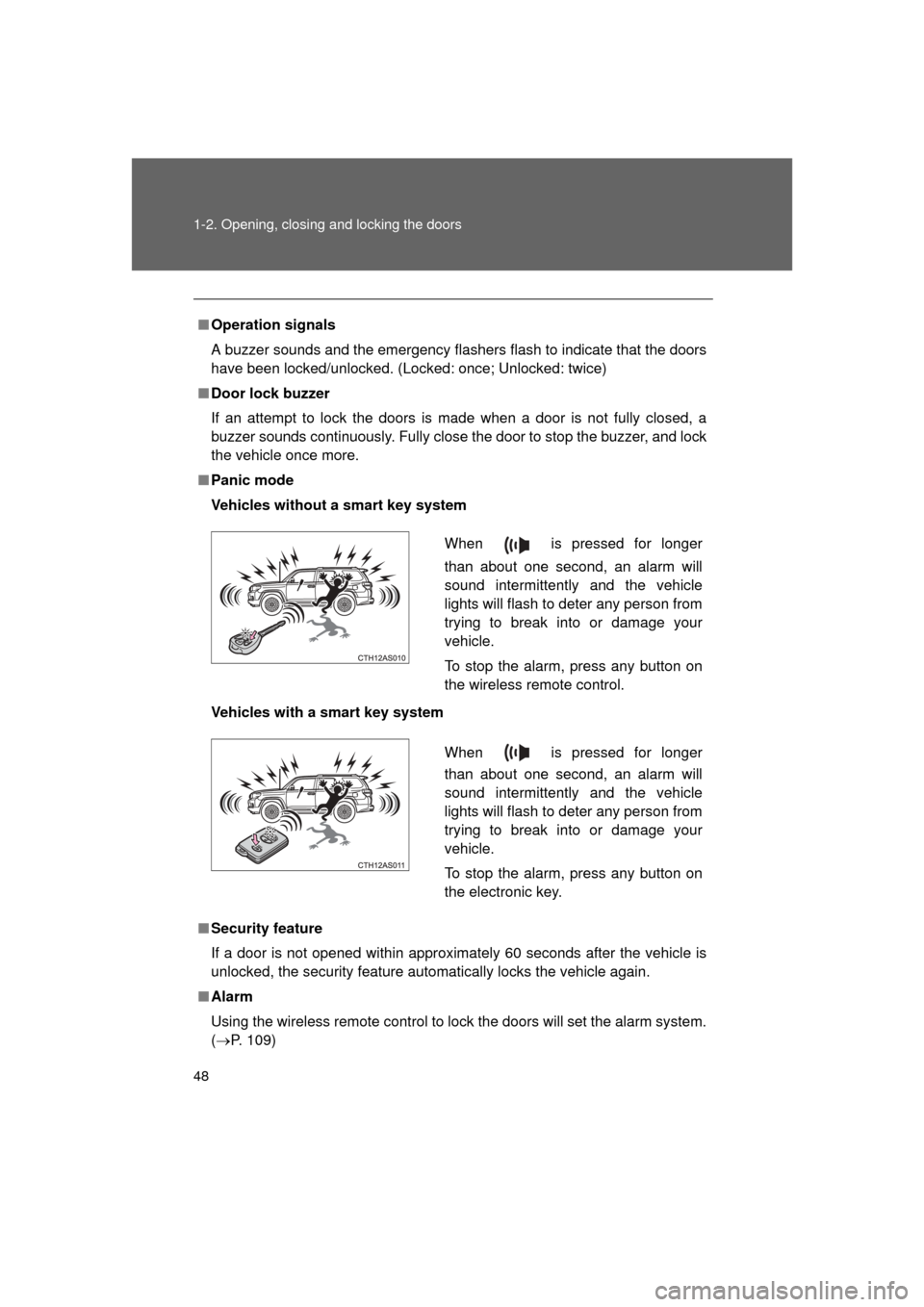
■ Panic mode
Vehicles without a smart key system
Vehicles with a smart key system
■ Security feature
If a door is not opened within approximately 60 seconds after the vehicle is
unlocked, the security feature automatically locks the vehicle again.
■ Alarm
Using the wireless remote control to lock the doors will set the alarm system.
(P. 109)
When is pressed for longer
than about one second, an alarm will
sound intermittently and the vehicle
lights will flash to deter any person from
trying to break into or damage your
vehicle.
To stop the alarm, press any button on
the wireless remote control.
When is pressed for longer
than about one second, an alarm will
sound intermittently and the vehicle
lights will flash to deter any person from
trying to break into or damage your
vehicle.
To stop the alarm, press any button on
the electronic key.
Page 57 of 680
57
1-2. Opening, closing and locking the doors
1
Before driving
4RUNNER_U
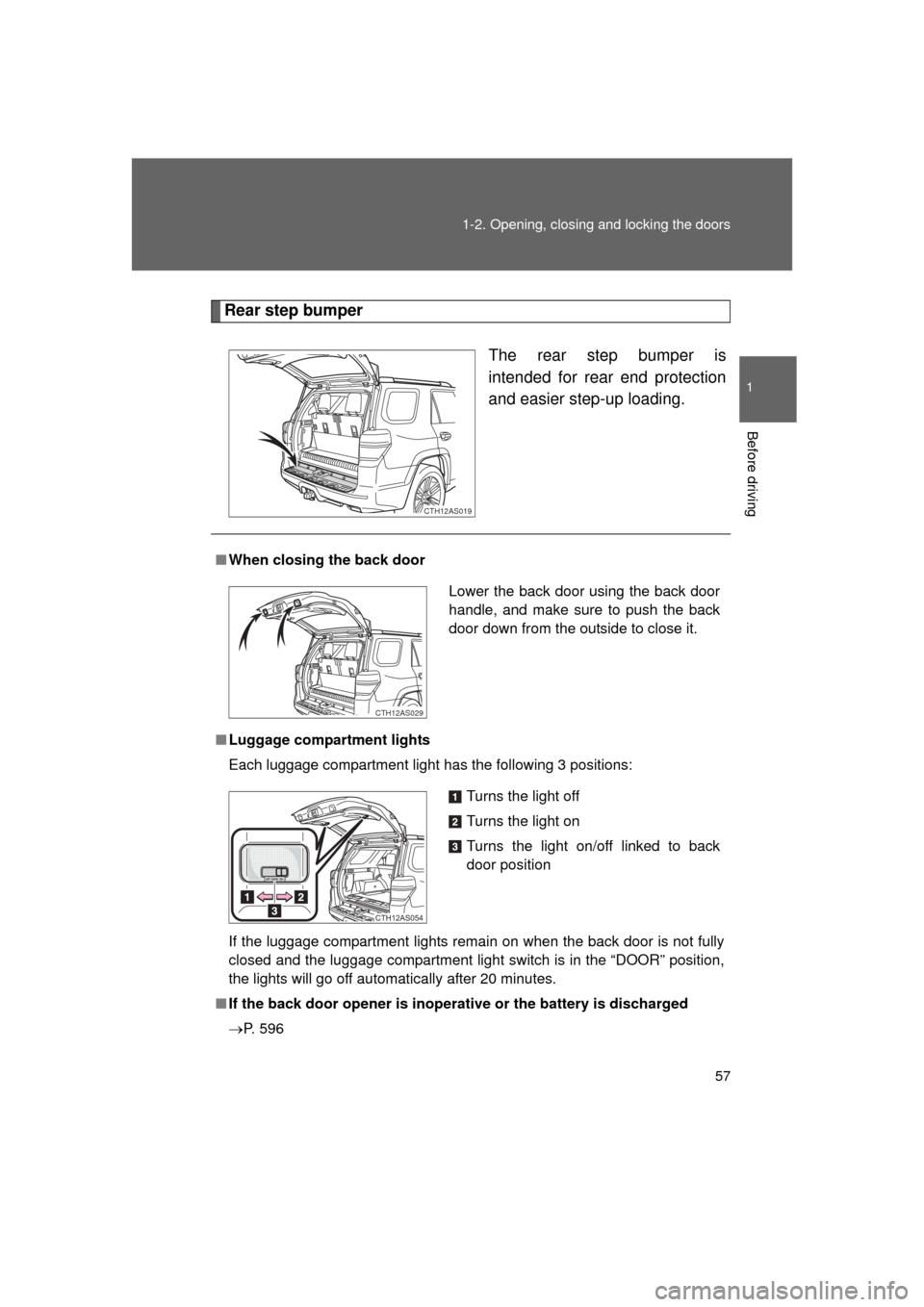
Rear step bumper
The rear step bumper is
intended for rear end protection
and easier step-up loading.
CTH12AS019
■When closing the back door
■ Luggage compartment lights
Each luggage compartment light has the following 3 positions:
If the luggage compartment lights remain on when the back door is not fully
closed and the luggage compartment light switch is in the “DOOR” position,
the lights will go off automatically after 20 minutes.
■ If the back door opener is inoperative or the battery is discharged
P. 596
Lower the back door using the back door
handle, and make sure to push the back
door down from the outside to close it.
CTH12AS029
Turns the light off
Turns the light on
Turns the light on/off linked to back
door position
CTH12AS054
Page 59 of 680
59
1-2. Opening, closing and locking the doors
1
Before driving
4RUNNER_U
CAUTION
●
When opening or closing the back door, thoroughly check to make sure
the surrounding area is safe.
● If anyone is in the vicinity, make sure they are safe and let them know that
the back door is about to open or close.
● Use caution when opening or closing the back door in windy weather as it
may move abruptly in strong wind.
● Do not pull on the back door damper stay to close the back door, and do
not hang on the back door damper stay.
Doing so may cause hands to be caught or the back door damper stay to
break, causing an accident.
● Do not attach any accessories other than genuine Toyota parts to the back
door. Such additional weight on the back door may cause the back door to
fall closed again after it is opened.
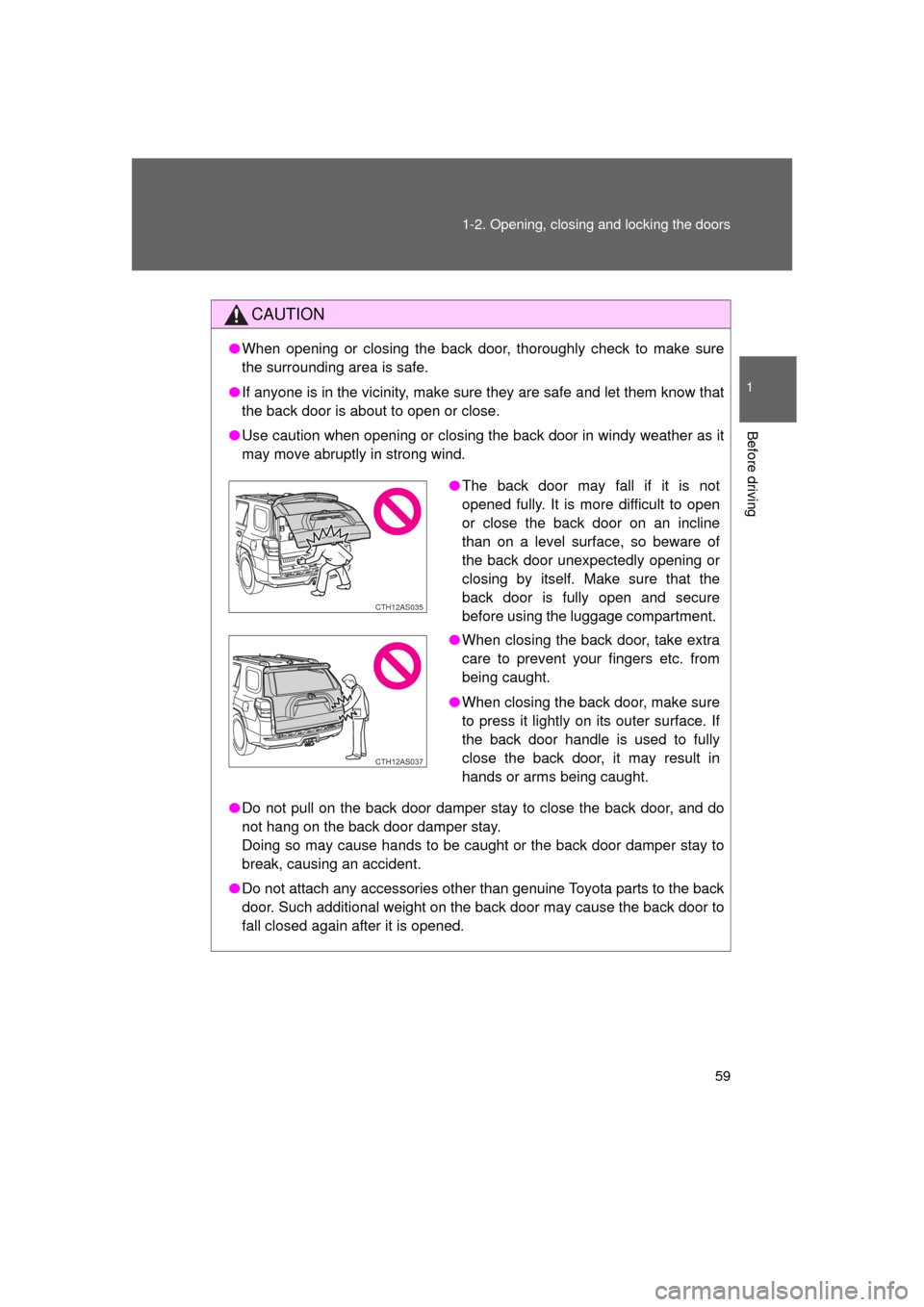
●The back door may fall if it is not
opened fully. It is more difficult to open
or close the back door on an incline
than on a level surface, so beware of
the back door unexpectedly opening or
closing by itself. Make sure that the
back door is fully open and secure
before using the luggage compartment.
● When closing the back door, take extra
care to prevent your fingers etc. from
being caught.
● When closing the back door, make sure
to press it lightly on its outer surface. If
the back door handle is used to fully
close the back door, it may result in
hands or arms being caught.
CTH12AS035
CTH12AS037
Page 62 of 680

62 1-3. Adjustable components (seats, mirrors, steering wheel)
4RUNNER_U
Active head restraints
When the occupant’s lower back
presses against the seatback
during a rear-end collision, the
head restraint moves slightly for-
ward and upward to help reduce
the risk of whiplash to the seat
occupant.
Power seat Seat position adjustment
switch
Seatback angle adjustment
switch
Seat cushion (front) angle
adjustment switch (driver’s
side only)
Vertical height adjustment
switch (driver’s side only)
Lumber support adjustment
switch (driver’s side only)
CTH13AS010
CTH13AS011
Page 81 of 680
81
1-3. Adjustable components (s
eats, mirrors, steering wheel)
1
Before driving
4RUNNER_U
■Emergency locking retractor (ELR)
The retractor will lock the belt during a sudden stop or on impact. It may also
lock if you lean forward too quickly. A slow, easy motion will allow the belt to
extend so that you can move around fully.
■ Automatic locking retractor (ALR)
When a passenger's shoulder belt is completely extended and then
retracted even slightly, the belt is locked in that position and cannot be
extended. This feature is used to hold the child restraint system (CRS) firmly.
To free the belt again, fully retract the belt and then pull the belt out once
more. ( P. 140)
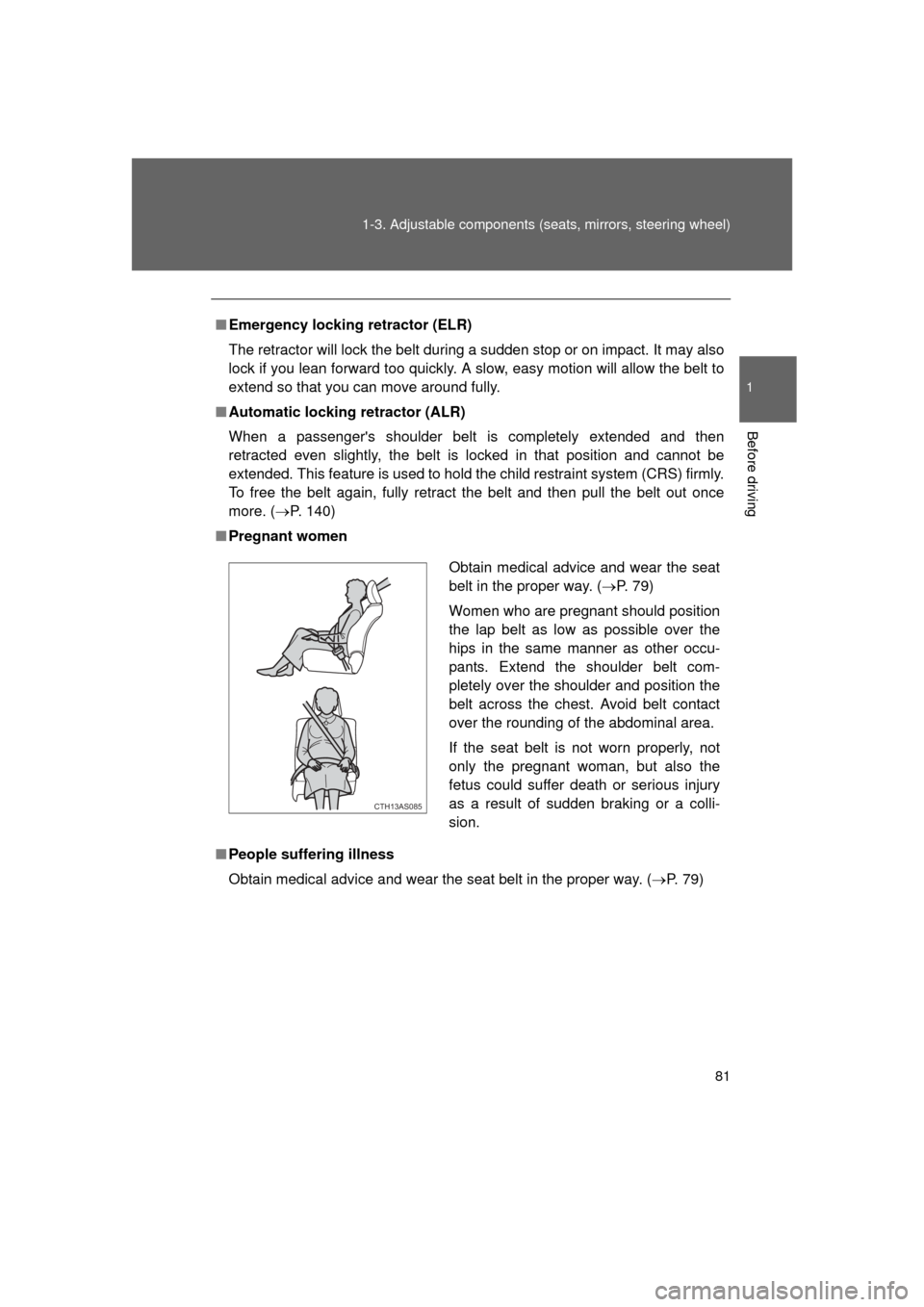
■ Pregnant women
■ People suffering illness
Obtain medical advice and wear the seat belt in the proper way. ( P. 79)
Obtain medical advice and wear the seat
belt in the proper way. (P. 79)
Women who are pregnant should position
the lap belt as low as possible over the
hips in the same manner as other occu-
pants. Extend the shoulder belt com-
pletely over the shoulder and position the
belt across the chest. Avoid belt contact
over the rounding of the abdominal area.
If the seat belt is not worn properly, not
only the pregnant woman, but also the
fetus could suffer death or serious injury
as a result of sudden braking or a colli-
sion.
CTH13AS085
Page 83 of 680
83
1-3. Adjustable components (s
eats, mirrors, steering wheel)
1
Before driving
4RUNNER_U
CAUTION
■Wearing a seat belt
Observe the following precautions to reduce the risk of injury in the event of
sudden braking, sudden swerving or an accident.
Failure to do so may cause death or serious injury.
● Ensure that all passengers wear a seat belt.
● Always wear a seat belt properly.
● Each seat belt should be used by one person only. Do not use a seat belt
for more than one person at once, including children.
● Toyota recommends that children be seated in the rear seat and always
use a seat belt and/or an appropriate child restraint system.
● To achieve a proper seating position, do not recline the seat more than
necessary. The seat belt is most effective when the occupants are sitting
up straight and well back in the seats.
● Do not wear the shoulder belt under your arm.
● Always wear your seat belt low and snug across your hips.
■ Seat belt pretensioners
● Do not place anything, such as a cushion, on the front passenger's seat.
Doing so will disperse the passenger's weight, which prevents the sensor
from detecting the passenger's weight properly. As a result, the seat belt
pretensioner for the front passenger's seat may not activate in the event of
a collision.
● If the pretensioner has activated, the SRS warning light will come on. In
that case, the seat belt cannot be used again and must be replaced at
your Toyota dealer.
■ Adjustable shoulder anchor
Always make sure the shoulder belt is positioned across the center of your
shoulder. The belt should be kept away from your neck, but not falling off
your shoulder. Failure to do so could reduce the amount of protection in an
accident and cause death or serious injuries in the event of a sudden stop,
sudden swerve or accident. ( P. 80)
Page 87 of 680
87
1
1-3. Adjustable components (seats, mirrors, steering wheel)
Before driving
4RUNNER_U
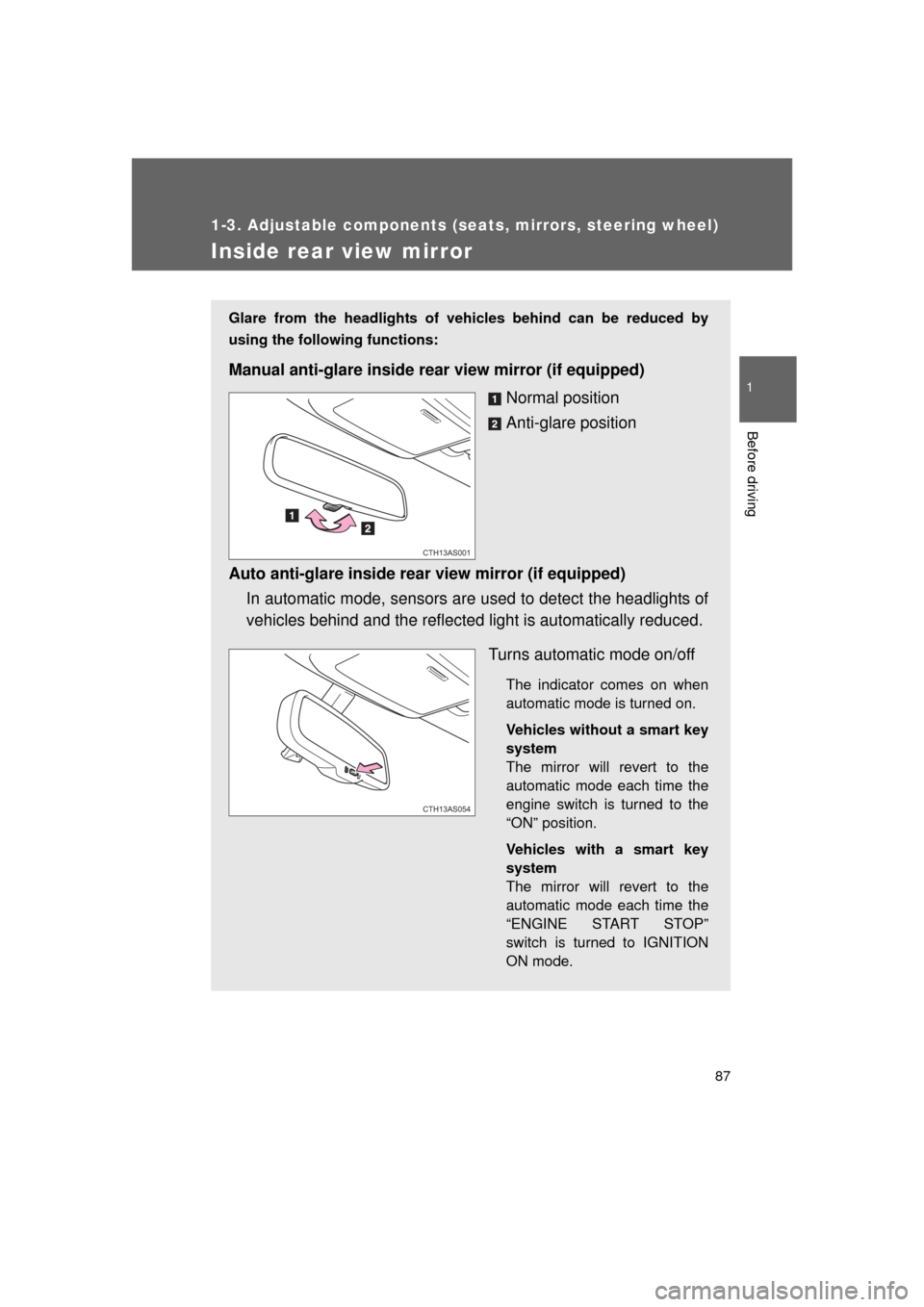
Inside rear view mirror
Glare from the headlights of vehicles behind can be reduced by
using the following functions:
Manual anti-glare inside rear view mirror (if equipped)Normal position
Anti-glare position
Auto anti-glare inside rear view mirror (if equipped) In automatic mode, sensors are used to detect the headlights of
vehicles behind and the reflecte d light is automatically reduced.
Turns automatic mode on/off
The indicator comes on when
automatic mode is turned on.
Vehicles without a smart key
system
The mirror will revert to the
automatic mode each time the
engine switch is turned to the
“ON” position.
Vehicles with a smart key
system
The mirror will revert to the
automatic mode each time the
“ENGINE START STOP”
switch is turned to IGNITION
ON mode.
CTH13AS001
CTH13AS054