key battery TOYOTA 4RUNNER 2012 N280 / 5.G User Guide
[x] Cancel search | Manufacturer: TOYOTA, Model Year: 2012, Model line: 4RUNNER, Model: TOYOTA 4RUNNER 2012 N280 / 5.GPages: 700, PDF Size: 10.76 MB
Page 192 of 700
192 2-2. Instrument cluster
4RUNNER_U
■The meters and display illuminate when (Optitron type meter)
Vehicles without a smart key system:
The engine switch is in the “ON” position.
Vehicles with a smart key system:
The “ENGINE START STOP” switch is in IGNITION ON mode.
■ Eco Driving Indicator Light will not operate in the following conditions
● The shift lever is anything other than D.
● The vehicle speed is approximately 80 mph (130 km/h) or higher.
■ When the average fuel consumption is reset
The average fuel consumption displayed on the accessory meter and “Past
Record” screen of the Display Audio system (if equipped) or the navigation
system (if equipped) will be reset at the same time.
■ The brightness of the instrument panel lights (Optitron type meter)
When the headlight switch is turned to on, the brightness will be reduced
slightly unless the control dial is turned fully upward.
NOTICE
■ To prevent damage to the engine and its components
● Do not let the indicator needle of the tachometer enter the red zone, which
indicates the maximum engine speed.
● The engine may be overheating if the engine coolant temperature gauge is
in the red zone (H). In this case, immediately stop the vehicle in a safe
place, and check the engine after it has cooled completely. ( P. 627)
■ While driving (Optitron type meter)
When the voltmeter indicates more than 19 V or less than 9 V, the battery
may be malfunctioning. Have your vehicle checked at your Toyota dealer.
Page 208 of 700
208 2-3. Operating the lights and wipers
4RUNNER_U
■Automatic light off system
Vehicles without a smart key system
● When the headlights come on: The headlights and tail lights turn off 30
seconds after a door is opened and closed if the engine switch is turned
to the “ACC” or “LOCK” position. (The lights turn off immediately if
on the key is pressed after all the doors are locked.)
● When only the tail lights come on: The tail lights turn off automatically if
the engine switch is turned to the “ACC” or “LOCK” position and the
driver’s door is opened.
To turn the lights on again, turn the engine switch to the “ON” position, or
turn the lights off and then back to or .
Vehicles with a smart key system
● When the headlights come on: The headlights and tail lights turn off 30
seconds after a door is opened and closed if the “ENGINE START
STOP” switch is turned to ACCESSORY mode or turned off. (The lights
turn off immediately if on the key is pressed after all the doors are
locked.)
● When only the tail lights come on: The tail lights turn off automatically if
the “ENGINE START STOP” switch is turned off and the driver’s door is
opened.
To turn the lights on again, turn the “ENGINE START STOP” switch to IGNI-
TION ON mode, or turn the light switch off and then back to or
.
■ Customization that can be co nfigured at Toyota dealer
Settings (e.g. light sensor sensitivity) can be changed.
(Customizable features P. 660)
NOTICE
■To prevent battery discharge
Do not leave the lights on longer than necessary when the engine is not run-
ning.
Page 440 of 700
440 3-5. Using the interior lights
4RUNNER_U
■Illuminated entry system
Vehicles without a smart key system
The lights automatically turn on/off according to the engine switch position,
whether the doors are locked/unlocked, and whether the doors are open/
closed.
Vehicles with a smart key system
The lights automatically turn on/off according to “ENGINE START STOP”
switch mode, the presence of the electronic key, whether the doors are
locked/unlocked, and whether the doors are open/closed.
■ To prevent battery discharge
If the following lights remain on when the door is not fully closed, the lights
will go off automatically after 20 minutes:
● Engine switch light
● Front interior light (when the switch is in the position)
● Rear interior light (when the switch is in the position)
● Footwell lights
● Inside door handle lights
■ Customization that can be co nfigured at Toyota dealer
Settings (e.g. the time elapsed before lights turn off) can be changed.
(Customizable features
P. 660)
Personal lights
Page 456 of 700
456 3-7. Other interior features
4RUNNER_U
■For quicker adjustment of the clock
To advance the minutes and hours quickly, press and hold the “M” or “H” but-
ton.
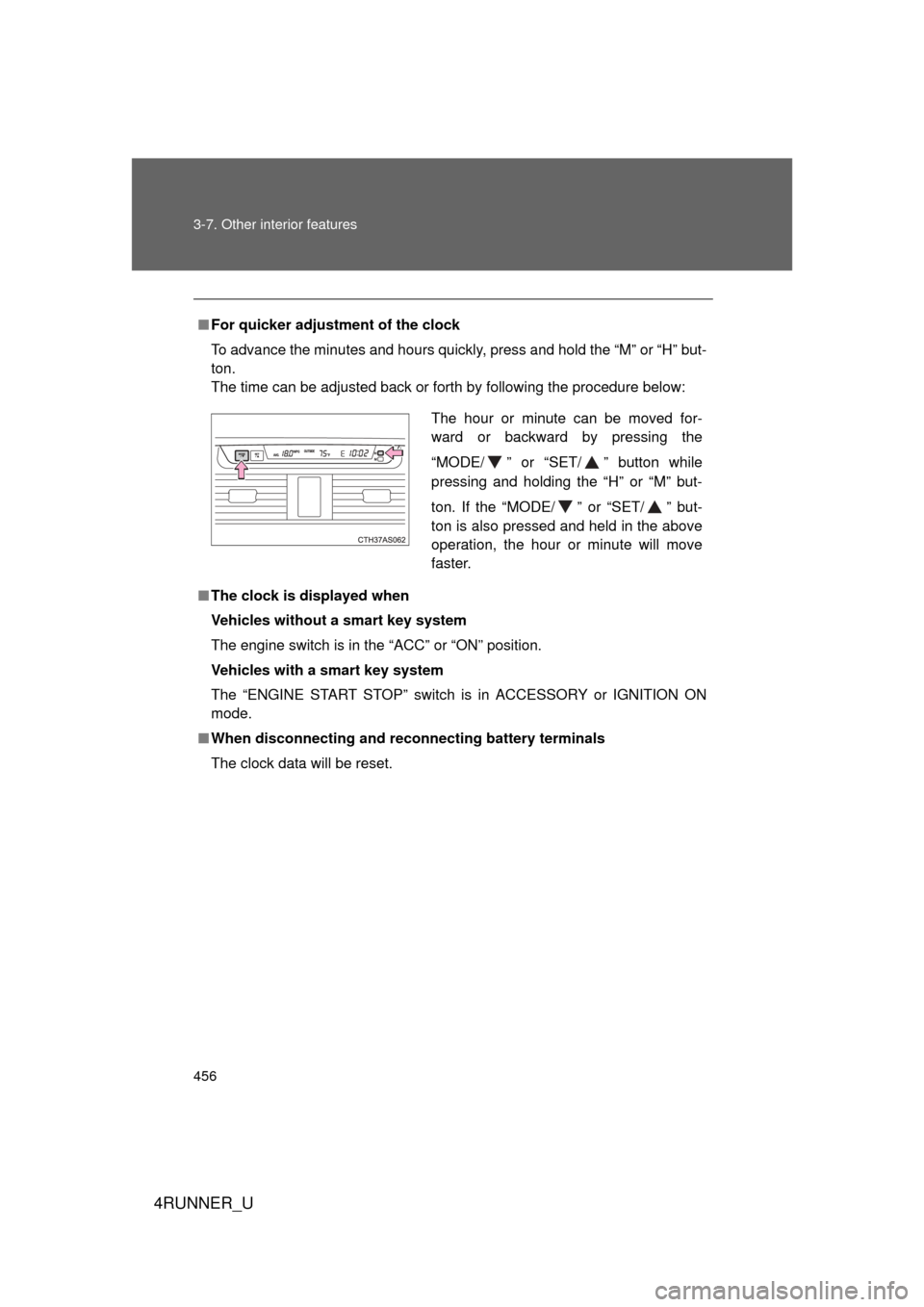
The time can be adjusted back or forth by following the procedure below:
■ The clock is displayed when
Vehicles without a smart key system
The engine switch is in the “ACC” or “ON” position.
Vehicles with a smart key system
The “ENGINE START STOP” switch is in ACCESSORY or IGNITION ON
mode.
■ When disconnecting and reco nnecting battery terminals
The clock data will be reset.
The hour or minute can be moved for-
ward or backward by pressing the
“MODE/ ” or “SET/ ” button while
pressing and holding the “H” or “M” but-
ton. If the “MODE/ ” or “SET/ ” but-
ton is also pressed and held in the above
operation, the hour or minute will move
faster.
Page 462 of 700
462 3-7. Other interior features
4RUNNER_U
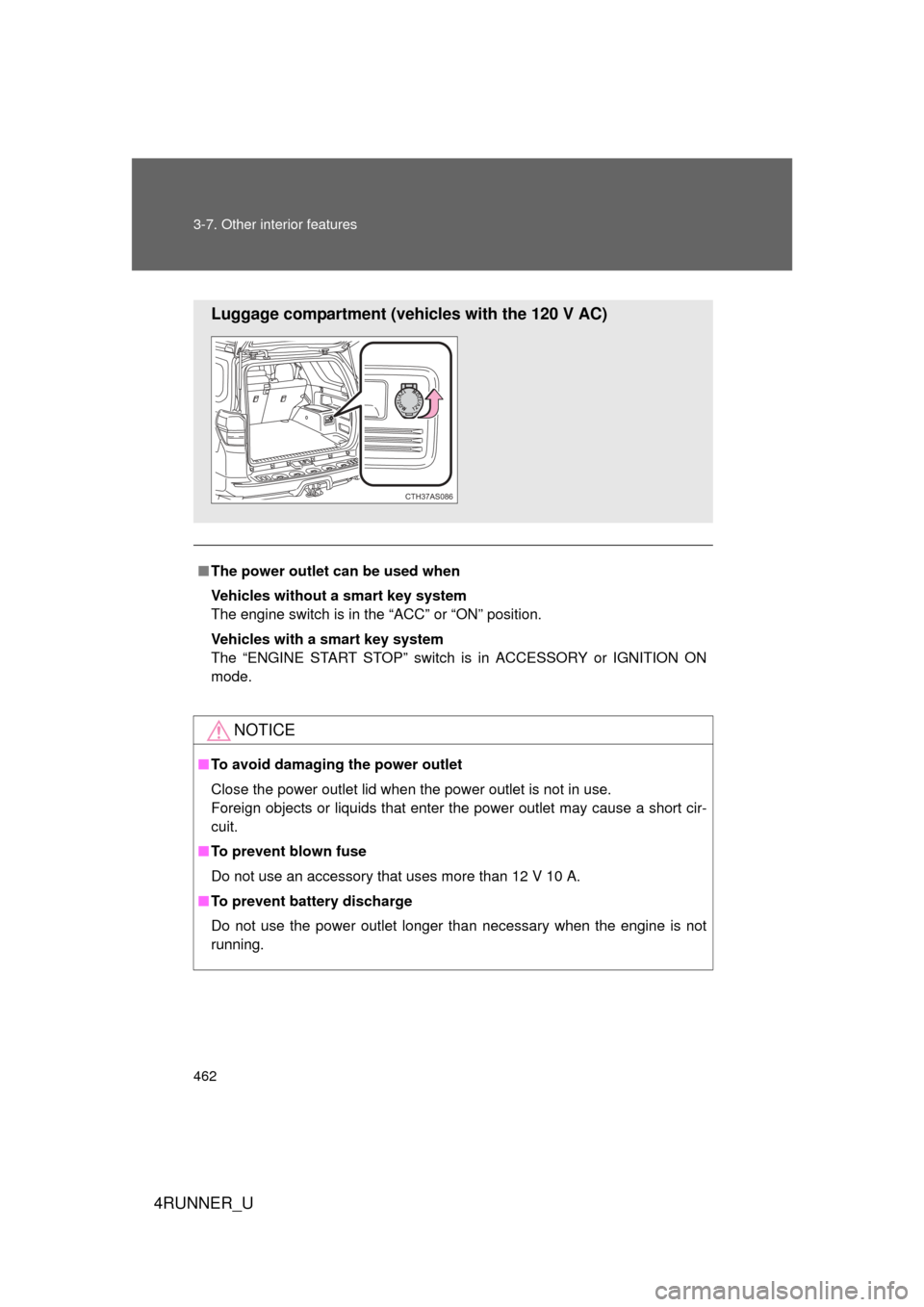
■The power outlet can be used when
Vehicles without a smart key system
The engine switch is in the “ACC” or “ON” position.
Vehicles with a smart key system
The “ENGINE START STOP” switch is in ACCESSORY or IGNITION ON
mode.
NOTICE
■ To avoid damaging the power outlet
Close the power outlet lid when the power outlet is not in use.
Foreign objects or liquids that enter the power outlet may cause a short cir-
cuit.
■ To prevent blown fuse
Do not use an accessory that uses more than 12 V 10 A.
■ To prevent battery discharge
Do not use the power outlet longer than necessary when the engine is not\
running.
Luggage compartment (vehicles with the 120 V AC)
CTH37AS086
Page 501 of 700
Maintenance and care4
501
4RUNNER_U
4-1. Maintenance and careCleaning and protecting the vehicle exterior ......... 502
Cleaning and protecting the vehicle interior .......... 505
4-2. Maintenance Maintenance requirements .................. 508
General maintenance....... 511
Emission inspection and maintenance (I/M)
programs ........................ 515
4-3. Do-it-yourself maintenance
Do-it-yourself service precautions .................... 516
Hood ................................ 519
Engine compartment ........ 520
Tires ................................. 537
Tire inflation pressure ...... 543
Wheels ............................. 547
Air conditioning filter......... 550
Wireless remote control/ electronic key battery
....... 552
Checking and replacing fuses .............................. 555
Light bulbs........................ 565
Page 533 of 700
533
4-3. Do-it-yourself maintenance
4
Maintenance and care
4RUNNER_U
■
After recharging/reconnect ing the battery (vehicles with smart key sys-
tem)
● Unlocking the doors using the smart key system may not be possible
immediately after reconnecting the battery. If this happens, use the wire-
less remote control or the mechanical key to lock/unlock the doors.
● Start the engine with the “ENGINE START STOP” switch in ACCES-
SORY mode. The engine may not start with the “ENGINE START STOP”
switch turned OFF. However, the engine will operate normally from the
second attempt.
● The “ENGINE START STOP” switch mode is recorded by the vehicle. If
the battery is reconnected, the vehicle will return the “ENGINE START
STOP” switch mode to the status it was in before the battery was discon-
nected. Make sure to turn off the engine before disconnect the battery.
Take extra care when connecting the battery if the “ENGINE START
STOP” switch mode prior to discharge is unknown.
If the system will not start even after multiple attempts, contact your Toyota
dealer.
CAUTION
■ Chemicals in the battery
Batteries contain poisonous and corrosive sulfuric acid and may produce
hydrogen gas which is flammable and explosive. To reduce the risk of death
or serious injury, take the following precautions while working on or near the
battery:
● Do not cause sparks by touching the battery terminals with tools.
● Do not smoke or light a match near the battery.
● Avoid contact with eyes, skin and clothes.
● Never inhale or swallow electrolyte.
● Wear protective safety glasses when working near the battery.
● Keep children away from the battery.
Page 552 of 700
552
4-3. Do-it-yourself maintenance
4RUNNER_U
Wireless remote control/electronic key batter y
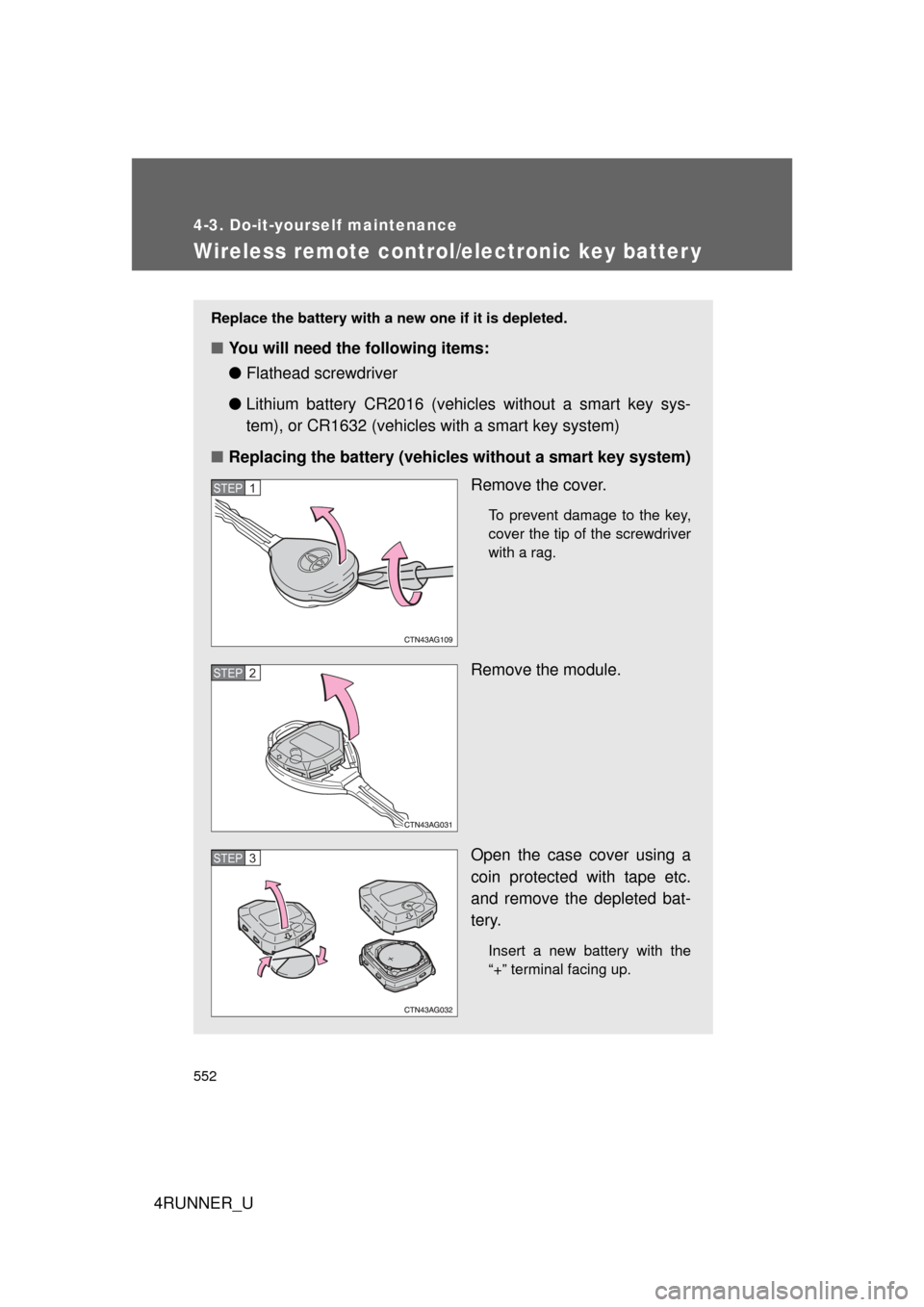
Replace the battery with a new one if it is depleted.
■You will need the following items:
●Flathead screwdriver
● Lithium battery CR2016 (vehicles without a smart key sys-
tem), or CR1632 (vehicles with a smart key system)
■ Replacing the battery (vehicles without a smart key system)
Remove the cover.
To prevent damage to the key,
cover the tip of the screwdriver
with a rag.
Remove the module.
Open the case cover using a
coin protected with tape etc.
and remove the depleted bat-
tery.
Insert a new battery with the
“+” terminal facing up.
STEP 1
STEP 2
STEP 3
Page 553 of 700
553
4-3. Do-it-yourself maintenance
4
Maintenance and care
4RUNNER_U
■
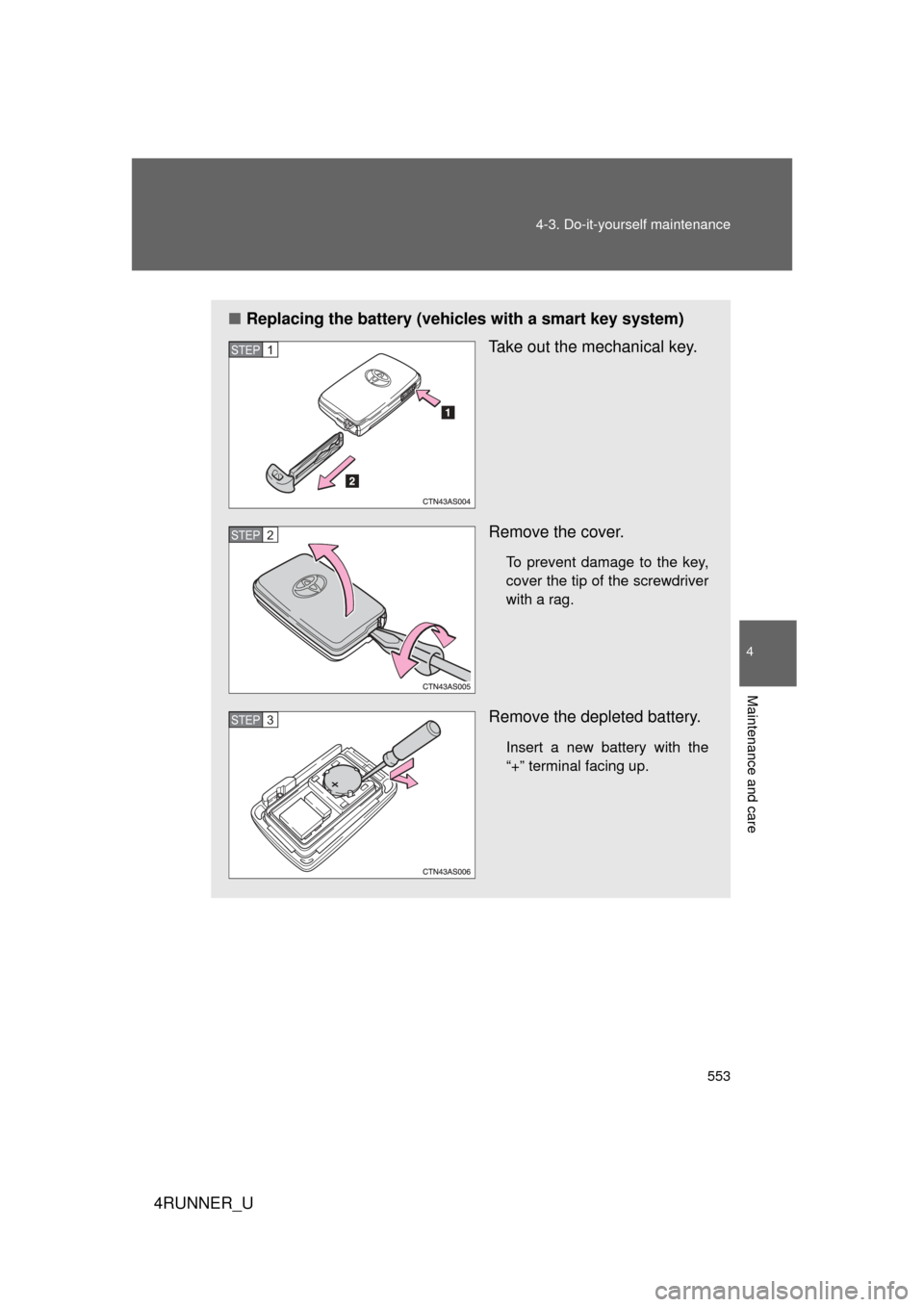
Replacing the battery (vehicles with a smart key system)
Take out the mechanical key.
Remove the cover.
To prevent damage to the key,
cover the tip of the screwdriver
with a rag.
Remove the depleted battery.
Insert a new battery with the
“+” terminal facing up.
STEP 1
STEP 2
STEP 3
Page 554 of 700
554 4-3. Do-it-yourself maintenance
4RUNNER_U
■Use a CR2016 (vehicles without a smart key system) or CR1632 (vehi-
cles with a smart key system) lithium battery
● Batteries can be purchased at your Toyota dealer, local electrical appli-
ance shops or camera stores.
● Replace only with the same or equivalent type recommended by the
manufacturer.
● Dispose of used batteries according to local laws.
■ If the key battery is depleted
The following symptoms may occur:
● The smart key system and wireless remote control will not function prop-
erly.
● The operational range will be reduced.
CAUTION
■Removed battery and other parts
Keep away from children. These parts are small and if swallowed by a child,
they can cause choking. Failure to do so could result in death or serious
injury.
NOTICE
■For normal operation after replacing the battery
Observe the following precautions to prevent accidents:
● Always work with dry hands.
Moisture may cause the battery to rust.
● Do not touch or move any other component inside the remote control.
● Do not bend either of the battery terminals.