lock TOYOTA 4RUNNER 2012 N280 / 5.G Repair Manual
[x] Cancel search | Manufacturer: TOYOTA, Model Year: 2012, Model line: 4RUNNER, Model: TOYOTA 4RUNNER 2012 N280 / 5.GPages: 700, PDF Size: 10.76 MB
Page 91 of 700
91
1-3. Adjustable components (s
eats, mirrors, steering wheel)
1
Before driving
4RUNNER_U
CAUTION
■Adjustable shoulder anchor
Always make sure the shoulder belt is positioned across the center of your
shoulder. The belt should be kept away from your neck, but not falling off
your shoulder. Failure to do so could reduce the amount of protection in an
accident and cause death or serious injuries in the event of a sudden stop,
sudden swerve or accident. ( P. 87)
■ Seat belt damage and wear
● Do not damage the seat belts by allowing the belt, plate, or buckle to be
jammed in the door.
● Inspect the seat belt system periodically. Check for cuts, fraying, and loose
parts. Do not use a damaged seat belt until it is replaced. Damaged seat
belts cannot protect an occupant from death or serious injury.
● Ensure that the belt and plate are locked and the belt is not twisted.
If the seat belt does not function correctly, immediately contact your Toyota
dealer.
● Replace the seat assembly, including the belts, if your vehicle has been
involved in a serious accident, even if there’s no obvious damage.
● Do not attempt to install, remove, modify, disassemble or dispose of the
seat belts. Have any necessary repairs carried out by your Toyota dealer.
Inappropriate handling of the pretensioner may prevent it from operating
properly, resulting in death or serious injury.
■ Using a seat belt extender
● Do not wear the seat belt extender if you can fasten the seat belt without
the extender.
● Do not use the seat belt extender when installing a child restraint system
because the belt will not securely hold the child restraint system, increas-
ing the risk of death or serious injury in the event of an accident.
● The personalized extender may not be safe on another vehicle, when
used by another person, or at a different seating position other than the
one originally intended.
Page 93 of 700
93
1
1-3. Adjustable components (seats, mirrors, steering wheel)
Before driving
4RUNNER_U
Steering wheel
CAUTION
■Caution while driving
Do not adjust the steering wheel while driving.
Doing so may cause the driver to mishandle the vehicle and cause an acci-
dent, resulting in death or serious injury.
■ After adjusting the steering wheel
Make sure that the steering wheel is securely locked.
Otherwise, the steering wheel may move suddenly, possibly causing an
accident, and resulting in death or serious injury.
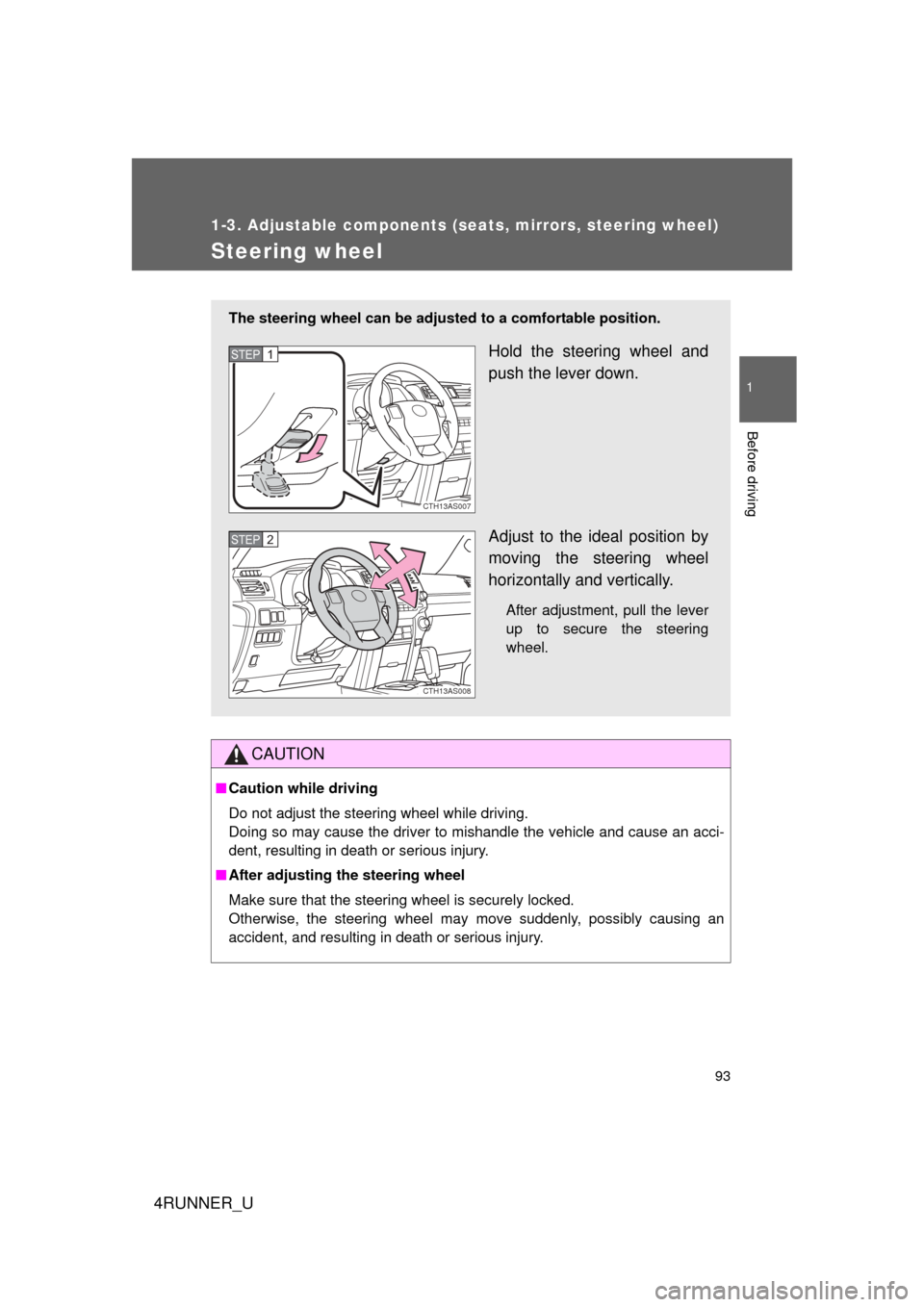
The steering wheel can be adjust ed to a comfortable position.
Hold the steering wheel and
push the lever down.
Adjust to the ideal position by
moving the steering wheel
horizontally and vertically.
After adjustment, pull the lever
up to secure the steering
wheel.
CTH13AS007
STEP 1
CTH13AS008
STEP 2
Page 98 of 700
98
4RUNNER_U
1-4. Opening and closing the windows and moon roof
Power windows
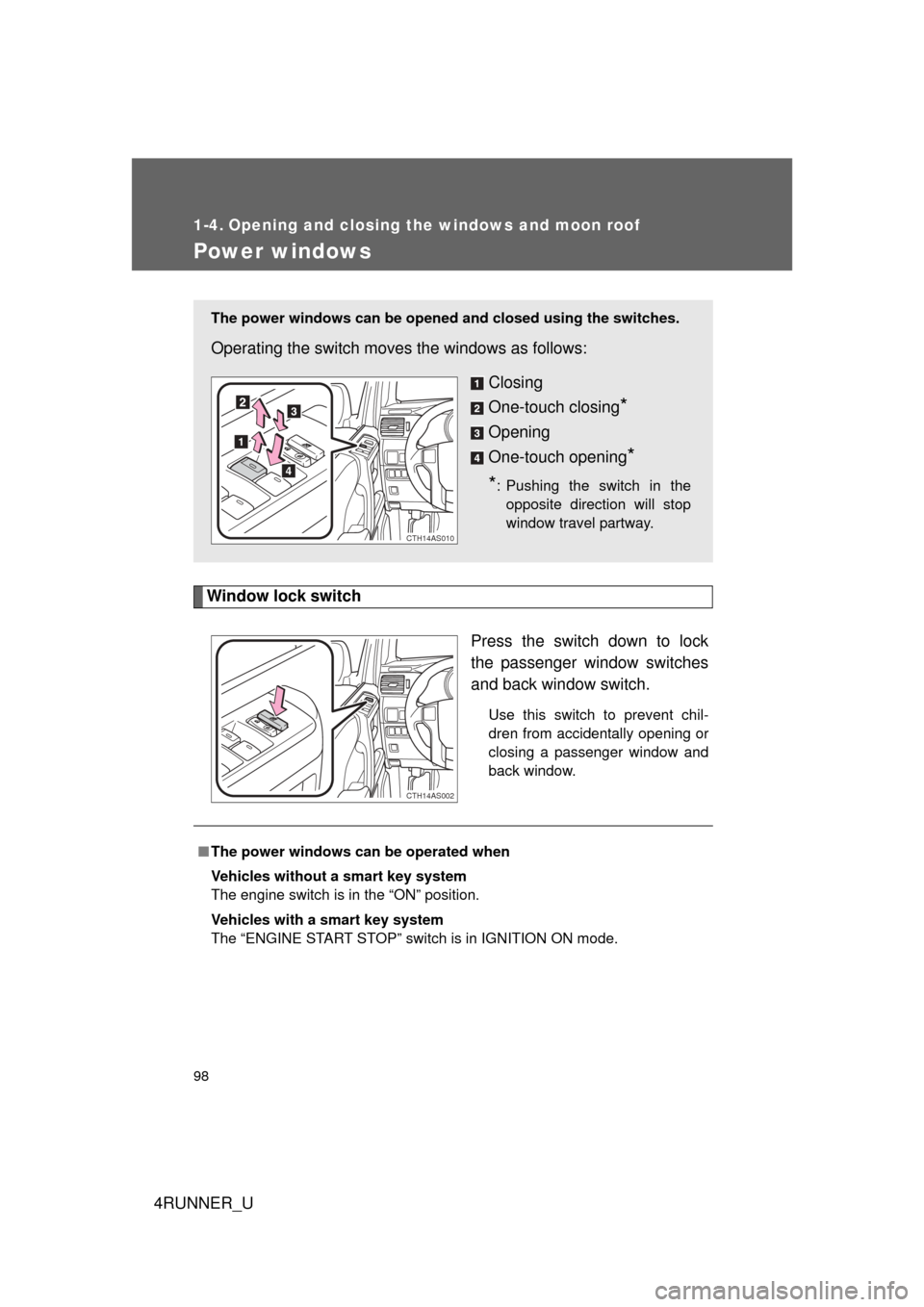
Window lock switchPress the switch down to lock
the passenger window switches
and back window switch.
Use this switch to prevent chil-
dren from accidentally opening or
closing a passenger window and
back window.
The power windows can be opened and closed using the switches.
Operating the switch moves the windows as follows:
Closing
One-touch closing
*
Opening
One-touch opening
*
*
: Pushing the switch in the opposite direction will stop
window travel partway.
CTH14AS010
CTH14AS002
■ The power windows can be operated when
Vehicles without a smart key system
The engine switch is in the “ON” position.
Vehicles with a smart key system
The “ENGINE START STOP” switch is in IGNITION ON mode.
Page 99 of 700
99
1-4. Opening and closing the windows and moon roof
1
Before driving
4RUNNER_U
■
Operating the power windows af ter turning the engine off
Vehicles without a smart key system
The power windows can be operated for approximately 45 seconds even
after the engine switch is turned to the “ACC” or “LOCK” position. They can-
not, however, be operated once either front door is opened.
Vehicles with a smart key system
The power windows can be operated for approximately 45 seconds even
after the “ENGINE START STOP” switch is turned to ACCESSORY mode or
turned off. They cannot, however, be operated once either front door is
opened.
■ Jam protection function
If an object becomes caught between the window and the window frame,
window travel is stopped and the window is opened slightly.
■ When the power window does not close normally
If the jam protection function is operating abnormally and a window cannot
be closed, perform the following operations using the power window switch
on the relevant door.
● After stopping the vehicle, the window can be closed by holding the
power window switch in the one-touch closing position while the engine
switch is turned to the “ON” position (vehicles without a smart key sys-
tem) or the “ENGINE START STOP” switch is turned to IGNITION ON
mode (vehicles with a smart key system).
● If the window still cannot be closed even by carrying out the operation
explained above, initialize the function by performing the following proce-
dure.
Hold the power window switch in the one-touch closing position.
Continue holding the switch for a further 6 seconds after the win-
dow has closed.
Hold the power window switch in the one-touch opening position.
Continue holding the switch for a further 2 seconds after the win-
dow has opened completely.
STEP 1
STEP 2
Page 100 of 700
100 1-4. Opening and closing the windows and moon roof
4RUNNER_U
Hold the power window switch in the one-touch closing position
once again. Continue holding the switch for a further 2 seconds
after the window has closed.
If you release the switch while the window is moving, start again from the
beginning.
If the window continues to close but then re-open slightly even after perform-
ing the above procedure correctly, have the vehicle inspected by your Toyota
dealer.
■ Customization that can be co nfigured at Toyota dealer
Settings (e.g. linked door lock operation) can be changed.
(Customizable features P. 660)
CAUTION
■Closing the windows
Observe the following precautions.
Failure to do so may result in death or serious injury.
● Check to make sure that all passengers do not have any part of their body
in a position where it could be caught when a window is being operated.
● Do not allow children to operate the power windows.
Closing a power window on someone can cause serious injury, and in
some instances, even death.
■ Jam protection function
● Never use any part of your body to intentionally activate the jam protection
function.
● The jam protection function may not work if something gets caught just
before the window fully closes.
STEP 3
Page 103 of 700
103
1-4. Opening and closing the windows and moon roof
1
Before driving
4RUNNER_U
■
Operating the power back window from inside the vehicle after turning
the engine off
Vehicles without a smart key system
The power back window can be operated for approximately 45 seconds
even after the engine switch is turned to the “ACC” or “LOCK” posit\
ion. It
cannot, however, be operated once either front door is opened.
Vehicles with a smart key system
The power back window can be operated for approximately 45 seconds
even after the “ENGINE START STOP” switch is turned to ACCESSORY
mode or turned off. It cannot, however, be operated once either front door is
opened.
■ Jam protection function
If an object becomes caught between the window and the window frame,
window travel is stopped and the window is opened slightly.
■ When the power back window does not close normally
If the jam protection function is operating abnormally and a window cannot
be closed, perform the following operations using the power back window
switch.
● After stopping the vehicle, the window can be closed by holding the
power back window switch in the one-touch closing position while the
engine switch is turned to the “ON” position (vehicles without a smart key
system) or the “ENGINE START STOP” switch is turned to IGNITION ON
mode (vehicles with a smart key system).
● If the window still cannot be closed even by carrying out the operation
explained above, initialize the function by performing the following proce-
dure.
Hold the power back window switch in the one-touch closing posi-
tion. Continue holding the switch for a further 6 seconds after the
window has closed.
Hold the power back window switch in the one-touch opening posi-
tion. Continue holding the switch for a further 2 seconds after the
window has opened completely.
Hold the power back window switch in the one-touch closing posi-
tion once again. Continue holding the switch for a further 2 seconds
after the window has closed.
STEP 1
STEP 2
STEP 3
Page 106 of 700

106 1-4. Opening and closing the windows and moon roof
4RUNNER_U
■The moon roof can be operated when
Vehicles without a smart key system
The engine switch is in the “ON” position.
Vehicles with a smart key system
The “ENGINE START STOP” switch is in IGNITION ON mode.
■ Operating the moon roof af ter turning the engine off
Vehicles without a smart key system
The moon roof can be operated for approximately 45 seconds even after the
engine switch is turned to the “ACC” or “LOCK” position. It cannot, however,
be operated once either front door is opened.
Vehicles with a smart key system
The moon roof can be operated for approximately 45 seconds even after the
“ENGINE START STOP” switch is turned to ACCESSORY mode or turned
off. It cannot, however, be operated once either front door is opened.
■ Jam protection function
If an object is detected between the moon roof and the frame while the moon
roof is closing or tilting down, travel is stopped and the moon roof opens
slightly.
■ To reduce moon roof wind noise
When the moon roof is opened automatically, it will stop slightly before the
fully open position. Driving with the moon roof in this position can help
reduce wind noise.
■ Sunshade
The sunshade can be opened and closed manually. However, the sunshade
will open automatically when the moon roof is opened.
Page 108 of 700
108 1-4. Opening and closing the windows and moon roof
4RUNNER_U
■Moon roof open reminder function
Vehicles without a smart key system
An alarm will sound when the driver’s door is opened with the moon roof not
fully closed and the engine switch off.
Vehicles with a smart key system
An alarm will sound when the driver’s door is opened with the moon roof not
fully closed and the “ENGINE START STOP” switch off.
■ Customization that can be co nfigured at Toyota dealer
Settings (e.g. linked door lock operation) can be changed.
(Customizable features P. 660)
CAUTION
■Opening the moon roof
Observe the following precautions.
Failure to do so may cause death or serious injury.
● Do not allow any passengers to put their hands or heads outside the vehi-
cle while it is moving.
● Do not sit on top of the moon roof.
■ Closing the moon roof
Observe the following precautions.
Failure to do so may result in death or serious injury.
● Check to make sure that all passengers do not have any part of their body
in a position where it could be caught when the moon roof is being oper-
ated.
● Do not allow children to operate the moon roof.
Closing the moon roof on someone can cause death or serious injury.
■ Jam protection function
● Never use any part of your body to intentionally activate the jam protection
function.
● The jam protection function may not work if something gets caught just
before the moon roof fully closes.
Page 116 of 700
116
1-6. Theft deterrent system
4RUNNER_U
Alarm
: If equipped
The system sounds the alarm and flashes the lights when forced
entry is detected.
■ Triggering of the alarm
The alarm is triggered in the fo llowing situations when the alarm
is set:
● A locked door is unlocked or opened in any way other than
using the entry function, wireless remote control or mechani-
cal key. (The doors will lock again automatically.)
● The hood is opened.
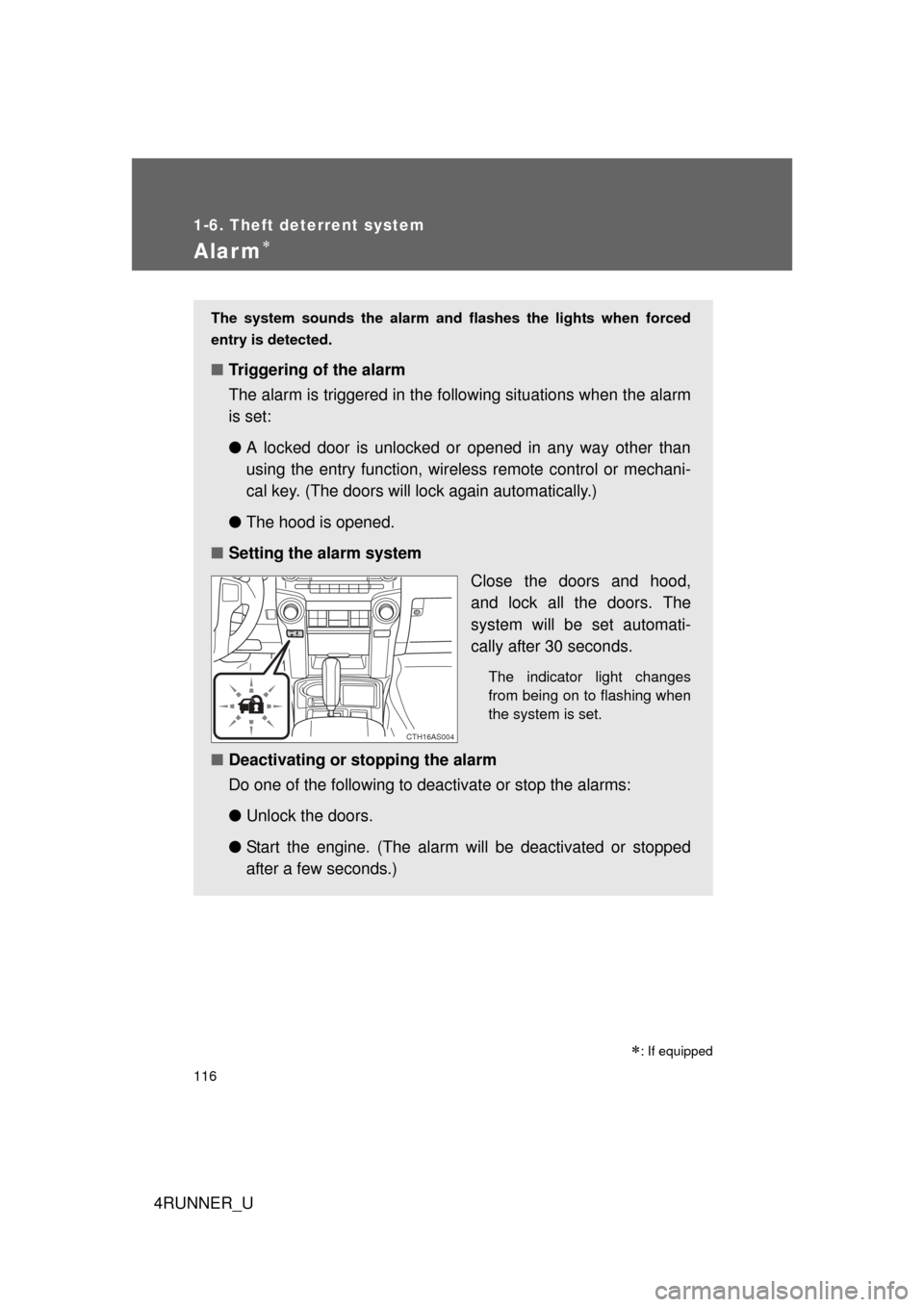
■ Setting the alarm system
Close the doors and hood,
and lock all the doors. The
system will be set automati-
cally after 30 seconds.
The indicator light changes
from being on to flashing when
the system is set.
■Deactivating or stopping the alarm
Do one of the following to deactivate or stop the alarms:
●Unlock the doors.
● Start the engine. (The alarm will be deactivated or stopped
after a few seconds.)
CTH16AS004
Page 117 of 700
117
1-6. Theft deterrent system
1
Before driving
4RUNNER_U
■
System maintenance
The vehicle has a maintenance-free type alarm system.
■ Items to check before locking the vehicle
To prevent unexpected triggering of the alarm and vehicle theft, make sure
of the following:
● Nobody is in the vehicle.
● The windows and moon roof are closed before the alarm is set.
● No valuables or other personal items are left in the vehicle.
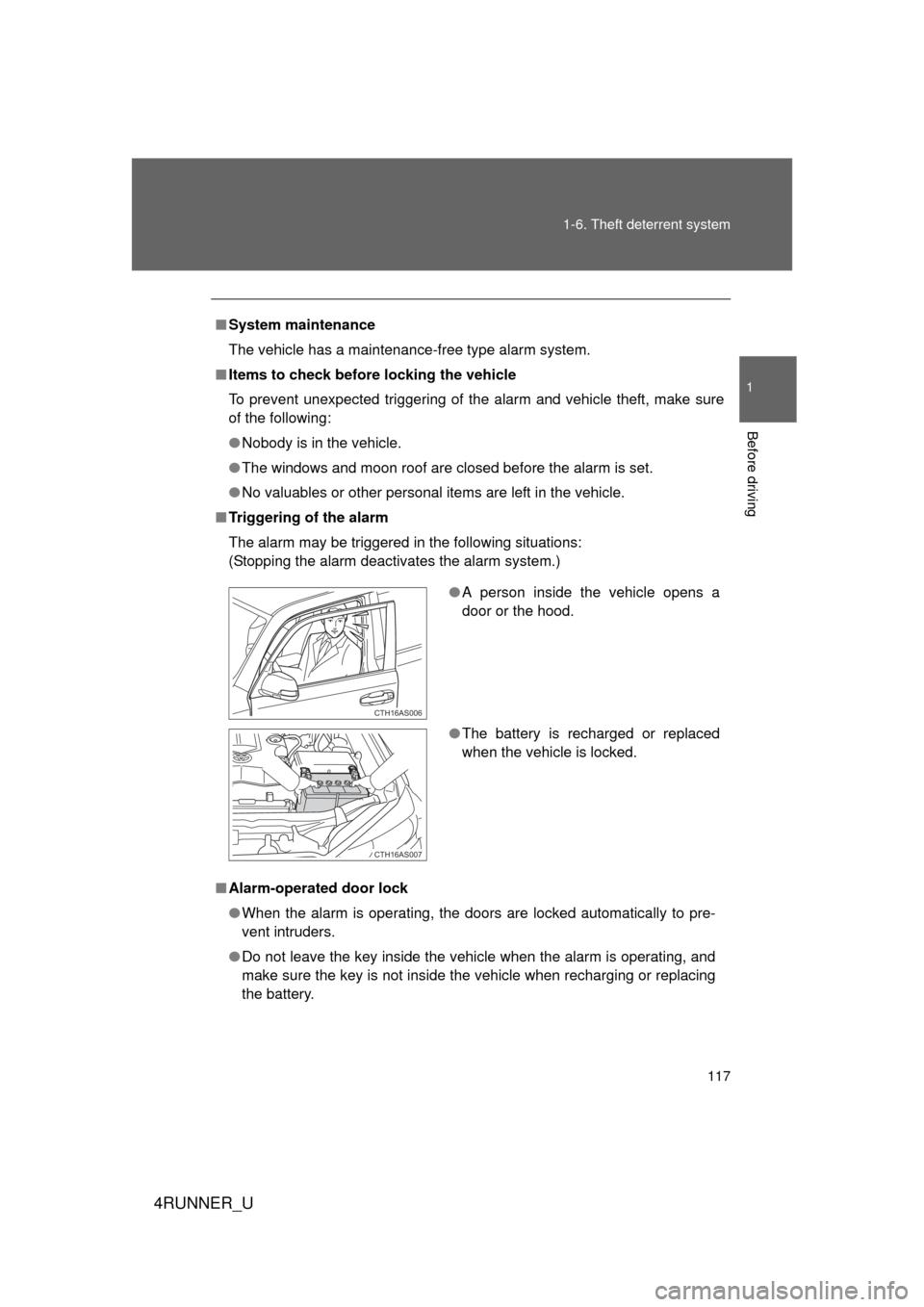
■ Triggering of the alarm
The alarm may be triggered in the following situations:
(Stopping the alarm deactivates the alarm system.)
■ Alarm-operated door lock
● When the alarm is operating, the doors are locked automatically to pre-
vent intruders.
● Do not leave the key inside the vehicle when the alarm is operating, and
make sure the key is not inside the vehicle when recharging or replacing
the battery.
●A person inside the vehicle opens a
door or the hood.
● The battery is recharged or replaced
when the vehicle is locked.
CTH16AS006
CTH16AS007