engine TOYOTA 4RUNNER 2013 N280 / 5.G Owners Manual
[x] Cancel search | Manufacturer: TOYOTA, Model Year: 2013, Model line: 4RUNNER, Model: TOYOTA 4RUNNER 2013 N280 / 5.GPages: 704, PDF Size: 11.56 MB
Page 607 of 704
5
When trouble arises
607
5-2. Steps to take in an emergency
4RUNNER_U
If you have a flat tire
Remove the flat tire and replace it with the spare tire provided.
■Before jacking up the vehicle
●Stop the vehicle on a hard, flat surface.
● Set the parking brake.
● Shift the shift lever to P.
● Stop the engine.
● Turn on the emergency flashers.
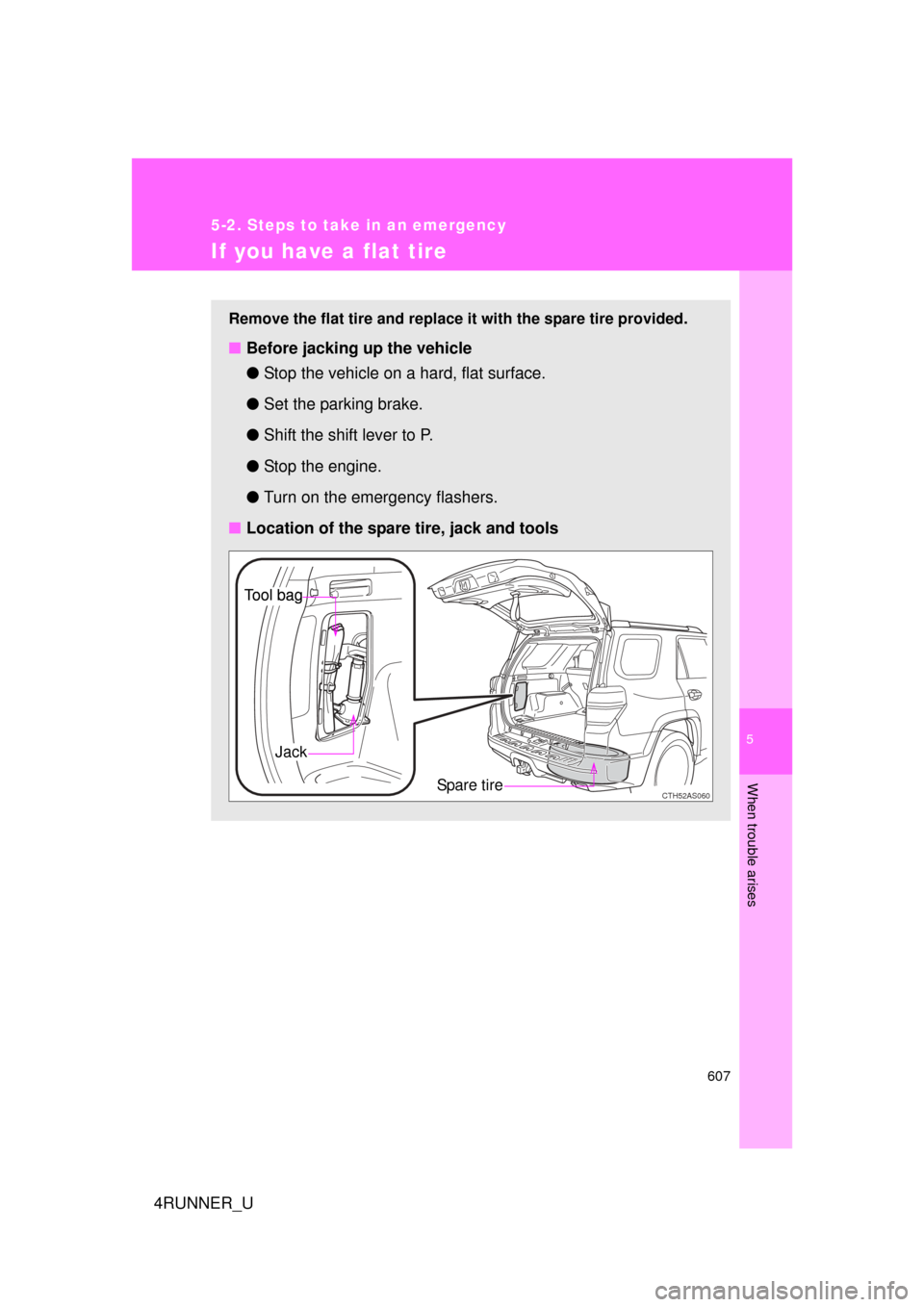
■ Location of the spare tire, jack and tools
CTH52AS060Spare tire
Jack
Tool bagTool bag
Page 617 of 704
5
When trouble arises
617
5-2. Steps to take in an emergency
4RUNNER_U
CAUTION
■Using the tire jack
Improper use of the tire jack may cause the vehicle to suddenly fall off the
jack, leading to death or serious injury.
●
Do not use the tire jack for any pu
rpose other than replacing tires or
installing and removing tire chains.
●Only use the tire jack that comes wi th this vehicle for replacing a flat
tire.
Do not use it on other vehicles, and do not use other tire jacks for
replacing tires on this vehicle.
●Always check that the tire jack is securely set to the jack point.
●Do not put any part of your body under the vehicle while it is supported
by the jack.
●Do not start or run the engine while your vehicle is supported by the
jack.
●Do not raise the vehicle while someone is inside.
●When raising the vehicle, do not put an object on or under the jack.
●Do not raise the vehicle to a hei ght greater than that required to
replace the tire.
●Use a jack stand if it is necessary to get under the vehicle.
Vehicles with Automatic running boards
● Observe the following precautions. Failure to do so may result in serious
injury:
•
When jacking up the vehicle, always turn the Automatic running
boards switch off.
•When jacking up the vehicle, do not use an Automatic running
board as a jack point. The Automatic running board may break,
causing injuries.
Take particular care when lowering the vehicle to ensure that no one
working on or near the vehicle may be injured.
Page 620 of 704
620
5-2. Steps to take in an emergency
4RUNNER_U
If the engine will not star t
If the engine will not start even though correct starting procedures
are being followed ( P. 170, 173), consider each of the following
points:
■ The engine will not start even though the starter motor
operates normally.
One of the following may be the cause of the problem:
●There may not be sufficient fuel in the vehicle’s tank.
Refuel the vehicle.
● The engine may be flooded.
Try to restart the engine again following correct starting proce-
dures. ( P. 170, 173)
● There may be a malfunction in the engine immobilizer system.
( P. 1 1 3 )
■ The starter motor turns over slowly, the interior lights and
headlights are dim, or the horn does not sound or sounds at
a low volume.
One of the following may be the cause of the problem:
●The battery may be discharged. ( P. 627)
● The battery terminal connec tions may be loose or corroded.
■ The starter motor does not turn over.
The engine starting system may be malfunctioning due to an
electrical problem such as an open circuit or a blown fuse. How-
ever, an interim measure is available to start the engine.
(
P. 621)
Page 621 of 704
5
When trouble arises
621
5-2. Steps to take in an emergency
4RUNNER_U
Emergency start function (vehicles with a smart key system)
When the engine does not start, the following steps can be used as
an interim measure to start the engine if the “ENGINE START STOP”
switch is functioning normally: Set the parking brake.
Shift the shift lever to P.
Turn the “ENGINE START STOP” switch to ACCESSORY
mode.
Press and hold the “ENGINE START STOP” switch for about
15 seconds while depressing the brake pedal firmly.
Even if the engine can be start ed using the above steps, the system
may be malfunctioning. Have the vehicle inspected by your Toyota
dealer.
■ The starter motor does not turn over, the interior lights and
headlights do not turn on, or the horn does not sound.
One of the following may be the cause of the problem:
● One or both of the battery terminals may be disconnected.
● The battery may be discharged. ( P. 627)
● There may be a malfunction in the steering lock system. (vehi-
cles with a smart key system)
Contact your Toyota dealer if the problem cannot be repaired, or if
repair procedures are unknown.
STEP 1
STEP 2
STEP 3
STEP 4
Page 622 of 704
622
5-2. Steps to take in an emergency
4RUNNER_U
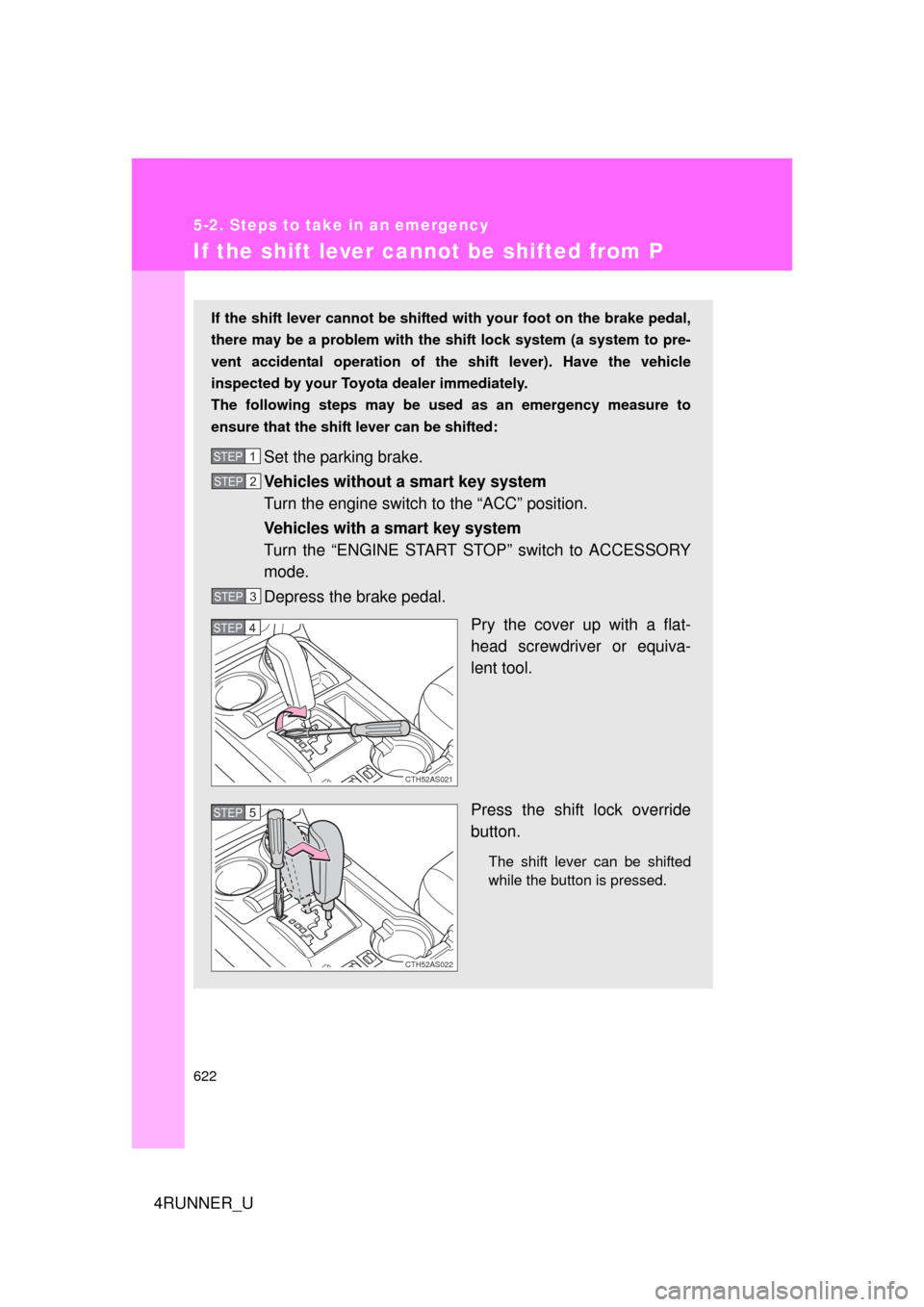
If the shift lever cannot be shifted from P
If the shift lever cannot be shifted with your foot on the brake pedal,
there may be a problem with the shift lock system (a system to pre-
vent accidental operation of the shift lever). Have the vehicle
inspected by your Toyo ta dealer immediately.
The following steps may be used as an emergency measure to
ensure that the shift lever can be shifted:
Set the parking brake.
Vehicles without a smart key system
Turn the engine switch to the “ACC” position.
Vehicles with a smart key system
Turn the “ENGINE START STOP” switch to ACCESSORY
mode.
Depress the brake pedal.
Pry the cover up with a flat-
head screwdriver or equiva-
lent tool.
Press the shift lock override
button.
The shift lever can be shifted
while the button is pressed.
STEP 1
STEP 2
STEP 3
CTH52AS021
STEP 4
CTH52AS022
STEP 5
Page 625 of 704
5
When trouble arises
625
5-2. Steps to take in an emergency
4RUNNER_U
If the electronic key does not operate properly (vehicles with a smar t key system)
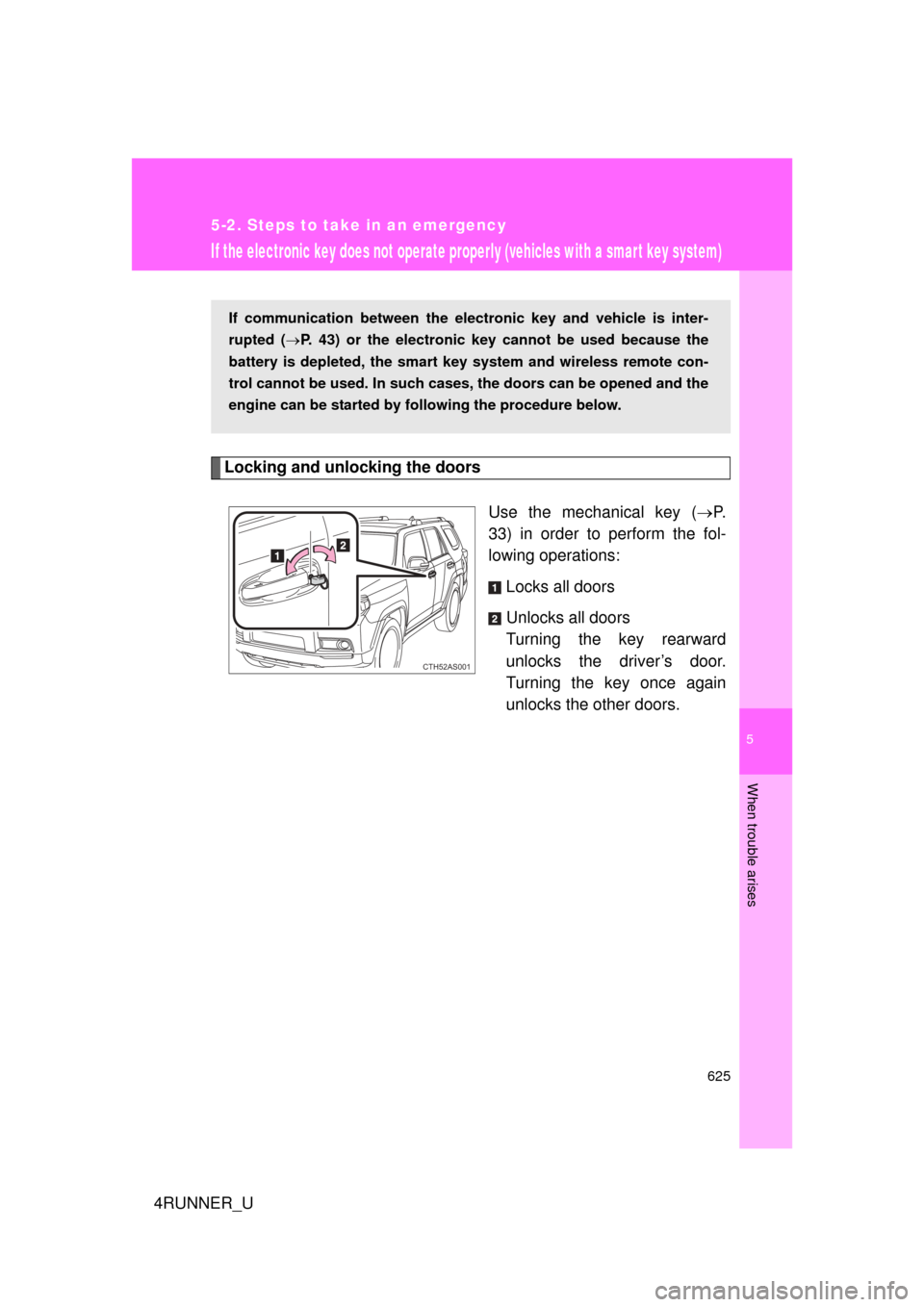
Locking and unlocking the doorsUse the mechanical key (P.
33) in order to perform the fol-
lowing operations:
Locks all doors
Unlocks all doors
Turning the key rearward
unlocks the driver’s door.
Turning the key once again
unlocks the other doors.
If communication between the electronic key and vehicle is inter-
rupted ( P. 43) or the electronic key cannot be used because the
battery is depleted, the smart key system and wireless remote con-
trol cannot be used. In such cases, the doors can be opened and the
engine can be started by following the procedure below.
CTH52AS001
Page 626 of 704
626 5-2. Steps to take in an emergency
4RUNNER_U
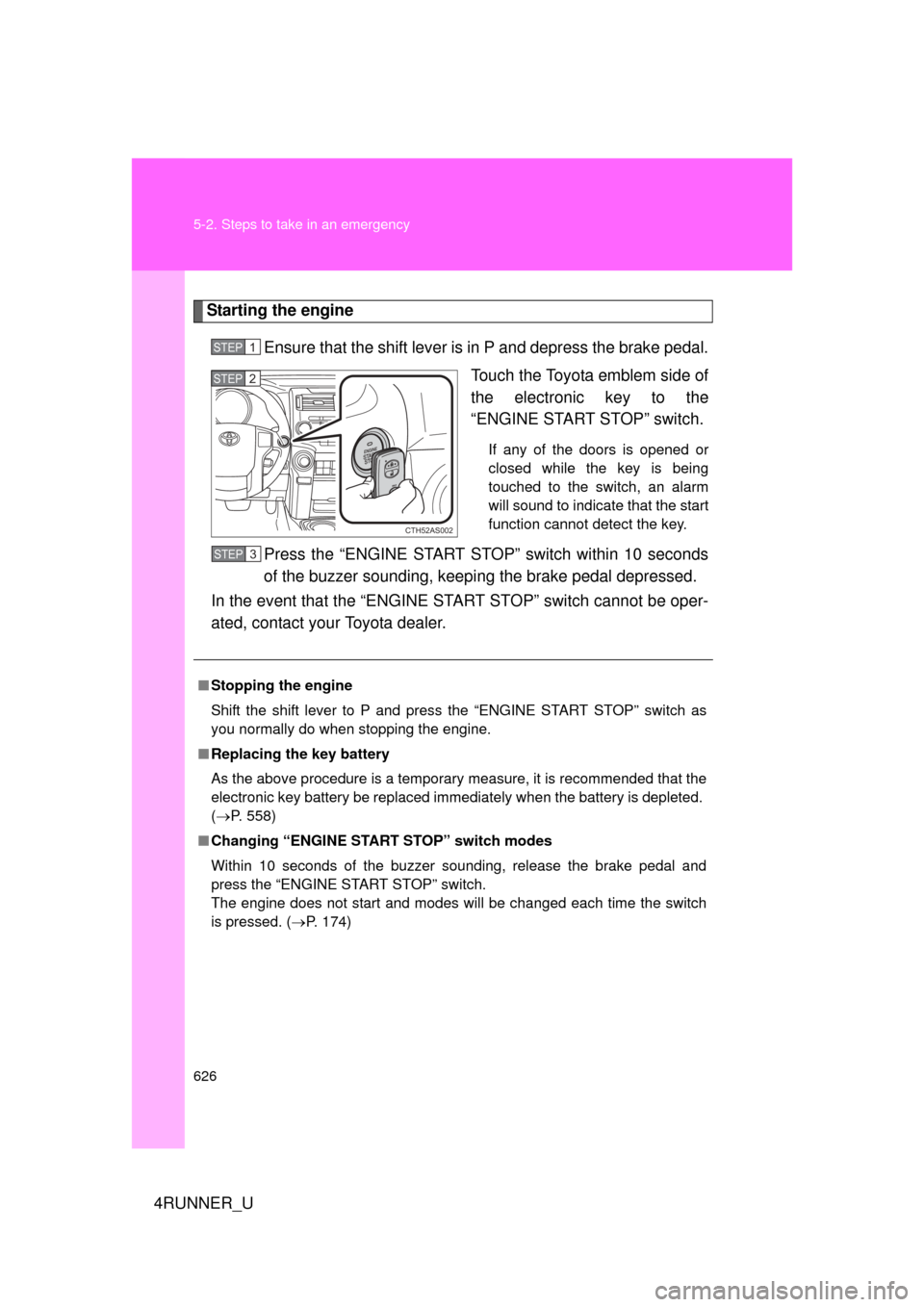
Starting the engineEnsure that the shift lever is in P and depress the brake pedal. Touch the Toyota emblem side of
the electronic key to the
“ENGINE START STOP” switch.
If any of the doors is opened or
closed while the key is being
touched to the switch, an alarm
will sound to indicate that the start
function cannot detect the key.
Press the “ENGINE START STOP” switch within 10 seconds
of the buzzer sounding, keep ing the brake pedal depressed.
In the event that the “ENGINE START STOP” switch cannot be oper-
ated, contact your Toyota dealer.
STEP 1
CTH52AS002
STEP 2
■ Stopping the engine
Shift the shift lever to P and press the “ENGINE START STOP” switch as
you normally do when stopping the engine.
■ Replacing the key battery
As the above procedure is a temporary measure, it is recommended that the
electronic key battery be replaced immediately when the battery is depleted.
(P. 558)
■ Changing “ENGINE START STOP” switch modes
Within 10 seconds of the buzzer sounding, release the brake pedal and
press the “ENGINE START STOP” switch.
The engine does not start and modes will be changed each time the switch
is pressed. ( P. 174)
STEP 3
Page 627 of 704
5
When trouble arises
627
5-2. Steps to take in an emergency
4RUNNER_U
If the vehicle batter y is discharged
The following procedures may be used to start the engine if the vehi-
cle's battery is discharged.
You can also call your Toyota dealer or a qualified repair shop.
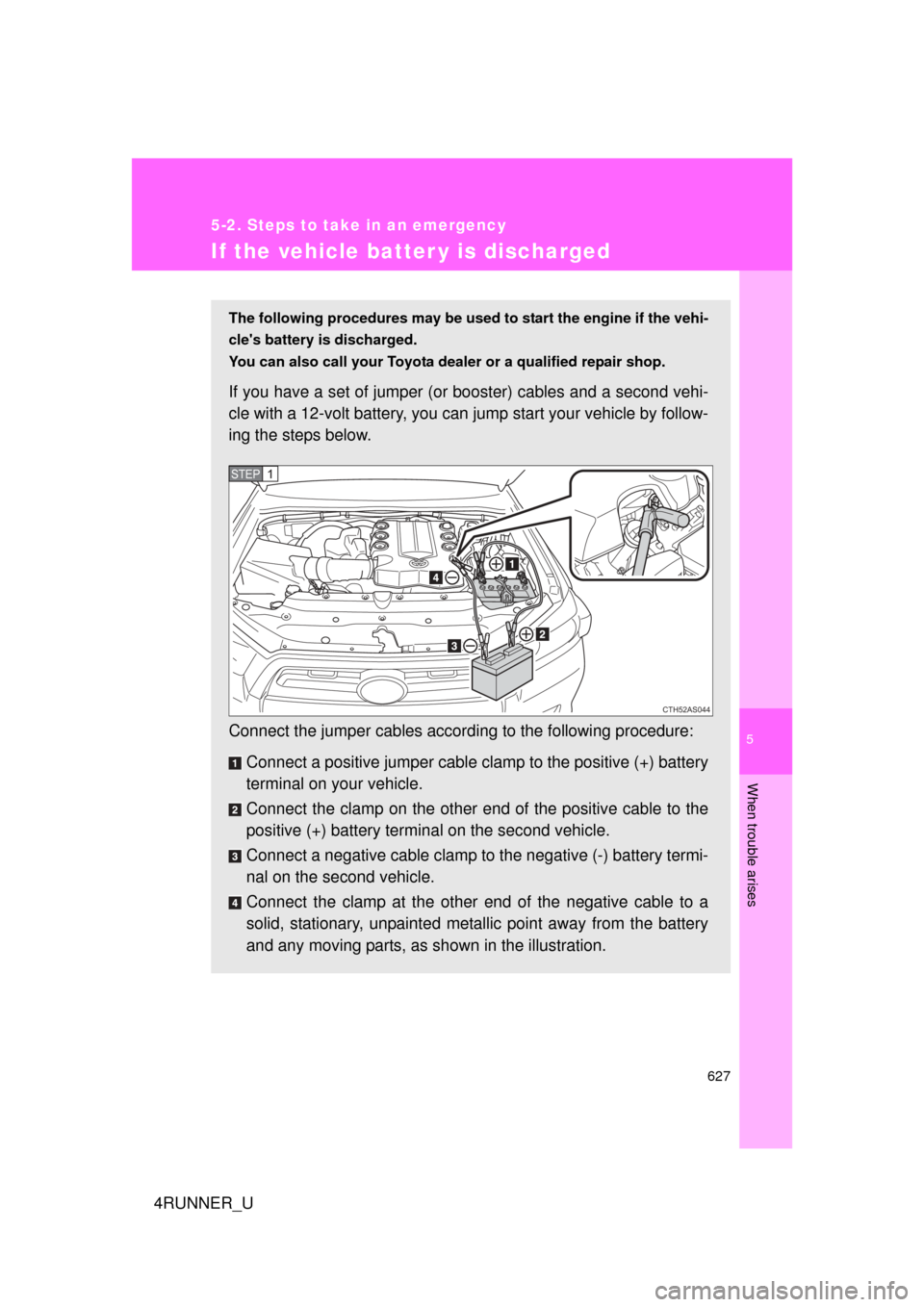
If you have a set of jumper (or booster) cables and a second vehi-
cle with a 12-volt battery, you can jump start your vehicle by follow-
ing the steps below.
Connect the jumper cables accord ing to the following procedure:
Connect a positive jumper cable clamp to the positive (+) battery
terminal on your vehicle.
Connect the clamp on the other e nd of the positive cable to the
positive (+) battery termin al on the second vehicle.
Connect a negative cable clamp to the negative (-) battery termi-
nal on the second vehicle.
Connect the clamp at the other end of the negative cable to a
solid, stationary, unpainted metallic point away from the battery
and any moving parts, as shown in the illustration.
CTH52AS044
STEP 1
Page 628 of 704
628 5-2. Steps to take in an emergency
4RUNNER_U
Start the engine of the second vehicle. Increase the engine
speed slightly and maintain at that level for approximately 5
minutes to recharge the battery of your vehicle.
Vehicles with a smart key system only: Open and close any
of the doors of your vehicle with the “ENGINE START
STOP” switch off.
Maintain the engine speed of the second vehicle and start
the engine of your vehicle by turning the “ENGINE START
STOP” switch to IGNITION ON mode (vehicles with a smart
key system) or turning the engine switch to the “ON” posi-
tion (vehicles without a smart key system).
Once the vehicle’s engine has started, remove the jumper
cables in the exact reverse or der from which they were con-
nected.
Once the engine starts, have the vehicle inspected at your Toyota
dealer as soon as possible.STEP 2
STEP 3
STEP 4
STEP 5
Page 629 of 704
5
When trouble arises
629
5-2. Steps to take in an emergency
4RUNNER_U
■
Starting the engine when the battery is discharged
The engine cannot be started by push-starting.
■ To prevent battery discharge
● Turn off the headlights and the audio system while the engine is off.
● Turn off any unnecessary electrical components when the vehicle is run-
ning at a low speed for an extended period, such as in heavy traffic.
■ When the battery is removed or discharged
Make sure that the key is not inside the vehicle when recharging or replacing
the battery. The key may be locked in the vehicle if the alarm is activated.
(P. 117)
■ Charging the battery
The electricity stored in the battery will discharge gradually even when the
vehicle is not in use, due to natural discharge and the draining effects of cer-
tain electrical appliances. If the vehicle is left for a long time, the battery may
discharge, and the engine may be unable to start. (The battery recharges
automatically during driving.)
■ Precautions when the battery is di scharged (vehicles with a smart key
system)
● In some cases, it may not be possible to unlock the doors using the smart
key system when the battery is discharged. Use the wireless remote con-
trol or the mechanical key to lock or unlock the doors.
● The engine may not start on the first attempt after the battery has
recharged but will start normally after the second attempt. This is not a
malfunction.
● The “ENGINE START STOP” switch mode is memorized by the vehicle.
When the battery is reconnected, the system will return to the mode it
was in before the battery was discharged. Before disconnecting the bat-
tery, turn the “ENGINE START STOP” switch off.
If you are unsure what mode the “ENGINE START STOP” switch was in
before the battery discharged, be especially careful when reconnecting
the battery.