sensor TOYOTA 4RUNNER 2013 N280 / 5.G User Guide
[x] Cancel search | Manufacturer: TOYOTA, Model Year: 2013, Model line: 4RUNNER, Model: TOYOTA 4RUNNER 2013 N280 / 5.GPages: 704, PDF Size: 11.56 MB
Page 208 of 704
208 2-3. Operating the lights and wipers
4RUNNER_U
■Automatic light off system
Vehicles without a smart key system
● When the headlights come on: The headlights and tail lights turn off 30
seconds after a door is opened and closed if the engine switch is turned
to the “ACC” or “LOCK” position. (The lights turn off immediately if
on the key is pressed after all the doors are locked.)
● When only the tail lights come on: The tail lights turn off automatically if
the engine switch is turned to the “ACC” or “LOCK” position and the
driver’s door is opened.
To turn the lights on again, turn the engine switch to the “ON” position, or
turn the lights off and then back to or .
Vehicles with a smart key system
● When the headlights come on: The headlights and tail lights turn off 30
seconds after a door is opened and closed if the “ENGINE START
STOP” switch is turned to ACCESSORY mode or turned off. (The lights
turn off immediately if on the key is pressed after all the doors are
locked.)
● When only the tail lights come on: The tail lights turn off automatically if
the “ENGINE START STOP” switch is turned off and the driver’s door is
opened.
To turn the lights on again, turn the “ENGINE START STOP” switch to IGNI-
TION ON mode, or turn the light switch off and then back to or
.
■ Customization that can be co nfigured at Toyota dealer
Settings (e.g. light sensor sensitivity) can be changed.
(Customizable features P. 664)
NOTICE
■To prevent battery discharge
Do not leave the lights on longer than necessary when the engine is not run-
ning.
Page 221 of 704
221
2-4. Using other driving systems
2
When driving
4RUNNER_U
Intuitive parking assist
The distance from your vehicle to nearby obstacles when parallel
parking or maneuvering into a garage is measured by the sensors
and communicated via an indicator and a buzzer. Always check the
surrounding area when using this system.
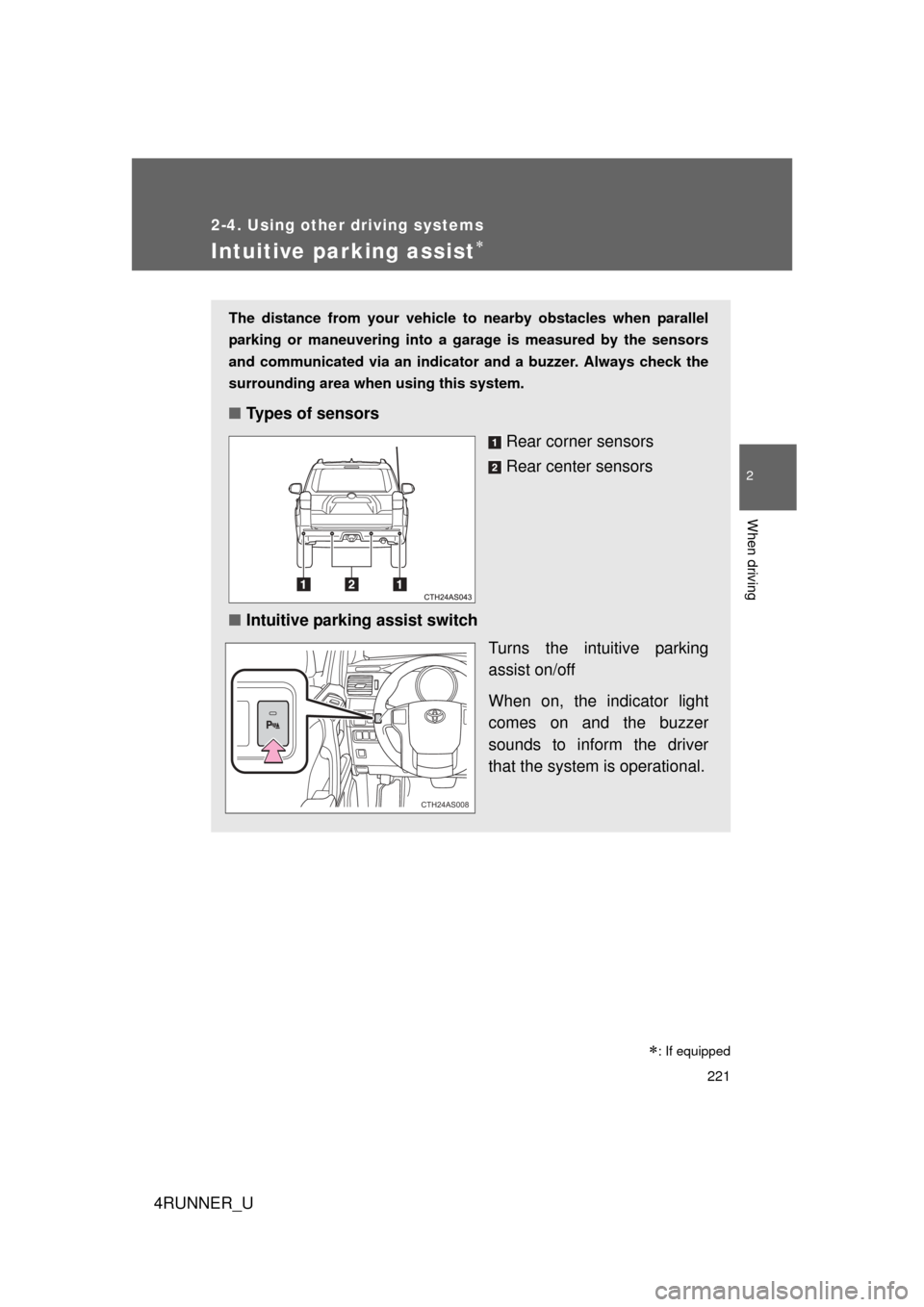
■Types of sensors
Rear corner sensors
Rear center sensors
■ Intuitive parking assist switch
Turns the intuitive parking
assist on/off
When on, the indicator light
comes on and the buzzer
sounds to inform the driver
that the system is operational.
CTH24AS008
: If equipped
Page 222 of 704
222 2-4. Using other driving systems
4RUNNER_U
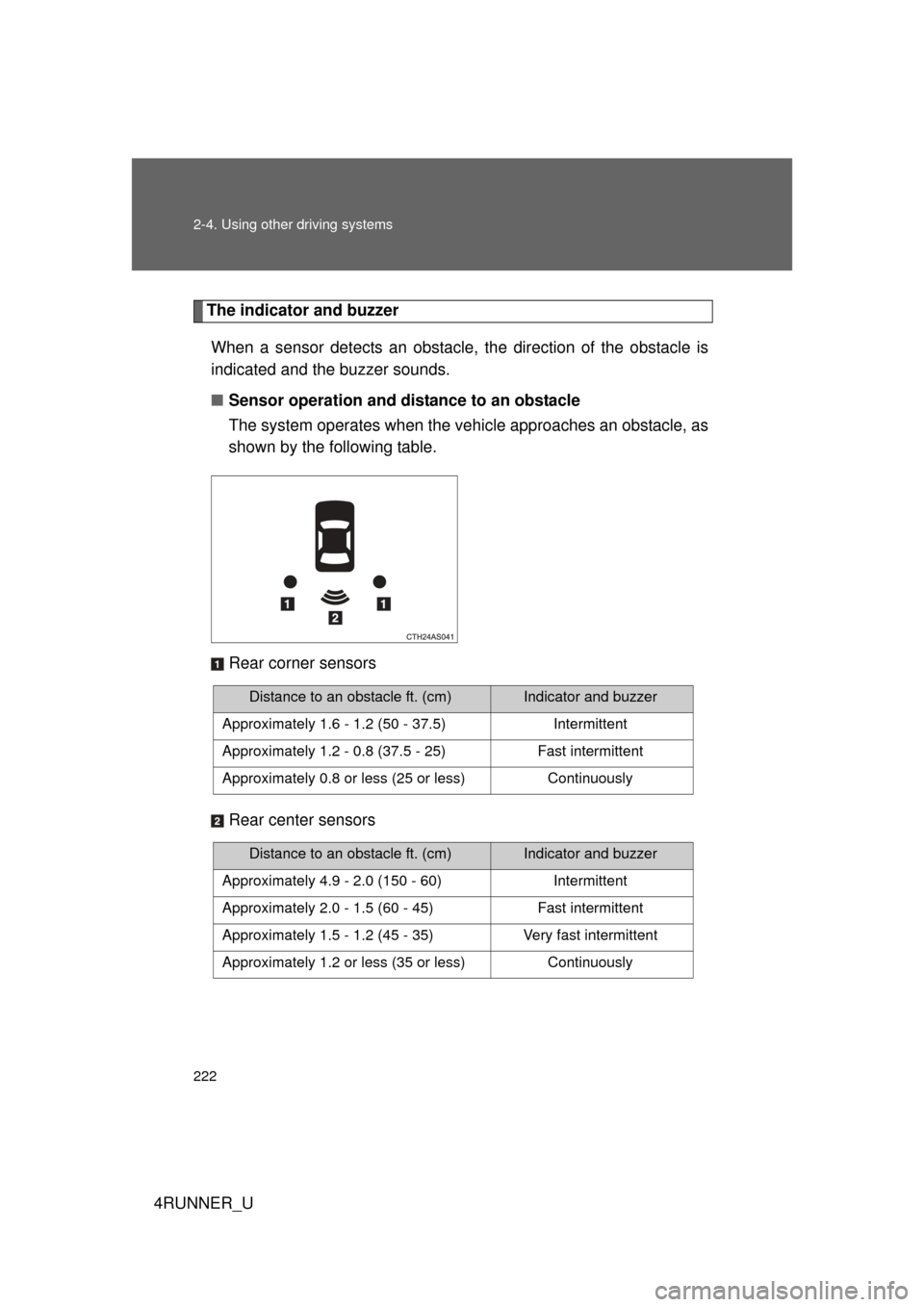
The indicator and buzzerWhen a sensor detects an obstacle, the direction of the obstacle is
indicated and the buzzer sounds.
■ Sensor operation and distance to an obstacle
The system operates when the vehicle approaches an obstacle, as
shown by the following table.
Rear corner sensors
Rear center sensors
Distance to an obstacle ft. (cm)Indicator and buzzer
Approximately 1.6 - 1.2 (50 - 37.5) Intermittent
Approximately 1.2 - 0.8 (37.5 - 25) Fast intermittent
Approximately 0.8 or less (25 or less) Continuously
Distance to an obstacle ft. (cm)Indicator and buzzer
Approximately 4.9 - 2.0 (150 - 60) Intermittent
Approximately 2.0 - 1.5 (60 - 45) Fast intermittent
Approximately 1.5 - 1.2 (45 - 35) Very fast intermittent
Approximately 1.2 or less (35 or less) Continuously
Page 223 of 704
223
2-4. Using other
driving systems
2
When driving
4RUNNER_U
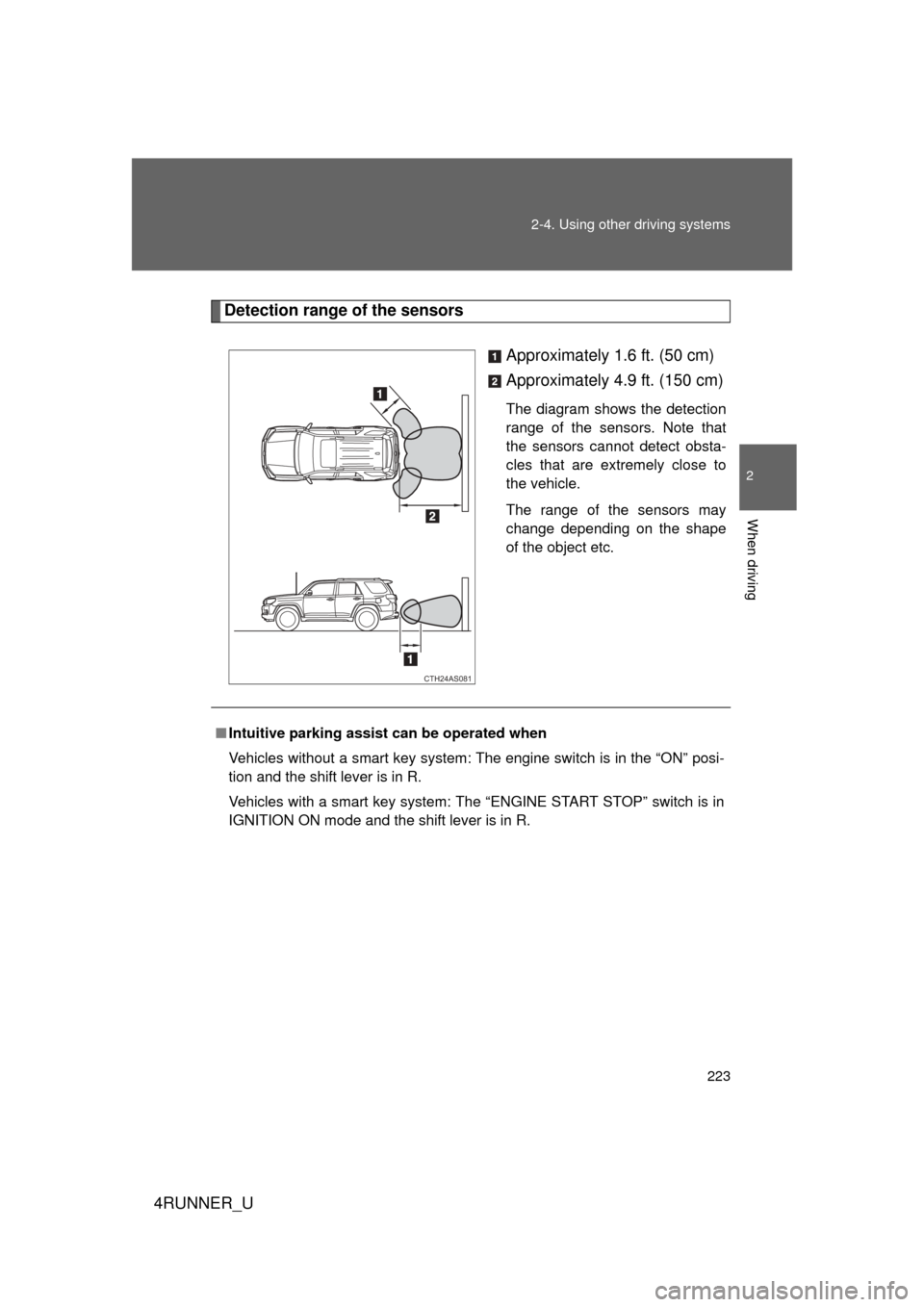
Detection range of the sensors
Approximately 1.6 ft. (50 cm)
Approximately 4.9 ft. (150 cm)
The diagram shows the detection
range of the sensors. Note that
the sensors cannot detect obsta-
cles that are extremely close to
the vehicle.
The range of the sensors may
change depending on the shape
of the object etc.
CTH24AS081
■Intuitive parking assist can be operated when
Vehicles without a smart key system: The engine switch is in the “ON” posi-
tion and the shift lever is in R.
Vehicles with a smart key system: The “ENGINE START STOP” switch is in
IGNITION ON mode and the shift lever is in R.
Page 224 of 704

224 2-4. Using other driving systems
4RUNNER_U
■Sensor detection information
● Certain vehicle conditions and the surrounding environment may affect
the ability of a sensor to correctly detect an obstacle. Particular instances
where this may occur are listed below.
• There is dirt, snow or ice on a sensor.
• A sensor is frozen.
• A sensor is covered in any way.
• The vehicle is leaning considerably to one side.
• On an extremely bumpy road, on an incline, on gravel, or on grass
• The vicinity of the vehicle is noisy due to vehicle horns, motorcycle
engines, air brakes of large vehicles, or other loud noises producing
ultrasonic waves.
• There is another vehicle equipped with parking assist sensors in the vicinity.
• A sensor is coated with a sheet of spray or heavy rain.
• A bumper or sensor receives a strong impact.
• The vehicle is approaching a tall or right-angled curb.
• In harsh sunlight or intense cold weather
• A non-genuine Toyota suspension (lowered suspension etc.) is installed.
In addition to the examples above, there are instances in which, because of
their shape, signs and other objects may be judged by a sensor to be closer
than they are.
● The shape of the obstacle may prevent a sensor from detecting it. Pay
particular attention to the following obstacles:
• Wires, fences, ropes, etc.
• Cotton, snow and other materials that absorb sound waves
• Sharply-angled objects
• Low obstacles
• Tall obstacles with upper sections projecting outwards in the direction
of your vehicle
Page 225 of 704
225
2-4. Using other
driving systems
2
When driving
4RUNNER_U
■When the system malfunctions
If a malfunction occurs and no obstacles have been detected, the indicator
flashes and the buzzer sounds for approximately 7 seconds.
If the indicator comes on and stays on after that, have the vehicle inspected
by your Toyota dealer.
■ Customization that can be co nfigured at Toyota dealer
Settings (e.g. buzzer volume) can be changed.
(Customizable features P. 664)
■ Certification
For vehicles sold in the U.S.A.
This device complies with Part 15 of the FCC Rules. Operation is subject to
the following two conditions; (1) This device may not cause harmful interfer-
ence, and (2) This device must accept any interference received, including
interference that may cause undesired operation.
For vehicles sold in Canada
This ISM device complies with Canadian ICES-001.
Cet appareil ISM est conforme a la norme NMB-001 du Canada.
CAUTION
■Caution when using the intu itive parking assist-sensor
Do not attach any accessories within the sensor range.
Doing so may result in the vehicle being unable to be driven safely and pos-
sibly cause an accident.
NOTICE
■ Notes when washing the vehicle
Do not apply intensive bursts of water or steam to the sensor area.
Doing so may result in the sensor malfunctioning.
Page 485 of 704
485
3-7. Other interior features
3
Interior features
4RUNNER_U
■
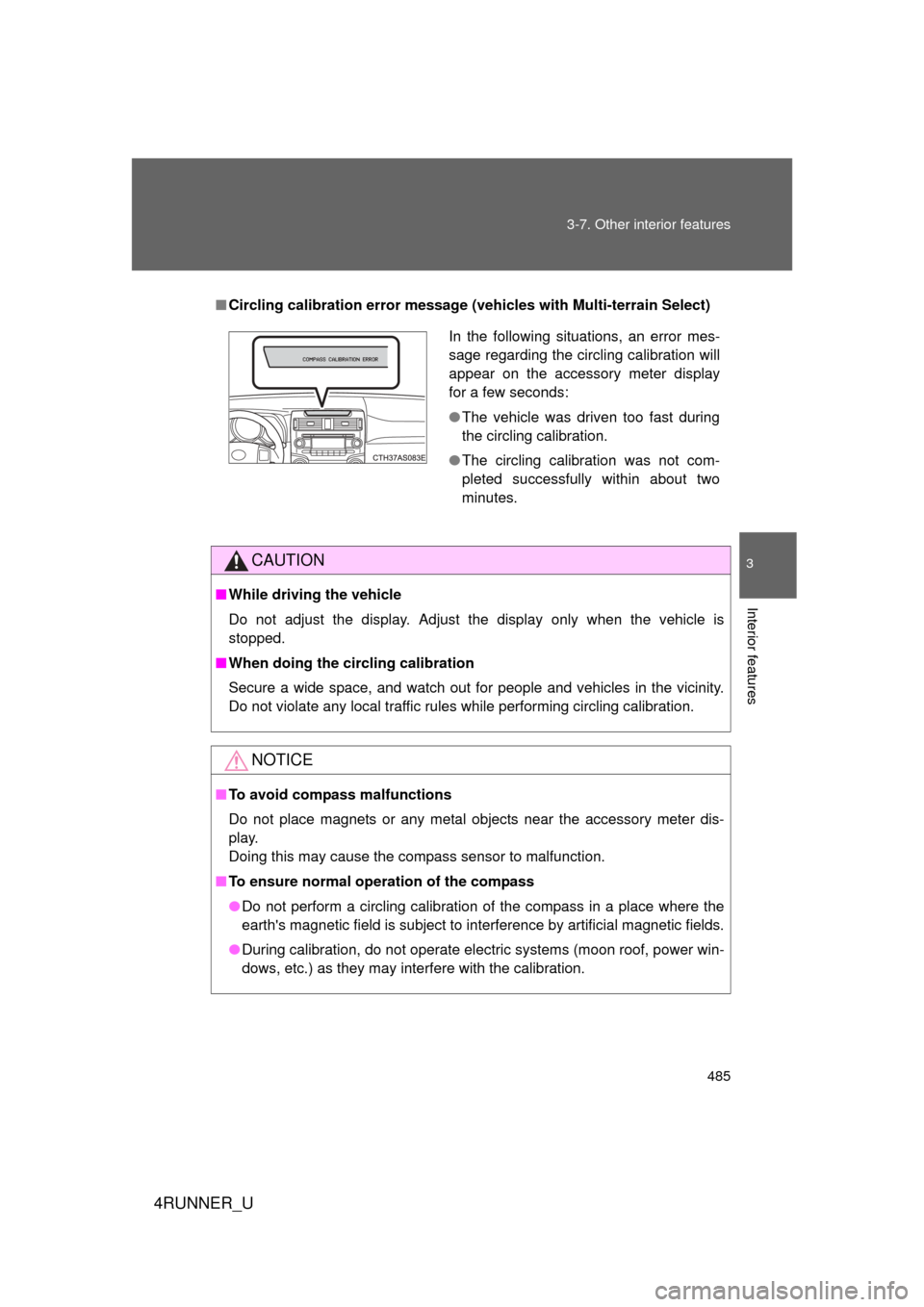
Circling calibration error message (vehicles with Multi-terrain Select)
CAUTION
■While driving the vehicle
Do not adjust the display. Adjust the display only when the vehicle is
stopped.
■ When doing the circling calibration
Secure a wide space, and watch out for people and vehicles in the vicinity.
Do not violate any local traffic rules while performing circling calibration.
NOTICE
■To avoid compass malfunctions
Do not place magnets or any metal objects near the accessory meter dis-
play.
Doing this may cause the compass sensor to malfunction.
■ To ensure normal operation of the compass
● Do not perform a circling calibration of the compass in a place where the
earth's magnetic field is subject to interference by artificial magnetic fields.
● During calibration, do not operate electric systems (moon roof, power win-
dows, etc.) as they may interfere with the calibration.
In the following situations, an error mes-
sage regarding the circling calibration will
appear on the accessory meter display
for a few seconds:
●The vehicle was driven too fast during
the circling calibration.
● The circling calibration was not com-
pleted successfully within about two
minutes.
Page 565 of 704
565
4-3. Do-it-yourself maintenance
4
Maintenance and care
4RUNNER_U
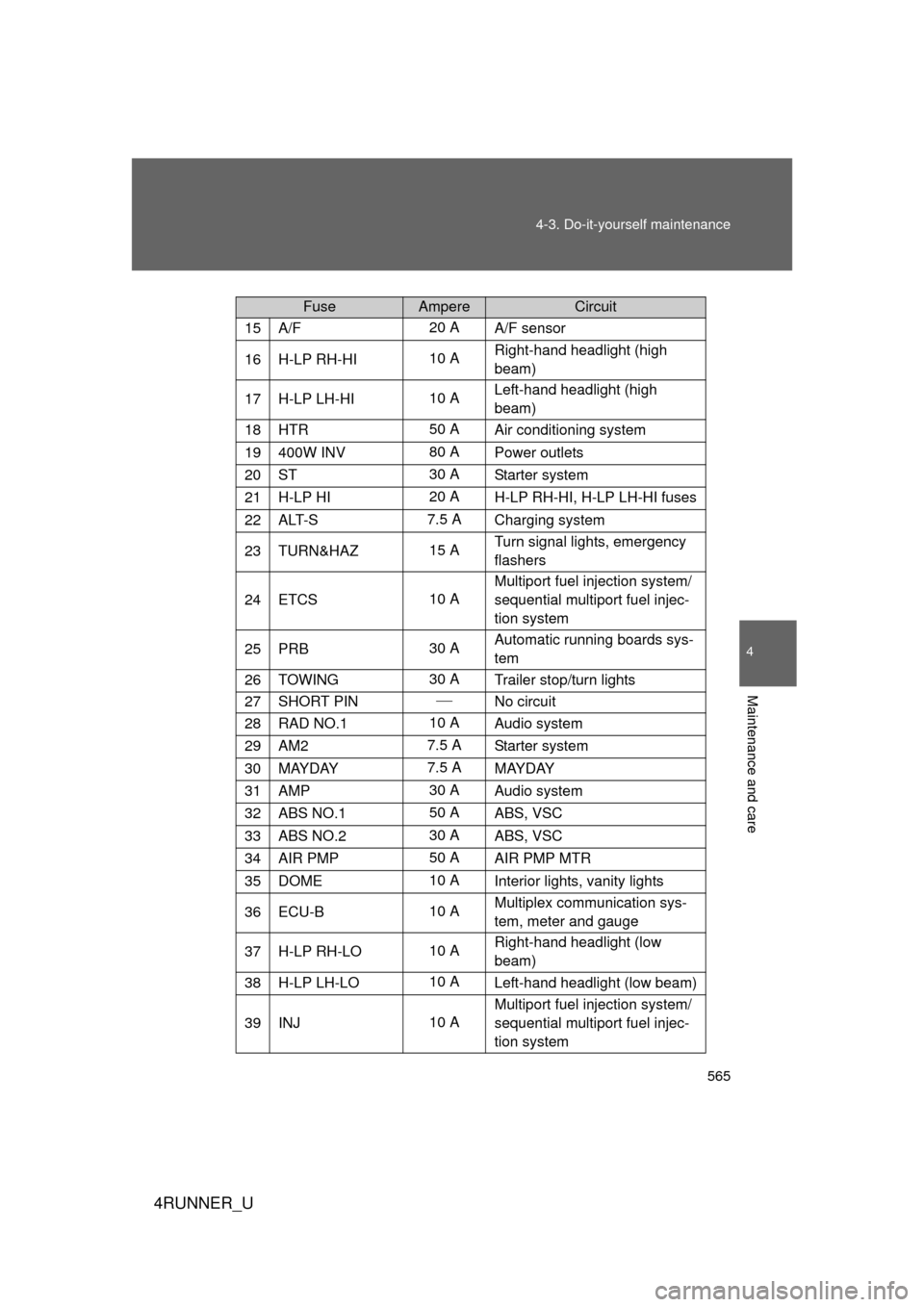
15A/F20 A
A/F sensor
16H-LP RH-HI10 ARight-hand headlight (high
beam)
17H-LP LH-HI10 ALeft-hand headlight (high
beam)
18HTR50 A
Air conditioning system
19400W INV 80 APower outlets
20ST30 A
Starter system
21H-LP HI20 AH-LP RH-HI, H-LP LH-HI fuses
22ALT-S7.5 A Charging system
23TURN&HAZ15 ATurn signal lights, emergency
flashers
24ETCS10 AMultiport fuel injection system/
sequential multiport fuel injec-
tion system
25PRB30 A
Automatic running boards sys-
tem
26TOWING30 A
Trailer stop/turn lights
27SHORT PIN
No circuit
28RAD NO.1 10 A Audio system
29AM27.5 A Starter system
30MAYDAY 7.5 A
MAYDAY
31AMP30 AAudio system
32ABS NO.150 AABS, VSC
33ABS NO.230 A
ABS, VSC
34AIR PMP50 AAIR PMP MTR
35DOME10 AInterior lights, vanity lights
36ECU-B10 AMultiplex communication sys-
tem, meter and gauge
37H-LP RH-LO10 ARight-hand headlight (low
beam)
38H-LP LH-LO10 A
Left-hand headlight (low beam)
39INJ10 AMultiport fuel injection system/
sequential multiport fuel injec-
tion system
FuseAmpereCircuit
Page 567 of 704
567
4-3. Do-it-yourself maintenance
4
Maintenance and care
4RUNNER_U
■
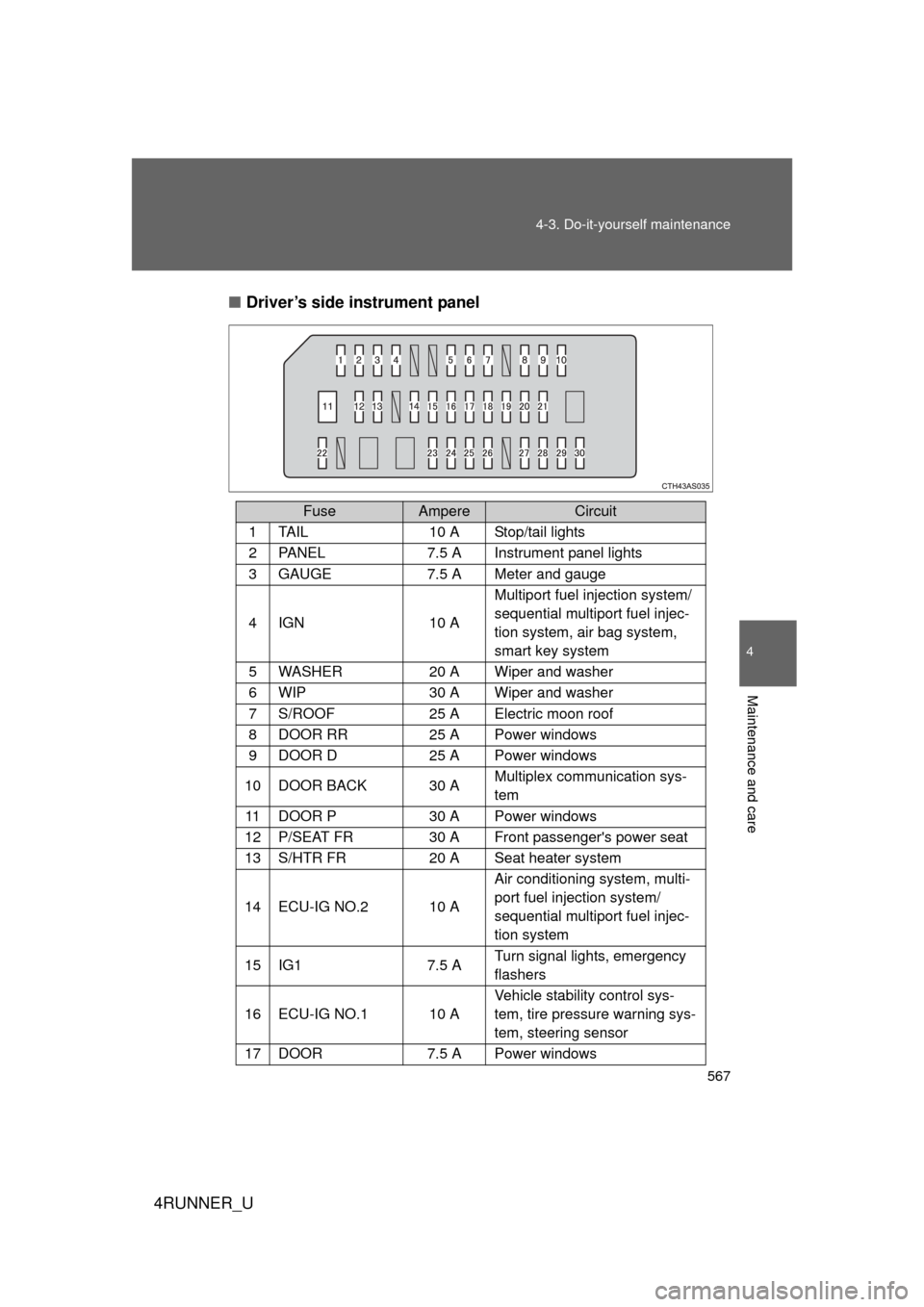
Driver’s side instrument panel
FuseAmpereCircuit
1TA I L10 A Stop/tail lights
2PA N E L7.5 A Instrument panel lights
3GAUGE7.5 A Meter and gauge
4IGN10 A Multiport fuel injection system/
sequential multiport fuel injec-
tion system, air bag system,
smart key system
5WASHER20 A Wiper and washer
6WIP30 A Wiper and washer
7S/ROOF 25 A Electric moon roof
8DOOR RR25 A Power windows
9DOOR D25 A Power windows
10DOOR BACK30 A
Multiplex communication sys-
tem
11DOOR P30 A Power windows
12P/SEAT FR 30 A Front passenger's power seat
13S/HTR FR 20 A Seat heater system
14ECU-IG NO.210 AAir conditioning system, multi-
port fuel injection system/
sequential multiport fuel injec-
tion system
15IG17.5 A
Turn signal lights, emergency
flashers
16ECU-IG NO.110 AVehicle stability control sys-
tem, tire pressure warning sys-
tem, steering sensor
17DOOR7.5 A Power windows
Page 601 of 704
5
When trouble arises
601
5-2. Steps to take in an emergency
4RUNNER_U
■
SRS warning light
This warning light system monitors the airbag sensor assembly, front airbag
sensors, side and curtain shield airbag sensors, curtain shield airbag sen-
sors, floor sensor, driver's seat belt buckle switch, front passenger occupant
classification system (ECU and sensor s), SRS airbag on-off indicator, roll
sensing of curtain shield airbags off indicator, front passenger's seat belt
buckle switch, seat belt pretensioners and force limiters, airbags, intercon-
necting wiring and power sources. ( P. 121)
■ Key reminder buzzer (vehicl es without a smart key system)
The buzzer indicates that the key has not been removed with the engine off
and the driver’s door opened.
■ Open moon roof reminder buzzer (if equipped)
The buzzer indicates that the moon roof is not fully closed with the engine off
and the driver’s door opened.
■ Front passenger detection sensor, passenger seat belt reminder and
warning buzzer
● If luggage is placed on the front passenger seat, the front passenger
detection sensor may cause the warning light to flash and the warning
buzzer to sound even if a passenger is not sitting in the seat.
● If a cushion is placed on the seat, the sensor may not detect a passen-
ger, and the warning light may not operate properly.
■ If the malfunction indicator lamp comes on while driving
First check the following:
● Is the fuel tank empty?
If it is, fill the fuel tank immediately.
● Is the fuel tank cap loose?
If it is, tighten it securely.
The light will go off after several driving trips.
If the light does not go off even after several trips, contact your Toyota dealer
as soon as possible.