4WD TOYOTA 4RUNNER 2013 N280 / 5.G Owners Manual
[x] Cancel search | Manufacturer: TOYOTA, Model Year: 2013, Model line: 4RUNNER, Model: TOYOTA 4RUNNER 2013 N280 / 5.GPages: 704, PDF Size: 11.56 MB
Page 3 of 704

1
2
3
4
5
6
7
4RUNNER_U
3
2-3. Operating the lights and wipers
Headlight switch .................. 203
Fog light switch ................... 209
Windshield wipers and washer .............................. 211
Rear window wiper and washer .............................. 214
2-4. Using other driving systems Cruise control ...................... 217
Intuitive parking assist......... 221
Rear view monitor system .............................. 226
Four-wheel drive system (part-time 4WD models).... 236
Four-wheel drive system (full-time 4WD models) ..... 241
Active traction control system .............................. 245
AUTO LSD system.............. 247
Rear differential lock system .............................. 250
Downhill assist control system .............................. 253
Crawl Control ...................... 256
Multi-terrain Select .............. 260
Driving assist systems ........ 268
2-5. Driving information Off-road precautions ........... 277
Cargo and luggage ............. 282
Vehicle load limits ............... 288
Winter driving tips ............... 290
Trailer towing ...................... 295
Dinghy towing ..................... 313 3-1. Using the air conditioning
system and defogger
Manual air conditioning system .............................. 316
Automatic air conditioning system .............................. 322
Rear window and outside rear view
mirror defoggers ............... 331
Windshield wiper de-icer .... 333
3-2. Using the audio system Audio system types ............ 334
Using the radio ................... 341
Using the CD player ........... 348
Playing MP3 and WMA discs ................................. 357
Operating an iPod .............. 365
Operating a USB memory ............................ 372
Optimal use of the audio system .............................. 379
Using the AUX port............. 384
Using the steering wheel audio switches.................. 385
Detachable pole antenna ............................ 388
3Interior features
Page 18 of 704

4RUNNER_U
18
D
2WD models
CTHPIAS113Cup holders P. 452
Power outlets P. 464
Shift lock override button P. 622
Pictorial indexInstrument panel
AUX port
AUX port/USB port
P. 384
P. 365, 372, 384
Part-time 4WD models (type A)
CTHPIAS114
Power outlets P. 464
Front-wheel drive control lever
P. 236
Cup holders P. 452
Shift lock override button P. 622
AUX port
AUX port/USB port
P. 384
P. 365, 372, 384
Page 19 of 704
4RUNNER_U
19
D
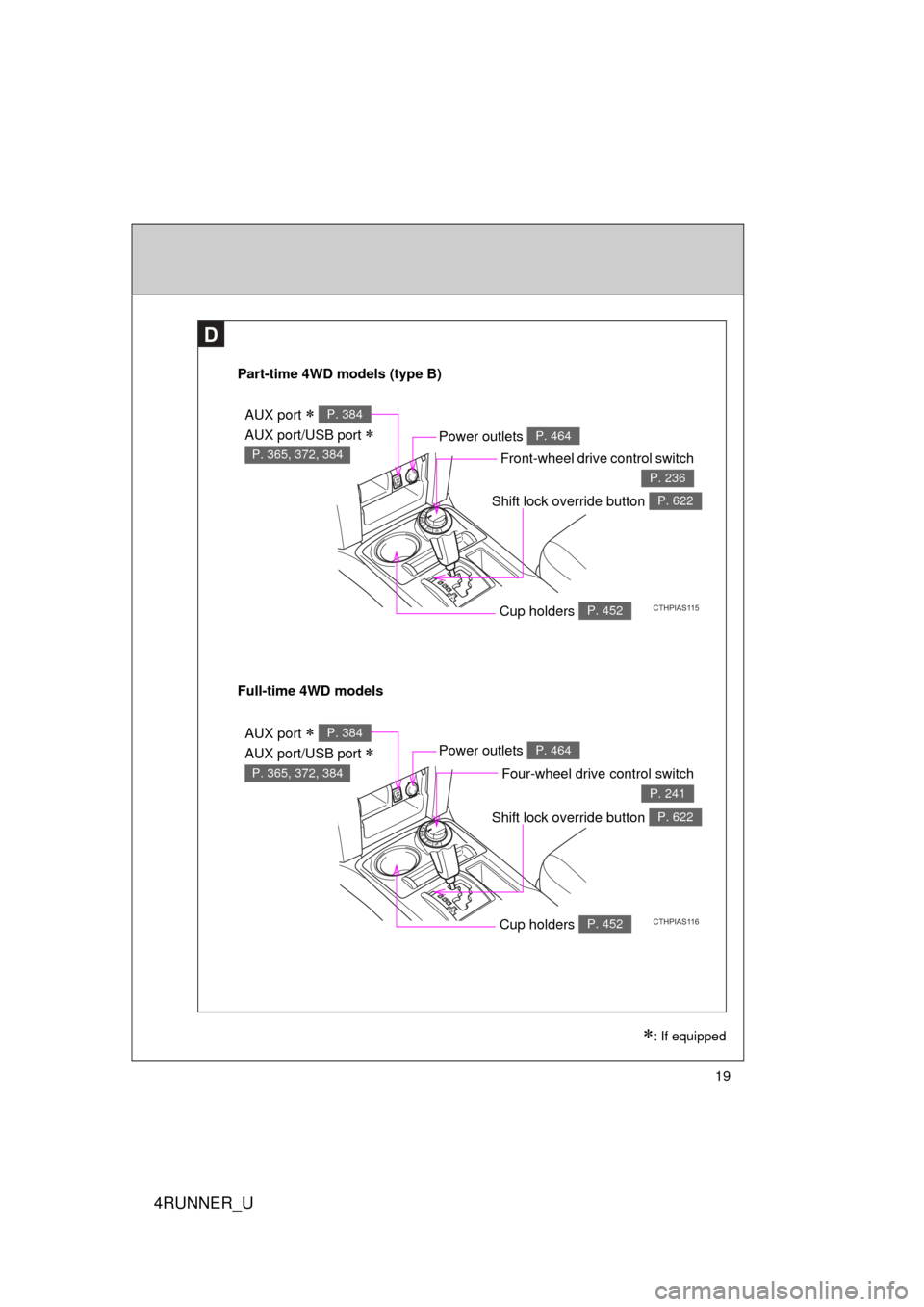
Part-time 4WD models (type B)
CTHPIAS115
Power outlets P. 464
Front-wheel drive control switch
P. 236
Cup holders P. 452
Shift lock override button P. 622
Full-time 4WD models
CTHPIAS116
Power outlets P. 464
Four-wheel drive control switch
P. 241
Cup holders P. 452
Shift lock override button P. 622
AUX port
AUX port/USB port
P. 384
P. 365, 372, 384
AUX port
AUX port/USB port
P. 384
P. 365, 372, 384
: If equipped
Page 159 of 704
When driving2
159
4RUNNER_U
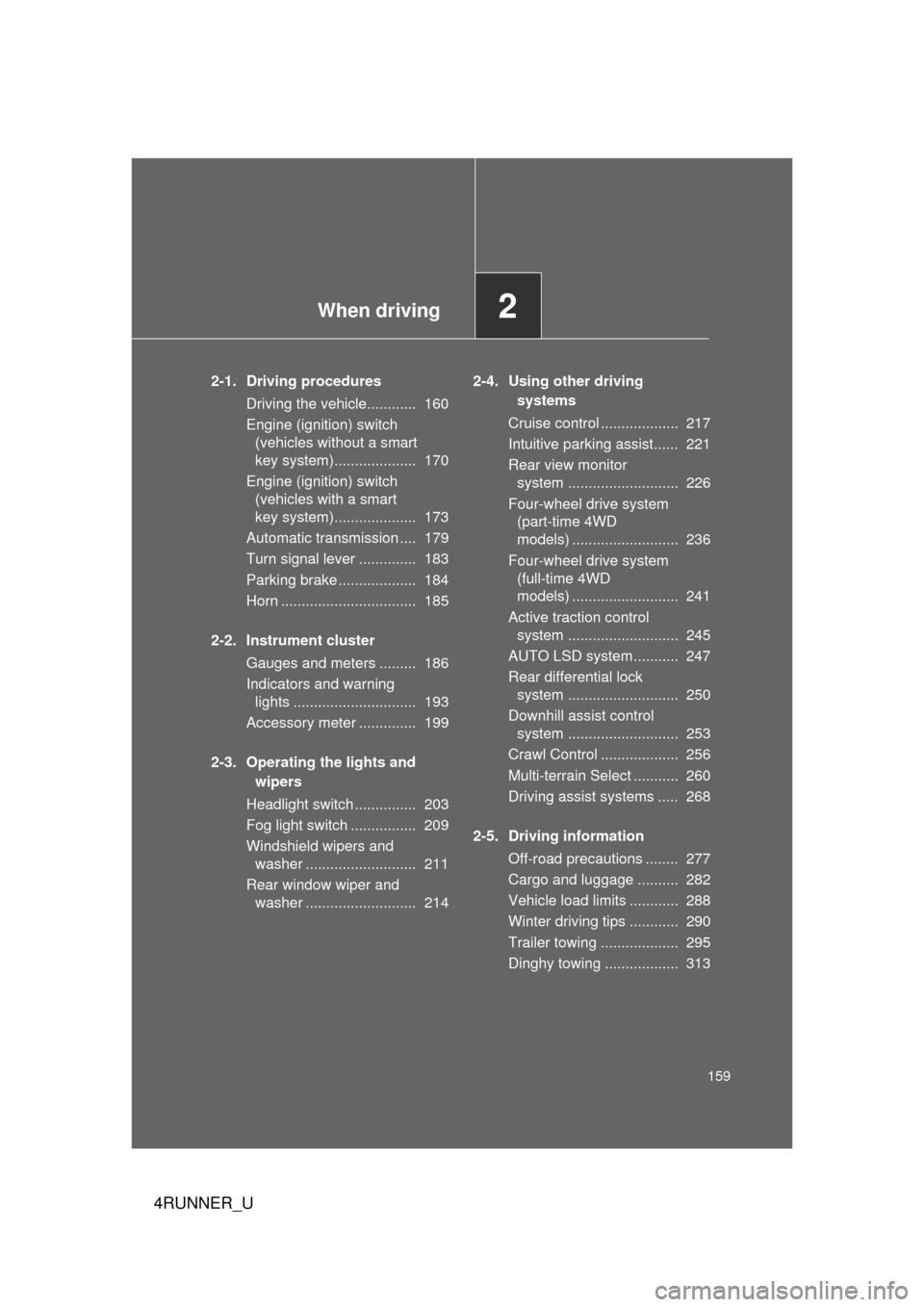
2-1. Driving proceduresDriving the vehicle............ 160
Engine (ignition) switch (vehicles without a smart
key system).................... 170
Engine (ignition) switch (vehicles with a smart
key system).................... 173
Automatic transmission .... 179
Turn signal lever .............. 183
Parking brake ................... 184
Horn ................................. 185
2-2. Instrument cluster Gauges and meters ......... 186
Indicators and warning lights .............................. 193
Accessory meter .............. 199
2-3. Operating the lights and wipers
Headlight switch ............... 203
Fog light switch ................ 209
Windshield wipers and washer ........................... 211
Rear window wiper and washer ........................... 214 2-4. Using other driving
systems
Cruise control ................... 217
Intuitive parking assist...... 221
Rear view monitor system ........................... 226
Four-wheel drive system (part-time 4WD
models) .......................... 236
Four-wheel drive system (full-time 4WD
models) .......................... 241
Active traction control system ........................... 245
AUTO LSD system........... 247
Rear differential lock system ........................... 250
Downhill assist control system ........................... 253
Crawl Control ................... 256
Multi-terrain Select ........... 260
Driving assist systems ..... 268
2-5. Driving information Off-road precautions ........ 277
Cargo and luggage .......... 282
Vehicle load limits ............ 288
Winter driving tips ............ 290
Trailer towing ................... 295
Dinghy towing .................. 313
Page 169 of 704
169
2-1. Driving procedures
2
When driving
4RUNNER_U
NOTICE
■
When encountering flooded roads
Do not drive on a road that has flooded after heavy rain etc. Doing so may
cause the following serious damage to the vehicle:
● Engine stalling
● Short in electrical components
● Engine damage caused by water immersion
In the event that you drive on a flooded road and the vehicle is flooded, be
sure to have your Toyota dealer check the following:
● Brake function
● Changes in quantity and quality of oil and fluid used for the engine, trans-
mission, transfer (4WD models), differentials, etc.
● Lubricant condition for the propeller shaft, bearings and suspension joints
(where possible), and the function of all joints, bearings, etc.
Page 219 of 704
219
2-4. Using other
driving systems
2
When driving
4RUNNER_U
■Cruise control can be set when
● The shift lever is in the D or range 4 or higher of S has been selected.
● Vehicle speed is above approximately 25 mph (40 km/h).
■ Accelerating after setting the vehicle speed
● The vehicle can be accelerated normally. After acceleration, the set
speed resumes.
● Even without canceling the cruise control, the set speed can be
increased by first accelerating the vehicle to the desired speed and then
pushing the lever down to set the new speed.
■ Automatic cruise control cancelation
Cruise control will stop maintaining the vehicle speed in any of the following
situations.
● Actual vehicle speed falls more than approximately 10 mph (16 km/h)
below the preset vehicle speed.
At this time, the memorized set speed is not retained.
● Actual vehicle speed is below approximately 25 mph (40 km/h).
● VSC is activated.
● The operation cannot be switched for 5 seconds or more after operating
the front-wheel drive control switch (p art-time 4WD models) or the four-
wheel drive control switch (full-time 4WD models).
■ If the cruise control indicator light flashes
Press the “ON-OFF” button once to deactivate the system, and then press
the button again to reactivate the system.
If the cruise control speed cannot be set or if the cruise control cancels
immediately after being activated, there may be a malfunction in the cruise
control system. Have the vehicle inspected by your Toyota dealer.
Page 236 of 704
236
2-4. Using other driving systems
4RUNNER_U
Four-wheel drive system (par t-time 4WD models)
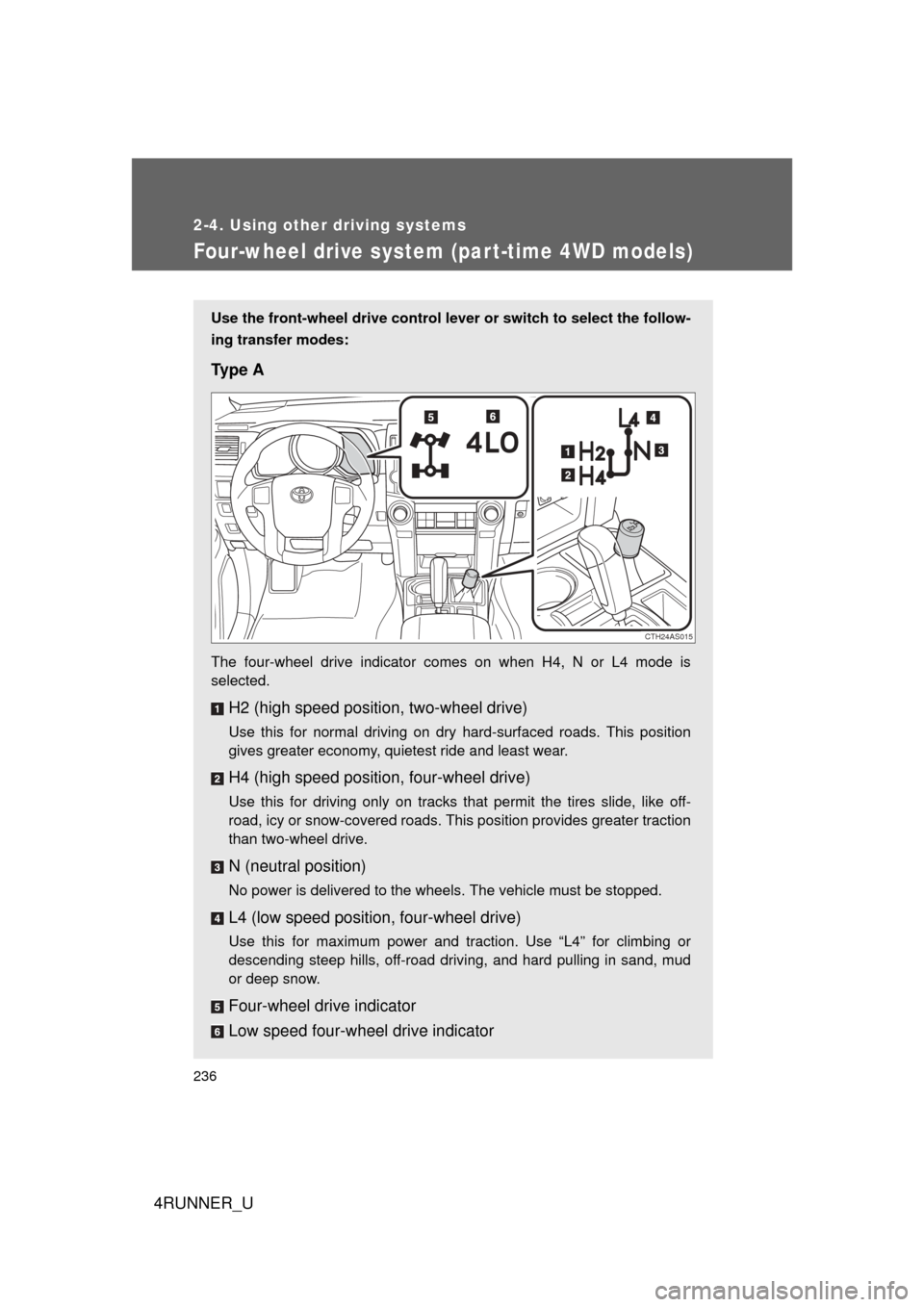
Use the front-wheel drive control lever or switch to select the follow-
ing transfer modes:
Ty p e A
The four-wheel drive indicator comes on when H4, N or L4 mode is
selected.
H2 (high speed position, two-wheel drive)
Use this for normal driving on dry hard-surfaced roads. This position
gives greater economy, quietest ride and least wear.
H4 (high speed position, four-wheel drive)
Use this for driving only on tracks that permit the tires slide, like off-
road, icy or snow-covered roads. This position provides greater traction
than two-wheel drive.
N (neutral position)
No power is delivered to the wheels. The vehicle must be stopped.
L4 (low speed position, four-wheel drive)
Use this for maximum power and traction. Use “L4” for climbing or
descending steep hills, off-road driving, and hard pulling in sand, mud
or deep snow.
Four-wheel drive indicator
Low speed four-wheel drive indicator
CTH24AS015
Page 241 of 704
241
2-4. Using other driving systems
2
When driving
4RUNNER_U
Four-wheel drive system (full-time 4WD models)
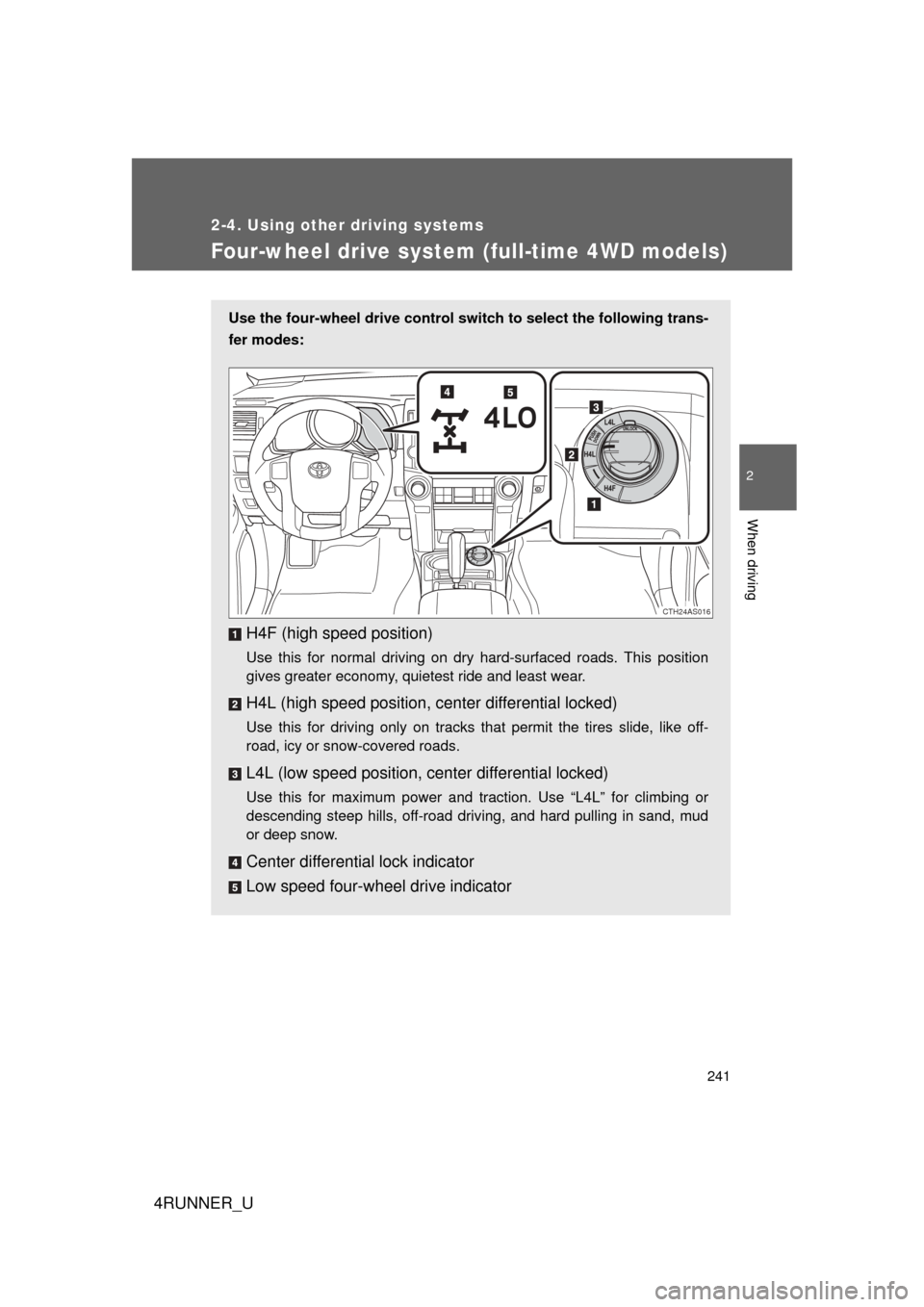
Use the four-wheel drive control switch to select the following trans-
fer modes:
H4F (high speed position)
Use this for normal driving on dry hard-surfaced roads. This position
gives greater economy, quietest ride and least wear.
H4L (high speed position, c enter differential locked)
Use this for driving only on tracks that permit the tires slide, like off-
road, icy or snow-covered roads.
L4L (low speed position, center differential locked)
Use this for maximum power and traction. Use “L4L” for climbing or
descending steep hills, off-road driving, and hard pulling in sand, mud
or deep snow.
Center differential lock indicator
Low speed four-wheel drive indicator
CTH24AS016
Page 245 of 704
245
2-4. Using other driving systems
2
When driving
4RUNNER_U
Active traction control system
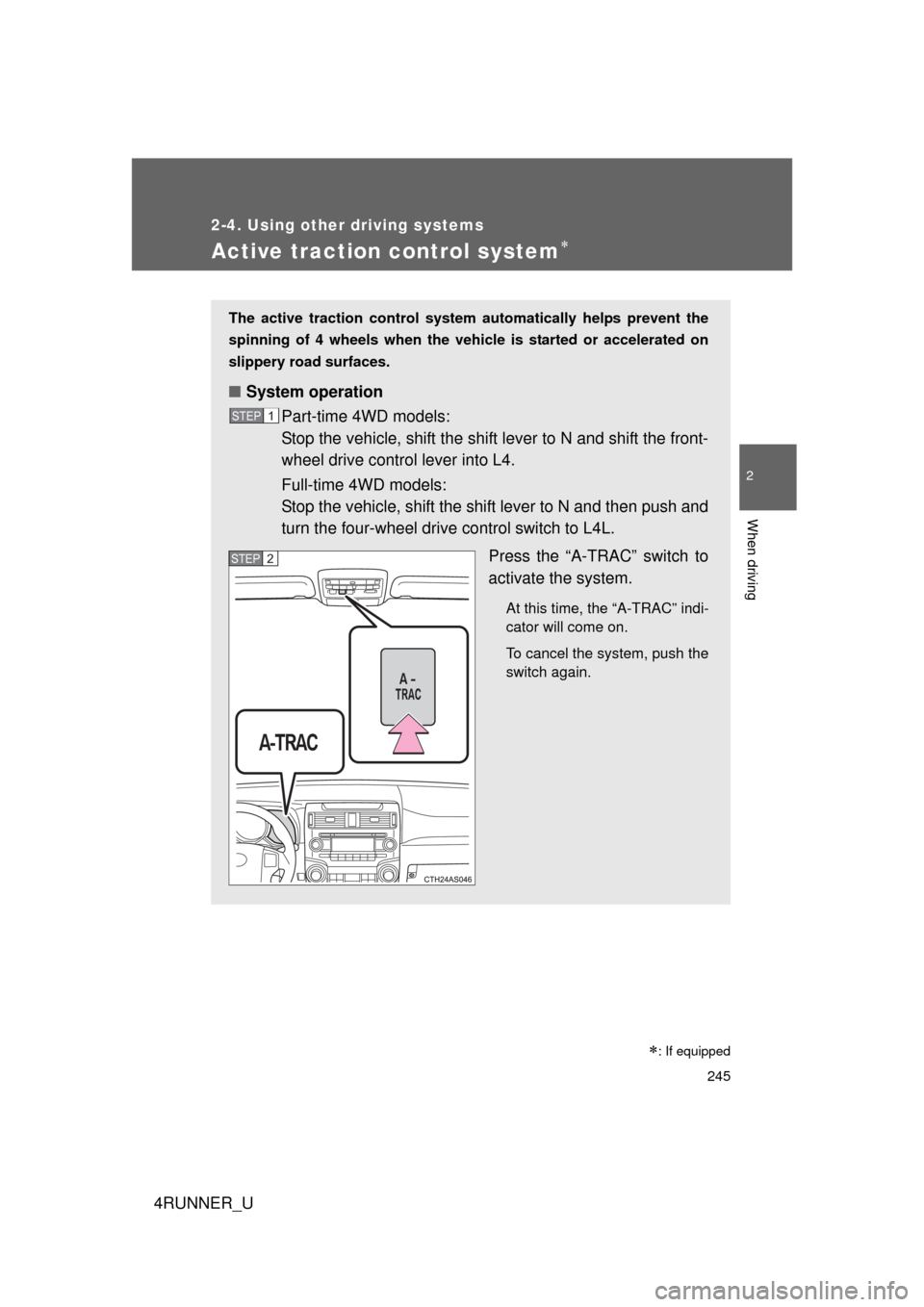
The active traction control system automatically helps prevent the
spinning of 4 wheels when the vehicle is started or accelerated on
slippery road surfaces.
■ System operation
Part-time 4WD models:
Stop the vehicle, shift the shift lever to N and shift the front-
wheel drive control lever into L4.
Full-time 4WD models:
Stop the vehicle, shift the shift lever to N and then push and
turn the four-wheel drive control switch to L4L.
Press the “A-TRAC” switch to
activate the system.
At this time, the “A-TRAC” indi-
cator will come on.
To cancel the system, push the
switch again.
STEP 1
STEP 2
: If equipped
Page 253 of 704
253
2-4. Using other driving systems
2
When driving
4RUNNER_U
Downhill assist control system
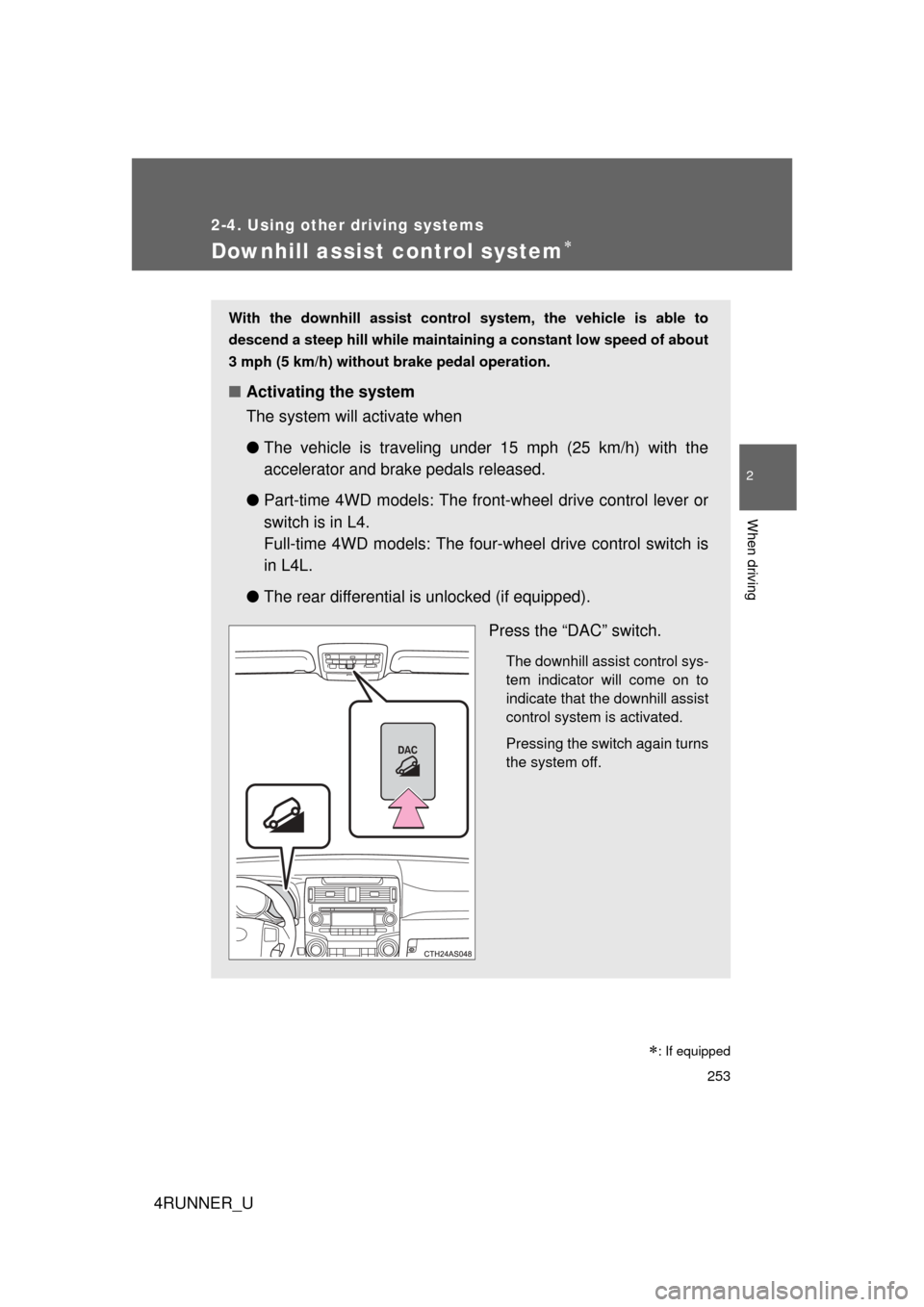
With the downhill assist control system, the vehicle is able to
descend a steep hill while maintaining a constant low speed of about
3 mph (5 km/h) without brake pedal operation.
■ Activating the system
The system will activate when
●The vehicle is traveling under 15 mph (25 km/h) with the
accelerator and brake pedals released.
● Part-time 4WD models: The front -wheel drive control lever or
switch is in L4.
Full-time 4WD models: The fou r-wheel drive control switch is
in L4L.
● The rear differential is unlocked (if equipped).
Press the “DAC” switch.
The downhill assist control sys-
tem indicator will come on to
indicate that the downhill assist
control system is activated.
Pressing the switch again turns
the system off.
: If equipped