lock TOYOTA 4RUNNER 2014 N280 / 5.G Owners Manual
[x] Cancel search | Manufacturer: TOYOTA, Model Year: 2014, Model line: 4RUNNER, Model: TOYOTA 4RUNNER 2014 N280 / 5.GPages: 530, PDF Size: 9.97 MB
Page 237 of 530
2354-5. Using the driving support systems
4
Driving
4RUNNER (U)_(OM35A83U)■
Shifting from L4 to H4
Stop the vehicle completely and continue to depress the brake
pedal.
Shift the shift lever to N.
Ty p e A
Shift the front-wheel drive control lever to H4.
Ty p e BPush the “UNLOCK” button and turn the front-wheel drive control
switch to H4.
The low speed four-wheel drive indicator will go off.
■When the front-wheel drive control lever or switch is shifted to L4
VSC and TRAC are automatically turned off.
■ If the four-wheel drive indicator flashes
The transfer mode may not successfully change. Drive straight ahead while
accelerating or decelerating, or drive in reverse.
■ If the low speed four-wheel dr ive indicator continues to flash
The transfer mode may not successfully change. Operate the four-wheel
drive control switch again.
■ If the low speed four-wheel drive indicator continues to flash and a
buzzer sounds
The shift lever is not in N and/or the vehicle is moving. Stop the vehicle com-
pletely, shift the shift lever to N and make sure that the indicator stops flash-
ing.
■ If the four-wheel drive or low speed four-wheel drive indicator flashes
rapidly
There may be a malfunction in the four-wheel drive system. Have the vehicle
inspected by your Toyota dealer immediately.
■ Four-wheel drive usage frequency
You should drive in four-wheel drive for at least 10 miles (16 km) each month.
This will assure that the front drive components are lubricated.
CAUTION
■Shifting the front-wheel drive contro l lever or switch from H2 to H4
while driving
Never operate the front-wheel drive control lever or switch if the wheels are
slipping.
Stop the slipping or spinning before shifting.
1
2
3
3
Page 238 of 530
2364-5. Using the driving support systems
4RUNNER (U)_(OM35A83U)
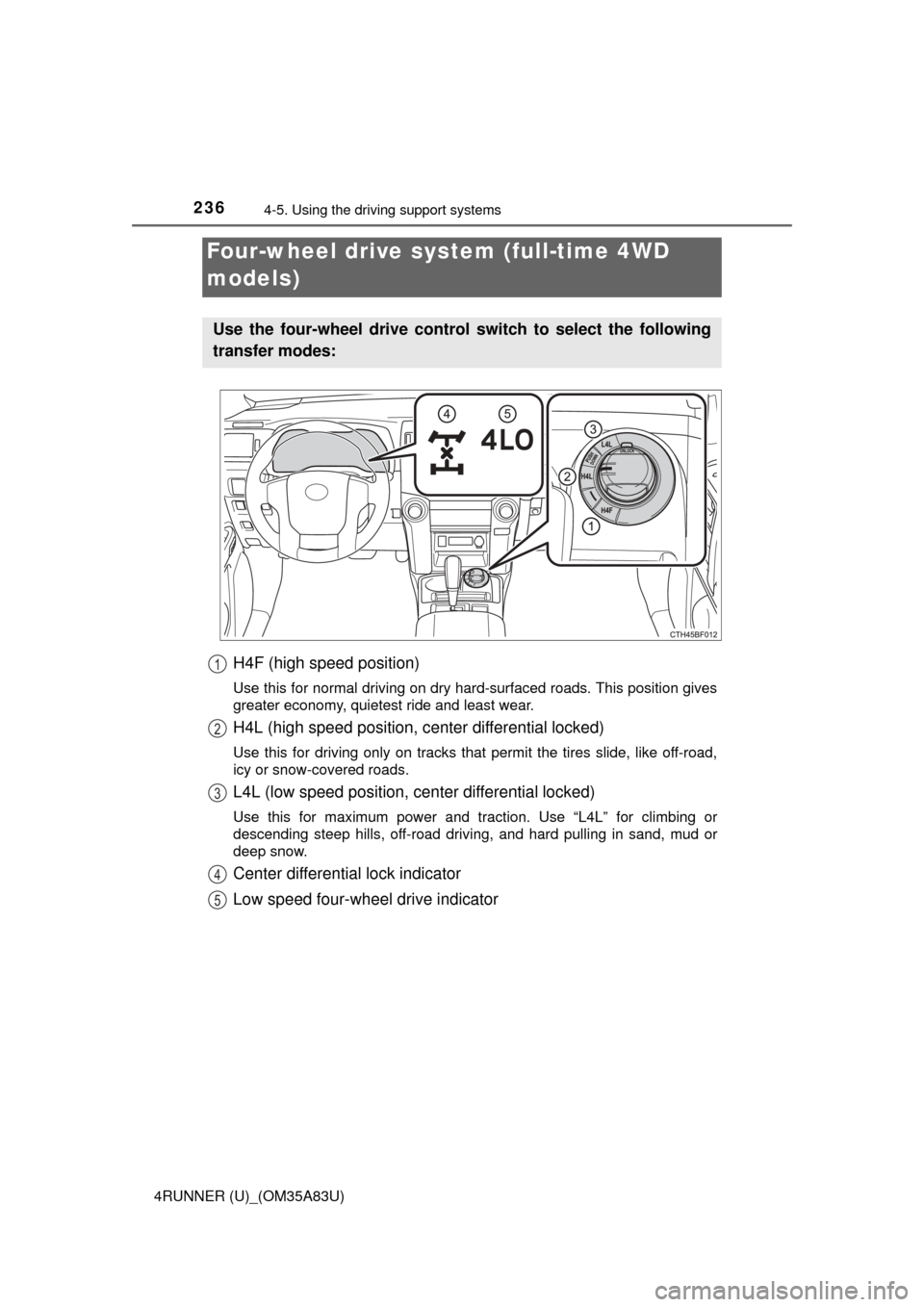
H4F (high speed position)
Use this for normal driving on dry hard-surfaced roads. This position gives
greater economy, quietest ride and least wear.
H4L (high speed position, center differential locked)
Use this for driving only on tracks that permit the tires slide, like off-road,
icy or snow-covered roads.
L4L (low speed position, center differential locked)
Use this for maximum power and traction. Use “L4L” for climbing or
descending steep hills, off-road driving, and hard pulling in sand, mud or
deep snow.
Center differential lock indicator
Low speed four-wheel drive indicator
Four-wheel drive system (full-time 4WD
models)
Use the four-wheel drive control switch to select the following
transfer modes:
1
2
3
4
5
Page 239 of 530
2374-5. Using the driving support systems
4
Driving
4RUNNER (U)_(OM35A83U)
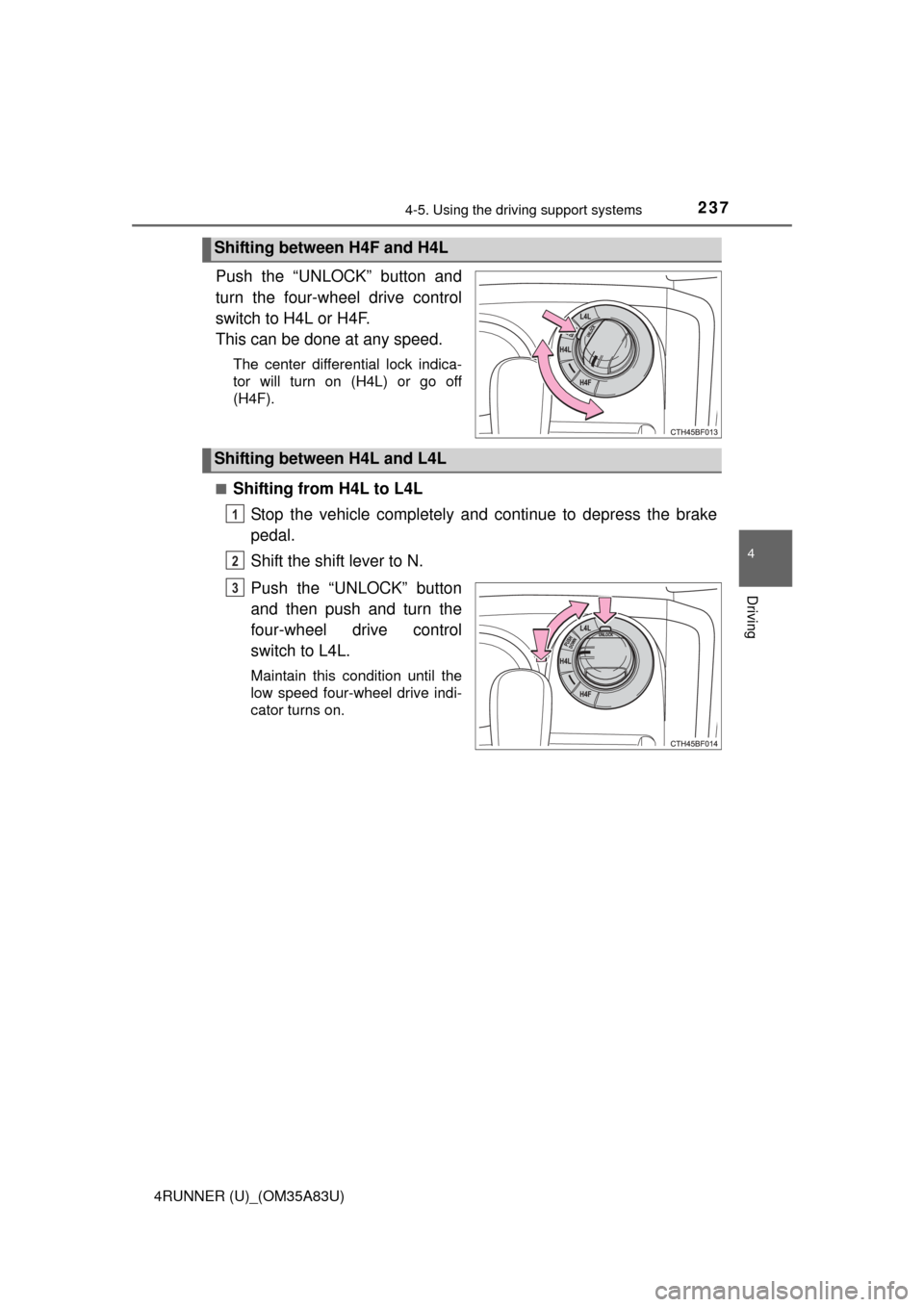
Push the “UNLOCK” button and
turn the four-wheel drive control
switch to H4L or H4F.
This can be done at any speed.
The center differential lock indica-
tor will turn on (H4L) or go off
(H4F).
■
Shifting from H4L to L4L Stop the vehicle completely and continue to depress the brake
pedal.
Shift the shift lever to N.
Push the “UNLOCK” button
and then push and turn the
four-wheel drive control
switch to L4L.
Maintain this condition until the
low speed four-wheel drive indi-
cator turns on.
Shifting between H4F and H4L
Shifting between H4L and L4L
1
2
3
Page 240 of 530
2384-5. Using the driving support systems
4RUNNER (U)_(OM35A83U)■
Shifting from L4L to H4L
Stop the vehicle completely and continue to depress the brake
pedal.
Shift the shift lever to N.
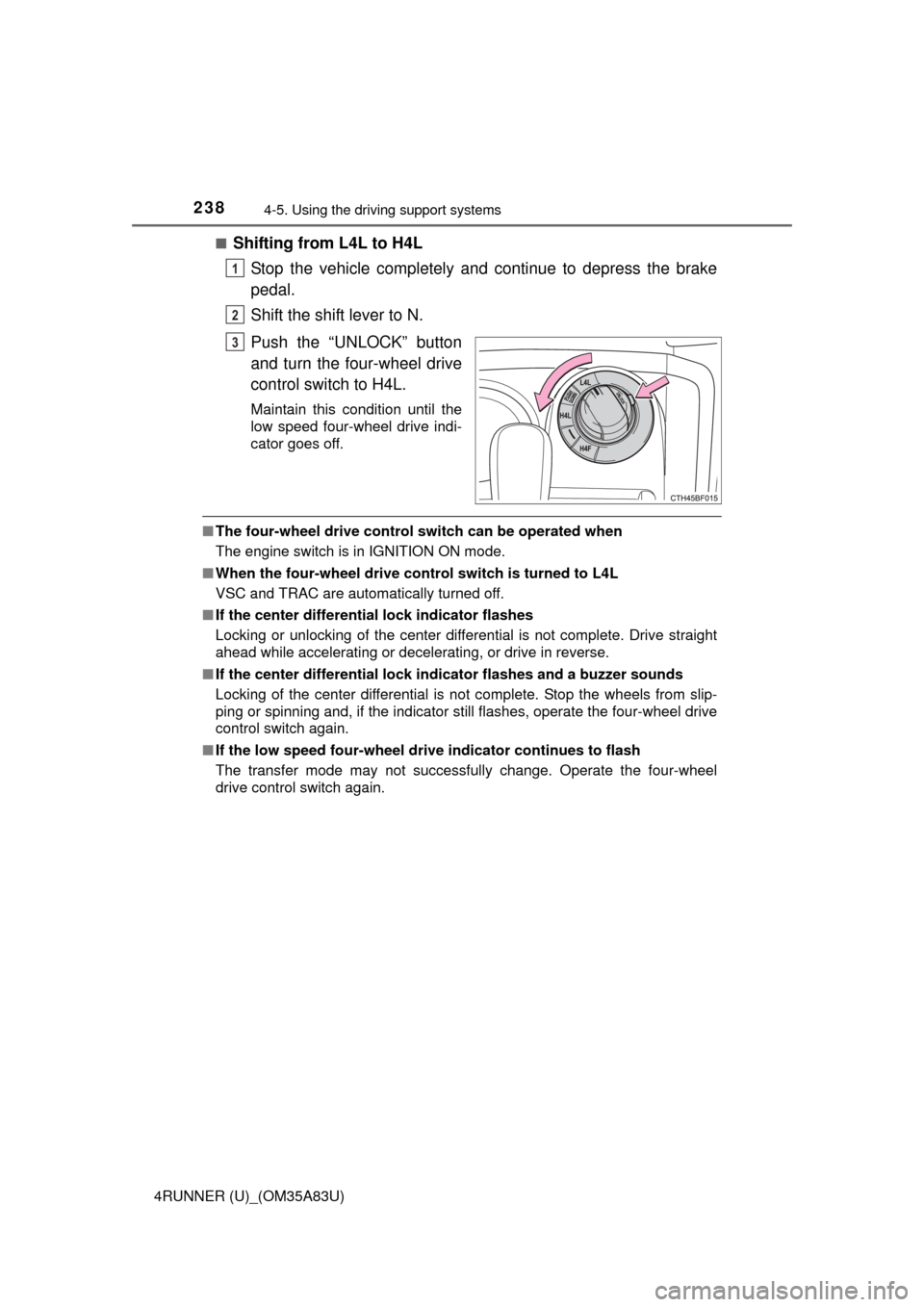
Push the “UNLOCK” button
and turn the four-wheel drive
control switch to H4L.
Maintain this condition until the
low speed four-wheel drive indi-
cator goes off.
■The four-wheel drive control switch can be operated when
The engine switch is in IGNITION ON mode.
■ When the four-wheel drive cont rol switch is turned to L4L
VSC and TRAC are automatically turned off.
■ If the center differential lock indicator flashes
Locking or unlocking of the center differential is not complete. Drive straight
ahead while accelerating or decelerating, or drive in reverse.
■ If the center differential lock in dicator flashes and a buzzer sounds
Locking of the center differential is not complete. Stop the wheels from slip-
ping or spinning and, if the indicator still flashes, operate the four-wheel drive
control switch again.
■ If the low speed four-wheel dr ive indicator continues to flash
The transfer mode may not successfully change. Operate the four-wheel
drive control switch again.
1
2
3
Page 241 of 530
2394-5. Using the driving support systems
4
Driving
4RUNNER (U)_(OM35A83U)■
If the low speed four-wheel drive indicator continues to flash and a
buzzer sounds
The shift lever is not in N and/or the vehicle is moving. Stop the vehicle com-
pletely, shift the shift lever to N and make sure that the indicator stops flash-
ing.
■ If the low speed four-wheel drive indi cator or the center differential lock
indicator flashes rapidly
There may be a malfunction in the four-wheel drive system. Have the vehicle
inspected by your Toyota dealer immediately.
CAUTION
■ Operating the four-wheel drive control switch
Never operate the four-wheel drive control switch if the wheels have lost
traction. Doing so may cause an accident resulting in death or serious
injury.
Stop the wheels from slipping or spinning before operating the switch.
NOTICE
■ To prevent damage to the center differential
● For normal driving on dry and hard surface roads, unlock the center differ-
ential.
● Unlock the center differential after the wheels are out of the ditch or off the
slippery or bumpy surface.
● Do not lock or unlock the center differential when the vehicle is turning or
when its wheels are spinning freely off the ground.
Page 243 of 530
2414-5. Using the driving support systems
4
Driving
4RUNNER (U)_(OM35A83U)
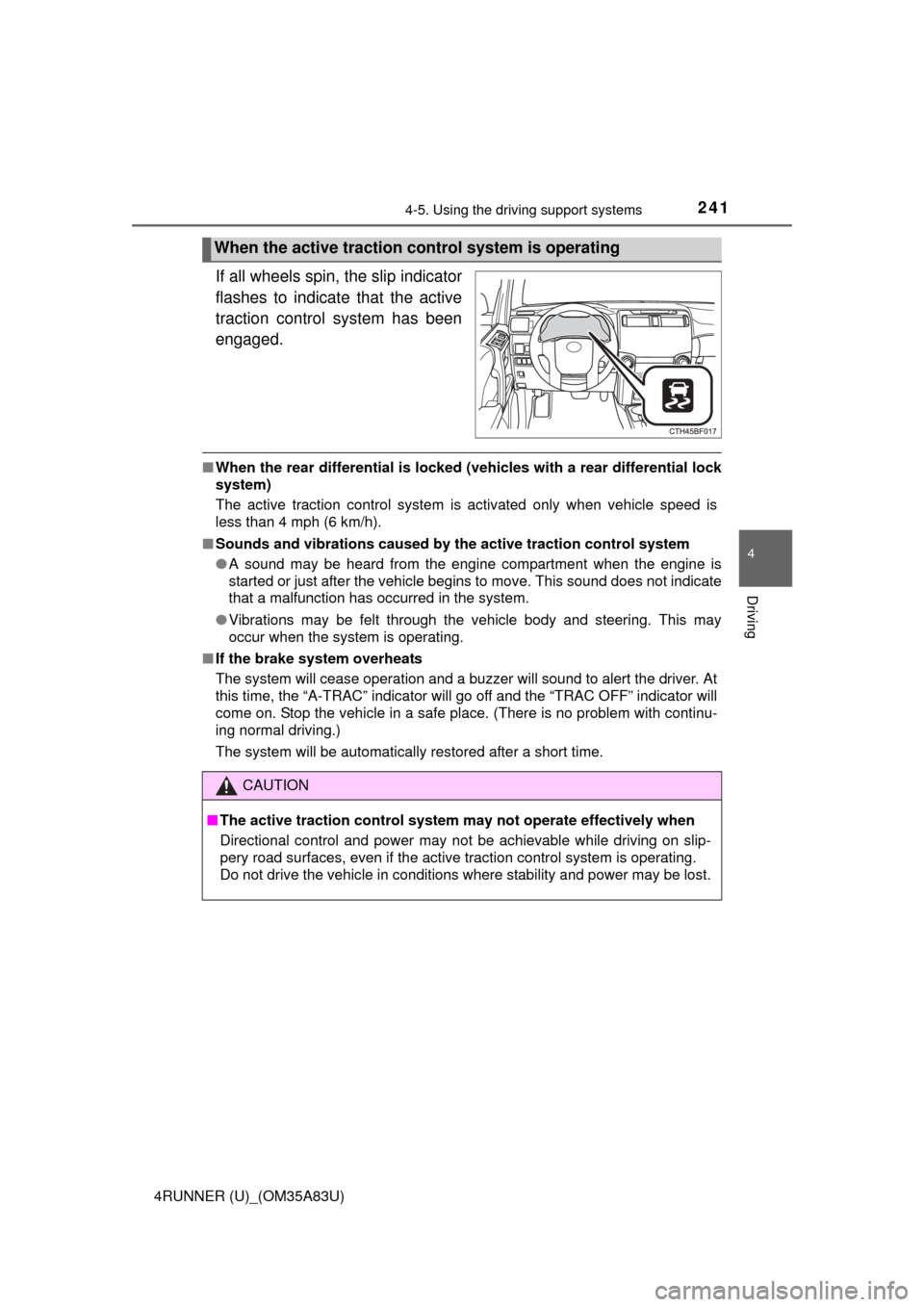
If all wheels spin, the slip indicator
flashes to indicate that the active
traction control system has been
engaged.
■ When the rear differential is locked (vehicles with a rear differential lock
system)
The active traction control system is activated only when vehicle speed is
less than 4 mph (6 km/h).
■ Sounds and vibrations caused by the active traction control system
● A sound may be heard from the engine compartment when the engine is
started or just after the vehicle begins to move. This sound does not indicate
that a malfunction has occurred in the system.
● Vibrations may be felt through the vehicle body and steering. This may
occur when the system is operating.
■ If the brake system overheats
The system will cease operation and a buzzer will sound to alert the driver. At
this time, the “A-TRAC” indicator will go off and the “TRAC OFF” indicator will
come on. Stop the vehicle in a safe place. (There is no problem with continu-
ing normal driving.)
The system will be automatically restored after a short time.
When the active traction control system is operating
CAUTION
■The active traction control system may not operate effectively when
Directional control and power may not be achievable while driving on slip-
pery road surfaces, even if the active traction control system is operat\
ing.
Do not drive the vehicle in conditions where stability and power may be lost.
Page 246 of 530
2444-5. Using the driving support systems
4RUNNER (U)_(OM35A83U)
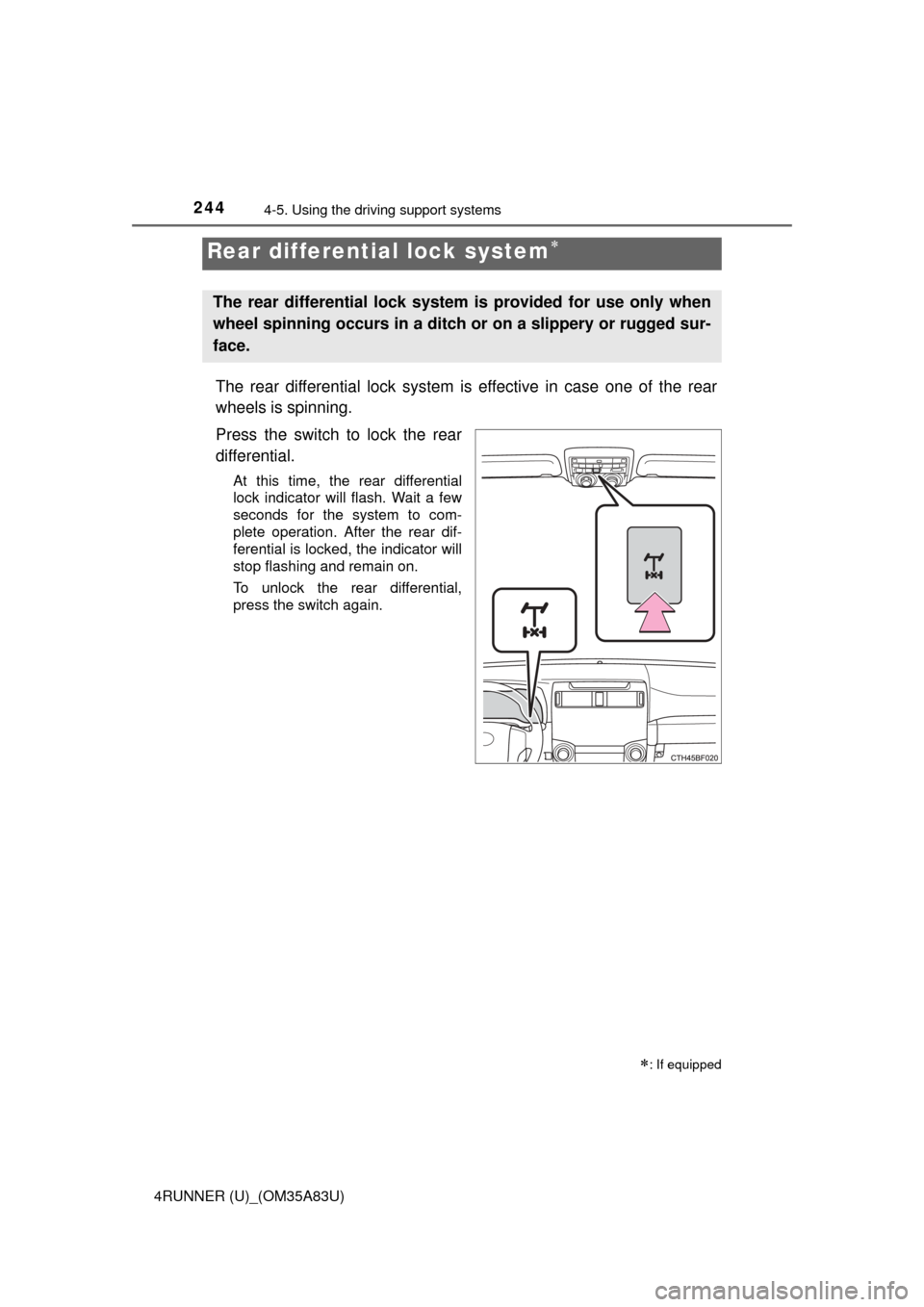
The rear differential lock system is effective in case one of the rear
wheels is spinning.
Press the switch to lock the rear
differential.
At this time, the rear differential
lock indicator will flash. Wait a few
seconds for the system to com-
plete operation. After the rear dif-
ferential is locked, the indicator will
stop flashing and remain on.
To unlock the rear differential,
press the switch again.
Rear differential lock system
: If equipped
The rear differential lock system is provided for use only when
wheel spinning occurs in a ditch or on a slippery or rugged sur-
face.
Page 247 of 530
2454-5. Using the driving support systems
4
Driving
4RUNNER (U)_(OM35A83U)
Before using the rear differential lock system:
Stop the vehicle, shift the shift lever to N and shift the front-wheel
drive control lever into L4 to see if this is sufficient. If this has no
effect, additionally use the rear differential lock system.
Be sure the wheels have stopped spinning.
Press the rear differential lock switch.
Gently depress the accelerator pedal.
After the rear differential is locked, the indicator will come on.
Unlock the rear differential as soon as the vehicle moves.
To unlock the rear differential, press the switch again.
■ Locking the rear differential
The following systems do not operate when the rear differential is locked. It is
normal operation for the ABS warning light and VSC OFF indicator to be on at
this time.
•ABS
• Multi Terrain ABS
• Brake assist system
•VSC
• Hill-start assist control
■ The rear differential lock is disengaged when
The front-wheel drive control lever or switch is shifted to H2 or H4.
Never forget to turn off the switch after using this feature.
■ After unlocking the rear differential
Check that the indicator goes off.
■ If the rear differential lock indicator flashes rapidly
There may be a malfunction in the rear differential lock system. Have the
vehicle inspected by your Toyota dealer immediately.
Using the rear differential lock system
1
2
3
4
Page 248 of 530

2464-5. Using the driving support systems
4RUNNER (U)_(OM35A83U)
CAUTION
■To avoid an accident
● Do not use the rear differential lock system except when wheel spinning
occurs in a ditch or on a slippery or rugged surface. Large steering effort
and careful cornering control will be required.
● Do not lock the rear differential until the wheels have stopped spinning.
Otherwise, the vehicle may move in an unexpected direction when the dif-
ferential lock is engaged, resulting in an accident. This may also lead to
possible damage to rear differential lock component parts.
● Do not drive over 5 mph (8 km/h) when the rear differential is locked.
● Do not keep driving with the rear differential lock switch on.
Page 249 of 530
2474-5. Using the driving support systems
4
Driving
4RUNNER (U)_(OM35A83U)■
Activating the system
The system will activate when
●
The vehicle is traveling under 15 mph (25 km/h) with the acceler-
ator and brake pedals released.
● Part-time 4WD models: The front-wheel drive control lever or
switch is in L4.
Full-time 4WD models: The four-wheel drive control switch is in
L4L.
● The rear differential is unlocked (if equipped).
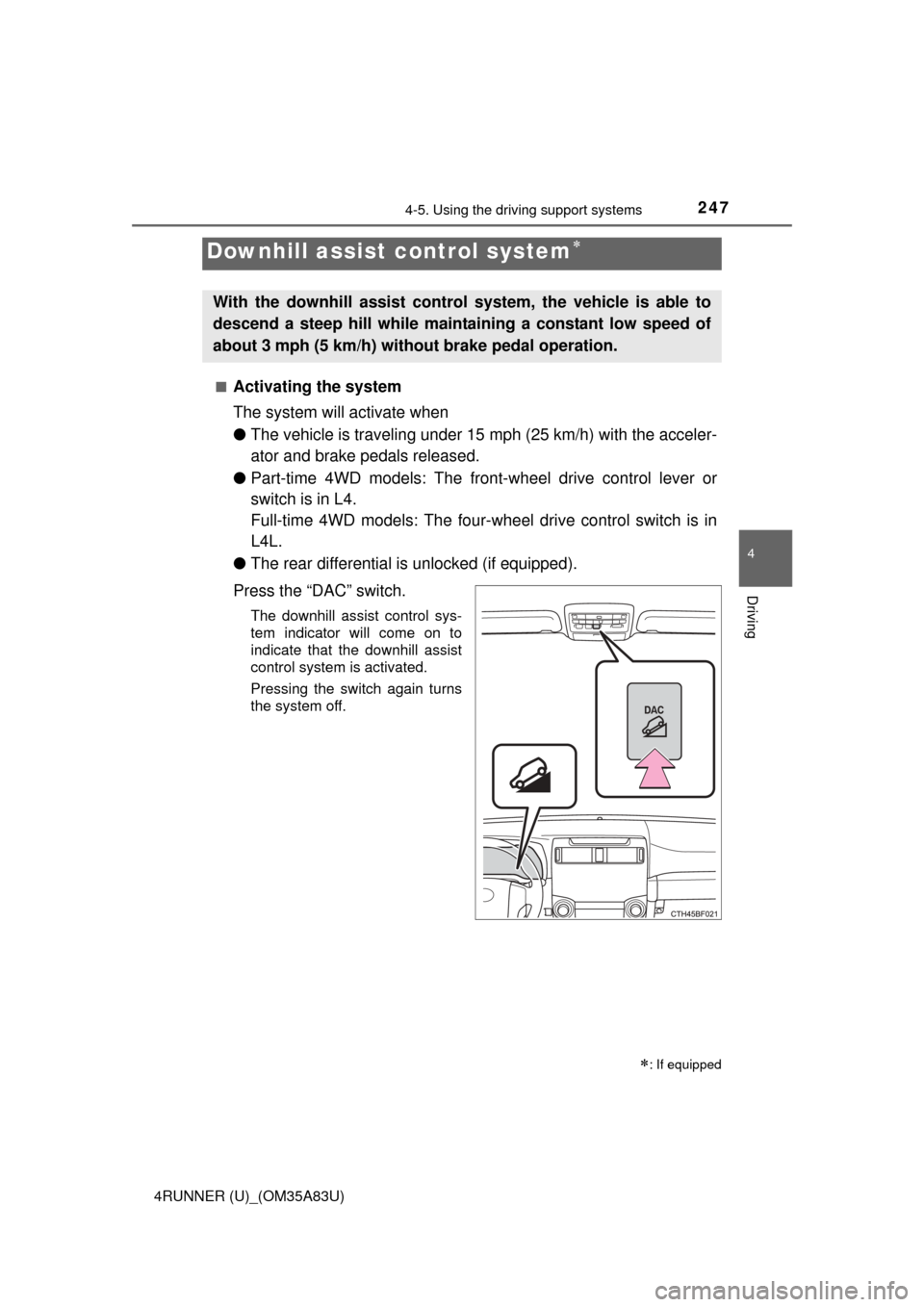
Press the “DAC” switch.
The downhill assist control sys-
tem indicator will come on to
indicate that the downhill assist
control system is activated.
Pressing the switch again turns
the system off.
Downhill assist control system
: If equipped
With the downhill assist control system, the vehicle is able to
descend a steep hill while maintaining a constant low speed of
about 3 mph (5 km/h) without brake pedal operation.