check engine TOYOTA 4RUNNER 2014 N280 / 5.G Owner's Manual
[x] Cancel search | Manufacturer: TOYOTA, Model Year: 2014, Model line: 4RUNNER, Model: TOYOTA 4RUNNER 2014 N280 / 5.GPages: 530, PDF Size: 9.97 MB
Page 198 of 530
1964-2. Driving procedures
4RUNNER (U)_(OM35A83U)
Stop the vehicle.
Shift the shift lever to P.
Set the parking brake. (P. 204)
Press the engine switch.
Release the brake pedal and check t hat the indicator on the engine
switch is off.
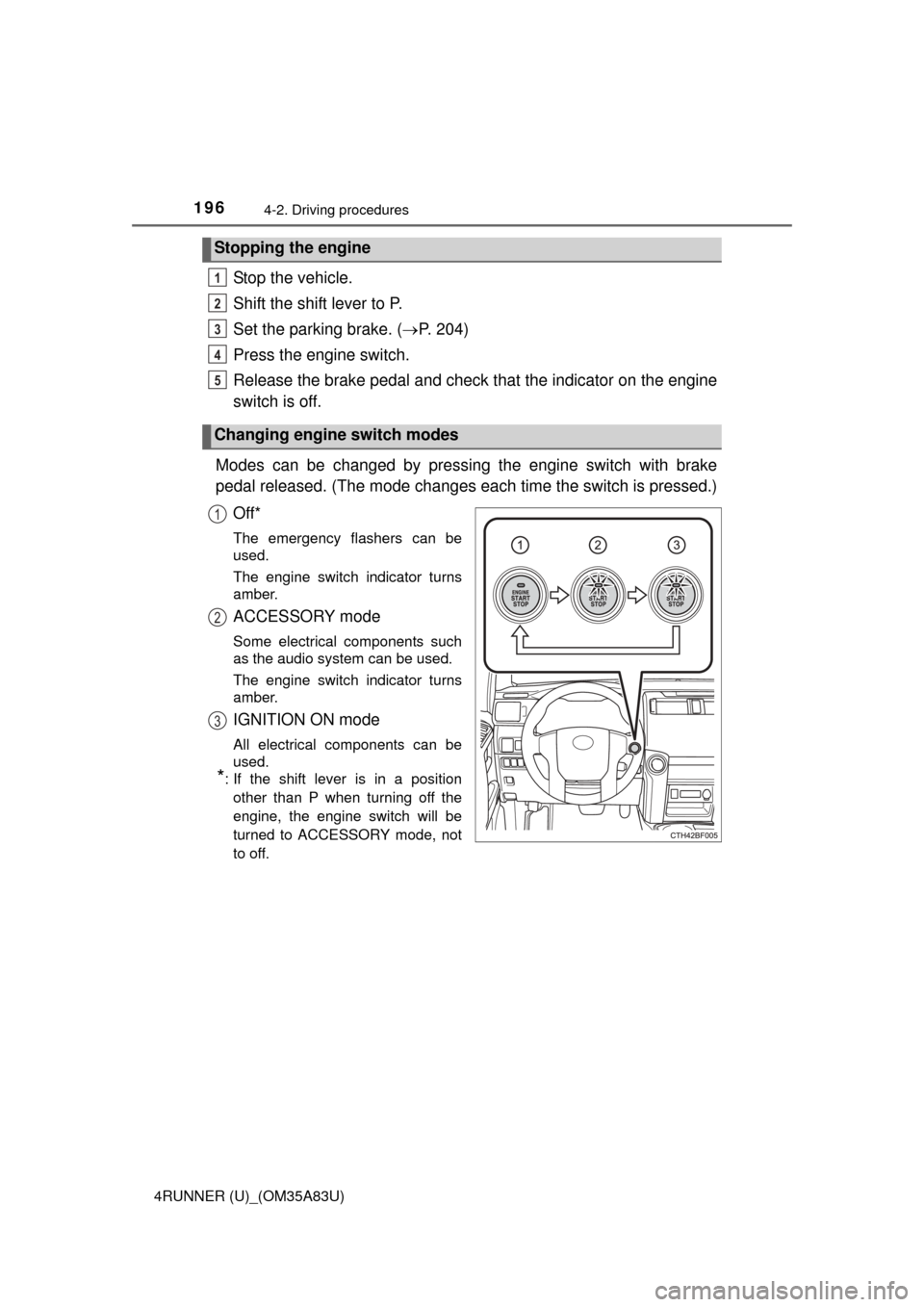
Modes can be changed by pressing the engine switch with brake
pedal released. (The mode changes ea ch time the switch is pressed.)
Off*
The emergency flashers can be
used.
The engine switch indicator turns
amber.
ACCESSORY mode
Some electrical components such
as the audio system can be used.
The engine switch indicator turns
amber.
IGNITION ON mode
All electrical components can be
used.
*: If the shift lever is in a position other than P when turning off the
engine, the engine switch will be
turned to ACCESSORY mode, not
to off.
Stopping the engine
Changing engine switch modes
1
2
3
4
5
1
2
3
Page 199 of 530
1974-2. Driving procedures
4
Driving
4RUNNER (U)_(OM35A83U)
If the engine is stopped with the shift lever in a position other than P,
the engine switch will not be turned off but instead be turned to
ACCESSORY mode. Perform the following procedure to turn the
switch off:
Check that the parking brake is set.
Shift the shift lever to P.
Check that the indicator on th e engine switch is illuminated in
amber and then press the engine switch once.
Check that the indicator on the engine switch is off.
■Auto power off function
If the vehicle is left in ACCESSORY mode for more than 20 minutes or IGNI-
TION ON mode (the engine is not running) for more than an hour with th\
e
shift lever in P, the engine switch will automatically turn off. However, this
function cannot entirely prevent battery discharge. Do not leave the vehicle
with the engine switch in ACCESSORY or IGNITION ON mode for long peri-
ods of time when the engine is not running.
■ Electronic key battery depletion
P. 9 7
■ Conditions affecting operation
P. 1 1 0
■ Notes for the entry function
P. 1 1 1
■ If the engine does not start
The engine immobilizer system may not have been deactivated. ( P. 70)
Contact your Toyota dealer.
■ Steering lock
After turning the engine switch off and opening and closing the doors, the
steering wheel will be locked due to the steering lock function. Operating the
engine switch again automatically cancels the steering lock.
When stopping the engine with the shift lever in a position other
than P
1
2
3
4
Page 201 of 530
1994-2. Driving procedures
4
Driving
4RUNNER (U)_(OM35A83U)
CAUTION
■When starting the engine
Always start the engine while sitting in the driver’s seat. Do not depress the
accelerator pedal while starting the engine under any circumstances.
Doing so may cause an accident resulting in death or serious injury.
■ Caution while driving
If engine failure occurs while the vehicle is moving, do not lock or open the
doors until the vehicle reaches a safe and complete stop. Activation of the
steering lock in this circumstance may lead to an accident, resulting in
death or serious injury.
■ Stopping the engine in an emergency
If you want to stop the engine in an emergency while driving the vehicle,
press and hold the engine switch for more than 2 seconds, or press it briefly
3 times or more in succession. ( P. 409)
However, do not touch the engine switch while driving except in an emer-
gency. Turning the engine off while driving will not cause loss of steering or
braking control, but the power assist to these systems will be lost. This will
make it more difficult to steer and brake, so you should pull over and stop
the vehicle as soon as it is safe to do so.
NOTICE
■ To prevent battery discharge
Do not leave the engine switch in ACCESSORY or IGNITION ON mode for
long periods of time without the engine running.
■ When starting the engine
● Do not race a cold engine.
● If the engine becomes difficult to star t or stalls frequently, have your vehi-
cle checked by your Toyota dealer immediately.
Page 205 of 530
2034-2. Driving procedures
4
Driving
4RUNNER (U)_(OM35A83U)
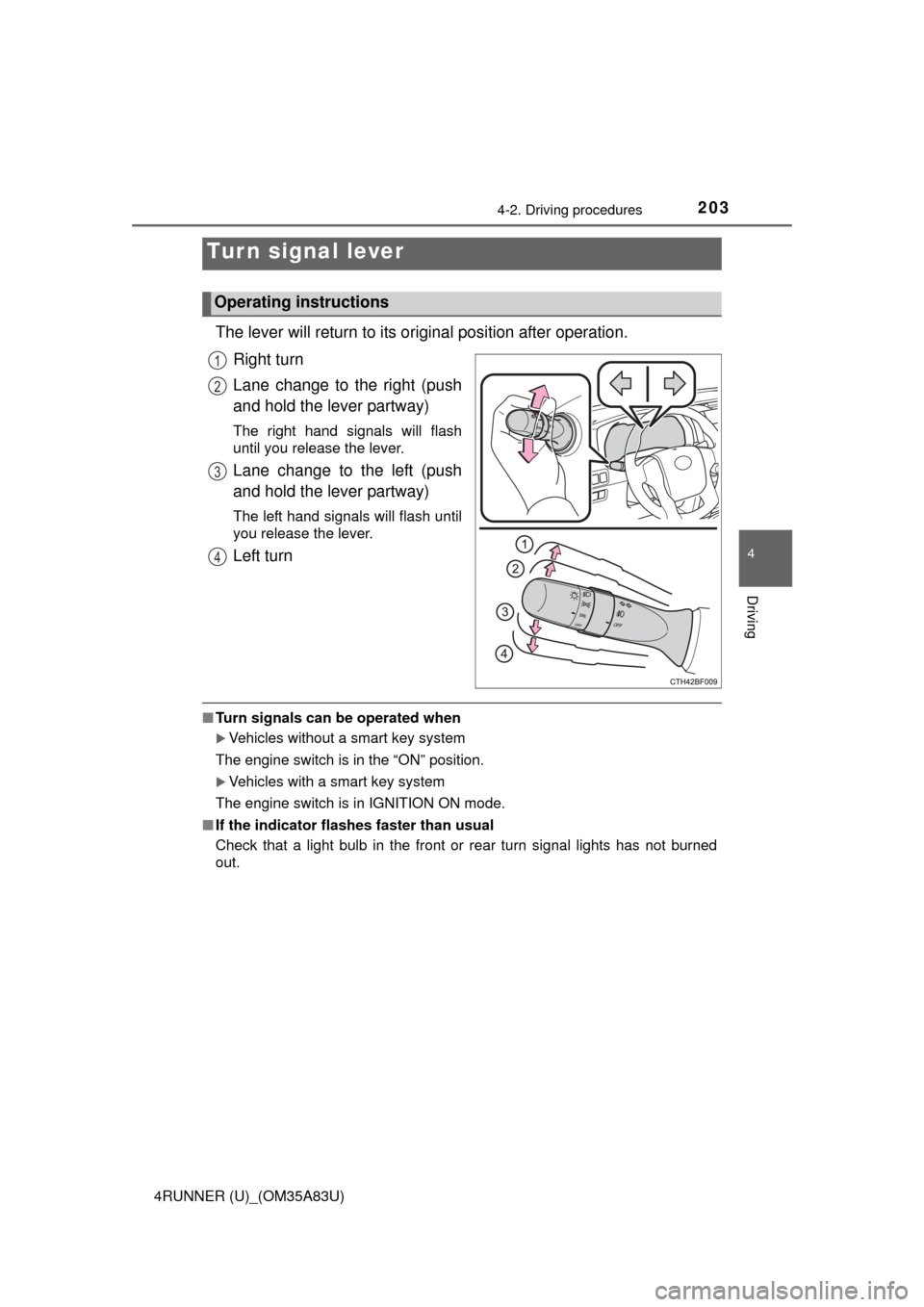
The lever will return to its original position after operation.
Right turn
Lane change to the right (push
and hold the lever partway)
The right hand signals will flash
until you release the lever.
Lane change to the left (push
and hold the lever partway)
The left hand signals will flash until
you release the lever.
Left turn
■ Turn signals can be operated when
Vehicles without a smart key system
The engine switch is in the “ON” position.
Vehicles with a smart key system
The engine switch is in IGNITION ON mode.
■ If the indicator flashes faster than usual
Check that a light bulb in the front or rear turn signal lights has not burned
out.
Turn signal lever
Operating instructions
1
2
3
4
Page 217 of 530
2154-3. Operating the lights and wipers
4
Driving
4RUNNER (U)_(OM35A83U)
■The windshield wiper and washer can be operated when
Vehicles without a smart key system
The engine switch is in the “ON” position.
Vehicles with a smart key system
The engine switch is in IGNITION ON mode.
■ If no windshield washer fluid sprays
Check that the washer nozzles are not blocked if there is washer fluid in the
washer fluid reservoir.
CAUTION
■Caution regarding the use of washer fluid
When it is cold, do not use the washer fluid until the windshield becomes
warm. The fluid may freeze on the windshield and cause low visibility. This
may lead to an accident, resulting in death or serious injury.
NOTICE
■When the windshield is dry
Do not use the wipers, as they may damage the windshield.
■ When the washer fluid tank is empty
Do not operate the switch continually as the washer fluid pump may over-
heat.
■ When a nozzle becomes blocked
In this case, contact your Toyota dealer.
Do not try to clear it with a pin or other object. The nozzle will be damaged\
.
Page 220 of 530

2184-3. Operating the lights and wipers
4RUNNER (U)_(OM35A83U)■
When the rear window wiper and washer switch is turned off
The rear wiper will stop operation, and return to the retracted position after
approximately 3 seconds.
However, if the engine switch is turned to the “ACC” or “LOCK” position (vehi-
cles without a smart key system) or the engine switch is turned to ACCES-
SORY mode or turned off (vehicles with a smart key system) while the rear
wiper is operating, the rear wiper will stop at that position and will not return to
the retracted position.
■ If no washer fluid sprays
Check that the washer nozzle is not blocked if there is washer fluid in the
washer fluid reservoir.
■ Customization
Settings (e.g. drip prevention function) can be changed.
(Customizable features P. 485)
NOTICE
■When the rear window is dry
Do not use the wiper, as it may damage the rear window.
■ When the washer fluid tank is empty
Do not operate the switch continually as the washer fluid pump may over-
heat.
■ When a nozzle becomes blocked
In this case, contact your Toyota dealer.
Do not try to clear it with a pin or other object. The nozzle will be damaged\
.
Page 254 of 530
2524-5. Using the driving support systems
4RUNNER (U)_(OM35A83U)■
Automatic system cancelation
In the following situations, the system will cease operation and a buzzer will
sound to alert the driver. The Crawl Control indicator will flash until the system
is turned off completely.
●When the shift lever is shifted to P or N
● When the front-wheel drive control lever or switch is shifted to H4
● When the driver’s door is opened
● When the system is malfunctioning
● When the brake system overheats
Stop the vehicle in a safe place. (There is no problem with continuing normal
driving.)
● When the automatic transmission system overheats
Stop the vehicle in a safe place until the automatic transmission fluid tem-
perature warning light goes off.
■ Sounds and vibrations caused by the Crawl Control system
● A sound may be heard from the engine compartment when the engine is
started or just after the vehicle begins to move. This sound does not indicate
that a malfunction has occurred in Crawl Control system.
● Either of the following conditions may occur when the Crawl Control system
is operating. None of these indicates that a malfunction has occurred.
• Vibrations may be felt through the vehicle body and steering.
• A motor sound may be heard after the vehicle comes to a stop.
CAUTION
■When using Crawl Control
● Do not overly rely on Crawl Control. This function does not extend the
vehicle’s performance limitations. A lways check the terrain thoroughly and
drive safely.
● The recommended speed modes for the listed terrains ( P. 251) are only
a reference. The selected mode may not be suitable to actual off-road con-
ditions due to factors such as the type or unevenness of the terrain or the
degree of incline. Check the actual terrain thoroughly and drive safely.
● After activating Crawl Control, make sure that the Crawl Control indicator
comes on. If the indicator flashes, the vehicle is not under system control.
■ Conditions under which the syst em may not operate correctly
When driving on the following surfaces, the system may not be able to
maintain a fixed low speed, which may result in an accident:
● Extremely steep inclines
● Extremely uneven surfaces
● Snow-covered roads, or other slippery surfaces
Page 279 of 530
2774-6. Driving tips
4
Driving
4RUNNER (U)_(OM35A83U)
NOTICE
■To prevent water damage
Take all necessary safety measures to ensure that water damage to the
engine or other components does not occur.
● Water entering the engine air intake will cause severe engine damage.
● Water entering the automatic transmission will cause deterioration in shift
quality, locking up of your transmission accompanied by vibration, and ulti-
mately damage.
● Water can wash the grease from wheel bearings, causing rusting and pre-
mature failure, and may also enter the differentials, transmission and
transfer case, reducing the gear oil’s lubricating qualities.
■ When you drive through water
If driving through water, such as when crossing shallow streams, first check
the depth of the water and the bottom of the riverbed for firmness. Drive
slowly and avoid deep water.
■ Inspection after off-road driving
● Sand and mud that has accumulated in brake drums and around brake
discs may affect braking efficiency and may damage brake system compo-
nents.
● Always perform a maintenance inspection after each day of off-road driv-
ing that has taken you through rough terrain, sand, mud, or water. For
scheduled maintenance information, refer to the “Scheduled Maintenance
Guide” or “Owner’s Manual Supplement”.
Page 315 of 530
3135-4. Other interior features
5
Interior features
4RUNNER (U)_(OM35A83U)■
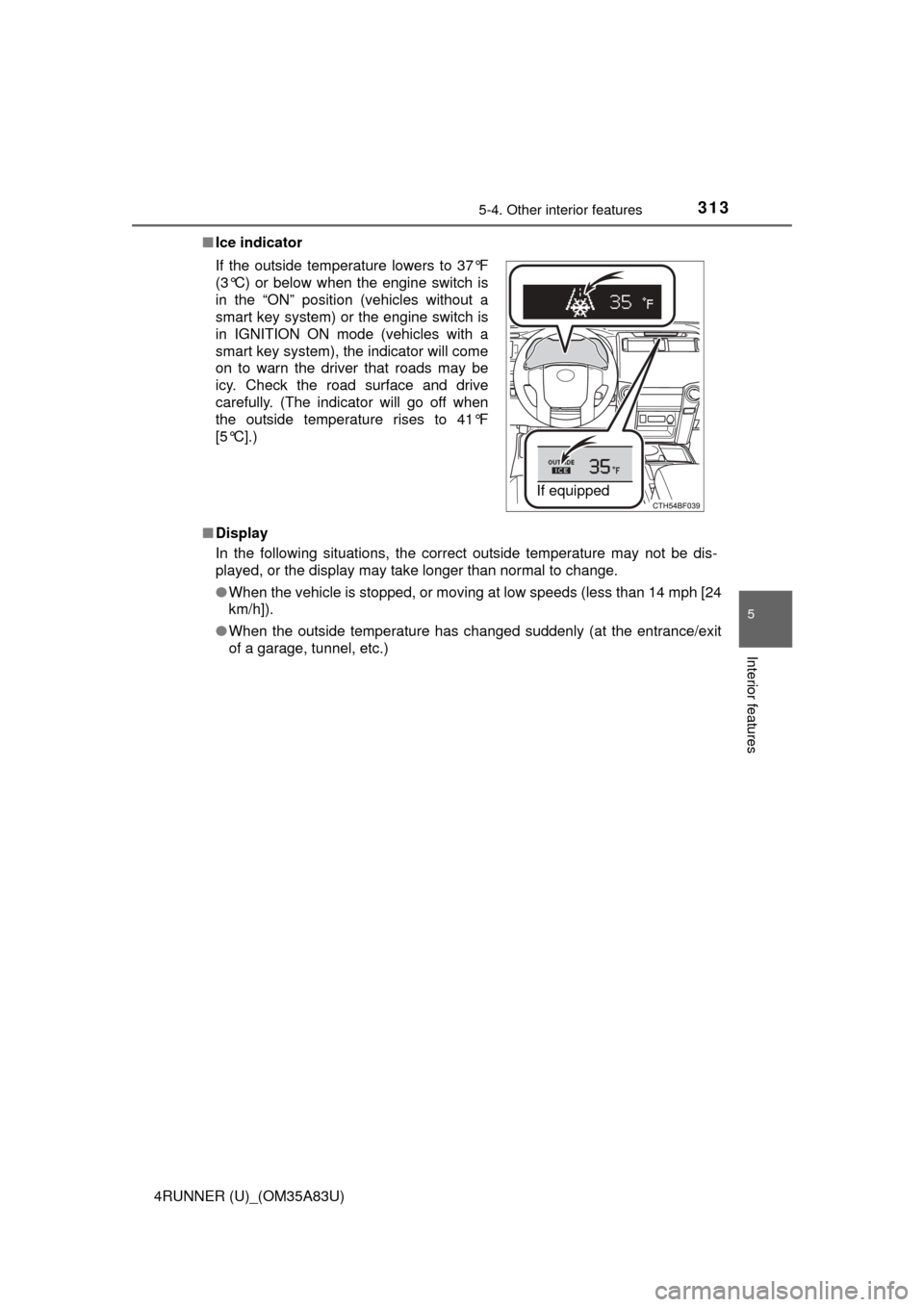
Ice indicator
■ Display
In the following situations, the correct outside temperature may not be dis-
played, or the display may take longer than normal to change.
●When the vehicle is stopped, or moving at low speeds (less than 14 mph [24
km/h]).
● When the outside temperature has changed suddenly (at the entrance/exit
of a garage, tunnel, etc.)
If the outside temperature lowers to 37°F
(3°C) or below when the engine switch is
in the “ON” position (vehicles without a
smart key system) or the engine switch is
in IGNITION ON mode (vehicles with a
smart key system), the indicator will come
on to warn the driver that roads may be
icy. Check the road surface and drive
carefully. (The indicator will go off when
the outside temperature rises to 41°F
[5°C].)
If equipped
Page 343 of 530

341
Maintenance and care6
4RUNNER (U)_(OM35A83U)6-1. Maintenance and care
Cleaning and protecting the vehicle
exterior ............................ 342
Cleaning and protecting the vehicle interior ........... 344
6-2. Maintenance Maintenance requirements ................... 347
General maintenance........ 349
Emission inspection and maintenance (I/M)
programs......................... 352
6-3. Do-it-yourself maintenance
Do-it-yourself service precautions ..................... 353
Hood ................................. 356
Engine compartment ......... 357
Tires .................................. 372
Tire inflation pressure ....... 377
Wheels .............................. 380
Air conditioning filter.......... 383
Wireless remote control/ electronic key battery ...... 385
Checking and replacing fuses ............................... 388
Light bulbs......................... 391