lock TOYOTA 4RUNNER 2014 N280 / 5.G Owner's Manual
[x] Cancel search | Manufacturer: TOYOTA, Model Year: 2014, Model line: 4RUNNER, Model: TOYOTA 4RUNNER 2014 N280 / 5.GPages: 530, PDF Size: 9.97 MB
Page 68 of 530
681-1. For safe use
4RUNNER (U)_(OM35A83U)
CAUTION
■When installing a child restraint system
● Vehicles with third row seats: When using the LATCH anchors for a child
restraint system, move the seat as far back as possible, with the seatback
close to the child restraint system.
● When a booster seat is installed, always ensure that the shoulder belt is
positioned across the center of the child’s shoulder. The belt should be
kept away from the child’s neck, but not so that it could fall off the child’s
shoulder. Failing to do so may result in death or serious injury in the event
of an accident or a sudden braking.
● Ensure that the belt and plate are securely locked and the seat belt is not
twisted.
● Shake the child restraint system left and right, and forward and backward
to ensure that it has been securely installed.
● After securing a child restraint system, never adjust the seat.
● Follow all installation instructions provided by the child restraint system
manufacturer.
■ Do not use a seat belt extender
If a seat belt extender is used when installing a child restraint system, the
seat belt will not securely hold the child restraint system, which could cause
death or serious injury to the child or other passengers in the event of a sud-
den braking, sudden swerving or an accident.
■ To correctly attach a child restraint system to the anchors
● When using the LATCH anchors, be sure that there are no foreign objects
around the anchors and that the seat belt is not caught behind the child
restraint system. Make sure the child restraint system is securely attached,
or it may cause death or serious injury to the child or other passengers in
the event of a sudden braking or an accident.
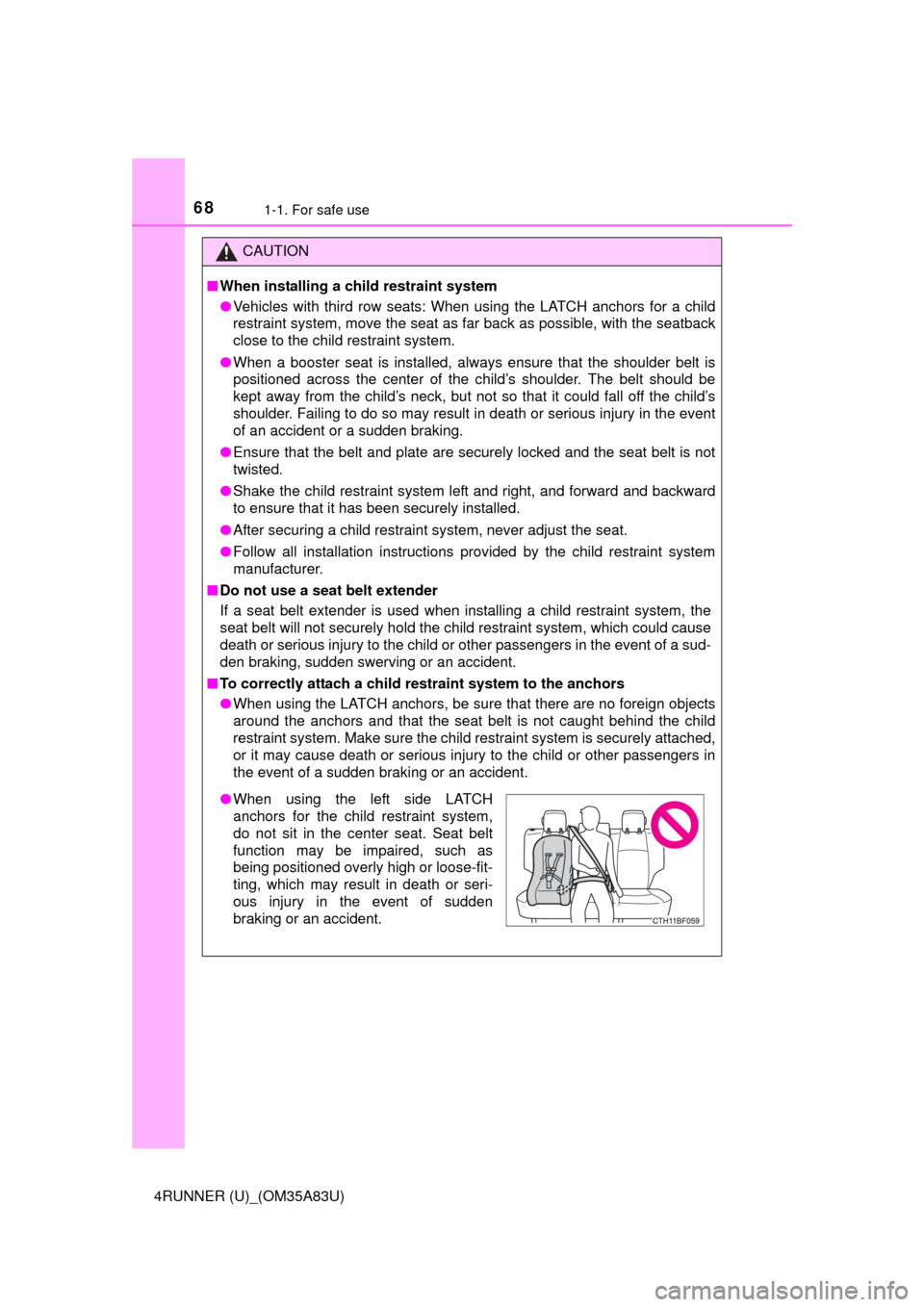
●When using the left side LATCH
anchors for the child restraint system,
do not sit in the center seat. Seat belt
function may be impaired, such as
being positioned overly high or loose-fit-
ting, which may result in death or seri-
ous injury in the event of sudden
braking or an accident.
Page 72 of 530
721-2. Theft deterrent system
4RUNNER (U)_(OM35A83U)
The alarm uses light and sound to give an alert when an intrusion is
detected.
The alarm is triggered in the following situations when the alarm is
set:
●A locked door is unlocked or opened in any way other than using
the entry function, wireless remote control or mechanical key. (The
doors will lock again automatically.)
● The hood is opened.
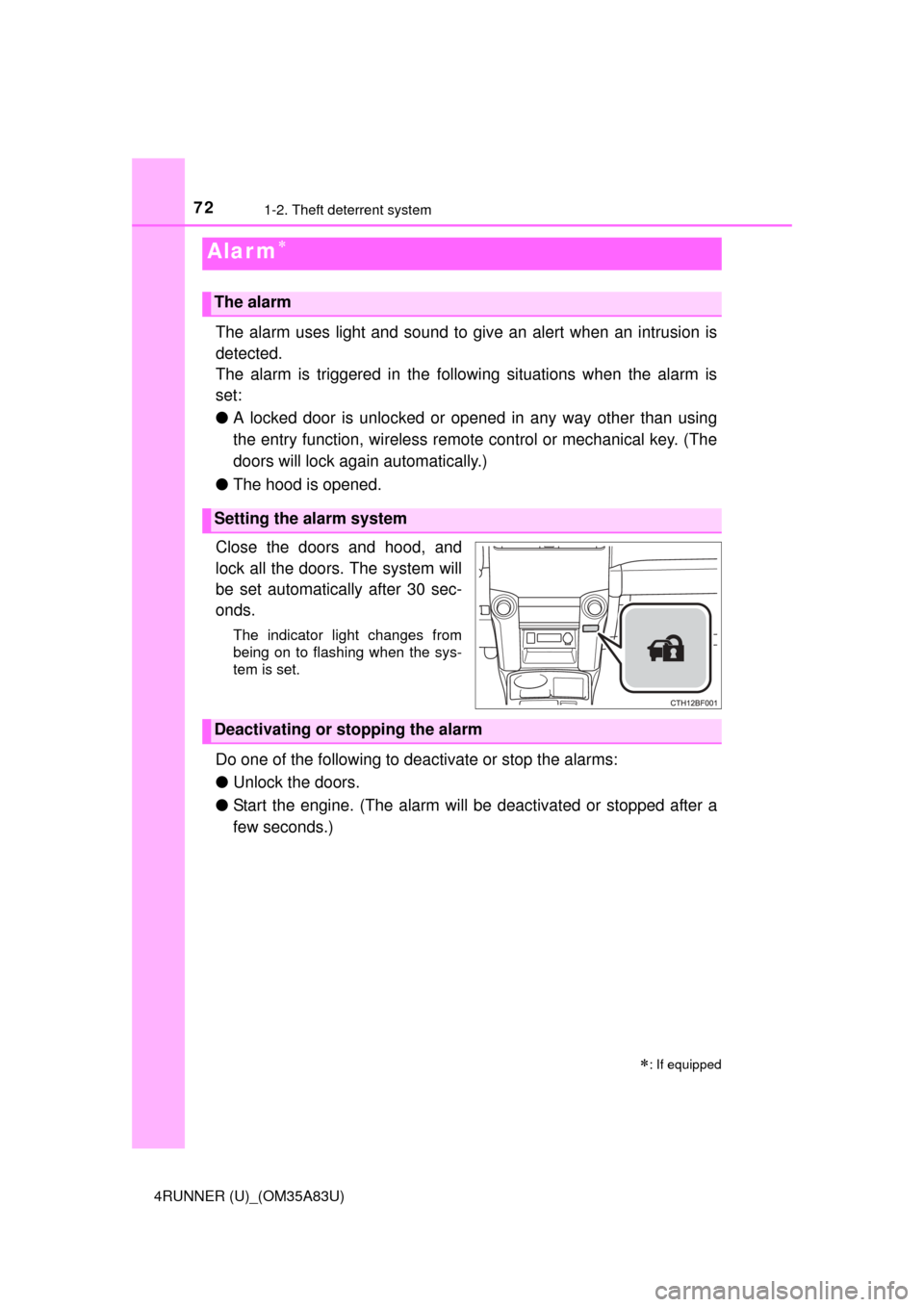
Close the doors and hood, and
lock all the doors. The system will
be set automatically after 30 sec-
onds.
The indicator light changes from
being on to flashing when the sys-
tem is set.
Do one of the following to d eactivate or stop the alarms:
● Unlock the doors.
● Start the engine. (The alarm will be deactivated or stopped after a
few seconds.)
Alar m
: If equipped
The alarm
Setting the alarm system
Deactivating or stopping the alarm
Page 73 of 530
731-2. Theft deterrent system
1
For safety and security
4RUNNER (U)_(OM35A83U)
■System maintenance
The vehicle has a maintenance-free type alarm system.
■ Items to check before locking the vehicle
To prevent unexpected triggering of the alarm and vehicle theft, make sure of
the following:
●Nobody is in the vehicle.
● The windows and moon roof are closed before the alarm is set.
● No valuables or other personal items are left in the vehicle.
■ Triggering of the alarm
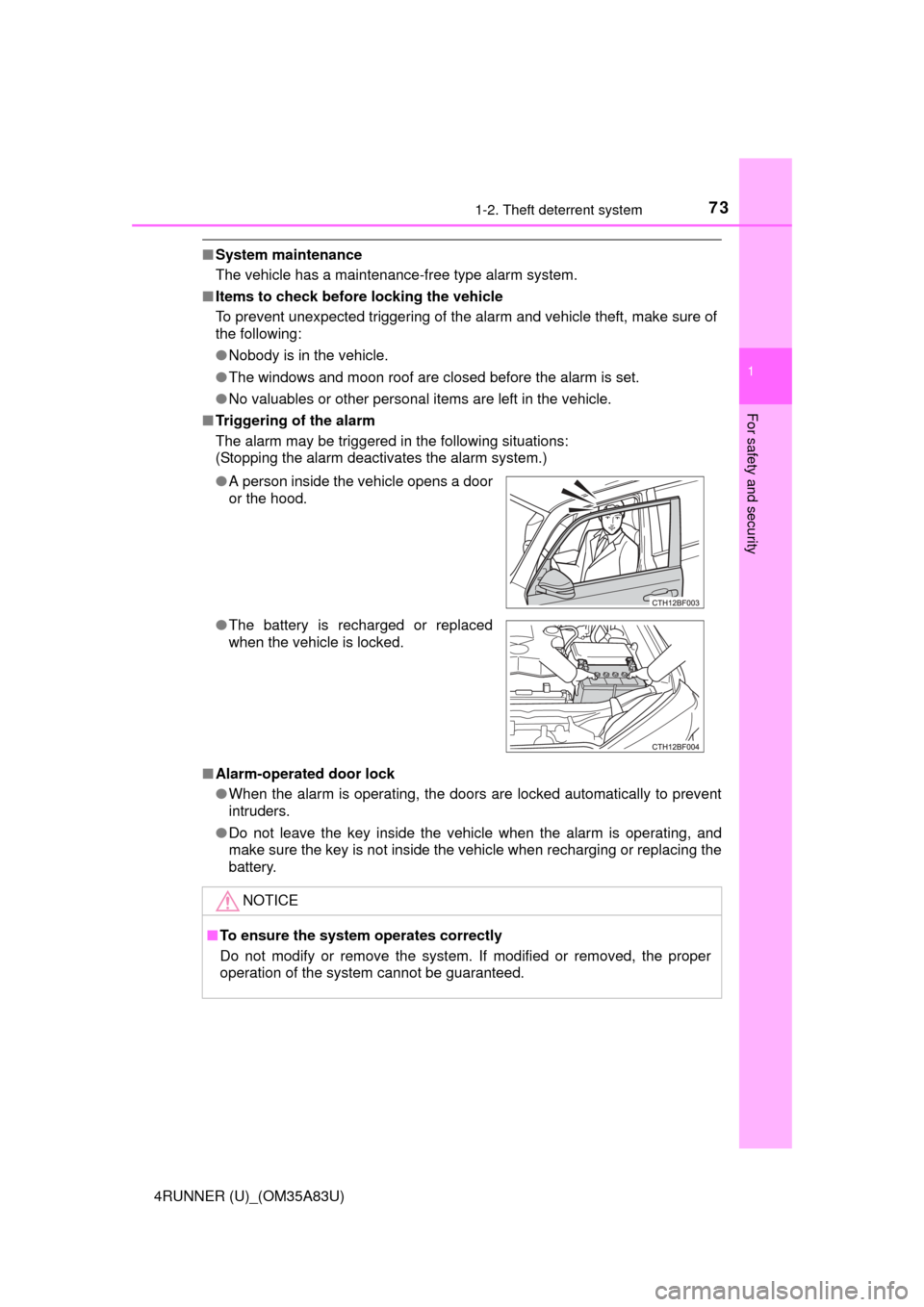
The alarm may be triggered in the following situations:
(Stopping the alarm deactivates the alarm system.)
■ Alarm-operated door lock
●When the alarm is operating, the doors are locked automatically to prevent
intruders.
● Do not leave the key inside the vehicle when the alarm is operating, and
make sure the key is not inside the vehicle when recharging or replacing the
battery.
●
A person inside the vehicle opens a door
or the hood.
● The battery is recharged or replaced
when the vehicle is locked.
NOTICE
■To ensure the system operates correctly
Do not modify or remove the system. If modified or removed, the proper
operation of the system cannot be guaranteed.
Page 77 of 530
772. Instrument cluster
2
Instrument cluster
4RUNNER (U)_(OM35A83U)
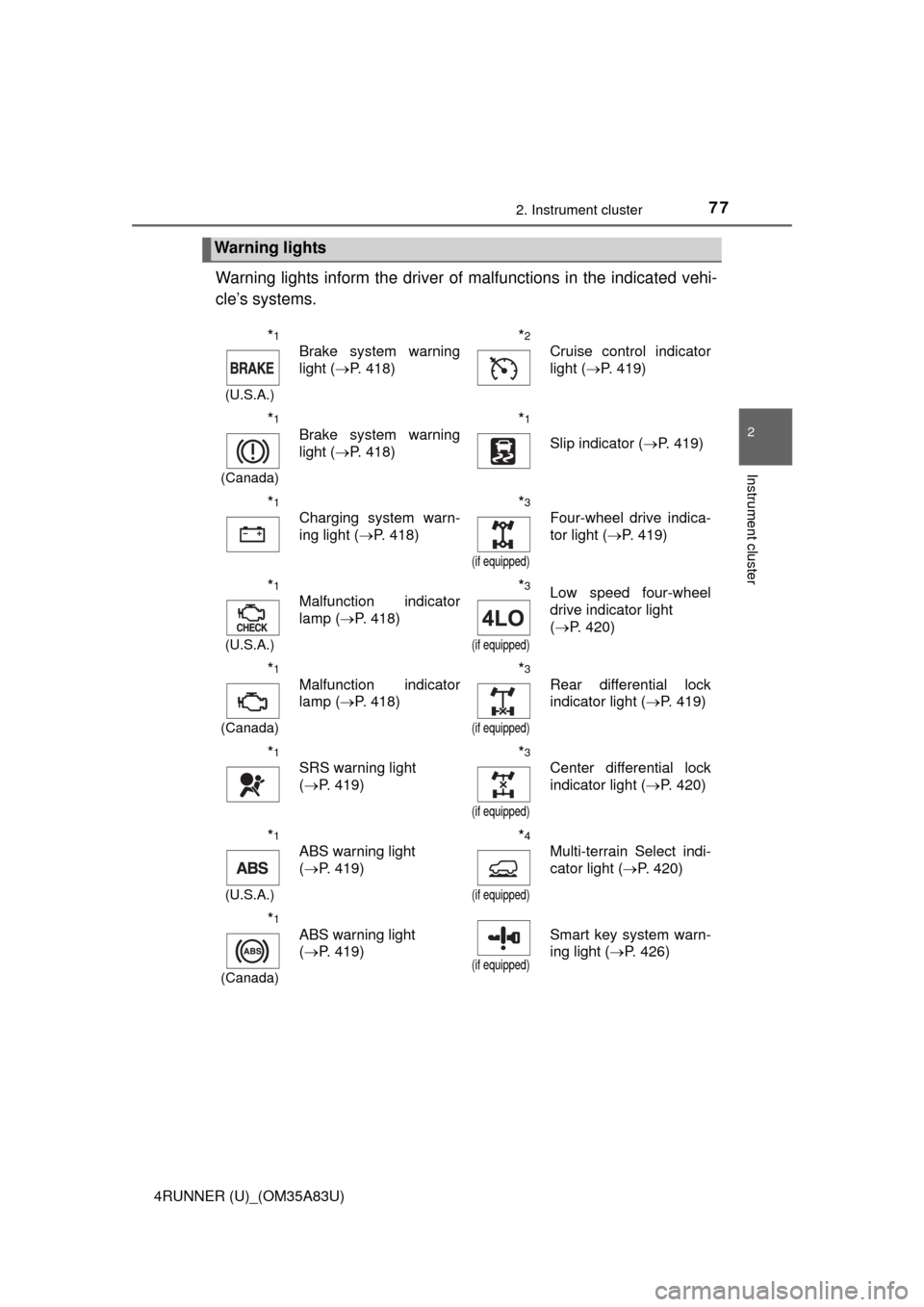
Warning lights inform the driver of malfunctions in the indicated vehi-
cle’s systems.
Warning lights
*1
(U.S.A.)
Brake system warning
light ( P. 418)*2
Cruise control indicator
light (P. 419)
*1
(Canada)
Brake system warning
light (P. 418)*1
Slip indicator ( P. 419)
*1
Charging system warn-
ing light (P. 418)*3
(if equipped)
Four-wheel drive indica-
tor light (P. 419)
*1
(U.S.A.)
Malfunction indicator
lamp (P. 418)*3
(if equipped)
Low speed four-wheel
drive indicator light
(P. 420)
*1
(Canada)
Malfunction indicator
lamp ( P. 418)*3
(if equipped)
Rear differential lock
indicator light ( P. 419)
*1
SRS warning light
(P. 419)*3
(if equipped)
Center differential lock
indicator light ( P. 420)
*1
(U.S.A.)
ABS warning light
(P. 419)*4
(if equipped)
Multi-terrain Select indi-
cator light ( P. 420)
*1
(Canada)
ABS warning light
(P. 419)
(if equipped)
Smart key system warn-
ing light ( P. 426)
Page 79 of 530
792. Instrument cluster
2
Instrument cluster
4RUNNER (U)_(OM35A83U)
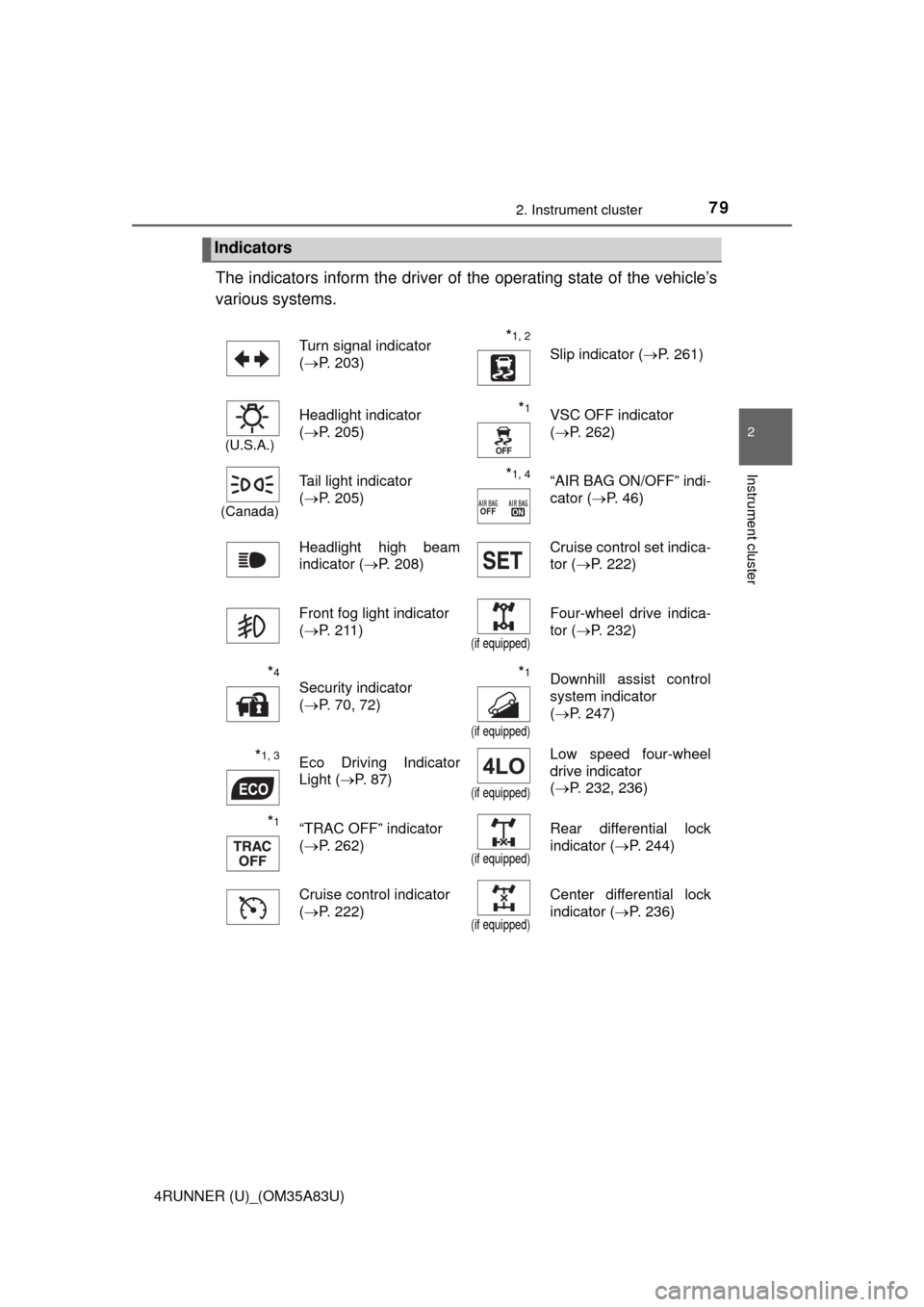
The indicators inform the driver of the operating state of the vehicle’s
various systems.
Indicators
Turn signal indicator
( P. 203)*1, 2 Slip indicator ( P. 261)
(U.S.A.)
Headlight indicator
(P. 205)*1VSC OFF indicator
(P. 262)
(Canada)
Tail light indicator
(P. 205) *1, 4“AIR BAG ON/OFF” indi-
cator ( P. 46)
Headlight high beam
indicator ( P. 208) Cruise control set indica-
tor (
P. 222)
Front fog light indicator
( P. 211)
(if equipped)
Four-wheel drive indica-
tor ( P. 232)
*4
Security indicator
(P. 70, 72)*1
(if equipped)
Downhill assist control
system indicator
(P. 247)
*1, 3Eco Driving Indicator
Light ( P. 87)
(if equipped)
Low speed four-wheel
drive indicator
(P. 232, 236)
*1“TRAC OFF” indicator
(P. 262)
(if equipped)
Rear differential lock
indicator ( P. 244)
Cruise control indicator
( P. 222)
(if equipped)
Center differential lock
indicator ( P. 236)
Page 89 of 530
892. Instrument cluster
2
Instrument cluster
4RUNNER (U)_(OM35A83U)
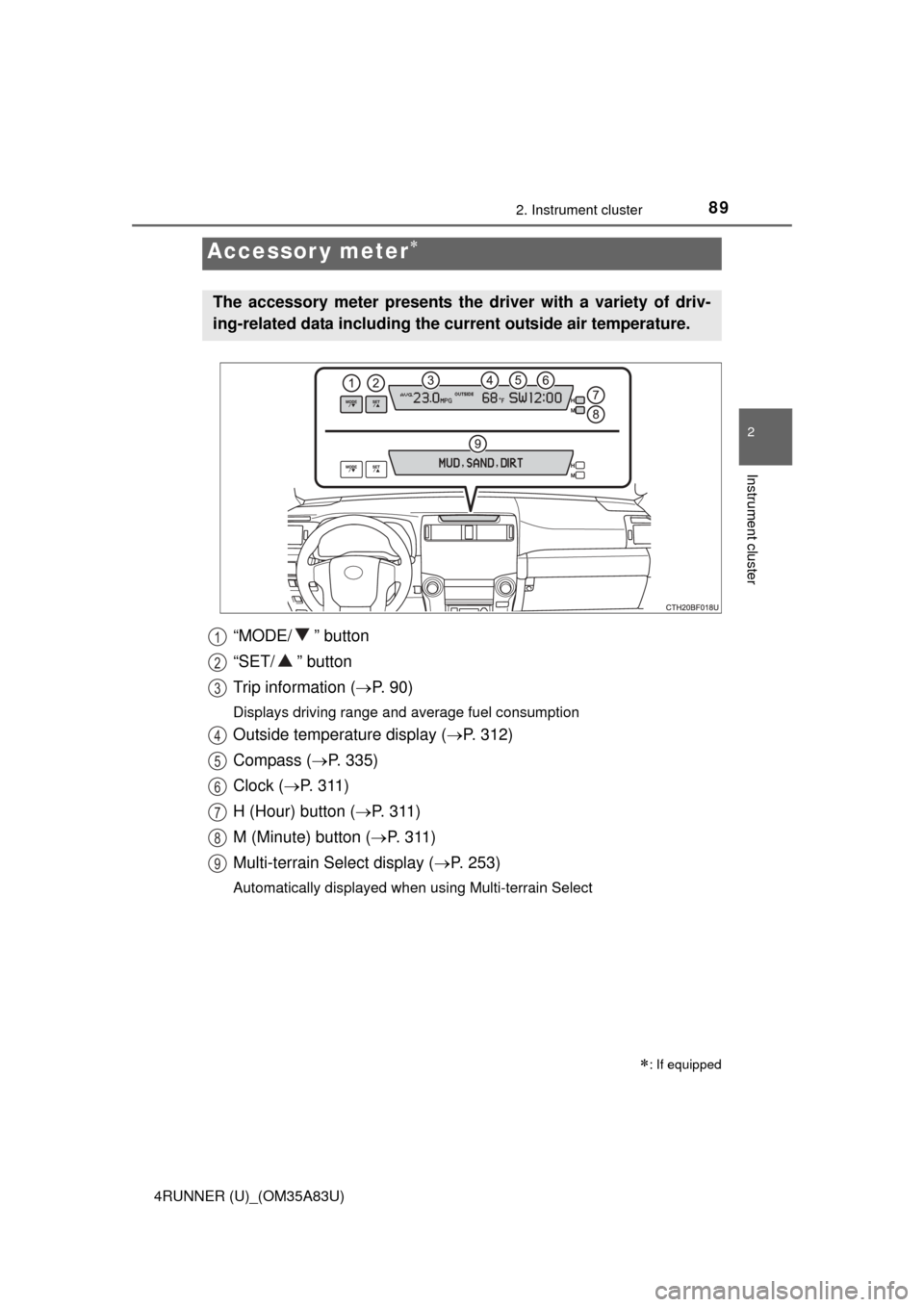
“MODE/ ” button
“SET/ ” button
Trip information (P. 9 0 )
Displays driving range and average fuel consumption
Outside temperature display ( P. 312)
Compass ( P. 335)
Clock ( P. 3 1 1 )
H (Hour) button ( P. 311)
M (Minute) button ( P. 3 1 1 )
Multi-terrain Select display ( P. 253)
Automatically displayed when using Multi-terrain Select
Accessor y meter
: If equipped
The accessory meter presents the driver with a variety of driv-
ing-related data including the cu rrent outside air temperature.
1
2
3
4
5
6
7
8
9
Page 93 of 530
93
Operation of
each component
3
4RUNNER (U)_(OM35A83U) 3-1. Key information
Keys .................................... 94
Side doors ......................... 100
3-2. Opening, closing and locking the doors
Smart key system ............. 107
Automatic running boards ............................. 114
Back door .......................... 117
3-3. Adjusting the seats Front seats ........................ 122
Rear seats......................... 125
Driving position memory ........................... 135
Head restraints.................. 139
3-4. Adjusting the steering wheel and mirrors
Steering wheel .................. 142
Inside rear view mirror ...... 144
Outside rear view mirrors ............................. 146
3-5. Opening, closing the windows and moon roof
Power windows ................. 148
Power back window .......... 151
Moon roof .......................... 155
Page 95 of 530
953-1. Key information
3
Operation of each component
4RUNNER (U)_(OM35A83U)
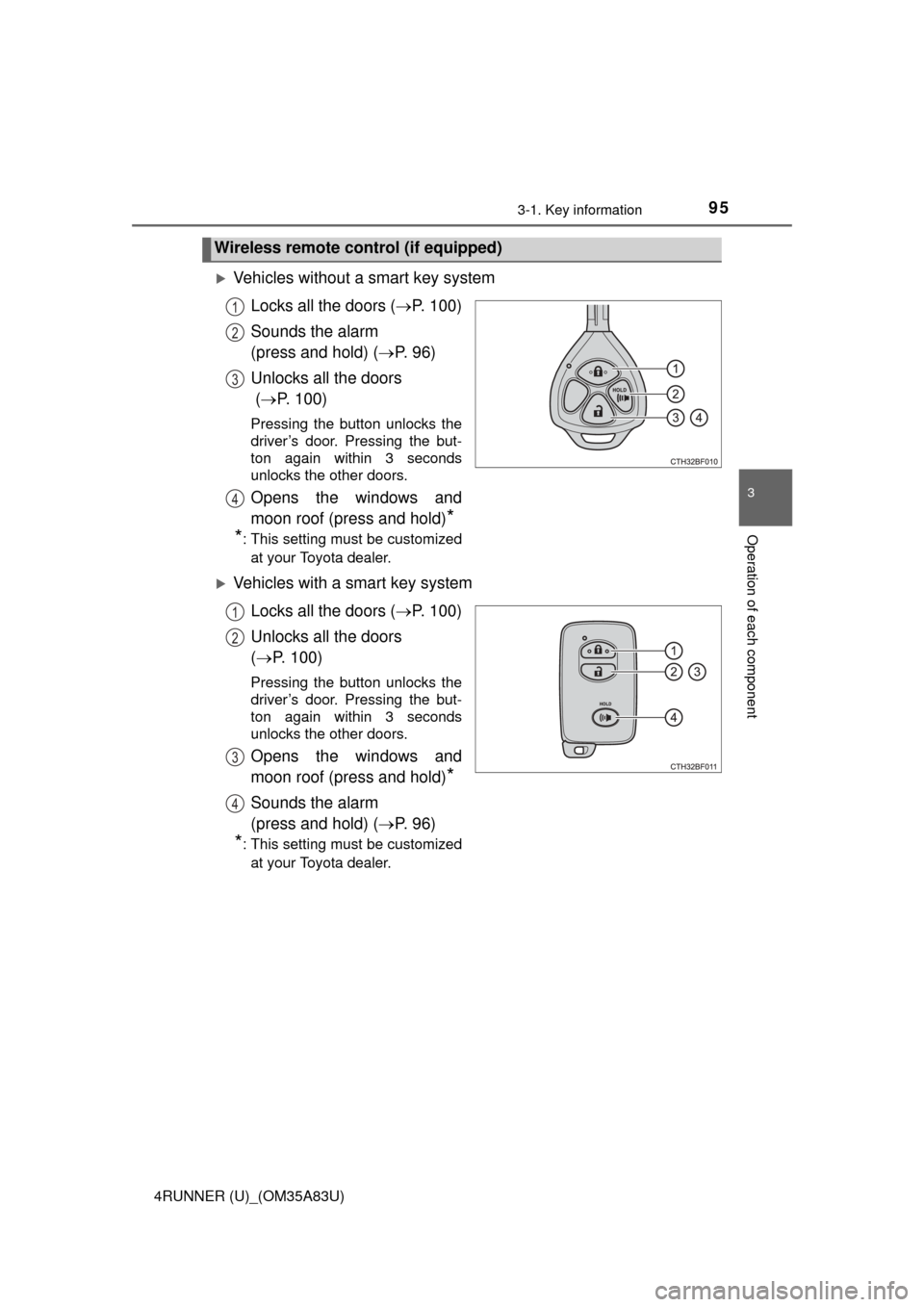
Vehicles without a smart key systemLocks all the doors ( P. 100)
Sounds the alarm
(press and hold) ( P. 9 6 )
Unlocks all the doors
( P. 100)
Pressing the button unlocks the
driver’s door. Pressing the but-
ton again within 3 seconds
unlocks the other doors.
Opens the windows and
moon roof (press and hold)
*
*
: This setting must be customized
at your Toyota dealer.
Vehicles with a smart key system
Locks all the doors ( P. 100)
Unlocks all the doors
( P. 100)
Pressing the button unlocks the
driver’s door. Pressing the but-
ton again within 3 seconds
unlocks the other doors.
Opens the windows and
moon roof (press and hold)
*
Sounds the alarm
(press and hold) ( P. 9 6 )
*: This setting must be customized
at your Toyota dealer.
Wireless remote control (if equipped)
1
2
3
4
1
2
3
4
Page 96 of 530
963-1. Key information
4RUNNER (U)_(OM35A83U)
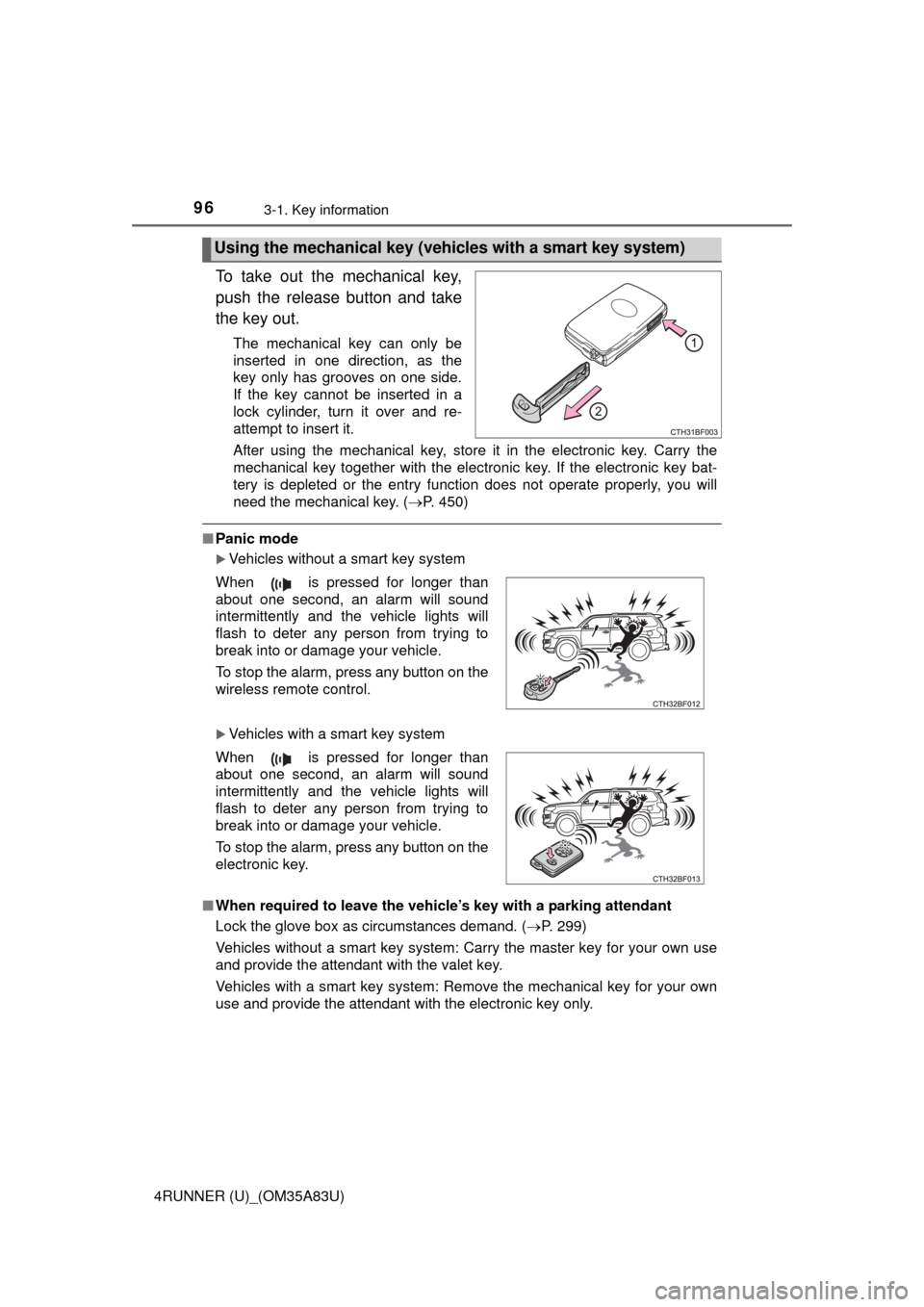
To take out the mechanical key,
push the release button and take
the key out.
The mechanical key can only be
inserted in one direction, as the
key only has grooves on one side.
If the key cannot be inserted in a
lock cylinder, turn it over and re-
attempt to insert it.
After using the mechanical key, store it in the electronic key. Carry the
mechanical key together with the electronic key. If the electronic key bat-
tery is depleted or the entry function does not operate properly, you will
need the mechanical key. (P. 450)
■Panic mode
Vehicles without a smart key system
Vehicles with a smart key system
■ When required to leave the vehicle’s key with a parking attendant
Lock the glove box as circumstances demand. ( P. 299)
Vehicles without a smart key system: Carry the master key for your own use
and provide the attendant with the valet key.
Vehicles with a smart key system: Remove the mechanical key for your own
use and provide the attendant with the electronic key only.
Using the mechanical key (vehic les with a smart key system)
When is pressed for longer than
about one second, an alarm will sound
intermittently and the vehicle lights will
flash to deter any person from trying to
break into or damage your vehicle.
To stop the alarm, press any button on the
wireless remote control.
When is pressed for longer than
about one second, an alarm will sound
intermittently and the vehicle lights will
flash to deter any person from trying to
break into or damage your vehicle.
To stop the alarm, press any button on the
electronic key.
Page 98 of 530
983-1. Key information
4RUNNER (U)_(OM35A83U)●
To avoid serious deterioration, do not leave the electronic key within 3 ft. (1
m) of the following electrical appl iances that produce a magnetic field:
•TVs
• Personal computers
• Cellular phones, cordless phones and battery chargers
• Recharging cellular phones or cordless phones
• Table lamps
• Induction cookers
Vehicles without a smart key system
If the wireless remote control function does not operate, the battery may be
depleted. Replace the battery when necessary. ( P. 385)
■ Precautions when disconnecting the battery (vehicles with a smart key
system)
● In some cases, it may not be possible to unlock the doors using the smart
key system immediately after the battery has been disconnected. Use the
wireless remote control or the mechanical key to lock or unlock the doors.
● The engine may not start on the first attempt after reconnecting the battery
but will start normally after the second attempt. This is not a malfunction.
● The engine switch mode is memorized by the vehicle. When the battery is
reconnected, the system will return to the mode it was in before the battery
was disconnected. Before disconnecting the battery, turn the engine switch
off.
If you are unsure what mode the engine switch was in when the battery was
disconnected, be especially careful when reconnecting the battery.
■ Replacing the battery
P. 385
■ Confirmation of the registered key number
The number of keys already registered to the vehicle can be confirmed. Ask
your Toyota dealer for details.
■ If a wrong key is used (vehicles with a smart key system)
The key cylinder rotates freely to isolate inside mechanism.
■ Certification for wireless remote control
For vehicles sold in the U.S.A.
FCC ID: HYQ14ACX
FCC ID: HYQ13CZD
FCC ID: HYQ14ADF
FCC ID: HYQ13CZE
FCC ID: HYQ12BBY
FCC ID: HYQ13BDC