brake TOYOTA 4RUNNER 2014 N280 / 5.G Workshop Manual
[x] Cancel search | Manufacturer: TOYOTA, Model Year: 2014, Model line: 4RUNNER, Model: TOYOTA 4RUNNER 2014 N280 / 5.GPages: 530, PDF Size: 9.97 MB
Page 252 of 530
2504-5. Using the driving support systems
4RUNNER (U)_(OM35A83U)■
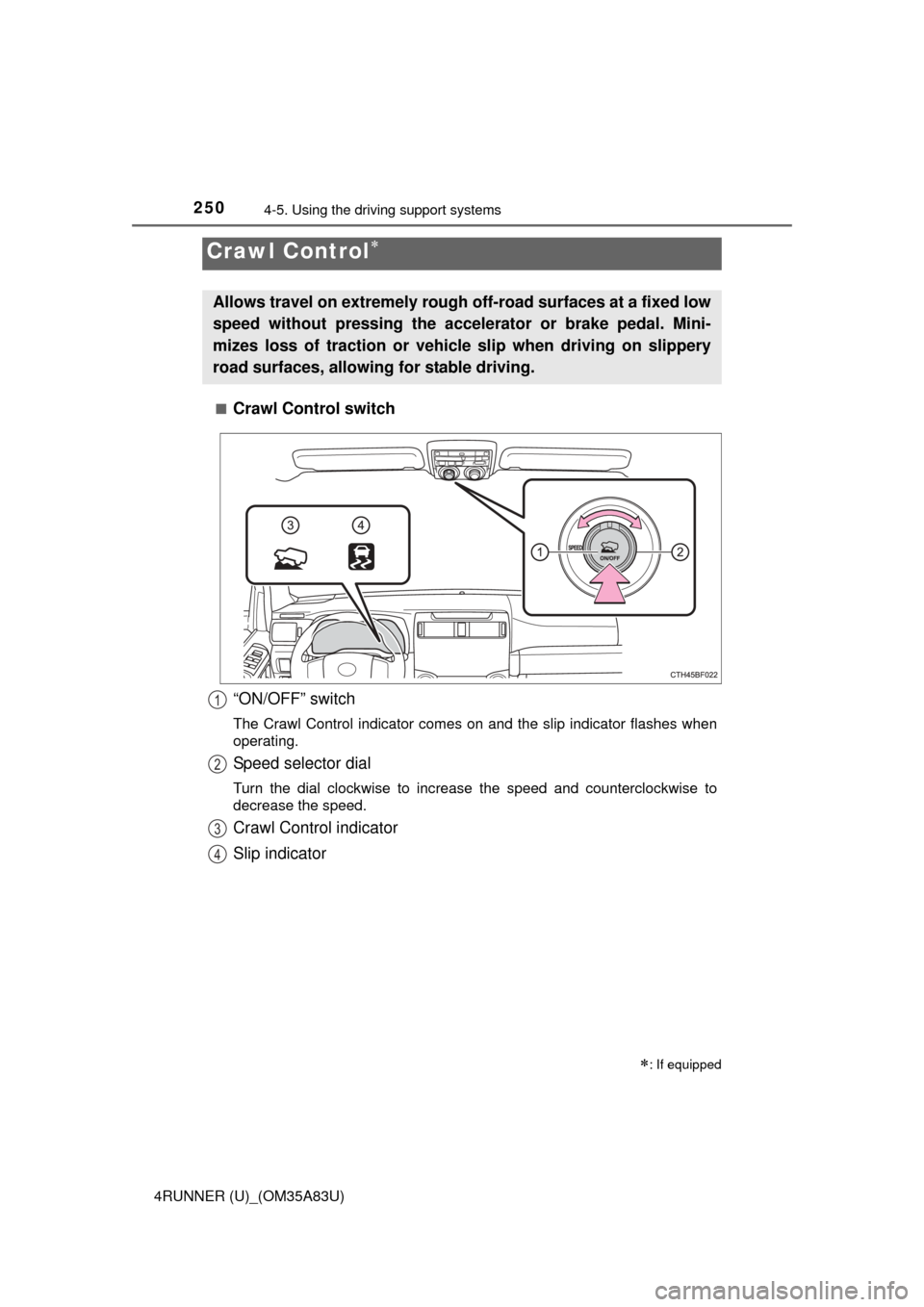
Crawl Control switch
Crawl Control
: If equipped
Allows travel on extremely rough o
ff-road surfaces at a fixed low
speed without pressing the acceler ator or brake pedal. Mini-
mizes loss of traction or vehicle slip when driving on slippery
road surfaces, allowing for stable driving.
“ON/OFF” switch
The Crawl Control indicator comes on and the slip indicator flashes when\
operating.
Speed selector dial
Turn the dial clockwise to increase the speed and counterclockwise to
decrease the speed.
Crawl Control indicator
Slip indicator
1
2
3
4
Page 254 of 530
2524-5. Using the driving support systems
4RUNNER (U)_(OM35A83U)■
Automatic system cancelation
In the following situations, the system will cease operation and a buzzer will
sound to alert the driver. The Crawl Control indicator will flash until the system
is turned off completely.
●When the shift lever is shifted to P or N
● When the front-wheel drive control lever or switch is shifted to H4
● When the driver’s door is opened
● When the system is malfunctioning
● When the brake system overheats
Stop the vehicle in a safe place. (There is no problem with continuing normal
driving.)
● When the automatic transmission system overheats
Stop the vehicle in a safe place until the automatic transmission fluid tem-
perature warning light goes off.
■ Sounds and vibrations caused by the Crawl Control system
● A sound may be heard from the engine compartment when the engine is
started or just after the vehicle begins to move. This sound does not indicate
that a malfunction has occurred in Crawl Control system.
● Either of the following conditions may occur when the Crawl Control system
is operating. None of these indicates that a malfunction has occurred.
• Vibrations may be felt through the vehicle body and steering.
• A motor sound may be heard after the vehicle comes to a stop.
CAUTION
■When using Crawl Control
● Do not overly rely on Crawl Control. This function does not extend the
vehicle’s performance limitations. A lways check the terrain thoroughly and
drive safely.
● The recommended speed modes for the listed terrains ( P. 251) are only
a reference. The selected mode may not be suitable to actual off-road con-
ditions due to factors such as the type or unevenness of the terrain or the
degree of incline. Check the actual terrain thoroughly and drive safely.
● After activating Crawl Control, make sure that the Crawl Control indicator
comes on. If the indicator flashes, the vehicle is not under system control.
■ Conditions under which the syst em may not operate correctly
When driving on the following surfaces, the system may not be able to
maintain a fixed low speed, which may result in an accident:
● Extremely steep inclines
● Extremely uneven surfaces
● Snow-covered roads, or other slippery surfaces
Page 261 of 530

2594-5. Using the driving support systems
4
Driving
4RUNNER (U)_(OM35A83U)■
If the Multi-terrain Select indicator goes off while Multi-terrain Select is
operating
● One of the vehicle systems related to Multi-terrain Select may be malfunc-
tioning.
Have your vehicle inspected by your Toyota dealer.
●
The brake actuator may be at risk of overheating.
A buzzer will sound, the “A-TRAC” indicator will go off and the “TRAC OFF”
indicator will come on. Stop the vehicle in a safe place. Refrain from using
Multi-terrain Select until the “A-TRAC” indicator comes back on and the
“TRAC OFF” indicator goes off. (The vehicle can still be driven, even if Multi-
terrain Select is inoperative.)
In the above cases, Multi-terrain Select is automatically canceled.
CAUTION
■ Before driving
To avoid an accident, observe the precautions relating to off-road driving.
(P. 273)
■ When using Multi-terrain Select
● Do not use the Multi-terrain Select system for normal (on-road) driving.
The Multi-terrain Select system is designed for off-road use only.
● Do not overly rely on Multi-terrain Select. This function does not exten\
d
the vehicle’s performance limitations. Always check the terrain thoroughly
and drive safely.
● The recommended modes for the listed terrains ( P. 254) are only a refer-
ence. The selected mode may not be suitable to actual off-road conditions
due to factors such as the type or unevenness of the terrain or the degree
of incline. Check the actual terrain thoroughly and drive safely.
● After selecting a mode, make sure that the Multi-terrain Select indicator
and the selected mode indicator come on. If any related indicator flashes,
the vehicle is not under Multi-terrain Select control.
Page 262 of 530
2604-5. Using the driving support systems
4RUNNER (U)_(OM35A83U)
◆ABS (Anti-lock Brake System)
Helps to prevent wheel lock when the brakes are applied suddenly,
or if the brakes are applied while driving on a slippery road surface
◆Multi Terrain ABS (Anti-lock Brake System) (if equipped)
Helps to prevent wheel lock when the brakes are applied suddenly,
or if the brakes are applied while driving on a slippery road surface,
or in off-road conditions (such as rough roads, sand and mud)
The Multi Terrain ABS operates in synchronization with the Multi-
terrain Select.
◆Brake assist
Generates an increased level of braking force after the brake pedal
is depressed when the system detects a panic stop situation
◆VSC (Vehicle Stability Control)
Helps the driver to control skidding when swerving suddenly or
turning on slippery road surfaces
◆Trailer Sway Control
Helps the driver to control trailer sway by selectively applying brake
pressure for individual wheels and reducing engine torque when
trailer sway is detected.
Trailer Sway Control is part of the VSC system and will not operate
if VSC is turned off or experiences a malfunction.
◆TRAC (Traction Control)
Helps to maintain drive power and prevent the drive wheels from
spinning when starting the vehicle or accelerating on slippery roads
Driving assist systems
To help enhance driving safety and performance, the following
systems operate automatically in response to various driving
situations. Be aware, however, that these systems are supple-
mentary and should not be relied upon too heavily when operat-
ing the vehicle.
Page 268 of 530

2664-5. Using the driving support systems
4RUNNER (U)_(OM35A83U)
■When the “TRAC OFF” indicator li ght comes on even if the VSC off
switch has not been pressed
TRAC, hill-start assist control, downhill assist control and Crawl Control can-
not be operated. Contact your Toyota dealer.
■ Hill-start assist contro l operation conditions
● The shift lever is in D or S.
● The brake pedal is not depressed.
● The rear differential is unlocked (if equipped).
■ If the brake system overheats
The hill-start assist control will cease operation and a buzzer will sound to
alert the driver. At this time, the “TRAC OFF” indicator will come on. Stop the
vehicle in a safe place. (There is no problem with continuing with normal driv-
ing.)
The system will be automatically restored after a short time.
■ Sounds and vibrations caused by the ABS, Multi Terrain ABS (if
equipped), brake assist, VSC, Trailer Sway Control, TRAC and hill-start
assist control (if equipped) systems
● A sound may be heard from the engine compartment when the engine is
started or just after the vehicle begins to move. This sound does not indicate
that a malfunction has occurred in any of these systems.
● Any of the following conditions may occur when the above systems are
operating. None of these indicates that a malfunction has occurred.
• Vibrations may be felt through the vehicle body and steering.
• A motor sound may be heard after the vehicle comes to a stop.
• The brake pedal may pulsate slightly after the ABS or Multi Terrain ABS is
activated.
• The brake pedal may move down slightly after the ABS or Multi Terrain ABS is activated.
■ Reactivation of the TRAC/VSC/Trailer Sway Control systems after turn-
ing off the engine
Turning off the engine after turning off the TRAC/VSC/Trailer Sway Control
systems will automatically reactivate them.
Page 270 of 530

2684-5. Using the driving support systems
4RUNNER (U)_(OM35A83U)
CAUTION
■When the VSC and Trailer Sway Control are activated
The slip indicator light flashes. Always drive carefully.
Reckless driving may cause an accident. Exercise particular care when the
indicator light flashes.
■ When TRAC/VSC/Trailer Sway Control systems are turned off
Be especially careful and drive at a speed appropriate to the road condi-
tions. As these are systems to ensure vehicle stability and driving force, do
not turn the TRAC/VSC/Trailer Sway Control systems off unless necessary.
■ Replacing tires
Make sure that all tires are of the specified size, brand, tread pattern and
total load capacity. In addition, make sure that the tires are inflated to the
recommended tire inflation pressure level.
The ABS, Multi Terrain ABS, VSC and Trailer Sway Control will not function
correctly if different tires are fitted on the vehicle.
Contact your Toyota dealer for further information when replacing tires or
wheels.
■ Handling of tires and the suspension
Using tires with any kind of problem or modifying the suspension will affect
the driving assist systems, and may cause a system to malfunction.
■ Trailer Sway Control precaution
The Trailer Sway Control system is not able to reduce trailer sway in all situ-
ations.
Depending on many factors such as the conditions of the vehicle, trailer,
road surface, and driving environment, the Trailer Sway Control system
may not be effective. Refer to your trailer owner’s manual for information on
how to tow your trailer properly.
■ If trailer sway occurs
Observe the following precautions.
Failing to do so may cause death or serious injury.
● Firmly grip the steering wheel. Steer straight ahead.
Do not try to control trailer swaying by turning the steering wheel.
● Begin releasing the accelerator pedal immediately but very gradually to
reduce speed.
Do not increase speed. Do not apply vehicle brakes.
If you make no extreme correction with the steering or brakes, your vehicle
and trailer should stabilize. ( P. 188)
Page 272 of 530
2704-6. Driving tips
4RUNNER (U)_(OM35A83U)
Perform the following according to the driving conditions:
● Do not try to forcibly open a window or move a wiper that is frozen.
Pour warm water over the frozen area to melt the ice. Wipe away
the water immediately to prevent it from freezing.
● To ensure proper operation of the climate control system fan,
remove any snow that has accumulated on the air inlet vents in
front of the windshield.
● Check for and remove any excess ice or snow that may have accu-
mulated on the exterior lights, ve hicle’s roof, chassis, around the
tires or on the brakes.
● Remove any snow or mud from the bottom of your shoes before
getting in the vehicle.
Accelerate the vehicle slowly, keep a safe distance between you and
the vehicle ahead, and drive at a reduced speed suitable to road con-
ditions.
Park the vehicle and move the shift lever to P without setting the park-
ing brake. The parking brake may fr eeze up, preventing it from being
released. If necessary, block the wheels to prev ent inadvertent sliding
or creeping.
Before driving the vehicle
When driving the vehicle
When parking the vehicle
Page 278 of 530

2764-6. Driving tips
4RUNNER (U)_(OM35A83U)
CAUTION
■Off-road driving precautions
Always observe the following precautions to minimize the risk of death, seri-
ous injury or damage to your vehicle:
● Drive carefully when off the road. Do not take unnecessary risks by driving
in dangerous places.
● Do not grip the steering wheel spok es when driving off-road. A bad bump
could jerk the wheel and injure your hands. Keep both hands and espe-
cially your thumbs on the outside of the rim.
● Always check your brakes for effectiveness immediately after driving in
sand, mud, water or snow.
● After driving through tall grass, mud, rock, sand, rivers, etc., check that
there is no grass, bush, paper, rags, stone, sand, etc. adhering or trapped
on the underbody. Clear off any such matter from the underbody. If the
vehicle is used with these materials trapped or adhering to the underbody,
a breakdown or fire could occur.
● In a rollover crash, an unbelted person is significantly more likely to die
than a person wearing a seat belt. Ther efore, the driver and all passengers
should fasten their seat belts whenever the vehicle is moving.
● When driving off-road or in rugged te rrain, do not drive at excessive
speeds, jump, make sharp turns, strike objects, etc. This may cause loss
of control or vehicle rollover causing death or serious injury. You are also
risking expensive damage to your vehicle’s suspension and chassis.
Page 279 of 530
2774-6. Driving tips
4
Driving
4RUNNER (U)_(OM35A83U)
NOTICE
■To prevent water damage
Take all necessary safety measures to ensure that water damage to the
engine or other components does not occur.
● Water entering the engine air intake will cause severe engine damage.
● Water entering the automatic transmission will cause deterioration in shift
quality, locking up of your transmission accompanied by vibration, and ulti-
mately damage.
● Water can wash the grease from wheel bearings, causing rusting and pre-
mature failure, and may also enter the differentials, transmission and
transfer case, reducing the gear oil’s lubricating qualities.
■ When you drive through water
If driving through water, such as when crossing shallow streams, first check
the depth of the water and the bottom of the riverbed for firmness. Drive
slowly and avoid deep water.
■ Inspection after off-road driving
● Sand and mud that has accumulated in brake drums and around brake
discs may affect braking efficiency and may damage brake system compo-
nents.
● Always perform a maintenance inspection after each day of off-road driv-
ing that has taken you through rough terrain, sand, mud, or water. For
scheduled maintenance information, refer to the “Scheduled Maintenance
Guide” or “Owner’s Manual Supplement”.
Page 318 of 530

3165-4. Other interior features
4RUNNER (U)_(OM35A83U)■
If the protection circuit is activated and the power supply is cut, conduct
the following procedure:
Park the vehicle in a safe place, and then securely apply the parking
brake.
Check and ensure that the shift lever is in P or N.
Make sure that the power consumption of the electric appliance is within
the maximum capacity of the power outlet and the appliance is not bro-
ken.
Press the power outlet main switch again.
When the cabin temperature is high, open the windows to cool the tempera-
ture down. Once it reaches the normal temperature, turn the power outlet
main switch on again.
If the power supply does not resume even after the above procedure has
been performed, have the vehicle inspected by your Toyota dealer.
1
2
3
4