four wheel drive TOYOTA 4RUNNER 2014 N280 / 5.G Owners Manual
[x] Cancel search | Manufacturer: TOYOTA, Model Year: 2014, Model line: 4RUNNER, Model: TOYOTA 4RUNNER 2014 N280 / 5.GPages: 530, PDF Size: 9.97 MB
Page 3 of 530
3
1
8 7
6
5
4
3
2
9
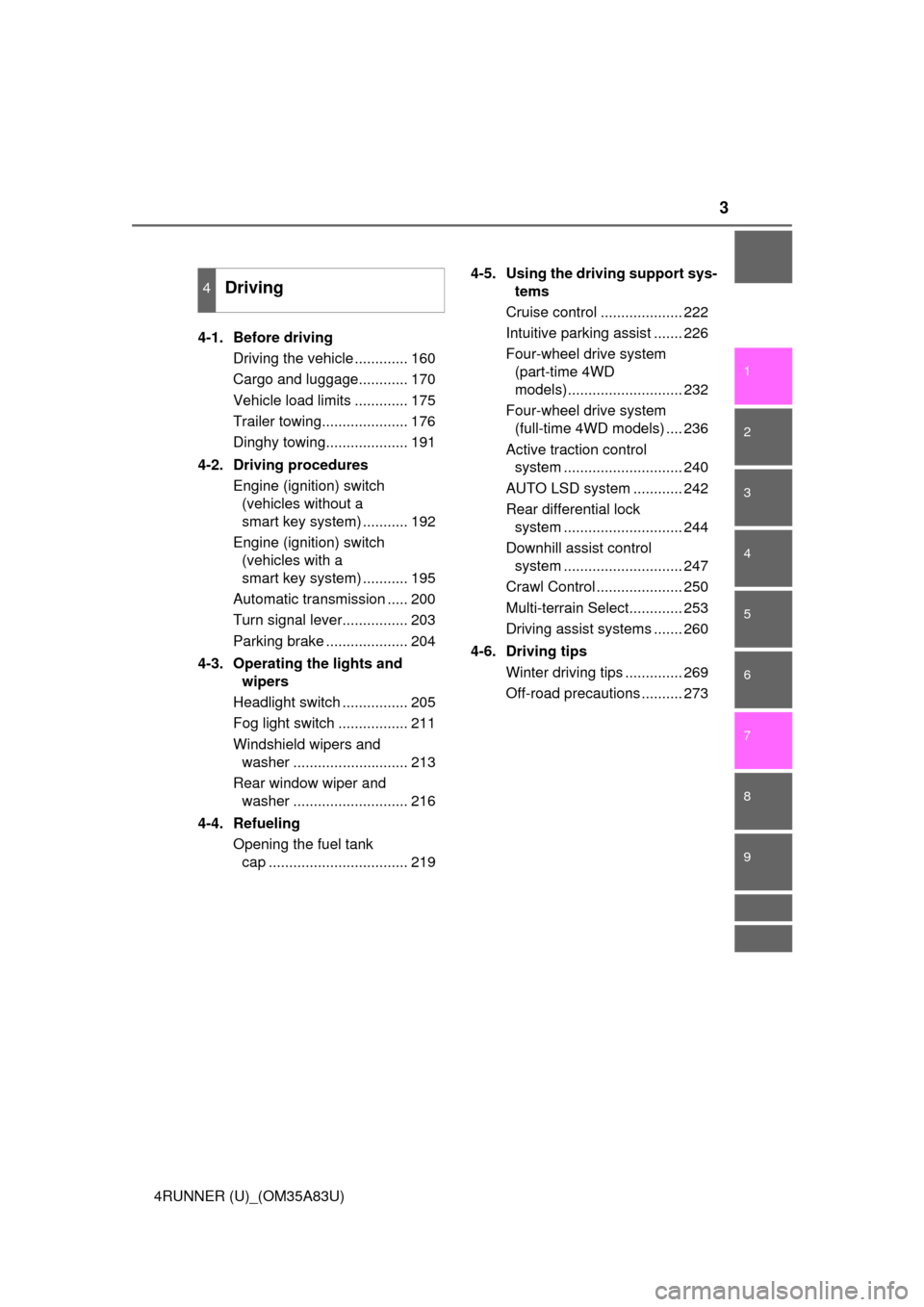
4RUNNER (U)_(OM35A83U)4-1. Before driving
Driving the vehicle ............. 160
Cargo and luggage............ 170
Vehicle load limits ............. 175
Trailer towing..................... 176
Dinghy towing.................... 191
4-2. Driving procedures Engine (ignition) switch (vehicles without a
smart key system) ........... 192
Engine (ignition) switch (vehicles with a
smart key system) ........... 195
Automatic transmission ..... 200
Turn signal lever................ 203
Parking brake .................... 204
4-3. Operating the lights and wipers
Headlight switch ................ 205
Fog light switch ................. 211
Windshield wipers and washer ............................ 213
Rear window wiper and washer ............................ 216
4-4. Refueling Opening the fuel tank cap .................................. 219 4-5. Using the driving support sys-
tems
Cruise control .................... 222
Intuitive parking assist ....... 226
Four-wheel drive system (part-time 4WD
models)............................ 232
Four-wheel drive system (full-time 4WD models) .... 236
Active traction control system ............................. 240
AUTO LSD system ............ 242
Rear differential lock system ............................. 244
Downhill assist control system ............................. 247
Crawl Control ..................... 250
Multi-terrain Select............. 253
Driving assist systems ....... 260
4-6. Driving tips Winter driving tips .............. 269
Off-road precautions .......... 273
4Driving
Page 19 of 530
19Pictorial index
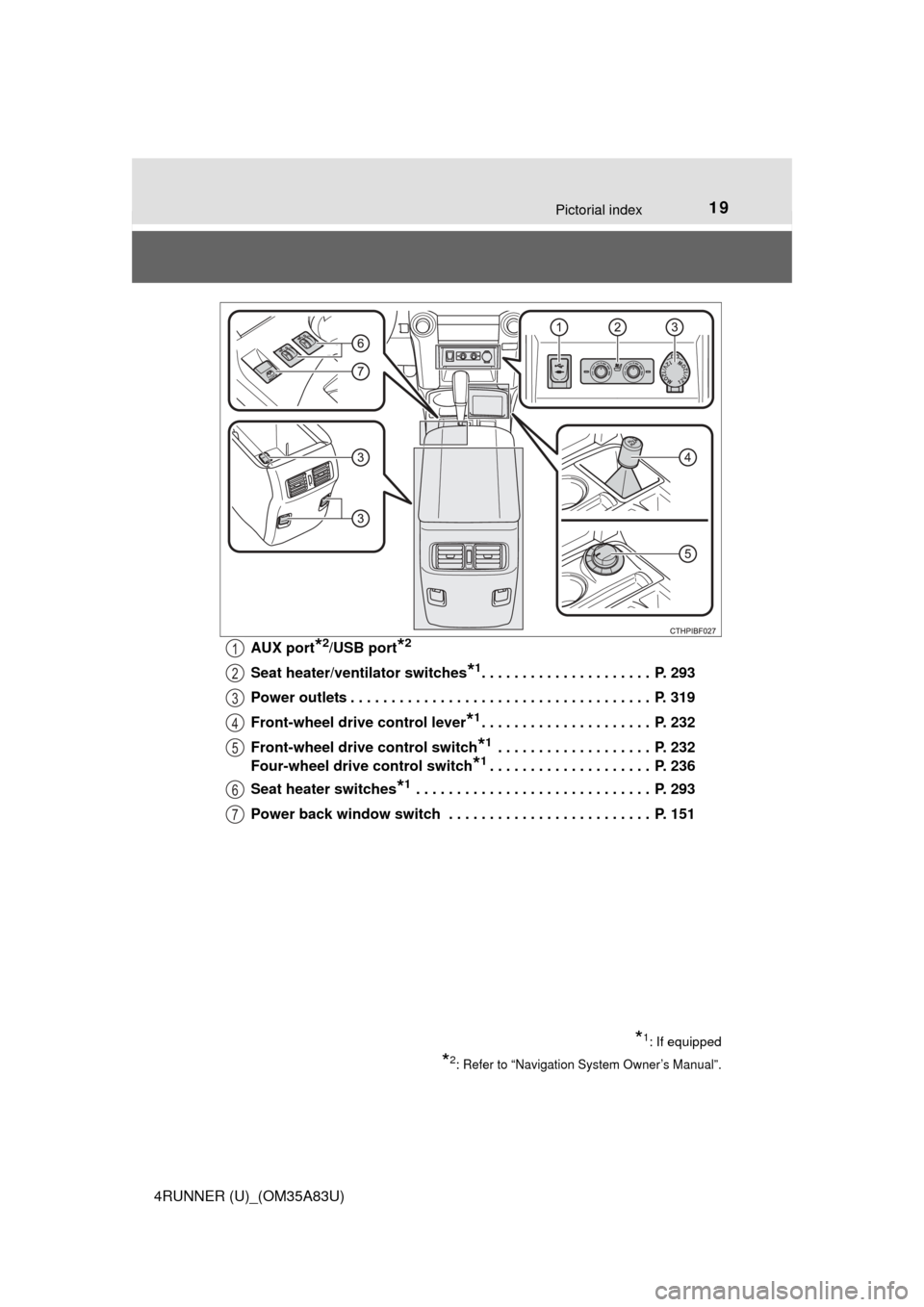
4RUNNER (U)_(OM35A83U)AUX port
*2/USB port*2
Seat heater/ven
tilator switches*1. . . . . . . . . . . . . . . . . . . . . P. 293
Power outlets . . . . . . . . . . . . . . . . . . . . . . . . . . . . . . . . . . . . . P. 319
Front-wheel drive control lever
*1. . . . . . . . . . . . . . . . . . . . . P. 232
Front-wheel drive control switch
*1 . . . . . . . . . . . . . . . . . . . P. 232
Four-wheel drive control switch
*1. . . . . . . . . . . . . . . . . . . . P. 236
Seat heater switches
*1 . . . . . . . . . . . . . . . . . . . . . . . . . . . . . P. 293
Power back window switch . . . . . . . . . . . . . . . . . . . . . . . . . P. 151
*1: If equipped
*2: Refer to “Navigation System Owner’s Manual”.
1
2
3
4
5
6
7
Page 77 of 530
772. Instrument cluster
2
Instrument cluster
4RUNNER (U)_(OM35A83U)
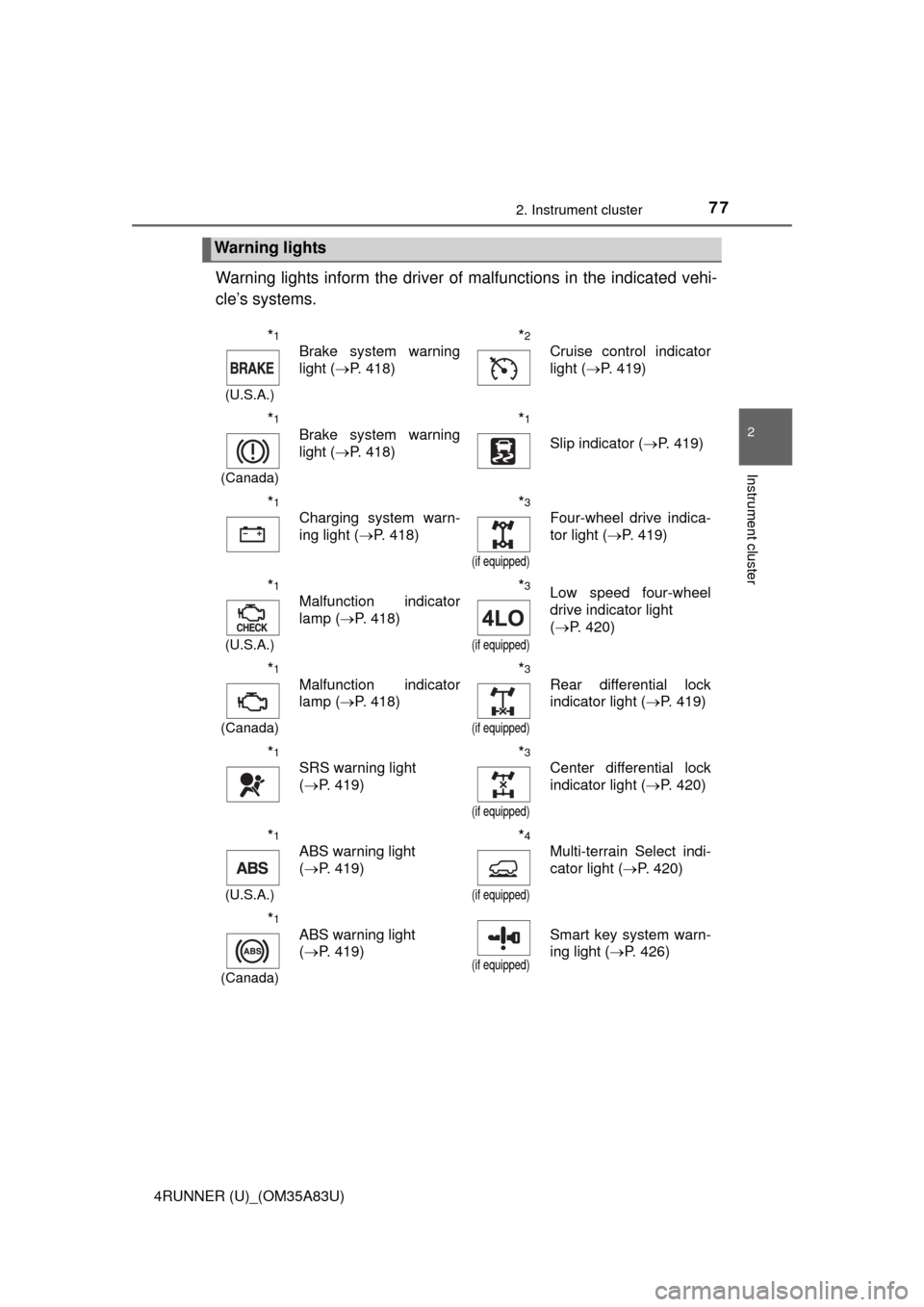
Warning lights inform the driver of malfunctions in the indicated vehi-
cle’s systems.
Warning lights
*1
(U.S.A.)
Brake system warning
light ( P. 418)*2
Cruise control indicator
light (P. 419)
*1
(Canada)
Brake system warning
light (P. 418)*1
Slip indicator ( P. 419)
*1
Charging system warn-
ing light (P. 418)*3
(if equipped)
Four-wheel drive indica-
tor light (P. 419)
*1
(U.S.A.)
Malfunction indicator
lamp (P. 418)*3
(if equipped)
Low speed four-wheel
drive indicator light
(P. 420)
*1
(Canada)
Malfunction indicator
lamp ( P. 418)*3
(if equipped)
Rear differential lock
indicator light ( P. 419)
*1
SRS warning light
(P. 419)*3
(if equipped)
Center differential lock
indicator light ( P. 420)
*1
(U.S.A.)
ABS warning light
(P. 419)*4
(if equipped)
Multi-terrain Select indi-
cator light ( P. 420)
*1
(Canada)
ABS warning light
(P. 419)
(if equipped)
Smart key system warn-
ing light ( P. 426)
Page 79 of 530
792. Instrument cluster
2
Instrument cluster
4RUNNER (U)_(OM35A83U)
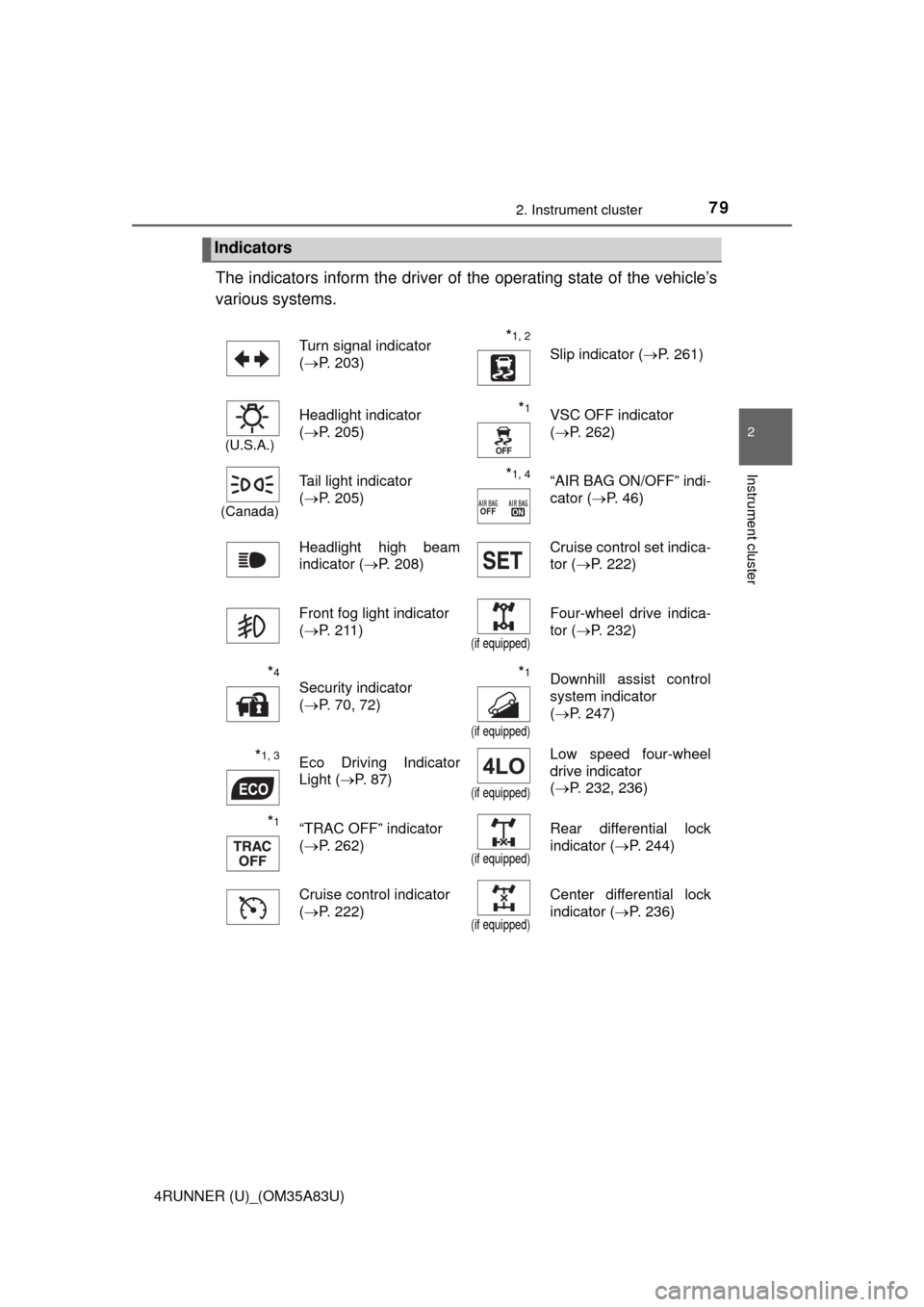
The indicators inform the driver of the operating state of the vehicle’s
various systems.
Indicators
Turn signal indicator
( P. 203)*1, 2 Slip indicator ( P. 261)
(U.S.A.)
Headlight indicator
(P. 205)*1VSC OFF indicator
(P. 262)
(Canada)
Tail light indicator
(P. 205) *1, 4“AIR BAG ON/OFF” indi-
cator ( P. 46)
Headlight high beam
indicator ( P. 208) Cruise control set indica-
tor (
P. 222)
Front fog light indicator
( P. 211)
(if equipped)
Four-wheel drive indica-
tor ( P. 232)
*4
Security indicator
(P. 70, 72)*1
(if equipped)
Downhill assist control
system indicator
(P. 247)
*1, 3Eco Driving Indicator
Light ( P. 87)
(if equipped)
Low speed four-wheel
drive indicator
(P. 232, 236)
*1“TRAC OFF” indicator
(P. 262)
(if equipped)
Rear differential lock
indicator ( P. 244)
Cruise control indicator
( P. 222)
(if equipped)
Center differential lock
indicator ( P. 236)
Page 161 of 530

159
Driving4
4RUNNER (U)_(OM35A83U)4-1. Before driving
Driving the vehicle ............. 160
Cargo and luggage ........... 170
Vehicle load limits ............. 175
Trailer towing..................... 176
Dinghy towing ................... 191
4-2. Driving procedures Engine (ignition) switch (vehicles without a
smart key system) ........... 192
Engine (ignition) switch (vehicles with a
smart key system) ........... 195
Automatic transmission ..... 200
Turn signal lever................ 203
Parking brake .................... 204
4-3. Operating the lights and wipers
Headlight switch ................ 205
Fog light switch ................. 211
Windshield wipers and washer ............................ 213
Rear window wiper and washer ............................ 216 4-4. Refueling
Opening the fuel tank cap .................................. 219
4-5. Using the driving support systems
Cruise control .................... 222
Intuitive parking assist....... 226
Four-wheel drive system (part-time 4WD
models) ........................... 232
Four-wheel drive system (full-time 4WD
models) ........................... 236
Active traction control system ............................ 240
AUTO LSD system............ 242
Rear differential lock system ............................ 244
Downhill assist control system ............................ 247
Crawl Control .................... 250
Multi-terrain Select ............ 253
Driving assist systems ...... 260
4-6. Driving tips Winter driving tips ............. 269
Off-road precautions ......... 273
Page 226 of 530

2244-5. Using the driving support systems
4RUNNER (U)_(OM35A83U)
■Cruise control can be set when
●The shift lever is in D or range 4 or higher of S has been selected.
● Vehicle speed is above approximately 25 mph (40 km/h).
■ Accelerating after setting the vehicle speed
●The vehicle can be accelerated normally. After acceleration, the set speed
resumes.
● Even without canceling the cruise control, the set speed can be increased
by first accelerating the vehicle to the desired speed and then pushing the
lever down to set the new speed.
■ Automatic cruise co ntrol cancelation
Cruise control will stop maintaining the vehicle speed in any of the following
situations.
● Actual vehicle speed falls more than approximately 10 mph (16 km/h) below
the preset vehicle speed.
At this time, the memorized set speed is not retained.
● Actual vehicle speed is below approximately 25 mph (40 km/h).
● VSC is activated.
● The operation cannot be switched for 5 seconds or more after operating the
front-wheel drive control switch (part-time 4WD models) or the four-wheel
drive control switch (full-time 4WD models).
■ If the cruise control indicator light flashes
Press the “ON-OFF” button once to deactivate the system, and then press
the button again to reactivate the system.
If the cruise control speed cannot be set or if the cruise control cancels imme-
diately after being activated, there may be a malfunction in the cruise control
system. Have the vehicle inspected by your Toyota dealer.
Page 234 of 530
2324-5. Using the driving support systems
4RUNNER (U)_(OM35A83U)
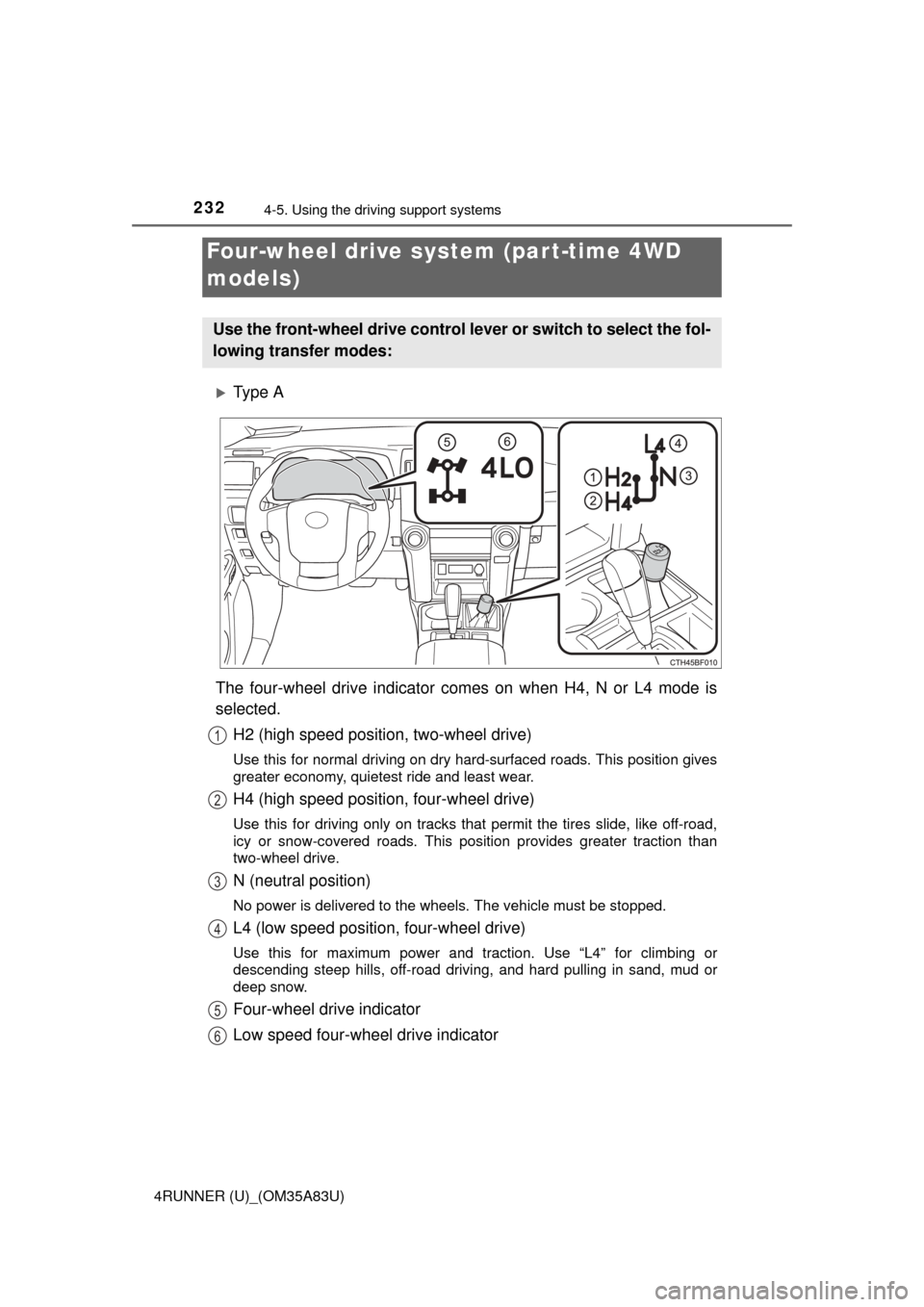
Ty p e A
The four-wheel drive indicator comes on when H4, N or L4 mode is
selected. H2 (high speed position, two-wheel drive)
Use this for normal driving on dry hard-surfaced roads. This position gives
greater economy, quietest ride and least wear.
H4 (high speed position, four-wheel drive)
Use this for driving only on tracks that permit the tires slide, like off-road,
icy or snow-covered roads. This position provides greater traction than
two-wheel drive.
N (neutral position)
No power is delivered to the wheels. The vehicle must be stopped.
L4 (low speed position, four-wheel drive)
Use this for maximum power and traction. Use “L4” for climbing or
descending steep hills, off-road driving, and hard pulling in sand, mud or
deep snow.
Four-wheel drive indicator
Low speed four-wheel drive indicator
Four-wheel drive system (par t-time 4WD
models)
Use the front-wheel drive control lever or switch to select the fol-
lowing transfer modes:
1
2
3
4
5
6
Page 235 of 530
2334-5. Using the driving support systems
4
Driving
4RUNNER (U)_(OM35A83U)
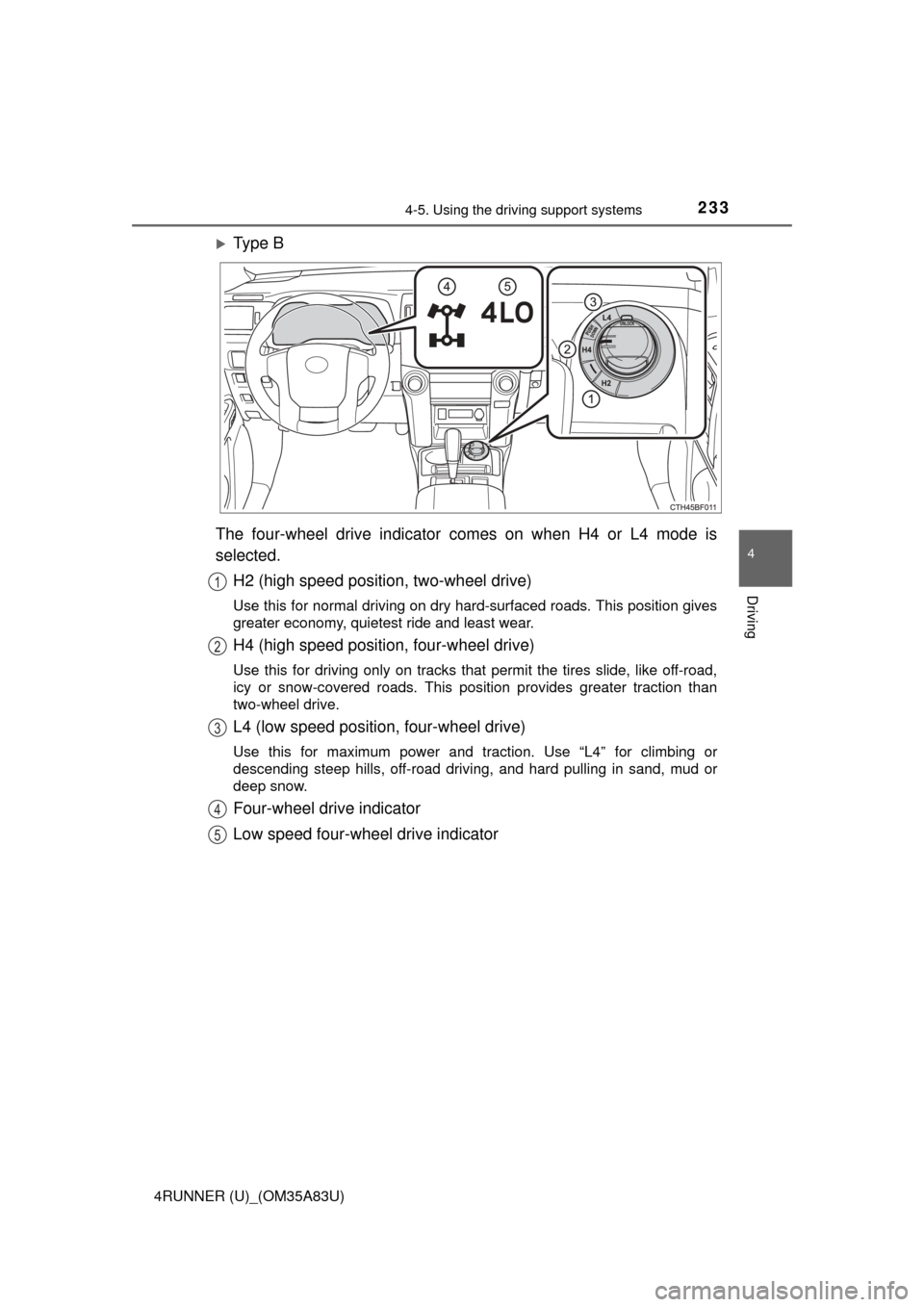
Ty p e B
The four-wheel drive indicator comes on when H4 or L4 mode is
selected. H2 (high speed position, two-wheel drive)
Use this for normal driving on dry hard-surfaced roads. This position gives
greater economy, quietest ride and least wear.
H4 (high speed position, four-wheel drive)
Use this for driving only on tracks that permit the tires slide, like off-road,
icy or snow-covered roads. This position provides greater traction than
two-wheel drive.
L4 (low speed position, four-wheel drive)
Use this for maximum power and traction. Use “L4” for climbing or
descending steep hills, off-road driving, and hard pulling in sand, mud or
deep snow.
Four-wheel drive indicator
Low speed four-wheel drive indicator
1
2
3
4
5
Page 236 of 530
2344-5. Using the driving support systems
4RUNNER (U)_(OM35A83U)■
Shifting from H2 to H4
Ty p e A
Reduce vehicle speed to less than 50 mph (80 km/h).
Shift the front-wheel drive control lever to H4.
Ty p e BReduce vehicle speed to less than 62 mph (100 km/h).
Push the “UNLOCK” button and turn the front-wheel drive control
switch to H4.
The four-wheel drive indicator will turn on.
■
Shifting from H4 to H2
Ty p e A
Shift the front-wheel drive control lever to H2.
Ty p e B
Push the “UNLOCK” button and turn the front-wheel drive control
switch to H2.
This can be done at any speed.
The four-wheel drive indicator will go off.
■
Shifting from H4 to L4 Stop the vehicle completely and continue to depress the brake
pedal.
Shift the shift lever to N.
Ty p e A
Shift the front-wheel drive control lever to L4.
Ty p e B
Push the “UNLOCK” button and then push and turn the front-
wheel drive control switch to L4.
The low speed four-wheel drive indicator will turn on.
Shifting between H2 and H4
Shifting between H4 and L4
1
2
1
2
1
2
3
3
Page 237 of 530
2354-5. Using the driving support systems
4
Driving
4RUNNER (U)_(OM35A83U)■
Shifting from L4 to H4
Stop the vehicle completely and continue to depress the brake
pedal.
Shift the shift lever to N.
Ty p e A
Shift the front-wheel drive control lever to H4.
Ty p e BPush the “UNLOCK” button and turn the front-wheel drive control
switch to H4.
The low speed four-wheel drive indicator will go off.
■When the front-wheel drive control lever or switch is shifted to L4
VSC and TRAC are automatically turned off.
■ If the four-wheel drive indicator flashes
The transfer mode may not successfully change. Drive straight ahead while
accelerating or decelerating, or drive in reverse.
■ If the low speed four-wheel dr ive indicator continues to flash
The transfer mode may not successfully change. Operate the four-wheel
drive control switch again.
■ If the low speed four-wheel drive indicator continues to flash and a
buzzer sounds
The shift lever is not in N and/or the vehicle is moving. Stop the vehicle com-
pletely, shift the shift lever to N and make sure that the indicator stops flash-
ing.
■ If the four-wheel drive or low speed four-wheel drive indicator flashes
rapidly
There may be a malfunction in the four-wheel drive system. Have the vehicle
inspected by your Toyota dealer immediately.
■ Four-wheel drive usage frequency
You should drive in four-wheel drive for at least 10 miles (16 km) each month.
This will assure that the front drive components are lubricated.
CAUTION
■Shifting the front-wheel drive contro l lever or switch from H2 to H4
while driving
Never operate the front-wheel drive control lever or switch if the wheels are
slipping.
Stop the slipping or spinning before shifting.
1
2
3
3