sensor TOYOTA 4RUNNER 2015 N280 / 5.G User Guide
[x] Cancel search | Manufacturer: TOYOTA, Model Year: 2015, Model line: 4RUNNER, Model: TOYOTA 4RUNNER 2015 N280 / 5.GPages: 524, PDF Size: 9.46 MB
Page 227 of 524
2274-5. Using the driving support systems
4
Driving
4RUNNER (U)_(OM35B18U)
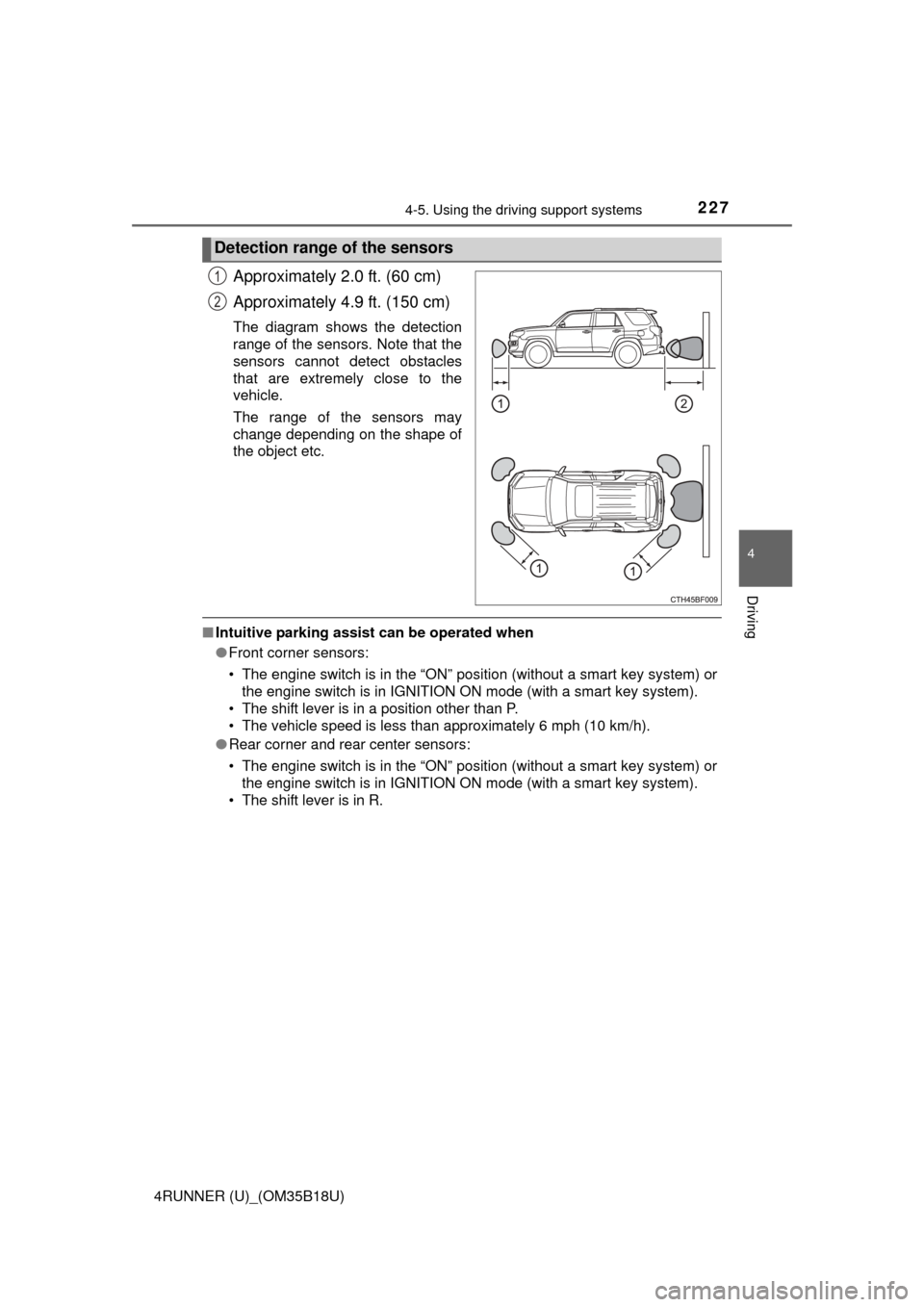
Approximately 2.0 ft. (60 cm)
Approximately 4.9 ft. (150 cm)
The diagram shows the detection
range of the sensors. Note that the
sensors cannot detect obstacles
that are extremely close to the
vehicle.
The range of the sensors may
change depending on the shape of
the object etc.
■Intuitive parking assist can be operated when
●Front corner sensors:
• The engine switch is in the “ON” position (without a smart key system) or
the engine switch is in IGNITION ON mode (with a smart key system).
• The shift lever is in a position other than P.
• The vehicle speed is less than approximately 6 mph (10 km/h).
● Rear corner and rear center sensors:
• The engine switch is in the “ON” position (without a smart key system) or
the engine switch is in IGNITION ON mode (with a smart key system).
• The shift lever is in R.
Detection range of the sensors
1
2
Page 228 of 524

2284-5. Using the driving support systems
4RUNNER (U)_(OM35B18U)■
Sensor detection information
●The sensor’s detection areas are limited to the areas around the vehicle’s
front corner and rear bumpers.
● Certain vehicle conditions and the surrounding environment may affect the
ability of the sensor to correctly detect obstacles. Particular instances where
this may occur are listed below.
• There is dirt, snow or ice on the sensor. (Wiping the sensors will resolve
this problem.)
• The sensor is frozen. (Thawing the area will resolve this problem.)
In especially cold weather, if a sensor is frozen the screen may show an
abnormal display, or obstacles may not be detected.
• The sensor is covered in any way.
• The vehicle is leaning considerably to one side.
• On an extremely bumpy road, on an incline, on gravel, or on grass.
• The vicinity of the vehicle is noisy due to vehicle horns, motorcycleengines, air brakes of large vehicles, or other loud noises producing ultra-
sonic waves.
• There is another vehicle equipped with parking assist sensors in the
vicinity.
• The sensor is coated with a sheet of spray or heavy rain.
• The vehicle is equipped with a fender pole or wireless antenna.
• Towing eyelet is installed.
• The bumper or sensor receives a strong impact.
• The vehicle is approaching a tall or curved curb.
• In harsh sunlight or intense cold weather.
• The area directly under the bumpers is not detected.
• If obstacles draw too close to the sensor.
• A non-genuine Toyota suspension (lowered suspension etc.) is installed.
• People may not be detected if they are wearing certain types of clothing.
In addition to the examples above, there are instances in which, because of
their shape, signs and other objects may be judged by the sensor to be closer
than they are.
● The shape of the obstacle may prevent the sensor from detecting it. Pay
particular attention to the following obstacles:
• Wires, fences, ropes, etc.
• Cotton, snow and other materials that absorb sound waves
• Sharply-angled objects
• Low obstacles
• Tall obstacles with upper sections projecting outwards in the direction of
your vehicle
Page 229 of 524
2294-5. Using the driving support systems
4
Driving
4RUNNER (U)_(OM35B18U)●
The following situations may occur during use.
• Depending on the shape of the obstacle and other factors, the detection
distance may shorten, or detection may be impossible.
• Obstacles may not be detected if they are too close to the sensor.
• There will be a short delay between obstacle detection and display. Even at slow speeds, there is a possibility that the obstacle will come within the
sensor’s detection areas before the display is shown and the warning
beep sounds.
• Thin posts or objects lower than the sensor may not be detected for colli- sion when approached, even if they have been detected once.
• It might be difficult to hear beeps due to the volume of audio system or air flow noise of air conditioning system.
■ If a message is displayed on the multi-information display
P. 421
■ Customization that can be co nfigured at Toyota dealer
Settings (e.g. buzzer volume) can be changed.
(Customizable features P. 481)
■ Certification
For vehicles sold in the U.S.A.
This device complies with Part 15 of the FCC Rules. Operation is subject to
the following two conditions; (1) This device may not cause harmful interfer-
ence, and (2) This device must accept any interference received, including
interference that may cause undesired operation.
For vehicles sold in Canada
This ISM device complies with Canadian ICES-001.
Cet appareil ISM est conforme a la norme NMB-001 du Canada.
Page 230 of 524
2304-5. Using the driving support systems
4RUNNER (U)_(OM35B18U)
CAUTION
■When using the intuitive parking assist
Observe the following precautions.
Failing to do so may result in the vehicle being unable to be driven safely
and possibly cause an accident.
● Do not use the sensor at speeds in excess of 6 mph (10 km/h).
● The sensors’ detection areas and reaction times are limited. When moving
forward or reversing, check the areas surrounding the vehicle (especially
the sides of the vehicle) for safety, and drive slowly, using the brake to
control the vehicle’s speed.
● Do not install accessories within the sensors’ detection areas.
NOTICE
■When using intuitive parking assist-sensor
In the following situations, the system may not function correctly due t\
o a
sensor malfunction etc. Have the vehicle checked by your Toyota dealer.
● The intuitive parking assist operation display flashes, and a beep sounds
when no obstacles are detected.
● If the area around a sensor collides with something, or is subjected to
strong impact.
● If the bumper collides with something.
● If the display shows continuously without a beep.
● If a display error occurs, first check the sensor.
If the error occurs even if there is no ice, snow or mud on the sensor, it is
likely that the sensor is malfunctioning.
■ Notes when washing the vehicle
Do not apply intensive bursts of water or steam to the sensor area.
Doing so may result in the sensor malfunctioning.
Page 416 of 524
4167-2. Steps to take in an emergency
4RUNNER (U)_(OM35B18U)
*1: Parking brake engaged warning buzzer:A buzzer will sound if the vehicle is driven at a speed of approximately 3
mph (5 km/h) or more.
*2: Open door warning buzzer:The open door warning buzzer sounds to alert one or more of the doors is
not fully closed (with the vehicle having reached a speed of 3 mph [5 km/h]).
*3: Driver’s and front passenger’s seat belt buzzer: The driver’s and front passenger’s seat belt buzzer sounds to alert the
driver and front passenger that
his or her seat belt is not fastened. The
buzzer sounds intermittently for 10 seconds after the vehicle reaches a
speed of 12 mph (20 km/h). Then, if the seat belt is still unfastened, the
buzzer will sound in a different tone for 20 more seconds.
■ SRS warning light
This warning light system monitors the airbag sensor assembly, front impact
sensors, side impact sensors (front door), side impact sensors (rear), safing
sensor (rear), driver's seat belt buckle switch, front passenger occupant clas-
sification system (ECU and sensors) , “AIR BAG ON” and “AIR BAG OFF”
indicator lights, front passenger's seat belt buckle switch, seat belt preten-
sioners, airbags, interconnecting wiring and power sources. (P. 3 5 )
■ Key reminder buzzer (vehicles without a smart key system)
The buzzer indicates that the key has not been removed with the engine off
and the driver’s door opened.
■ Open moon roof reminder buzzer (if equipped)
The buzzer indicates that the moon roof is not fully closed with the engine off
and the driver’s door opened.
■ Front passenger detection sensor, passenger seat belt reminder and
warning buzzer
● If luggage is placed on the front passenger seat, the front passenger detec-
tion sensor may cause the warning light to flash and the warning buzzer to
sound even if a passenger is not sitting in the seat.
● If a cushion is placed on the seat, the sensor may not detect a passenger,
and the warning light may not operate properly.
■ If the malfunction indicator la mp comes on while driving
First check the following:
● Is the fuel tank empty?
If it is, fill the fuel tank immediately.
● Is the fuel tank cap loose?
If it is, tighten it securely.
The light will go off after several driving trips.
If the light does not go off even after several trips, contact your Toyota dealer
as soon as possible.
Page 422 of 524
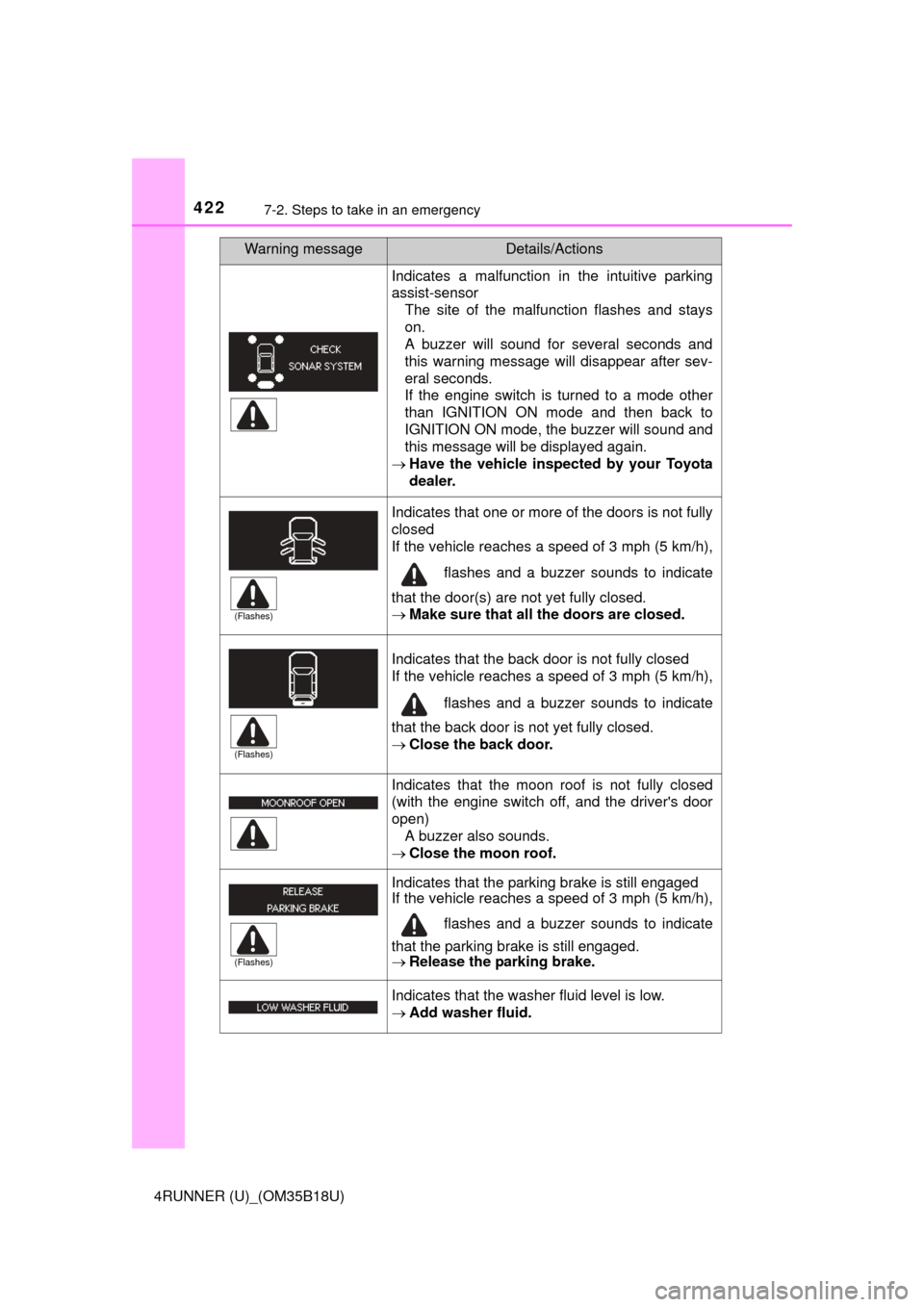
4227-2. Steps to take in an emergency
4RUNNER (U)_(OM35B18U)
Indicates a malfunction in the intuitive parking
assist-sensorThe site of the malfunction flashes and stays
on.
A buzzer will sound for several seconds and
this warning message will disappear after sev-
eral seconds.
If the engine switch is turned to a mode other
than IGNITION ON mode and then back to
IGNITION ON mode, the buzzer will sound and
this message will be displayed again.
Have the vehicle inspected by your Toyota
dealer.
Indicates that one or more of the doors is not fully
closed
If the vehicle reaches a speed of 3 mph (5 km/h), flashes and a buzzer sounds to indicate
that the door(s) are not yet fully closed.
Make sure that all the doors are closed.
Indicates that the back door is not fully closed
If the vehicle reaches a speed of 3 mph (5 km/h), flashes and a buzzer sounds to indicate
that the back door is not yet fully closed.
Close the back door.
Indicates that the moon roof is not fully closed
(with the engine switch off, and the driver's door
open)
A buzzer also sounds.
Close the moon roof.
Indicates that the parking brake is still engaged
If the vehicle reaches a speed of 3 mph (5 km/h),
flashes and a buzzer sounds to indicate
that the parking brake is still engaged.
Release the parking brake.
Indicates that the washer fluid level is low.
Add washer fluid.
Warning messageDetails/Actions
(Flashes)
(Flashes)
(Flashes)
Page 423 of 524
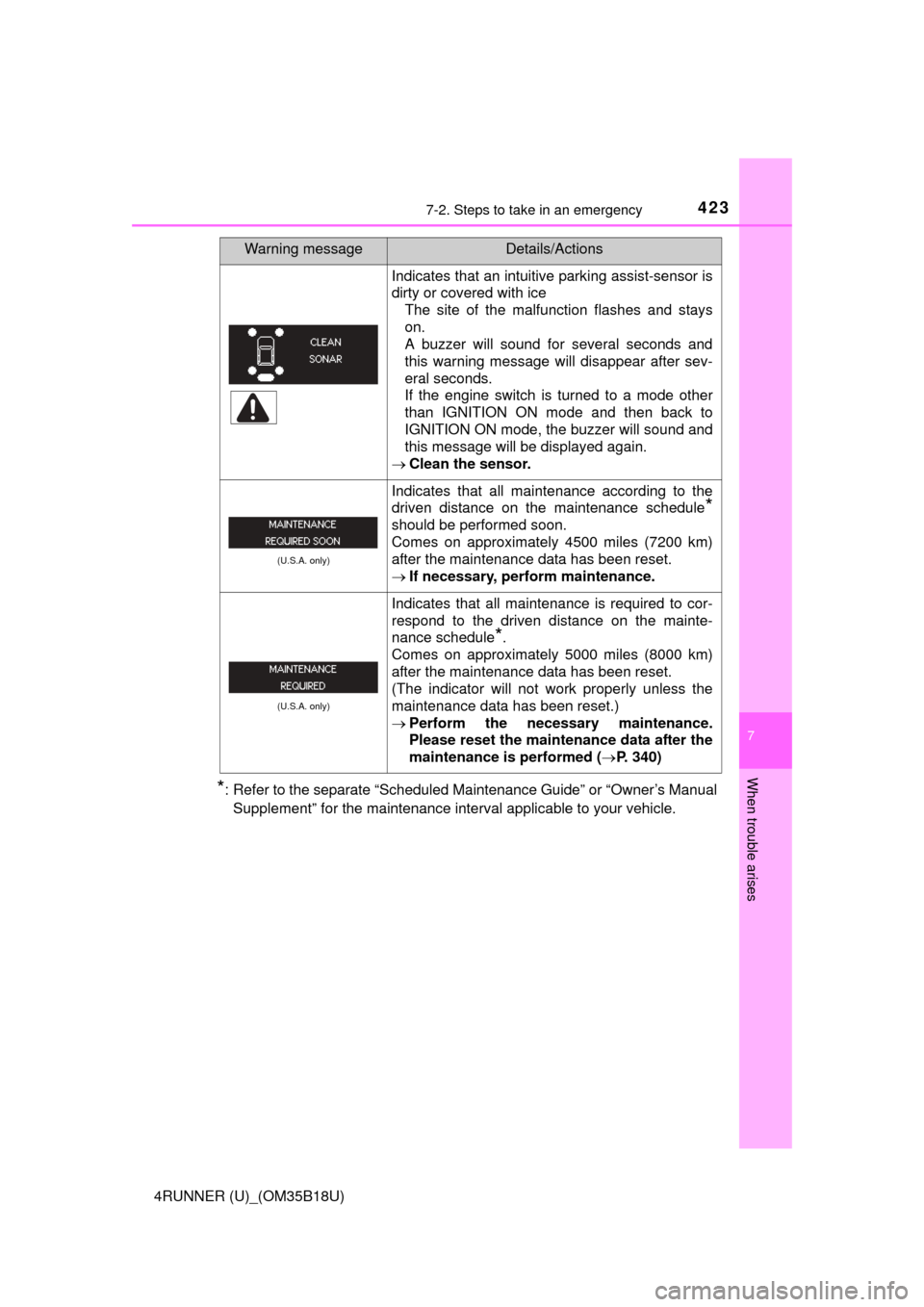
4237-2. Steps to take in an emergency
7
When trouble arises
4RUNNER (U)_(OM35B18U)
*: Refer to the separate “Scheduled Maintenance Guide” or “Owner’s ManualSupplement” for the maintenance interval applicable to your vehicle.
Indicates that an intuitive parking assist-sensor is
dirty or covered with ice The site of the malfunction flashes and stays
on.
A buzzer will sound for several seconds and
this warning message will disappear after sev-
eral seconds.
If the engine switch is turned to a mode other
than IGNITION ON mode and then back to
IGNITION ON mode, the buzzer will sound and
this message will be displayed again.
Clean the sensor.
(U.S.A. only)
Indicates that all maintenance according to the
driven distance on the maintenance schedule
*
should be performed soon.
Comes on approximately 4500 miles (7200 km)
after the maintenance data has been reset.
If necessary, perform maintenance.
(U.S.A. only)
Indicates that all maintenance is required to cor-
respond to the driven distance on the mainte-
nance schedule
*.
Comes on approximately 5000 miles (8000 km)
after the maintenance data has been reset.
(The indicator will not work properly unless the
maintenance data has been reset.)
Perform the necessary maintenance.
Please reset the maintenance data after the
maintenance is performed ( P. 340)
Warning messageDetails/Actions
Page 483 of 524
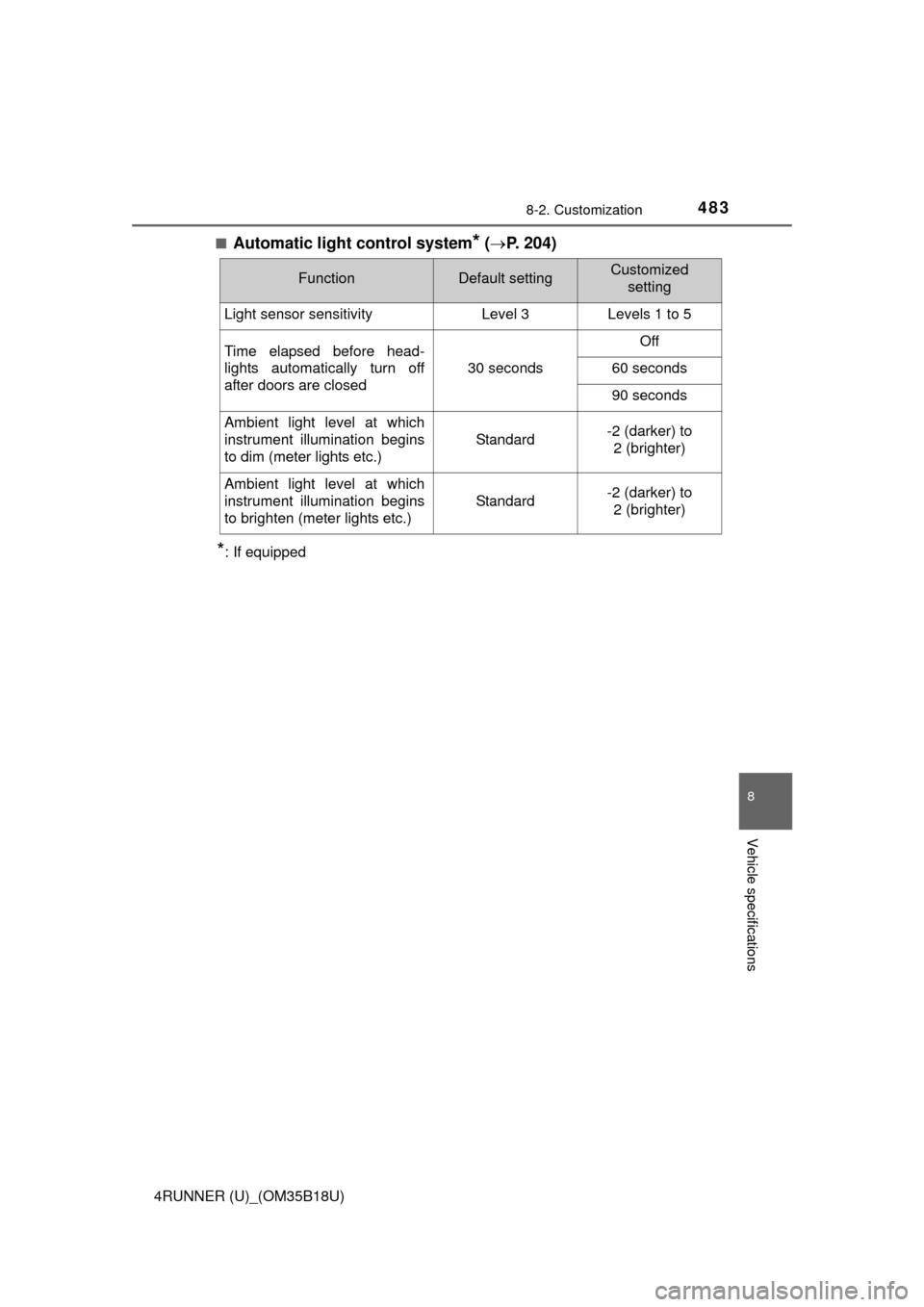
4838-2. Customization
8
Vehicle specifications
4RUNNER (U)_(OM35B18U)■
Automatic light control system* (
P. 204)
*: If equipped
FunctionDefault settingCustomized
setting
Light sensor sensitivityLevel 3Levels 1 to 5
Time elapsed before head-
lights automatically turn off
after doors are closed
30 seconds
Off
60 seconds
90 seconds
Ambient light level at which
instrument illumination begins
to dim (meter lights etc.)
Standard-2 (darker) to
2 (brighter)
Ambient light level at which
instrument illumination begins
to brighten (meter lights etc.)
Standard-2 (darker) to 2 (brighter)
Page 508 of 524
508What to do if... (Troubleshooting)
4RUNNER (U)_(OM35B18U)
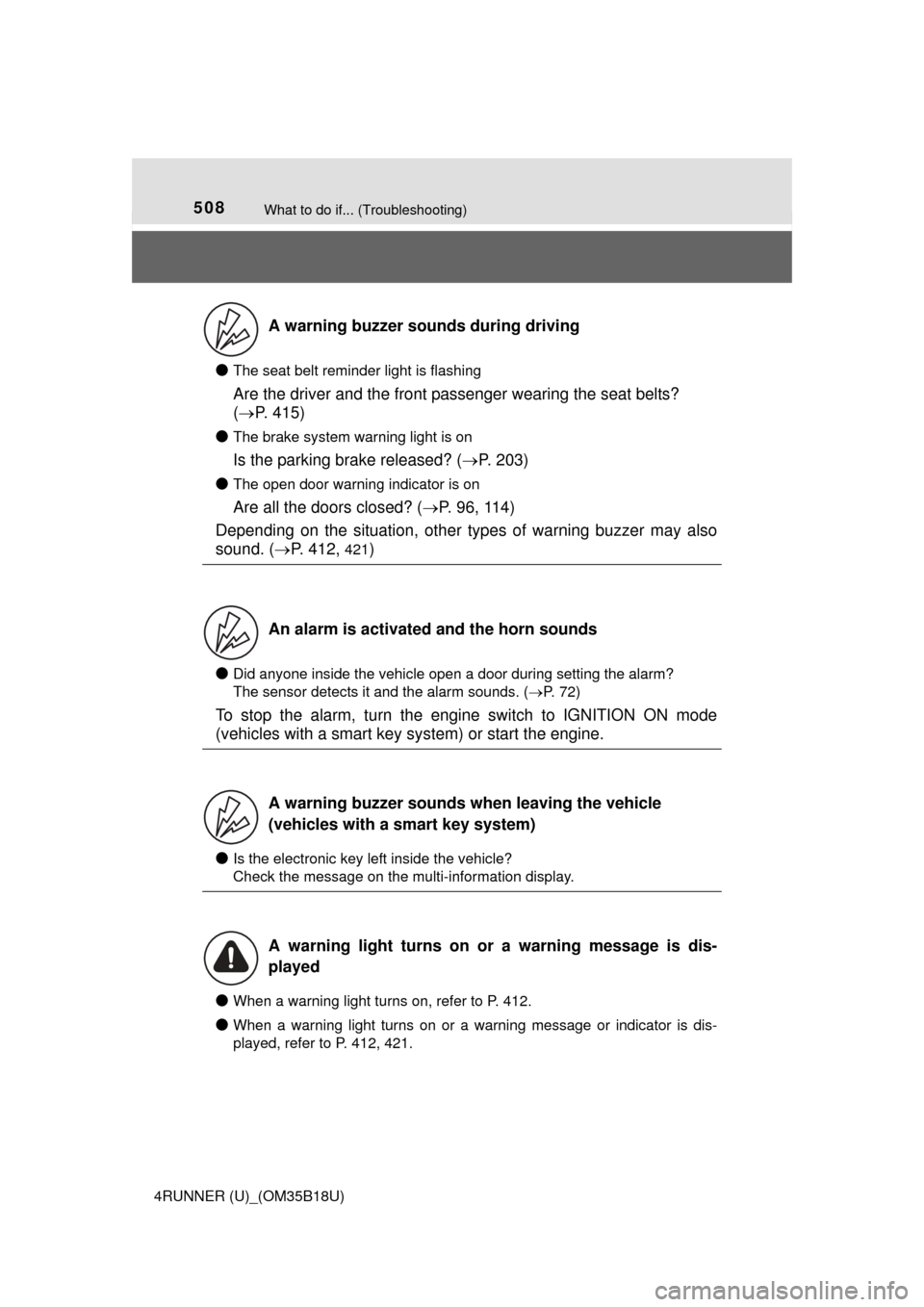
●The seat belt reminder light is flashing
Are the driver and the front passenger wearing the seat belts?
( P. 415)
●
The brake system warning light is on
Is the parking brake released? ( P. 203)
●
The open door warning indicator is on
Are all the doors closed? ( P. 96, 114)
Depending on the situation, other types of warning buzzer may also
sound. ( P. 412,
421)
●Did anyone inside the vehicle open a door during setting the alarm?
The sensor detects it and the alarm sounds. ( P. 72)
To stop the alarm, turn the engine switch to IGNITION ON mode
(vehicles with a smart key system) or start the engine.
●Is the electronic key left inside the vehicle?
Check the message on the multi-information display.
●When a warning light turns on, refer to P. 412.
●When a warning light turns on or a warning message or indicator is dis-
played, refer to P. 412, 421.
A warning buzzer sounds during driving
An alarm is activated and the horn sounds
A warning buzzer sounds when leaving the vehicle
(vehicles with a smart key system)
A warning light turns on or a warning message is dis-
played
Page 519 of 524
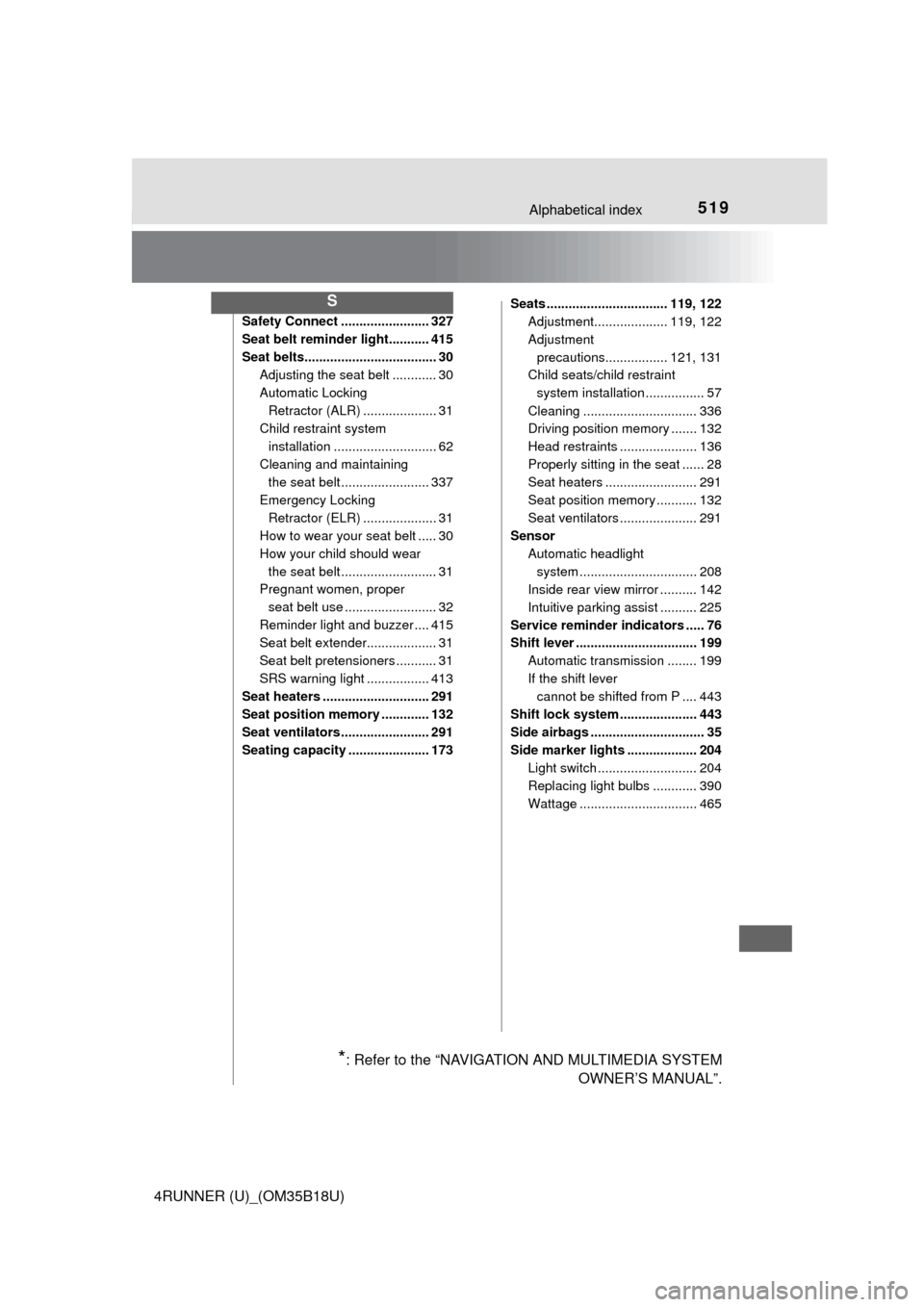
519Alphabetical index
4RUNNER (U)_(OM35B18U)
Safety Connect ........................ 327
Seat belt reminder light........... 415
Seat belts.................................... 30Adjusting the seat belt ............ 30
Automatic Locking
Retractor (ALR) .................... 31
Child restra int system
installation ............................ 62
Cleaning and maintaining the seat belt ........................ 337
Emergency Locking Retractor (ELR) .................... 31
How to wear your seat belt ..... 30
How your child should wear
the seat belt .......................... 31
Pregnant women, proper
seat belt use ......................... 32
Reminder light and buzzer .... 415
Seat belt extender................... 31
Seat belt pretensioners ........... 31
SRS warning light ................. 413
Seat heaters ............................. 291
Seat position memory ............. 132
Seat ventilators ........................ 291
Seating capacity ...................... 173 Seats ................................. 119, 122
Adjustment.................... 119, 122
Adjustment
precautions................. 121, 131
Child seats/child restraint
system installation ................ 57
Cleaning ............................... 336
Driving position memory ....... 132
Head restraints ..................... 136
Properly sitting in the seat ...... 28
Seat heaters ......................... 291
Seat position memory ........... 132
Seat ventilators ..................... 291
Sensor
Automatic headlight system .......... ...................... 208
Inside rear view mirror .......... 142
Intuitive parking assist .......... 225
Service reminder indicators ..... 76
Shift lever ................................. 199 Automatic transmission ........ 199
If the shift lever cannot be shifted from P .... 443
Shift lock system ..................... 443
Side airbags ............................... 35
Side marker lights ................... 204 Light switch ........................... 204
Replacing light bulbs ............ 390
Wattage ................................ 465
S
*: Refer to the “NAVIGATION AND MULTIMEDIA SYSTEM OWNER’S MANUAL”.