engine TOYOTA 4RUNNER 2015 N280 / 5.G Repair Manual
[x] Cancel search | Manufacturer: TOYOTA, Model Year: 2015, Model line: 4RUNNER, Model: TOYOTA 4RUNNER 2015 N280 / 5.GPages: 524, PDF Size: 9.46 MB
Page 196 of 524

1964-2. Driving procedures
4RUNNER (U)_(OM35B18U)
If the engine is stopped with the shift lever in a position other than P,
the engine switch will not be turned off but instead be turned to
ACCESSORY mode. Perform the following procedure to turn the
switch off:
Check that the parking brake is set.
Shift the shift lever to P.
Check that the indicator on th e engine switch is illuminated in
amber and then press the engine switch once.
Check that the indicator on the engine switch is off.
■Auto power off function
If the vehicle is left in ACCESSORY mode for more than 20 minutes or IGNI-
TION ON mode (the engine is not running) for more than an hour with th\
e
shift lever in P, the engine switch will automatically turn off. However, this
function cannot entirely prevent battery discharge. Do not leave the vehicle
with the engine switch in ACCESSORY or IGNITION ON mode for long peri-
ods of time when the engine is not running.
■ Electronic key battery depletion
P. 9 3
■ Conditions affecting operation
P. 106
■ Notes for the entry function
P. 107
■ If the engine does not start
The engine immobilizer system may not have been deactivated. ( P. 70)
Contact your Toyota dealer.
■ Steering lock
After turning the engine switch off and opening and closing the doors, the
steering wheel will be locked due to the steering lock function. Operating the
engine switch again automatically cancels the steering lock.
When stopping the engine with the shift lever in a position other
than P
1
2
3
4
Page 197 of 524
1974-2. Driving procedures
4
Driving
4RUNNER (U)_(OM35B18U)■
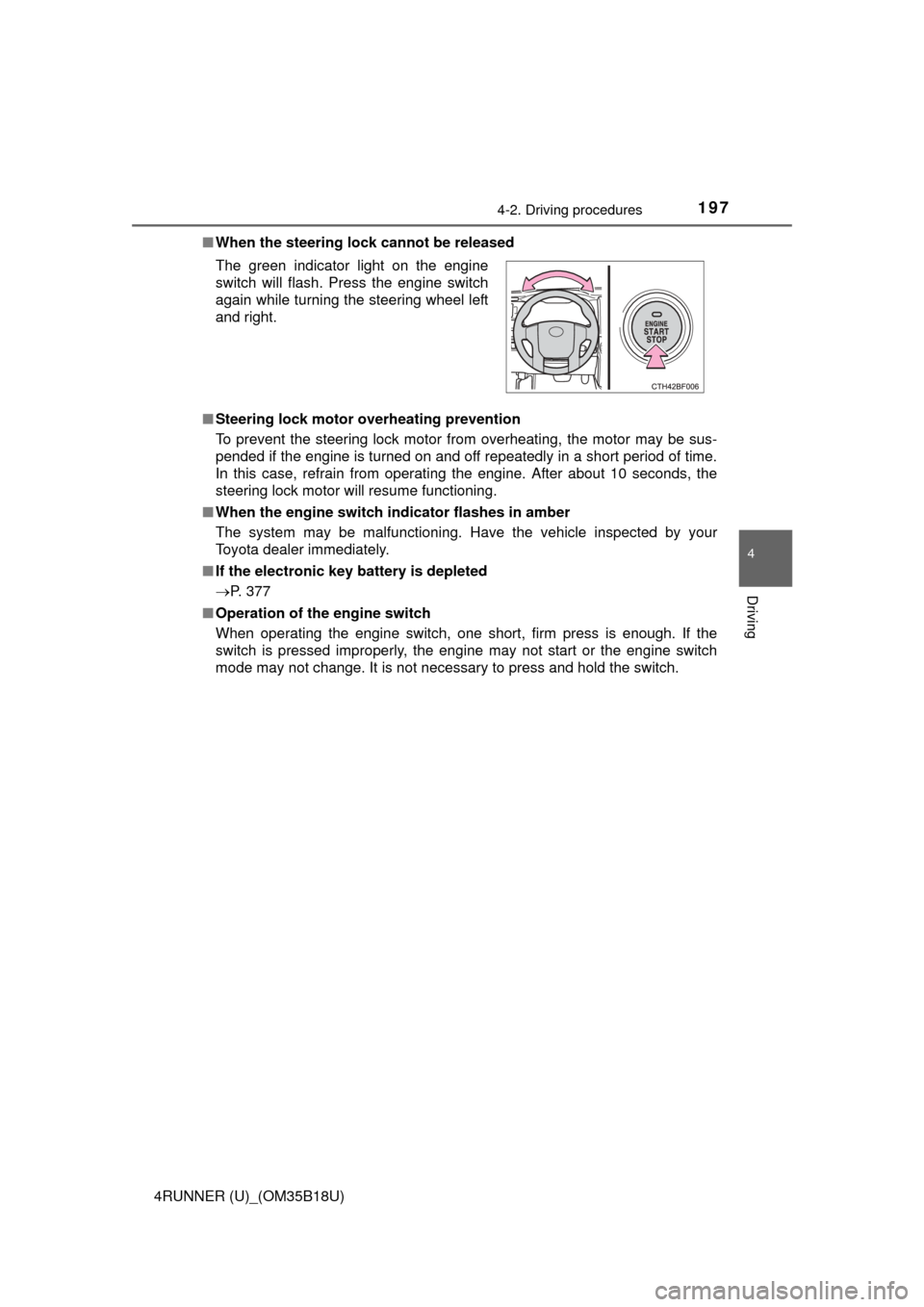
When the steering lock cannot be released
■ Steering lock motor overheating prevention
To prevent the steering lock motor from overheating, the motor may be sus-
pended if the engine is turned on and off repeatedly in a short period of time.
In this case, refrain from operating the engine. After about 10 seconds, the
steering lock motor will resume functioning.
■ When the engine switch indicator flashes in amber
The system may be malfunctioning. Have the vehicle inspected by your
Toyota dealer immediately.
■ If the electronic key battery is depleted
P. 377
■ Operation of the engine switch
When operating the engine switch, one short, firm press is enough. If the
switch is pressed improperly, the engine may not start or the engine switch
mode may not change. It is not necessary to press and hold the switch. The green indicator light on the engine
switch will flash. Press the engine switch
again while turning the steering wheel left
and right.
Page 198 of 524

1984-2. Driving procedures
4RUNNER (U)_(OM35B18U)
CAUTION
■When starting the engine
Always start the engine while sitting in the driver’s seat. Do not depress the
accelerator pedal while starting the engine under any circumstances.
Doing so may cause an accident resulting in death or serious injury.
■ Caution while driving
If engine failure occurs while the vehicle is moving, do not lock or open the
doors until the vehicle reaches a safe and complete stop. Activation of the
steering lock in this circumstance may lead to an accident, resulting in
death or serious injury.
■ Stopping the engine in an emergency
If you want to stop the engine in an emergency while driving the vehicle,
press and hold the engine switch for more than 2 seconds, or press it briefly
3 times or more in succession. ( P. 401)
However, do not touch the engine switch while driving except in an emer-
gency. Turning the engine off while driving will not cause loss of steering or
braking control, but the power assist to these systems will be lost. This will
make it more difficult to steer and brake, so you should pull over and stop
the vehicle as soon as it is safe to do so.
NOTICE
■ To prevent battery discharge
Do not leave the engine switch in ACCESSORY or IGNITION ON mode for
long periods of time without the engine running.
■ When starting the engine
● Do not race a cold engine.
● If the engine becomes difficult to star t or stalls frequently, have your vehi-
cle checked by your Toyota dealer immediately.
Page 199 of 524
1994-2. Driving procedures
4
Driving
4RUNNER (U)_(OM35B18U)
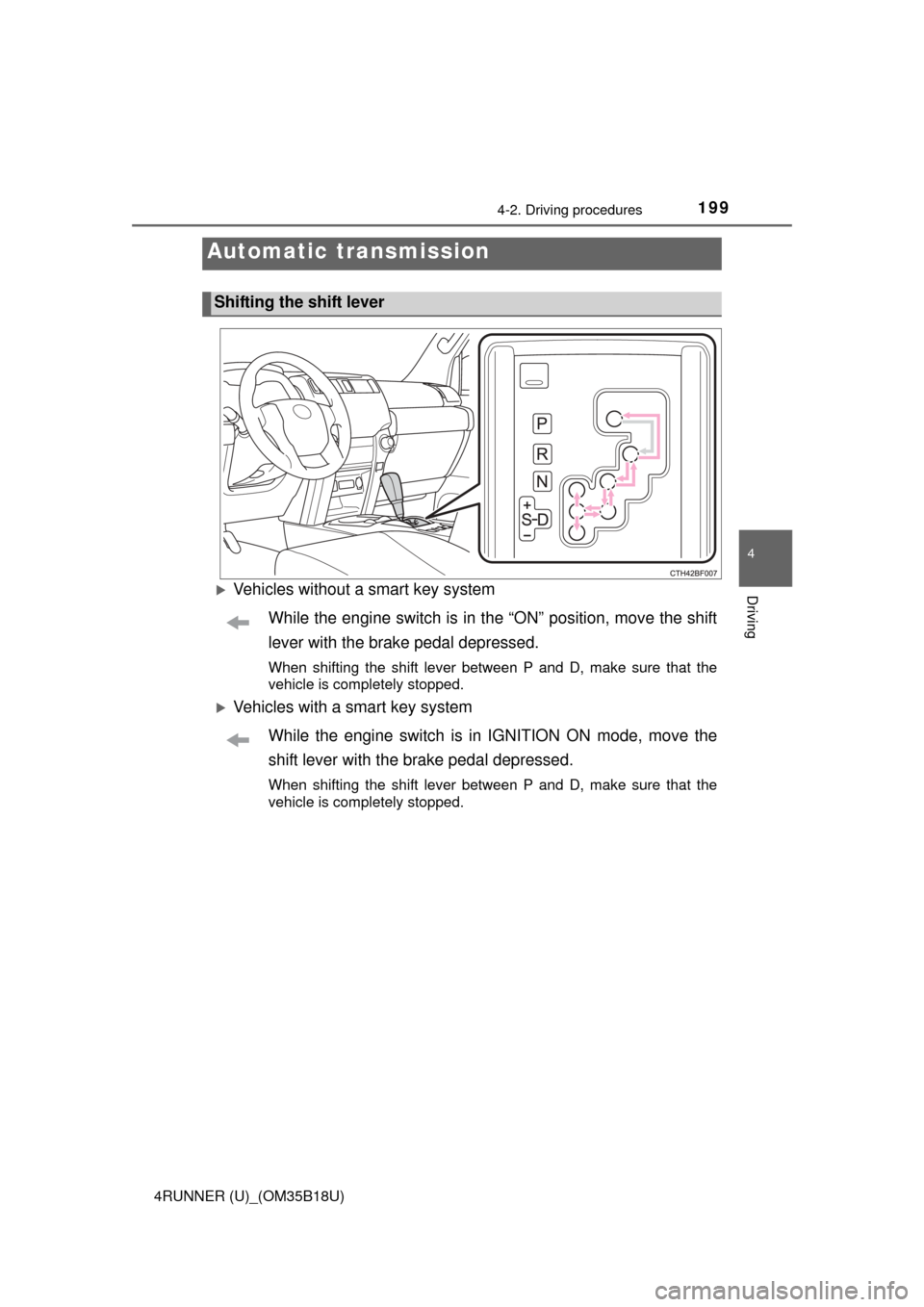
Vehicles without a smart key systemWhile the engine switch is in the “ON” position, move the shift
lever with the brake pedal depressed.
When shifting the shift lever between P and D, make sure that the
vehicle is completely stopped.
Vehicles with a smart key systemWhile the engine switch is in IGNITION ON mode, move the
shift lever with the brake pedal depressed.
When shifting the shift lever between P and D, make sure that the
vehicle is completely stopped.
Automatic transmission
Shifting the shift lever
Page 200 of 524
2004-2. Driving procedures
4RUNNER (U)_(OM35B18U)
*1: To improve fuel efficiency and reduce noises, set the shift lever in the Dposition for normal driving.
*2: Selecting shift ranges using S mode restricts the upper limit of the possiblegear ranges, controls engine braking forces, and prevents unnecessary
upshifting
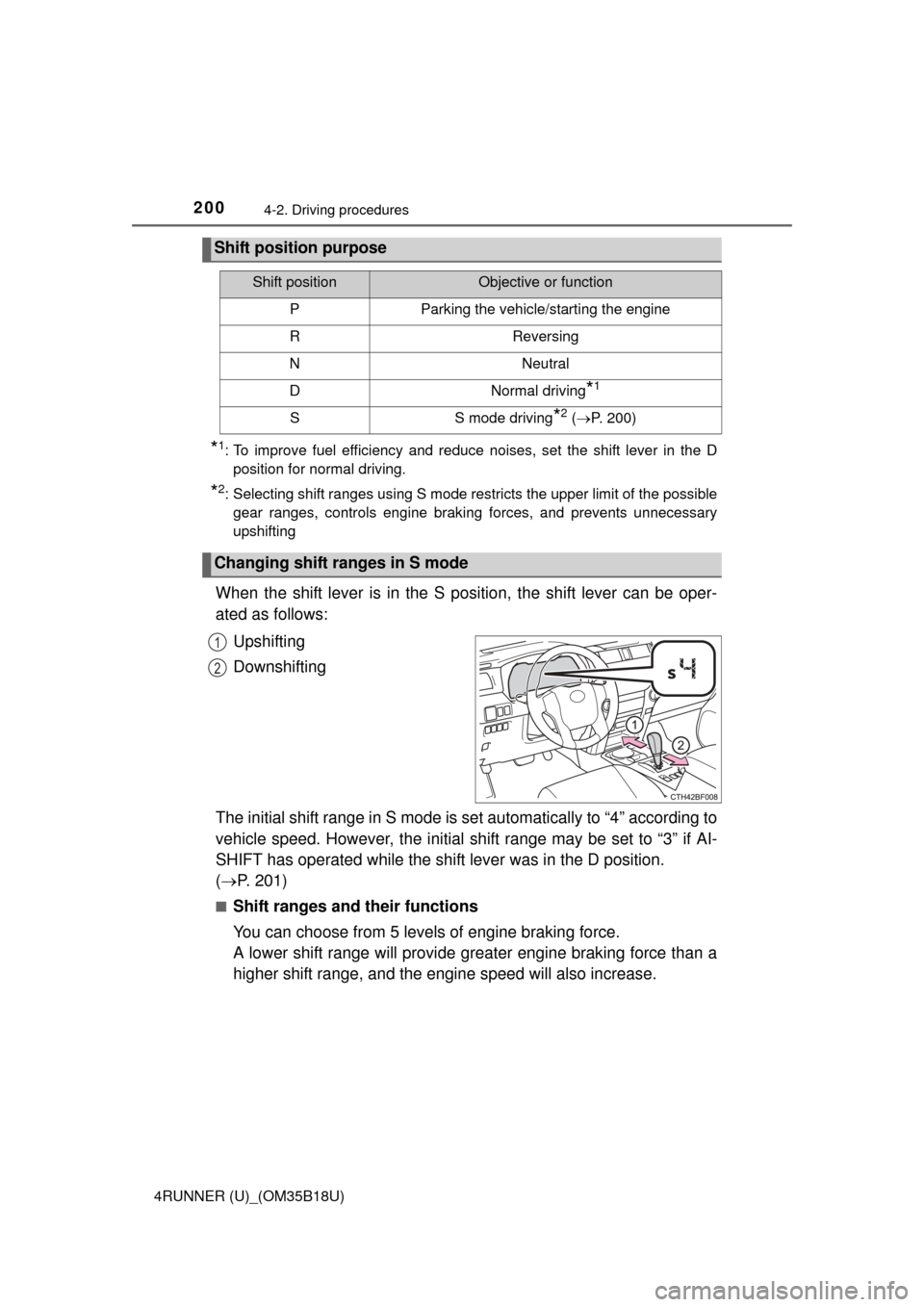
When the shift lever is in the S position, the shift lever can be oper-
ated as follows:
Upshifting
Downshifting
The initial shift range in S mode is set automatically to “4” according to
vehicle speed. However, the initial sh ift range may be set to “3” if AI-
SHIFT has operated while the shift lever was in the D position.
( P. 201)
■Shift ranges and their functions
You can choose from 5 levels of engine braking force.
A lower shift range will provide greater engine braking force than a
higher shift range, and the engine speed will also increase.
Shift position purpose
Shift positionObjective or function
PParking the vehicle/starting the engine
RReversing
NNeutral
DNormal driving*1
SS mode driving*2 ( P. 200)
Changing shift ranges in S mode
1
2
Page 201 of 524

2014-2. Driving procedures
4
Driving
4RUNNER (U)_(OM35B18U)
■S mode
When the shift range is “3” or lower, holding the shift lever toward “+” sets the
shift range to “5”.
■ AI-SHIFT
AI-SHIFT automatically selects the optimal gear according to driver perfor-
mance and driving conditions.
AI-SHIFT automatically operates when the shift lever is in the D position.
(Shifting the shift lever to the S position or paddle shifting cancels the func-
tion.)
The engine speed may remain high after releasing the accelerator pedal. This
does not indicate a malfunction.
■ When driving with cruise control system
Engine braking will not occur in S mode, even when downshifting to “4”.
(P. 221)
■ If the shift lever cannot be shifted from P
P. 443
■ If the “S” indicator does not come on even after shifting the shift lever to
S
This may indicate a malfunction in the automatic transmission system. Have
the vehicle inspected by your Toyota dealer immediately.
(In this situation, the transmission will operate in the same manner as when
the shift lever is in D.)
■ Downshift restriction wa rning buzzer (S mode)
To help ensure safety and driving performance, downshifting operation may
sometimes be restricted. In some circumstances, downshifting may not be
possible even when the shift lever is operated. (A buzzer will sound twice.)
CAUTION
■ When driving on slippery road surfaces
Be careful of downshifting and sudden acceleration, as this could result in
the vehicle skidding to the side or spinning.
Page 202 of 524
2024-2. Driving procedures
4RUNNER (U)_(OM35B18U)
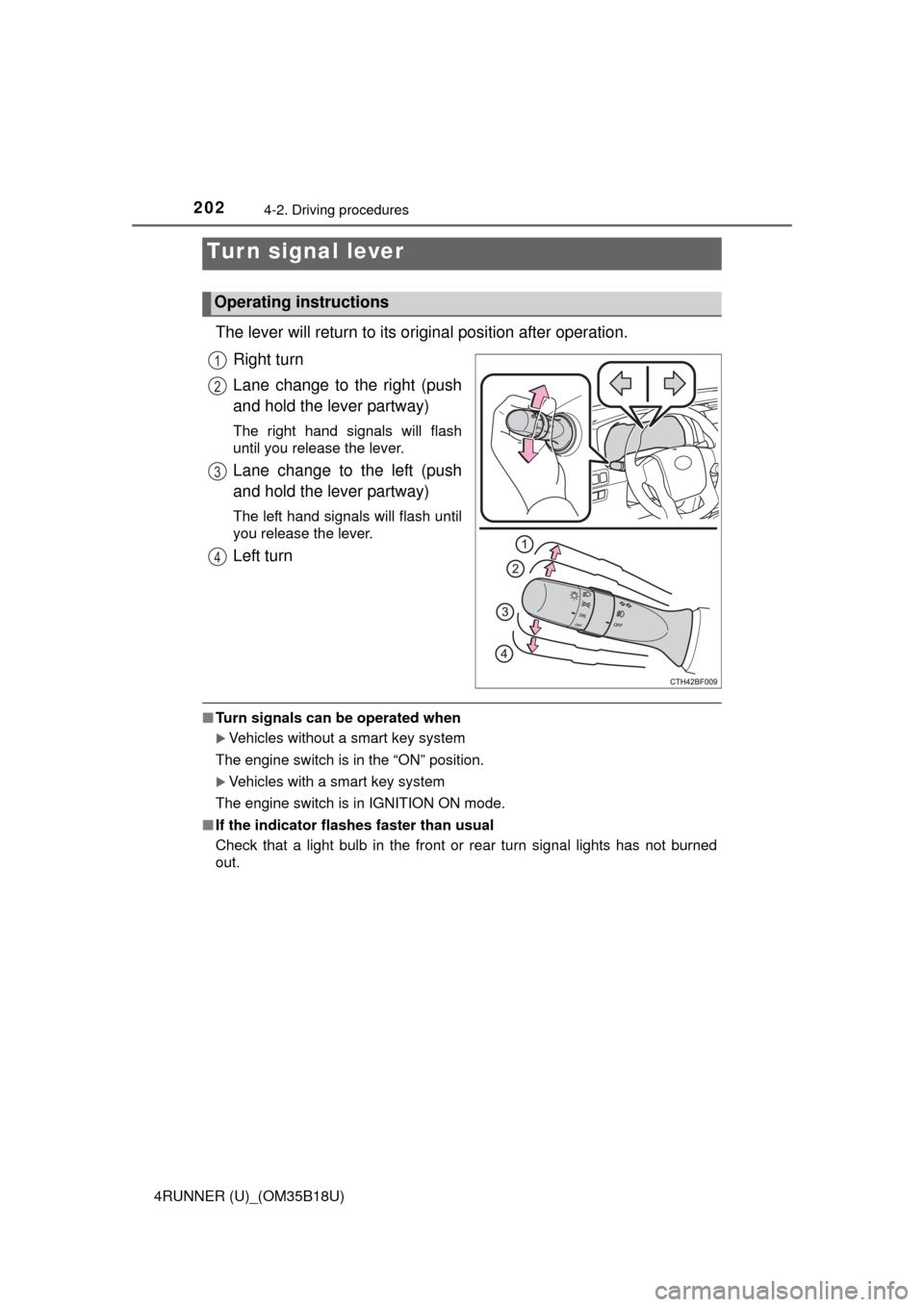
The lever will return to its original position after operation.
Right turn
Lane change to the right (push
and hold the lever partway)
The right hand signals will flash
until you release the lever.
Lane change to the left (push
and hold the lever partway)
The left hand signals will flash until
you release the lever.
Left turn
■ Turn signals can be operated when
Vehicles without a smart key system
The engine switch is in the “ON” position.
Vehicles with a smart key system
The engine switch is in IGNITION ON mode.
■ If the indicator flashes faster than usual
Check that a light bulb in the front or rear turn signal lights has not burned
out.
Turn signal lever
Operating instructions
1
2
3
4
Page 205 of 524
2054-3. Operating the lights and wipers
4
Driving
4RUNNER (U)_(OM35B18U)
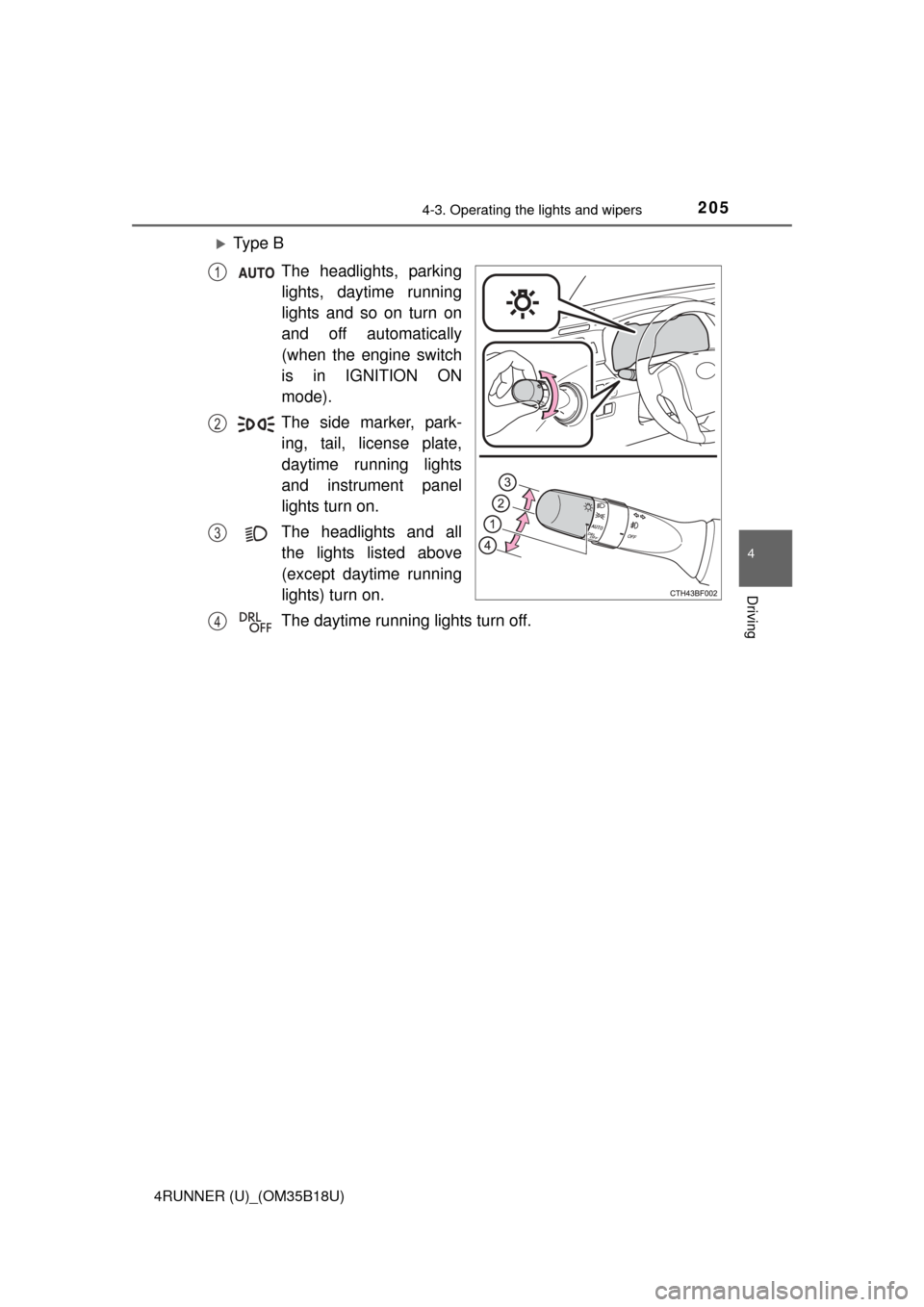
Ty p e BThe headlights, parkinglights, daytime running
lights and so on turn on
and off automatically
(when the engine switch
is in IGNITION ON
mode).
The side marker, park- ing, tail, license plate,
daytime running lights
and instrument panel
lights turn on.
The headlights and all the lights listed above
(except daytime running
lights) turn on.
The daytime running lights turn off.
1
2
3
4
Page 207 of 524
2074-3. Operating the lights and wipers
4
Driving
4RUNNER (U)_(OM35B18U)
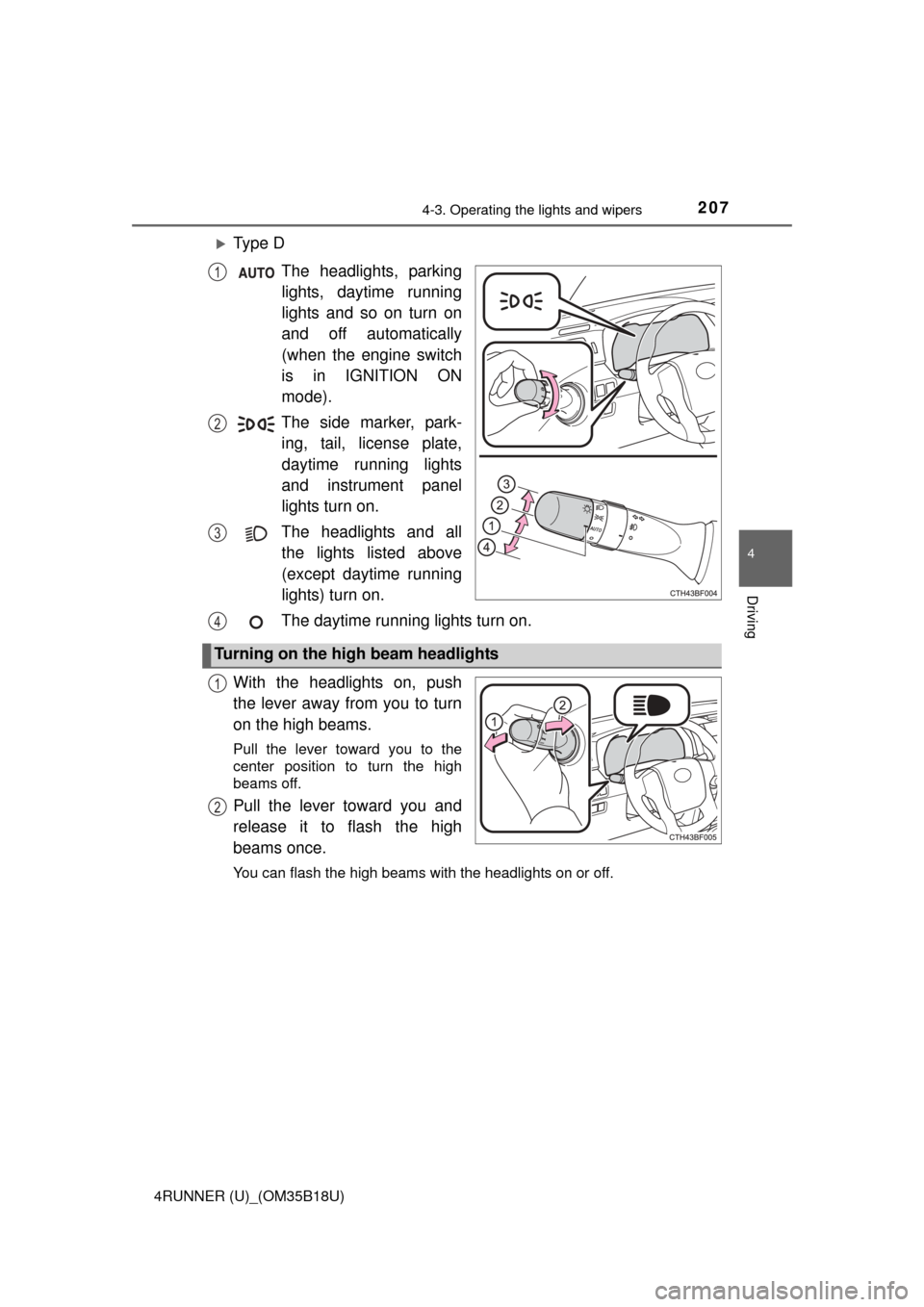
Ty p e DThe headlights, parkinglights, daytime running
lights and so on turn on
and off automatically
(when the engine switch
is in IGNITION ON
mode).
The side marker, park- ing, tail, license plate,
daytime running lights
and instrument panel
lights turn on.
The headlights and all the lights listed above
(except daytime running
lights) turn on.
The daytime running lights turn on.
With the headlights on, push
the lever away from you to turn
on the high beams.
Pull the lever toward you to the
center position to turn the high
beams off.
Pull the lever toward you and
release it to flash the high
beams once.
You can flash the high beams with the headlights on or off.
1
2
3
Turning on the high beam headlights
4
1
2
Page 208 of 524
2084-3. Operating the lights and wipers
4RUNNER (U)_(OM35B18U)
■Daytime running light system
●To make your vehicle more visible to other drivers, the headlight high beam
turn on automatically (at a decreased intensity) whenever the engine is
started and the parking brake is released. Daytime running lights are not
designed for use at night.
Type A and B: Daytime running lights can be turned off by operating the
switch.
● Compared to turning on the headlights, the daytime running light system
offers greater durability and consumes less electricity, so it can help improve
fuel economy.
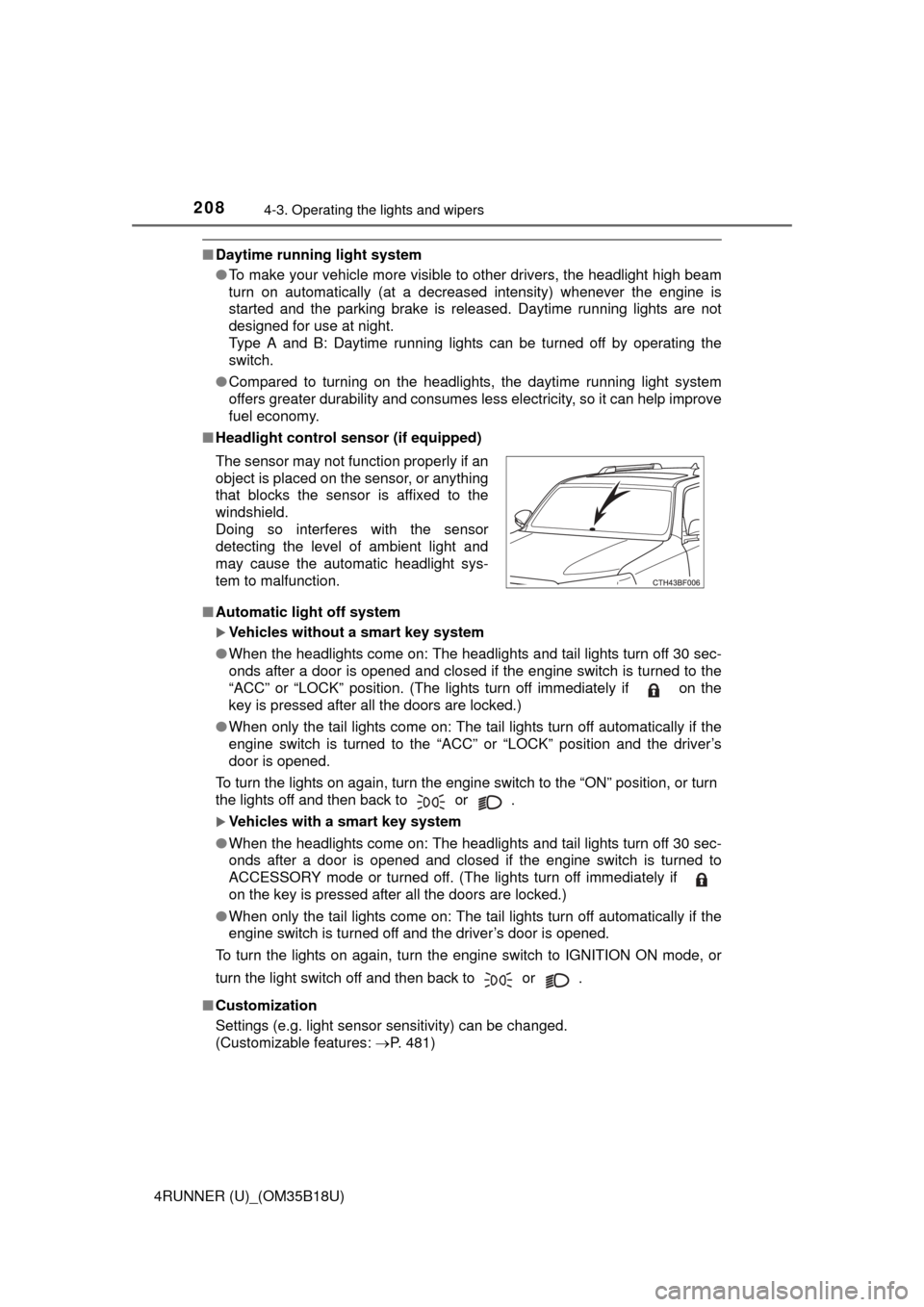
■ Headlight control sensor (if equipped)
■ Automatic light off system
Vehicles without a smart key system
● When the headlights come on: The headlights and tail lights turn off 30 sec-
onds after a door is opened and closed if the engine switch is turned to the
“ACC” or “LOCK” position. (The lights turn off immediately if on the
key is pressed after all the doors are locked.)
● When only the tail lights come on: The tail lights turn off automatically if the
engine switch is turned to the “ACC” or “LOCK” position and the driver’s
door is opened.
To turn the lights on again, turn the engine switch to the “ON” position, or turn
the lights off and then back to or .
Vehicles with a smart key system
● When the headlights come on: The headlights and tail lights turn off 30 sec-
onds after a door is opened and closed if the engine switch is turned to
ACCESSORY mode or turned off. (The lights turn off immediately if
on the key is pressed after all the doors are locked.)
● When only the tail lights come on: The tail lights turn off automatically if the
engine switch is turned off and the driver’s door is opened.
To turn the lights on again, turn the engine switch to IGNITION ON mode, or
turn the light switch off and then back to or .
■ Customization
Settings (e.g. light sensor sensitivity) can be changed.
(Customizable features: P. 481)
The sensor may not function properly if an
object is placed on the sensor, or anything
that blocks the sensor is affixed to the
windshield.
Doing so interferes with the sensor
detecting the level of ambient light and
may cause the automatic headlight sys-
tem to malfunction.