warning TOYOTA 4RUNNER 2017 N280 / 5.G Owner's Manual
[x] Cancel search | Manufacturer: TOYOTA, Model Year: 2017, Model line: 4RUNNER, Model: TOYOTA 4RUNNER 2017 N280 / 5.GPages: 528, PDF Size: 10.03 MB
Page 95 of 528
953-1. Key information
3
Operation of each component
4RUNNER (U)_(OM35B37U)■
Replacing the battery
→P. 383
■ Confirmation of the registered key number
The number of keys already registered to the vehicle can be confirmed. Ask
your Toyota dealer for details.
■ If a wrong key is used (vehicles with a smart key system)
The key cylinder rotates freely to isolate inside mechanism.
■ Certification for wireless remote control
For vehicles sold in the U.S.A.
FCC ID: HYQ12BBY
FCC ID: HYQ13BDC
NOTE:
This device complies with part 15 of the FCC Rules. Operation is subject to
the following two conditions: (1) This device may not cause harmful interfer-
ence, and (2) this device must accept any interference received, including
interference that may cause undesired operation.
FCC WARNING:
Changes or modifications not expressly approved by the party responsible for
compliance could void the user’s authority to operate the equipment.
For vehicles sold in Canada
NOTE:
This device complies with Industry Canada's licence-exempt RSSs.
Operation is subject to the following two conditions:
(1) This device may not cause interference; and
(2) This device must accept any interference, including interference that may cause undesired operation of the device.
Page 106 of 528
1063-2. Opening, closing and locking the doors
4RUNNER (U)_(OM35B37U)
■Alarms and warning indicators
A combination of exterior and interior alarms as well as warning messages
shown on the multi-information display are used to prevent theft of the vehicle
and accidents resulting from erroneous operation. Take appropriate mea-
sures in response to any warning message on the multi-information display.
(→P. 426)
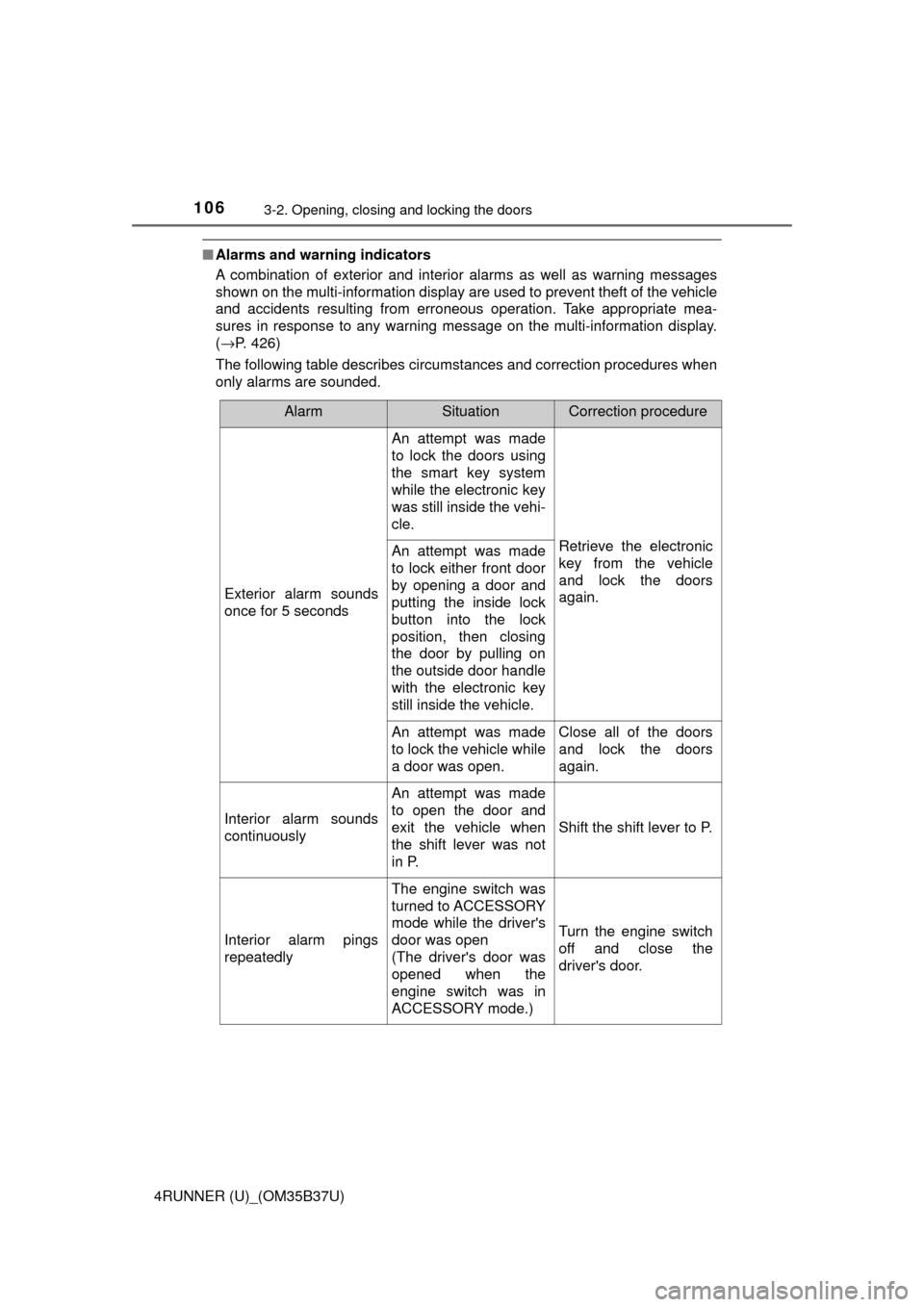
The following table describes circumstances and correction procedures when
only alarms are sounded.
AlarmSituationCorrection procedure
Exterior alarm sounds
once for 5 seconds
An attempt was made
to lock the doors using
the smart key system
while the electronic key
was still inside the vehi-
cle.
Retrieve the electronic
key from the vehicle
and lock the doors
again.An attempt was made
to lock either front door
by opening a door and
putting the inside lock
button into the lock
position, then closing
the door by pulling on
the outside door handle
with the electronic key
still inside the vehicle.
An attempt was made
to lock the vehicle while
a door was open.Close all of the doors
and lock the doors
again.
Interior alarm sounds
continuously
An attempt was made
to open the door and
exit the vehicle when
the shift lever was not
in P.
Shift the shift lever to P.
Interior alarm pings
repeatedly
The engine switch was
turned to ACCESSORY
mode while the driver's
door was open
(The driver's door was
opened when the
engine switch was in
ACCESSORY mode.)
Turn the engine switch
off and close the
driver's door.
Page 110 of 528
1103-2. Opening, closing and locking the doors
4RUNNER (U)_(OM35B37U)■
If the smart key system has been deactivated in a customized setting
●Locking and unlocking the doors: →P. 451
● Starting the engine and changing engine switch modes: →P. 452
● Stopping the engine: →P. 197
■ Certification for the smart key system
For vehicles sold in the U.S.A.
FCC ID: HYQ14ACX
FCC ID: HYQ13CZD
FCC ID: HYQ14ADF
FCC ID: HYQ13CZE
NOTE:
This device complies with part 15 of the FCC Rules. Operation is subject to
the following two conditions: (1) This device may not cause harmful interfer-
ence, and (2) this device must accept any interference received, including
interference that may cause undesired operation.
FCC WARNING:
Changes or modifications not expressly approved by the party responsible for
compliance could void the user’s authority to operate the equipment.
For vehicles sold in Canada
NOTE:
This device complies with Industry Canada's licence-exempt RSSs.
Operation is subject to the following two conditions:
(1) This device may not cause interference; and
(2) This device must accept any interference, including interference that may cause undesired operation of the device.
For vehicles sold in the U.S.A.
FCC ID: NI4TMLF8-14
This device complies with part 15 of the FCC Rules. Operation is subject to
the following two conditions: (1) This device may not cause harmful interfer-
ence, and (2) this device must accept any interference received, including
interference that may cause undesired operation.
Changes or modifications not expressly approved by the party responsible for
compliance could void the user’s authority to operate the equipment.
For vehicles sold in Canada
This device complies with Industry Canada licence-exempt RSS standard(s).
Operation is subject to the following two conditions: (1) this device may not
cause interference, and (2) this device must accept any interference, includ-
ing interference that may cause undesired operation of the device.
Page 204 of 528
2044-2. Driving procedures
4RUNNER (U)_(OM35B37U)■
If the shift lever canno t be shifted from P
First, check whether the brake pedal is being depressed.
If the shift lever cannot be shifted with your foot on the brake pedal, there may
be a problem with the shift lock system. Have the vehicle inspected by y\
our
Toyota dealer immediately.
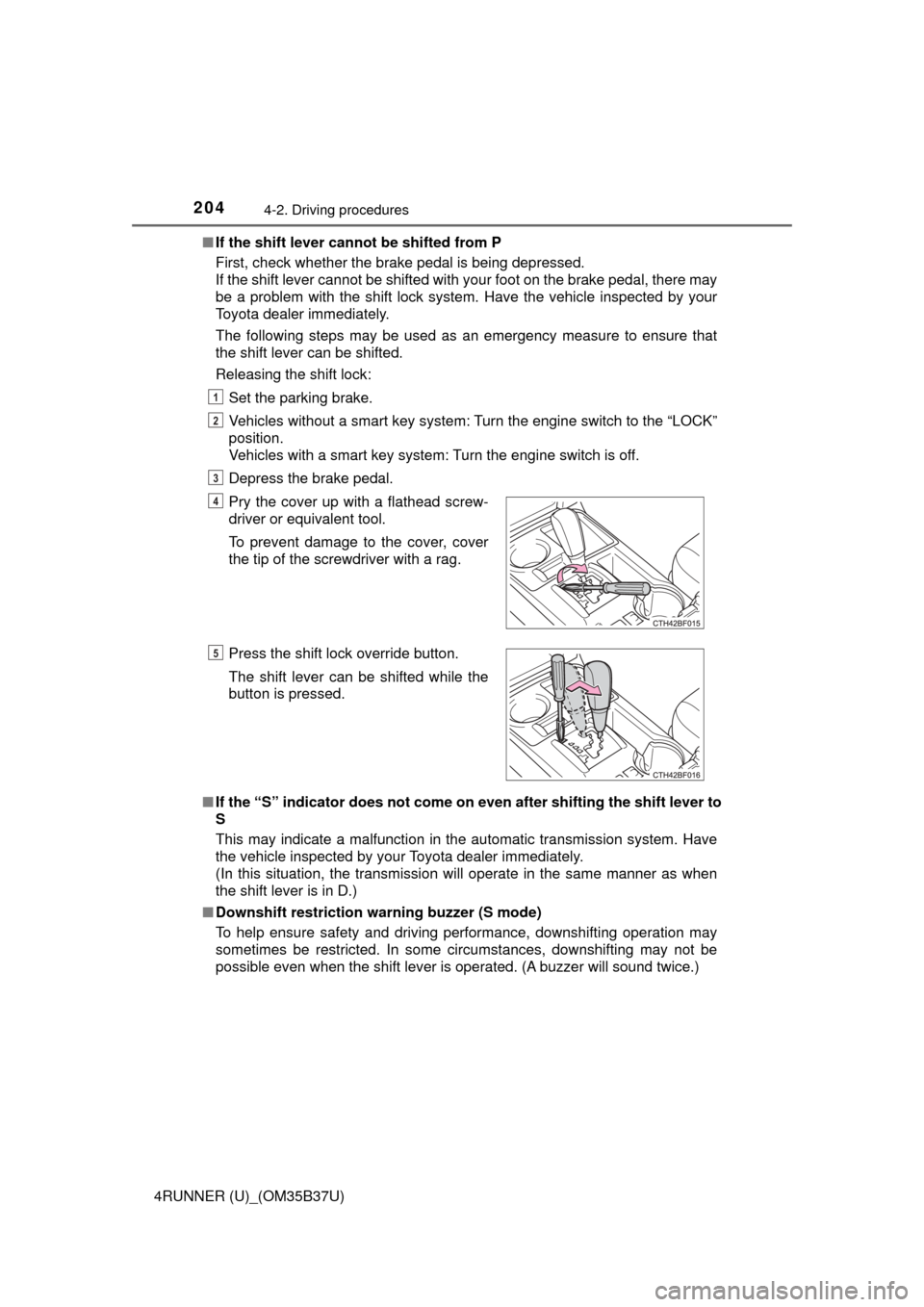
The following steps may be used as an emergency measure to ensure that
the shift lever can be shifted.
Releasing the shift lock:
Set the parking brake.
Vehicles without a smart key system: Turn the engine switch to the “LOCK”
position.
Vehicles with a smart key system: Turn the engine switch is off.
Depress the brake pedal.
■ If the “S” indicator does not come on even after shifting the shift lever to
S
This may indicate a malfunction in the automatic transmission system. Have
the vehicle inspected by your Toyota dealer immediately.
(In this situation, the transmission will operate in the same manner as when
the shift lever is in D.)
■ Downshift restriction warning buzzer (S mode)
To help ensure safety and driving performance, downshifting operation may
sometimes be restricted. In some circumstances, downshifting may not be
possible even when the shift lever is operated. (A buzzer will sound twice.) Pry the cover up with a flathead screw-
driver or equivalent tool.
To prevent damage to the cover, cover
the tip of the screwdriver with a rag.
Press the shift lock override button.
The shift lever can be shifted while the
button is pressed.
1
2
3
4
5
Page 233 of 528
2334-5. Using the driving support systems
4
Driving
4RUNNER (U)_(OM35B37U)●
The following situations may occur during use.
• Depending on the shape of the obstacle and other factors, the detection
distance may shorten, or detection may be impossible.
• Obstacles may not be detected if they are too close to the sensor.
• There will be a short delay between obstacle detection and display. Even at slow speeds, there is a possibility that the obstacle will come within the
sensor’s detection areas before the display is shown and the warning
beep sounds.
• Thin posts or objects lower than the sensor may not be detected for colli- sion when approached, even if they have been detected once.
• It might be difficult to hear beeps due to the volume of audio system or air flow noise of air conditioning system.
■ If a message is displayed on the multi-information display
→P. 426
■ Customization that can be co nfigured at Toyota dealer
Settings (e.g. buzzer volume) can be changed.
(Customizable features →P. 489)
■ Certification
For vehicles sold in the U.S.A.
This device complies with Part 15 of the FCC Rules. Operation is subject to
the following two conditions; (1) This device may not cause harmful interfer-
ence, and (2) This device must accept any interference received, including
interference that may cause undesired operation.
For vehicles sold in Canada
This ISM device complies with Canadian ICES-001.
Cet appareil ISM est conforme a la norme NMB-001 du Canada.
Page 248 of 528
2484-5. Using the driving support systems
4RUNNER (U)_(OM35B37U)
Before using the rear differential lock system:
Stop the vehicle, shift the shift lever to N and shift the front-wheel
drive control lever into L4 to see if this is sufficient. If this has no
effect, additionally use the rear differential lock system.
Be sure the wheels have stopped spinning.
Press the rear differential lock switch.
Gently depress the accelerator pedal.
After the rear differential is locked, the indicator will come on.
Unlock the rear differential as soon as the vehicle moves.
To unlock the rear differential, press the switch again.
■ Locking the rear differential
The following systems do not operate when the rear differential is locked. It is
normal operation for the ABS warning light and VSC OFF indicator to be on at
this time.
•ABS
• Multi Terrain ABS
• Brake assist system
•VSC
• Hill-start assist control
■ The rear differential lock is disengaged when
The front-wheel drive control lever or switch is shifted to H2 or H4.
Never forget to turn off the switch after using this feature.
■ After unlocking the rear differential
Check that the indicator goes off.
■ If the rear differential lock indicator flashes rapidly
There may be a malfunction in the rear differential lock system. Have the
vehicle inspected by your Toyota dealer immediately.
Using the rear differential lock system
1
2
3
4
Page 255 of 528
2554-5. Using the driving support systems
4
Driving
4RUNNER (U)_(OM35B37U)■
Automatic system cancelation
In the following situations, the system will cease operation and a buzzer will
sound to alert the driver. The Crawl Cont rol indicator will flash until the system
is turned off completely.
● When the shift lever is shifted to P or N
● When the front-wheel drive control lever or switch is shifted to H4
● When the driver’s door is opened
● When the system is malfunctioning
● When the brake system overheats
Stop the vehicle in a safe place. (There is no problem with continuing normal
driving.)
● When the automatic transmission system overheats
Stop the vehicle in a safe place until the automatic transmission fluid tem-
perature warning light goes off.
■ Sounds and vibrations caused by the Crawl Control system
● A sound may be heard from the engine compartment when the engine is
started or just after the vehicle begins to move. This sound does not indicate
that a malfunction has occurred in Crawl Control system.
● Either of the following conditions may occur when the Crawl Control system
is operating. None of these indicates that a malfunction has occurred.
• Vibrations may be felt through the vehicle body and steering.
• A motor sound may be heard after the vehicle comes to a stop.
CAUTION
■When using Crawl Control
● Do not overly rely on Crawl Control. This function does not extend the
vehicle’s performance limitations. Always check the terrain thoroughly and
drive safely.
● The recommended speed modes for the listed terrains ( →P. 254) are only
a reference. The selected mode may not be suitable to actual off-road con-
ditions due to factors such as the type or unevenness of the terrain or the
degree of incline. Check the actual terrain thoroughly and drive safely.
● After activating Crawl Control, make sure that the Crawl Control indicator
comes on. If the indicator flashes, the vehicle is not under system control.
■ Conditions under which the syst em may not operate correctly
When driving on the following surfaces, the system may not be able to
maintain a fixed low speed, which may result in an accident:
● Extremely steep inclines
● Extremely uneven surfaces
● Snow-covered roads, or other slippery surfaces
Page 275 of 528
2754-6. Driving tips
4
Driving
4RUNNER (U)_(OM35B37U)
CAUTION
■Driving with snow tires
Observe the following precautions to reduce the risk of accidents.
Failure to do so may result in a loss of vehicle control and cause death or
serious injury.
● Use tires of the specified size.
● Maintain the recommended level of air pressure.
● Do not drive in excess of 75 mph (120 km/h), regardless of the type of
snow tires being used.
● Use snow tires on all, not just some wheels.
■ Driving with tire chains
Observe the following precautions to reduce the risk of accidents.
Failure to do so may result in the vehicle being unable to be driven safely,
and may cause death or serious injury.
● Do not drive in excess of the speed limit specified for the tire chains being
used, or 30 mph (50 km/h), whichever is lower.
● Avoid driving on bumpy road surfaces or over potholes.
● Avoid sudden acceleration, abrupt steering, sudden braking and shifting
operations that cause sudden engine braking.
● Slow down sufficiently before entering a curve to ensure that vehicle con-
trol is maintained.
NOTICE
■Repairing or replacing snow tires
Request repairs or replacement of snow tires from Toyota dealers or legiti-
mate tire retailers.
This is because the removal and attachment of snow tires affects the opera-
tion of the tire pressure warning valves and transmitters.
■ Fitting tire chains
The tire pressure warning valves and transmitters may not function correctly
when tire chains are fitted.
Page 329 of 528
3295-4. Other interior features
5
Interior features
4RUNNER (U)_(OM35B37U)
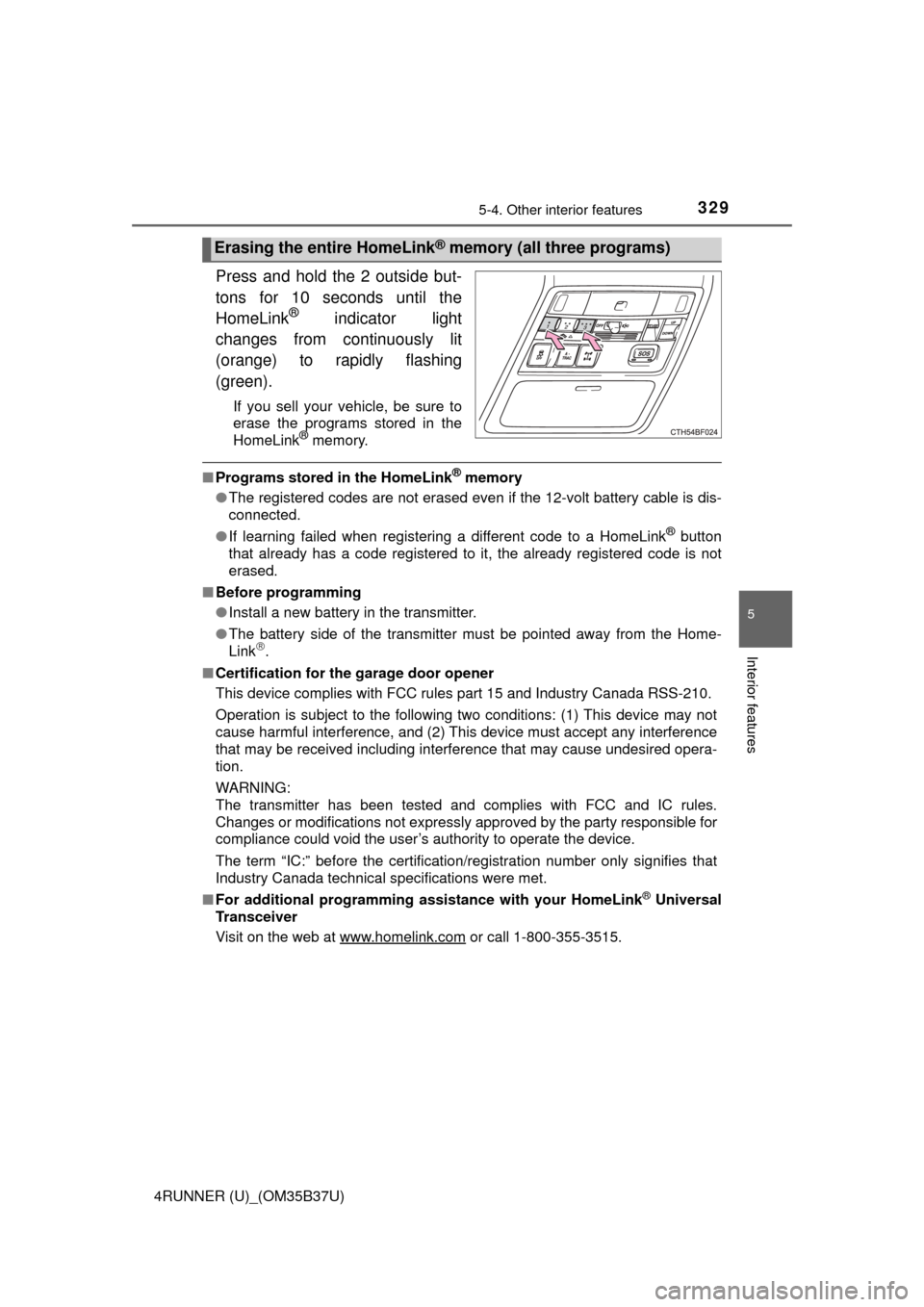
Press and hold the 2 outside but-
tons for 10 seconds until the
HomeLink
® indicator light
changes from continuously lit
(orange) to rapidly flashing
(green).
If you sell your vehicle, be sure to
erase the programs stored in the
HomeLink
® memory.
■ Programs stored in the HomeLink® memory
● The registered codes are not erased even if the 12-volt battery cable is dis-
connected.
● If learning failed when registering a different code to a HomeLink
® button
that already has a code registered to it, the already registered code is not
erased.
■ Before programming
●Install a new battery in the transmitter.
● The battery side of the transmitter must be pointed away from the Home-
Link
.
■ Certification for the garage door opener
This device complies with FCC rules part 15 and Industry Canada RSS-210.
Operation is subject to the following two conditions: (1) This device may not
cause harmful interference, and (2) This device must accept any interference
that may be received including interference that may cause undesired opera-
tion.
WARNING:
The transmitter has been tested and complies with FCC and IC rules.
Changes or modifications not expressly approved by the party responsible for
compliance could void the user’s authority to operate the device.
The term “IC:” before the certification/registration number only signifies that
Industry Canada technical specifications were met.
■ For additional programming assistance with your HomeLink
® Universal
Transceiver
Visit on the web at www.homelink.com
or call 1-800-355-3515.
Erasing the entire HomeLink® memory (all three programs)
Page 335 of 528

3355-4. Other interior features
5
Interior features
4RUNNER (U)_(OM35B37U)
Important! Read this information before using Safety Connect.
■Exposure to radio frequency signals
The Safety Connect system install ed in your vehicle is a low-power
radio transmitter and receiver. It receives and also sends out radio
frequency (RF) signals.
In August 1996, the Federal Communications Commission (FCC)
adopted RF exposure gui delines with safety levels for mobile wire-
less phones. Those guidelines are c onsistent with the safety stan-
dards previously set by the fo llowing U.S. and international
standards bodies.
● ANSI (American National Stand ards Institute) C95.1 [1992]
● NCRP (National Council on Radi ation Protection and Measure-
ment) Report 86 [1986]
● ICNIRP (International Commiss ion on Non-Ionizing Radiation
Protection) [1996]
Those standards were based on comprehensive and periodic eval-
uations of the relevant scientific literature. Over 120 scientists, engi-
neers, and physicians from uni versities, and government health
agencies and industries reviewed t he available body of research to
develop the ANSI Standard (C95.1).
The design of Safety Connect complies with the FCC guidelines in
addition to those standards.
■ Certification for Safety Connect
FCC ID: O6Y-CDMRF101
FCC ID: XOECDMRF101B
FCC ID: N7NGTM2
NOTE:
This device complies with Part 15 of the FCC Rules. Operation is subject to
the following two conditions: (1) This device may not cause harmful interfer-
ence, and (2) this device must accept any interference received, including
interference that may cause undesired operation.
FCC WARNING:
Changes or modifications not expressly approved by the party responsible for
compliance could void the user's authority to operate the equipment.
Safety information for Safety Connect