tire TOYOTA 4RUNNER 2018 (in English) User Guide
[x] Cancel search | Manufacturer: TOYOTA, Model Year: 2018, Model line: 4RUNNER, Model: TOYOTA 4RUNNER 2018Pages: 528, PDF Size: 9.81 MB
Page 175 of 528
1754-1. Before driving
4
Driving
4RUNNER (U)_(OM35B46U)
◆Total load capacity (vehicle capacity weight): (→P. 462)
Total load capacity means the comb ined weight of occupants, cargo
and luggage.
◆Seating capacity
Vehicle without third seats: 5 occupants (Front 2, Rear 3)
Vehicle with third seats: 7 occupants (Front 2, Rear 5)
Seating capacity means the maxi mum number of occupants whose
estimated average weight is 150 lb. (68 kg) per person.
◆TWR (Trailer Weight Rating): ( →P. 181, 462)
TWR means the maximum gross trailer weight (trailer weight plus
its cargo weight) that you vehicle is able to tow.
◆Cargo capacity
Cargo capacity may increase or decrease depending on the weight
and the number of occupants.
■Total load capacity and seating capacity
These details are also described on the tire and loading information label.
( → P. 375)
Vehicle load limits
Vehicle load limits include total load capacity, seating capacity,
TWR (Trailer Weight Rating) and cargo capacity.
CAUTION
■Overloading the vehicle
Do not overload the vehicle.
It may not only cause damage to the tires, but also degrade steering
and braking ability, resu lting in an accident.
Page 185 of 528

1854-1. Before driving
4
Driving
4RUNNER (U)_(OM35B46U)
Your vehicle will handle differently when towing a trailer. Help to avoid
an accident, death or serious injury, keep the following in mind when
towing:
● Speed limits for towing a trailer vary by state or province. Do not
exceed the posted to wing speed limit.
● Toyota recommends that the vehi cle-trailer speed limit is 65 mph
(104 km/h) on a flat, straight, dry road. Do not exceed this limit, the
posted towing speed limit or the spe ed limit for your trailer as set
forth in your trailer owner’s manual, whichever is lowest. Instability
of the towing vehicle-trailer combination (trailer sway) increases as
speed increases. Exceeding speed limits may cause loss of control.
● Before starting out, check the tr ailer lights, tires and the vehicle-
trailer connections. Recheck after driving a short distance.
● Practice turning, stopping and reversing with the trailer attached in
an area away from traffic until you become accustomed to the feel
of the vehicle-trailer combination.
● Reversing with a trailer attached is difficult and requires practice.
Grip the bottom of the steering wheel and move your hand to the
left to move the trailer to the left . Move your hand to the right to
move the trailer to right. (This is generally opposite to reversing
without a trailer attached.) Avoid sharp or prolonged turning. Have
someone guide you when reversing to reduce the risk of an acci-
dent.
● As stopping distance is increased when towing a trailer, vehicle-to
vehicle distance should be increased. For each 10 mph (16 km/h)
of speed, allow at least one vehicle and trailer length.
● Avoid sudden braking as you may skid, resulting in the trailer jack-
knifing and a loss of vehicle control. This is especially true on wet or
slippery surfaces.
Trailer towing tips
Page 188 of 528

1884-1. Before driving
4RUNNER (U)_(OM35B46U)■
Before towing
Check that the following conditions are met:
●Ensure that your vehicle’s tires are properly inflated. ( →P. 472)
● Trailer tires are inflated according to the trailer manufacturer’s recommen-
dation.
● All trailer lights work as required by law.
● All lights work each time you connect them.
● The trailer ball is set at the proper height for the coupler on the trailer.
● The trailer is level when it is hitched.
Do not drive if the trailer is not level, and check for improper tongue weight,
overloading, worn suspension, or other possible causes.
● The trailer cargo is securely loaded.
● The rear view mirrors conform to all applicable federal, state/provincial or
local regulations. If they do not, install rear view mirrors appropriate for tow-
ing purposes.
■ Break-in schedule
If your vehicle is new or equipped with any new power train components
(such as an engine, transmission, differential or wheel bearing), Toyota rec-
ommends that you do not tow a trailer until the vehicle has been driven for
over 500 miles (800 km).
After the vehicle has been driven for over 500 miles (800 km), you can start
towing. However, for the next 500 miles (800 km), drive the vehicle at a speed
of less than 45 mph (72 km/h) when towing a trailer, and avoid full throttle
acceleration.
■ Maintenance
●If you tow a trailer, your vehicle will require more frequent maintenance due
to the additional load. (See “Scheduled Maintenance Guide” or “Owner’s
Manual Supplement”.)
● Retighten the fixing bolts of the towing ball and bracket after approximately
600 miles (1000 km) of trailer towing.
■ If trailer sway occurs
One or more factors (crosswinds, passing vehicles, rough roads, etc.) can
adversely affect handling of your vehicle and trailer, causing instability.
●If trailer swaying occurs:
• Firmly grip the steering wheel. Steer straight ahead.
Do not try to control trailer swaying by turning the steering wheel.
• Begin releasing the accelerator pedal immediately but very gradually to reduce speed.
Do not increase speed. Do not apply vehicle brakes.
If you make no extreme correction with the steering or brakes, your vehicle
and trailer should stabilize. (if enabled, Trailer Sway Control can also help to
stabilize the vehicle and trailer.)
Page 189 of 528
1894-1. Before driving
4
Driving
4RUNNER (U)_(OM35B46U)●
After the trailer swaying has stopped:
• Stop in a safe place. Get all occupants out of the vehicle.
• Check the tires of the vehicle and the trailer.
• Check the load in the trailer.
Make sure the load has not shifted.
Make sure the tongue weight is appropriate, if possible.
• Check the load in the vehicle.
Make sure the vehicle is not overloaded after occupants get in.
If you cannot find any problems, the speed at which trailer swaying occurred
is beyond the limit of your particular vehicle-trailer combination.
Drive at a lower speed to prevent instability. Remember that swaying of the
towing vehicle-trailer increases as speed increases.
CAUTION
■ Trailer towing precautions
To tow a trailer safely, use extreme care and drive the vehicle in accordance
with the trailer’s characteristics and operating conditions. Failure to do so
could cause an accident resulting in death or serious injury. Vehicle stability
and braking performance are affected by trailer stability, brake setting and
performance, and the hitch. Your vehicle will handle differently when towing
a trailer.
■ To avoid accident or injury
● Do not exceed the TWR, unbraked TWR, GCWR, GVWR or GAWR.
● If the gross trailer weight is over 2000 lb. (907 kg), a sway control device
with sufficient capacity is required.
● Adjust the tongue weight within the appropriate range. Place heavier loads
as close to the trailer axle as possible.
● Do not exceed 65 mph (104 km/h), the posted towing speed limit or the
speed limit for your trailer as set forth in your trailer owner’s manual,
whichever is lowest. Slow down sufficiently before making a turn, in cross
winds, on wet or slippery surface, etc. to help avoid an accident. If you
experience a vehicle-trailer instability from reducing a certain speed, slow
down and make sure you keep your vehicle speed under the speed of
which you experience the instability.
● Do not make jerky, abrupt or sharp turns.
Page 198 of 528

1984-2. Driving procedures
4RUNNER (U)_(OM35B46U)
If the engine is stopped with the shift lever in a position other than P,
the engine switch will not be turned off but instead be turned to
ACCESSORY mode. Perform the following procedure to turn the
switch off:
Check that the parking brake is set.
Shift the shift lever to P.
Check that the indicator on th e engine switch is illuminated in
amber and then press the engine switch once.
Check that the indicator on the engine switch is off.
■Auto power off function
If the vehicle is left in ACCESSORY mode for more than 20 minutes or IGNI-
TION ON mode (the engine is not running) for more than an hour with th\
e
shift lever in P, the engine switch will automatically turn off. However, this
function cannot entirely prevent battery discharge. Do not leave the vehicle
with the engine switch in ACCESSORY or IGNITION ON mode for long peri-
ods of time when the engine is not running.
■ Electronic key battery depletion
→P. 9 4
■ Conditions affecting operation
→P. 107
■ Notes for the entry function
→P. 108
■ If the engine does not start
The engine immobilizer system may not have been deactivated. ( →P. 70)
Contact your Toyota dealer.
■ Steering lock
After turning the engine switch off and opening and closing the doors, the
steering wheel will be locked due to the steering lock function. Operating the
engine switch again automatically cancels the steering lock.
When stopping the engine with the shift lever in a position other
than P
1
2
3
4
Page 235 of 528
2354-5. Using the driving support systems
4
Driving
4RUNNER (U)_(OM35B46U)
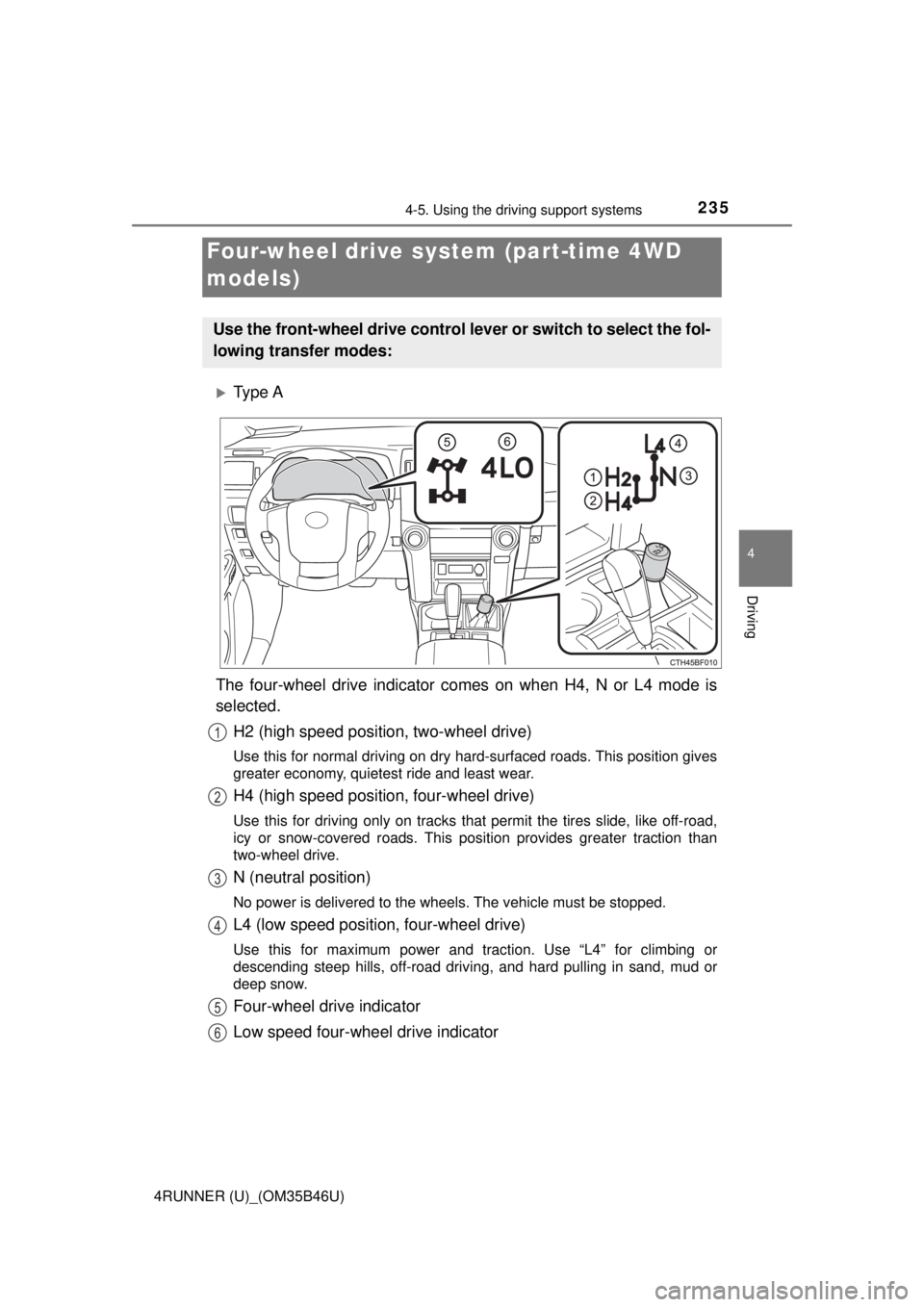
Ty p e A
The four-wheel drive indicator comes on when H4, N or L4 mode is
selected. H2 (high speed position, two-wheel drive)
Use this for normal driving on dry hard-surfaced roads. This position gives
greater economy, quietest ride and least wear.
H4 (high speed position, four-wheel drive)
Use this for driving only on tracks that permit the tires slide, like off-road,
icy or snow-covered roads. This position provides greater traction than
two-wheel drive.
N (neutral position)
No power is delivered to the wheels. The vehicle must be stopped.
L4 (low speed position, four-wheel drive)
Use this for maximum power and traction. Use “L4” for climbing or
descending steep hills, off-road driving, and hard pulling in sand, mud or
deep snow.
Four-wheel drive indicator
Low speed four-wheel drive indicator
Four-wheel drive system (part-time 4WD
models)
Use the front-wheel drive control lever or switch to select the fol-
lowing transfer modes:
1
2
3
4
5
6
Page 236 of 528
2364-5. Using the driving support systems
4RUNNER (U)_(OM35B46U)
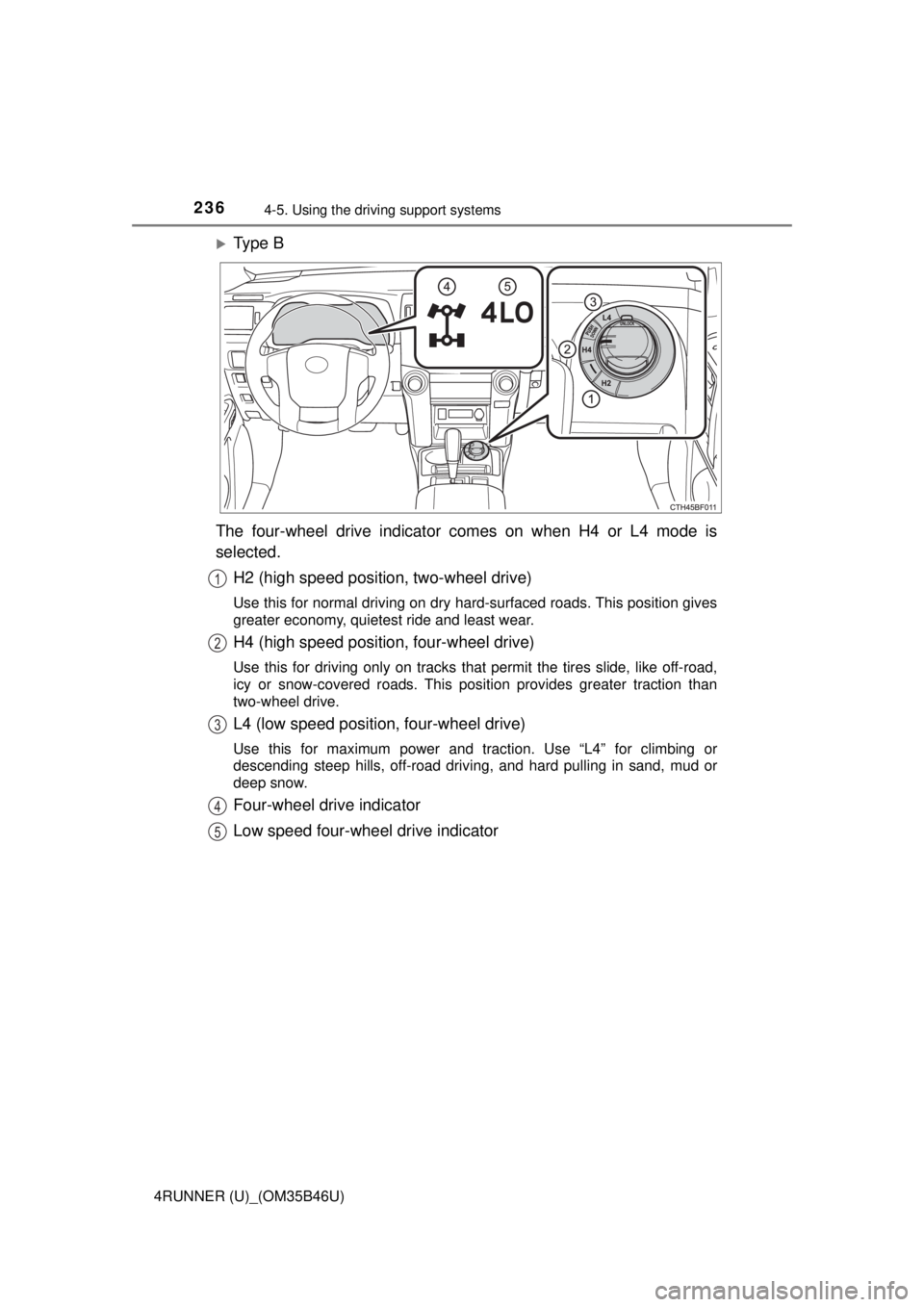
Ty p e B
The four-wheel drive indicator comes on when H4 or L4 mode is
selected. H2 (high speed position, two-wheel drive)
Use this for normal driving on dry hard-surfaced roads. This position gives
greater economy, quietest ride and least wear.
H4 (high speed position, four-wheel drive)
Use this for driving only on tracks that permit the tires slide, like off-road,
icy or snow-covered roads. This position provides greater traction than
two-wheel drive.
L4 (low speed position, four-wheel drive)
Use this for maximum power and traction. Use “L4” for climbing or
descending steep hills, off-road driving, and hard pulling in sand, mud or
deep snow.
Four-wheel drive indicator
Low speed four-wheel drive indicator
1
2
3
4
5
Page 239 of 528
2394-5. Using the driving support systems
4
Driving
4RUNNER (U)_(OM35B46U)
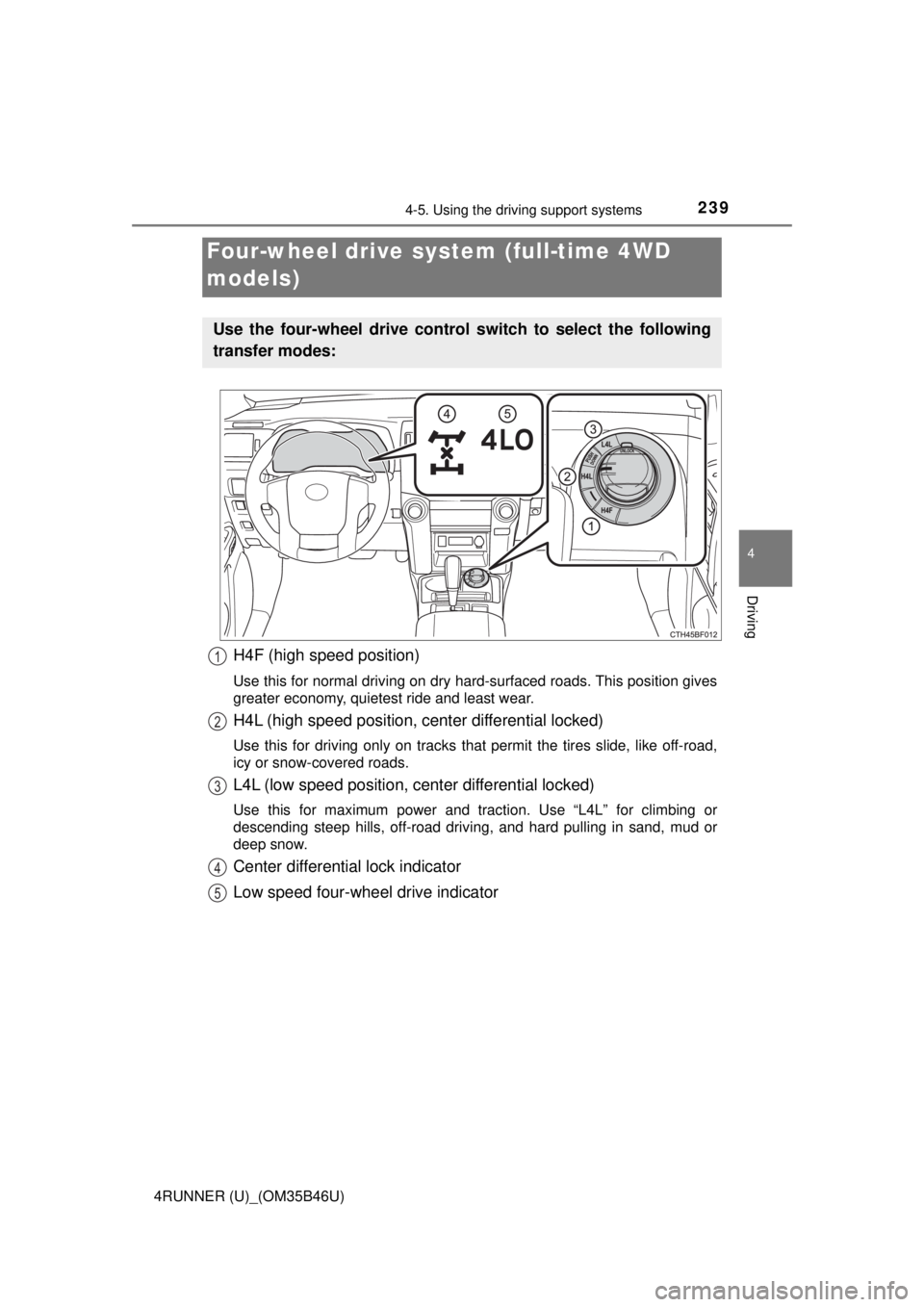
H4F (high speed position)
Use this for normal driving on dry hard-surfaced roads. This position gives
greater economy, quietest ride and least wear.
H4L (high speed position, center differential locked)
Use this for driving only on tracks that permit the tires slide, like off-road,
icy or snow-covered roads.
L4L (low speed position, center differential locked)
Use this for maximum power and traction. Use “L4L” for climbing or
descending steep hills, off-road driving, and hard pulling in sand, mud or
deep snow.
Center differential lock indicator
Low speed four-wheel drive indicator
Four-wheel drive system (full-time 4WD
models)
Use the four-wheel drive control switch to select the following
transfer modes:
1
2
3
4
5
Page 264 of 528
2644-5. Using the driving support systems
4RUNNER (U)_(OM35B46U)
◆Hill-start assist control (if equipped)
Helps to prevent the vehicle from rolling backward when starting on
an incline or slippery slope
◆LSD (Limited Slip Diff erential) (if equipped)
Transfers drive power to the rear tires when front tires spin, and
vice versa, in order to improve traction
◆KDSS (Kinetic Dynamic Suspension System) (if equipped)
Enhances ride comfort and handling response by using a hydraulic
control system to cont rol the suspension stab ilizer bars in response
to road surface and driving condi tions during cornering or off-road
driving
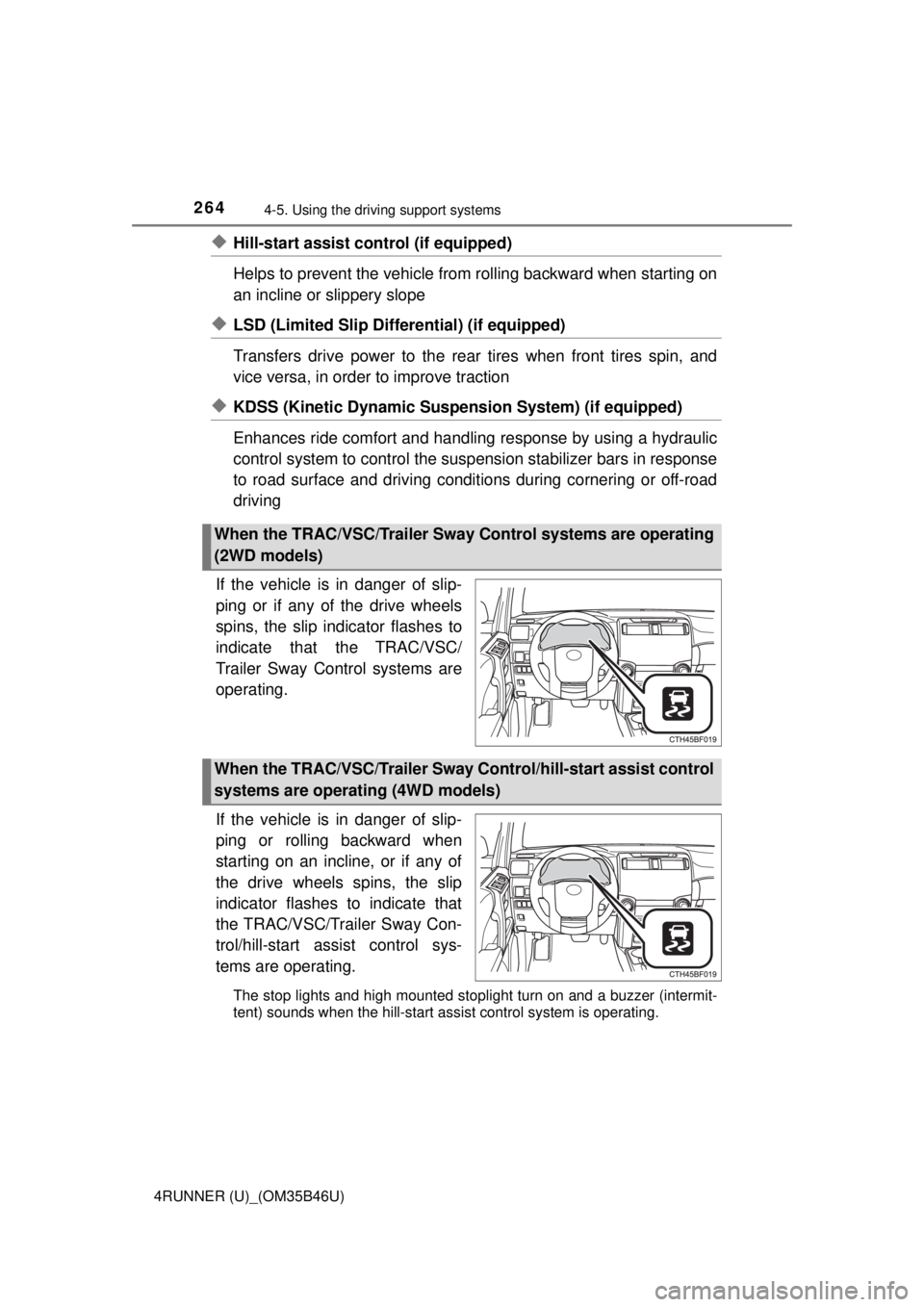
If the vehicle is in danger of slip-
ping or if any of the drive wheels
spins, the slip indicator flashes to
indicate that the TRAC/VSC/
Trailer Sway Control systems are
operating.
If the vehicle is in danger of slip-
ping or rolling backward when
starting on an incline, or if any of
the drive wheels spins, the slip
indicator flashes to indicate that
the TRAC/VSC/Trailer Sway Con-
trol/hill-start assist control sys-
tems are operating.
The stop lights and high mounted stoplight turn on and a buzzer (intermit-
tent) sounds when the hill-start assist control system is operating.
When the TRAC/VSC/Trailer Sway Control systems are operating
(2WD models)
When the TRAC/VSC/Trailer Sway Control/hill-start assist control
systems are operating (4WD models)
Page 270 of 528
2704-5. Using the driving support systems
4RUNNER (U)_(OM35B46U)■
Reactivation of the VSC and Trailer Sway Control system linked to vehi-
cle speed (2WD models)
When the TRAC system is turned off and the AUTO LSD system is turned on,
the VSC and Trailer Sway Control system will turn on when vehicle speed
increases. However, when the TRAC, VSC and Trailer Sway Control systems
are turned off, the systems will not turn on even when vehicle speed
increases.
■ Reactivation of the TRAC/VSC/Trail er Sway Control systems (4WD mod-
els)
If the TRAC/VSC/Trailer Sway Control systems are turned off, the systems
will not turn on even when vehicle speed increases.
CAUTION
■ The ABS and Multi Terrain ABS do not operate effectively when
● The limits of tire gripping performance have been exceeded (such as
excessively worn tires on a snow covered road).
● The vehicle hydroplanes while driving at high speed on wet or slick roads.
■ Stopping distance when the ABS or Multi Terrain ABS is operating may
exceed that of normal conditions
The ABS and Multi Terrain ABS are not designed to shorten the vehicle’s
stopping distance. Always maintain a safe distance from the vehicle in front
of you, especially in the following situations:
● When driving on dirt, gravel or snow-covered roads
● When driving with tire chains
● When driving over bumps in the road
● When driving over roads with potholes or roads with uneven surfaces
■ TRAC may not operat e effectively when
Directional control and power may not be achievable while driving on slip-
pery road surfaces, even if the TRAC system is operating.
Do not drive the vehicle in conditions where stability and power may be lost.
■ Hill-start assist control does not operate effectively when
Do not overly rely on the hill-start assist control. The hill-start assist control
may not operate effectively on steep inclines and roads covered with ice.