battery TOYOTA 4RUNNER 2021 (in English) Service Manual
[x] Cancel search | Manufacturer: TOYOTA, Model Year: 2021, Model line: 4RUNNER, Model: TOYOTA 4RUNNER 2021Pages: 592, PDF Size: 13.3 MB
Page 417 of 592
4176-3. Do-it-yourself maintenance
6
Maintenance and care
4RUNNER (U)
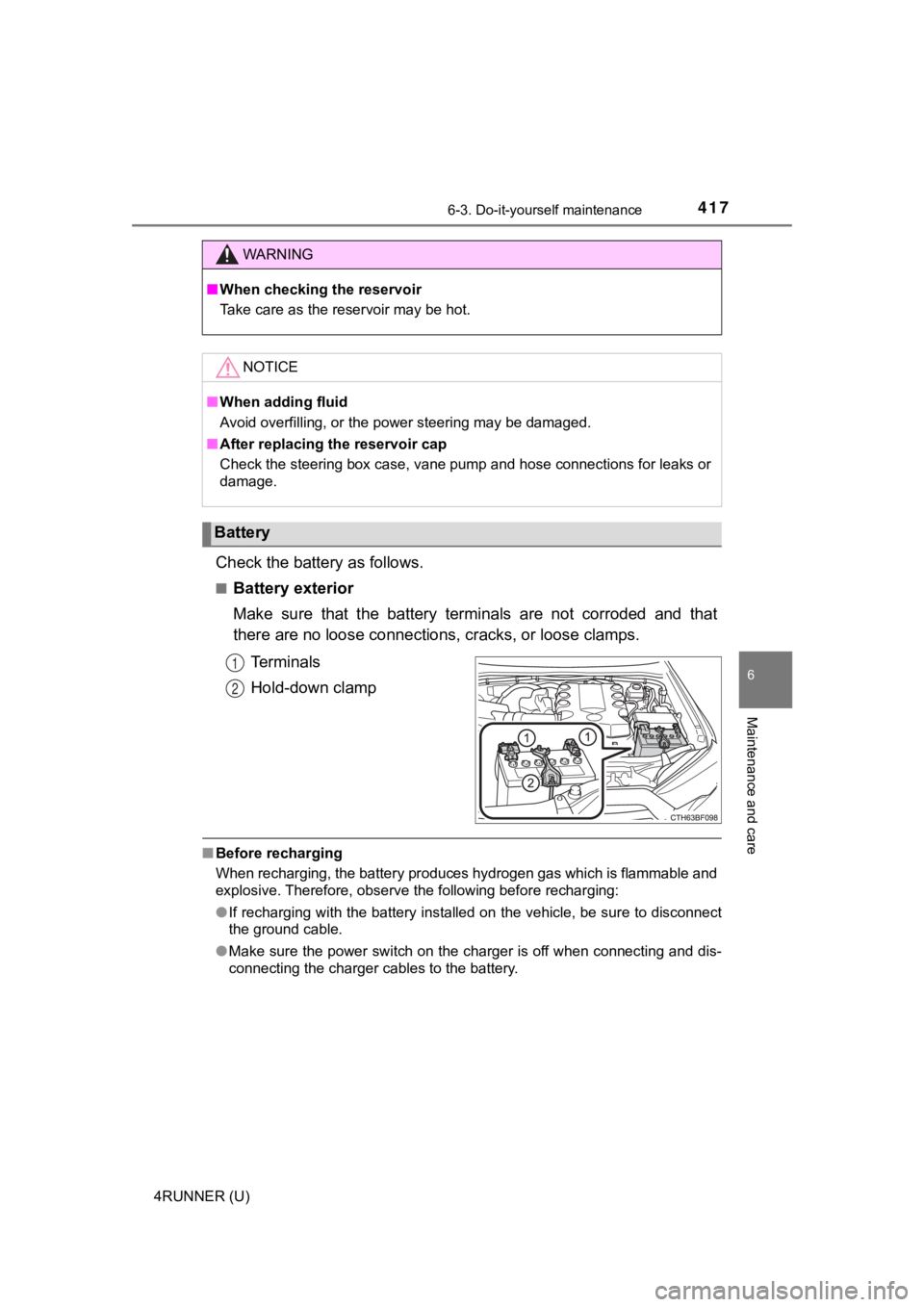
Check the battery as follows.
■Battery exterior
Make sure that the battery terminals are not corroded and that
there are no loose connections, cracks, or loose clamps.
Terminals
Hold-down clamp
■ Before recharging
When recharging, the battery produces hydrogen gas which is flammable and
explosive. Therefore, observe the following before recharging:
●If recharging with the battery installed on the vehicle, be sur e to disconnect
the ground cable.
● Make sure the power switch on the charger is off when connectin g and dis-
connecting the charger cables to the battery.
WARNING
■ When checking the reservoir
Take care as the reservoir may be hot.
NOTICE
■When adding fluid
Avoid overfilling, or the power steering may be damaged.
■ After replacing the reservoir cap
Check the steering box case, vane pump and hose connections for leaks or
damage.
Battery
1
2
Page 418 of 592
4186-3. Do-it-yourself maintenance
4RUNNER (U)■
After recharging/reconnecting the battery (vehicles with a smar t key sys-
tem)
The engine may not start. Follow the procedure below to initial ize the system.
Shift the shift lever to P.
Open and close any of the doors.
Restart the engine.
● Unlocking the doors using the smart key system may not be possi ble imme-
diately after reconnecting the battery. If this happens, use the wireless
remote control or the mechanical key to lock/unlock the doors.
● Start the engine with the engine switch in ACCESSORY mode. The engine
may not start when the engine switch turned from off. However, the engine
will operate normally from the second attempt.
● The engine switch mode is recorded by the vehicle. If the batte ry is recon-
nected, the vehicle will return the engine switch mode to the s tatus it was in
before the battery was disconnected. Make sure to turn off the engine
before disconnect the battery. Take extra care when connecting the battery
if the engine switch mode prior to discharge is unknown.
If the system will not start even after multiple attempts, contact your Toyota
dealer.
WARNING
■ Chemicals in the battery
Batteries contain poisonous and corrosive sulfuric acid and may produce
hydrogen gas which is flammable and explosive. To reduce the ri sk of death
or serious injury, take the following precautions while working on or near the
battery:
● Do not cause sparks by touching the battery terminals with tool s.
● Do not smoke or light a match near the battery.
● Avoid contact with eyes, skin and clothes.
● Never inhale or swallow electrolyte.
● Wear protective safety glasses when working near the battery.
● Keep children away from the battery.
1
2
3
Page 419 of 592
4196-3. Do-it-yourself maintenance
6
Maintenance and care
4RUNNER (U)
WARNING
■Where to safely charge the battery
Always charge the battery in an open area. Do not charge the ba ttery in a
garage or closed room where there is insufficient ventilation.
■ How to recharge the battery
Only perform a slow charge (5 A or less). The battery may explo de if
charged at a quicker rate.
■ Emergency measures regarding electrolyte
● If electrolyte gets in your eyes
Flush your eyes with clean water for at least 15 minutes and ge t immedi-
ate medical attention. If possible, continue to apply water wit h a sponge or
cloth while traveling to the nearest medical facility.
● If electrolyte gets on your skin
Wash the affected area thoroughly. If you feel pain or burning, get medical
attention immediately.
● If electrolyte gets on your clothes
It can soak through clothing on to your skin. Immediately take off the cloth-
ing and follow the procedure above if necessary.
● If you accidentally swallow electrolyte
Drink a large quantity of water or milk. Get emergency medical attention
immediately.
NOTICE
■When recharging the battery
Never recharge the battery while the engine is running. Also, b e sure all
accessories are turned off.
Page 443 of 592
4436-3. Do-it-yourself maintenance
6
Maintenance and care
4RUNNER (U)
●Flathead screwdriver
● Small flathead screwdriver
● Lithium battery CR2016 (vehicles without a smart key system), o r
CR1632 (vehicles with a smart key system)
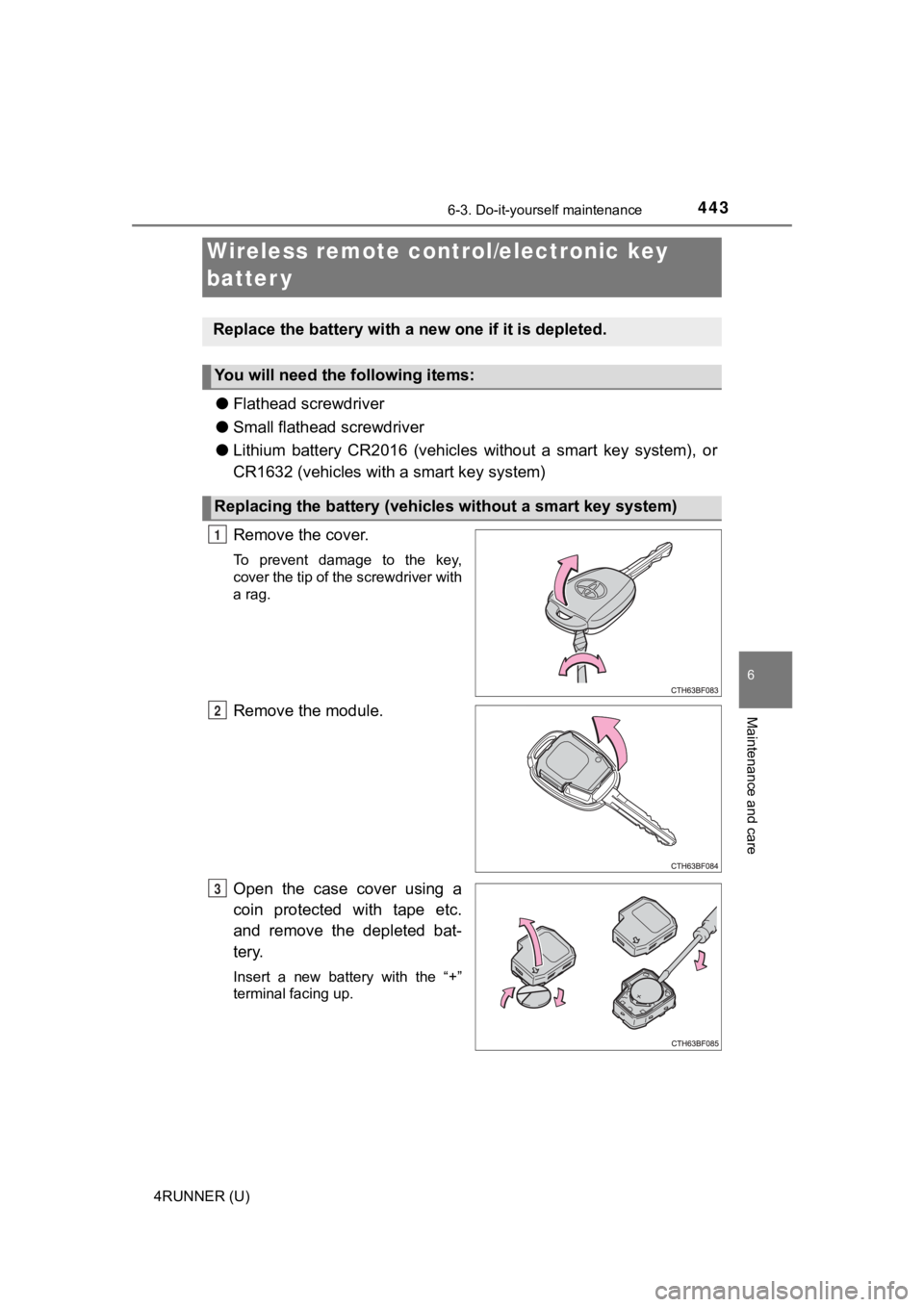
Remove the cover.
To prevent damage to the key,
cover the tip of the screwdriver with
a rag.
Remove the module.
Open the case cover using a
coin protected with tape etc.
and remove the depleted bat-
tery.
Insert a new battery with the “+”
terminal facing up.
Wireless remote control/electronic key
batter y
Replace the battery with a n ew one if it is depleted.
You will need the following items:
Replacing the battery (vehicles without a smart key system)
1
2
3
Page 444 of 592
4446-3. Do-it-yourself maintenance
4RUNNER (U)
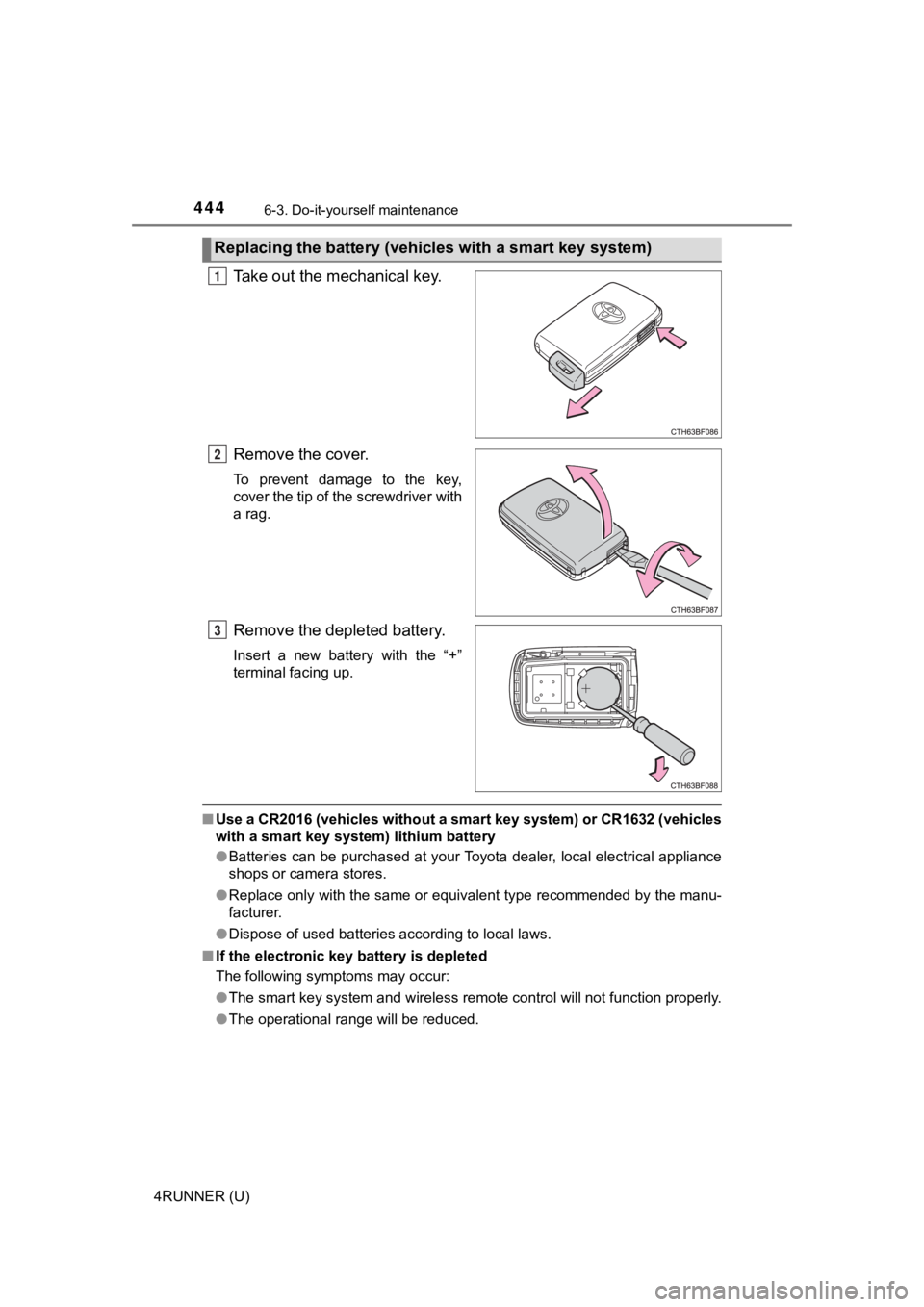
Take out the mechanical key.
Remove the cover.
To prevent damage to the key,
cover the tip of the screwdriver with
a rag.
Remove the depleted battery.
Insert a new battery with the “+”
terminal facing up.
■Use a CR2016 (vehicles without a smart key system) or CR1632 (v ehicles
with a smart key system) lithium battery
● Batteries can be purchased at your Toyota dealer, local electri cal appliance
shops or camera stores.
● Replace only with the same or equivalent type recommended by the manu-
facturer.
● Dispose of used batteries according to local laws.
■ If the electronic key battery is depleted
The following symptoms may occur:
●The smart key system and wireless remote control will not funct ion properly.
● The operational range will be reduced.
Replacing the battery (vehic les with a smart key system)
1
2
3
Page 445 of 592
4456-3. Do-it-yourself maintenance
6
Maintenance and care
4RUNNER (U)
WARNING
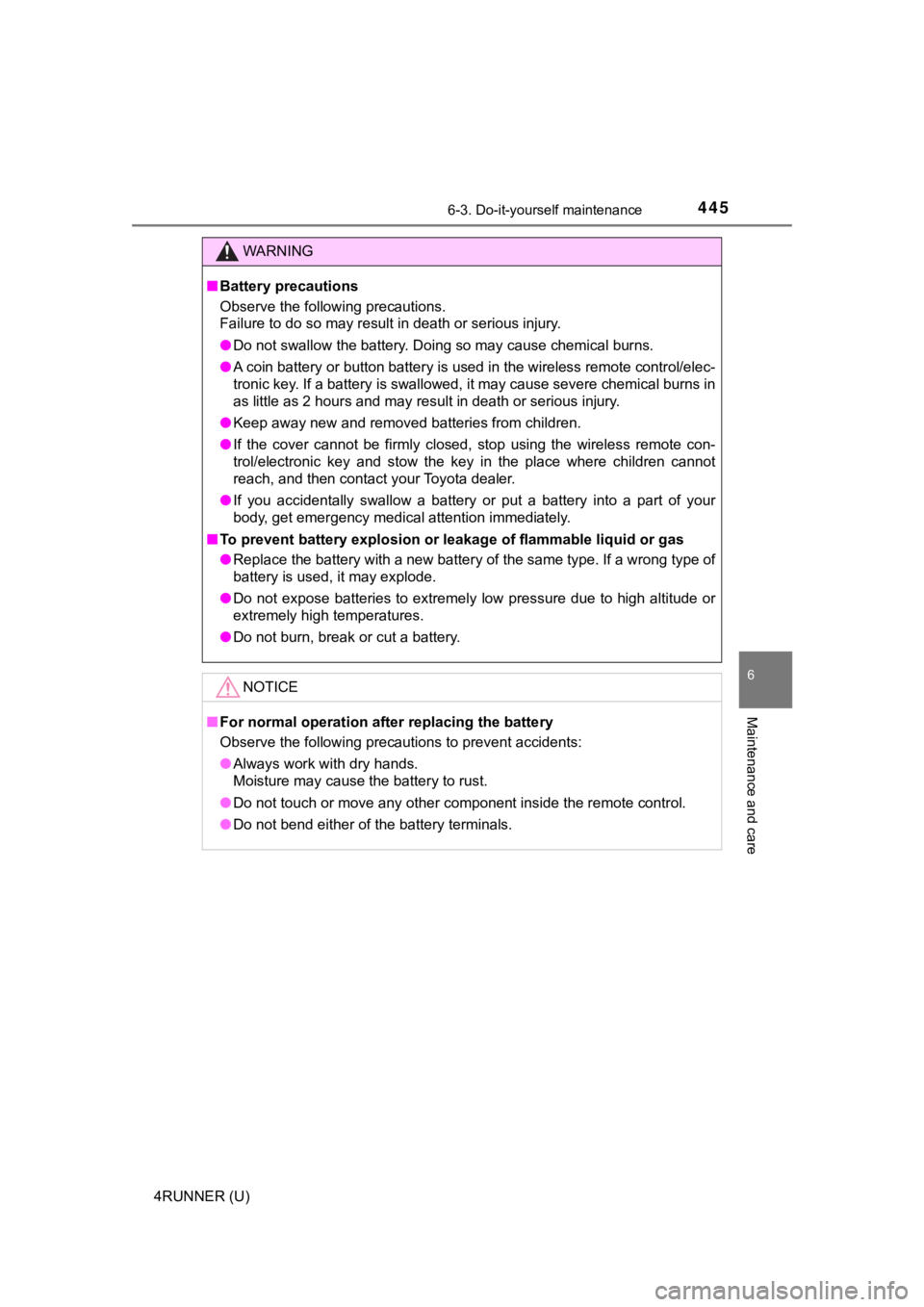
■Battery precautions
Observe the following precautions.
Failure to do so may result in death or serious injury.
● Do not swallow the battery. Doing so may cause chemical burns.
● A coin battery or button battery is used in the wireless remote control/elec-
tronic key. If a battery is swallowed, it may cause severe chem ical burns in
as little as 2 hours and may result in death or serious injury.
● Keep away new and removed batteries from children.
● If the cover cannot be firmly closed, stop using the wireless r emote con-
trol/electronic key and stow the key in the place where childre n cannot
reach, and then contact your Toyota dealer.
● If you accidentally swallow a battery or put a battery into a p art of your
body, get emergency medical attention immediately.
■ To prevent battery explosion or leakage of flammable liquid or gas
● Replace the battery with a new battery of the same type. If a w rong type of
battery is used, it may explode.
● Do not expose batteries to extremely low pressure due to high altitude or
extremely high temperatures.
● Do not burn, break or cut a battery.
NOTICE
■For normal operation after replacing the battery
Observe the following precautions to prevent accidents:
● Always work with dry hands.
Moisture may cause the battery to rust.
● Do not touch or move any other component inside the remote cont rol.
● Do not bend either of the battery terminals.
Page 461 of 592
461
When trouble arises7
4RUNNER (U)7-1. Essential information
Emergency flashers .......... 462
If your vehicle has to be stopped in an
emergency ...................... 463
If the vehicle is trapped in rising water ..................... 465
7-2. Steps to take in an emergency
If your vehicle needs to be towed .............................. 466
If you think something is wrong .............................. 472
Fuel pump shut off system ............................ 473
If a warning light turns on or a warning buzzer
sounds ............................ 474
If a warning message is displayed......................... 484
If you have a flat tire.......... 489
If the engine will not start ................................. 504
If you cannot operate back door opener ............ 506
If the electronic key does not operate properly
(vehicles with a smart
key system)..................... 507
If the vehicle battery is discharged ...................... 510
If your vehicle overheats ........................ 514
If the vehicle becomes stuck ............................... 517
Page 462 of 592
462
4RUNNER (U)
7-1. Essential information
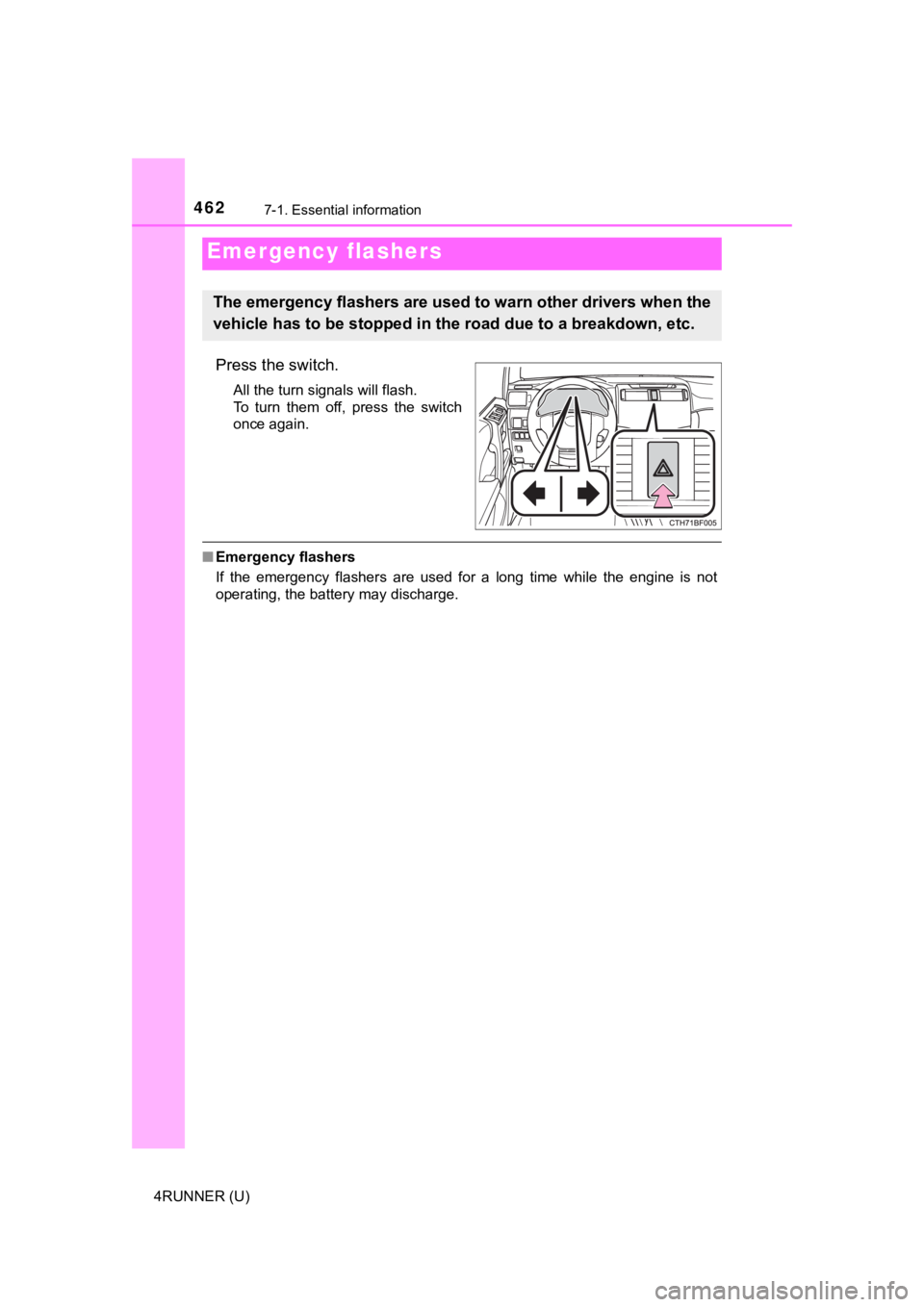
Press the switch.
All the turn signals will flash.
To turn them off, press the switch
once again.
■Emergency flashers
If the emergency flashers are used for a long time while the en gine is not
operating, the battery may discharge.
Emergency flashers
The emergency flashers are used to warn other drivers when the
vehicle has to be stopped in the road due to a breakdown, etc.
Page 487 of 592
4877-2. Steps to take in an emergency
7
When trouble arises
4RUNNER (U)■
If “Auto power off to co nserve battery” is shown
Power was turned off due to the automatic power off function.
Next time when starting the engine, increase the engine speed s lightly and
maintain that level for approximately 5 minutes to recharge the battery.
■ When a message that indicates the need for the shift lever oper ation is
shown
To prevent the shift lever from being operated incorrectly or t he vehicle from
moving unexpectedly, a message that requires shifting the shift lever may be
shown on the multi-information display. In that case, follow th e instruction of
the message and shift the shift lever.
■ When “Headlight System Malfuncti on Visit Your Dealer” is displayed on
the multi-information display
The following system may be malfunctioning. Have the vehicle in spected by
your Toyota dealer.
● Automatic High Beam
■ If a message that indicates the malfunction of front camera is displayed
The following systems may be suspended until the problem shown in the
message is resolved. ( P. 251, 484)
● PCS (Pre-Collision System)
● LDA (Lane Departure Alert)
● Dynamic radar cruise control
● Automatic High Beam
■ If a following message is shown, take appropriate action and co nfirm
that the message has disappeared.
*
● “Crawl Not Available Select L4 and Shift to [D] or [R] Position ”
● “Crawl Not Available Check System Operation Conditions”
*: Refer to the “Off-road Driving Owner’s Manual”.
■ If “Oil Maintenance Required Soon” is displayed (U.S.A. only)
Indicates that all maintenance according to the driven distance on the mainte-
nance schedule* should be performed soon.
Comes on approximately 4500 miles (7200 km) after the message has been
reset.
If necessary, perform maintenance. Please reset the message aft er the main-
tenance is performed. ( P. 399)
*: Refer to the separate “Scheduled Maintenance Guide” or “Owner’ s Manual
Supplement” for the maintenance interval applicable to your veh icle.
Page 504 of 592
5047-2. Steps to take in an emergency
4RUNNER (U)
One of the following may be the cause of the problem:
● There may not be sufficient fuel in the vehicle’s tank.
Refuel the vehicle.
● The engine may be flooded.
Try to restart the engine again following correct starting proc edures.
( P. 209, 212)
● There may be a malf unction in the engine immobilizer system.
( P. 76)
One of the following may be the cause of the problem:
● The battery may be discharged. ( P. 510)
● The battery terminal connecti ons may be loose or corroded.
The engine starting system may be malfunctioning due to an elec trical
problem such as an open circuit or a blown fuse. However, an in terim
measure is available to start the engine. ( P. 505)
If the engine will not star t
If the engine will not start eve n though correct starting proce -
dures are being followed ( P. 209, 212), consider each of the fol-
lowing points:
The engine will not start even t hough the starter motor operates
normally.
The starter motor turns over slowly, the interior lights and he ad-
lights are dim, or the horn does not sound or sounds at a low
volume.
The starter motor d oes not turn over