key battery TOYOTA 4RUNNER 2021 (in English) Owner's Manual
[x] Cancel search | Manufacturer: TOYOTA, Model Year: 2021, Model line: 4RUNNER, Model: TOYOTA 4RUNNER 2021Pages: 592, PDF Size: 13.3 MB
Page 443 of 592
4436-3. Do-it-yourself maintenance
6
Maintenance and care
4RUNNER (U)
●Flathead screwdriver
● Small flathead screwdriver
● Lithium battery CR2016 (vehicles without a smart key system), o r
CR1632 (vehicles with a smart key system)
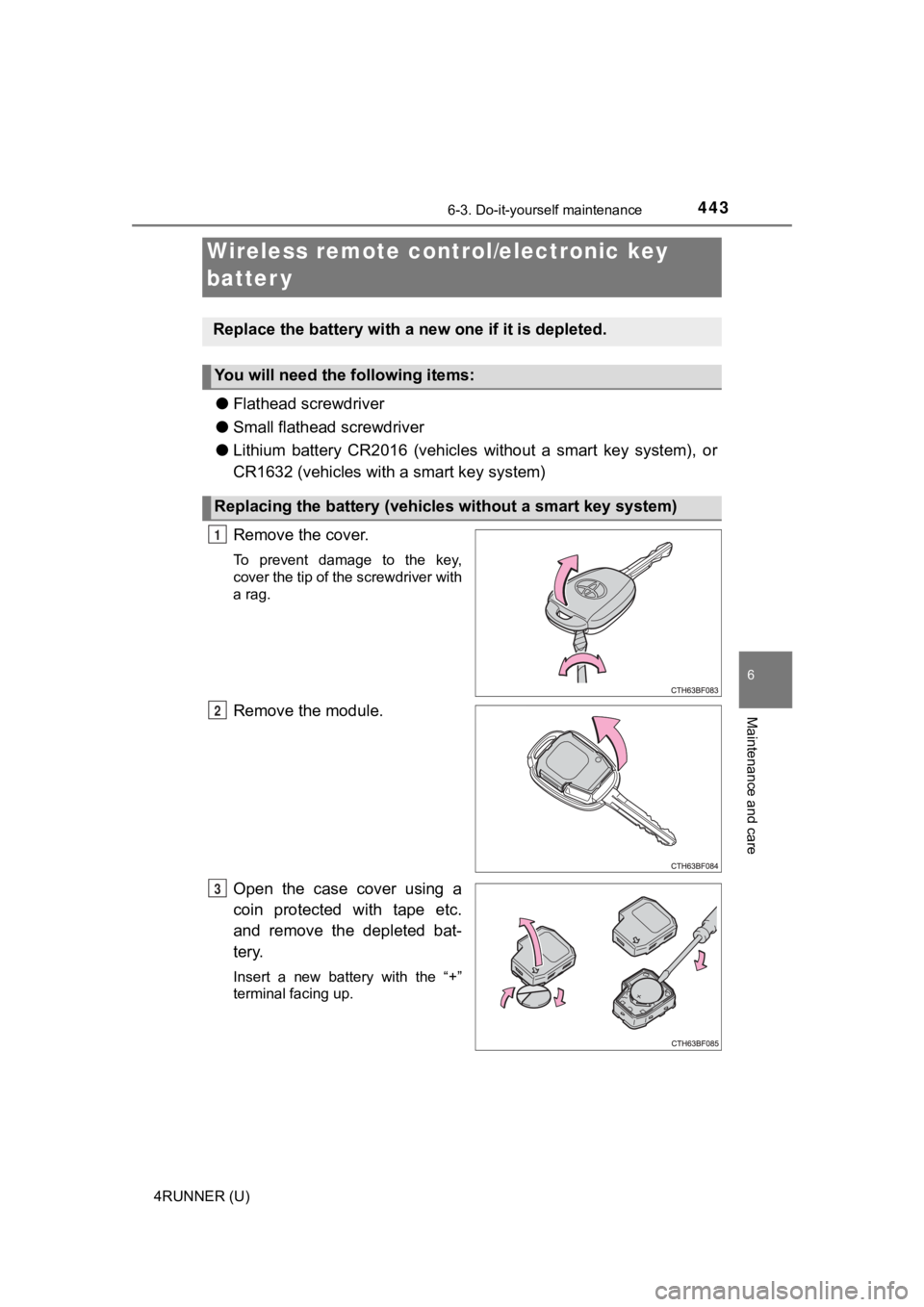
Remove the cover.
To prevent damage to the key,
cover the tip of the screwdriver with
a rag.
Remove the module.
Open the case cover using a
coin protected with tape etc.
and remove the depleted bat-
tery.
Insert a new battery with the “+”
terminal facing up.
Wireless remote control/electronic key
batter y
Replace the battery with a n ew one if it is depleted.
You will need the following items:
Replacing the battery (vehicles without a smart key system)
1
2
3
Page 444 of 592
4446-3. Do-it-yourself maintenance
4RUNNER (U)
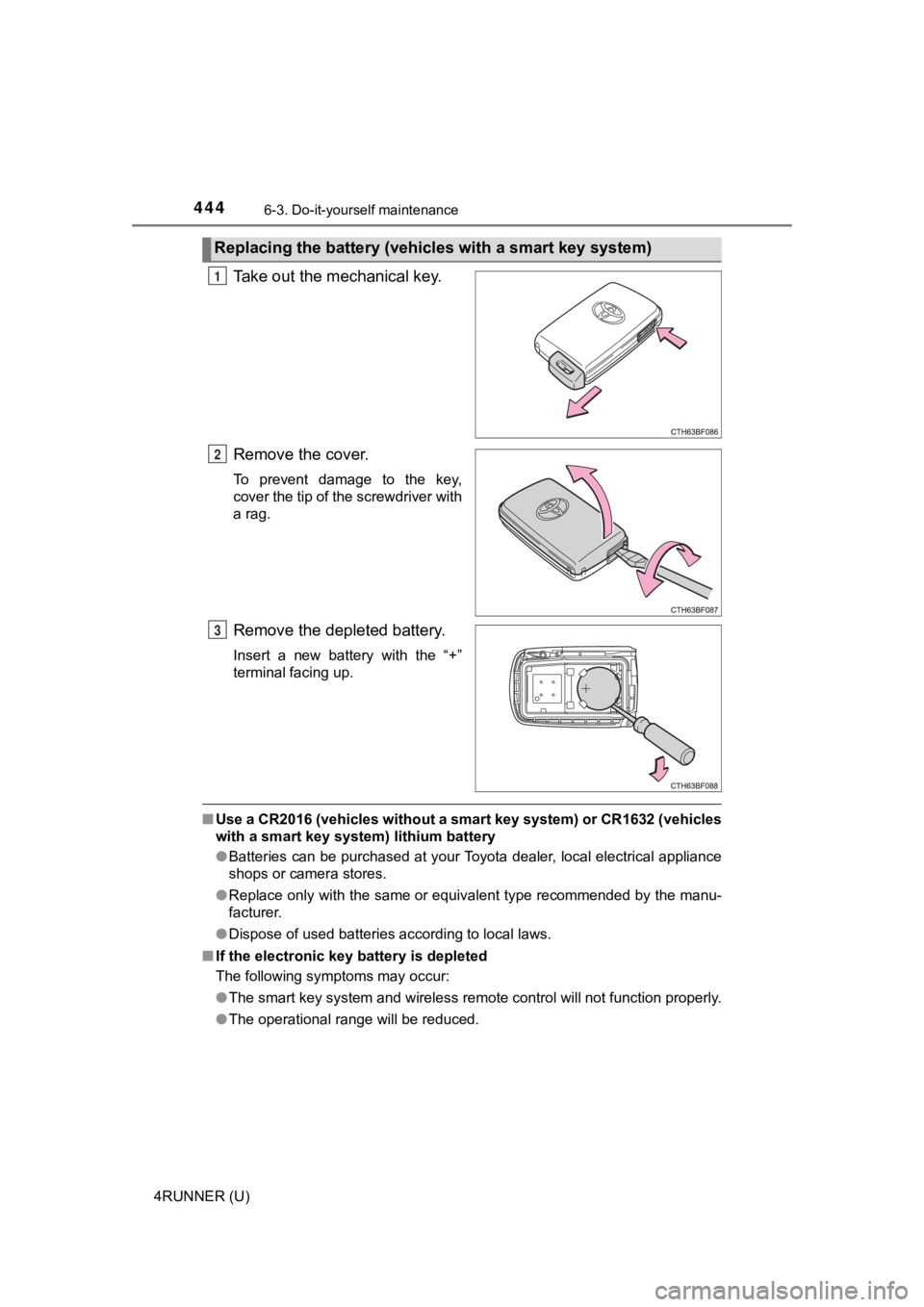
Take out the mechanical key.
Remove the cover.
To prevent damage to the key,
cover the tip of the screwdriver with
a rag.
Remove the depleted battery.
Insert a new battery with the “+”
terminal facing up.
■Use a CR2016 (vehicles without a smart key system) or CR1632 (v ehicles
with a smart key system) lithium battery
● Batteries can be purchased at your Toyota dealer, local electri cal appliance
shops or camera stores.
● Replace only with the same or equivalent type recommended by the manu-
facturer.
● Dispose of used batteries according to local laws.
■ If the electronic key battery is depleted
The following symptoms may occur:
●The smart key system and wireless remote control will not funct ion properly.
● The operational range will be reduced.
Replacing the battery (vehic les with a smart key system)
1
2
3
Page 445 of 592
4456-3. Do-it-yourself maintenance
6
Maintenance and care
4RUNNER (U)
WARNING
■Battery precautions
Observe the following precautions.
Failure to do so may result in death or serious injury.
● Do not swallow the battery. Doing so may cause chemical burns.
● A coin battery or button battery is used in the wireless remote control/elec-
tronic key. If a battery is swallowed, it may cause severe chem ical burns in
as little as 2 hours and may result in death or serious injury.
● Keep away new and removed batteries from children.
● If the cover cannot be firmly closed, stop using the wireless r emote con-
trol/electronic key and stow the key in the place where childre n cannot
reach, and then contact your Toyota dealer.
● If you accidentally swallow a battery or put a battery into a p art of your
body, get emergency medical attention immediately.
■ To prevent battery explosion or leakage of flammable liquid or gas
● Replace the battery with a new battery of the same type. If a w rong type of
battery is used, it may explode.
● Do not expose batteries to extremely low pressure due to high altitude or
extremely high temperatures.
● Do not burn, break or cut a battery.
NOTICE
■For normal operation after replacing the battery
Observe the following precautions to prevent accidents:
● Always work with dry hands.
Moisture may cause the battery to rust.
● Do not touch or move any other component inside the remote cont rol.
● Do not bend either of the battery terminals.
Page 461 of 592

461
When trouble arises7
4RUNNER (U)7-1. Essential information
Emergency flashers .......... 462
If your vehicle has to be stopped in an
emergency ...................... 463
If the vehicle is trapped in rising water ..................... 465
7-2. Steps to take in an emergency
If your vehicle needs to be towed .............................. 466
If you think something is wrong .............................. 472
Fuel pump shut off system ............................ 473
If a warning light turns on or a warning buzzer
sounds ............................ 474
If a warning message is displayed......................... 484
If you have a flat tire.......... 489
If the engine will not start ................................. 504
If you cannot operate back door opener ............ 506
If the electronic key does not operate properly
(vehicles with a smart
key system)..................... 507
If the vehicle battery is discharged ...................... 510
If your vehicle overheats ........................ 514
If the vehicle becomes stuck ............................... 517
Page 505 of 592
5057-2. Steps to take in an emergency
7
When trouble arises
4RUNNER (U)
One of the following may be the cause of the problem:
● One or both of the battery t erminals may be disconnected.
● The battery may be discharged. ( P. 510)
● There may be a malfunction in the steering lock system (vehicles
with a smart key system).
Contact your Toyota dealer if the problem cannot be repaired, o r if repair
procedures are unknown.
When the engine does not start, the following steps can be used as an
interim measure to start the engine if the engine switch is fun ctioning
normally:
Set the parking brake.
Shift the shift lever to P.
Turn the engine switch to ACCESSORY mode.
Press and hold the engine switch for about 15 seconds while
depressing the brake pedal firmly.
Even if the engine can be start ed using the above steps, the sy stem
may be malfunctioning. Have the vehicle inspected by your Toyot a
dealer.
The starter motor does not turn over, the interior lights and h ead-
lights do not turn on, o r the horn does not sound.
Emergency start function (vehicles with a smart key system)
1
2
3
4
Page 507 of 592
5077-2. Steps to take in an emergency
7
When trouble arises
4RUNNER (U)
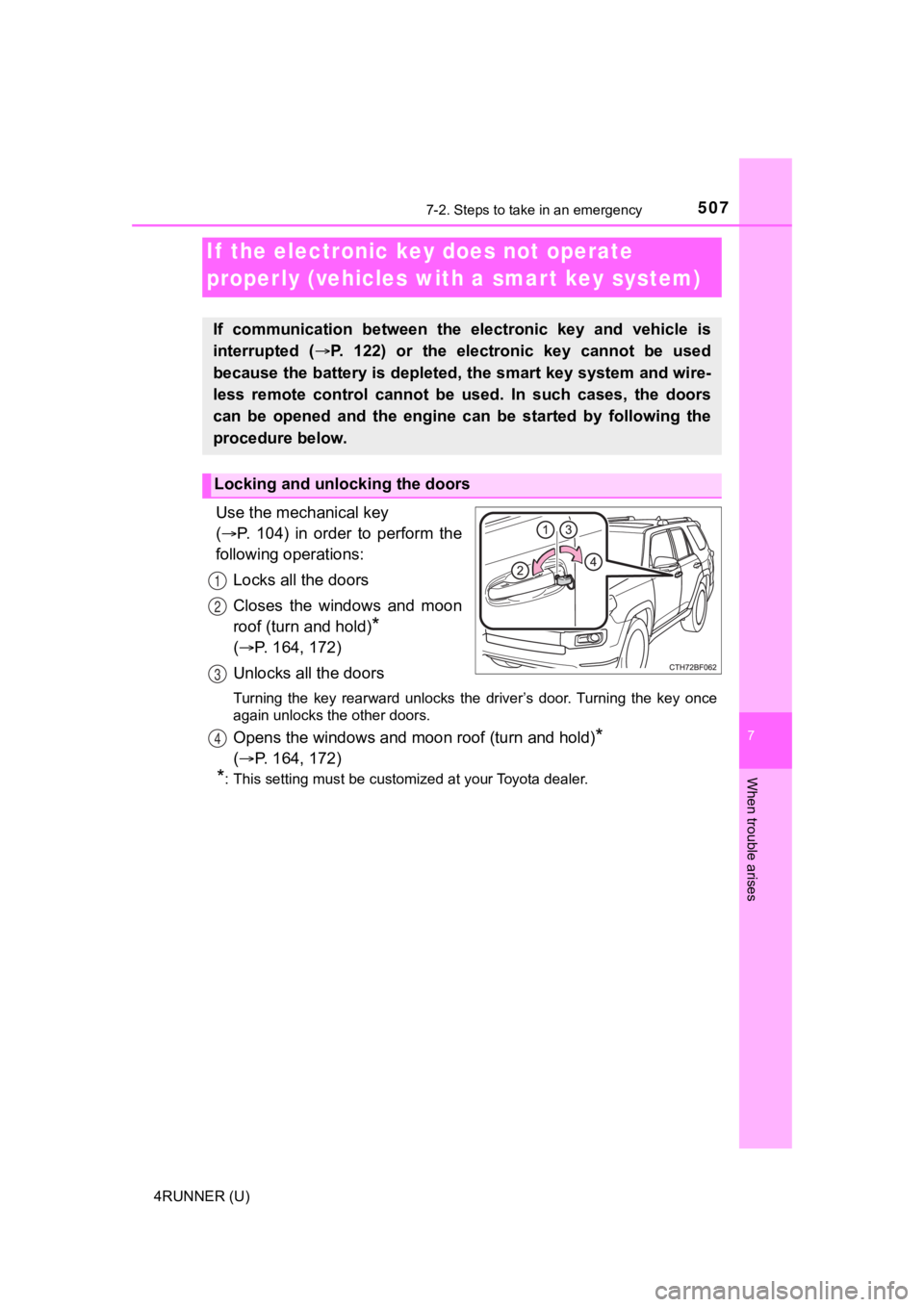
Use the mechanical key
( P. 104) in order to perform the
following operations:
Locks all the doors
Closes the windows and moon
roof (turn and hold)
*
( P. 164, 172)
Unlocks all the doors
Turning the key rearward unlocks the driver’s door. Turning the key once
again unlocks the other doors.
Opens the windows and moon roof (turn and hold)*
( P. 164, 172)
*: This setting must be customized at your Toyota dealer.
If the electronic key does not operate
properly (vehicles with a smar t key system)
If communication between the electronic key and vehicle is
interrupted ( P. 122) or the electronic key cannot be used
because the battery is depleted, the smart key system and wire-
less remote control cannot be used. In such cases, the doors
can be opened and the engine c an be started by following the
procedure below.
Locking and unlocking the doors
1
2
3
4
Page 508 of 592
5087-2. Steps to take in an emergency
4RUNNER (U)
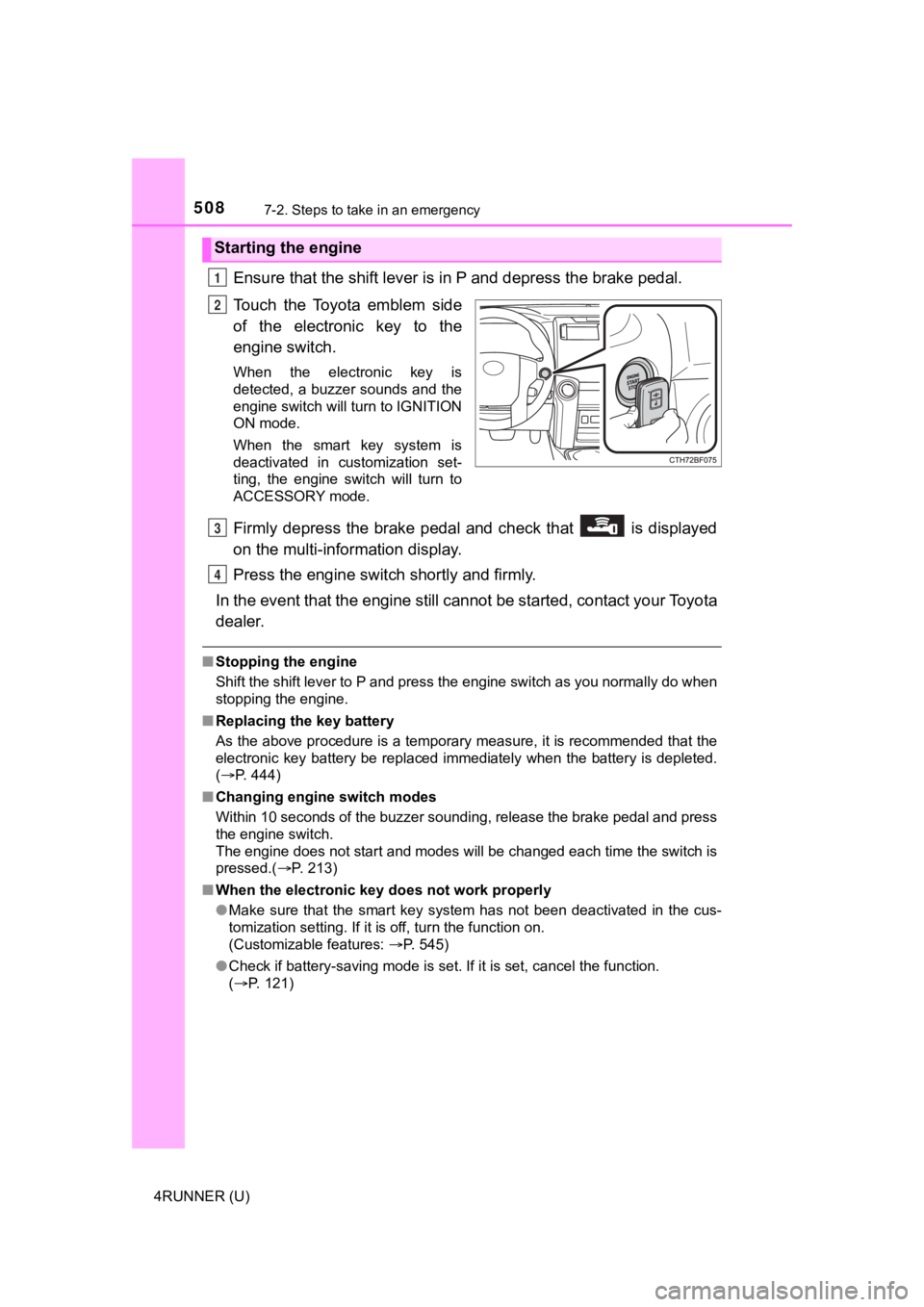
Ensure that the shift lever is in P and depress the brake pedal.
Touch the Toyota emblem side
of the electronic key to the
engine switch.
When the electronic key is
detected, a buzzer sounds and the
engine switch will turn to IGNITION
ON mode.
When the smart key system is
deactivated in customization set-
ting, the engine switch will turn to
ACCESSORY mode.
Firmly depress the brake pedal and check that is displayed
on the multi-information display.
Press the engine switch shortly and firmly.
In the event that the engine still cannot be started, contact your Toyota
dealer.
■ Stopping the engine
Shift the shift lever to P and press the engine switch as you normally do when
stopping the engine.
■ Replacing the key battery
As the above procedure is a temporary measure, it is recommende d that the
electronic key battery be replaced immediately when the battery is depleted.
( P. 444)
■ Changing engine switch modes
Within 10 seconds of the buzzer sounding, release the brake ped al and press
the engine switch.
The engine does not start and modes will be changed each time t he switch is
pressed.( P. 213)
■ When the electronic key does not work properly
●Make sure that the smart key system has not been deactivated in the cus-
tomization setting. If it is off, turn the function on.
(Customizable features: P. 545)
● Check if battery-saving mode is set. If it is set, cancel the f unction.
( P. 121)
Starting the engine
1
2
3
4
Page 510 of 592
5107-2. Steps to take in an emergency
4RUNNER (U)
If you have a set of jumper (or booster) cables and a second vehicle
with a 12-volt battery, you can jump start your vehicle by foll owing the
steps below.
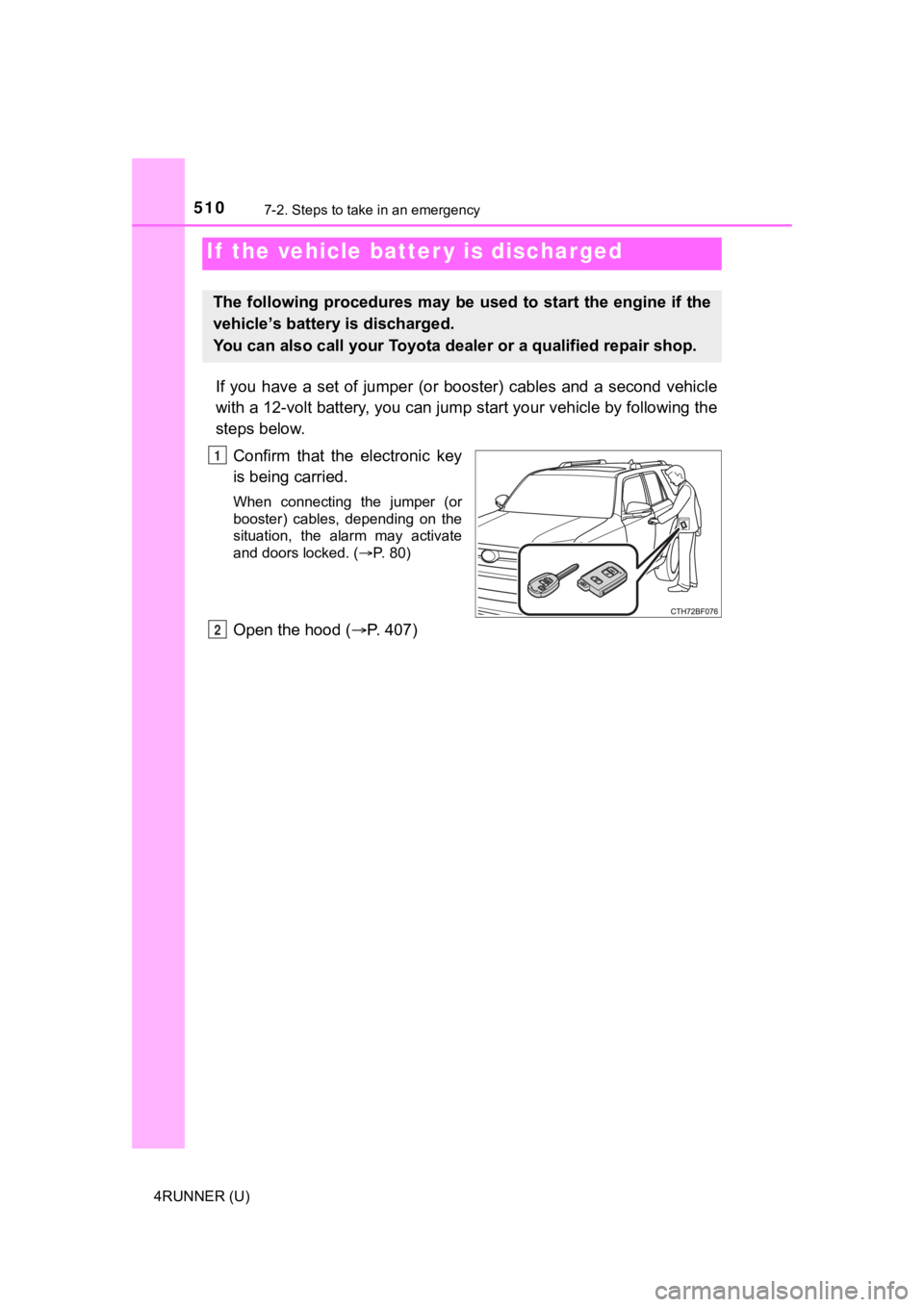
Confirm that the electronic key
is being carried.
When connecting the jumper (or
booster) cables, depending on the
situation, the alarm may activate
and doors locked. ( P. 80)
Open the hood ( P. 407)
If the vehicle batt er y is discharged
The following procedures may be used to start the engine if the
vehicle’s battery is discharged.
You can also call your Toyota de aler or a qualified repair shop.
1
2
Page 511 of 592
5117-2. Steps to take in an emergency
7
When trouble arises
4RUNNER (U)
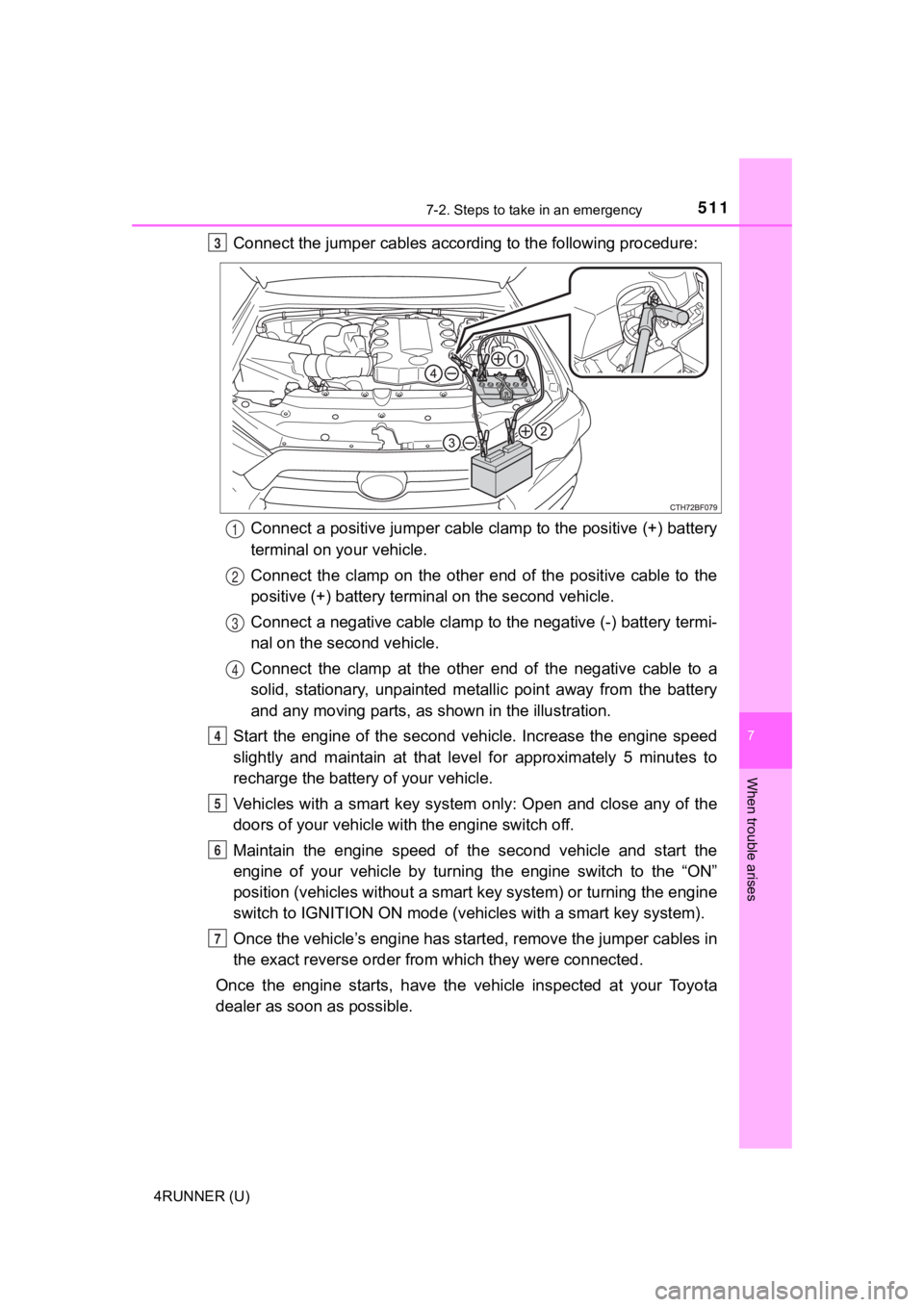
Connect the jumper cables according to the following procedure:Connect a positive jumper cable clamp to the positive (+) batte ry
terminal on your vehicle.
Connect the clamp on the other end of the positive cable to the
positive (+) battery termi nal on the second vehicle.
Connect a negative cable clamp to the negative (-) battery term i-
nal on the s econd vehicle.
Connect the clamp at the other e nd of the negative cable to a
solid, stationary, unpainted meta llic point away from the battery
and any moving parts, as shown in the illustration.
Start the engine of the second v ehicle. Increase the engine speed
slightly and maintain at that lev el for approximately 5 minutes to
recharge the batter y of your vehicle.
Vehicles with a smart key system only: Open and close any of th e
doors of your vehicle wi th the engine switch off.
Maintain the engine speed of the second vehicle and start the
engine of your vehicle by turning the engine switch to the “ON”
position (vehicles without a smart key system) or turning the e ngine
switch to IGNITION ON mode (vehi cles with a smart key system).
Once the vehicle’s engine has st arted, remove the jumper cables in
the exact reverse order from which they were connected.
Once the engine starts, have the vehicle inspected at your Toyota
dealer as soon as possible.3
1
2
3
4
4
5
6
7
Page 512 of 592

5127-2. Steps to take in an emergency
4RUNNER (U)
■Starting the engine when t he battery is discharged
The engine cannot be started by push-starting.
■ To prevent battery discharge
●Turn off the headlights and the audio system while the engine is off.
● Turn off any unnecessary electrical components when the vehicle is running
at a low speed for an extended period, such as in heavy traffic .
■ Charging the battery
The electricity stored in the battery will discharge gradually even when the
vehicle is not in use, due to natural discharge and the draining effects of cer-
tain electrical appliances. If the vehicle is left for a long t ime, the battery may
discharge, and the engine may be unable to start. (The battery recharges
automatically during driving.)
■ When recharging or replacing the battery
●Vehicles with a smart key system: In some cases, it may not be possible to
unlock the doors using the smart key system when the battery is dis-
charged. Use the wireless remote control or the mechanical key to lock or
unlock the doors.
● The engine may not start on the first attempt after the battery has recharged
but will start normally after the second attempt. This is not a malfunction.
● Vehicles with a smart key system: The engine switch mode is memorized by
the vehicle. When the battery is reconnected, the system will r eturn to the
mode it was in before the battery was discharged. Before disconnecting the
battery, turn the engine switch off.
If you are unsure what mode the engine switch was in before the battery dis-
charged, be especially careful when reconnecting the battery.
● Make sure that the key is not inside the vehicle when rechargin g or replac-
ing the battery. The key may be locked in the vehicle if the al arm is acti-
vated. ( P. 80)