fuel TOYOTA 4RUNNER 2022 User Guide
[x] Cancel search | Manufacturer: TOYOTA, Model Year: 2022, Model line: 4RUNNER, Model: TOYOTA 4RUNNER 2022Pages: 616, PDF Size: 12.01 MB
Page 95 of 616
952. Instrument cluster
2
Instrument cluster
4RUNNER (U)
Items displayed can be switched by pressing or up and down.
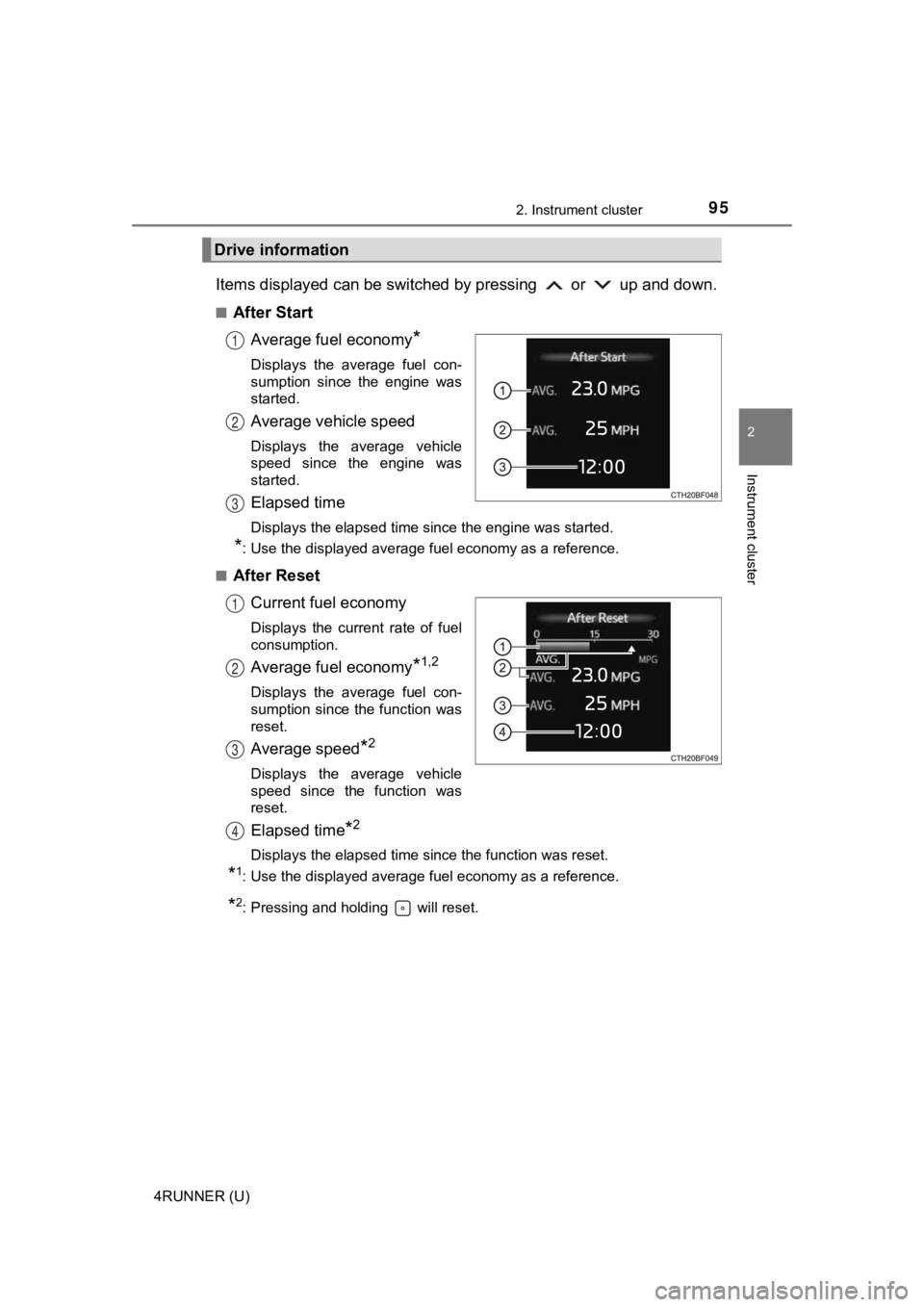
■After StartAverage fuel economy
*
Displays the average fuel con-
sumption since the engine was
started.
Average vehicle speed
Displays the average vehicle
speed since the engine was
started.
Elapsed time
Displays the elapsed time since the engine was started.
*: Use the displayed average fuel economy as a reference.
■
After Reset Current fuel economy
Displays the current rate of fuel
consumption.
Average fuel economy*1,2
Displays the average fuel con-
sumption since the function was
reset.
Average speed*2
Displays the average vehicle
speed since the function was
reset.
Elapsed time*2
Displays the elapsed time since the function was reset.
*1: Use the displayed average fuel economy as a reference.
*2: Pressing and holding will reset.
Drive information
1
2
3
1
2
3
4
Page 96 of 616
962. Instrument cluster
4RUNNER (U)■
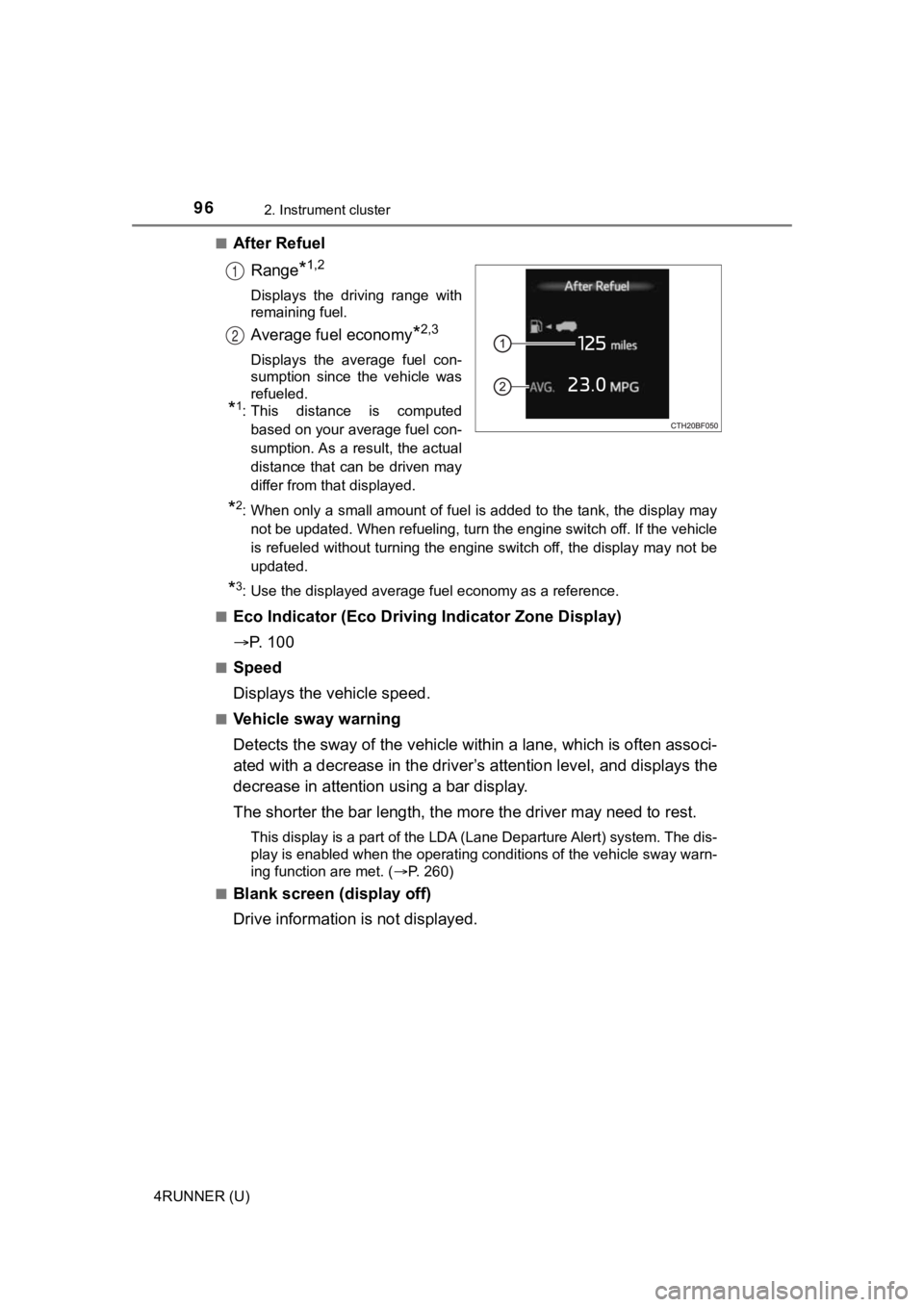
After Refuel
Range
*1,2
Displays the driving range with
remaining fuel.
Average fuel economy*2,3
Displays the average fuel con-
sumption since the vehicle was
refueled.
*1: This distance is computedbased on your average fuel con-
sumption. As a result, the actual
distance that can be driven may
differ from that displayed.
*2: When only a small amount of fuel is added to the tank, the dis play may
not be updated. When refueling, turn the engine switch off. If the vehicle
is refueled without turning the engine switch off, the display may not be
updated.
*3: Use the displayed average fuel economy as a reference.
■
Eco Indicator (Eco Drivi ng Indicator Zone Display)
P. 1 0 0
■Speed
Displays the vehicle speed.
■Vehicle sway warning
Detects the sway of the vehicle within a lane, which is often associ-
ated with a decrease in the driv er’s attention level, and displays the
decrease in attention using a bar display.
The shorter the bar length, the m ore the driver may need to rest.
This display is a part of the LDA (Lane Departure Alert) system. The dis-
play is enabled when the operating conditions of the vehicle sw ay warn-
ing function are met. ( P. 260)
■
Blank screen (display off)
Drive information is not displayed.
1
2
Page 173 of 616

173
Driving4
4RUNNER (U)4-1. Before driving
Driving the vehicle ............. 174
Cargo and luggage ........... 184
Vehicle load limits ............. 189
Trailer towing..................... 190
Dinghy towing ................... 206
4-2. Driving procedures Engine (ignition) switch (vehicles without a
smart key system) ........... 207
Engine (ignition) switch (vehicles with a
smart key system) ........... 210
Automatic transmission ..... 216
Turn signal lever................ 221
Parking brake .................... 222
4-3. Operating the lights and wipers
Headlight switch ................ 223
AHB (Automatic High Beam) ............................. 228
Fog light switch ................. 232
Windshield wipers and washer ............................ 234
Rear window wiper and washer ............................ 237
4-4. Refueling Opening the fuel tank cap .................................. 240 4-5. Using the driving
support systems
Toyota Safety Sense P ..... 243
PCS (Pre-Collision System)........................... 250
LDA (Lane Departure Alert) ............................... 260
Dynamic radar cruise control ............................. 268
BSM (Blind Spot Monitor)........................... 281
Intuitive parking assist....... 288
RCTA (Rear Cross Traffic Alert) .................... 297
Four-wheel drive system (part-time 4WD
models) ........................... 305
Four-wheel drive system (full-time 4WD
models) ........................... 309
Active traction control system ............................ 313
AUTO LSD system (2WD models) ................. 315
Rear differential lock system ............................ 317
Downhill assist control system ............................ 320
Crawl Control .................... 323
Multi-terrain Select ............ 326
Driving assist systems ...... 333
4-6. Driving tips Winter driving tips ............. 342
Off-road precautions ......... 346
Page 176 of 616

1764-1. Before driving
4RUNNER (U)■
Breaking in your new Toyota
To extend the life of the vehicle, observing the following prec autions is recom-
mended:
● For the first 200 miles (300 km):
Avoid sudden stops.
● For the first 500 miles (800 km):
Do not tow a trailer.
● For the first 1000 miles (1600 km):
• Do not drive at extremely high speeds.
• Avoid sudden acceleration.
• Do not drive continuously in low gears.
• Do not drive at a constant speed for extended periods.
■ Drum-in-disc type parking brake system
Your vehicle has a drum-in-disc type parking brake system. This type of brake
system needs bedding-down of the brake shoes periodically or wh enever the
parking brake shoes and/or drum are replaced. Have your Toyota dealer per-
form the bedding down operation.
■ Operating your vehicle in a foreign country
Comply with the relevant vehicle registration laws and confirm the availability
of the correct fuel. ( P. 542)
■ When turning off the engine
The emission system operating sounds may continue for a short time after
the engine is turned off. This is not a malfunction, and helps to ensure optimal
performance of the emission system.
WARNING
Observe the following precautions.
Failure to do so may result in death or serious injury.
■When starting the vehicle
Always keep your foot on the brake pedal while stopped with the engine
running. This prevents the vehicle from creeping.
Page 184 of 616
1844-1. Before driving
4RUNNER (U)
Cargo and luggage
Take notice of the following information about storage precau-
tions, cargo capacity and load:● Stow cargo and luggage in the luggage compartment whenever
possible.
● Be sure all items are secured in place.
● To maintain vehicle balance while driving, position luggage evenly
within the luggage compartment.
● For better fuel economy, do no t carry unnecessary weight.
Page 190 of 616
1904-1. Before driving
4RUNNER (U)
Trailer towing
Your vehicle is designed primarily as a passenger-and-load-car-
rying vehicle. Towing a trailer can have an adverse impact on
handling, performance, braking, durability, and fuel consump-
tion. For your safety and the safety of others, you must not ov er-
load your vehicle or trailer. You must also ensure that you are
using appropriate towing equipm ent, that the towing equipment
has been installed correctly a nd used properly, and that you
employ the requisi te driving habits.
Vehicle-trailer stability and braking performance are affected by
trailer stability, brake performance and setting, trailer brake s,
the hitch and hitch systems (if equipped).
To tow a trailer safely, use extreme care and drive the vehicle in
accordance with your trailer’s characteristics and operating
conditions.
Toyota warranties do not apply to damage or malfunction
caused by towing a trailer for commercial purposes.
Contact your Toyota dealer for further information about addi-
tional requirements such as a towing kit, etc.
Page 217 of 616
2174-2. Driving procedures
4
Driving
4RUNNER (U)
*1: To improve fuel efficiency and reduce noises, set the shift lever in the D
position for normal driving.
*2: Selecting shift ranges using S mode restricts the upper limit of the possible
gear ranges, controls engine braking forces, and prevents unnec essary
upshifting
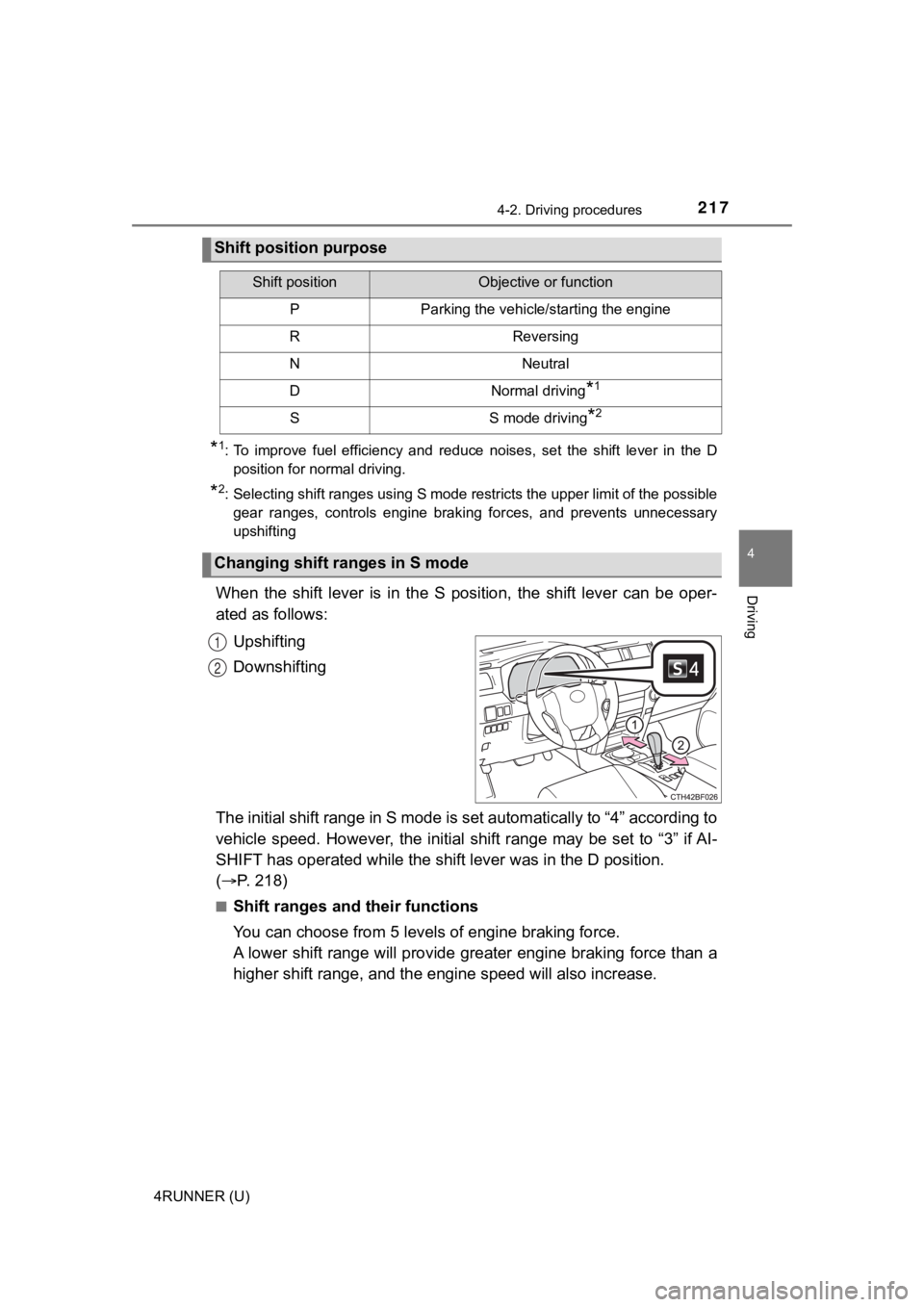
When the shift lever is in the S position, the shift lever can be oper-
ated as follows:
Upshifting
Downshifting
The initial shift range in S mode is set automatically to “4” a ccording to
vehicle speed. However, the ini tial shift range may be set to “3” if AI-
SHIFT has operated while the shif t lever was in the D position.
( P. 218)
■Shift ranges and their functions
You can choose from 5 leve ls of engine braking force.
A lower shift range will provide greater engine braking force t han a
higher shift range, and the engine speed will also increase.
Shift position purpose
Shift positionObjective or function
PParking the vehicle/starting the engine
RReversing
NNeutral
DNormal driving*1
SS mode driving*2
Changing shift ranges in S mode
1
2
Page 226 of 616
2264-3. Operating the lights and wipers
4RUNNER (U)
■Daytime running light system
●Vehicles with a headlight high beam/daytime running lights: The daytime
running lights illuminate using the same lights as the headligh t high beam
and illuminate dimmer than the headlight high beam.
● To make your vehicle more visible to other drivers during dayti me driving,
the daytime running lights turn on automatically when all of the following
conditions are met. (The daytime running lights are not designe d for use at
night.)
• The engine is running
• The parking brake is released
• The headlight switch is in the , (type A only),
* (type B
and C) position
*: When the surroundings are bright
The daytime running lights remain on after they illuminate, eve n if the park-
ing brake is set again.
Type A and B: Daytime running lights can be turned off by opera ting the
switch.
● Compared to turning on the headlights, the daytime running ligh t system
offers greater durability and consumes less electricity, so it can help improve
fuel economy.
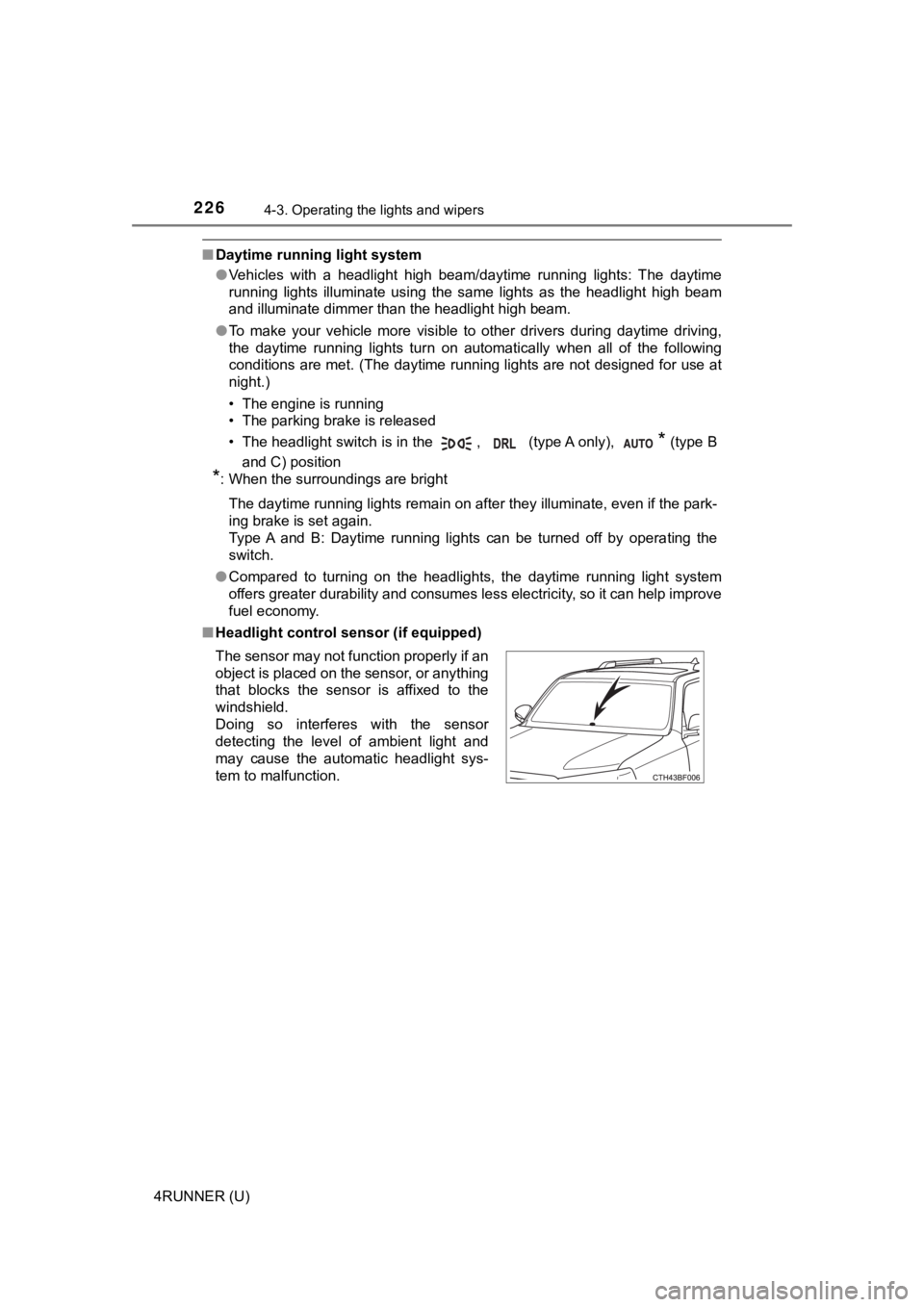
■ Headlight control sensor (if equipped)
The sensor may not function properly if an
object is placed on the sensor, or anything
that blocks the sensor is affixed to the
windshield.
Doing so interferes with the sensor
detecting the level of ambient light and
may cause the automatic headlight sys-
tem to malfunction.
Page 240 of 616
240
4RUNNER (U)
4-4. Refueling
●Turn the engine switch to the “LOCK” position and ensure that a ll
the doors and windows are closed.
● Confirm the type of fuel.
■Fuel types
P. 542
■ Fuel tank opening for unleaded gasoline
To help prevent incorrect fueling, your vehicle has a fuel tank opening that
only accommodates the special nozzle on unleaded fuel pumps.
■ If the malfunction indicator lamp illuminates
The malfunction indicator lamp may illuminate erroneously if re fueling is per-
formed repeatedly when the fuel tank is nearly full.
Opening the fuel tank cap
Perform the following steps to open the fuel tank cap:
Before refueling the vehicle
Page 241 of 616
2414-4. Refueling
4
Driving
4RUNNER (U)
WARNING
■When refueling the vehicle
Observe the following precautions while refueling the vehicle. Failure to do
so may result in death or serious injury.
● After exiting the vehicle and before opening the fuel door, touch an
unpainted metal surface to discharge any static electricity. It is important to
discharge static electricity before refueling because sparks resulting from
static electricity can cause fuel vapors to ignite while refueling.
● Always hold the grips on the fuel tank cap and turn it slowly t o remove it.
A whooshing sound may be heard when the fuel tank cap is loosened.
Wait until the sound cannot be heard before fully removing the cap. In hot
weather, pressurized fuel may spray out the filler neck and cau se injury.
● Do not allow anyone that has not discharged static electricity from their
body to come close to an open fuel tank.
● Do not inhale vaporized fuel.
Fuel contains substances that are harmful if inhaled.
● Do not smoke while refueling the vehicle.
Doing so may cause the fuel to ignite and cause a fire.
● Do not return to the vehicle or touch any person or object that is statically
charged.
This may cause static electricity to build up, resulting in a p ossible ignition
hazard.
■ When refueling
Observe the following precautions to prevent fuel overflowing from the fuel
tank:
● Securely insert the fuel nozzle into the fuel filler neck.
● Stop filling the tank after the fuel nozzle automatically click s off.
● Do not top off the fuel tank.
NOTICE
■Refueling
Do not spill fuel during refueling.
Doing so may damage the vehicle, such as causing the emission c ontrol
system to operate abnormally or damaging fuel system components or the
vehicle’s painted surface.