mirror TOYOTA 4RUNNER 2022 Owner's Manual
[x] Cancel search | Manufacturer: TOYOTA, Model Year: 2022, Model line: 4RUNNER, Model: TOYOTA 4RUNNER 2022Pages: 616, PDF Size: 12.01 MB
Page 247 of 616
2474-5. Using the driving support systems
4
Driving
4RUNNER (U)
WARNING
●Do not dirty or damage the front camera.
When cleaning the inside of the windshield, do not allow glass cleaner to
contact the lens of the front camera. Also, do not touch the le ns.
If the lens is dirty or damaged, contact your Toyota dealer.
● Do not subject the front camera to a strong impact.
● Do not change the installation position or direction of the front camera or
remove it.
● Do not disassemble the front camera.
● Do not modify any components of the vehicle around the front ca mera
(inside rear view mirror, etc.) or ceiling.
● Do not attach any accessories to the hood, front grille or front bumper that
may obstruct the front camera. Contact your Toyota dealer for details.
● If a surfboard or other long object is to be mounted on the roo f, make sure
that it will not obstruct the front camera.
● Do not modify the headlights or other lights.
Page 259 of 616
2594-5. Using the driving support systems
4
Driving
4RUNNER (U)●
In some situations such as the following, sufficient braking fo rce may not be
obtained, preventing the system from performing properly:
• If the braking functions cannot operate to their full extent, such as when
the brake parts are extremely cold, extremely hot, or wet
• If the vehicle is not properly maintained (brakes or tires are excessively
worn, improper tire inflation pressure, etc.)
• When the vehicle is being driven on a gravel road or other sli ppery sur-
face
● Some pedestrians such as the following may not be detected by t he radar
sensor and front camera, preventing the system from operating p roperly:
• Pedestrians shorter than approximately 3.2 ft. (1 m) or taller than approx-
imately 6.5 ft. (2 m)
• Pedestrians wearing oversized clothing (a rain coat, long skir t, etc.), mak-
ing their silhouette obscure
• Pedestrians who are carrying large baggage, holding an umbrella, etc., hiding part of their body
• Pedestrians who are bending forward or squatting
• Pedestrians who are pushing a stroller, wheelchair, bicycle or other vehi-
cle
• Groups of pedestrians which are close together
• Pedestrians who are wearing white and look extremely bright
• Pedestrians in the dark, such as at night or while in a tunnel
• Pedestrians whose clothing appears to be nearly the same color or
brightness as their surroundings
• Pedestrians near walls, fences, guardrails, or large objects
• Pedestrians who are on a metal object (manhole cover, steel plate, etc.)
on the road
• Pedestrians who are walking fast
• Pedestrians who are changing speed abruptly
• Pedestrians running out from behind a vehicle or a large objec t
• Pedestrians who are extremely close to the side of the vehicle (outside
rear view mirror, etc.)
■ If VSC is disabled
●If VSC is disabled ( P. 335, 336), the pre-collision brake assist and pre-col-
lision braking functions are also disabled.
● The PCS warning light will turn on and “VSC Turned Off Pre-Coll ision Brake
System Unavailable” will be displayed on the multi-information display.
Page 281 of 616
2814-5. Using the driving support systems
4
Driving
4RUNNER (U)
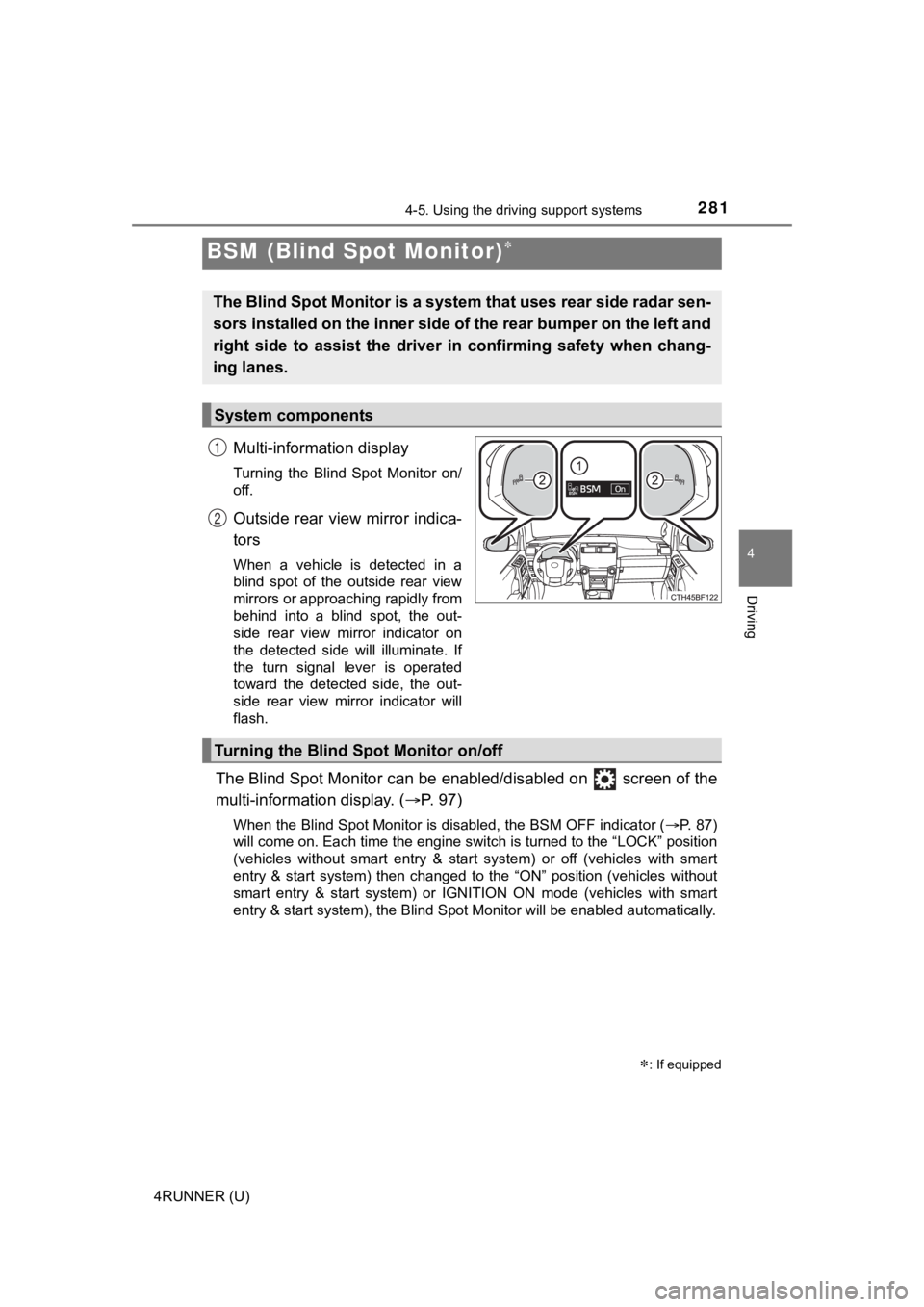
Multi-information display
Turning the Blind Spot Monitor on/
off.
Outside rear view mirror indica-
tors
When a vehicle is detected in a
blind spot of the outside rear view
mirrors or approaching rapidly from
behind into a blind spot, the out-
side rear view mirror indicator on
the detected side will illuminate. If
the turn signal lever is operated
toward the detected side, the out-
side rear view mirror indicator will
flash.
The Blind Spot Monitor can be enabled/disabled on screen of the
multi-information display. ( P. 9 7 )
When the Blind Spot Monitor is disabled, the BSM OFF indicator (P. 87)
will come on. Each time the engine switch is turned to the “LOC K” position
(vehicles without smart entry & start system) or off (vehicles with smart
entry & start system) then changed to the “ON” position (vehicl es without
smart entry & start system) or IGNITION ON mode (vehicles with smart
entry & start system), the Blind Spot Monitor will be enabled a utomatically.
BSM (Blind Spot Monitor)
: If equipped
The Blind Spot Monitor is a system that uses rear side radar se n-
sors installed on the inner side of the rear bumper on the left and
right side to assist the driver in confirming safety when chang-
ing lanes.
System components
1
2
Turning the Blind S pot Monitor on/off
Page 282 of 616
2824-5. Using the driving support systems
4RUNNER (U)
■Outside rear view mirror indicator visibility
In strong sunlight, the outside rear view mirror indicator may be difficult to
see.
■ When “BSM Unavailable See Owner’s Manual” is shown on the multi -
information display
The sensor voltage has become abnormal, or water, snow, mud, etc., may be
attached to the rear bumper around the sensors ( P. 283). Removing the
water, snow, mud, etc., from the vicinity of the sensor area sh ould return it to
normal. Also, the sensor may not function normally when used in extremely
hot or cold weather.
■ When “Blind Spot Monitor Malfunction Visit Your Dealer” is show n on
the multi-information display
There may be a sensor malfunction or misaligned. Have the vehicle
inspected by your Toyota dealer.
■ Customization
Some functions can be customized. ( P. 566)
Page 284 of 616
2844-5. Using the driving support systems
4RUNNER (U)■
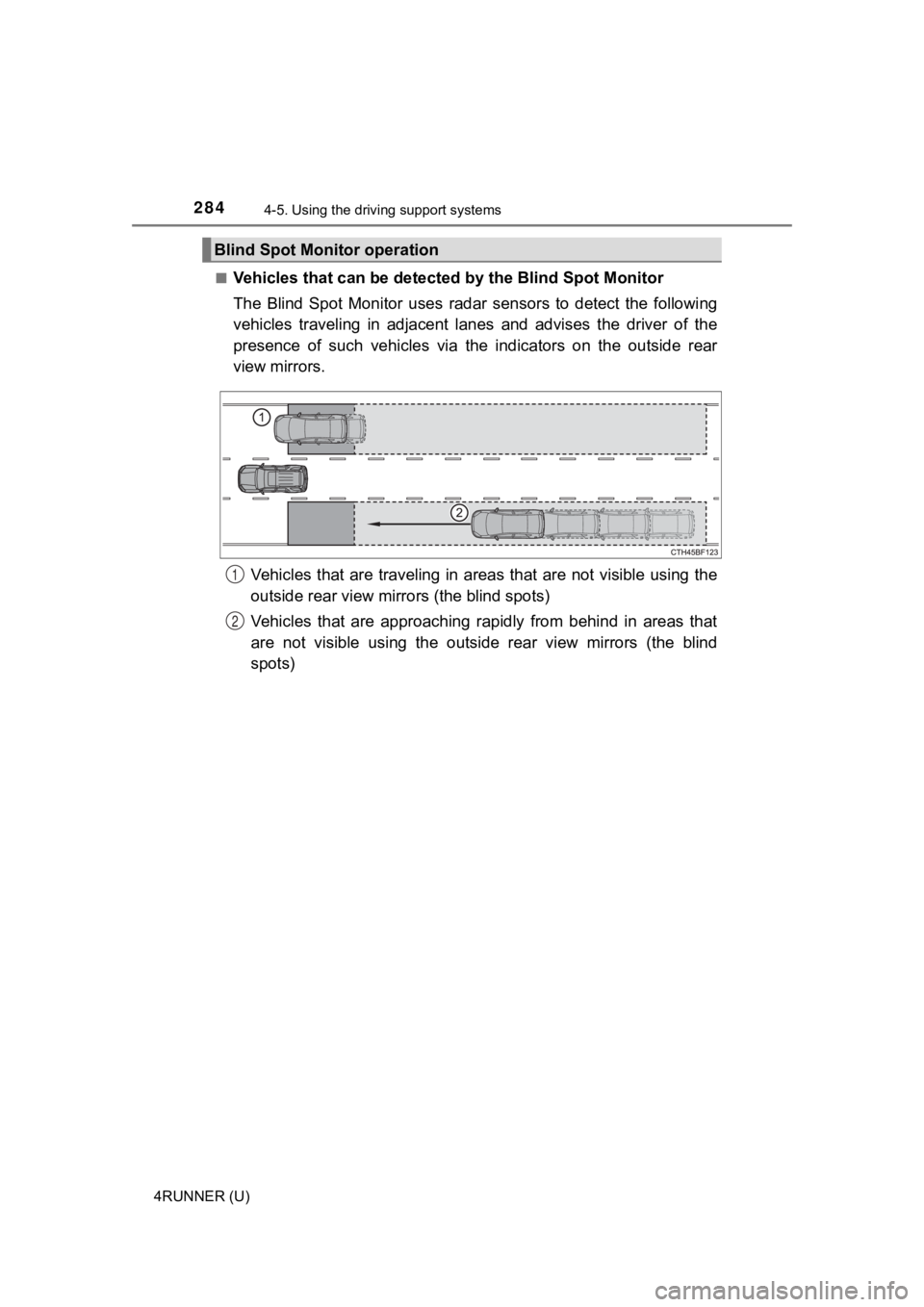
Vehicles that can be detected
by the Blind Spot Monitor
The Blind Spot Monitor uses radar sensors to detect the followi ng
vehicles traveling in adjacent lanes and advises the driver of the
presence of such vehicles via the indicators on the outside rea r
view mirrors.
Vehicles that are traveling in a reas that are not visible using the
outside rear view mirrors (the blind spots)
Vehicles that are approaching rapidly from behind in areas that
are not visible using the outside rear view mirrors (the blind
spots)
Blind Spot Monitor operation
1
2
Page 285 of 616
2854-5. Using the driving support systems
4
Driving
4RUNNER (U)■
Blind Spot Monito
r detection areas
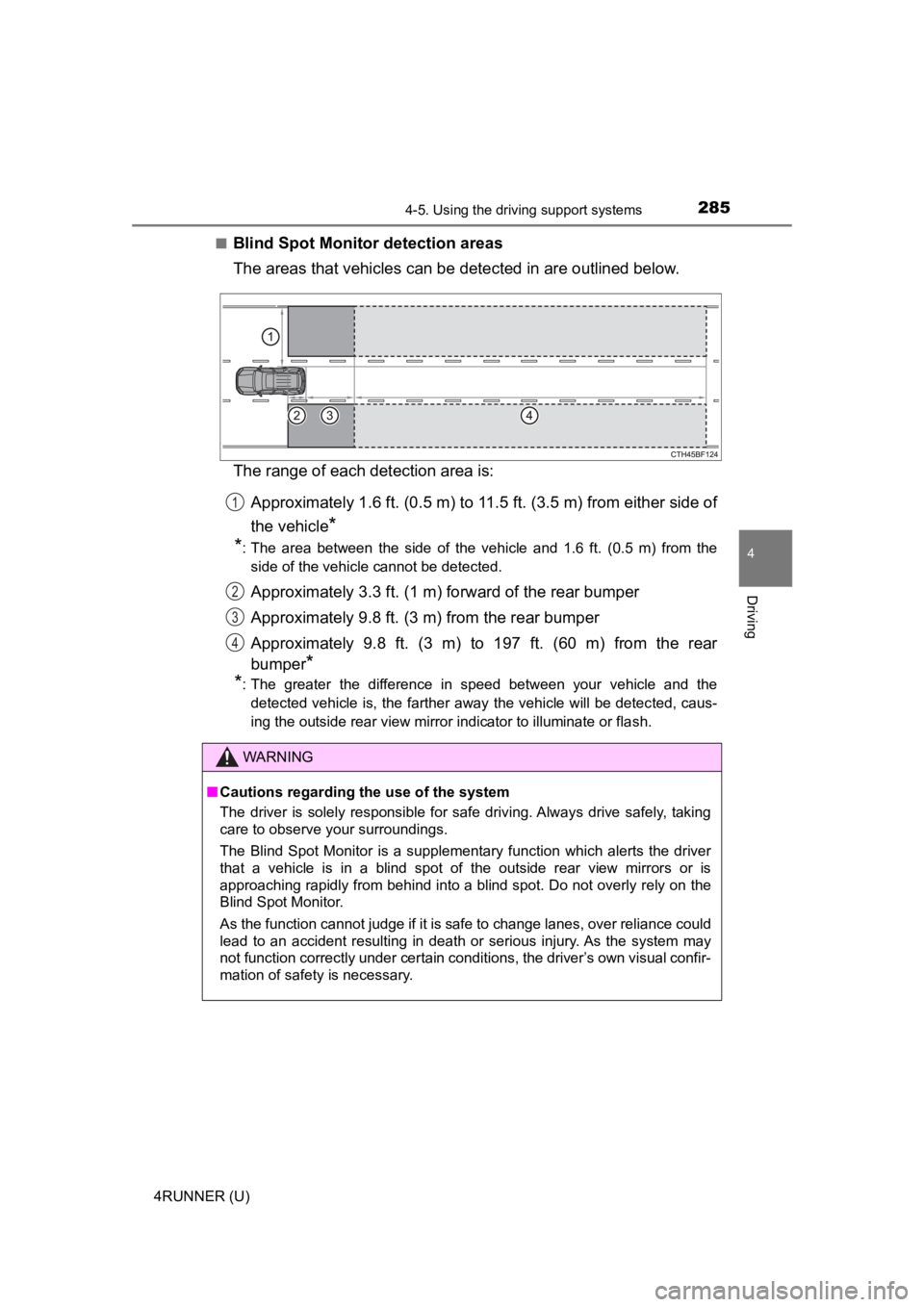
The areas that vehicles can be detected in are outlined below.
The range of each detection area is:
Approximately 1.6 ft. (0.5 m) to 11.5 ft. (3.5 m) from either s ide of
the vehicle
*
*
: The area between the side of the vehicle and 1.6 ft. (0.5 m) from the
side of the vehicle cannot be detected.
Approximately 3.3 ft. (1 m) f orward of the rear bumper
Approximately 9.8 ft. (3 m) from the rear bumper
Approximately 9.8 ft. (3 m) to 197 ft. (60 m) from the rear
bumper
*
*
: The greater the difference in speed between your vehicle and the
detected vehicle is, the farther away the vehicle will be detec ted, caus-
ing the outside rear view mirror indicator to illuminate or flash.
WARNING
■ Cautions regarding the use of the system
The driver is solely responsible for safe driving. Always drive safely, taking
care to observe your surroundings.
The Blind Spot Monitor is a supplementary function which alerts the driver
that a vehicle is in a blind spot of the outside rear view mirr ors or is
approaching rapidly from behind into a blind spot. Do not overl y rely on the
Blind Spot Monitor.
As the function cannot judge if it is safe to change lanes, ove r reliance could
lead to an accident resulting in death or serious injury. As the system may
not function correctly under certain conditions, the driver’s o wn visual confir-
mation of safety is necessary.
1
2
3
4
Page 297 of 616
2974-5. Using the driving support systems
4
Driving
4RUNNER (U)
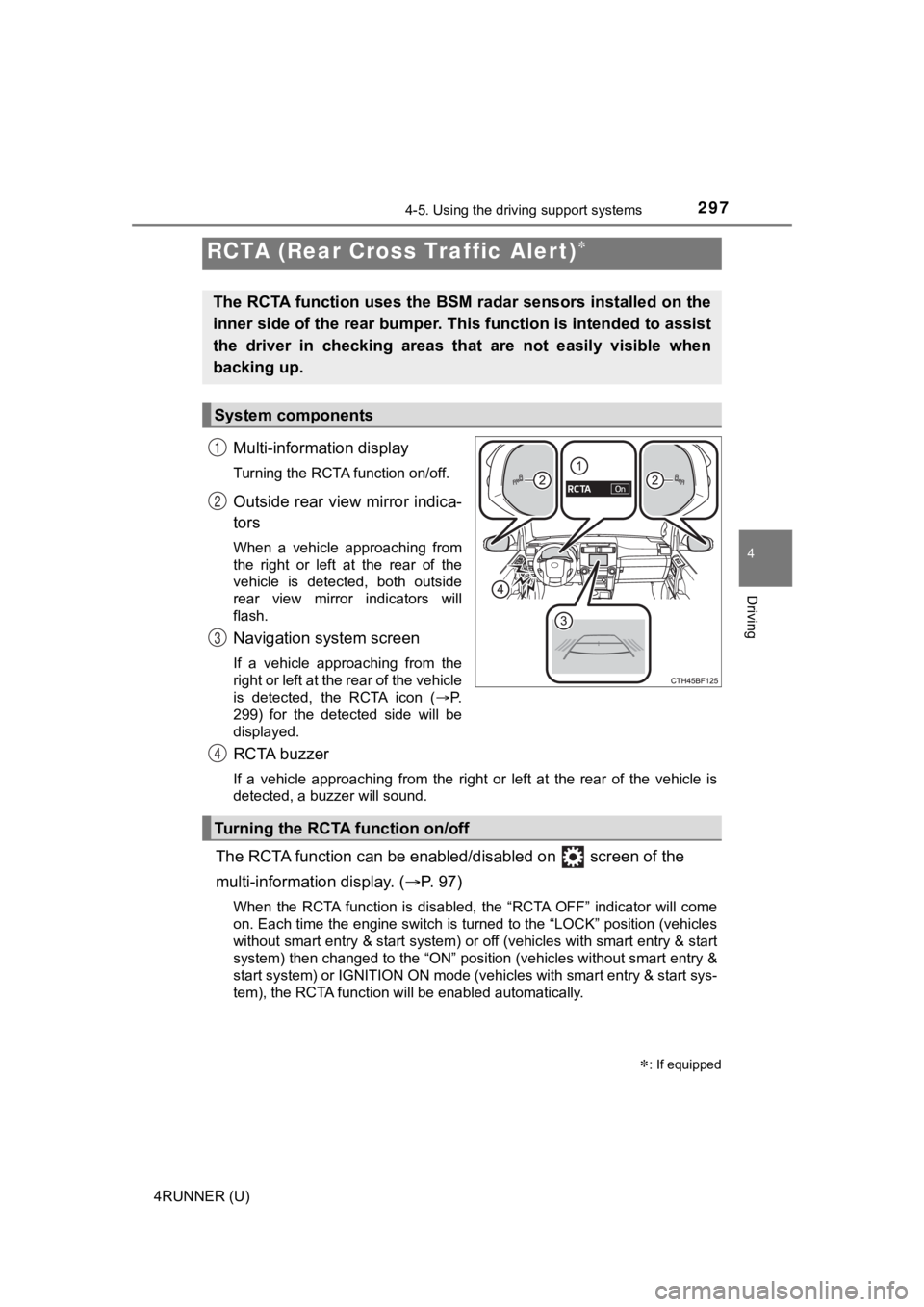
Multi-information display
Turning the RCTA function on/off.
Outside rear view mirror indica-
tors
When a vehicle approaching from
the right or left at the rear of the
vehicle is detected, both outside
rear view mirror indicators will
flash.
Navigation system screen
If a vehicle approaching from the
right or left at the rear of the vehicle
is detected, the RCTA icon (P.
299) for the detected side will be
displayed.
RCTA buzzer
If a vehicle approaching from the right or left at the rear of the vehicle is
detected, a buzzer will sound.
The RCTA function can be enabl ed/disabled on screen of the
multi-information display. ( P. 9 7 )
When the RCTA function is disabled, the “RCTA OFF” indicator wi ll come
on. Each time the engine switch is turned to the “LOCK” position (vehicles
without smart entry & start system) or off (vehicles with smart entry & start
system) then changed to the “ON” position (vehicles without sma rt entry &
start system) or IGNITION ON mode (vehicles with smart entry & start sys-
tem), the RCTA function will be enabled automatically.
RCTA (Rear Cross Traffic Alert)
: If equipped
The RCTA function uses the BSM radar sensors installed on the
inner side of the rear bumper. This function is intended to ass ist
the driver in checking areas that are not easily visible when
backing up.
System components
1
2
3
Turning the RCTA function on/off
4
Page 298 of 616
2984-5. Using the driving support systems
4RUNNER (U)
■Outside rear view mirror indicator visibility
In strong sunlight, the outside rear view mirror indicator may be difficult to
see.
■ Hearing the RCTA buzzer
The RCTA buzzer may be difficult to hear over loud noises, such as if the
audio system volume is high.
■ When “RCTA Unavailable” is shown on the multi-information displ ay
Water, snow, mud, etc., may be attached to the rear bumper around the sen-
sors ( P. 283). Removing the water, snow, mud, etc., from the vicinity of the
sensor area should return it to normal. Also, the sensor may no t function nor-
mally when used in extremely hot or cold weather.
■ When “RCTA Malfunction Visit Your Dealer” is shown on the multi -infor-
mation display
There may be a sensor malfunction or misaligned. Have the vehicle
inspected by your Toyota dealer.
■ Radar sensors
P. 283
■ Customization
Some functions can be customized. ( P. 566)
Page 299 of 616
2994-5. Using the driving support systems
4
Driving
4RUNNER (U)■
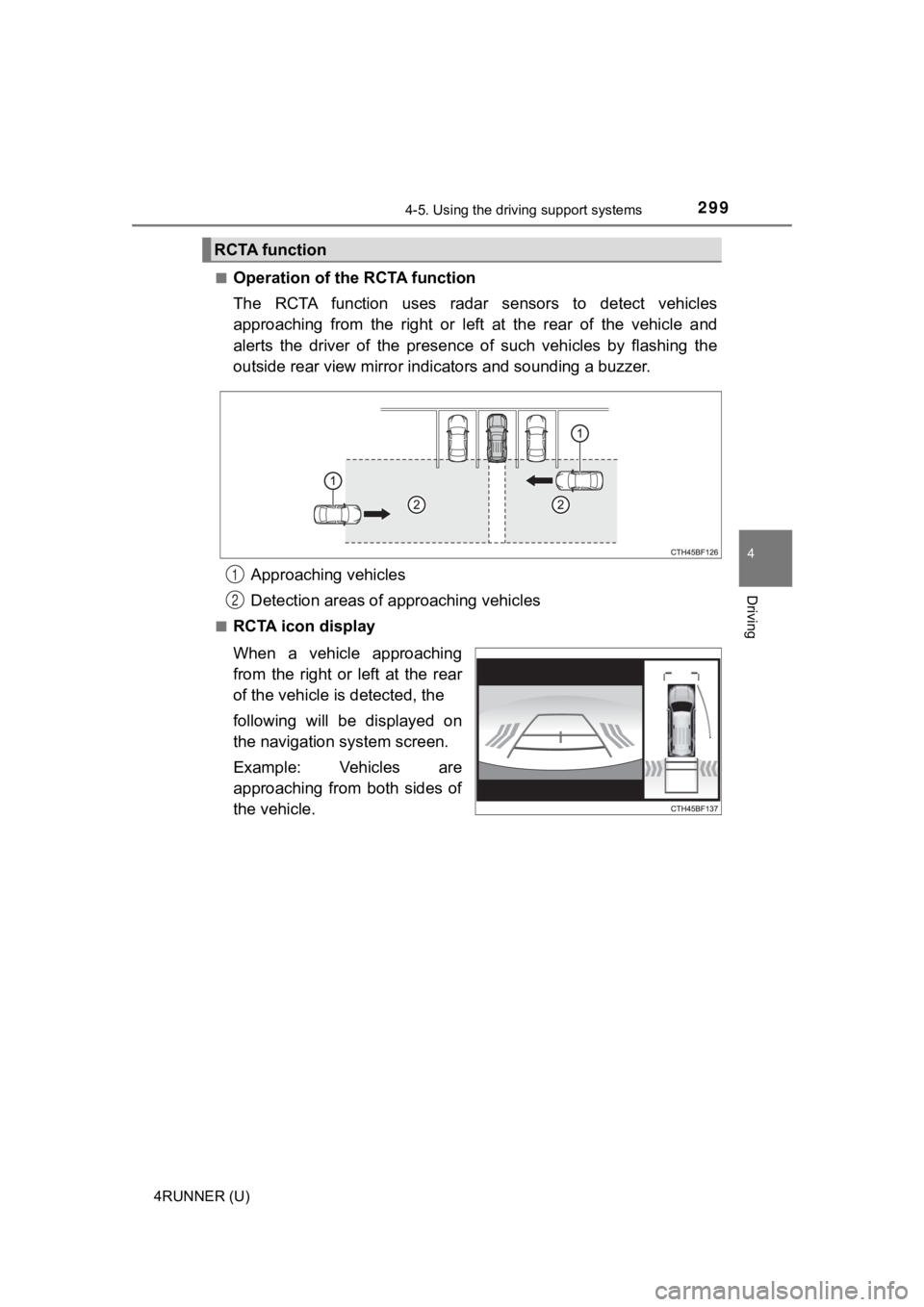
Operation of the RCTA function
The RCTA function uses radar
sensors to detect vehicles
approaching from the right or left at the rear of the vehicle a nd
alerts the driver of the presence of such vehicles by flashing the
outside rear view mirror indi cators and sounding a buzzer.
Approaching vehicles
Detection areas of approaching vehicles
■RCTA icon display
When a vehicle approaching
from the right or left at the rear
of the vehicle is detected, the
following will be displayed on
the navigation system screen.
Example: Vehicles are
approaching from both sides of
the vehicle.
RCTA function
1
2
Page 351 of 616
351
Interior features5
4RUNNER (U)5-1. Using the air conditioning
system and defogger
Manual air conditioning system ............................ 352
Automatic air conditioning system ............................ 359
Seat heaters/ seat ventilators ................ 367
5-2. Using the interior lights Interior lights list ................ 369
• Interior lights ................. 370
• Personal lights .............. 370
5-3. Using the storage features
List of storage features ..... 372
• Glove box...................... 373
• Console box .................. 373
• Cup holders .................. 374
• Auxiliary box ................. 376
• Coin holder/tissue pocket/
pen holder ..................... 377
• Bottle holders ................ 378
Luggage compartment features ........................... 379
5-4. Other interior features Other interior features ....... 384
• Sun visors ..................... 384
• Vanity mirrors................ 384
• Clock ............................. 385
• Power outlets (120 V AC) .................... 386
• Power outlets ................ 390
• USB charging ports....... 393
• Armrest ......................... 395
• Assist grips ................... 395
Garage door opener.......... 396