ignition TOYOTA 4RUNNER 2022 Owner's Guide
[x] Cancel search | Manufacturer: TOYOTA, Model Year: 2022, Model line: 4RUNNER, Model: TOYOTA 4RUNNER 2022Pages: 616, PDF Size: 12.01 MB
Page 236 of 616
2364-3. Operating the lights and wipers
4RUNNER (U)
■The windshield wiper and washer can be operated when
Vehicles without a smart key system
The engine switch is in the “ON” position.
Vehicles with a smart key system
The engine switch is in IGNITION ON mode.
■ If no windshield washer fluid sprays
Check that the washer nozzles are not blocked if there is washe r fluid in the
washer fluid reservoir.
WARNING
■ Caution regarding the use of washer fluid
When it is cold, do not use the washer fluid until the windshie ld becomes
warm. The fluid may freeze on the windshield and cause low visi bility. This
may lead to an accident, resulting in death or serious injury.
NOTICE
■ When the windshield is dry
Do not use the wipers, as they may damage the windshield.
■ When the washer fluid tank is empty
Do not operate the switch continually as the washer fluid pump may over-
heat.
■ When a nozzle becomes blocked
In this case, contact your Toyota dealer.
Do not try to clear it with a pin or other object. The nozzle will be damaged.
Page 241 of 616
2414-4. Refueling
4
Driving
4RUNNER (U)
WARNING
■When refueling the vehicle
Observe the following precautions while refueling the vehicle. Failure to do
so may result in death or serious injury.
● After exiting the vehicle and before opening the fuel door, touch an
unpainted metal surface to discharge any static electricity. It is important to
discharge static electricity before refueling because sparks resulting from
static electricity can cause fuel vapors to ignite while refueling.
● Always hold the grips on the fuel tank cap and turn it slowly t o remove it.
A whooshing sound may be heard when the fuel tank cap is loosened.
Wait until the sound cannot be heard before fully removing the cap. In hot
weather, pressurized fuel may spray out the filler neck and cau se injury.
● Do not allow anyone that has not discharged static electricity from their
body to come close to an open fuel tank.
● Do not inhale vaporized fuel.
Fuel contains substances that are harmful if inhaled.
● Do not smoke while refueling the vehicle.
Doing so may cause the fuel to ignite and cause a fire.
● Do not return to the vehicle or touch any person or object that is statically
charged.
This may cause static electricity to build up, resulting in a p ossible ignition
hazard.
■ When refueling
Observe the following precautions to prevent fuel overflowing from the fuel
tank:
● Securely insert the fuel nozzle into the fuel filler neck.
● Stop filling the tank after the fuel nozzle automatically click s off.
● Do not top off the fuel tank.
NOTICE
■Refueling
Do not spill fuel during refueling.
Doing so may damage the vehicle, such as causing the emission c ontrol
system to operate abnormally or damaging fuel system components or the
vehicle’s painted surface.
Page 253 of 616
2534-5. Using the driving support systems
4
Driving
4RUNNER (U)■
Enabling/disabling th
e pre-collision system
The pre-collision sy stem can be enabled/disabled on ( P. 9 8 )
of the multi-information display.
The system is automatically enabled each time the engine switch is
turned to the “ON” position (vehicles without a smart key syste m) or the
engine switch is turned to IGNITION ON mode (vehicles with a sm art
key system).
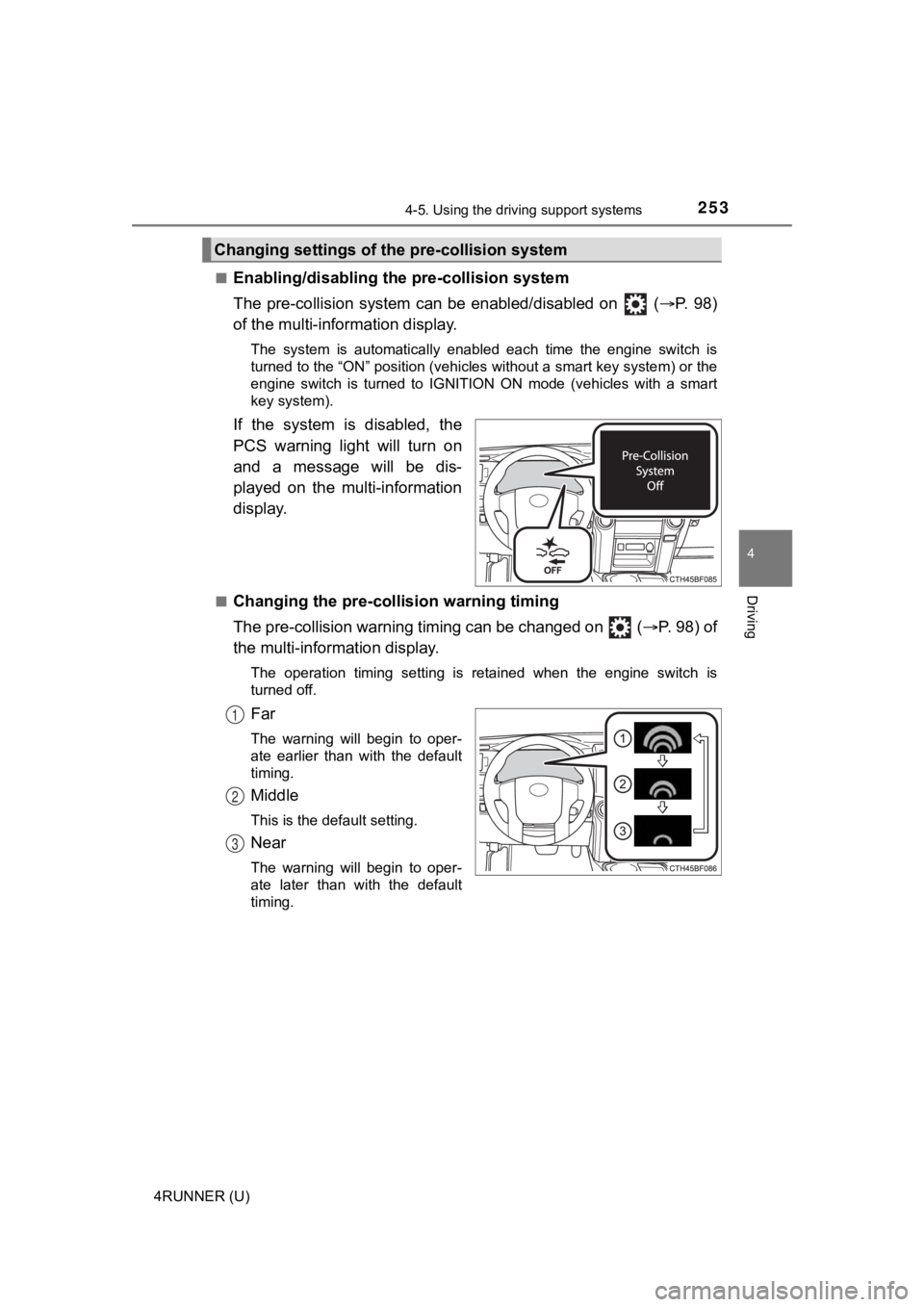
If the system is disabled, the
PCS warning light will turn on
and a message will be dis-
played on the multi-information
display.
■Changing the pre-colli sion warning timing
The pre-collision warning timing can be changed on ( P. 98) of
the multi-inform ation display.
The operation timing setting is retained when the engine switch is
turned off.
Far
The warning will begin to oper-
ate earlier than with the default
timing.
Middle
This is the default setting.
Near
The warning will begin to oper-
ate later than with the default
timing.
Changing settings of the pre-collision system
1
2
3
Page 275 of 616
2754-5. Using the driving support systems
4
Driving
4RUNNER (U)
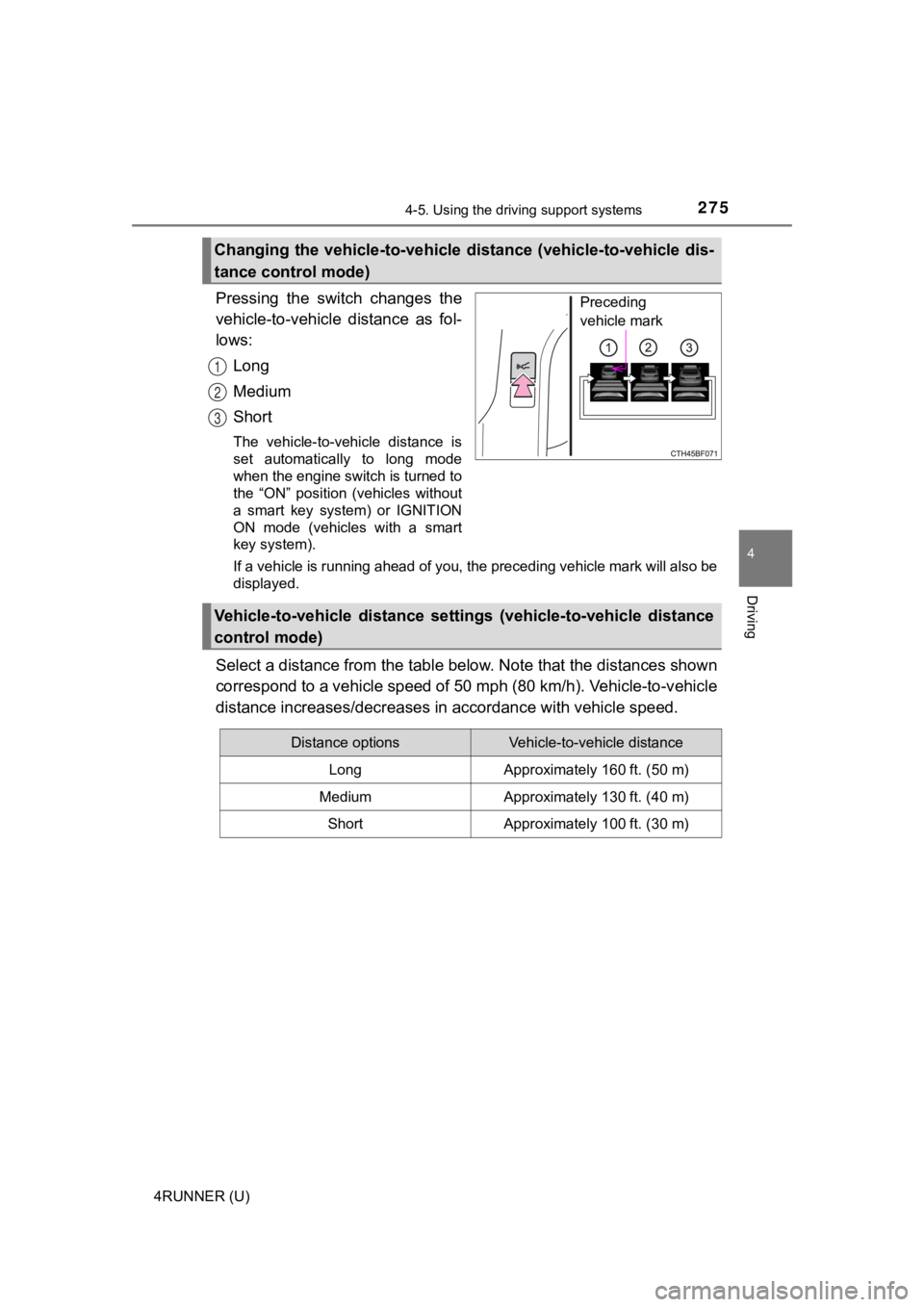
Pressing the switch changes the
vehicle-to-vehicle distance as fol-
lows:Long
Medium
Short
The vehicle-to-vehicle distance is
set automatically to long mode
when the engine switch is turned to
the “ON” position (vehicles without
a smart key system) or IGNITION
ON mode (vehicles with a smart
key system).
If a vehicle is running ahead of you, the preceding vehicle mar k will also be
displayed.
Select a distance from the tabl e below. Note that the distances shown
correspond to a vehicle speed of 50 mph (80 km/h). Vehicle-to-v ehicle
distance increases/decreases in accordance with vehicle speed.
Changing the vehicle-to-vehicle d istance (vehicle-to-vehicle dis-
tance control mode)
Preceding
vehicle mark
1
2
3
Vehicle-to-vehicle distance settings (vehicle-to-vehicle distan ce
control mode)
Distance optionsVehicle-to-vehicle distance
LongApproximately 160 ft. (50 m)
MediumApproximately 130 ft. (40 m)
ShortApproximately 100 ft. (30 m)
Page 281 of 616
2814-5. Using the driving support systems
4
Driving
4RUNNER (U)
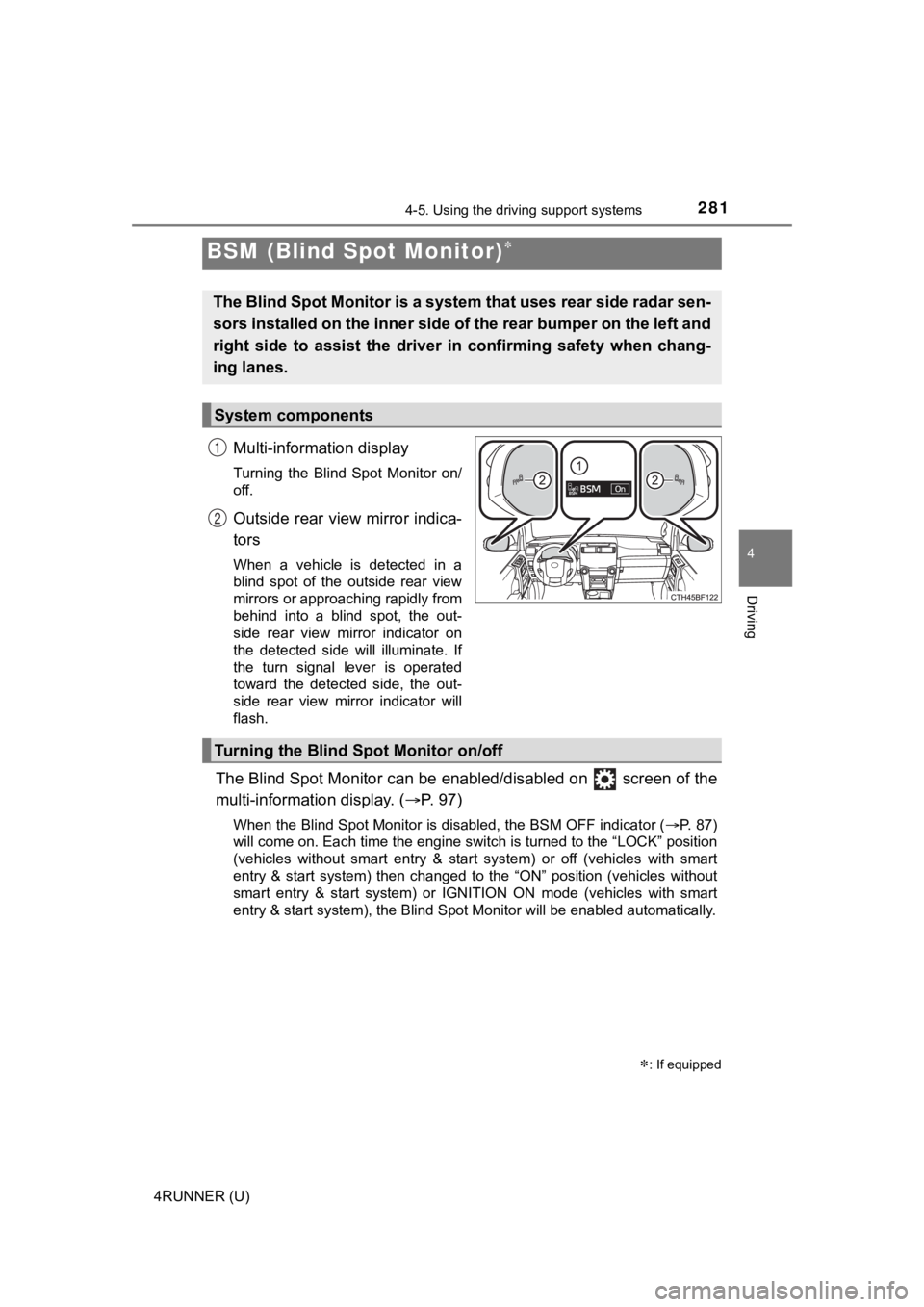
Multi-information display
Turning the Blind Spot Monitor on/
off.
Outside rear view mirror indica-
tors
When a vehicle is detected in a
blind spot of the outside rear view
mirrors or approaching rapidly from
behind into a blind spot, the out-
side rear view mirror indicator on
the detected side will illuminate. If
the turn signal lever is operated
toward the detected side, the out-
side rear view mirror indicator will
flash.
The Blind Spot Monitor can be enabled/disabled on screen of the
multi-information display. ( P. 9 7 )
When the Blind Spot Monitor is disabled, the BSM OFF indicator (P. 87)
will come on. Each time the engine switch is turned to the “LOC K” position
(vehicles without smart entry & start system) or off (vehicles with smart
entry & start system) then changed to the “ON” position (vehicl es without
smart entry & start system) or IGNITION ON mode (vehicles with smart
entry & start system), the Blind Spot Monitor will be enabled a utomatically.
BSM (Blind Spot Monitor)
: If equipped
The Blind Spot Monitor is a system that uses rear side radar se n-
sors installed on the inner side of the rear bumper on the left and
right side to assist the driver in confirming safety when chang-
ing lanes.
System components
1
2
Turning the Blind S pot Monitor on/off
Page 286 of 616
2864-5. Using the driving support systems
4RUNNER (U)
■The Blind Spot Monitor is operational when
The Blind Spot Monitor is operational when all of the following conditions are
met:
● The engine switch is in the “ON” position (vehicles without sma rt entry &
start system) or IGNITION ON m ode (vehicles with smart entry & start sys-
tem).
● The Blind Spot Monitor is on.
● The shift lever is in a position other than R.
● The vehicle speed is greater than approximately 10 mph (16 km/h ).
■ The Blind Spot Monitor will detect a vehicle when
The Blind Spot Monitor will detect a vehicle present in the det ection area in
the following situations:
● A vehicle in an adjacent lane overtakes your vehicle.
● You overtake a vehicle in adjacent lane slowly.
● Another vehicle enters the detection area when it changes lanes.
■ Conditions under which the system will not detect a vehicle
The Blind Spot Monitor is not designed to detect the following types of vehi-
cles and/or objects:
● Small motorcycles, bicycles, pedestrians, etc.
*
●Vehicles traveling in the opposite direction
● Guardrails, walls, signs, parked vehicles and similar stationar y objects
*
●Following vehicles that are in the same lane*
●Vehicles traveling 2 lanes away from your vehicle*
●Vehicles which are being overtaken rapidly by your vehicle.*
*
: Depending on the conditions, detection of a vehicle and/or obj ect may
occur.
Page 292 of 616
2924-5. Using the driving support systems
4RUNNER (U)
■Intuitive parking assist can be operated when
●Front corner sensors:
• The engine switch is in the “ON” position (without a smart key system) or
the engine switch is in IGNITION ON mode (with a smart key syst em).
• The shift lever is in a position other than P.
• The vehicle speed is less than approximately 6 mph (10 km/h).
● Rear corner and rear center sensors:
• The engine switch is in the “ON” position (without a smart key system) or
the engine switch is in IGNITION ON mode (with a smart key syst em).
• The shift lever is in R.
■ Intuitive parking assist display
When an obstacle is detected while the Toyota parking assist mo nitor is in
use, the warning indicator will appear in the upper part of the screen even if
the display setting has been set to off.
■ Sensor detection information
●The sensor’s detection areas are limited to the areas around th e vehicle’s
front corner and rear bumpers.
● The following situations may occur during use.
• Depending on the shape of the obstacle and other factors, the detection
distance may shorten, or detection may be impossible.
• Obstacles may not be detected if they are too close to the sen sor.
• There will be a short delay between obstacle detection and dis play. Even
at slow speeds, there is a possibility that the obstacle will c ome within the
sensor’s detection areas before the display is shown and the wa rning
beep sounds.
• Thin posts or objects lower than the sensor may not be detected for colli-
sion when approached, even if they have been detected once.
• It might be difficult to hear beeps due to the volume of audio system or air
flow noise of air conditioning system.
■ Objects which the system may not be properly detected
●Wires, fences, ropes, etc.
● Cotton, snow and other materials that absorb sound waves
● Sharply-angled objects
● Low obstacles
● Tall obstacles with upper sections projecting outwards in the d irection of
your vehicle
Page 297 of 616
2974-5. Using the driving support systems
4
Driving
4RUNNER (U)
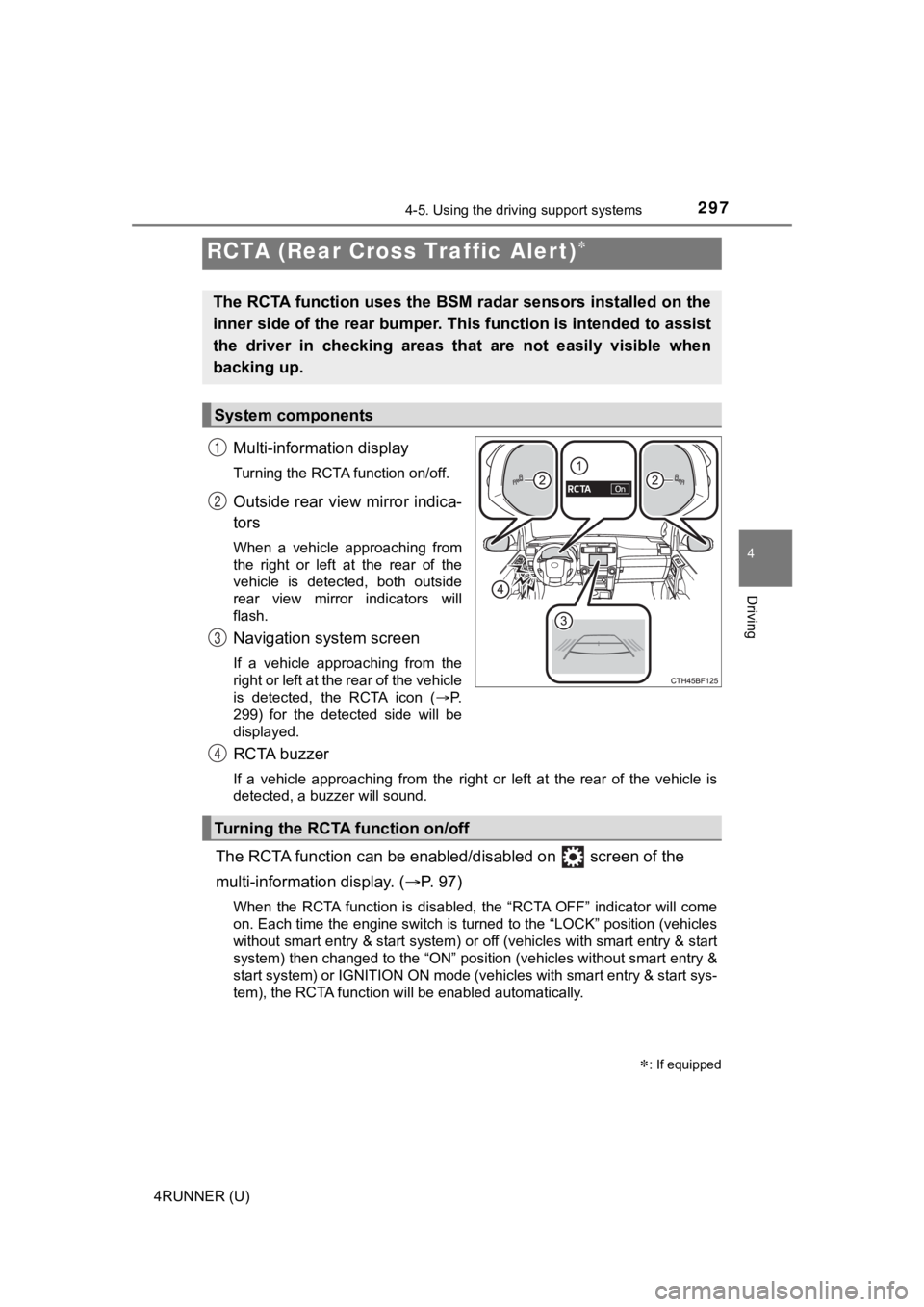
Multi-information display
Turning the RCTA function on/off.
Outside rear view mirror indica-
tors
When a vehicle approaching from
the right or left at the rear of the
vehicle is detected, both outside
rear view mirror indicators will
flash.
Navigation system screen
If a vehicle approaching from the
right or left at the rear of the vehicle
is detected, the RCTA icon (P.
299) for the detected side will be
displayed.
RCTA buzzer
If a vehicle approaching from the right or left at the rear of the vehicle is
detected, a buzzer will sound.
The RCTA function can be enabl ed/disabled on screen of the
multi-information display. ( P. 9 7 )
When the RCTA function is disabled, the “RCTA OFF” indicator wi ll come
on. Each time the engine switch is turned to the “LOCK” position (vehicles
without smart entry & start system) or off (vehicles with smart entry & start
system) then changed to the “ON” position (vehicles without sma rt entry &
start system) or IGNITION ON mode (vehicles with smart entry & start sys-
tem), the RCTA function will be enabled automatically.
RCTA (Rear Cross Traffic Alert)
: If equipped
The RCTA function uses the BSM radar sensors installed on the
inner side of the rear bumper. This function is intended to ass ist
the driver in checking areas that are not easily visible when
backing up.
System components
1
2
3
Turning the RCTA function on/off
4
Page 301 of 616
3014-5. Using the driving support systems
4
Driving
4RUNNER (U)
■The RCTA function is operational when
The RCTA function operates when all of the following conditions are met:
● The engine switch is in the “ON” position (vehicles without sma rt entry &
start system) or IGNITION ON m ode (vehicles with smart entry & start sys-
tem).
● The RCTA function is on.
● The shift lever is in R.
● The vehicle speed is less than approximately 9 mph (15 km/h).
● The approaching vehicle speed is between approximately 5 mph (8 km/h)
and 35 mph (56 km/h).
■ Muting a buzzer temporarily
A mute button will be displayed on the multi-information displa y when a vehi-
cle or an object is detected. To mute the buzzer, press. The bu zzers for the
RCTA function and Toyota parking assist-sensor will be muted si multane-
ously.
Mute will be automatically canceled in the following situations :
● When the shift position is changed.
● When there is a malfunction in a sensor or the system is temporarily
unavailable.
● When the function is disabled while it is operating.
● The engine switch is in the “LOCK” position (vehicles without s mart entry &
start system) or turned off (vehicles with smart entry & start system).
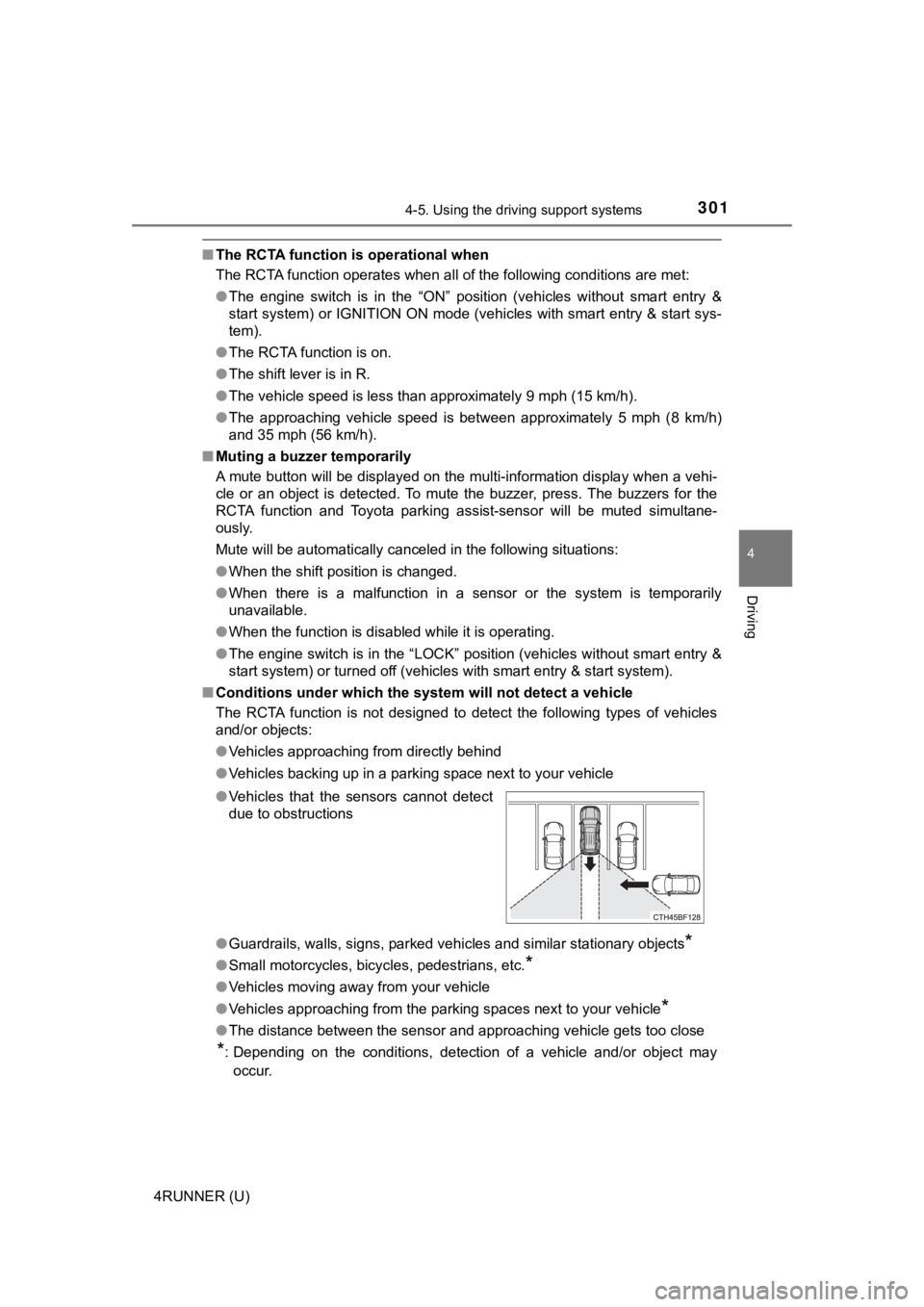
■ Conditions under which the system will not detect a vehicle
The RCTA function is not designed to detect the following types of vehicles
and/or objects:
● Vehicles approaching from directly behind
● Vehicles backing up in a parking space next to your vehicle
● Guardrails, walls, signs, parked vehicles and similar stationar y objects
*
●Small motorcycles, bicycles, pedestrians, etc.*
●Vehicles moving away from your vehicle
● Vehicles approaching from the parking spaces next to your vehic le
*
●The distance between the sensor and approaching vehicle gets to o close
*: Depending on the conditions, detection of a vehicle and/or obj ect may
occur.
●
Vehicles that the sensors cannot detect
due to obstructions
Page 311 of 616
3114-5. Using the driving support systems
4
Driving
4RUNNER (U)■
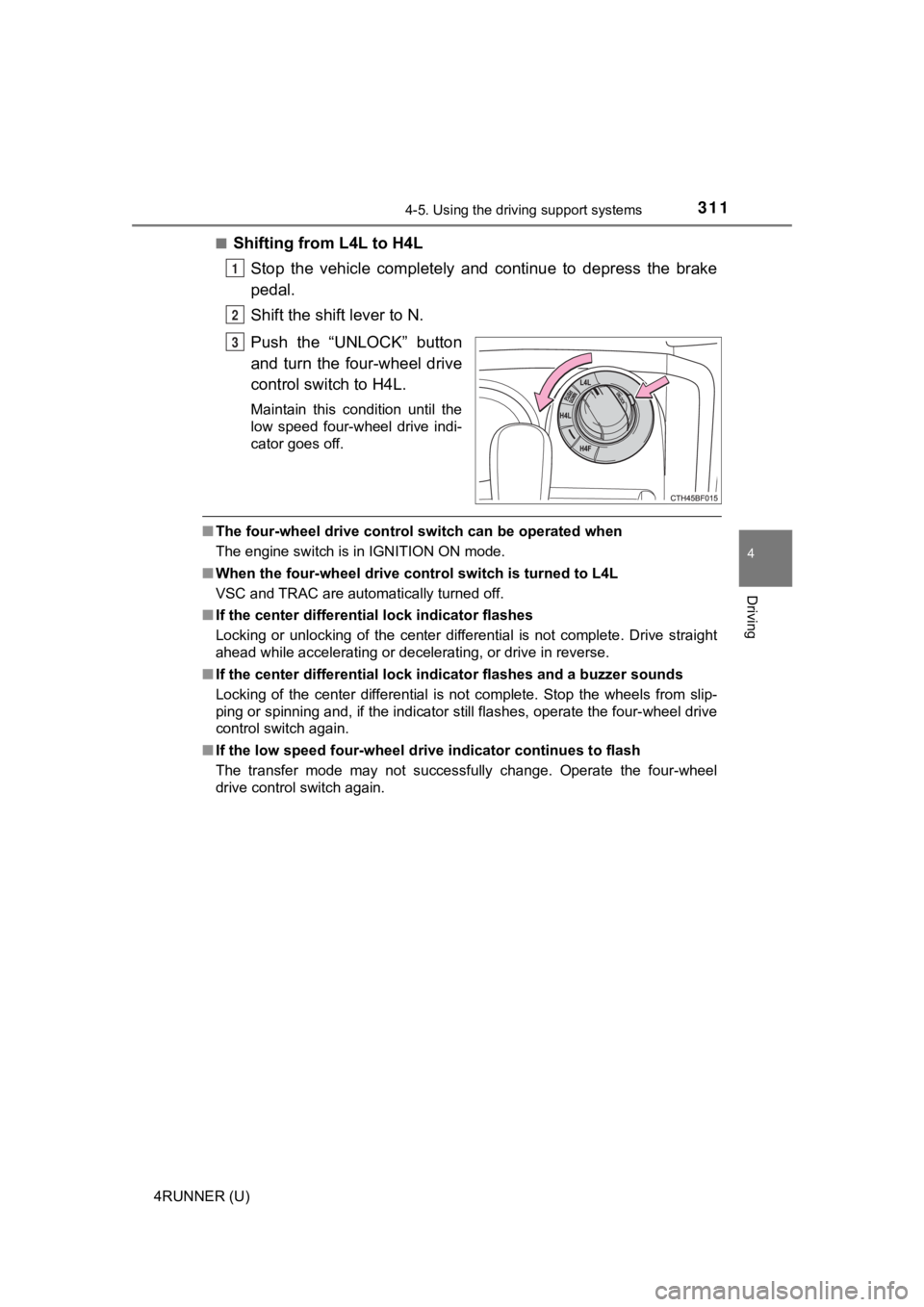
Shifting from L4L to H4L
Stop the vehicle completely and continue to depress the brake
pedal.
Shift the shift lever to N.
Push the “UNLOCK” button
and turn the four-wheel drive
control switch to H4L.
Maintain this condition until the
low speed four-wheel drive indi-
cator goes off.
■The four-wheel drive control sw itch can be operated when
The engine switch is in IGNITION ON mode.
■ When the four-wheel d rive control switch is turned to L4L
VSC and TRAC are automatically turned off.
■ If the center differential lock indicator flashes
Locking or unlocking of the center differential is not complete . Drive straight
ahead while accelerating or decelerating, or drive in reverse.
■ If the center differential lock indicator flashes and a buzzer sounds
Locking of the center differential is not complete. Stop the wh eels from slip-
ping or spinning and, if the indicator still flashes, operate the four-wheel drive
control switch again.
■ If the low speed four-wheel dri ve indicator continues to flash
The transfer mode may not successfully change. Operate the four -wheel
drive control switch again.
1
2
3