light TOYOTA 4RUNNER 2023 Owners Manual
[x] Cancel search | Manufacturer: TOYOTA, Model Year: 2023, Model line: 4RUNNER, Model: TOYOTA 4RUNNER 2023Pages: 608, PDF Size: 11.8 MB
Page 330 of 608

3304-5. Using the driving support systems
4RUNNER (U)
WARNING
■When the TRAC/VSC/Trailer Sway Control is activated
The slip indicator light flashes. Always drive carefully.
Reckless driving may cause an accident. Exercise particular car e when the
indicator light flashes.
■ When TRAC/VSC/Trailer Sway Control systems are turned off
Be especially careful and drive at a speed appropriate to the r oad condi-
tions. As these are systems to help ensure vehicle stability and driving
force, do not turn the TRAC/VSC/Trailer Sway Control systems off unless
necessary.
■ Replacing tires
Make sure that all tires are of the specified size, brand, trea d pattern and
total load capacity. In addition, make sure that the tires are inflated to the
recommended tire inflation pressure level.
The ABS, Multi Terrain ABS, TRAC, VSC and Trailer Sway Control will not
function correctly if different tires are installed on the vehi cle.
Contact your Toyota dealer for further information when replaci ng tires or
wheels.
■ Handling of tires and the suspension
Using tires with any kind of problem or modifying the suspensio n will affect
the driving assist systems, and may cause a system to malfunction.
■ Trailer Sway Control precaution
The Trailer Sway Control system is not able to reduce trailer sway in all situ-
ations.
Depending on many factors such as the conditions of the vehicle, trailer,
road surface and driving environment, the Trailer Sway Control system may
not be effective. Refer to your trailer owner’s manual for info rmation on how
to tow your trailer properly.
■ If trailer sway occurs
Observe the following precautions.
Failing to do so may cause death or serious injury.
● Firmly grip the steering wheel. Steer straight ahead.
Do not try to control trailer sway by turning the steering whee l.
● Begin releasing the accelerator pedal immediately but very grad ually to
reduce speed.
Do not increase speed. Do not apply vehicle brakes.
If you make no extreme correction with the steering or brakes, your vehicle
and trailer should stabilize. ( P. 195)
Page 332 of 608
3324-6. Driving tips
4RUNNER (U)
Perform the following according to the driving conditions:
● Do not try to forcibly open a window or move a wiper that is fr ozen.
Pour warm water over the frozen area to melt the ice. Wipe away
the water immediately to p revent it from freezing.
● To ensure proper operation of the climate control system fan,
remove any snow that has accumulated on the air inlet vents in
front of the windshield.
● Check for and remove any excess ic e or snow that may have accu-
mulated on the exterior lights, vehicle’s roof, chassis, around the
tires or on the brakes.
● Remove any snow or mud from the bottom of your shoes before
getting in the vehicle.
Accelerate the vehicle slowly, keep a safe distance between you and
the vehicle ahead, and drive at a reduced speed suitable to roa d con-
ditions.
● Park the vehicle and move the shift lever to P without setting the
parking brake. The parking brake may freeze up, preventing it from
being released. If the vehicle is parked without setting the pa rking
brake, make sure t o block the wheels.
Failure to do so may be dangerou s because it may cause the vehi-
cle to move unexpectedly, pos sibly leading to an accident.
● If the vehicle is parked without setting the parking brake, confirm
that the shift lever c annot be moved out of P
*.
*: The shift lever will be locked if it is attempted to be shifte d from P to any
other position without depressing the brake pedal. If the shift lever can be
shifted from P, there may be a problem with the shift lock syst em. Have the
vehicle inspected by your Toyota dealer immediately.
Before driving the vehicle
When driving the vehicle
When parking the vehicle
Page 341 of 608

341
Interior features5
4RUNNER (U)5-1. Using the air conditioning
system and defogger
Manual air conditioning system............................. 342
Automatic air conditioning system............................. 349
Heated steering wheel/ Seat heaters/
seat ventilators ................ 357
5-2. Using the interior lights Interior lights list ................ 360
• Interior lights ................. 361
• Personal lights .............. 361
5-3. Using the storage features
List of storage features ..... 363
• Glove box...................... 364
• Console box .................. 364
• Cup holders .................. 365
• Auxiliary box ................. 367
• Coin holder/tissue pocket/
pen holder ..................... 368
• Bottle holders ................ 369
Luggage compartment features ........................... 370 5-4. Other interior features
Other interior features ....... 375
• Sun visors ..................... 375
• Vanity mirrors................ 375
• Clock ............................. 376
• Power outlets (120 V AC) .................... 377
• Power outlets ................ 381
• USB charging ports....... 384
• Armrest ......................... 386
• Assist grips ................... 386
Garage door opener.......... 387
Page 346 of 608
3465-1. Using the air conditioning system and defogger
4RUNNER (U)
■Fogging up of the windows
●The windows will easily fog up when the humidity in the vehicle is high.
Turning on will dehumidify the air from the outlets and defog the wind-
shield effectively.
● If you turn off, the windows may fog up more easily.
● The windows may fog up if the recirculated air mode is used.
■ When driving on dusty roads
Close all windows. If dust thrown up by the vehicle is still drawn into the vehi-
cle after closing the windows, it is recommended that the air intake mode be
set to outside air mode and the fan speed to any setting except off.
■ Outside/recirculated air mode
Setting to the recirculated air mode temporarily is recommended in prevent-
ing dirty air from entering the vehicle interior and helping to cool the vehicle
when the outside air temperature is high.
■ When the outside temperature exceeds 75°F (24°C) and the air co ndition-
ing system is on
● In order to reduce the air conditioning power consumption, the air condition-
ing system may switch to recirculated air mode automatically. This may also
reduce fuel consumption.
● Recirculated air mode is selected as a default mode when the en gine switch
is turned to IGNITION ON mode.
● It is possible to switch to outside air mode at any time by pre ssing
.
■When the indicator light on flashes
Press
to turn off the cooling and dehumidification function and turn it on
again. There may be a problem in the air conditioning system if the indicator
light continues to flash. Turn the air conditioning system off and have it
inspected by your Toyota dealer.
Page 354 of 608
3545-1. Using the air conditioning system and defogger
4RUNNER (U)■
Fogging up of the windows
●The windows will easily fog up when the humidity in the vehicle is high.
Turning on will dehumidify the air from the outlets and defog the wind-
shield effectively.
● If you turn off, the windows may fog up more easily.
● The windows may fog up if the recirculated air mode is used.
■ When driving on dusty roads
Close all windows. If dust thrown up by the vehicle is still drawn into the vehi-
cle after closing the windows, it is recommended that the air intake mode be
set to outside air mode and the fan speed to any setting except off.
■ Outside/recirculated air mode
●Setting to the recirculated air mode temporarily is recommended in prevent-
ing dirty air from entering the vehicle interior and helping to cool the vehicle
when the outside air temperature is high.
● Outside/recirculated air mode may automatically switch dependin g on the
temperature setting, outside temperature, pressure, engine cool ant tem-
perature or inside temperature.
■ When the outside temperature exceeds 75°F (24°C) and the air co ndition-
ing system is on
● In order to reduce the air conditioning power consumption, the air condition-
ing system may switch to recirculated air mode automatically. This may also
reduce fuel consumption.
● Recirculated air mode is selected as a default mode when the en gine switch
is turned to IGNITION ON mode.
● It is possible to switch to outside air mode at any time by pre ssing
.
■When the outside tempera ture falls to nearly 32F (0 C)
The dehumidification function may not operate even when is pre ssed.
■ When driving on dusty roads
Close all windows. If dust thrown up by the vehicle is still drawn into the vehi-
cle after closing the windows, it is recommended that the air intake mode be
set to outside air mode and the fan speed to any setting except off.
■ When the indicator light on flashes
Press
to turn off the cooling and dehumidification function and turn it on
again. There may be a problem in the air conditioning system if the indicator
light continues to flash. Turn the air conditioning system off and have it
inspected by your Toyota dealer.
Page 358 of 608
3585-1. Using the air conditioning system and defogger
4RUNNER (U)
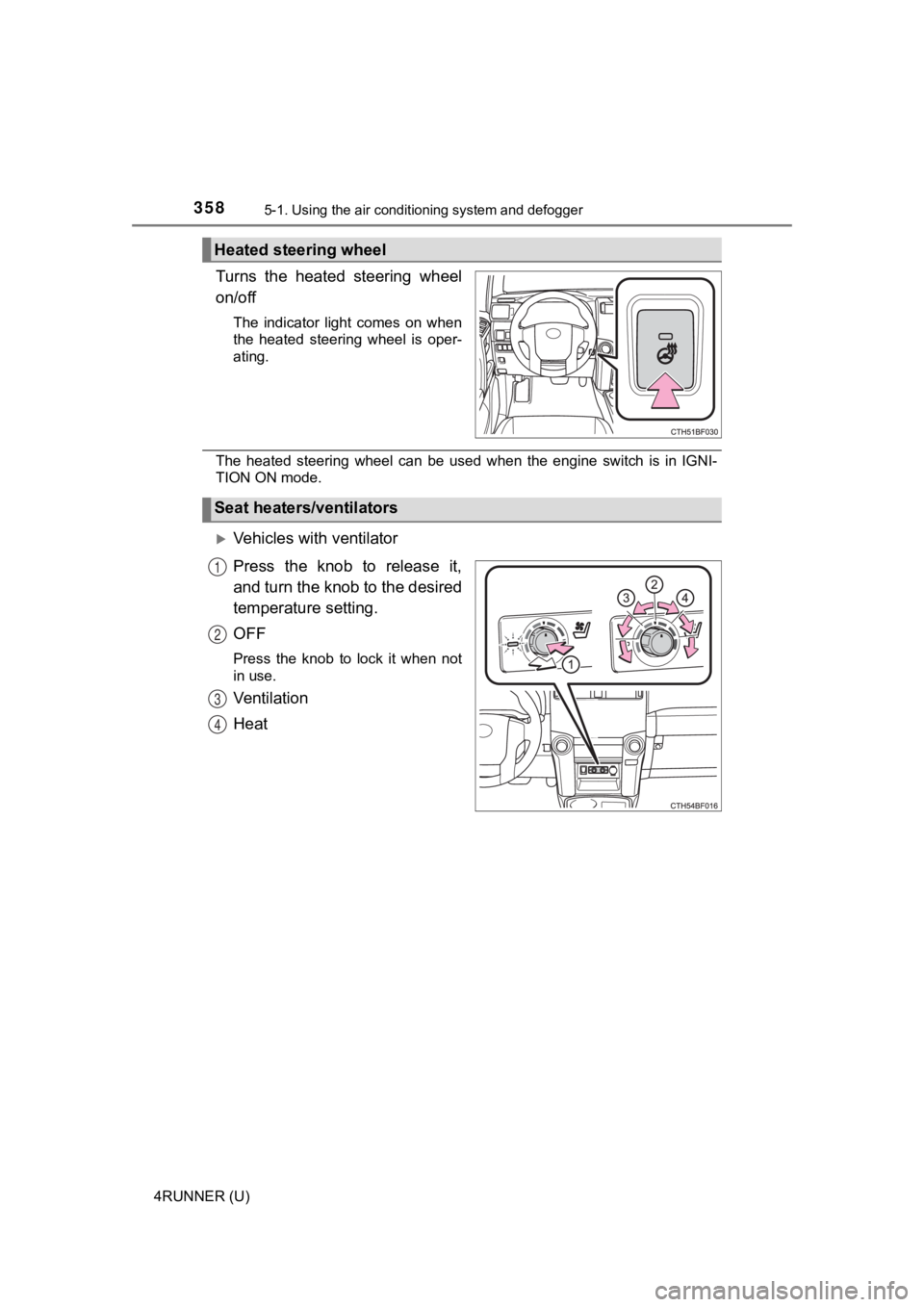
Turns the heated steering wheel
on/off
The indicator light comes on when
the heated steering wheel is oper-
ating.
The heated steering wheel can be used when the engine switch is in IGNI-
TION ON mode.
Vehicles with ventilator
Press the knob to release it,
and turn the knob to the desired
temperature setting.
OFF
Press the knob to lock it when not
in use.
Ventilation
Heat
Heated steering wheel
Seat heaters/ventilators
1
2
3
4
Page 359 of 608
3595-1. Using the air conditioning system and defogger
5
Interior features
4RUNNER (U)
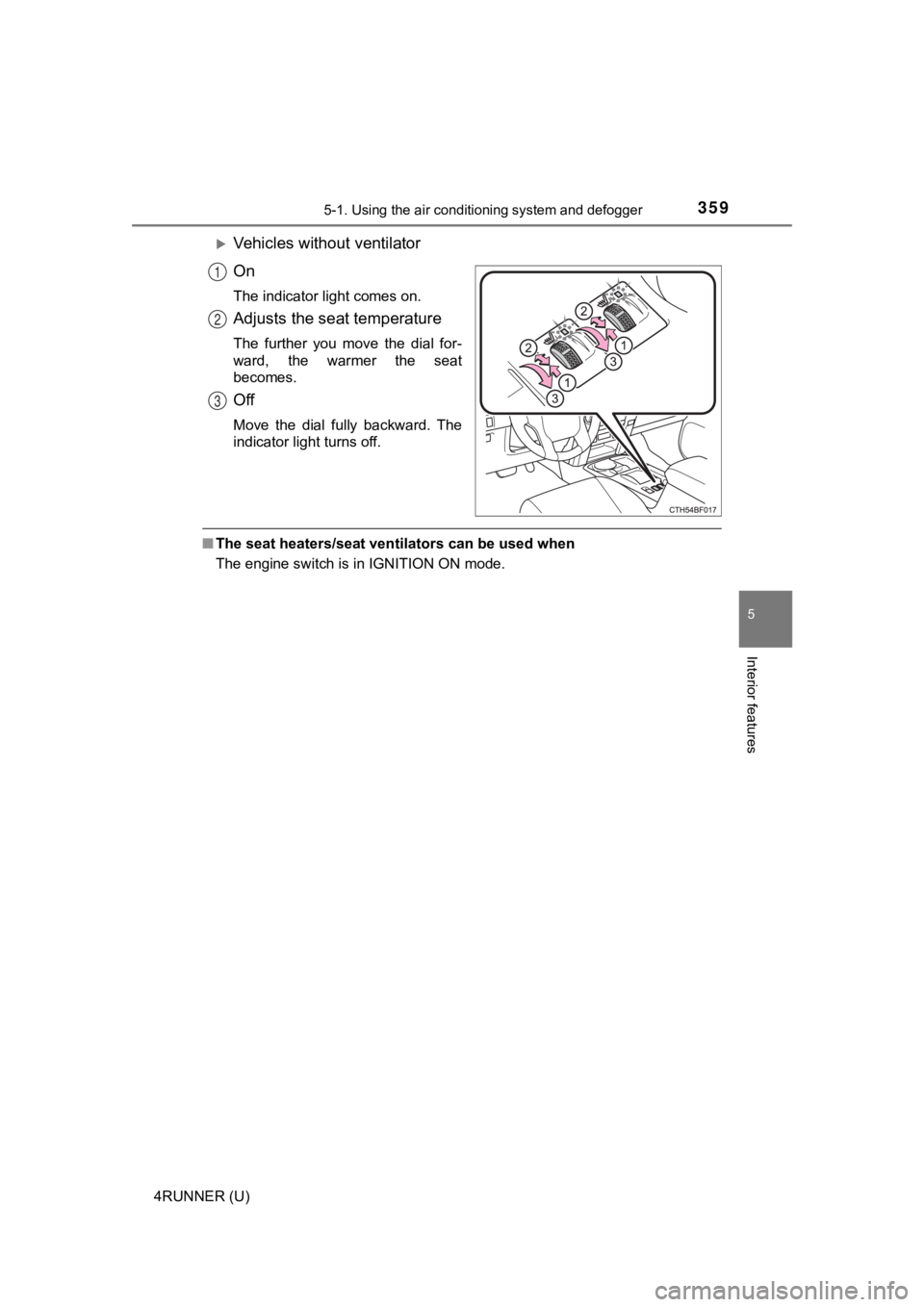
Vehicles without ventilator
On
The indicator light comes on.
Adjusts the seat temperature
The further you move the dial for-
ward, the warmer the seat
becomes.
Off
Move the dial fully backward. The
indicator light turns off.
■The seat heaters/seat ventilators can be used when
The engine switch is in IGNITION ON mode.
1
2
3
Page 360 of 608
360
4RUNNER (U)
5-2. Using the interior lights
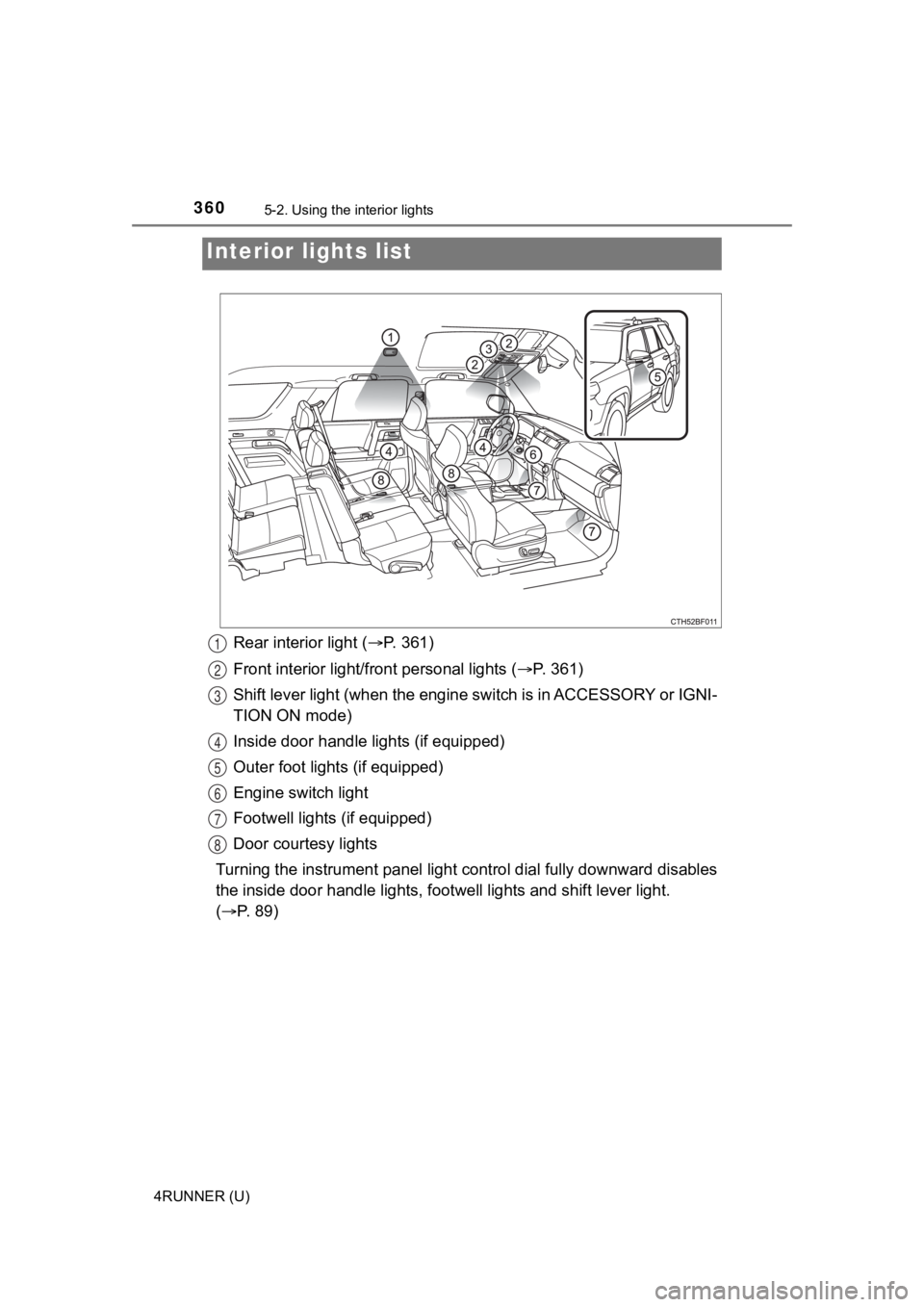
Rear interior light (P. 361)
Front interior light/fr ont personal lights ( P. 3 6 1 )
Shift lever light (when the eng ine switch is in ACCESSORY or IG NI-
TION ON mode)
Inside door handle lights (if equipped)
Outer foot lights (if equipped)
Engine switch light
Footwell lights (if equipped)
Door courtesy lights
Turning the instrument panel light control dial fully downward disables
the inside door handle lights, f ootwell lights and shift lever light.
( P. 89)
Interior li ghts list
1
2
3
4
5
6
7
8
Page 361 of 608
3615-2. Using the interior lights
5
Interior features
4RUNNER (U)■
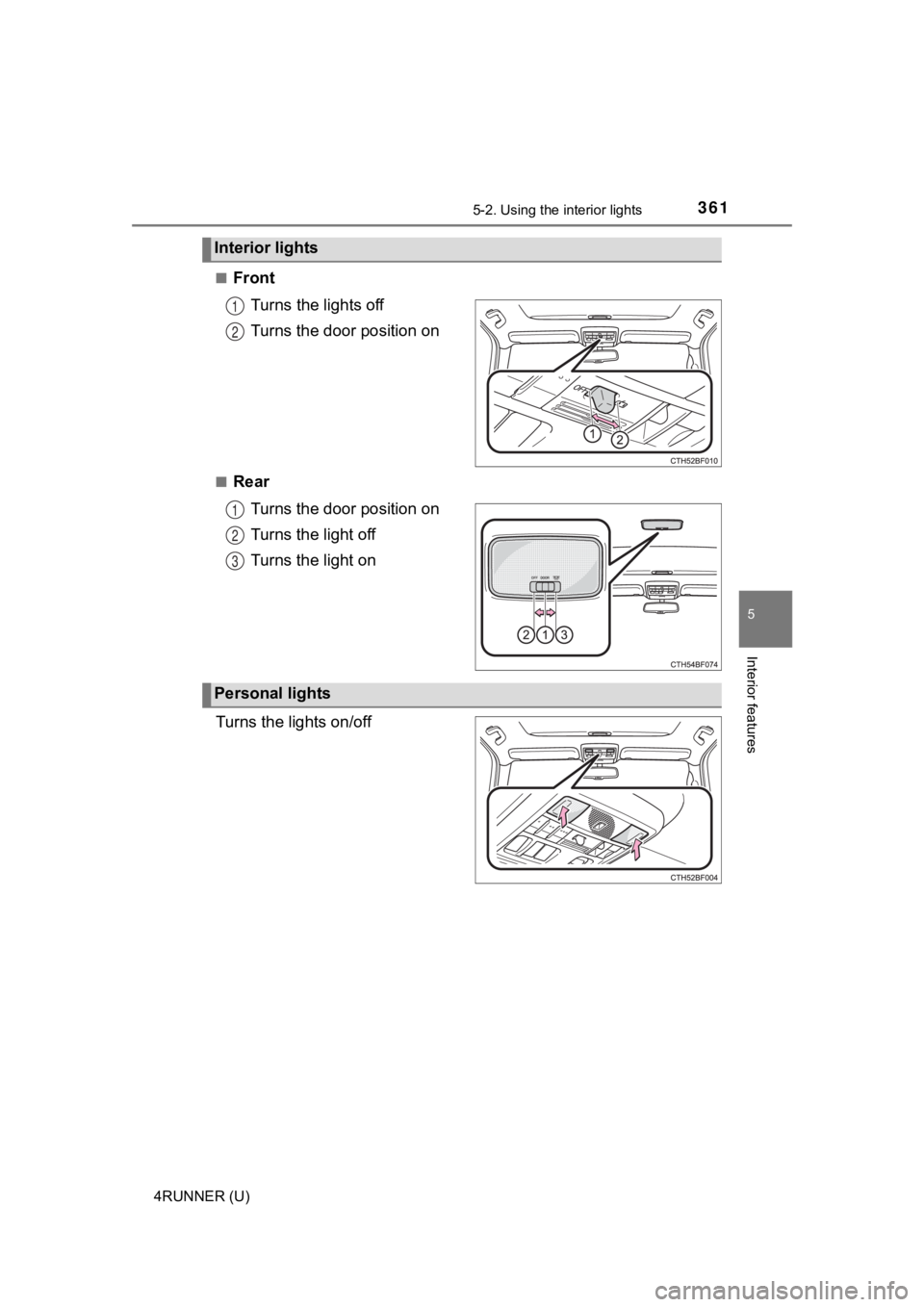
Front
Turns the lights off
Turns the door position on
■RearTurns the door position on
Turns the light off
Turns the light on
Turns the lights on/off
Interior lights
1
2
1
2
3
Personal lights
Page 362 of 608

3625-2. Using the interior lights
4RUNNER (U)
■Illuminated entry system
The lights automatically turn on/off according to engine switch mode, the
presence of the electronic key, whether the doors are locked/unlocked, and
whether the doors are opened/closed.
■ To prevent battery discharge
If the following lights remain on, the lights will go off automatically after 20
minutes:
●Engine switch light
● Front interior light
● Rear interior light
● Personal lights
● Footwell lights
● Inside door handle lights
● Door courtesy lights
■ Customization
Setting (e.g. the time elapsed before lights turn off) can be c hanged.
(Customizable features: P. 549)
NOTICE
■ To prevent battery discharge
Do not leave the lights on longer than necessary when the engin e is not
running.