brakes TOYOTA 4RUNNER 2023 User Guide
[x] Cancel search | Manufacturer: TOYOTA, Model Year: 2023, Model line: 4RUNNER, Model: TOYOTA 4RUNNER 2023Pages: 608, PDF Size: 11.8 MB
Page 196 of 608

1964-1. Before driving
4RUNNER (U)
WARNING
■Trailer towing precautions
To tow a trailer safely, use extreme care and drive the vehicle in accordance
with the trailer’s characteristics and operating conditions. Failure to do so
could cause an accident resulting in death or serious injury. V ehicle stability
and braking performance are affected by trailer stability, brake setting and
performance, and the hitch. Your vehicle will handle differently when towing
a trailer.
■ To avoid accident or injury
● Do not exceed the TWR, unbraked TWR, GCWR, GVWR or GAWR.
● If the gross trailer weight is over 2000 lb. (907 kg), a sway control device
with sufficient capacity is required.
● Adjust the tongue weight within the appropriate range. Place heavier loads
as close to the trailer axle as possible.
● Do not exceed 65 mph (104 km/h), the posted towing speed limit or the
speed limit for your trailer as set forth in your trailer owner’s manual,
whichever is lowest. Slow down sufficiently before making a tur n, in cross
winds, on wet or slippery surface, etc. to help avoid an accident. If you
experience a vehicle-trailer instability from reducing a certai n speed, slow
down and make sure you keep your vehicle speed under the speed of
which you experience the instability.
● Do not make jerky, abrupt or sharp turns.
● Do not apply the brakes suddenly as you may skid, resulting in jackknifing
and loss of vehicle control. This is especially true on wet or slippery sur-
faces.
● Do not exceed the trailer hitch assembly weight, gross vehicle weight,
gross axle weight and trailer tongue weight capacities.
● Do not use cruise control when towing.
● Slow down and downshift before descending steep or long downhil l
grades. Do not make sudden downshifts while descending steep or long
downhill grades.
● Vehicle-trailer instability is more likely on steep long downhi lls. Before
descending steep or long downhill grades, slow down and downshift. Do
not make sudden downshifts when descending steep or long downhi ll
grades. Avoid holding the brake pedal down too long or applying the
brakes too frequently. This could cause the brakes to overheat and result
in reduced braking efficiency.
Page 197 of 608

1974-1. Before driving
4
Driving
4RUNNER (U)
WARNING
■Hitch
Trailer hitch assemblies have different weight capacities estab lished by the
hitch manufacturer. Even though the vehicle may be physically capable of
towing a higher weight, the operator must determine the maximum weight
rating of the particular hitch assembly and never exceed the maximum
weight rating specified for the trailer-hitch. Exceeding the maximum weight
rating set by the trailer-hitch manufacturer can cause an accid ent resulting
in death or serious personal injuries.
■ When towing a trailer
Toyota recommends trailers with brakes that conform to any applicable fed-
eral and state/provincial regulations.
● If the gross trailer weight exceeds unbraked TWR, trailer brakes are
required. Toyota recommends trailers with brakes that conform t o all appli-
cable federal and state/provincial regulations.
● Never tap into your vehicle’s hydraulic system, as this will lo wer the vehi-
cle’s braking effectiveness.
● Never tow a trailer without using a safety chain securely attac hed to both
the trailer and the vehicle. If damage occurs to the coupling u nit or hitch
ball, there is danger of the trailer wandering into another lan e.
NOTICE
■When installing a trailer hitch
Use only the position recommended by your Toyota dealer. Do not install
the trailer hitch on the bumper; this may cause body damage.
■ Do not directly splice trailer lights
Do not directly splice trailer lights. Directly splicing traile r lights may damage
your vehicle’s electrical system and cause a malfunction.
Page 239 of 608
2394-5. Using the driving support systems
4
Driving
4RUNNER (U)
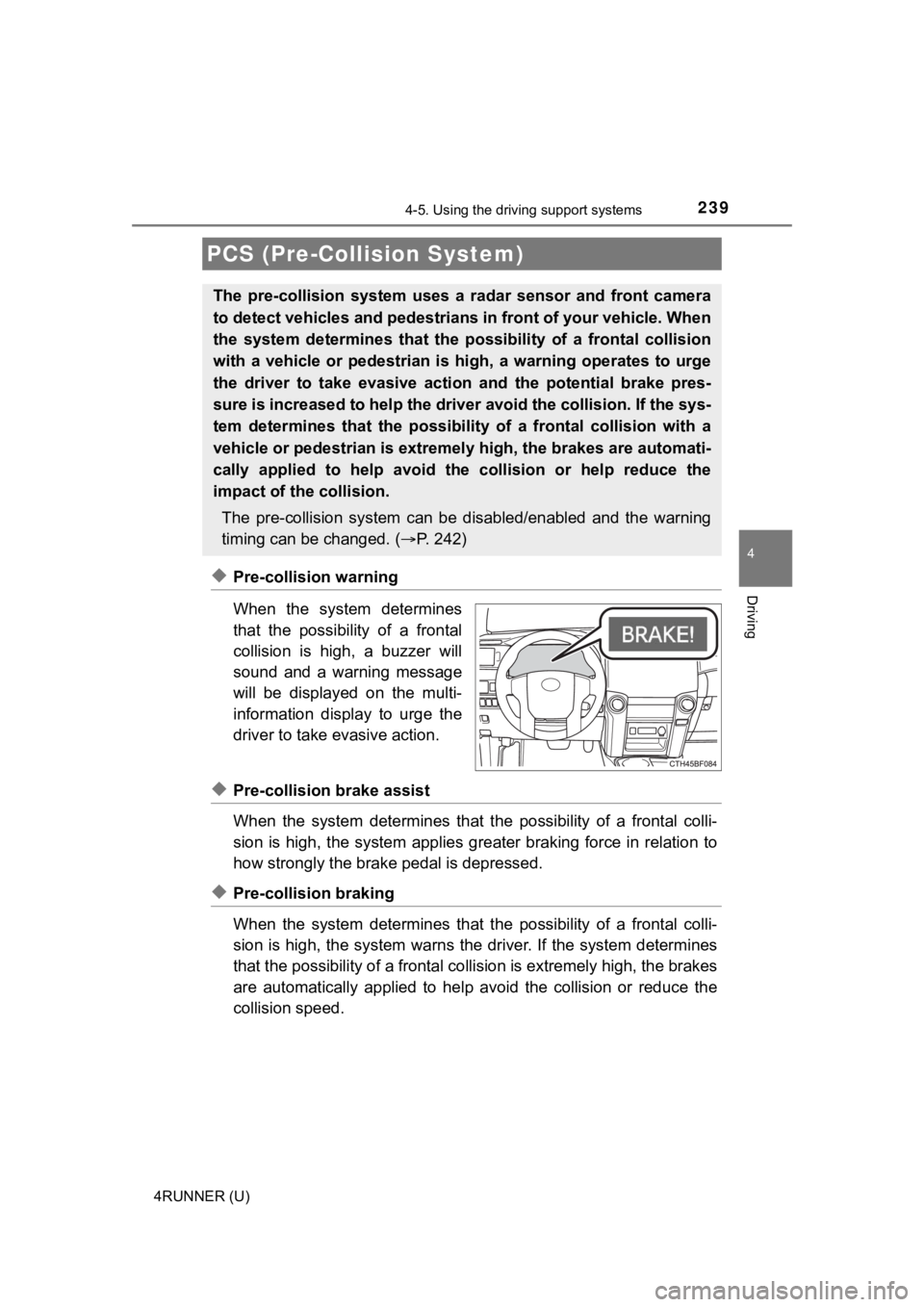
◆Pre-collision warning
When the system determines
that the possibility of a frontal
collision is high, a buzzer will
sound and a warning message
will be displayed on the multi-
information display to urge the
driver to take evasive action.
◆Pre-collision brake assist
When the system determines that the possibility of a frontal colli-
sion is high, the system applies greater braking force in relat ion to
how strongly the brake pedal is depressed.
◆Pre-collision braking
When the system determines that the possibility of a frontal colli-
sion is high, the system warns the driver. If the system determ ines
that the possibility of a frontal collision is extremely high, the brakes
are automatically applied to hel p avoid the collision or reduce the
collision speed.
PCS (Pre-Collision System)
The pre-collision system uses a radar sensor and front camera
to detect vehicles and pedestrians in front of your vehicle. Wh en
the system determines that the possibility of a frontal collisi on
with a vehicle or pedestrian i s high, a warning operates to urg e
the driver to take evasive action and the potential brake pres-
sure is increased to help the driver avoid the collision. If the sys-
tem determines that the possibi lity of a frontal collision with a
vehicle or pedestrian is extremely high, the brakes are automat i-
cally applied to hel p avoid the collision or help reduce the
impact of the collision.
The pre-collision system can b e disabled/enabled and the warnin g
timing can be changed. ( P. 2 4 2 )
Page 248 of 608

2484-5. Using the driving support systems
4RUNNER (U)●
In some situations such as the following, sufficient braking fo rce may not be
obtained, preventing the system from performing properly:
• If the braking functions cannot operate to their full extent, such as when
the brake parts are extremely cold, extremely hot, or wet
• If the vehicle is not properly maintained (brakes or tires are excessively
worn, improper tire inflation pressure, etc.)
• When the vehicle is being driven on a gravel road or other sli ppery sur-
face
● Some pedestrians such as the following may not be detected by t he radar
sensor and front camera, preventing the system from operating p roperly:
• Pedestrians shorter than approximately 3.2 ft. (1 m) or taller than approx-
imately 6.5 ft. (2 m)
• Pedestrians wearing oversized clothing (a rain coat, long skir t, etc.), mak-
ing their silhouette obscure
• Pedestrians who are carrying large baggage, holding an umbrella, etc., hiding part of their body
• Pedestrians who are bending forward or squatting
• Pedestrians who are pushing a stroller, wheelchair, bicycle or other vehi-
cle
• Groups of pedestrians which are close together
• Pedestrians who are wearing white and look extremely bright
• Pedestrians in the dark, such as at night or while in a tunnel
• Pedestrians whose clothing appears to be nearly the same color or
brightness as their surroundings
• Pedestrians near walls, fences, guardrails, or large objects
• Pedestrians who are on a metal object (manhole cover, steel plate, etc.)
on the road
• Pedestrians who are walking fast
• Pedestrians who are changing speed abruptly
• Pedestrians running out from behind a vehicle or a large objec t
• Pedestrians who are extremely close to the side of the vehicle (outside
rear view mirror, etc.)
■ If VSC is disabled
●If VSC is disabled ( P. 324, 325), the pre-collision brake assist and pre-col-
lision braking functions are also disabled.
● The PCS warning light will turn on and “VSC Turned Off Pre-Coll ision Brake
System Unavailable” will be displayed on the multi-information display.
Page 261 of 608
2614-5. Using the driving support systems
4
Driving
4RUNNER (U)
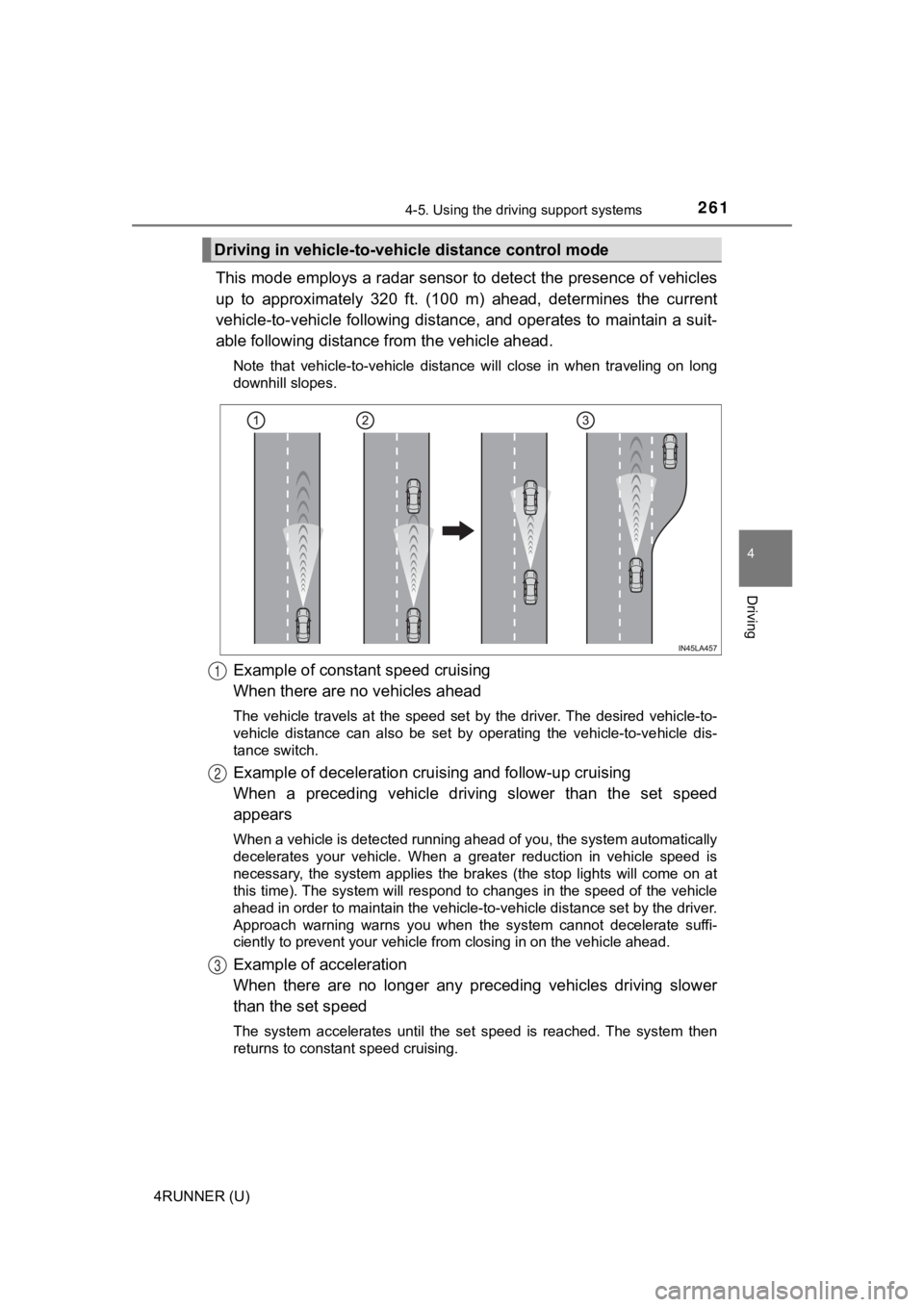
This mode employs a radar sensor to detect the presence of vehicles
up to approximately 320 ft. (100 m) ahead, determines the curre nt
vehicle-to-vehicle following distance, and operates to maintain a suit-
able following distance from the vehicle ahead.
Note that vehicle-to-vehicle distance will close in when traveling on long
downhill slopes.
Example of constant speed cruising
When there are no vehicles ahead
The vehicle travels at the speed set by the driver. The desired vehicle-to-
vehicle distance can also be set by operating the vehicle-to-ve hicle dis-
tance switch.
Example of deceleration crui sing and follow-up cruising
When a preceding vehicle driving slower than the set speed
appears
When a vehicle is detected running ahead of you, the system automatically
decelerates your vehicle. When a greater reduction in vehicle s peed is
necessary, the system applies the brakes (the stop lights will come on at
this time). The system will respond to changes in the speed of the vehicle
ahead in order to maintain the vehicle-to-vehicle distance set by the driver.
Approach warning warns you when the system cannot decelerate su ffi-
ciently to prevent your vehicle fr om closing in on the vehicle ahead.
Example of acceleration
When there are no longer any preceding vehicles driving slower
than the set speed
The system accelerates until the set speed is reached. The syst em then
returns to constant speed cruising.
Driving in vehicle-to-vehi cle distance control mode
1
2
3
Page 268 of 608
2684-5. Using the driving support systems
4RUNNER (U)■
Automatic cancelation of c onstant speed control mode
Constant speed control mode is automatically canceled in the following situa-
tions:
● Actual vehicle speed is more than approximately 10 mph (16 km/h ) below
the set vehicle speed.
● Actual vehicle speed falls below approximately 25 mph (40 km/h) .
● VSC is activated.
● TRAC is activated for a period of time.
● When the VSC or TRAC system is turned off.
● Pre-collision braking is activated.
If constant speed control mode is automatically canceled for an y other rea-
son, there may be a malfunction in the system. Contact your Toyota dealer.
■ Brake system operation sound
If the brakes are applied automatically while the vehicle is in vehicle-to-vehi-
cle distance control mode, a brake system operation sound may b e heard.
This does not indicate a malfunction.
■ Warning messages and buzzers for d ynamic radar cruise control
Warning messages and buzzers are used to indicate a system malfunction or
to inform the driver of the need for caution while driving. If a warning message
is shown on the multi-information display, read the message and follow the
instructions.
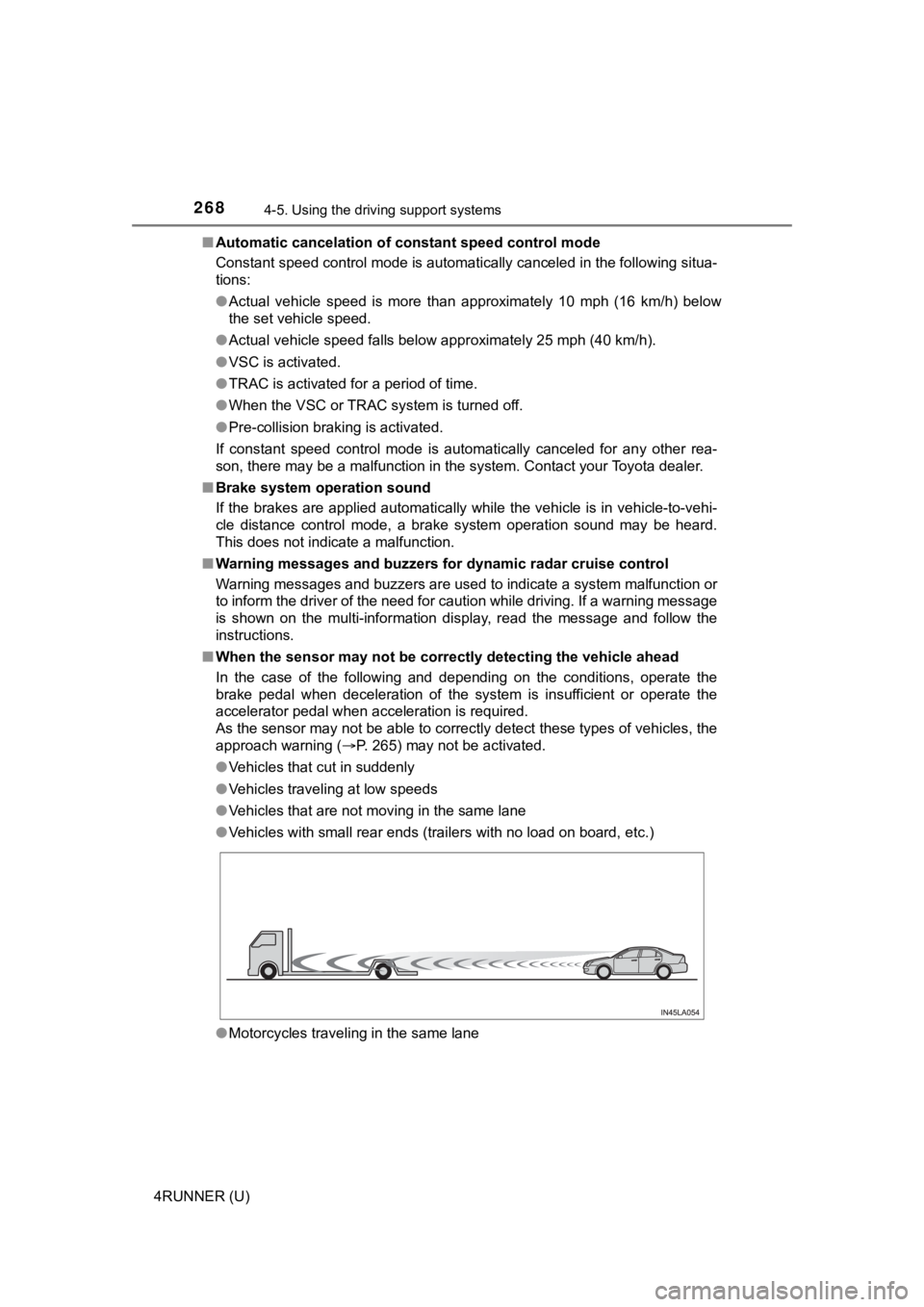
■ When the sensor may not be correctly detect ing the vehicle ahead
In the case of the following and depending on the conditions, o perate the
brake pedal when deceleration of the system is insufficient or operate the
accelerator pedal when acceleration is required.
As the sensor may not be able to correctly detect these types o f vehicles, the
approach warning ( P. 265) may not be activated.
● Vehicles that cut in suddenly
● Vehicles traveling at low speeds
● Vehicles that are not moving in the same lane
● Vehicles with small rear ends (trailers with no load on board, etc.)
● Motorcycles traveling in the same lane
Page 282 of 608
2824-5. Using the driving support systems
4RUNNER (U)■
Situations in which the syst em may not operate properly
Certain vehicle conditions and the surrounding environment may affect the
ability of a sensor to correctly detect objects. Particular instances where this
may occur are listed below.
● There is dirt, snow, water drops or ice on a sensor. (Cleaning the sensors
will resolve this problem.)
● A sensor is frozen. (Thawing t he area will resolve this problem .)
In especially cold weather, if a sensor is frozen the sensor di splay may be
displayed abnormally, or objects, such as a wall, may not be detected.
● On an extremely bumpy road, on an incline, on gravel, or on grass.
● When vehicle horns, vehicle detectors, motorcycle engines, air brakes of
large vehicles, the clearance sonar of other vehicles or other devices which
produce ultrasonic waves are near the vehicle
● A sensor is coated with a sheet of spray or heavy rain.
● If objects draw too close to the sensor.
● When a pedestrian is wearing clothing that does not reflect ult rasonic waves
(ex. skirts with gathers or frills).
● When objects that are not perpendicular to the ground, not perpendicular to
the vehicle traveling direction, uneven, or waving are in the d etection range.
● Strong wind is blowing
● When driving in inclement weather such as fog, snow or a sandst orm
● When an object that cannot be detected is between the vehicle a nd a
detected object
● If an object such as a vehicle, motorcycle, bicycle or pedestrian cuts in front
of the vehicle or runs out from the side of the vehicle
● If the orientation of a sensor has been changed due to a collis ion or other
impact
● When equipment that may obstruct a sensor is installed, such as a towing
eyelet, bumper protector (an additional trim strip, etc.), bicy cle carrier, or
snow plow
● If the front of the vehicle is raised or lowered due to the car ried load
● If the vehicle cannot be driven in a stable manner, such as whe n the vehicle
has been in an accident or is malfunctioning
● When a tire chains, compact spare tire or an emergency tire pun cture repair
kit is used
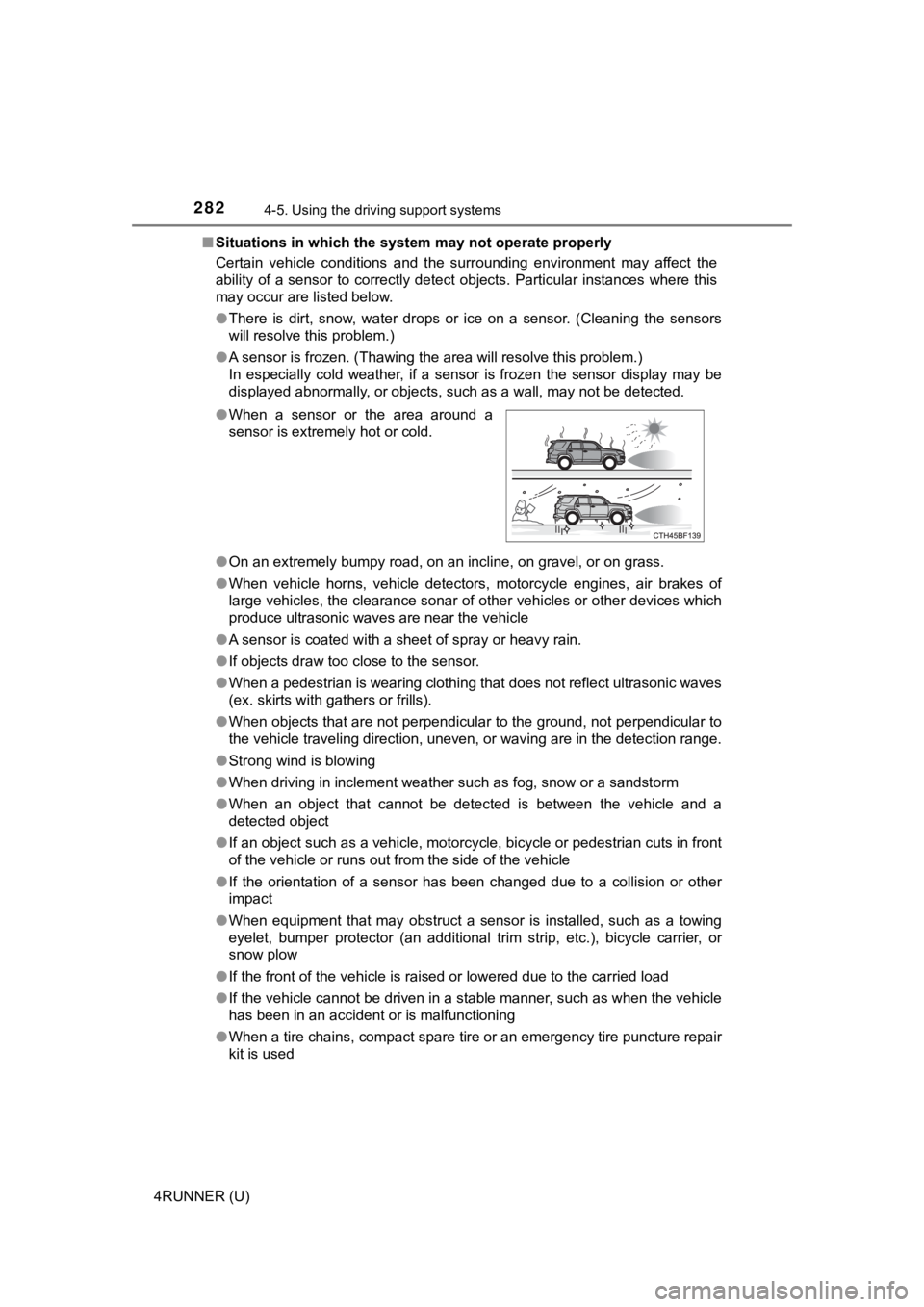
●
When a sensor or the area around a
sensor is extremely hot or cold.
Page 283 of 608
2834-5. Using the driving support systems
4
Driving
4RUNNER (U)■
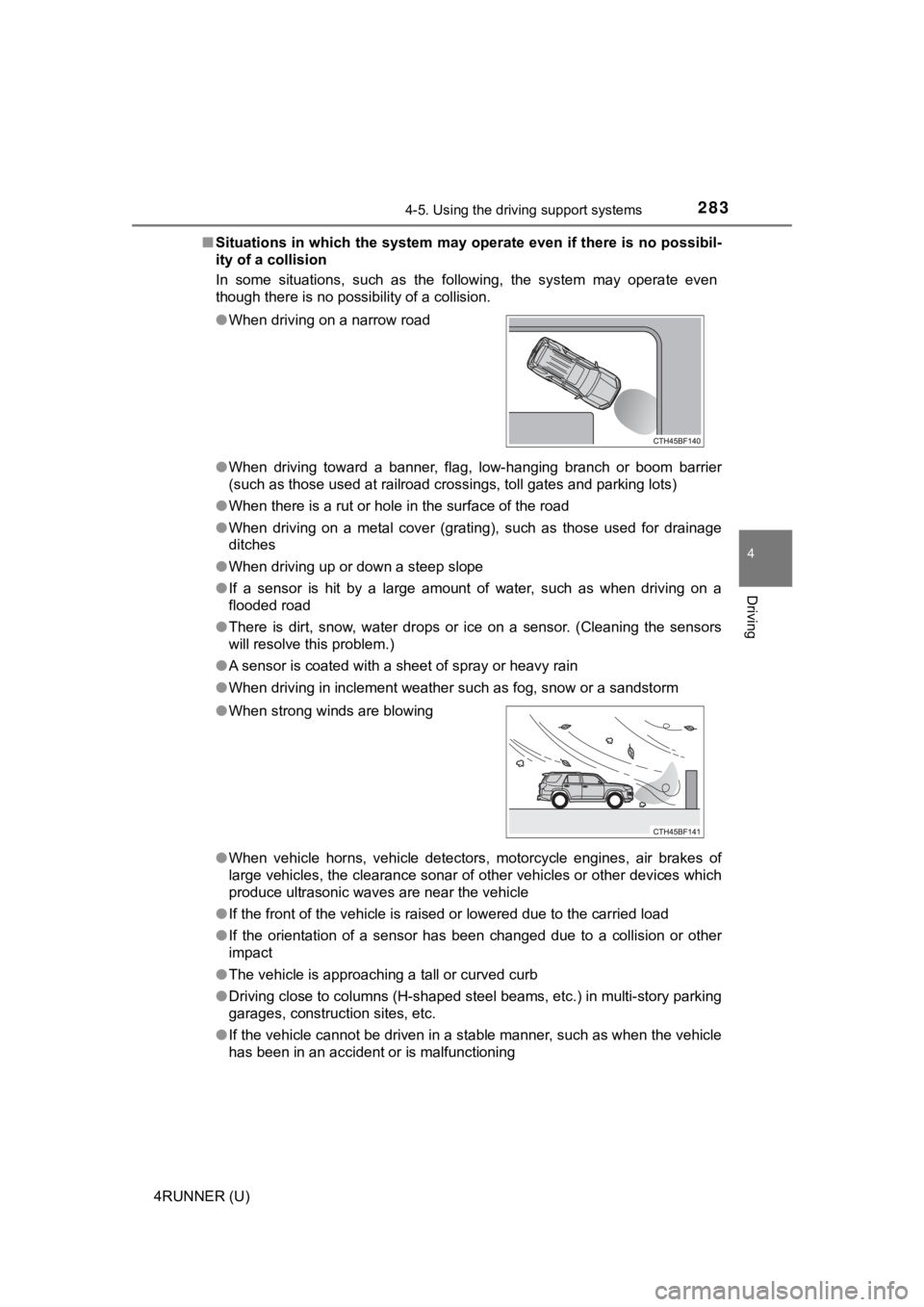
Situations in which the system may operate even if there is no possibil-
ity of a collision
In some situations, such as the following, the system may opera te even
though there is no possibility of a collision.
● When driving toward a banner, flag, low-hanging branch or boom barrier
(such as those used at railroad crossings, toll gates and parking lots)
● When there is a rut or hole in the surface of the road
● When driving on a metal cover (grating), such as those used for drainage
ditches
● When driving up or down a steep slope
● If a sensor is hit by a large amount of water, such as when dri ving on a
flooded road
● There is dirt, snow, water drops or ice on a sensor. (Cleaning the sensors
will resolve this problem.)
● A sensor is coated with a sheet of spray or heavy rain
● When driving in inclement weather such as fog, snow or a sandst orm
● When vehicle horns, vehicle detectors, motorcycle engines, air brakes of
large vehicles, the clearance sonar of other vehicles or other devices which
produce ultrasonic waves are near the vehicle
● If the front of the vehicle is raised or lowered due to the car ried load
● If the orientation of a sensor has been changed due to a collis ion or other
impact
● The vehicle is approaching a tall or curved curb
● Driving close to columns (H-shaped steel beams, etc.) in multi- story parking
garages, construction sites, etc.
● If the vehicle cannot be driven in a stable manner, such as whe n the vehicle
has been in an accident or is malfunctioning
●
When driving on a narrow road
● When strong winds are blowing
Page 322 of 608
3224-5. Using the driving support systems
4RUNNER (U)
◆ABS (Anti-lock Brake System)
Helps to prevent wheel lock when the brakes are applied suddenl y,
or if the brakes are applied while driving on a slippery road surface
◆Multi Terrain ABS (Anti-lock Brake System) (if equipped)
Helps to prevent wheel lock when the brakes are applied suddenl y,
or if the brakes are applied while driving on a slippery road s urface,
or in off-road conditions (such as rough roads, sand and mud)
The Multi Terrain ABS operates in synchronization with the Multi-
terrain Select.
◆Brake assist
Generates an increased level of braking force after the brake p edal
is depressed when the system de tects a panic stop situation
◆VSC (Vehicle Stability Control)
Helps the driver to control skidding when swerving suddenly or
turning on slippery road surfaces
◆Trailer Sway Control
Helps the driver to control trailer sway by selectively applying brake
pressure for individual wheels and reducing driving torque when
trailer sway is detected.
◆TRAC (Traction Control)
Helps to maintain drive power and prevent the drive wheels from
spinning when starting the vehicl e or accelerating on slippery roads
Driving assist systems
To keep driving safety and perf ormance, the following systems
operate automatically in respon se to various driving situations.
Be aware, however, that these systems are supplementary and
should not be relied upon too heav ily when operating the vehi-
cle.
Page 330 of 608

3304-5. Using the driving support systems
4RUNNER (U)
WARNING
■When the TRAC/VSC/Trailer Sway Control is activated
The slip indicator light flashes. Always drive carefully.
Reckless driving may cause an accident. Exercise particular car e when the
indicator light flashes.
■ When TRAC/VSC/Trailer Sway Control systems are turned off
Be especially careful and drive at a speed appropriate to the r oad condi-
tions. As these are systems to help ensure vehicle stability and driving
force, do not turn the TRAC/VSC/Trailer Sway Control systems off unless
necessary.
■ Replacing tires
Make sure that all tires are of the specified size, brand, trea d pattern and
total load capacity. In addition, make sure that the tires are inflated to the
recommended tire inflation pressure level.
The ABS, Multi Terrain ABS, TRAC, VSC and Trailer Sway Control will not
function correctly if different tires are installed on the vehi cle.
Contact your Toyota dealer for further information when replaci ng tires or
wheels.
■ Handling of tires and the suspension
Using tires with any kind of problem or modifying the suspensio n will affect
the driving assist systems, and may cause a system to malfunction.
■ Trailer Sway Control precaution
The Trailer Sway Control system is not able to reduce trailer sway in all situ-
ations.
Depending on many factors such as the conditions of the vehicle, trailer,
road surface and driving environment, the Trailer Sway Control system may
not be effective. Refer to your trailer owner’s manual for info rmation on how
to tow your trailer properly.
■ If trailer sway occurs
Observe the following precautions.
Failing to do so may cause death or serious injury.
● Firmly grip the steering wheel. Steer straight ahead.
Do not try to control trailer sway by turning the steering whee l.
● Begin releasing the accelerator pedal immediately but very grad ually to
reduce speed.
Do not increase speed. Do not apply vehicle brakes.
If you make no extreme correction with the steering or brakes, your vehicle
and trailer should stabilize. ( P. 195)