change wheel TOYOTA 4RUNNER 2023 User Guide
[x] Cancel search | Manufacturer: TOYOTA, Model Year: 2023, Model line: 4RUNNER, Model: TOYOTA 4RUNNER 2023Pages: 608, PDF Size: 11.8 MB
Page 320 of 608
3204-5. Using the driving support systems
4RUNNER (U)
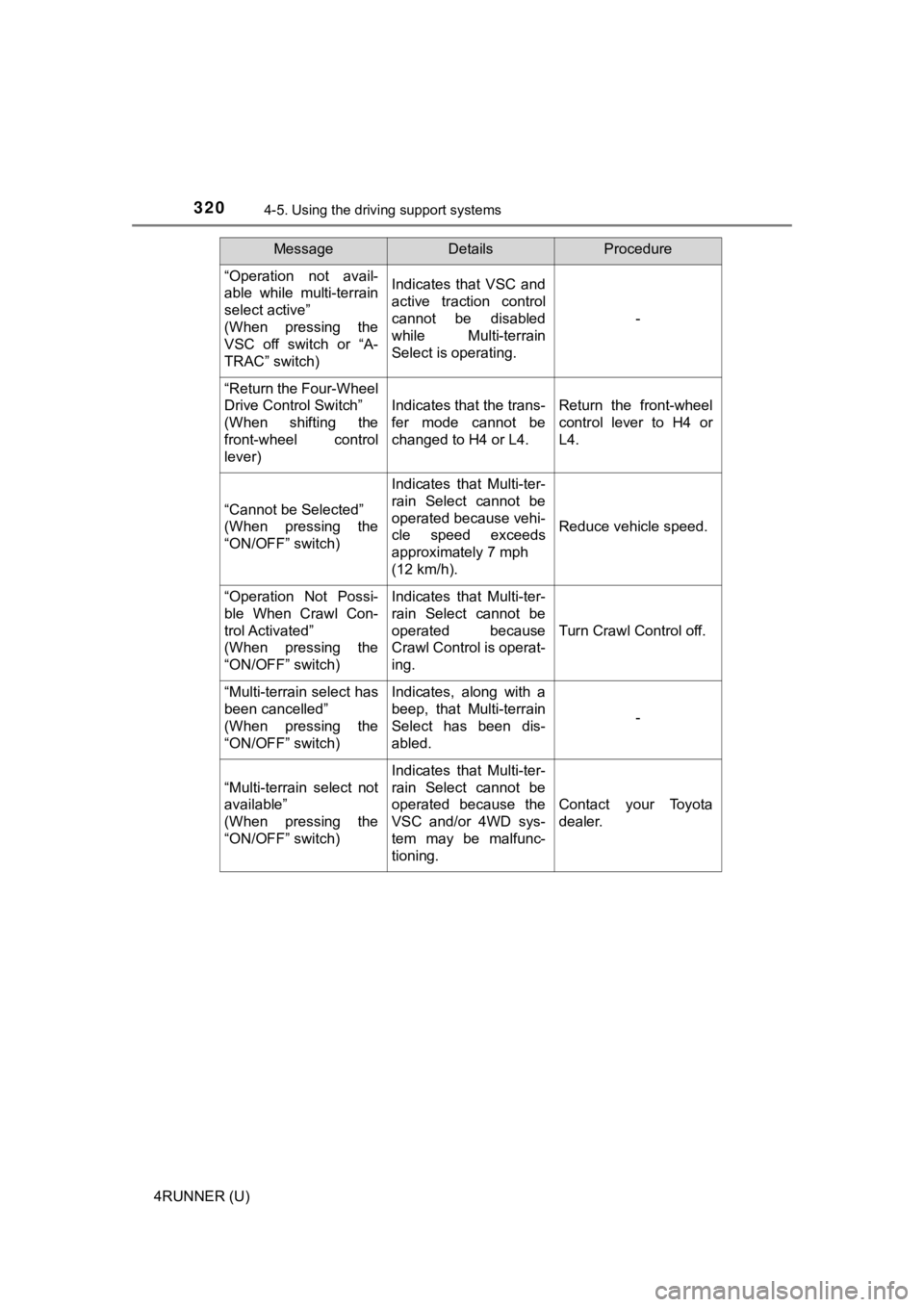
“Operation not avail-
able while multi-terrain
select active”
(When pressing the
VSC off switch or “A-
TRAC” switch)Indicates that VSC and
active traction control
cannot be disabled
while Multi-terrain
Select is operating.
-
“Return the Four-Wheel
Drive Control Switch”
(When shifting the
front-wheel control
lever)
Indicates that the trans-
fer mode cannot be
changed to H4 or L4.Return the front-wheel
control lever to H4 or
L4.
“Cannot be Selected”
(When pressing the
“ON/OFF” switch)
Indicates that Multi-ter-
rain Select cannot be
operated because vehi-
cle speed exceeds
approximately 7 mph
(12 km/h).
Reduce vehicle speed.
“Operation Not Possi-
ble When Crawl Con-
trol Activated”
(When pressing the
“ON/OFF” switch)Indicates that Multi-ter-
rain Select cannot be
operated because
Crawl Control is operat-
ing.
Turn Crawl Control off.
“Multi-terrain select has
been cancelled”
(When pressing the
“ON/OFF” switch)Indicates, along with a
beep, that Multi-terrain
Select has been dis-
abled.
-
“Multi-terrain select not
available”
(When pressing the
“ON/OFF” switch)
Indicates that Multi-ter-
rain Select cannot be
operated because the
VSC and/or 4WD sys-
tem may be malfunc-
tioning.
Contact your Toyota
dealer.
MessageDetailsProcedure
Page 430 of 608

4306-3. Do-it-yourself maintenance
4RUNNER (U)
◆Installing tire pressure warning valve and transmitters
When replacing the tires or wheels, the tire pressure warning v alve
and transmitters must be install ed to the wheels which will be
installed to the vehicle.
When new tire pressure warning valve and transmitters are
installed, new ID codes must be registered in the tire pressure
warning computer and the tire pressure warning system must be
initialized. ( P. 431)
◆Initializing the tire pressure warning system
■The tire pressure warning system must be initialized in the fol-
lowing circumstances:
● When the tire inflation pressure is changed such as when chang-
ing traveling speed or load weight.
● When the tire inflation pressure is changed such as when the ti re
size is changed.
● When rotating the tires.
● After performing the transmitter ID code registration procedure .
( P. 431)
When the tire pressure warning sy stem is initialized, the current tire
inflation pressure is set as the benchmark pressure.
■How to initialize the tire pressure warning system
Park the vehicle in a safe place and turn the engine switch off .
The initialization procedure cannot be started while the vehicle is
moving.
Adjust the tire inflation pressure to the specified cold tire i nflation
pressure level. ( P. 532)
Make sure to adjust the tire pre ssure to the specified cold tire infla-
tion pressure level. The tire pressure warning system will oper ate
based on this pr essure level.
Start the engine. ( P. 1 9 9 )
Select on the multi-information display using the meter con-
trol switches on the steering wheel. ( P. 9 6 )
Select “Vehicle Settings” and then press and hold .
Select “TPWS” and then press .
1
2
3
4
5
6
Page 432 of 608
4326-3. Do-it-yourself maintenance
4RUNNER (U)■
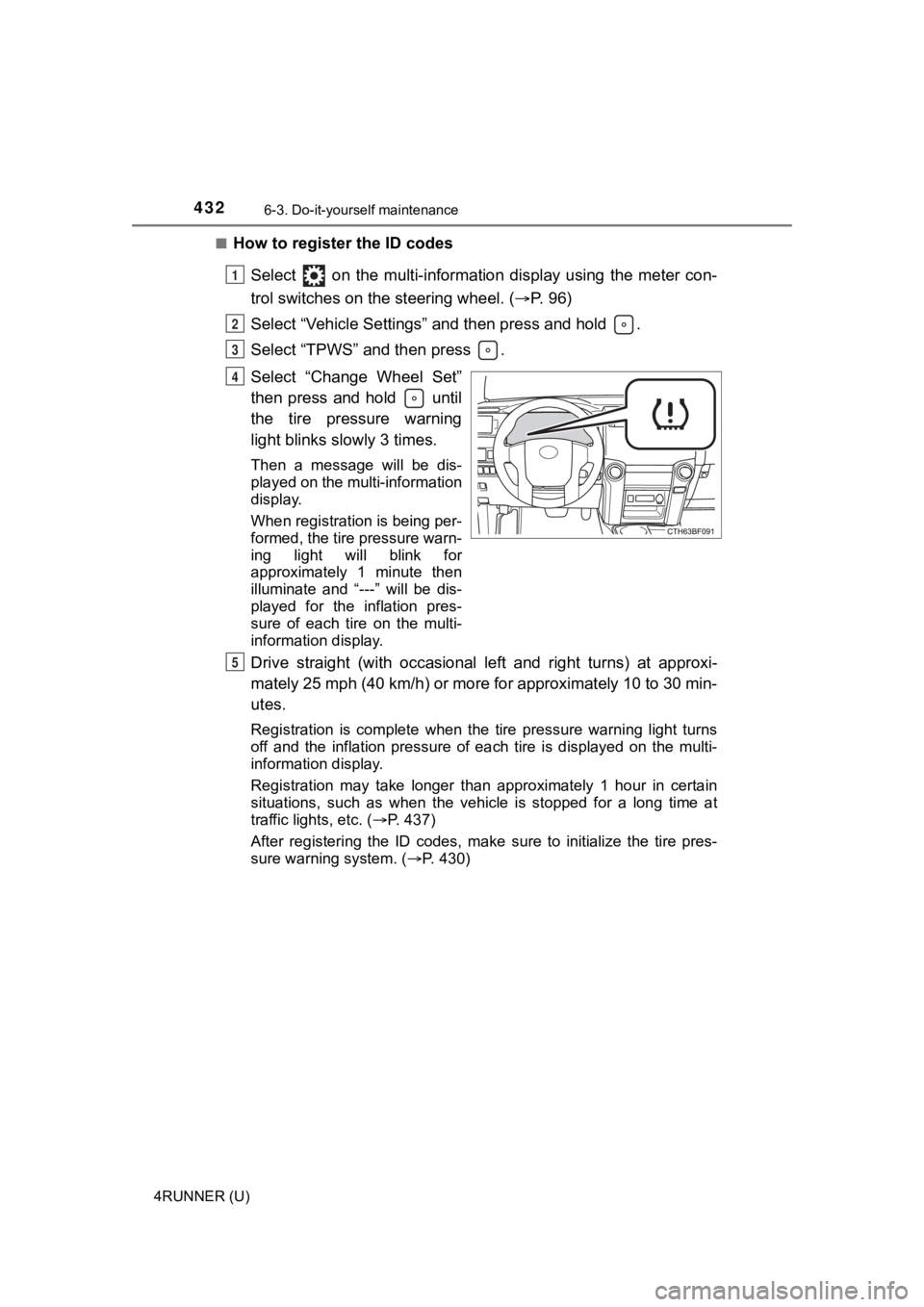
How to register the ID codes
Select on the multi-information display using the meter con-
trol switches on the steering wheel. ( P. 9 6 )
Select “Vehicle Settings” and then press and hold .
Select “TPWS” and then press .
Select “Change Wheel Set”
then press and hold until
the tire pressure warning
light blinks slowly 3 times.
Then a message will be dis-
played on the multi-information
display.
When registration is being per-
formed, the tire pressure warn-
ing light will blink for
approximately 1 minute then
illuminate and “---” will be dis-
played for the inflation pres-
sure of each tire on the multi-
information display.
Drive straight (with occasional left and right turns) at approxi-
mately 25 mph (40 km/h) or more for approximately 10 to 30 min-
utes.
Registration is complete when the tire pressure warning light t urns
off and the inflation pressure of each tire is displayed on the multi-
information display.
Registration may take longer than approximately 1 hour in certain
situations, such as when the veh icle is stopped for a long time at
traffic lights, etc. ( P. 437)
After registering the ID codes, make sure to initialize the tir e pres-
sure warning system. ( P. 430)
1
2
3
4
5
Page 434 of 608

4346-3. Do-it-yourself maintenance
4RUNNER (U)■
Tire types
●Summer tires
Summer tires are high-speed performance tires best suited to hi
ghway
driving under dry conditions. Si nce summer tires do not have th e same
traction performance as snow tires, summer tires are inadequate for
driving on snow-covered or icy ro ads. For driving on snow-covered
roads or icy roads, the use of snow tires is recommended. When install-
ing snow tires, be sure to replace all four tires.
●All season tires
All season tires are designed to provide better traction in sno w and to
be adequate for driving in most winter conditions as well as fo r use
year-round. All season tires, however, do not have adequate tra ction
performance compared with snow tires in heavy or loose snow. Al so, all
season tires fall short in acceleration and handling performanc e com-
pared with summer tires in highway driving.
●Snow tires
For driving on snow-covered roads or icy roads, we recommend us ing
snow tires. If you need snow tires, select tires of the same si ze, con-
struction and load capacity as t he originally installed tires. Since your
vehicle has radial tires as original equipment, make sure your snow
tires also have radial construct ion. Do not install studded tires without
first checking local regulations for possible restrictions. Sno w tires
should be install ed on all wheels. ( P. 331)
■If the tread on snow tires wea rs down below 0.16 in. (4 mm)
The effectiveness of the tires as snow tires is lost.
■Warning performance of the tire pressure warning system
The warning of the tire pressu re warning system will change in accor-
dance with the conditions under which it was initialized. For t his reason,
the system may give a warning even if the tire pressure does no t reach a
low enough level, or if the pressure is higher than the pressur e that was
adjusted to when the sys tem was initialized.
Page 437 of 608

4376-3. Do-it-yourself maintenance
6
Maintenance and care
4RUNNER (U)■
When ID code registration has failed
●Registration may take long time or the ID codes may not be regi
stered in
the following situations.
• When the vehicle is moved backward during registration.
Registration is started again from the beginning and it may tak e lon-
ger than usual.
• When another vehicle is running the side of the vehicle such a s in
heavy traffic.
It may take longer to detect the vehicle’ tire pressure warning valves
and transmitters.
• If tire pressure warning valves and transmitters are in the vehicle.
The ID codes may n ot be registered.
●When performing registration, drive on a paved road if possible .
Depending on the driving environment and condition of the tires, regis-
tration will be complet ed in approximately 10 to 30 minutes.
• If registration is not complete after driving approximately 30 minutes,
continue driving for a while.
• If registration is not complete after driving approximately 1 hour, park
the vehicle in a safe place for approximately 20 minutes. Then drive
straight (with occasional left and right turns) at approximatel y 40 km/h
(25 mph) or more
* for approximately 10 to 30 minutes.
If registration is still not comp lete, have the vehicle inspected by your
Toyota dealer.
*: Except when making a left/right turn
●When the tire pressure warning light does not blink slowly 3 ti mes, the
ID code will not be registered and the system will not operate properly.
Perform registration again.
■When registering ID codes
●Initialize the tire pressure war ning system after ID code regis tration. Ini-
tialization is disable d if the system was initialized before re gistration.
●After ID code registration, the tires are hot by driving. Initi alize the tire
pressure warning system af ter the tires become cold.
■Canceling the change wheel set mode
●If turning the engine switch off when in the change wheel set m ode
before driving, the change wheel set mode is canceled.
●After driving when in the change wheel set mode, the change whe el set
mode cannot be canceled. To cancel the mode, perform the proced ure
for ID code registration again and turn the engine switch off before driv-
ing.
●If the change wheel set mode is canceled, the ID codes that hav e
already been registered are commu nicated. When communication is fin-
ished, the tir e pressure warning light will turn off.
Page 469 of 608
469
7
When trouble arises
4RUNNER (U)
7-2. Steps to take in an emergency
If your vehicle needs to be towed
If towing is necessary, we recommend having your vehicle
towed by your Toyota dealer or commercial towing service,
using a wheel-lift type t ruck or flatbed truck.
Use a safety chain system for all towing, and abide by all stat e/
provincial and local laws.
WARNING
Observe the following precautions.
Failure to do so may result in death or serious injury.
■ When towing the vehicle
■ While towing
When towing using cables or chains, avoid sudden starts, etc. w hich place
excessive stress on the towing eyelets, cables or chains. The towing eye-
lets, cables or chains may become damaged, broken debris may hit people,
and cause serious damage.
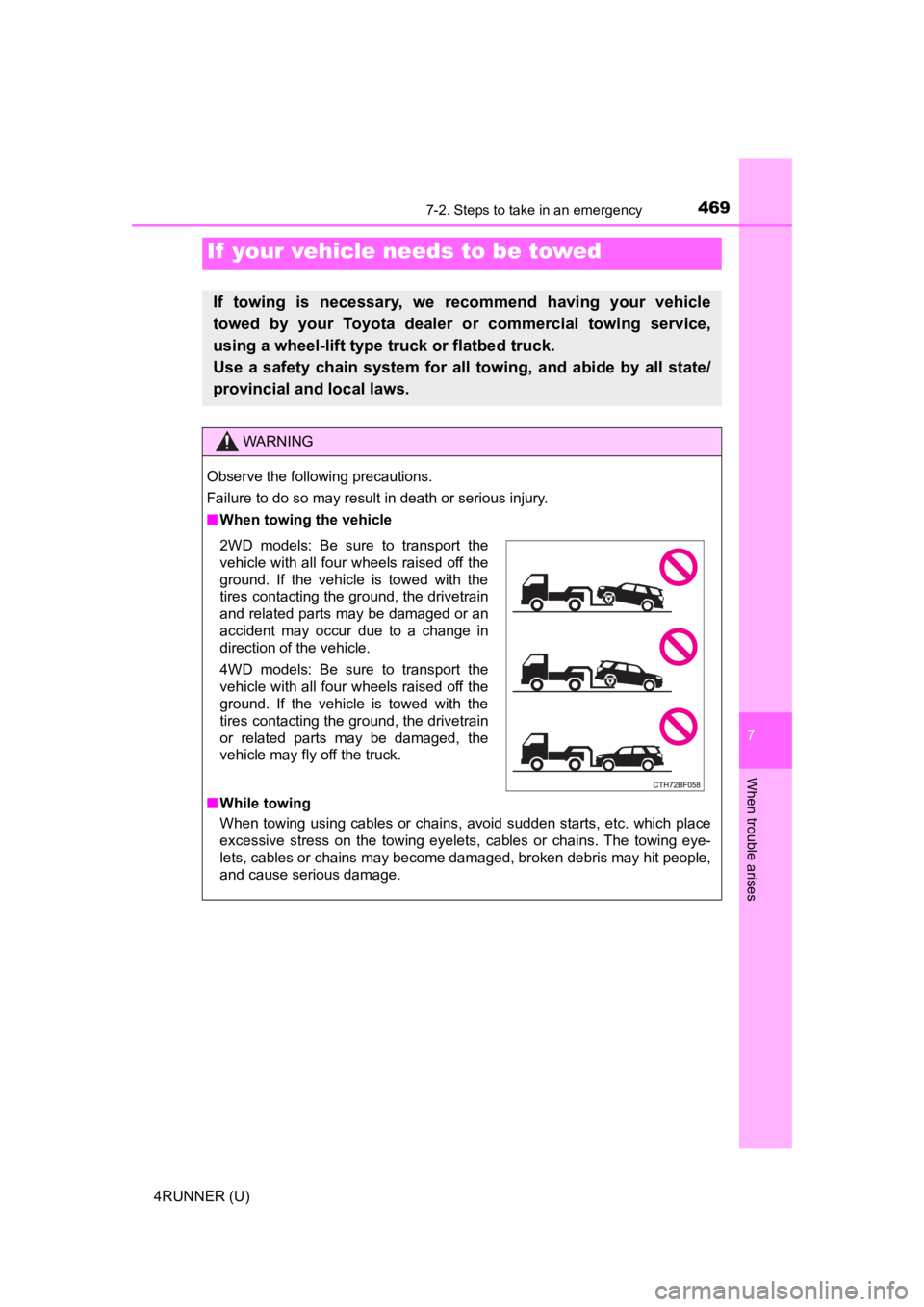
2WD models: Be sure to transport the
vehicle with all four wheels raised off the
ground. If the vehicle is towed with the
tires contacting the ground, the drivetrain
and related parts may be damaged or an
accident may occur due to a change in
direction of the vehicle.
4WD models: Be sure to transport the
vehicle with all four wheels raised off the
ground. If the vehicle is towed with the
tires contacting the ground, the drivetrain
or related parts may be damaged, the
vehicle may fly off the truck.
Page 486 of 608

4867-2. Steps to take in an emergency
4RUNNER (U)
WARNING
■If the tire pressure warning light comes on
Be sure to observe the following precautions. Failure to do so could
cause a loss of vehicle control and result in death or serious injury.
●Stop your vehicle in a safe place as soon as possible. Adjust the tire
inflation pressure immediately.
●If the tire pressure warning light comes on even after tire inf lation pres-
sure adjustment, it is probable that you have a flat tire. Chec k the tires.
If a tire is flat, change it with the spare tire and have the flat tire
repaired by the nearest Toyota dealer.
●Avoid abrupt maneuvering and braking. If the vehicle tires dete riorate,
you could lose control of the steering wheel or the brakes.
■If a blowout or sudden air leakage should occur
The tire pressure warning system may not activate immediately.
■Maintenance of the tires
Each tire, including the spare (if provided), should be checked monthly
when cold and inflated to the inflation pressure recommended by the
vehicle manufacturer on the vehicle placard or tire inflation p ressure
label (tire and load information label). (If your vehicle has t ires of a dif-
ferent size than the size indicated on the vehicle placard or t ire inflation
pressure label [tire and load information label], you should de termine
the proper tire inflation p ressure for those tires.)
As an added safety feature, your vehicle has been equipped with a tire
pressure monitoring system (TPMS -tire pressure warning system) that
illuminates a low tire pressure telltale (tire pressure warning light) when
one or more of your tires is significantly under-inflated. Acco rdingly,
when the low tire pressure telltale (tire pressure warning ligh t) illumi-
nates, you should stop and check your tires as soon as possible , and
inflate them to the proper pressure. Driving on a significantly under-
inflated tire causes the tire to overheat and can lead to tire failure.
Under-inflation also reduces fuel efficiency and tire tread lif e, and may
affect the vehicle’s handling and stopping ability.
Please note that the TPMS (tire pressure warning system) is not a sub-
stitute for proper tire maintenance, and it is the driver’s res ponsibility to
maintain correct tire pressure, even if under-inflation has not reached
the level to trigger illumination of the TPMS low tire pressure telltale (tire pressure warning light).
Page 508 of 608

5087-2. Steps to take in an emergency
4RUNNER (U)
Repeat step any time the tire is lowered or disturbed.
Stow the tools and jack securely.
■After completing the tire change
The tire pressure warni ng system must be reset. ( P. 430)
■When using the spare tire (veh icles without P245/60R20 tires)
As the spare tire is not equipped with a tire pressure warning valve and
transmitter, low inflation pressure of the spare tire will not be indicated by
the tire pressure warning system. Also, if you replace the spar e tire after
the tire pressure wa rning light comes on, the light remains on.
NOTICE
■Do not drive the vehicle with a flat tire
Do not continue driving with a flat tire.
Driving even a short distance wit h a flat tire can damage the tire and the
wheel beyond repair.
■When stowing the flat tire
Ensure that there is no object c aught between the tire and the vehicle
underbody.
■When replacing the tires
●When removing or fitting the wheels, tires or the tire pressure warning
valve and transmitter, contact your Toyota dealer as the tire p ressure
warning valve and transmitter may be damaged if not handled cor -
rectly.
●Replace the grommets for the tire pressure warning valves and trans-
mitters as well.
■To avoid damage to the tire pressure warning valves and transmi t-
ters
When a tire is repaired with liquid sealants, the tire pressure warning valve and transmitter may not operate properly. If a liquid sea lant is
used, contact your Toyota dealer or other qualified service shop as soon
as possible. Make sure to replace the tire pressure warning valve and
transmitter when replacing the tire. ( P. 430)
32
4
Page 549 of 608
549
8
Vehicle specifications
4RUNNER (U)
8-2. Customization
When customizing vehicle features, ensure that the vehicle is parked
in a safe place with the shift le ver in P and the parking brake set.
■Changing by using the multi-information display
Use the meter control switches to select on the multi-infor-
mation display.
Choose the desired item usi ng or , and then press .
Select the desired setting by operating or , and then
press .
To stop the selection, press to return to the previous screen.
■
Changing on the audio system screen
Press the “MENU” button.
Select “Setup” on the “Menu” screen.
Select “General” or “Vehicle” on the “Setup” screen.
Various setting can be changed. Refer to the list of settings t hat can
be changed for details.
Customizable features
Your vehicle includes a variety of electronic features that can be
personalized to suit your preferences. The settings of these fe a-
tures can be changed by using the steering wheel switches, nav-
igation system, multimedia syste m or at your Toyota dealer.
It is also possible to customize certain vehicle features yours elf
using the multi-information display.
Customizing vehicle features
1
2
3
1
2
3