warning lights TOYOTA 4RUNNER 2023 User Guide
[x] Cancel search | Manufacturer: TOYOTA, Model Year: 2023, Model line: 4RUNNER, Model: TOYOTA 4RUNNER 2023Pages: 608, PDF Size: 11.8 MB
Page 81 of 608
81
Instrument cluster2
4RUNNER (U)2. Instrument cluster
Warning lights and indicators .......................... 82
Gauges and meters ............ 88
Multi-information display ..... 90
Page 82 of 608
82
4RUNNER (U)
2. Instrument cluster
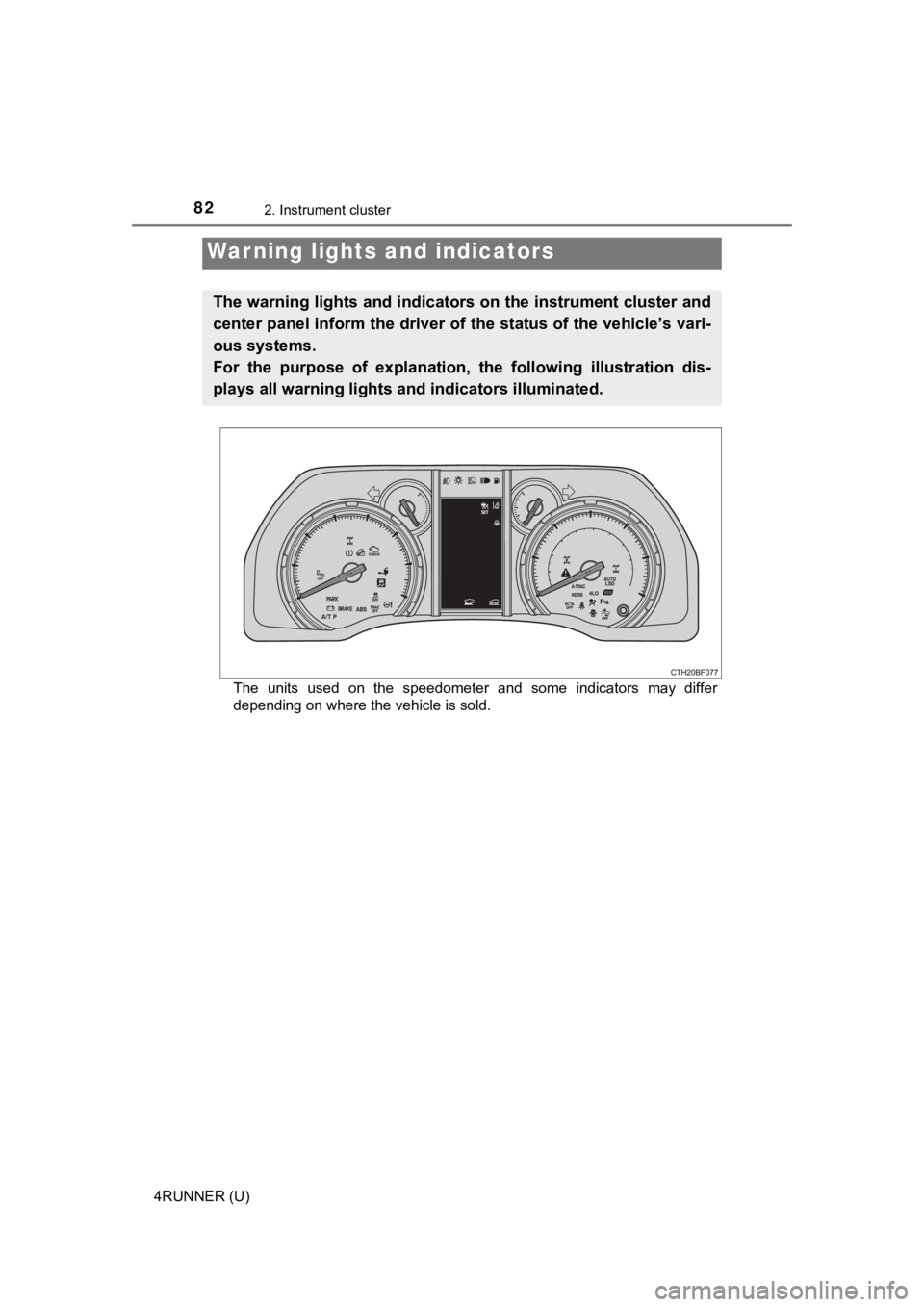
The units used on the speedometer and some indicators may differ
depending on where the vehicle is sold.
Warning lights and indicators
The warning lights and indicators on the instrument cluster and
center panel inform the driver of the status of the vehicle’s vari-
ous systems.
For the purpose of explanation, t he following illustration dis-
plays all warning lights a nd indicators illuminated.
Page 83 of 608
832. Instrument cluster
2
Instrument cluster
4RUNNER (U)
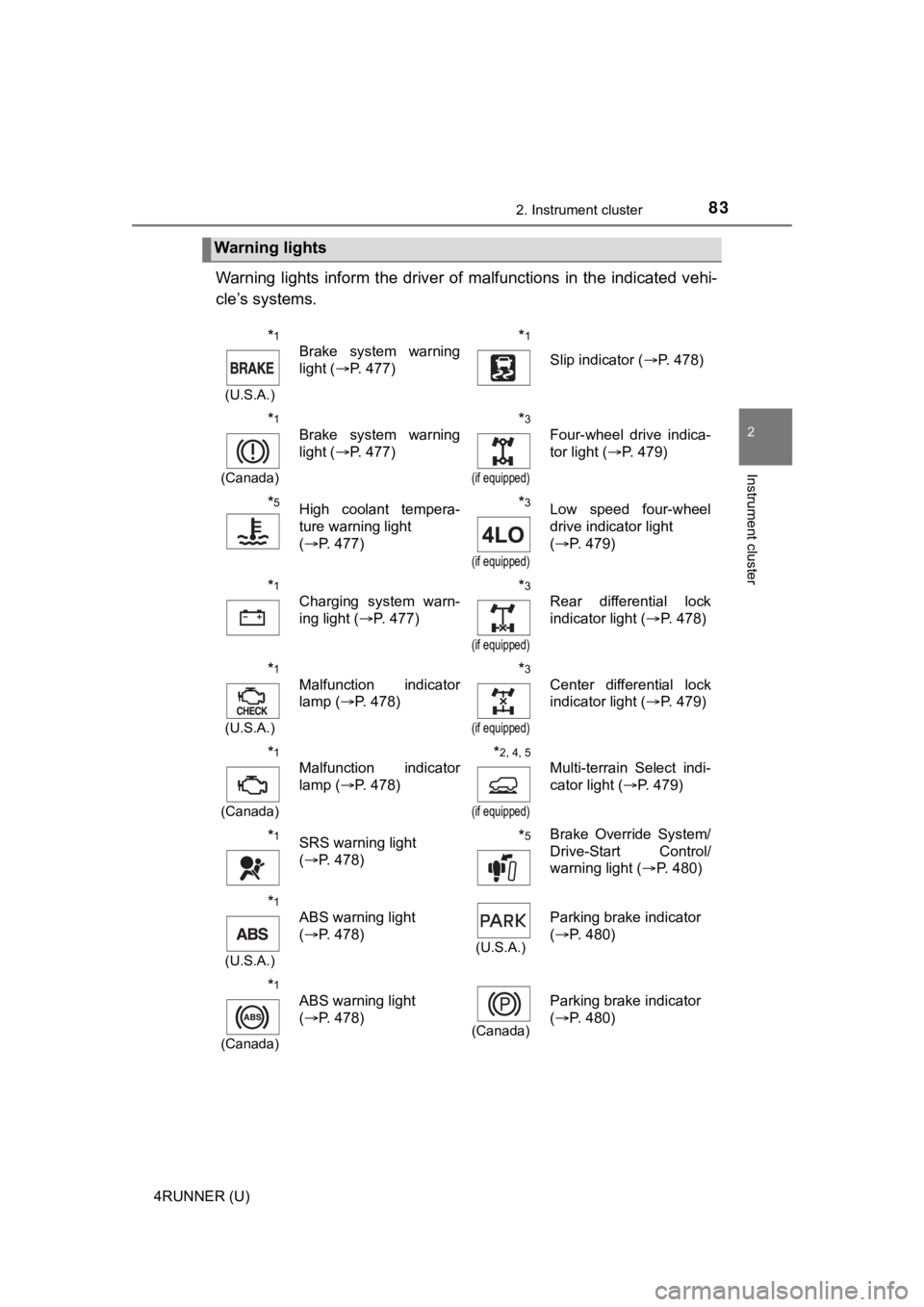
Warning lights inform the driver of malfunctions in the indicated vehi-
cle’s systems.
Warning lights
*1
(U.S.A.)
Brake system warning
light ( P. 477)*1
Slip indicator ( P. 478)
*1
(Canada)
Brake system warning
light (P. 477)*3
(if equipped)
Four-wheel drive indica-
tor light ( P. 479)
*5High coolant tempera-
ture warning light
(P. 477)*3
(if equipped)
Low speed four-wheel
drive indicator light
(P. 479)
*1
Charging system warn-
ing light ( P. 477)*3
(if equipped)
Rear differential lock
indicator light ( P. 478)
*1
(U.S.A.)
Malfunction indicator
lamp ( P. 478)*3
(if equipped)
Center differential lock
indicator light ( P. 479)
*1
(Canada)
Malfunction indicator
lamp ( P. 478)*2, 4, 5
(if equipped)
Multi-terrain Select indi-
cator light ( P. 479)
*1SRS warning light
(P. 478)*5Brake Override System/
Drive-Start Control/
warning light ( P. 480)
*1
(U.S.A.)
ABS warning light
(P. 478)
(U.S.A.)
Parking brake indicator
(P. 480)
*1
(Canada)
ABS warning light
(P. 478)
(Canada)
Parking brake indicator
(P. 480)
Page 84 of 608
842. Instrument cluster
4RUNNER (U)
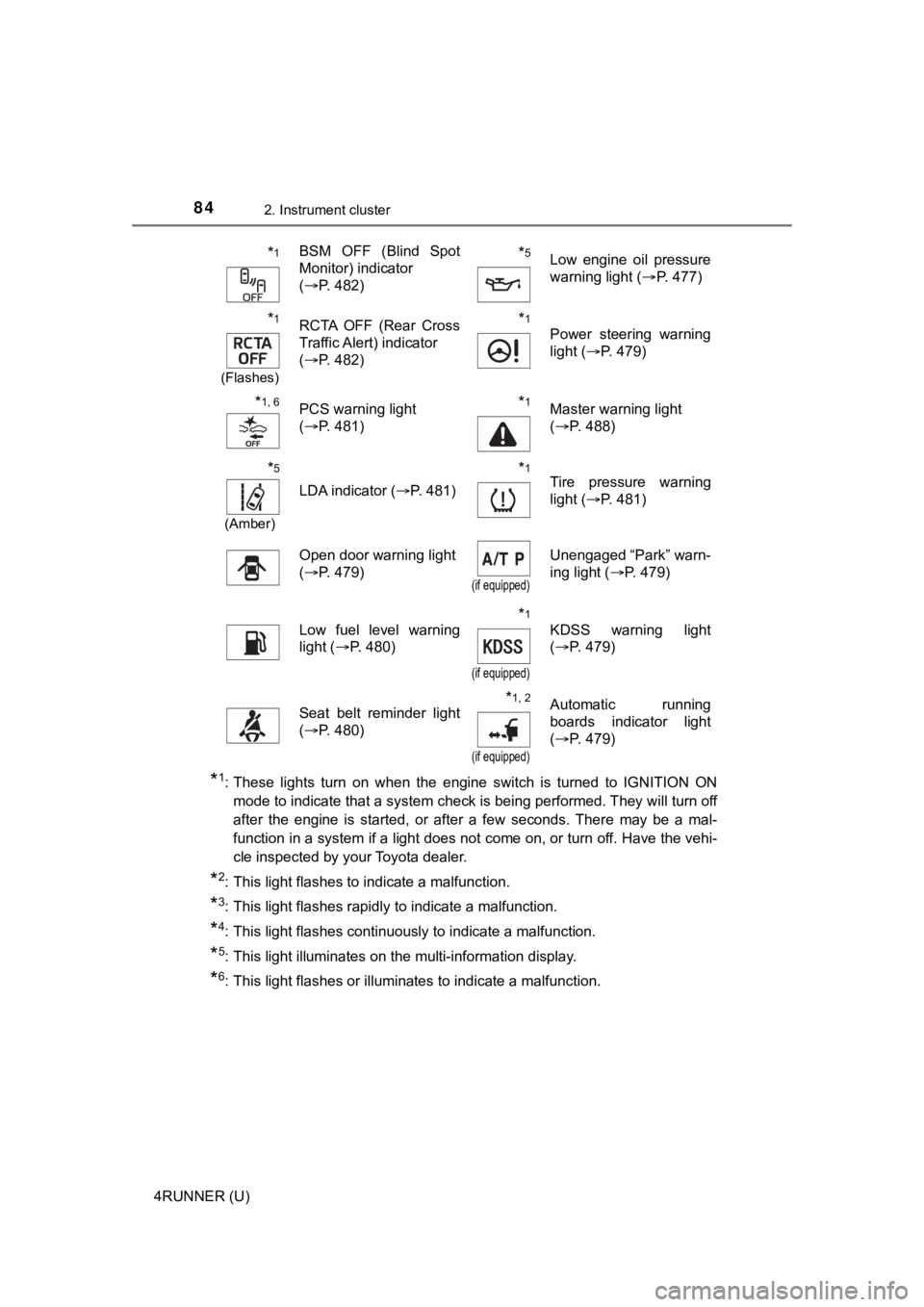
*1: These lights turn on when the engine switch is turned to IGNITION ON
mode to indicate that a system check is being performed. They w ill turn off
after the engine is started, or after a few seconds. There may be a mal-
function in a system if a light does not come on, or turn off. Have the vehi-
cle inspected by your Toyota dealer.
*2: This light flashes to indicate a malfunction.
*3: This light flashes rapidly to indicate a malfunction.
*4: This light flashes continuously to indicate a malfunction.
*5: This light illuminates on the multi-information display.
*6: This light flashes or illuminates to indicate a malfunction.
*1BSM OFF (Blind Spot
Monitor) indicator
( P. 482)*5Low engine oil pressure
warning light ( P. 477)
*1
(Flashes)
RCTA OFF (Rear Cross
Traffic Alert) indicator
(P. 482)*1
Power steering warning
light ( P. 479)
*1, 6PCS warning light
(P. 481)*1Master warning light
(P. 488)
*5
(Amber)
LDA indicator ( P. 481)
*1Tire pressure warning
light (P. 481)
Open door warning light
(P. 479)
(if equipped)
Unengaged “Park” warn-
ing light ( P. 479)
Low fuel level warning
light (P. 480)*1
(if equipped)
KDSS warning light
(P. 479)
Seat belt reminder light
(P. 480)*1, 2
(if equipped)
Automatic running
boards indicator light
(P. 479)
Page 87 of 608
872. Instrument cluster
2
Instrument cluster
4RUNNER (U)
*1: These lights turn on when the engine switch is turned to IGNITION ON
mode to indicate that a system check is being performed. They will turn off
after the engine is started, or after a few seconds. There may be a mal-
function in a system if a light does not come on, or turn off. Have the vehi-
cle inspected by your Toyota dealer.
*2: This light flashes to indicate that the system is operating.
*3: This light does not turn on when the system is disabled.
*4: This light illuminates on the center panel.
*5: This light illuminates on the multi-information display.
*6: This light turns on when the system is off.
*7: In order to confirm operation, the BSM outside rear view mirror indicators illuminate in the following situations:
• When the engine switch is turned to IGNITION ON mode while the sys-
tem is set to on.
• When the system is set to on while the engine switch is in IGN ITION ON
mode.
*8: This light illuminates on the outside rear view mirrors.
WARNING
■ If a safety system warning light does not come on
Should a safety system light such as the ABS and SRS warning li ght not
come on when you start the engine, this could mean that these s ystems are
not available to help protect you in an accident, which could result in death
or serious injury. Have the vehicle inspected by your Toyota dealer immedi-
ately if this occurs.
Page 126 of 608
1263-2. Opening, closing and locking the doors
4RUNNER (U)
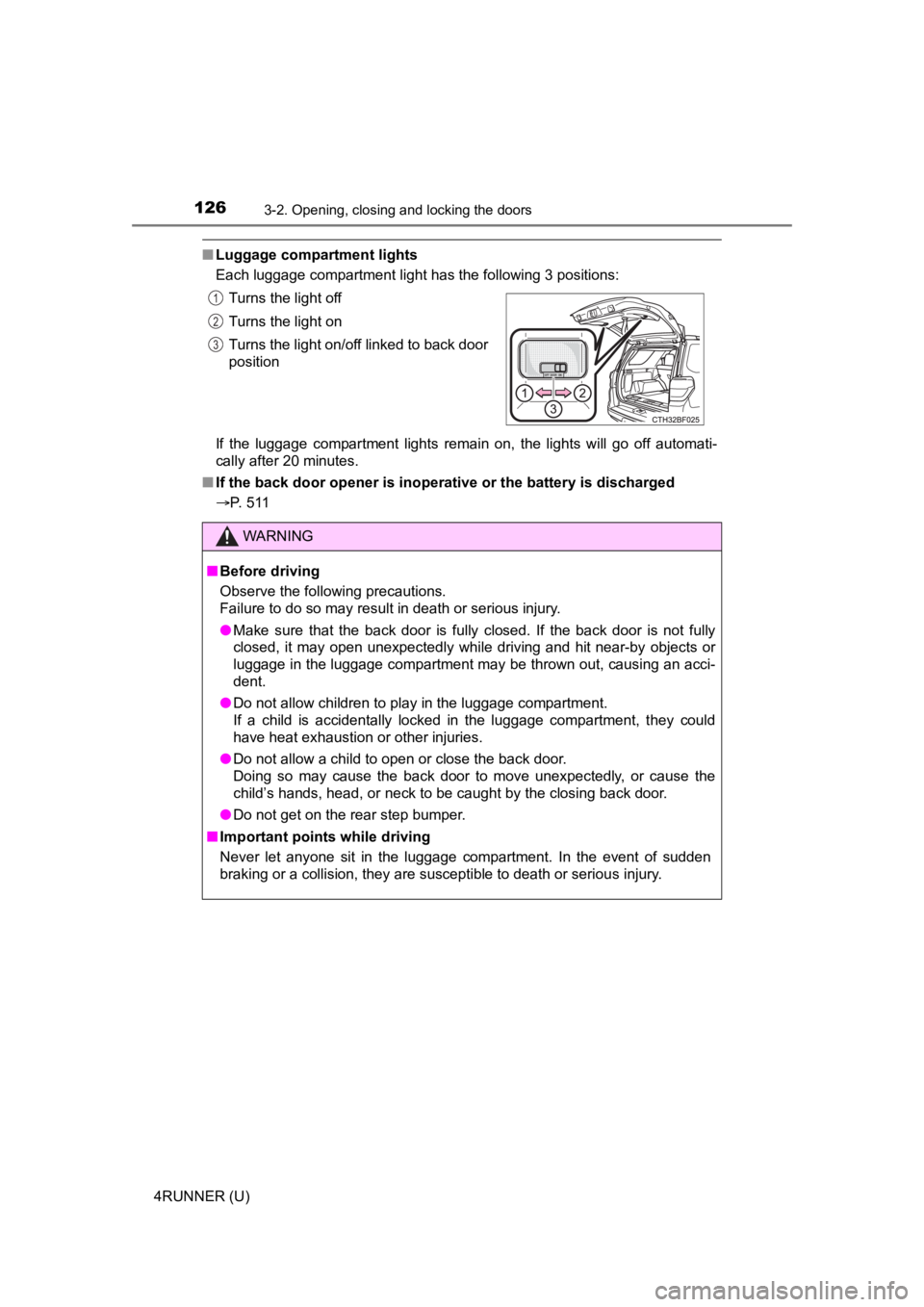
■Luggage compartment lights
Each luggage compartment light has the following 3 positions:
If the luggage compartment lights remain on, the lights will go off automati-
cally after 20 minutes.
■ If the back door opener is inoperative or the battery is discha rged
P. 511 Turns the light off
Turns the light on
Turns the light on/off linked to back door
position
WARNING
■
Before driving
Observe the following precautions.
Failure to do so may result in death or serious injury.
● Make sure that the back door is fully closed. If the back door is not fully
closed, it may open unexpectedly while driving and hit near-by objects or
luggage in the luggage compartment may be thrown out, causing an acci-
dent.
● Do not allow children to play in the luggage compartment.
If a child is accidentally locked in the luggage compartment, they could
have heat exhaustion or other injuries.
● Do not allow a child to open or close the back door.
Doing so may cause the back door to move unexpectedly, or cause the
child’s hands, head, or neck to be caught by the closing back door.
● Do not get on the rear step bumper.
■ Important points while driving
Never let anyone sit in the luggage compartment. In the event of sudden
braking or a collision, they are susceptible to death or seriou s injury.
1
2
3
Page 197 of 608
1974-1. Before driving
4
Driving
4RUNNER (U)
WARNING
■Hitch
Trailer hitch assemblies have different weight capacities estab lished by the
hitch manufacturer. Even though the vehicle may be physically capable of
towing a higher weight, the operator must determine the maximum weight
rating of the particular hitch assembly and never exceed the maximum
weight rating specified for the trailer-hitch. Exceeding the maximum weight
rating set by the trailer-hitch manufacturer can cause an accid ent resulting
in death or serious personal injuries.
■ When towing a trailer
Toyota recommends trailers with brakes that conform to any applicable fed-
eral and state/provincial regulations.
● If the gross trailer weight exceeds unbraked TWR, trailer brakes are
required. Toyota recommends trailers with brakes that conform t o all appli-
cable federal and state/provincial regulations.
● Never tap into your vehicle’s hydraulic system, as this will lo wer the vehi-
cle’s braking effectiveness.
● Never tow a trailer without using a safety chain securely attac hed to both
the trailer and the vehicle. If damage occurs to the coupling u nit or hitch
ball, there is danger of the trailer wandering into another lan e.
NOTICE
■When installing a trailer hitch
Use only the position recommended by your Toyota dealer. Do not install
the trailer hitch on the bumper; this may cause body damage.
■ Do not directly splice trailer lights
Do not directly splice trailer lights. Directly splicing traile r lights may damage
your vehicle’s electrical system and cause a malfunction.
Page 217 of 608
2174-3. Operating the lights and wipers
4
Driving
4RUNNER (U)
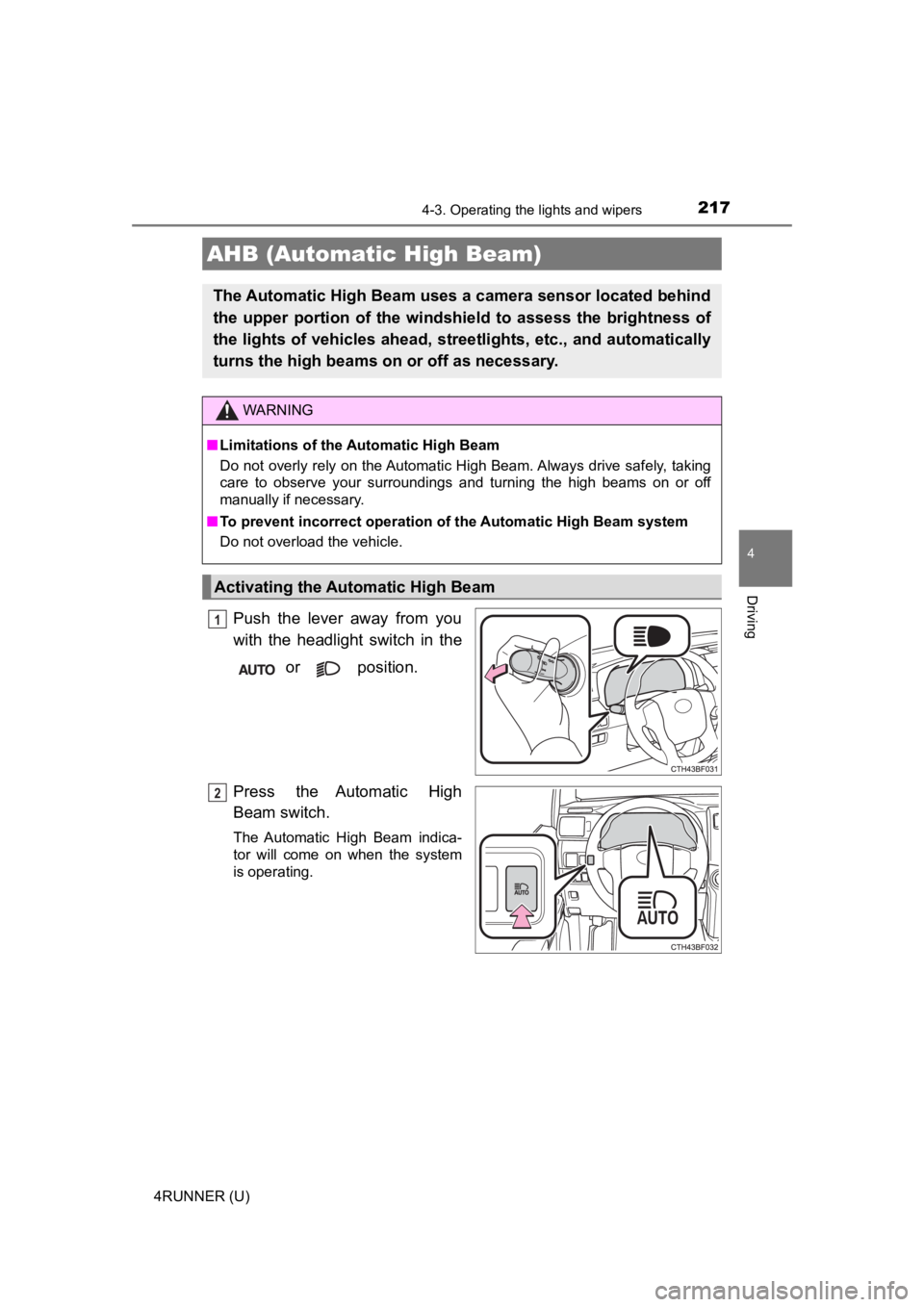
Push the lever away from you
with the headlight switch in the or position.
Press the Automatic High
Beam switch.
The Automatic High Beam indica-
tor will come on when the system
is operating.
AHB (Automatic High Beam)
The Automatic High Beam uses a camera sensor located behind
the upper portion of the windshi eld to assess the brightness of
the lights of vehicles ahead, streetlights, etc., and automatically
turns the high beams on or off as necessary.
WARNING
■Limitations of the Automatic High Beam
Do not overly rely on the Automatic High Beam. Always drive safely, taking
care to observe your surroundings and turning the high beams on or off
manually if necessary.
■ To prevent incorrect operation of the Automatic High Beam syste m
Do not overload the vehicle.
Activating the Automatic High Beam
1
2
Page 225 of 608
2254-3. Operating the lights and wipers
4
Driving
4RUNNER (U)
■The windshield wiper and washer can be operated when
The engine switch is in IGNITION ON mode.
■ If no windshield washer fluid sprays
Check that the washer nozzles are not blocked if there is washe r fluid in the
washer fluid reservoir.
WARNING
■ Caution regarding the use of washer fluid
When it is cold, do not use the washer fluid until the windshie ld becomes
warm. The fluid may freeze on the windshield and cause low visi bility. This
may lead to an accident, resulting in death or serious injury.
NOTICE
■ When the windshield is dry
Do not use the wipers, as they may damage the windshield.
■ When the washer fluid tank is empty
Do not operate the switch continually as the washer fluid pump may over-
heat.
■ When a nozzle becomes blocked
In this case, contact your Toyota dealer.
Do not try to clear it with a pin or other object. The nozzle will be damaged.
Page 235 of 608
2354-5. Using the driving support systems
4
Driving
4RUNNER (U)
WARNING
■To avoid malfunction of the front camera
Observe the following precautions.
Otherwise, the front camera may not operate properly, possibly leading to
an accident resulting in death or serious injury.
● Keep the windshield clean at all times.
• If the windshield is dirty or covered with an oily film, water droplets,
snow, etc., clean the windshield.
• If a glass coating agent is applied to the windshield, it will still be neces- sary to use the windshield wipers to remove water droplets, etc. from
the area of the windshield in front of the front camera.
• If the inner side of the windshield where the front camera is installed is
dirty, contact your Toyota dealer.
● If the part of the windshield in front of the front camera is fogged up or cov-
ered with condensation or ice, use the windshield defogger to remove the
fog, condensation or ice. ( P. 344)
● If water droplets cannot be properly removed from the area of t he wind-
shield in front of the front camera by the windshield wipers, replace the
wiper insert or wiper blade.
● Do not attach window tint to the windshield.
● Replace the windshield if it is damaged or cracked.
After replacing the windshield, the front camera must be recali brated. Con-
tact your Toyota dealer for details.
● Do not allow liquids to contact the front camera.
● Do not allow bright lights to shine into the front camera.
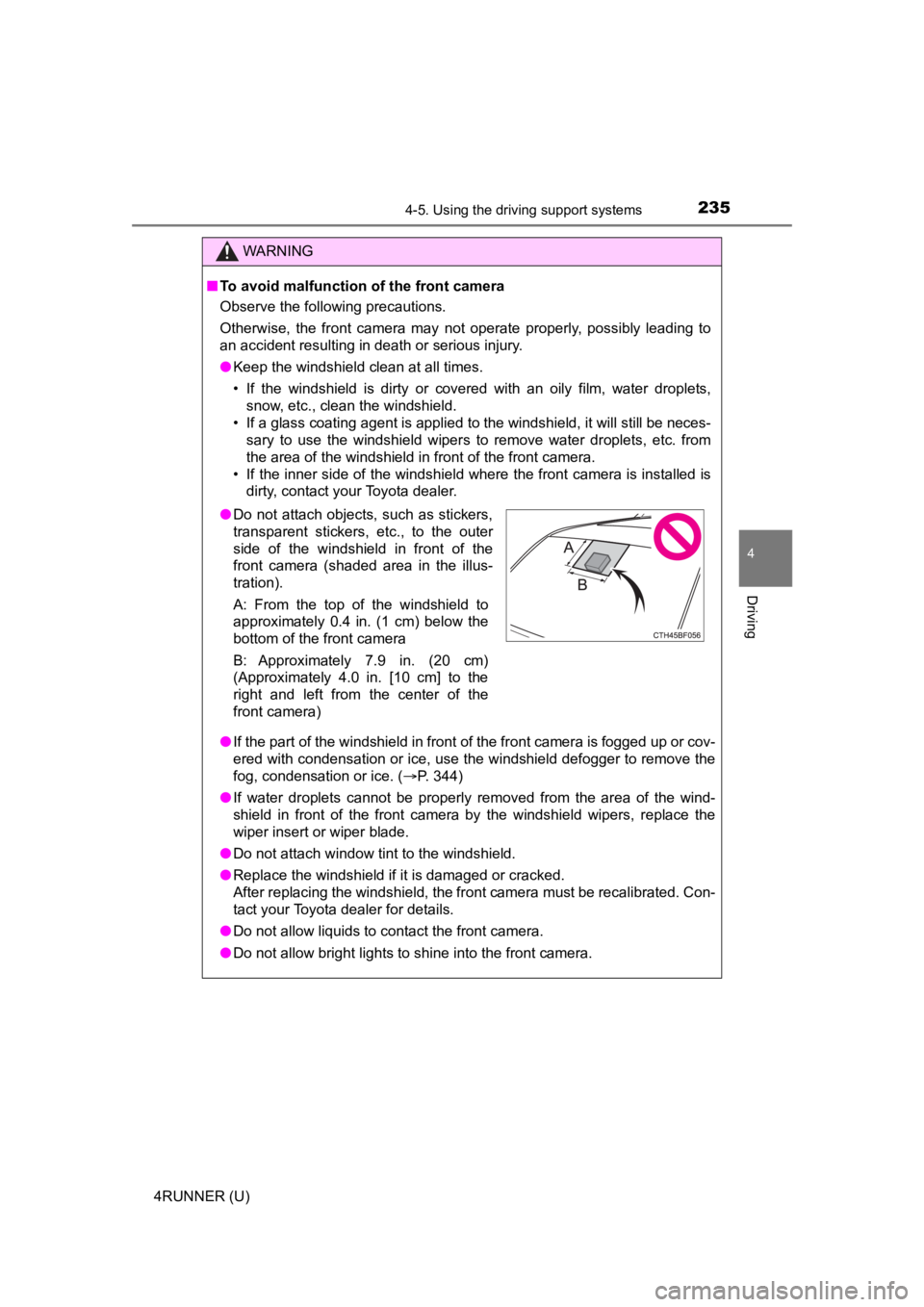
●Do not attach objects, such as stickers,
transparent stickers, etc., to the outer
side of the windshield in front of the
front camera (shaded area in the illus-
tration).
A: From the top of the windshield to
approximately 0.4 in. (1 cm) below the
bottom of the front camera
B: Approximately 7.9 in. (20 cm)
(Approximately 4.0 in. [10 cm] to the
right and left from the center of the
front camera)