engine TOYOTA 4RUNNER 2023 Owner's Manual
[x] Cancel search | Manufacturer: TOYOTA, Model Year: 2023, Model line: 4RUNNER, Model: TOYOTA 4RUNNER 2023Pages: 608, PDF Size: 11.8 MB
Page 99 of 608
992. Instrument cluster
2
Instrument cluster
4RUNNER (U)■
Pop-Up display
The pop-up display is displayed on the multi-information displa y according to
the operating conditions of the following functions:
● Route guidance display of the navigation system-linked system ( if equipped)
● Incoming call display of the hands-free phone system
The pop-up display function can be disabled.
■ Tire inflation pressure
●It may take a few minutes to display the tire inflation pressur e after the
engine switch is turned to IGNITION ON mode. It may also take a few min-
utes to display the tire inflation pressure after inflation pre ssure has been
adjusted.
● “---” may be displayed if the tire information cannot be determined due to
unfavorable radio wave conditions.
● Tire inflation pressure changes with temperature. The displayed values may
also be different from the values measured using a tire pressur e gauge.
■ Outside temperature display
In the following situations, the correct outside temperature ma y not be dis-
played, or the display may take longer than normal to change:
● When the vehicle is stopped, or moving at low speeds (less than 12 mph [20
km/h])
● When the outside temperature has changed suddenly (at the entra nce/exit
of a garage, tunnel, etc.)
● When “--” or “E” is displayed, the system may be malfunctioning. Take your
vehicle to Toyota dealer.
■ Liquid crystal display
Small spots or light spots may appear on the display. This phen omenon is
characteristic of liquid crystal displays, and there is no prob lem continuing to
use the display.
Page 100 of 608
1002. Instrument cluster
4RUNNER (U)
WARNING
■Caution for use while driving
For safety, avoid operating the meter control switches while dr iving as much
as possible, and do not look continuously at the multi-informat ion display
while driving. Stop the vehicle and operate the meter control switches. Fail-
ure to do so may cause a steering wheel operation error, resulting in an
unexpected accident.
■ Cautions while setting up the display
As the engine needs to be running during setting up the display , ensure that
the vehicle is parked in a place with adequate ventilation. In a closed area
such as a garage, exhaust gases including harmful carbon monoxi de (CO)
may collect and enter the vehicle. This may lead to death or a serious
health hazard.
■ The multi-information display at low temperatures
Allow the interior of the vehicle to warm up before using the multi-informa-
tion display. At extremely low temperatures, the multi-information display
monitor may respond slowly, and display changes may be delayed.
For example, there is a lag between the driver’s shifting and the new gear
number appearing on the display. This lag could cause the drive r to down-
shift again, causing rapid and excessive engine braking and pos sibly an
accident resulting in death or serious injury.
NOTICE
■ While setting up the display
To prevent battery discharge, ensure that the engine is running while setting
up the display features.
Page 104 of 608
1043-1. Key information
4RUNNER (U)■
Key battery depletion
●The standard battery life is 1 to 2 years.
● If the battery becomes low, an alarm will sound in the cabin wh en the engine
stops.
● As the electronic key always receives radio waves, the battery will become
depleted even if the electronic key is not used. The following symptoms indi-
cate that the electronic key battery may be depleted. Replace the battery
when necessary. ( P. 447)
• The smart key system or the wireless remote control does not o perate.
• The detection area becomes smaller.
• The LED indicator on the key surface does not turn on.
● To avoid serious deterioration, do not leave the electronic key within 3 ft. (1
m) of the following electrical appliances that produce a magnet ic field:
•TVs
• Personal computers
• Cellular phones, cordless phones and battery chargers
• Recharging cellular phones or cordless phones
• Table lamps
• Induction cookers
■ Precautions when disconnecting the battery
●In some cases, it may not be possible to unlock the doors using the smart
key system immediately after the battery has been disconnected. Use the
wireless remote control or the mechanical key to lock or unlock the doors.
● The engine may not start on the first attempt after reconnectin g the battery
but will start normally after the second attempt. This is not a malfunction.
● The engine switch mode is memorized by the vehicle. When the ba ttery is
reconnected, the system will return to the mode it was in befor e the battery
was disconnected. Before disconnecting the battery, turn the en gine switch
off.
If you are unsure what mode the engine switch was in when the b attery was
disconnected, be especially careful when reconnecting the batte ry.
■ Replacing the battery
P. 447
■ Confirmation of the registered key number
The number of keys already registered to the vehicle can be confirmed. Ask
your Toyota dealer for details.
■ If a wrong key is used
The key cylinder rotates freely to isolate inside mechanism.
Page 108 of 608
1083-1. Key information
4RUNNER (U)
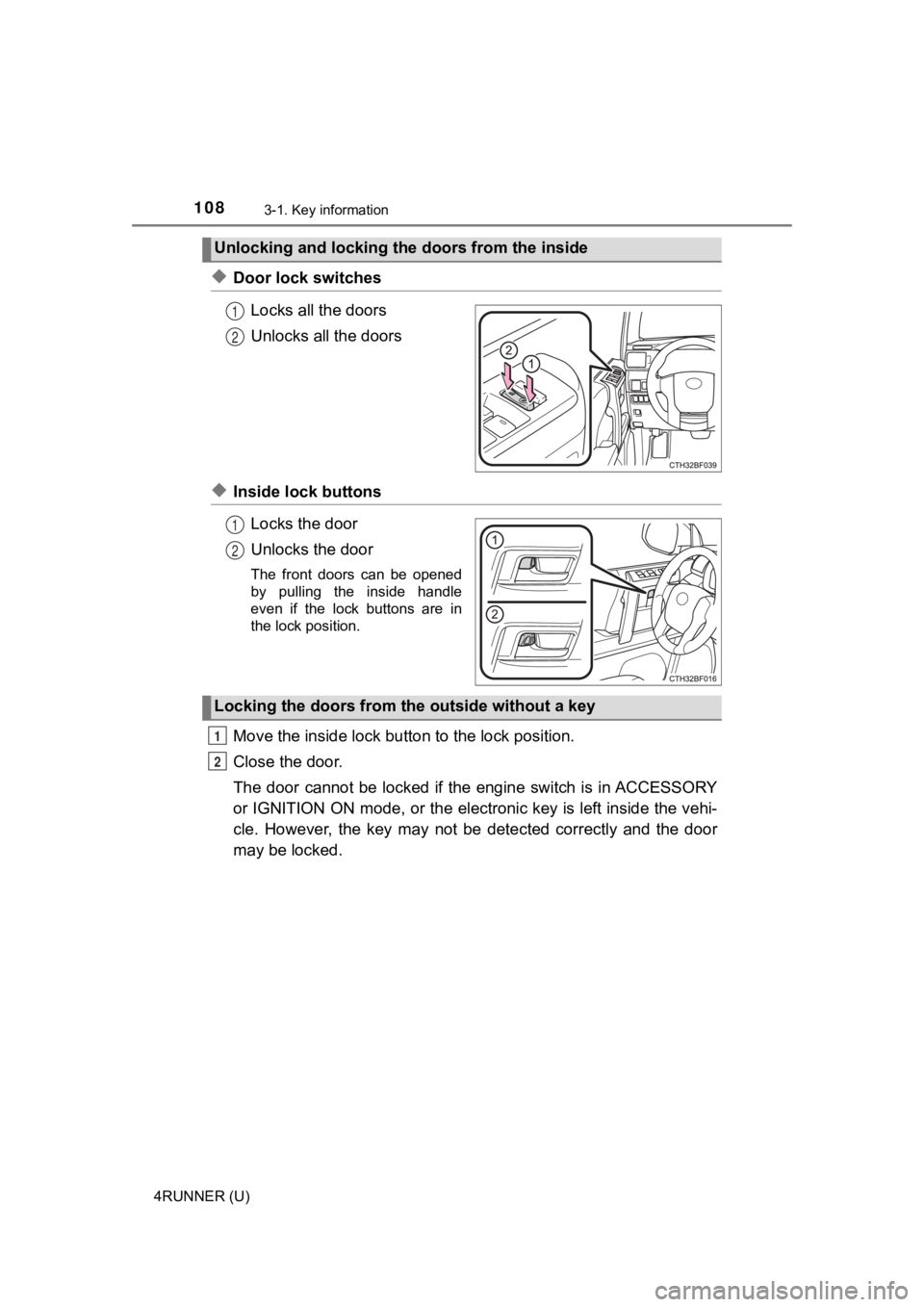
◆Door lock switchesLocks all the doors
Unlocks all the doors
◆Inside lock buttonsLocks the door
Unlocks the door
The front doors can be opened
by pulling the inside handle
even if the lock buttons are in
the lock position.
Move the inside lock bu tton to the lock position.
Close the door.
The door cannot be locked if the engine switch is in ACCESSORY
or IGNITION ON mode, or the electronic key is left inside the v ehi-
cle. However, the key may not be detected correctly and the doo r
may be locked.
Unlocking and locking the doors from the inside
1
2
1
2
Locking the doors from the outside without a key
1
2
Page 109 of 608
1093-1. Key information
3
Operation of each component
4RUNNER (U)
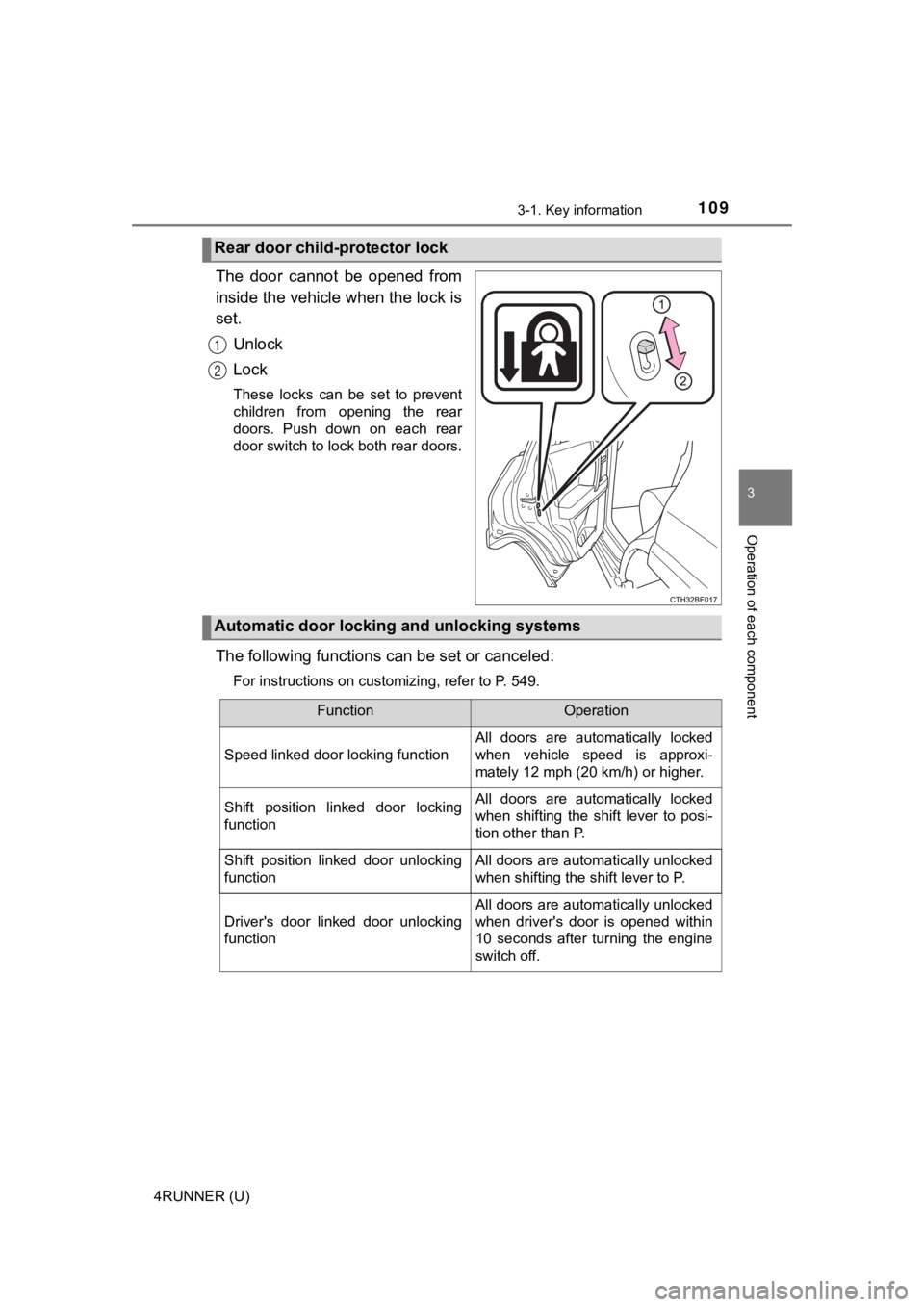
The door cannot be opened from
inside the vehicle when the lock is
set.Unlock
Lock
These locks can be set to prevent
children from opening the rear
doors. Push down on each rear
door switch to lock both rear doors.
The following functions can be set or canceled:
For instructions on customizing, refer to P. 549.
Rear door child-protector lock
1
2
Automatic door locking and unlocking systems
FunctionOperation
Speed linked door locking function
All doors are automatically locked
when vehicle speed is approxi-
mately 12 mph (20 km/h) or higher.
Shift position linked door locking
functionAll doors are automatically locked
when shifting the shift lever to posi-
tion other than P.
Shift position linked door unlocking
functionAll doors are automatically unlocked
when shifting the shift lever to P.
Driver's door linked door unlocking
function
All doors are automatically unlocked
when driver's door is opened within
10 seconds after turning the engine
switch off.
Page 110 of 608
1103-1. Key information
4RUNNER (U)■
Setting and cance
ling the functions
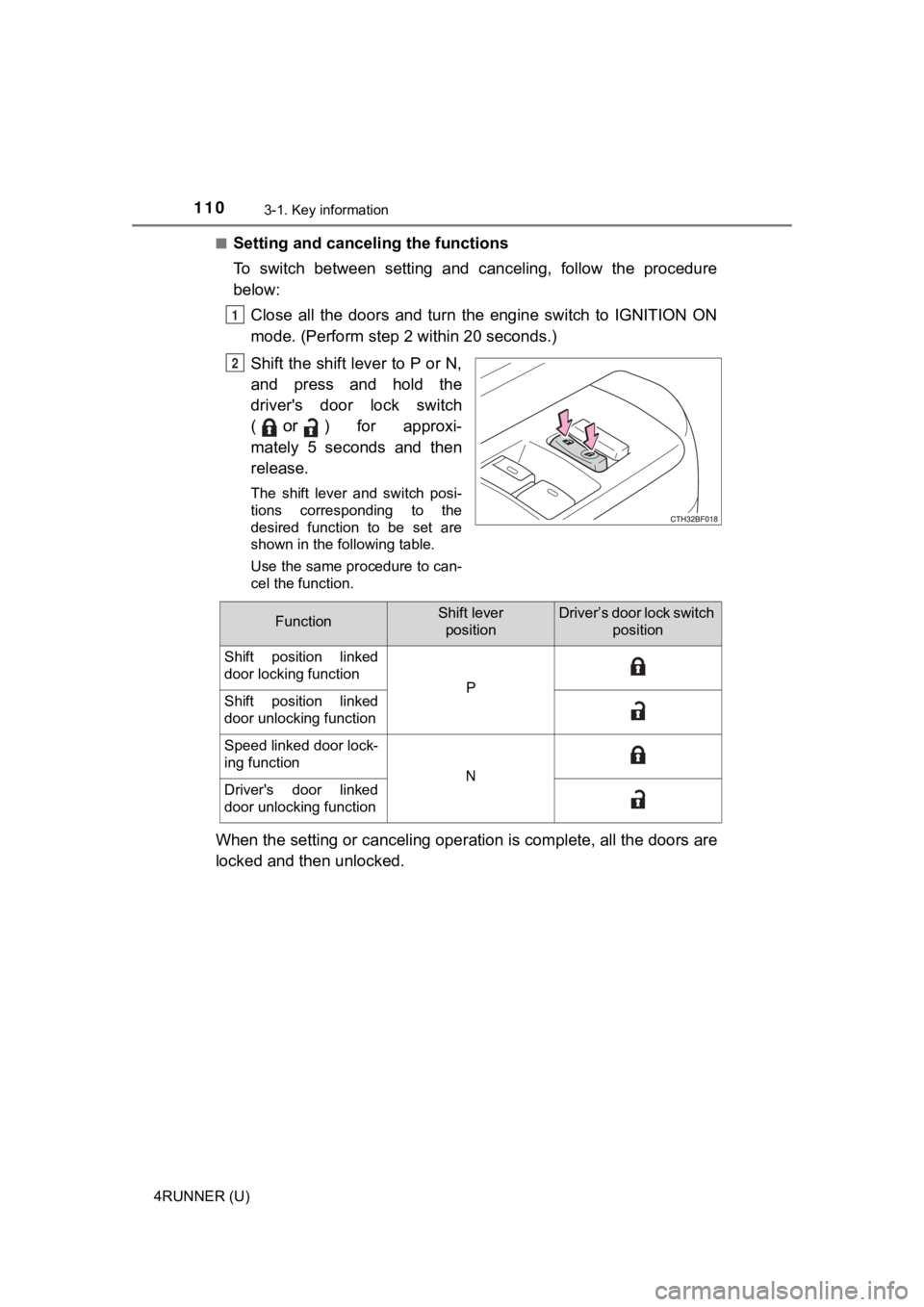
To switch between setting and canceling, follow the procedure
below: Close all the doors and turn the engine switch to IGNITION ON
mode. (Perform step 2 within 20 seconds.)
Shift the shift lever to P or N,
and press and hold the
driver's door lock switch
(
or) for approxi-
mately 5 seconds and then
release.
The shift lever and switch posi-
tions corresponding to the
desired function to be set are
shown in the following table.
Use the same procedure to can-
cel the function.
When the setting or canceling ope ration is complete, all the doors are
locked and then unlocked.
1
2
FunctionShift lever positionDriver’s door lock switch position
Shift position linked
door locking function
PShift position linked
door unlocking function
Speed linked door lock-
ing function
NDriver's door linked
door unlocking function
Page 111 of 608
1113-1. Key information
3
Operation of each component
4RUNNER (U)
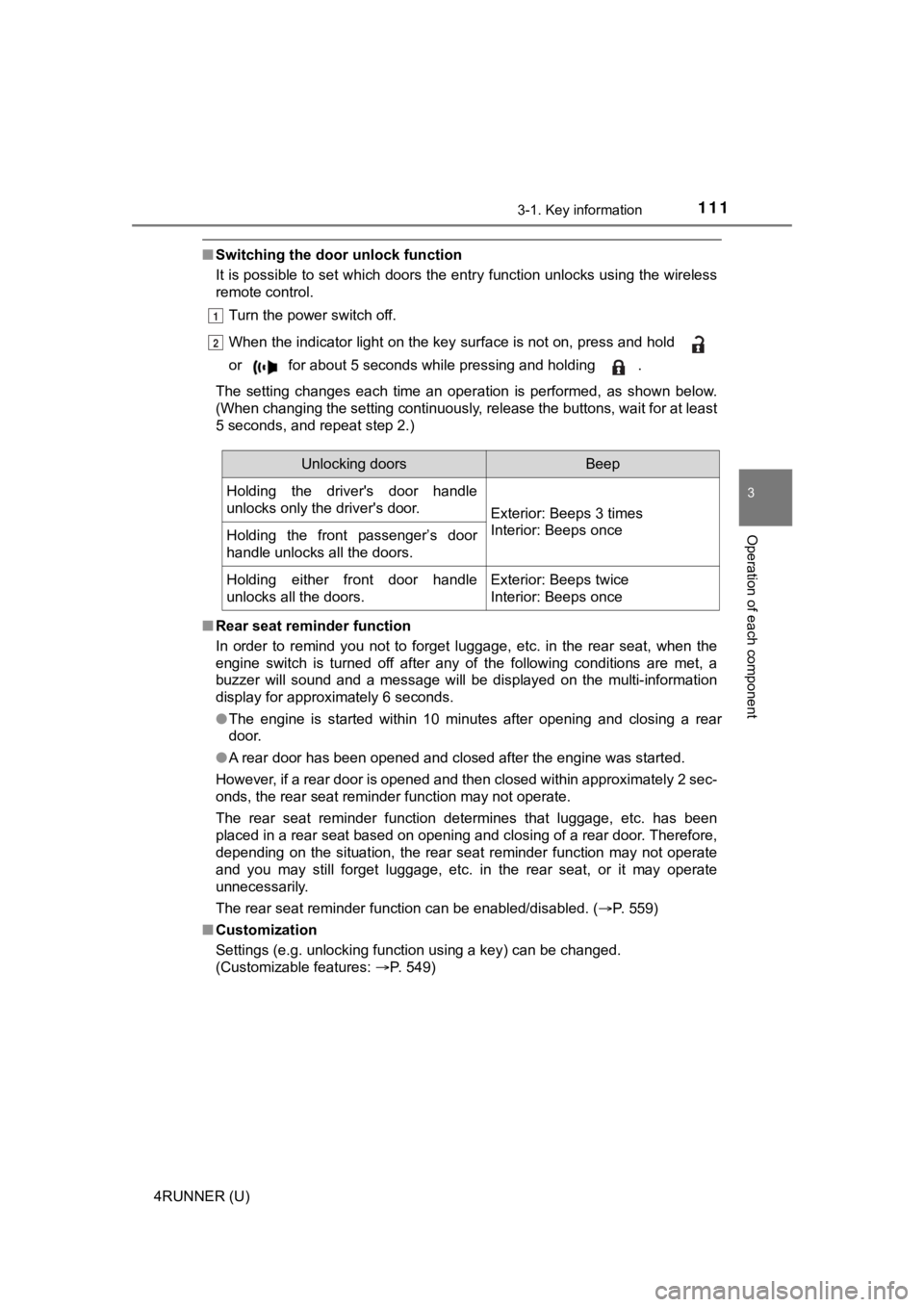
■Switching the door unlock function
It is possible to set which doors the entry function unlocks using the wireless
remote control.
Turn the power switch off.
When the indicator light on the key surface is not on, press an d hold
or for about 5 seconds while pressing and holding .
The setting changes each time an operation is performed, as sho wn below.
(When changing the setting continuously, release the buttons, w ait for at least
5 seconds, and repeat step 2.)
■ Rear seat reminder function
In order to remind you not to forget luggage, etc. in the rear seat, when the
engine switch is turned off after any of the following conditio ns are met, a
buzzer will sound and a message will be displayed on the multi- information
display for approximately 6 seconds.
● The engine is started within 10 minutes after opening and closi ng a rear
door.
● A rear door has been opened and closed after the engine was sta rted.
However, if a rear door is opened and then closed within approx imately 2 sec-
onds, the rear seat reminder function may not operate.
The rear seat reminder function determines that luggage, etc. h as been
placed in a rear seat based on opening and closing of a rear do or. Therefore,
depending on the situation, the rear seat reminder function may not operate
and you may still forget luggage, etc. in the rear seat, or it may operate
unnecessarily.
The rear seat reminder function can be enabled/disabled. ( P. 559)
■ Customization
Settings (e.g. unlocking function using a key) can be changed.
(Customizable features: P. 549)
1
2
Unlocking doorsBeep
Holding the driver's door handle
unlocks only the driver's door.
Exterior: Beeps 3 times
Interior: Beeps once
Holding the front passenger’s door
handle unlocks all the doors.
Holding either front door handle
unlocks all the doors.Exterior: Beeps twice
Interior: Beeps once
Page 113 of 608
113
3
Operation of each component
4RUNNER (U)
3-2. Opening, closing and locking the doors
●Locks and unloc ks the doors (P. 106)
● Starts the engine ( P. 1 9 9 )
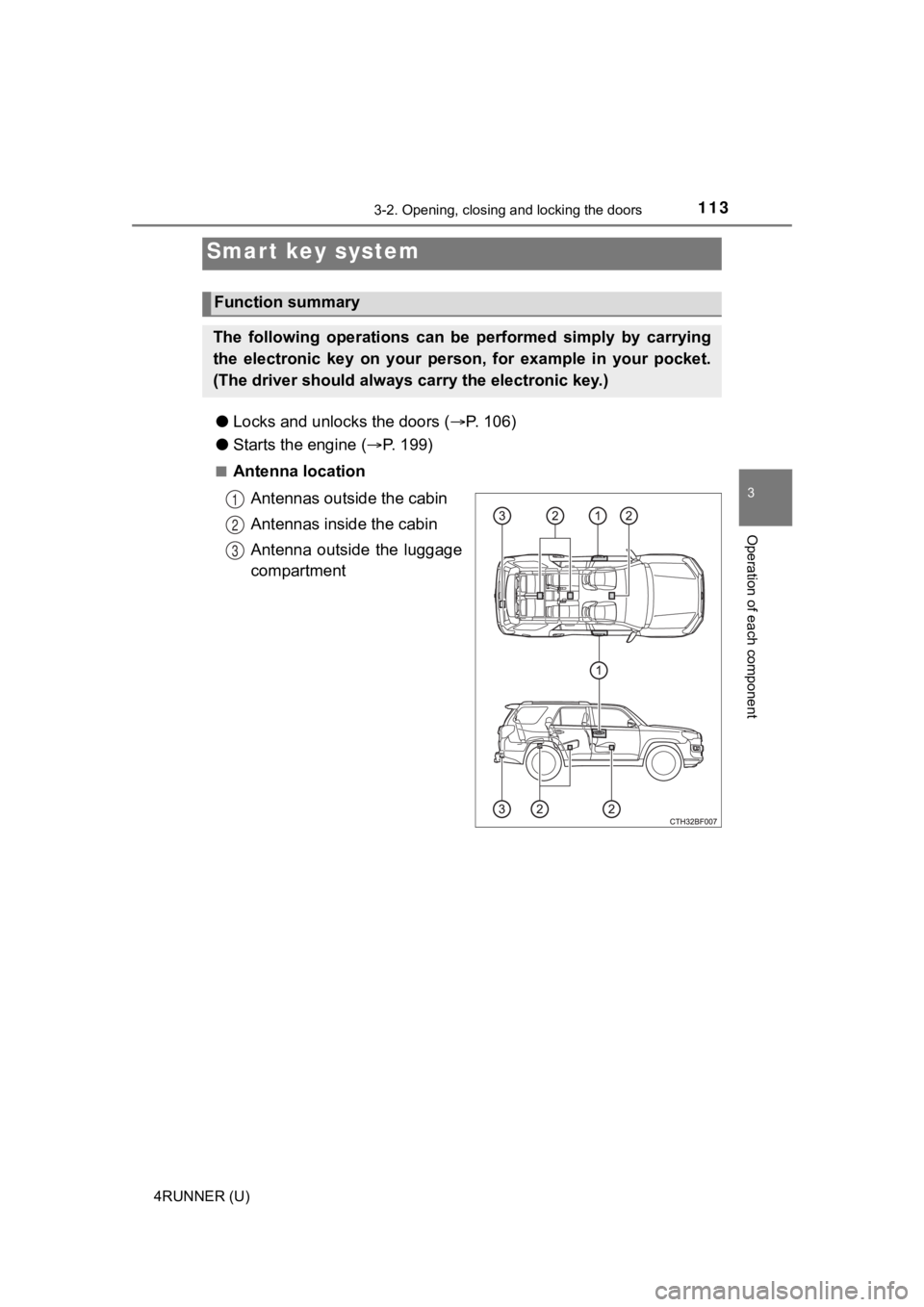
■Antenna location
Antennas outside the cabin
Antennas inside the cabin
Antenna outside the luggage
compartment
Smart key system
Function summary
The following operations can be performed simply by carrying
the electronic key on your person, for example in your pocket.
(The driver should always ca rry the electronic key.)
1
2
3
Page 114 of 608
1143-2. Opening, closing and locking the doors
4RUNNER (U)■
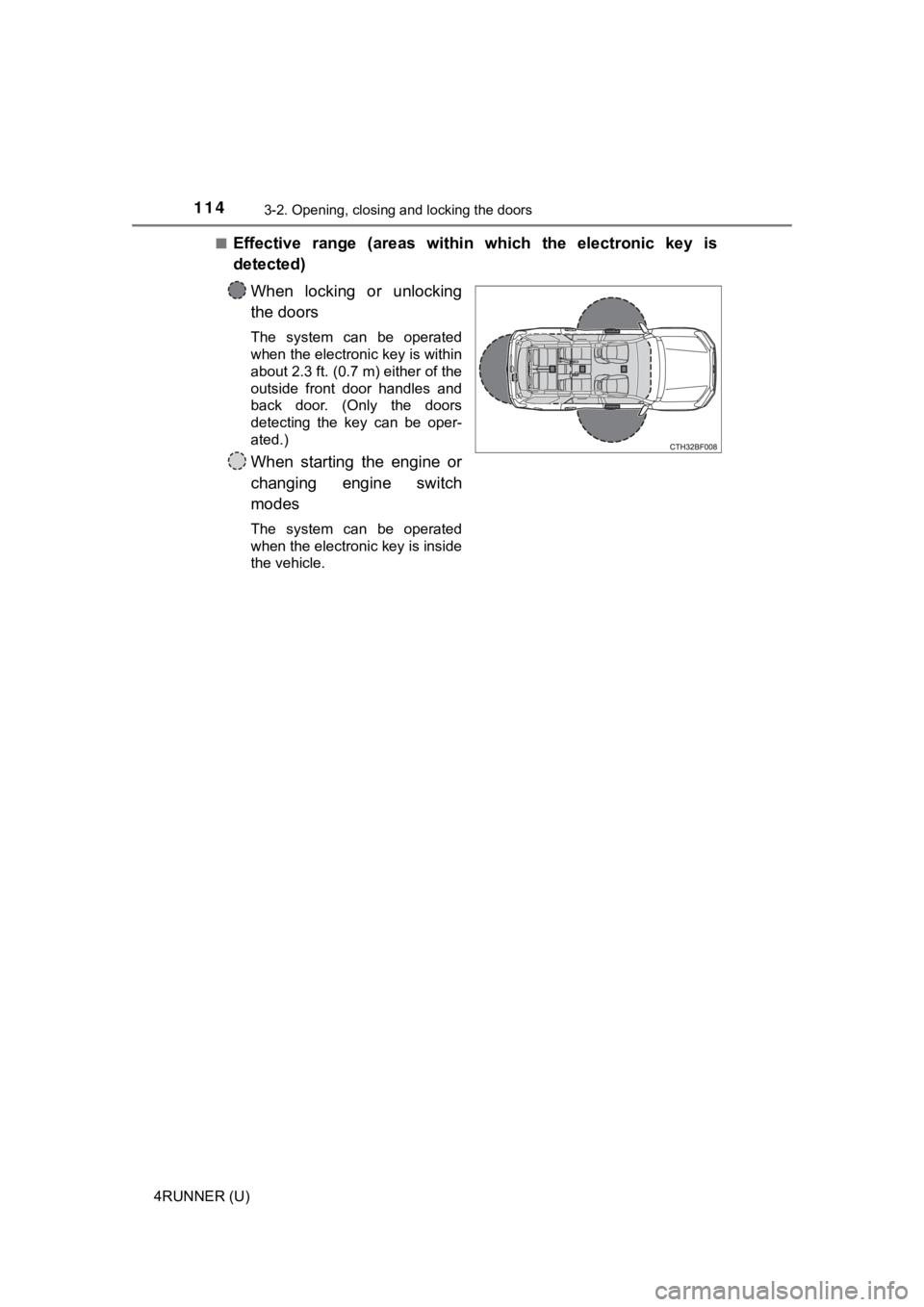
Effective range (areas within which the electronic key is
detected)
When locking or unlocking
the doors
The system can be operated
when the electronic key is within
about 2.3 ft. (0.7 m) either of the
outside front door handles and
back door. (Only the doors
detecting the key can be oper-
ated.)
When starting the engine or
changing engine switch
modes
The system can be operated
when the electronic key is inside
the vehicle.
Page 115 of 608
1153-2. Opening, closing and locking the doors
3
Operation of each component
4RUNNER (U)
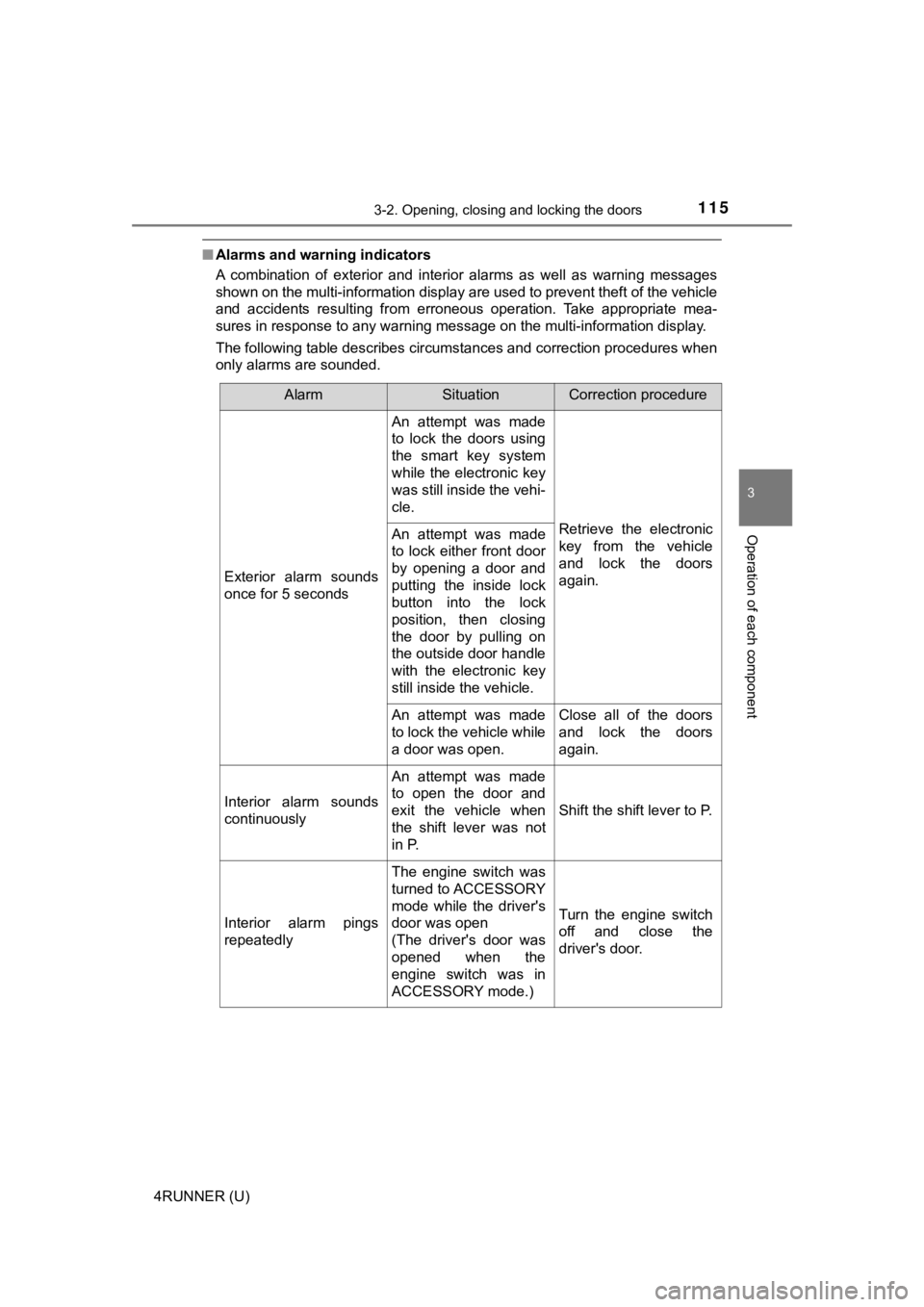
■Alarms and warning indicators
A combination of exterior and interior alarms as well as warnin g messages
shown on the multi-information display are used to prevent theft of the vehicle
and accidents resulting from erroneous operation. Take appropriate mea-
sures in response to any warning message on the multi-informati on display.
The following table describes circumstances and correction procedures when
only alarms are sounded.
AlarmSituationCorrection procedure
Exterior alarm sounds
once for 5 seconds
An attempt was made
to lock the doors using
the smart key system
while the electronic key
was still inside the vehi-
cle.
Retrieve the electronic
key from the vehicle
and lock the doors
again.An attempt was made
to lock either front door
by opening a door and
putting the inside lock
button into the lock
position, then closing
the door by pulling on
the outside door handle
with the electronic key
still inside the vehicle.
An attempt was made
to lock the vehicle while
a door was open.Close all of the doors
and lock the doors
again.
Interior alarm sounds
continuously
An attempt was made
to open the door and
exit the vehicle when
the shift lever was not
in P.
Shift the shift lever to P.
Interior alarm pings
repeatedly
The engine switch was
turned to ACCESSORY
mode while the driver's
door was open
(The driver's door was
opened when the
engine switch was in
ACCESSORY mode.)
Turn the engine switch
off and close the
driver's door.