lights TOYOTA 4RUNNER 2023 Repair Manual
[x] Cancel search | Manufacturer: TOYOTA, Model Year: 2023, Model line: 4RUNNER, Model: TOYOTA 4RUNNER 2023Pages: 608, PDF Size: 11.8 MB
Page 362 of 608
3625-2. Using the interior lights
4RUNNER (U)
■Illuminated entry system
The lights automatically turn on/off according to engine switch mode, the
presence of the electronic key, whether the doors are locked/unlocked, and
whether the doors are opened/closed.
■ To prevent battery discharge
If the following lights remain on, the lights will go off automatically after 20
minutes:
●Engine switch light
● Front interior light
● Rear interior light
● Personal lights
● Footwell lights
● Inside door handle lights
● Door courtesy lights
■ Customization
Setting (e.g. the time elapsed before lights turn off) can be c hanged.
(Customizable features: P. 549)
NOTICE
■ To prevent battery discharge
Do not leave the lights on longer than necessary when the engin e is not
running.
Page 375 of 608

375
5
Interior features
4RUNNER (U)
5-4. Other interior features
To set the visor in the forward
position, flip it down.
To set the visor in the side posi-
tion, flip down, unhook, and
swing it to the side.
To use the side extender, place
the visor in the side position,
then slide it backward.
Slide the cover to open.
The light turns on when the cover
is opened.
Other interior features
Sun visors
1
2
3
Vanity mirrors
NOTICE
■ To prevent battery discharge
Do not leave the vanity lights on for extended periods while th e engine is off.
Page 378 of 608
3785-4. Other interior features
4RUNNER (U)
■The power outlet can be used when
The engine is running.
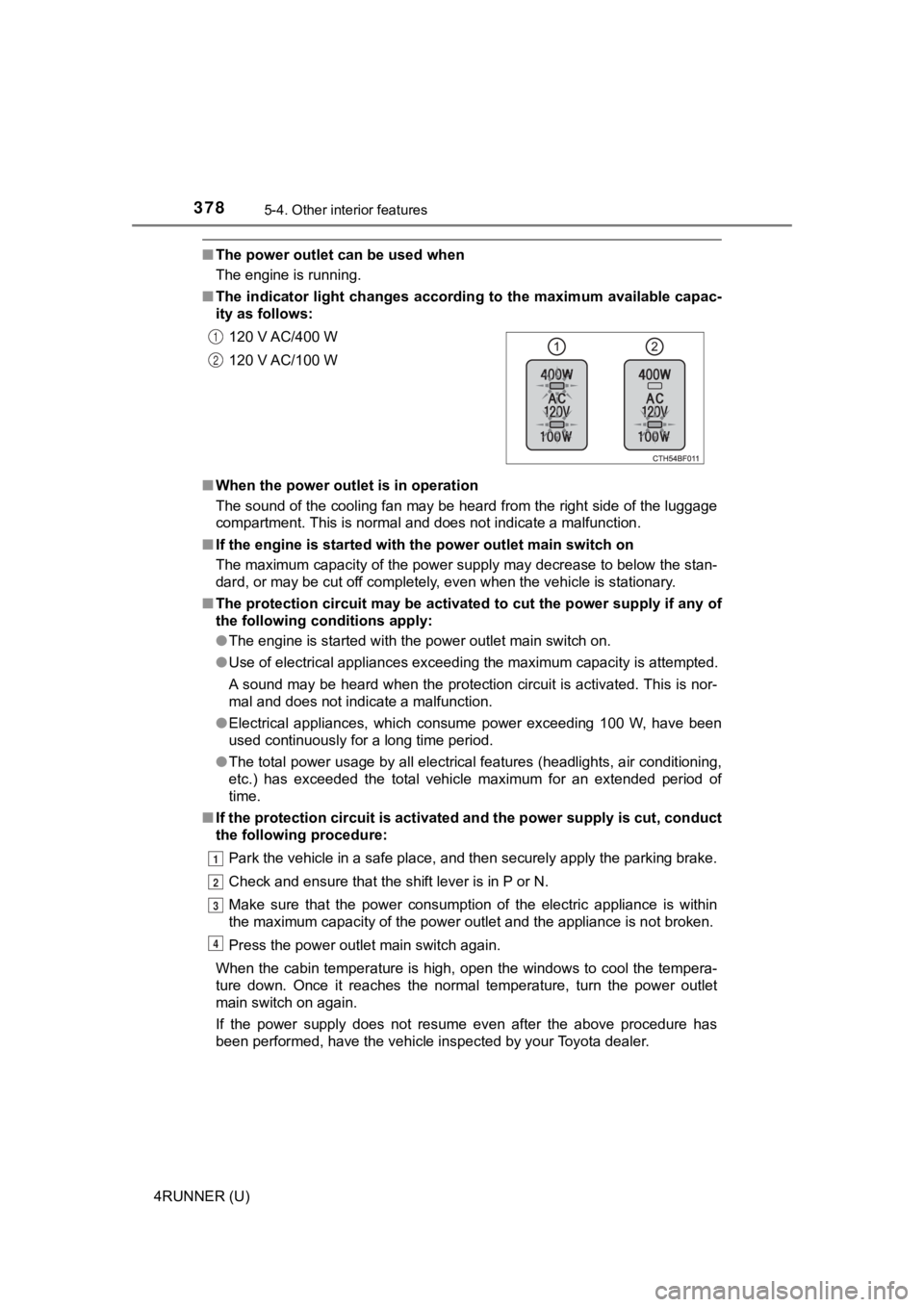
■ The indicator light changes acco rding to the maximum available capac-
ity as follows:
■ When the power outle t is in operation
The sound of the cooling fan may be heard from the right side o f the luggage
compartment. This is normal and does not indicate a malfunction .
■ If the engine is started with th e power outlet main switch on
The maximum capacity of the power supply may decrease to below the stan-
dard, or may be cut off completely, even when the vehicle is st ationary.
■ The protection circuit may be act ivated to cut the power supply if any of
the following conditions apply:
● The engine is started with the power outlet main switch on.
● Use of electrical appliances exceeding the maximum capacity is attempted.
A sound may be heard when the protection circuit is activated. This is nor-
mal and does not indicate a malfunction.
● Electrical appliances, which consume power exceeding 100 W, have been
used continuously for a long time period.
● The total power usage by all electrical features (headlights, a ir conditioning,
etc.) has exceeded the total vehicle maximum for an extended period of
time.
■ If the protection circuit is act ivated and the power supply is cut, conduct
the following procedure:
Park the vehicle in a safe place, and then securely apply the p arking brake.
Check and ensure that the shift lever is in P or N.
Make sure that the power consumption of the electric appliance is within
the maximum capacity of the power outlet and the appliance is n ot broken.
Press the power outlet main switch again.
When the cabin temperature is high, open the windows to cool th e tempera-
ture down. Once it reaches the normal temperature, turn the pow er outlet
main switch on again.
If the power supply does not resume even after the above procedure has
been performed, have the vehicle inspected by your Toyota deale r.
120 V AC/400 W
120 V AC/100 W
1
2
1
2
3
4
Page 380 of 608
3805-4. Other interior features
4RUNNER (U)
NOTICE
■To avoid damaging the power outlet and the plug
● Close the power outlet lid when not in use.
● Do not allow foreign objects or liquids to enter the power outlet, as this
may cause a short circuit.
● Do not use plug adaptors to connect too many plugs to the power outlet.
● After removing a plug, gently close the power outlet lid.
■ To prevent the fuse from being blown
Do not use a 120 V AC appliance that requires more than the maximum
capacity of the power outlet. If a 120 V AC appliance that consumes more
than the maximum capacity is used, the protection circuit will cut the power
supply.
■ Appliances that may not operate properly (120 V AC)
The following 120 V AC appliances may not operate even if their power con-
sumption is under maximum capacity.
● Appliances with high initial peak wattage
● Measuring devices that process precise data.
● Other appliances that require an extremely stable power supply
■ To prevent battery discharge
Turn off all the vehicle's electronic equipment and accessories , such as the
headlights and air conditioning, when electrical appliances tha t consume in
excess of 100 W are used continuously for long periods of time.
■ To prevent any damage caused by heat
● Do not use any electrical appliances that give off intense heat, such as
toasters, in any locations including the internal or external t rim, seats and
deck.
● Do not use any electrical appliances that are easily affected by vibration or
heat inside the vehicle. Vibration while driving, or the heat o f the sun while
parking, may result in damage to those electrical appliances.
Page 398 of 608
3986-1. Maintenance and care
4RUNNER (U)
NOTICE
■To prevent paint deterioration an d corrosion on the body and compo-
nents (aluminum wheels etc.)
● Wash the vehicle immediately in the following cases:
• After driving near the sea coast
• After driving on salted roads
• If coal tar or tree sap is present on the paint surface
• If dead insects, insect droppings or bird droppings are present on the
paint surface
• After driving in an area contaminated with soot, oily smoke, mine dust, iron powder or chemical substances
• If the vehicle becomes heavily soiled with dust or mud
• If liquids such as benzene and gasoline are spilled on the pai nt surface
● If the paint is chipped or scratched, have it repaired immediately.
● To prevent the wheels from corroding, remove any dirt and store in a place
with low humidity when storing the wheels.
■ Cleaning the exterior lights
● Wash carefully. Do not use organic substances or scrub with a h ard brush.
This may damage the surfaces of the lights.
● Do not apply wax to the surfaces of the lights.
Wax may cause damage to the lenses.
Page 406 of 608
4066-2. Maintenance
4RUNNER (U)
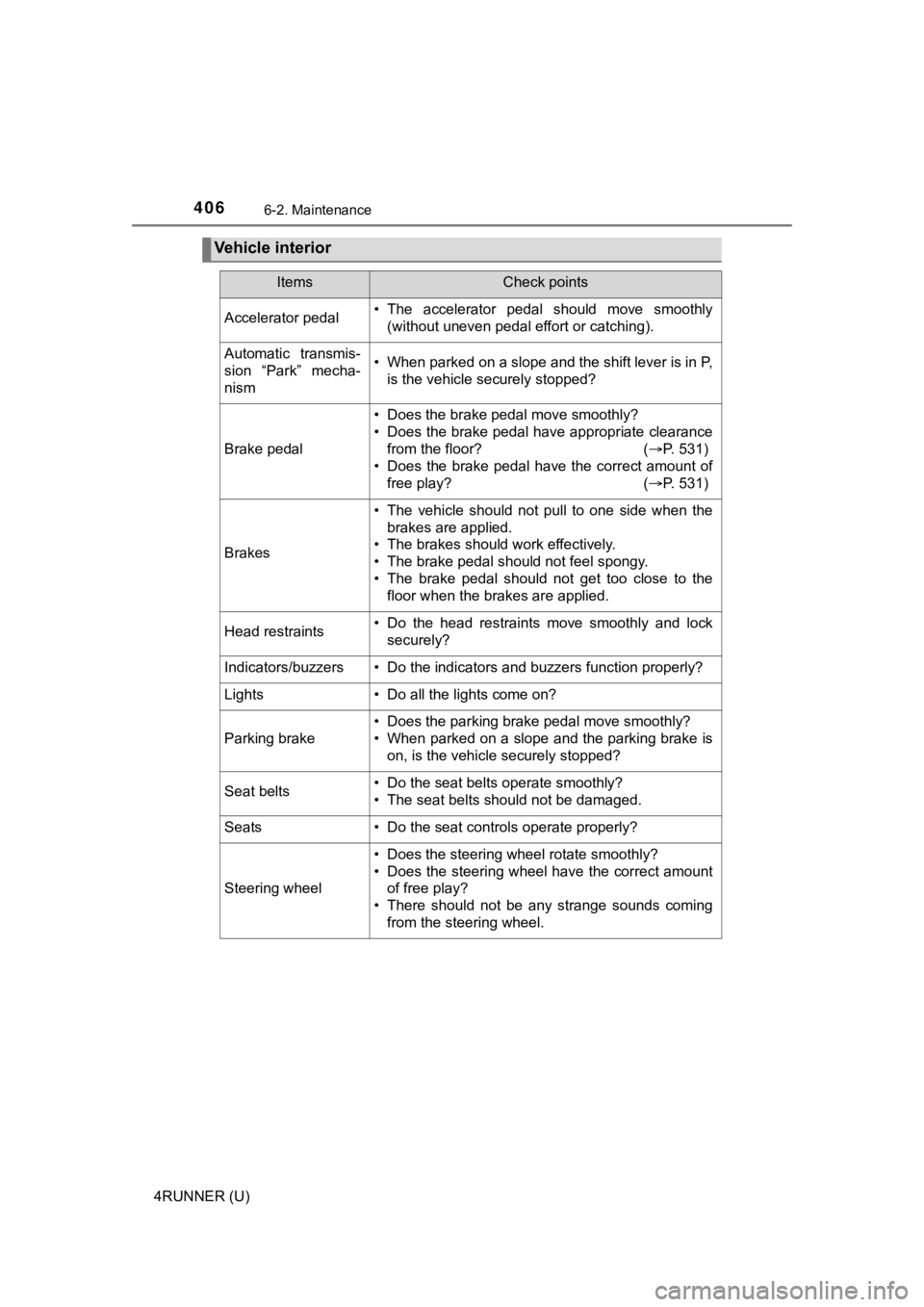
Vehicle interior
ItemsCheck points
Accelerator pedal• The accelerator pedal should move smoothly(without uneven pedal effort or catching).
Automatic transmis-
sion “Park” mecha-
nism• When parked on a slope and the shift lever is in P,is the vehicle securely stopped?
Brake pedal
• Does the brake pedal move smoothly?
• Does the brake pedal have appropriate clearancefrom the floor? ( P. 531)
• Does the brake pedal have the correct amount of
free play? ( P. 531)
Brakes
• The vehicle should not pull to one side when the
brakes are applied.
• The brakes should work effectively.
• The brake pedal should not feel spongy.
• The brake pedal should not get too close to the floor when the brakes are applied.
Head restraints• Do the head restraints move smoothly and locksecurely?
Indicators/buzzers• Do the indicators and buzzers function properly?
Lights • Do all the lights come on?
Parking brake
• Does the parking brake pedal move smoothly?
• When parked on a slope and the parking brake is
on, is the vehicle securely stopped?
Seat belts• Do the seat belts operate smoothly?
• The seat belts should not be damaged.
Seats• Do the seat controls operate properly?
Steering wheel
• Does the steering wheel rotate smoothly?
• Does the steering wheel have the correct amountof free play?
• There should not be any strange sounds coming
from the steering wheel.
Page 431 of 608
4316-3. Do-it-yourself maintenance
6
Maintenance and care
4RUNNER (U)
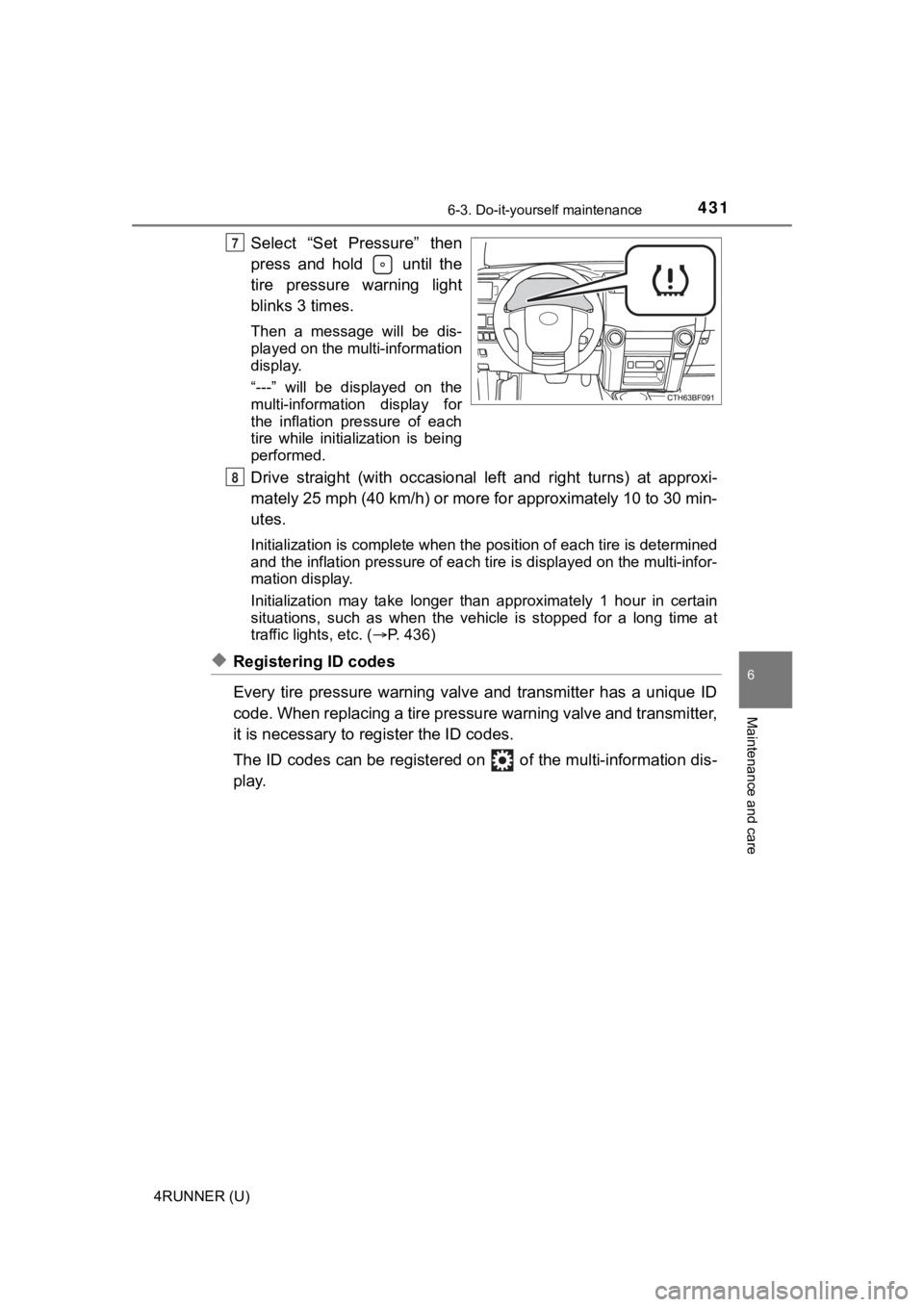
Select “Set Pressure” then
press and hold until the
tire pressure warning light
blinks 3 times.
Then a message will be dis-
played on the multi-information
display.
“---” will be displayed on the
multi-information display for
the inflation pressure of each
tire while initialization is being
performed.
Drive straight (with occasional left and right turns) at approxi-
mately 25 mph (40 km/h) or more for approximately 10 to 30 min-
utes.
Initialization is complete when the position of each tire is determined
and the inflation pressure of ea ch tire is displayed on the multi-infor-
mation display.
Initialization may ta ke longer than approximately 1 hour in cer tain
situations, such as when the veh icle is stopped for a long time at
traffic lights, etc. ( P. 436)
◆Registering ID codes
Every tire pressure warning valve and transmitter has a unique ID
code. When replacing a tire pressure warning valve and transmit ter,
it is necessary to reg ister the ID codes.
The ID codes can be registered on of the multi-information dis -
play.
7
8
Page 432 of 608
4326-3. Do-it-yourself maintenance
4RUNNER (U)■
How to register the ID codes
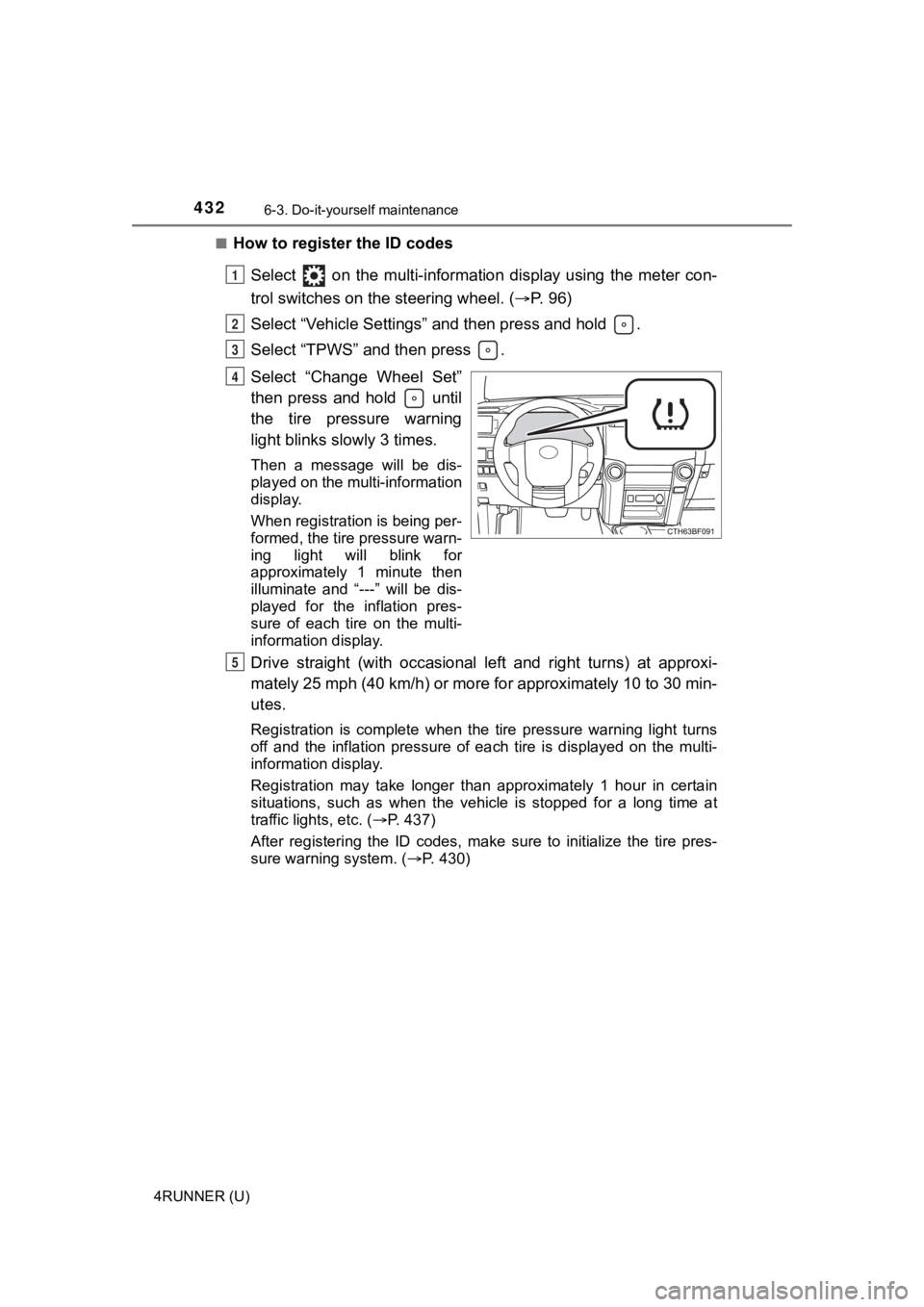
Select on the multi-information display using the meter con-
trol switches on the steering wheel. ( P. 9 6 )
Select “Vehicle Settings” and then press and hold .
Select “TPWS” and then press .
Select “Change Wheel Set”
then press and hold until
the tire pressure warning
light blinks slowly 3 times.
Then a message will be dis-
played on the multi-information
display.
When registration is being per-
formed, the tire pressure warn-
ing light will blink for
approximately 1 minute then
illuminate and “---” will be dis-
played for the inflation pres-
sure of each tire on the multi-
information display.
Drive straight (with occasional left and right turns) at approxi-
mately 25 mph (40 km/h) or more for approximately 10 to 30 min-
utes.
Registration is complete when the tire pressure warning light t urns
off and the inflation pressure of each tire is displayed on the multi-
information display.
Registration may take longer than approximately 1 hour in certain
situations, such as when the veh icle is stopped for a long time at
traffic lights, etc. ( P. 437)
After registering the ID codes, make sure to initialize the tir e pres-
sure warning system. ( P. 430)
1
2
3
4
5
Page 452 of 608
4526-3. Do-it-yourself maintenance
4RUNNER (U)
■After a fuse is replaced
●If the lights do not turn on even after the fuse has been repla ced, a bulb may
need replacement. ( P. 453)
● If the replaced fuse blows again, have the vehicle inspected by your Toyota
dealer.
■ If there is an overload in a circuit
The fuses are designed to blow, protecting the wiring harness f rom damage.
WARNING
■ To prevent system breakdowns and vehicle fire
Observe the following precautions.
Failure to do so may cause damage to the vehicle, and possibly a fire or
injury.
● Never use a fuse of a higher amperage rating than that indicated, or use
any other object in place of a fuse.
● Always use a genuine Toyota fuse or equivalent.
Never replace a fuse with a wire, even as a temporary fix.
● Do not modify the fuses or fuse boxes.
NOTICE
■Before replacing fuses
Have the cause of electrical overload determined and repaired b y your
Toyota dealer as soon as possible.
Page 455 of 608
4556-3. Do-it-yourself maintenance
6
Maintenance and care
4RUNNER (U)■
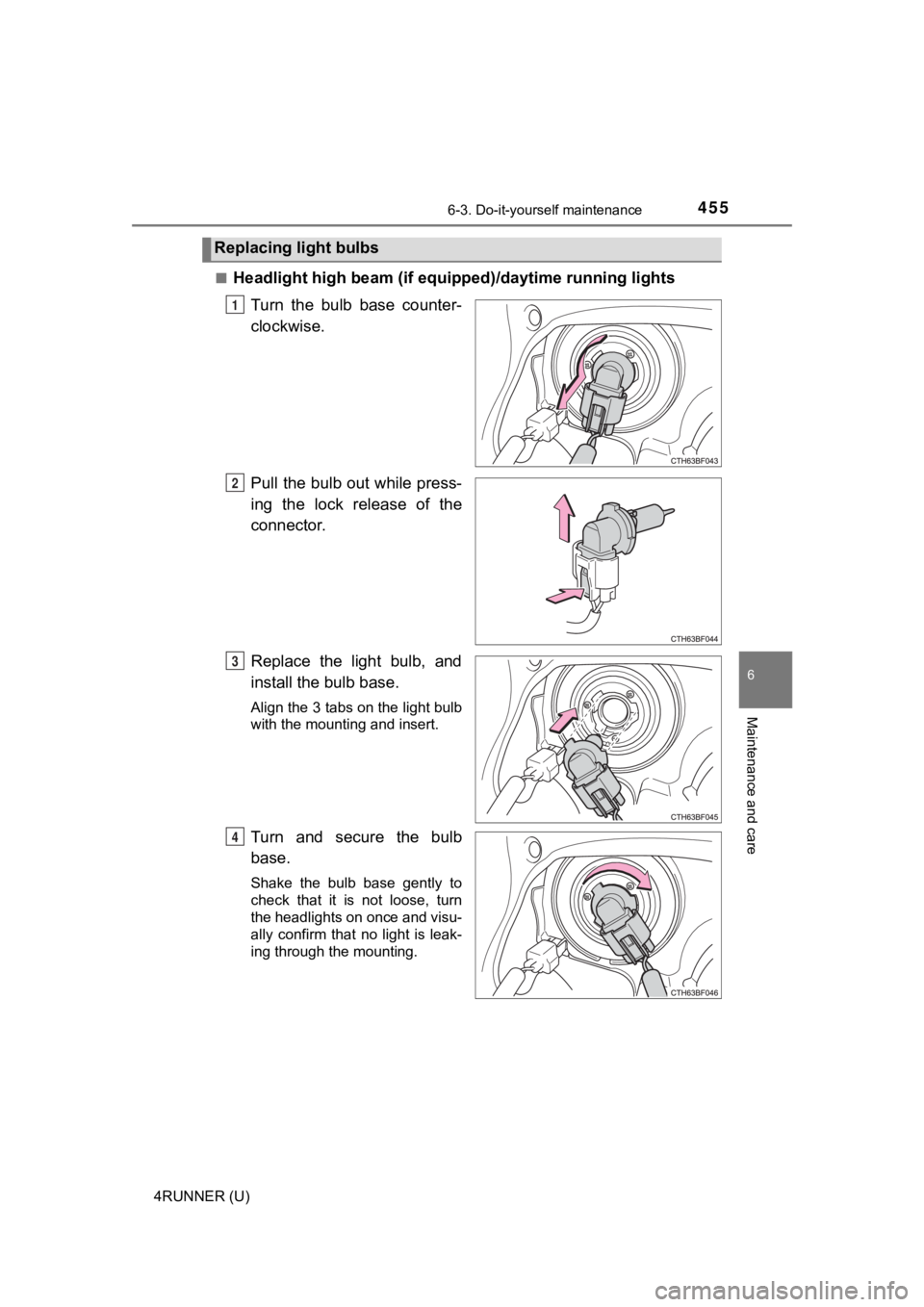
Headlight high beam (if equi
pped)/daytime running lights
Turn the bulb base counter-
clockwise.
Pull the bulb out while press-
ing the lock release of the
connector.
Replace the light bulb, and
install the bulb base.
Align the 3 tabs on the light bulb
with the mounting and insert.
Turn and secure the bulb
base.
Shake the bulb base gently to
check that it is not loose, turn
the headlights on once and visu-
ally confirm that no light is leak-
ing through the mounting.
Replacing light bulbs
1
2
3
4