wheel TOYOTA 4RUNNER 2023 Repair Manual
[x] Cancel search | Manufacturer: TOYOTA, Model Year: 2023, Model line: 4RUNNER, Model: TOYOTA 4RUNNER 2023Pages: 608, PDF Size: 11.8 MB
Page 314 of 608

3144-5. Using the driving support systems
4RUNNER (U)■
Automatic system cancelation
In the following situations, the system will cease operation an d a buzzer will
sound to alert the driver. The Cr awl Control indicator will flash until the system
is turned off completely.
● When the shift lever is shifted to P or N
● When the front-wheel drive control lever or switch is shifted to H4
● When the driver’s door is opened
● When the system is malfunctioning
● When the brake system overheats
Stop the vehicle in a safe place. (There is no problem with continuing normal
driving.)
● When the automatic transmission system overheats
Stop the vehicle in a safe place until the automatic transmission fluid tem-
perature warning light goes off.
■ Sounds and vibrations caused by the Crawl Control system
● A sound may be heard from the engine compartment when the engine is
started or just after the vehicle begins to move. This sound do es not indicate
that a malfunction has occurred in Crawl Control system.
● Either of the following conditions may occur when the Crawl Control system
is operating. None of these indicates that a malfunction has occurred.
• Vibrations may be felt through the vehicle body and steering.
• A motor sound may be heard after the vehicle comes to a stop.
■ When there is a malfunction in the system
Warning lights and/or warning messages will turn on. ( P. 477, 488)
WARNING
■When using Crawl Control
● Do not overly rely on Crawl Control. This function does not ext end the
vehicle’s performance limitations. Always check the terrain tho roughly and
drive safely.
● The recommended speed modes for the listed terrains ( P. 313) are only
a reference. The selected mode may not be suitable to actual off-road con-
ditions due to factors such as the type or unevenness of the te rrain or the
degree of incline. Check the actual terrain thoroughly and drive safely.
● After activating Crawl Control, make sure that the Crawl Control indicator
comes on. If the indicator flashes, the vehicle is not under system control.
■ Conditions under which the syst em may not operate correctly
When driving on the following surfaces, the system may not be able to
maintain a fixed low speed, which may result in an accident:
● Extremely steep inclines
● Extremely uneven surfaces
● Snow-covered roads, or other slippery surfaces
Page 317 of 608
3174-5. Using the driving support systems
4
Driving
4RUNNER (U)
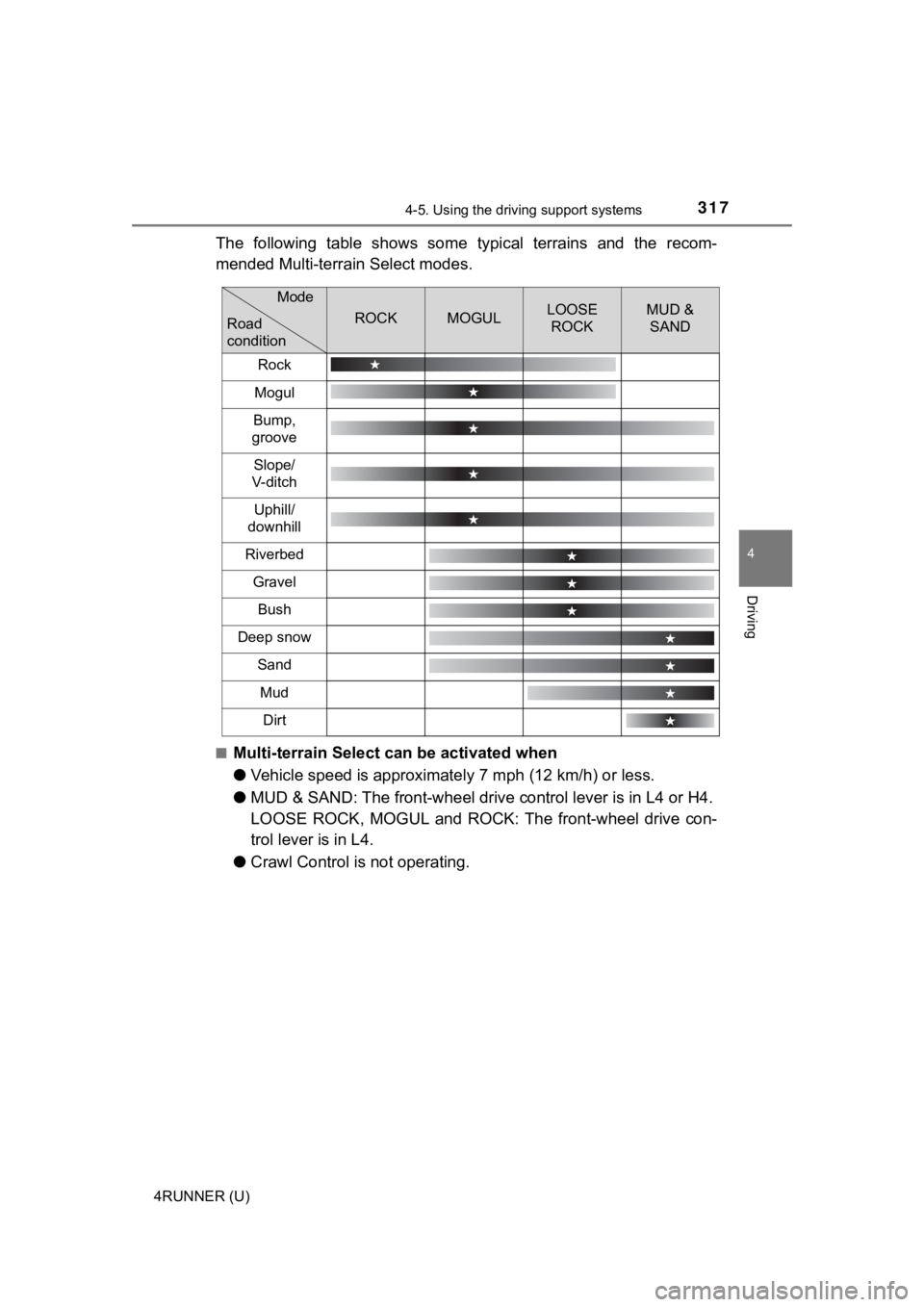
The following table shows some typical terrains and the recom-
mended Multi-terrain Select modes.
■Multi-terrain Select can be activated when
●Vehicle speed is approximatel y 7 mph (12 km/h) or less.
● MUD & SAND: The front-wheel drive control lever is in L4 or H4.
LOOSE ROCK, MOGUL and ROCK: The front-wheel drive con-
trol lever is in L4.
● Crawl Control is not operating.
ROCKMOGULLOOSE
ROCKMUD & SAND
Rock
Mogul
Bump,
groove
Slope/
V- di t c h
Uphill/
downhill
Riverbed
Gravel
Bush
Deep snow
Sand
Mud
Dirt
Mode
Road
condition
Page 319 of 608
3194-5. Using the driving support systems
4
Driving
4RUNNER (U)
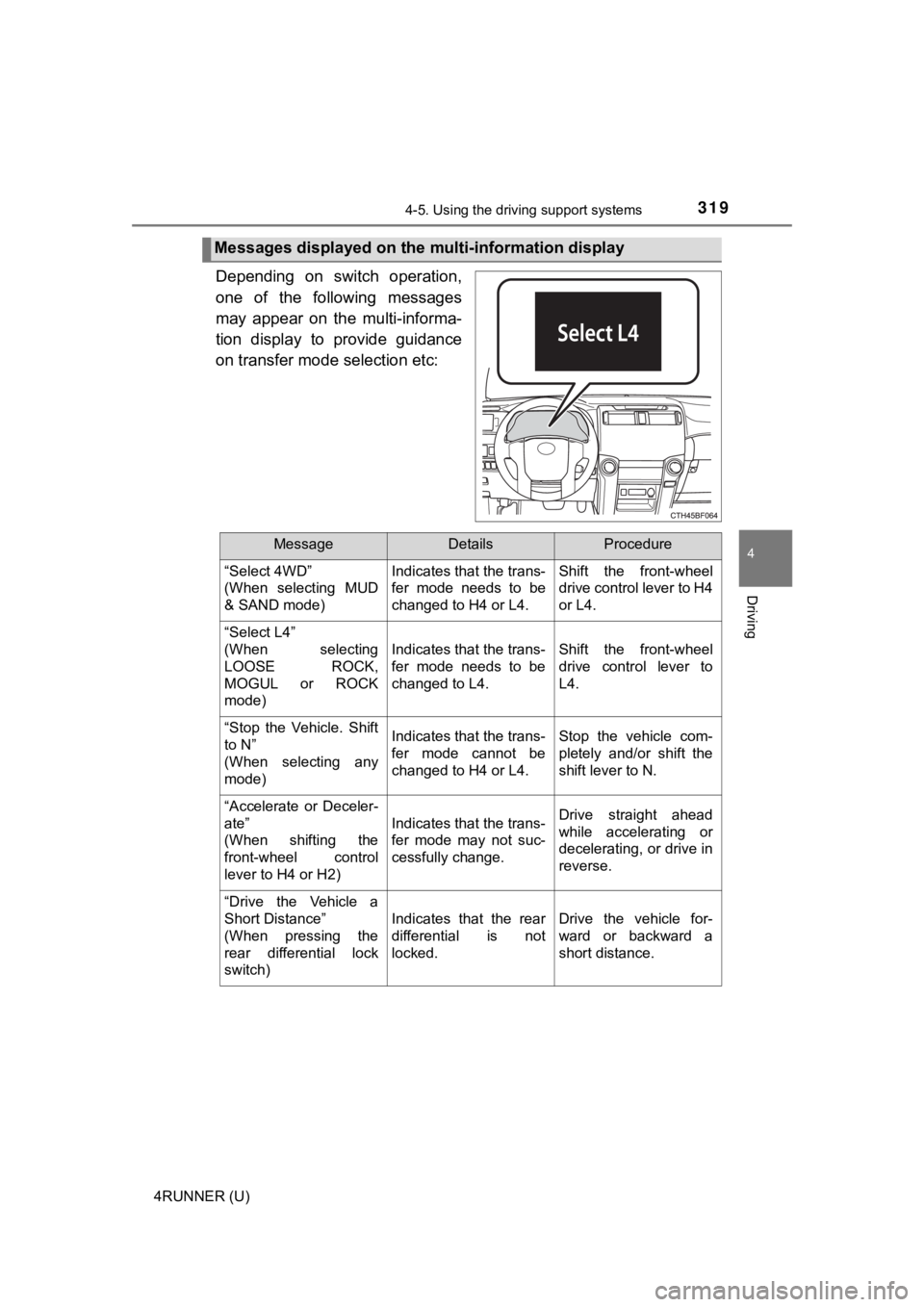
Depending on switch operation,
one of the following messages
may appear on the multi-informa-
tion display to provide guidance
on transfer mode selection etc:
Messages displayed on the multi-information display
MessageDetailsProcedure
“Select 4WD”
(When selecting MUD
& SAND mode) Indicates that the trans-
fer mode needs to be
changed to H4 or L4.Shift the front-wheel
drive control lever to H4
or L4.
“Select L4”
(When selecting
LOOSE ROCK,
MOGUL or ROCK
mode)
Indicates that the trans-
fer mode needs to be
changed to L4.Shift the front-wheel
drive control lever to
L4.
“Stop the Vehicle. Shift
to N”
(When selecting any
mode)Indicates that the trans-
fer mode cannot be
changed to H4 or L4.Stop the vehicle com-
pletely and/or shift the
shift lever to N.
“Accelerate or Deceler-
ate”
(When shifting the
front-wheel control
lever to H4 or H2)
Indicates that the trans-
fer mode may not suc-
cessfully change.Drive straight ahead
while accelerating or
decelerating, or drive in
reverse.
“Drive the Vehicle a
Short Distance”
(When pressing the
rear differential lock
switch)
Indicates that the rear
differential is not
locked.Drive the vehicle for-
ward or backward a
short distance.
Page 320 of 608
3204-5. Using the driving support systems
4RUNNER (U)
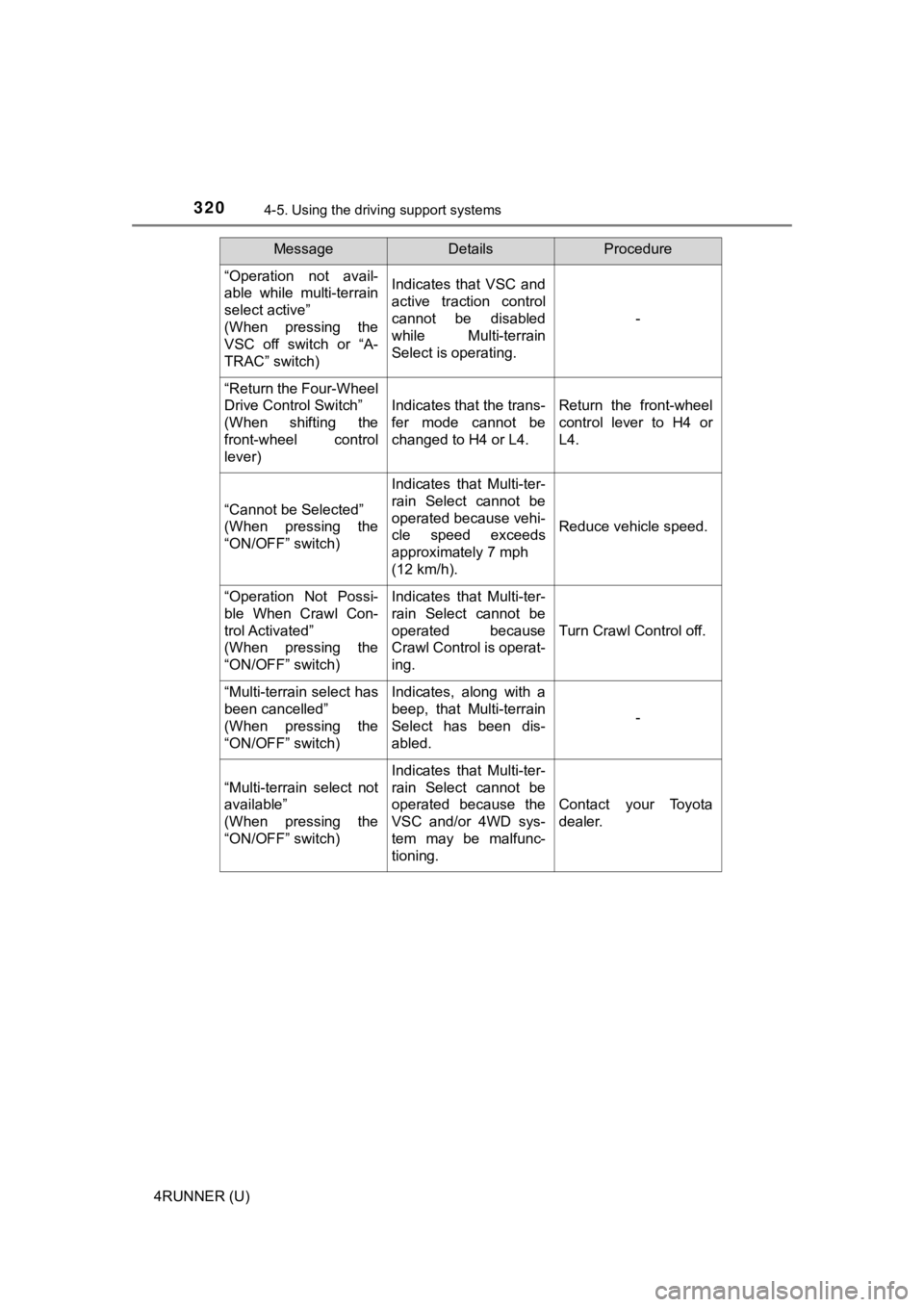
“Operation not avail-
able while multi-terrain
select active”
(When pressing the
VSC off switch or “A-
TRAC” switch)Indicates that VSC and
active traction control
cannot be disabled
while Multi-terrain
Select is operating.
-
“Return the Four-Wheel
Drive Control Switch”
(When shifting the
front-wheel control
lever)
Indicates that the trans-
fer mode cannot be
changed to H4 or L4.Return the front-wheel
control lever to H4 or
L4.
“Cannot be Selected”
(When pressing the
“ON/OFF” switch)
Indicates that Multi-ter-
rain Select cannot be
operated because vehi-
cle speed exceeds
approximately 7 mph
(12 km/h).
Reduce vehicle speed.
“Operation Not Possi-
ble When Crawl Con-
trol Activated”
(When pressing the
“ON/OFF” switch)Indicates that Multi-ter-
rain Select cannot be
operated because
Crawl Control is operat-
ing.
Turn Crawl Control off.
“Multi-terrain select has
been cancelled”
(When pressing the
“ON/OFF” switch)Indicates, along with a
beep, that Multi-terrain
Select has been dis-
abled.
-
“Multi-terrain select not
available”
(When pressing the
“ON/OFF” switch)
Indicates that Multi-ter-
rain Select cannot be
operated because the
VSC and/or 4WD sys-
tem may be malfunc-
tioning.
Contact your Toyota
dealer.
MessageDetailsProcedure
Page 321 of 608
3214-5. Using the driving support systems
4
Driving
4RUNNER (U)
■Multi-terrain Select is temporarily canceled when
The front-wheel drive control lever is shifted to H4 when Multi -terrain Select is
in ROCK, MOGUL or LOOSE ROCK mode. The mode indicator will flas h until
the lever is shifted back to L4.
■ If the Multi-terrain Select indicator continues to flash
This may indicate a malfunction in the Multi-terrain Select sys tem.
In this case, Multi-terrain Select is automatically canceled. Have your vehicle
inspected by your Toyota dealer.
■ If the Multi-terrain Select indicator goes off while Multi-terrain Select is
operating
●One of the vehicle systems related to Multi-terrain Select may be malfunc-
tioning.
Have your vehicle inspected by your Toyota dealer.
●
The brake actuator may be at risk of overheating.
A buzzer will sound, the “A-TRAC” indicator will go off and the “TRAC OFF”
indicator will come on. Stop the vehicle in a safe place. Refrain from using
Multi-terrain Select until the “A-TRAC” indicator comes back on and the
“TRAC OFF” indicator goes off. (The vehicle can still be driven, even if Multi-
terrain Select is inoperative.)
In the above cases, Multi-terrain Select is automatically canceled.
WARNING
■ Before driving
To avoid an accident, observe the precautions relating to off-road driving.
(P. 335)
■ When using Multi-terrain Select
● Do not use the Multi-terrain Select system for normal (on-road) driving.
The Multi-terrain Select system is designed for off-road use on l y.
● Do not overly rely on Multi-terrain Select. This function does not extend
the vehicle’s performance limitations. Always check the terrain thoroughly
and drive safely.
● The recommended modes for the listed terrains ( P. 316) are only a refer-
ence. The selected mode may not be suitable to actual off-road conditions
due to factors such as the type or unevenness of the terrain or the degree
of incline. Check the actual terrain thoroughly and drive safel y.
● After selecting a mode, make sure that the Multi-terrain Select indicator
and the selected mode indicator come on. If any related indicator flashes,
the vehicle is not under Multi-terrain Select control.
Page 322 of 608
3224-5. Using the driving support systems
4RUNNER (U)
◆ABS (Anti-lock Brake System)
Helps to prevent wheel lock when the brakes are applied suddenl y,
or if the brakes are applied while driving on a slippery road surface
◆Multi Terrain ABS (Anti-lock Brake System) (if equipped)
Helps to prevent wheel lock when the brakes are applied suddenl y,
or if the brakes are applied while driving on a slippery road s urface,
or in off-road conditions (such as rough roads, sand and mud)
The Multi Terrain ABS operates in synchronization with the Multi-
terrain Select.
◆Brake assist
Generates an increased level of braking force after the brake p edal
is depressed when the system de tects a panic stop situation
◆VSC (Vehicle Stability Control)
Helps the driver to control skidding when swerving suddenly or
turning on slippery road surfaces
◆Trailer Sway Control
Helps the driver to control trailer sway by selectively applying brake
pressure for individual wheels and reducing driving torque when
trailer sway is detected.
◆TRAC (Traction Control)
Helps to maintain drive power and prevent the drive wheels from
spinning when starting the vehicl e or accelerating on slippery roads
Driving assist systems
To keep driving safety and perf ormance, the following systems
operate automatically in respon se to various driving situations.
Be aware, however, that these systems are supplementary and
should not be relied upon too heav ily when operating the vehi-
cle.
Page 324 of 608
3244-5. Using the driving support systems
4RUNNER (U)
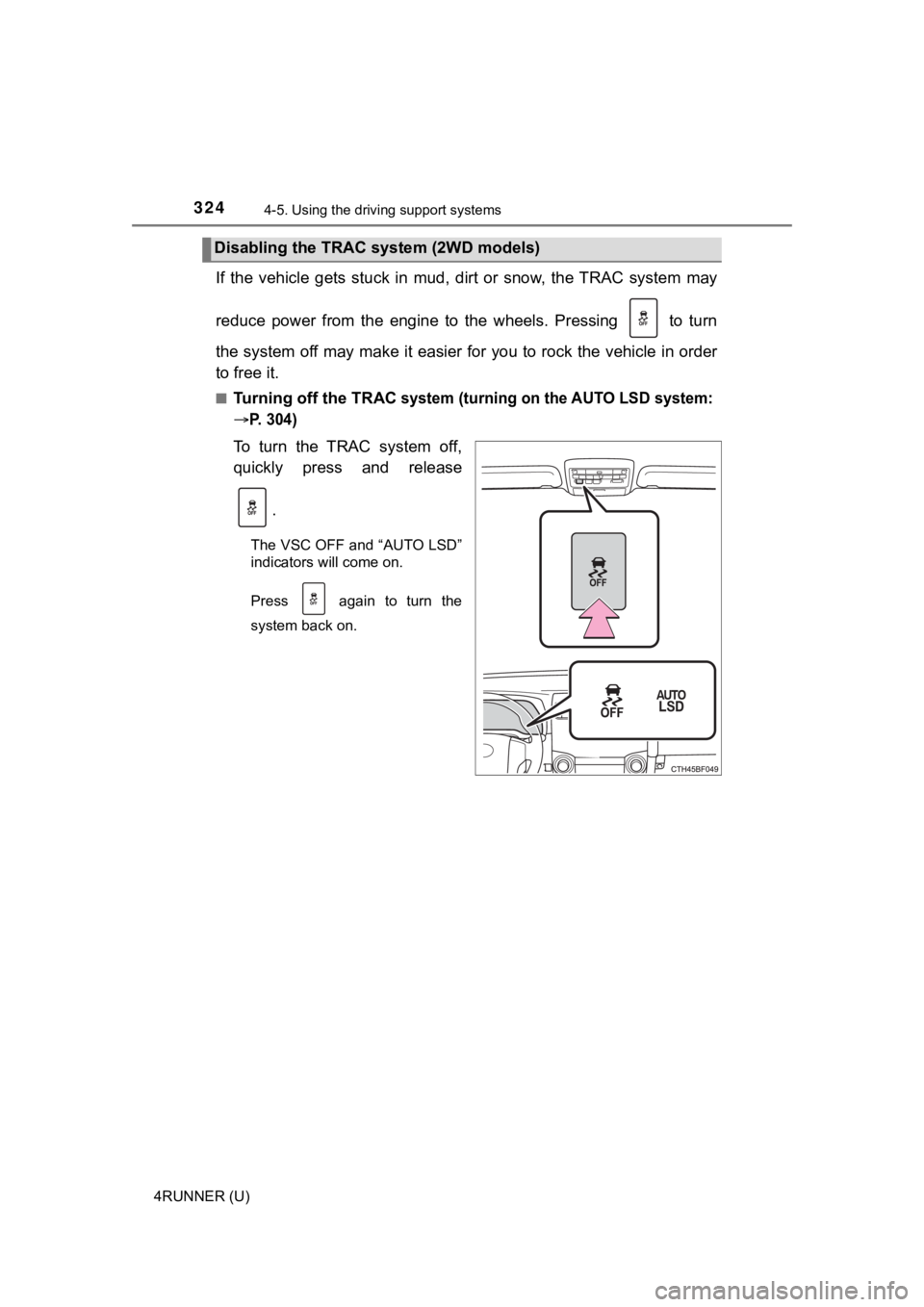
If the vehicle gets stuck in mud, dirt or snow, the TRAC system may
reduce power from the engine to the wheels. Pressing to turn
the system off may make it easier for you to rock the vehicle i n order
to free it.
■Turning off the TRAC system (turning on the AUTO LSD system:
P. 304)
To turn the TRAC system off,
quickly press and release
.
The VSC OFF and “AUTO LSD”
indicators will come on.
Press again to turn the
system back on.
Disabling the TRAC system (2WD models)
Page 325 of 608
3254-5. Using the driving support systems
4
Driving
4RUNNER (U)■
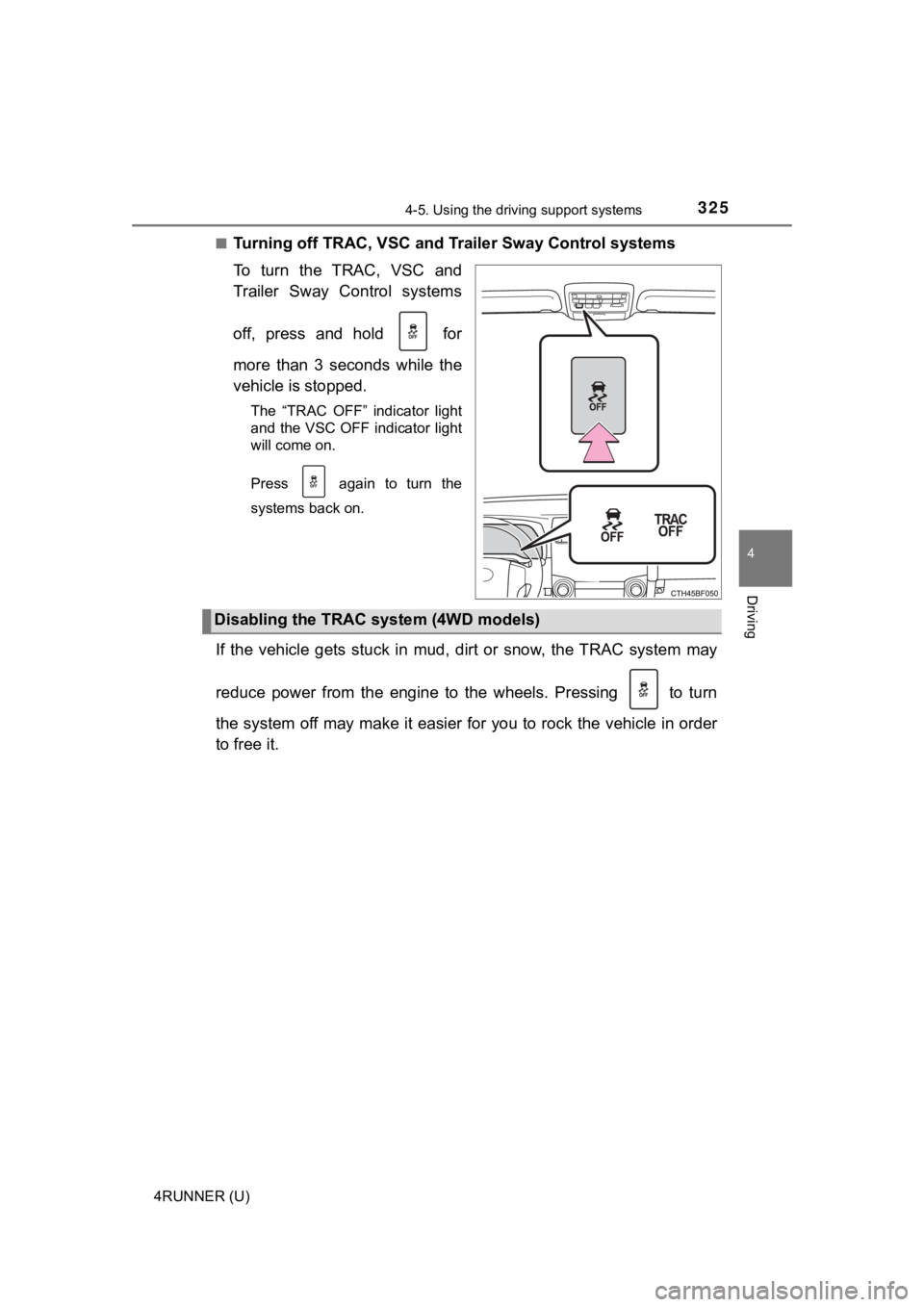
Turning off TRAC, VSC and Tr
ailer Sway Control systems
To turn the TRAC, VSC and
Trailer Sway Control systems
off, press and hold for
more than 3 seconds while the
vehicle is stopped.
The “TRAC OFF” indicator light
and the VSC OFF indicator light
will come on.
Press again to turn the
systems back on.
If the vehicle gets stuck in mud, dirt or snow, the TRAC system may
reduce power from the engine to the wheels. Pressing to turn
the system off may make it easier for you to rock the vehicle i n order
to free it.
Disabling the TRAC system (4WD models)
Page 330 of 608

3304-5. Using the driving support systems
4RUNNER (U)
WARNING
■When the TRAC/VSC/Trailer Sway Control is activated
The slip indicator light flashes. Always drive carefully.
Reckless driving may cause an accident. Exercise particular car e when the
indicator light flashes.
■ When TRAC/VSC/Trailer Sway Control systems are turned off
Be especially careful and drive at a speed appropriate to the r oad condi-
tions. As these are systems to help ensure vehicle stability and driving
force, do not turn the TRAC/VSC/Trailer Sway Control systems off unless
necessary.
■ Replacing tires
Make sure that all tires are of the specified size, brand, trea d pattern and
total load capacity. In addition, make sure that the tires are inflated to the
recommended tire inflation pressure level.
The ABS, Multi Terrain ABS, TRAC, VSC and Trailer Sway Control will not
function correctly if different tires are installed on the vehi cle.
Contact your Toyota dealer for further information when replaci ng tires or
wheels.
■ Handling of tires and the suspension
Using tires with any kind of problem or modifying the suspensio n will affect
the driving assist systems, and may cause a system to malfunction.
■ Trailer Sway Control precaution
The Trailer Sway Control system is not able to reduce trailer sway in all situ-
ations.
Depending on many factors such as the conditions of the vehicle, trailer,
road surface and driving environment, the Trailer Sway Control system may
not be effective. Refer to your trailer owner’s manual for info rmation on how
to tow your trailer properly.
■ If trailer sway occurs
Observe the following precautions.
Failing to do so may cause death or serious injury.
● Firmly grip the steering wheel. Steer straight ahead.
Do not try to control trailer sway by turning the steering whee l.
● Begin releasing the accelerator pedal immediately but very grad ually to
reduce speed.
Do not increase speed. Do not apply vehicle brakes.
If you make no extreme correction with the steering or brakes, your vehicle
and trailer should stabilize. ( P. 195)
Page 332 of 608
3324-6. Driving tips
4RUNNER (U)
Perform the following according to the driving conditions:
● Do not try to forcibly open a window or move a wiper that is fr ozen.
Pour warm water over the frozen area to melt the ice. Wipe away
the water immediately to p revent it from freezing.
● To ensure proper operation of the climate control system fan,
remove any snow that has accumulated on the air inlet vents in
front of the windshield.
● Check for and remove any excess ic e or snow that may have accu-
mulated on the exterior lights, vehicle’s roof, chassis, around the
tires or on the brakes.
● Remove any snow or mud from the bottom of your shoes before
getting in the vehicle.
Accelerate the vehicle slowly, keep a safe distance between you and
the vehicle ahead, and drive at a reduced speed suitable to roa d con-
ditions.
● Park the vehicle and move the shift lever to P without setting the
parking brake. The parking brake may freeze up, preventing it from
being released. If the vehicle is parked without setting the pa rking
brake, make sure t o block the wheels.
Failure to do so may be dangerou s because it may cause the vehi-
cle to move unexpectedly, pos sibly leading to an accident.
● If the vehicle is parked without setting the parking brake, confirm
that the shift lever c annot be moved out of P
*.
*: The shift lever will be locked if it is attempted to be shifte d from P to any
other position without depressing the brake pedal. If the shift lever can be
shifted from P, there may be a problem with the shift lock syst em. Have the
vehicle inspected by your Toyota dealer immediately.
Before driving the vehicle
When driving the vehicle
When parking the vehicle