remote control TOYOTA 4RUNNER 2023 Owners Manual
[x] Cancel search | Manufacturer: TOYOTA, Model Year: 2023, Model line: 4RUNNER, Model: TOYOTA 4RUNNER 2023Pages: 608, PDF Size: 11.8 MB
Page 22 of 608
22Pictorial index
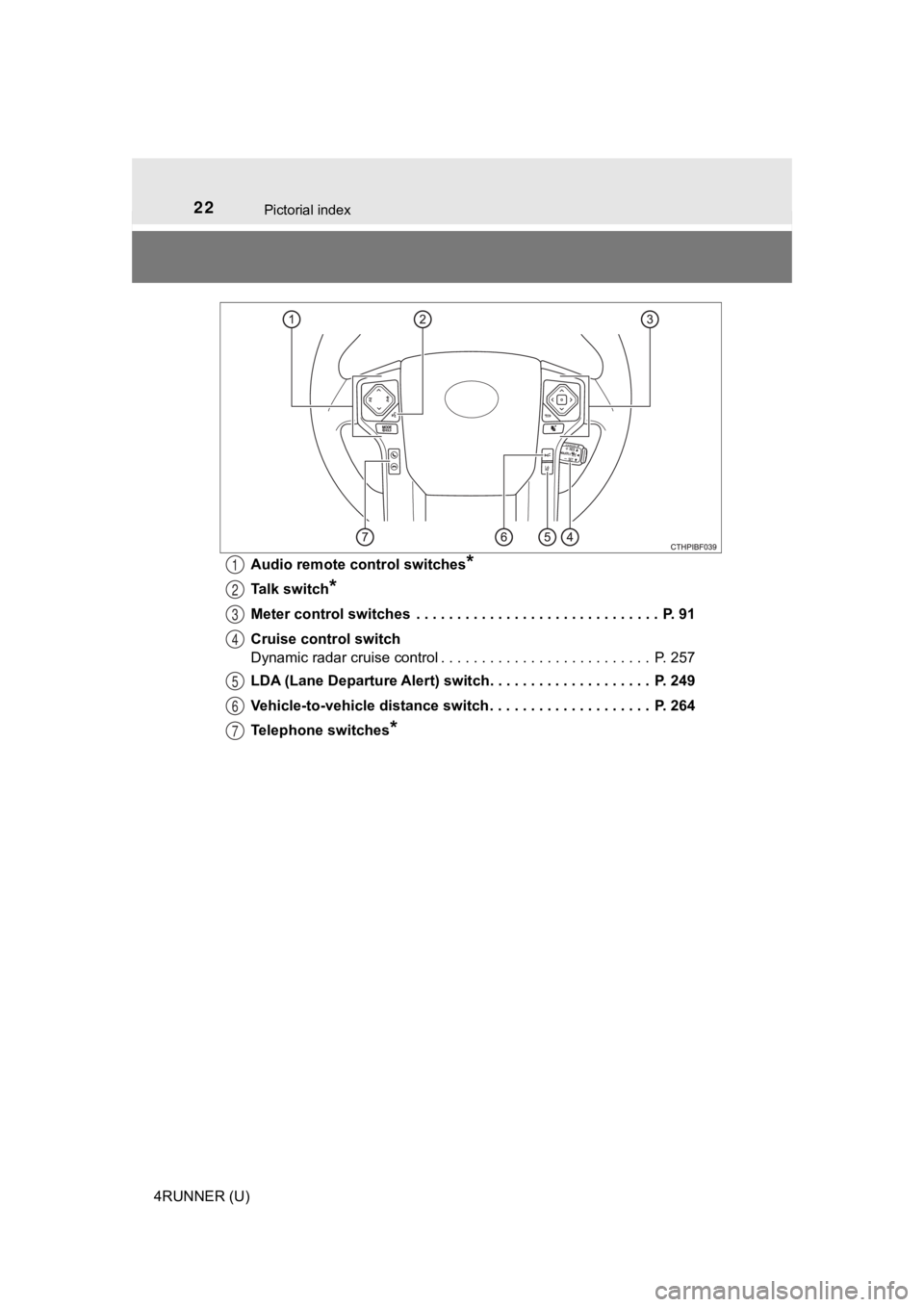
4RUNNER (U)Audio remote control switches
*
Talk switch*
Meter control switches . . . . . . . . . . . . . . . . . . . . . . . . . . . . . . P. 91
Cruise control switch
Dynamic radar cruise control . . . . . . . . . . . . . . . . . . . . . . . . . . P. 257
LDA (Lane Departure Alert) switch. . . . . . . . . . . . . . . . . . . . P. 249
Vehicle-to-vehicle distance switch . . . . . . . . . . . . . . . . . . . . P. 264
Telephone switches
*
1
2
3
4
5
6
7
Page 79 of 608
791-3. Theft deterrent system
1
For safety and security
4RUNNER (U)
The alarm uses light and sound to give an alert when an intrusion is
detected.
The alarm is triggered in the following situations when the ala rm is
set:
● A locked door is unlocked or opened in any way other than using
the entry function, wireless remote control or mechanical key. (The
doors will lock aga in automatically.)
● The hood is opened.
● The battery is reconnected.
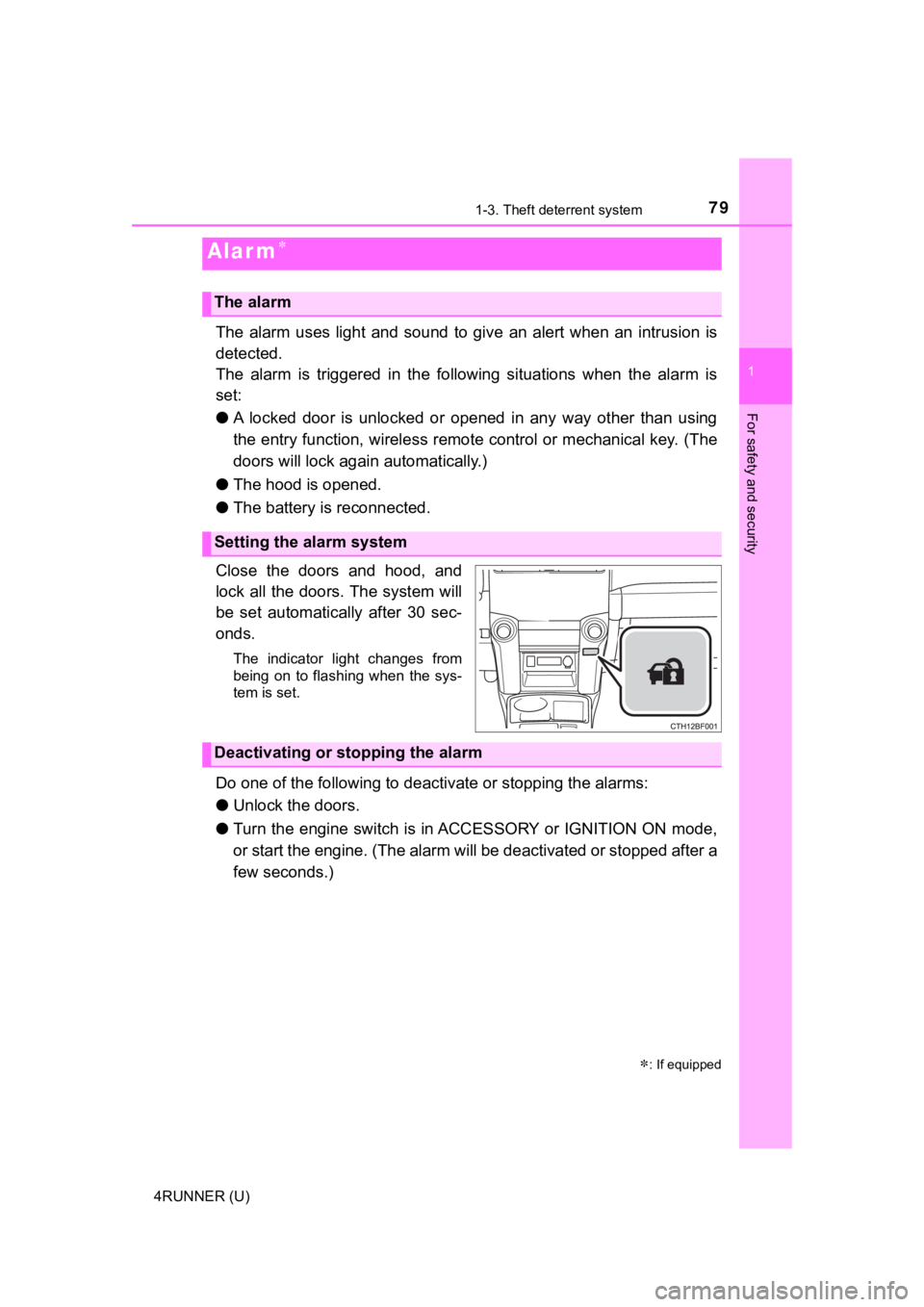
Close the doors and hood, and
lock all the doors. The system will
be set automatically after 30 sec-
onds.
The indicator light changes from
being on to flashing when the sys-
tem is set.
Do one of the following to deac tivate or stopping the alarms:
● Unlock the doors.
● Turn the engine switch is in ACCESSORY or IGNITION ON mode,
or start the engine. (The alarm will be deactivated or stopped after a
few seconds.)
Alar m
: If equipped
The alarm
Setting the alarm system
Deactivating or stopping the alarm
Page 102 of 608
102
4RUNNER (U)
3-1. Key information
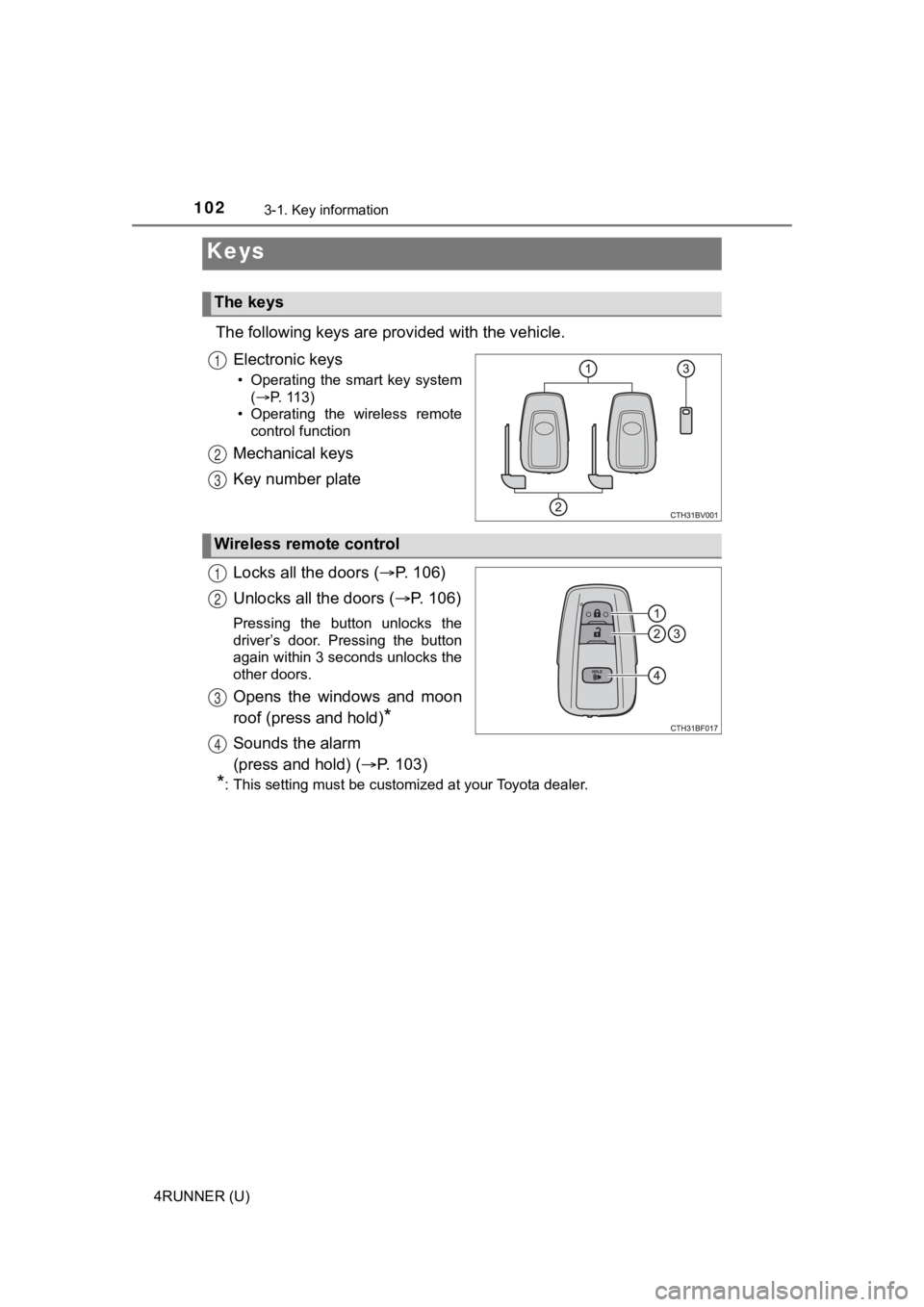
The following keys are provided with the vehicle.
Electronic keys
• Operating the smart key system (P. 113)
• Operating the wireless remote control function
Mechanical keys
Key number plate
Locks all the doors ( P. 1 0 6 )
Unlocks all the doors ( P. 1 0 6 )
Pressing the button unlocks the
driver’s door. Pressing the button
again within 3 seconds unlocks the
other doors.
Opens the windows and moon
roof (press and hold)
*
Sounds the alarm
(press and hold) ( P. 103)
*: This setting must be customized at your Toyota dealer.
Keys
The keys
1
2
3
Wireless remote control
1
2
3
4
Page 103 of 608
1033-1. Key information
3
Operation of each component
4RUNNER (U)
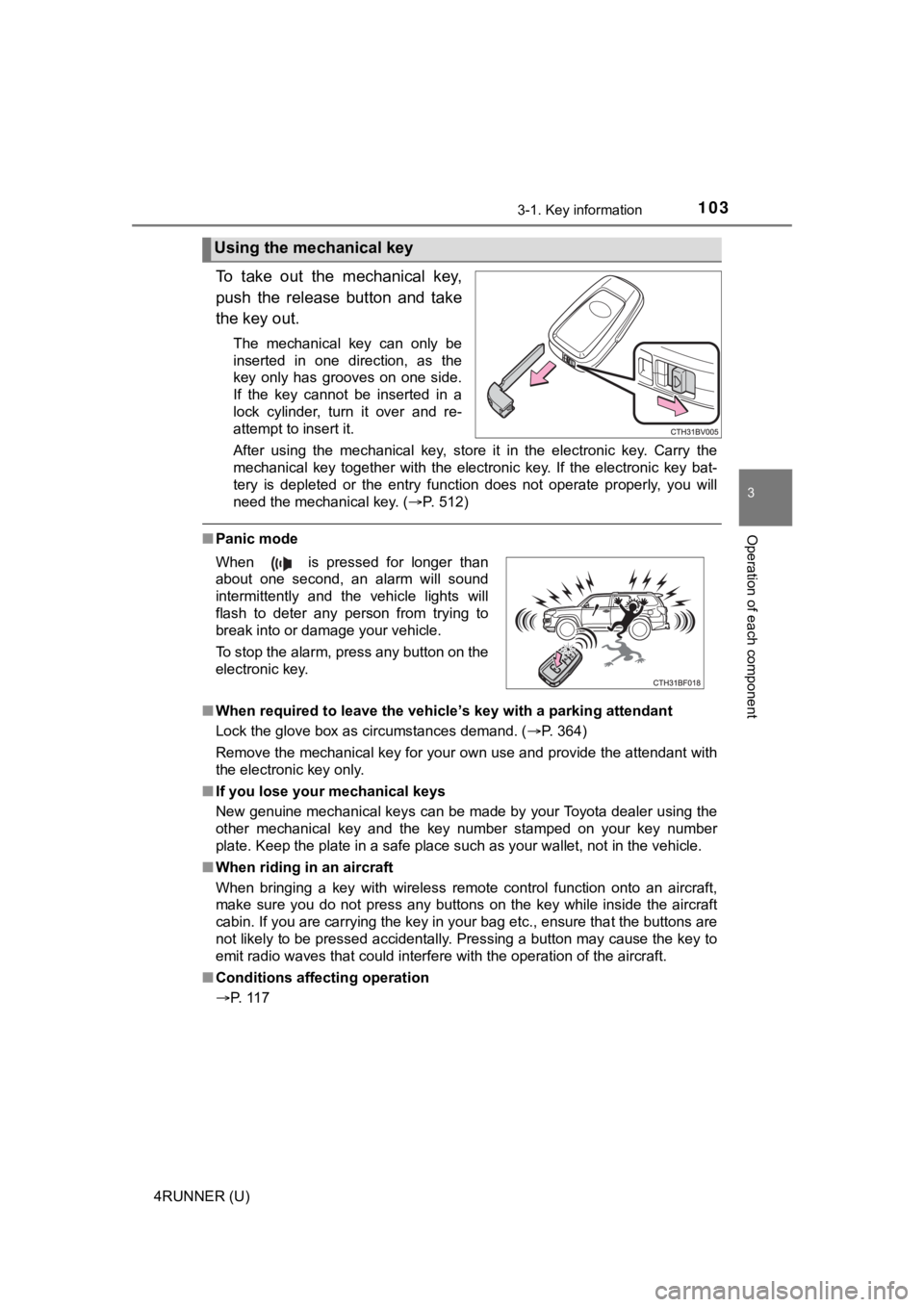
To take out the mechanical key,
push the release button and take
the key out.
The mechanical key can only be
inserted in one direction, as the
key only has grooves on one side.
If the key cannot be inserted in a
lock cylinder, turn it over and re-
attempt to insert it.
After using the mechanical key, store it in the electronic key. Carry the
mechanical key together with the electronic key. If the electro nic key bat-
tery is depleted or the entry function does not operate properl y, you will
need the mechanical key. ( P. 512)
■Panic mode
■ When required to leave the vehicle’s key with a parking attendant
Lock the glove box as circumstances demand. ( P. 364)
Remove the mechanical key for your own use and provide the attendant with
the electronic key only.
■ If you lose your mechanical keys
New genuine mechanical keys can be made by your Toyota dealer u sing the
other mechanical key and the key number stamped on your key num ber
plate. Keep the plate in a safe place such as your wallet, not in the vehicle.
■ When riding in an aircraft
When bringing a key with wireless remote control function onto an aircraft,
make sure you do not press any buttons on the key while inside the aircraft
cabin. If you are carrying the key in your bag etc., ensure tha t the buttons are
not likely to be pressed accidentally. Pressing a button may cause the key to
emit radio waves that could interfere with the operation of the aircraft.
■ Conditions affecting operation
P. 117
Using the mechanical key
When is pressed for longer than
about one second, an alarm will sound
intermittently and the vehicle lights will
flash to deter any person from trying to
break into or damage your vehicle.
To stop the alarm, press any button on the
electronic key.
Page 104 of 608
1043-1. Key information
4RUNNER (U)■
Key battery depletion
●The standard battery life is 1 to 2 years.
● If the battery becomes low, an alarm will sound in the cabin wh en the engine
stops.
● As the electronic key always receives radio waves, the battery will become
depleted even if the electronic key is not used. The following symptoms indi-
cate that the electronic key battery may be depleted. Replace the battery
when necessary. ( P. 447)
• The smart key system or the wireless remote control does not o perate.
• The detection area becomes smaller.
• The LED indicator on the key surface does not turn on.
● To avoid serious deterioration, do not leave the electronic key within 3 ft. (1
m) of the following electrical appliances that produce a magnet ic field:
•TVs
• Personal computers
• Cellular phones, cordless phones and battery chargers
• Recharging cellular phones or cordless phones
• Table lamps
• Induction cookers
■ Precautions when disconnecting the battery
●In some cases, it may not be possible to unlock the doors using the smart
key system immediately after the battery has been disconnected. Use the
wireless remote control or the mechanical key to lock or unlock the doors.
● The engine may not start on the first attempt after reconnectin g the battery
but will start normally after the second attempt. This is not a malfunction.
● The engine switch mode is memorized by the vehicle. When the ba ttery is
reconnected, the system will return to the mode it was in befor e the battery
was disconnected. Before disconnecting the battery, turn the en gine switch
off.
If you are unsure what mode the engine switch was in when the b attery was
disconnected, be especially careful when reconnecting the batte ry.
■ Replacing the battery
P. 447
■ Confirmation of the registered key number
The number of keys already registered to the vehicle can be confirmed. Ask
your Toyota dealer for details.
■ If a wrong key is used
The key cylinder rotates freely to isolate inside mechanism.
Page 106 of 608
1063-1. Key information
4RUNNER (U)
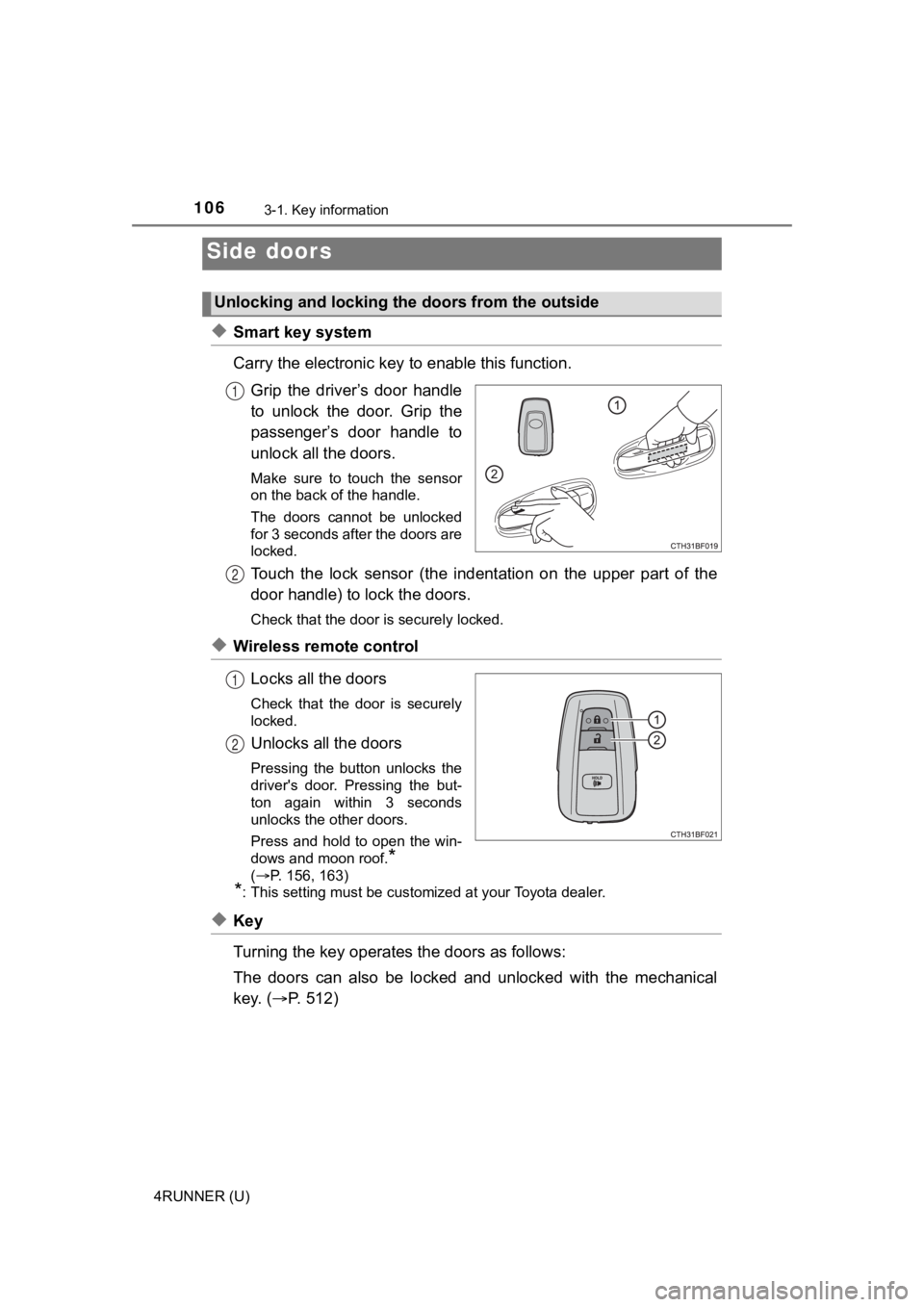
◆Smart key system
Carry the electronic key to enable this function.
Grip the driver’s door handle
to unlock the door. Grip the
passenger’s door handle to
unlock all the doors.
Make sure to touch the sensor
on the back of the handle.
The doors cannot be unlocked
for 3 seconds after the doors are
locked.
Touch the lock sensor (the indent ation on the upper part of the
door handle) to lock the doors.
Check that the door is securely locked.
◆Wireless remote control
Locks all the doors
Check that the door is securely
locked.
Unlocks all the doors
Pressing the button unlocks the
driver's door. Pressing the but-
ton again within 3 seconds
unlocks the other doors.
Press and hold to open the win-
dows and moon roof.
*
( P. 156, 163)
*: This setting must be customized at your Toyota dealer.
◆Key
Turning the key operates the doors as follows:
The doors can also be locked and unlocked with the mechanical
key. ( P. 5 1 2 )
Side doors
Unlocking and locking the doors from the outside
1
2
1
2
Page 107 of 608
1073-1. Key information
3
Operation of each component
4RUNNER (U)
■Operation signals
A buzzer sounds and the emergency flashers flash to indicate th at the doors
have been locked/unlocked. (Locked: once; Unlocked: twice)
■ Security feature
If a door is not opened within approximately 60 seconds after t he vehicle is
unlocked, the security feature automatically locks the vehicle again. (How-
ever, depending on the location of the electronic key, the key may be
detected as being in the vehicle. In this case, vehicle may be unlocked.)
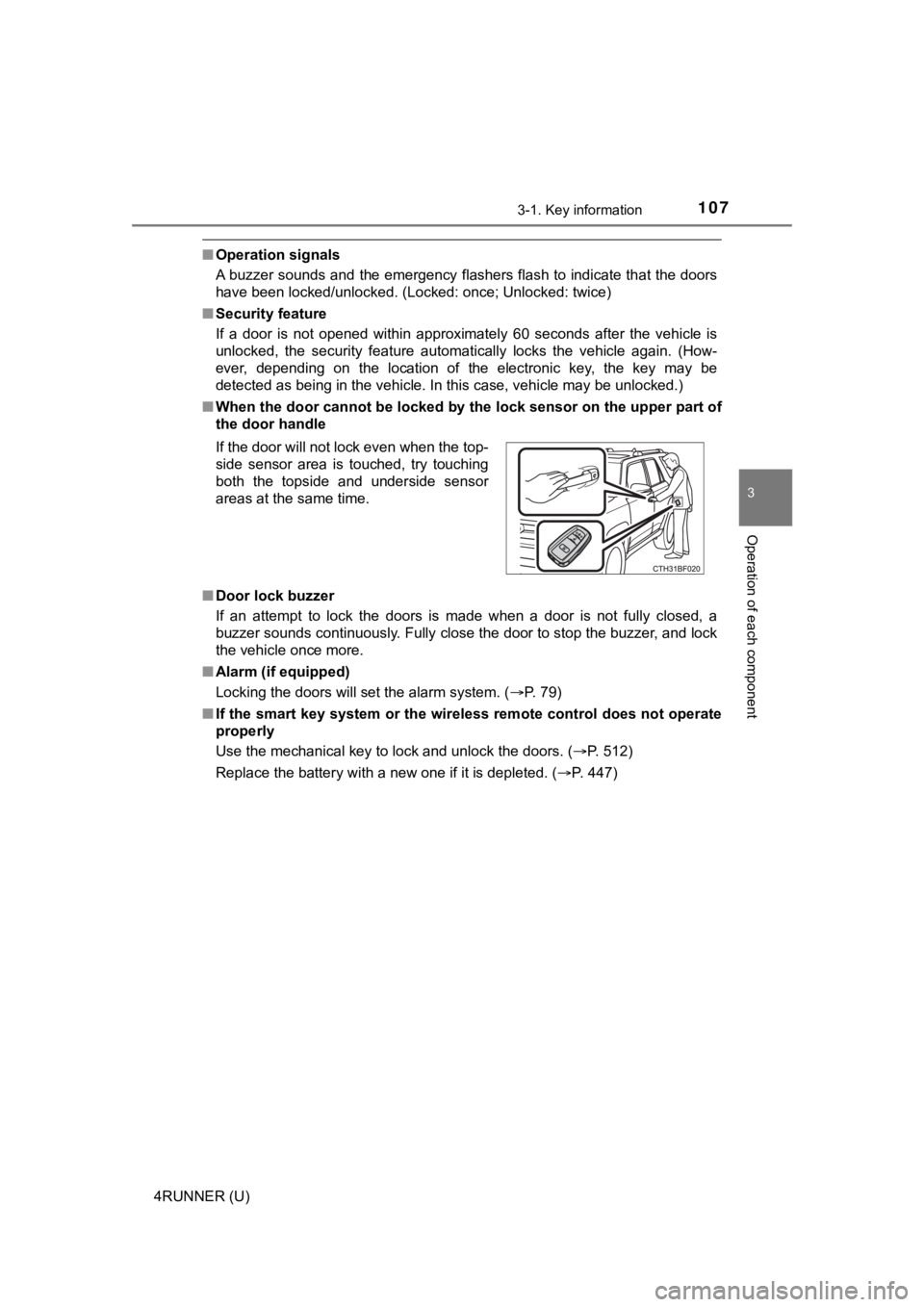
■ When the door cannot be locked by the lock sensor on the upper part of
the door handle
■ Door lock buzzer
If an attempt to lock the doors is made when a door is not full y closed, a
buzzer sounds continuously. Fully close the door to stop the bu zzer, and lock
the vehicle once more.
■ Alarm (if equipped)
Locking the doors will set the alarm system. ( P. 79)
■ If the smart key system or the wireless remote control does not operate
properly
Use the mechanical key to lock and unlock the doors. ( P. 512)
Replace the battery with a new one if it is depleted. ( P. 447)
If the door will not lock even when the top-
side sensor area is touched, try touching
both the topside and underside sensor
areas at the same time.
Page 111 of 608
1113-1. Key information
3
Operation of each component
4RUNNER (U)
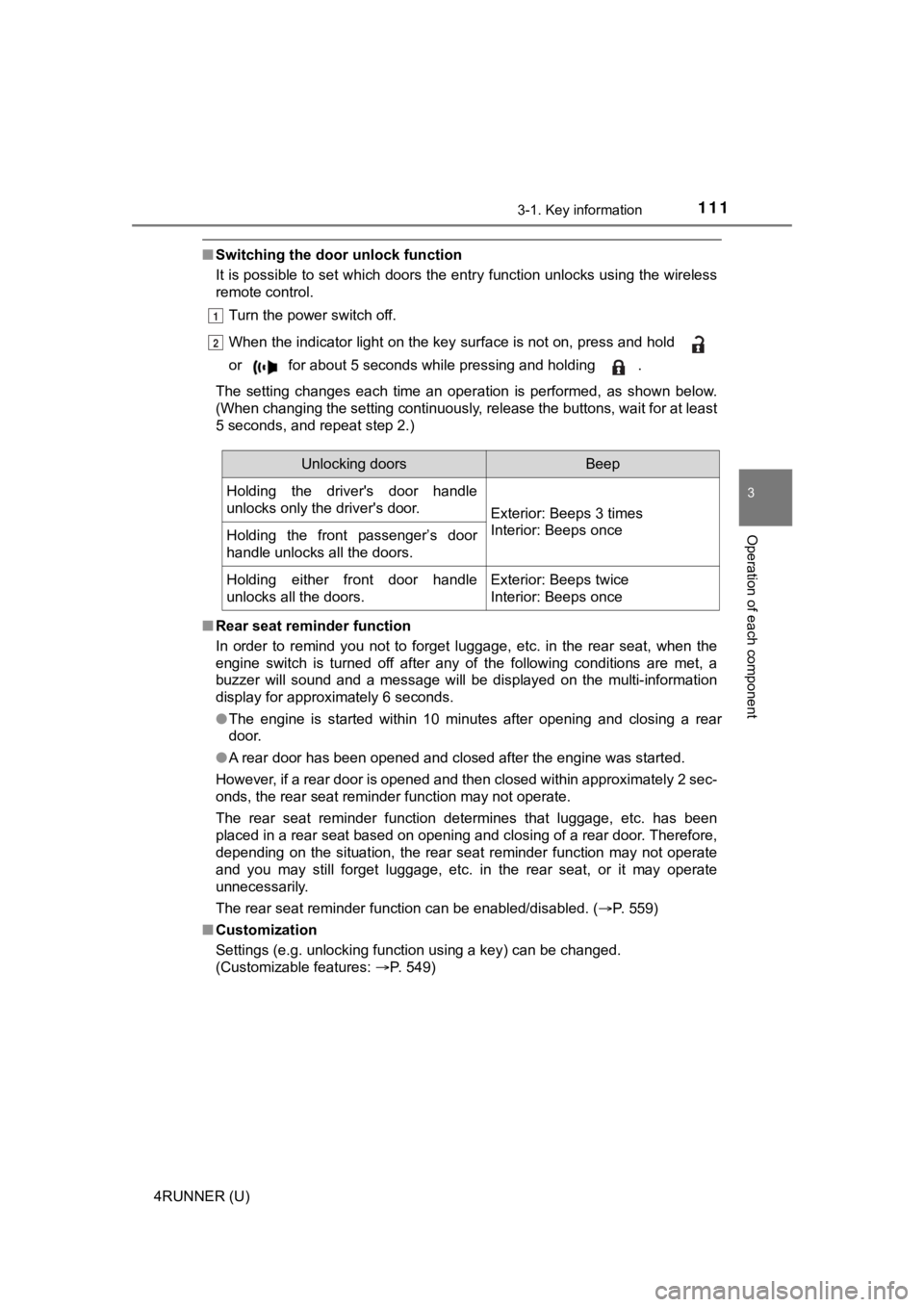
■Switching the door unlock function
It is possible to set which doors the entry function unlocks using the wireless
remote control.
Turn the power switch off.
When the indicator light on the key surface is not on, press an d hold
or for about 5 seconds while pressing and holding .
The setting changes each time an operation is performed, as sho wn below.
(When changing the setting continuously, release the buttons, w ait for at least
5 seconds, and repeat step 2.)
■ Rear seat reminder function
In order to remind you not to forget luggage, etc. in the rear seat, when the
engine switch is turned off after any of the following conditio ns are met, a
buzzer will sound and a message will be displayed on the multi- information
display for approximately 6 seconds.
● The engine is started within 10 minutes after opening and closi ng a rear
door.
● A rear door has been opened and closed after the engine was sta rted.
However, if a rear door is opened and then closed within approx imately 2 sec-
onds, the rear seat reminder function may not operate.
The rear seat reminder function determines that luggage, etc. h as been
placed in a rear seat based on opening and closing of a rear do or. Therefore,
depending on the situation, the rear seat reminder function may not operate
and you may still forget luggage, etc. in the rear seat, or it may operate
unnecessarily.
The rear seat reminder function can be enabled/disabled. ( P. 559)
■ Customization
Settings (e.g. unlocking function using a key) can be changed.
(Customizable features: P. 549)
1
2
Unlocking doorsBeep
Holding the driver's door handle
unlocks only the driver's door.
Exterior: Beeps 3 times
Interior: Beeps once
Holding the front passenger’s door
handle unlocks all the doors.
Holding either front door handle
unlocks all the doors.Exterior: Beeps twice
Interior: Beeps once
Page 117 of 608
1173-2. Opening, closing and locking the doors
3
Operation of each component
4RUNNER (U)■
Conditions affecting operation
The smart key system uses weak radio waves. In the following si tuations, the
communication between the electronic key and the vehicle may be affected,
preventing the smart key system, wireless remote control and en gine immobi-
lizer system from operating properly. (Ways of coping: P. 512)
● When the electronic key battery is depleted
● Near a TV tower, electric power plant, gas station, radio stati on, large dis-
play, airport or other facility that generates strong radio wav es or electrical
noise
● When carrying a portable radio, cellular phone, cordless phone or other
wireless communication device
● When the electronic key is in contact with, or is covered by the following
metallic objects
• Cards to which aluminum foil is attached
• Cigarette boxes that have aluminum foil inside
• Metallic wallets or bags
• Coins
• Hand warmers made of metal
• Media such as CDs and DVDs
● When multiple electronic keys are in the vicinity
● When other wireless keys (that emit radio waves) are being used nearby
● When carrying the electronic key together with the following devices that
emit radio waves
• Another vehicle’s electronic key or a wireless key that emits radio waves
• Personal computers or personal digital assistants (PDAs)
• Digital audio players
• Portable game systems
● If window tint with a metallic content or metallic objects are attached to the
back window
● When the electronic key is placed near a battery charger or ele ctronic
devices
● When the vehicle is parked in a pay parking spot where radio wa ves are
emitted.
If the doors cannot be locked/unlocked using the smart key syst em, lock/
unlock the doors by performing any of the following:
● Bring the electronic key close to either front door handle and operate the
entry function.
● Operate the wireless remote control.
If the doors cannot be locked/unlocked using the above methods, use the
mechanical key. ( P. 512)
If the engine cannot be started using the smart key system, ref er to P. 513.
Page 118 of 608

1183-2. Opening, closing and locking the doors
4RUNNER (U)■
Note for the entry function
●Even when the electronic key is within the effective range (det ection areas),
the system may not operate properly in the following cases:
• The electronic key is too close to the window or outside door handle, near
the ground, or in a high place when the doors are locked or unl ocked.
• The electronic key is on the instrument panel or floor, in the glove box, or
in the auxiliary box of the instrument panel.
● Do not leave the electronic key on top of the instrument panel or near the
door pockets when exiting the vehicle. Depending on the radio w ave recep-
tion conditions, it may be detected by the antenna outside the cabin and the
door will become lockable from the outside, possibly trapping the electronic
key inside the vehicle.
● As long as the electronic key is within the effective range, th e doors may be
locked or unlocked by anyone. However, only the doors detecting the elec-
tronic key can be used to unlock the vehicle.
● The doors may lock or unlock if the electronic key is within th e effective
range and a large amount of water splashes on the door handle, such as in
the rain or in a car wash. The doors will automatically be lock ed after
approximately 60 seconds if a door is not opened and closed.
● If the wireless remote control is used to lock the doors when t he electronic
key is near the vehicle, there is a possibility that the door m ay not be
unlocked by the entry function. (Use the wireless remote contro l to unlock
the doors.)
● Whether or not the electronic key is inside the vehicle, the engine could be
started if the electronic key is near the window.
■ Note for locking the doors
●Touching the door lock sensor while wearing gloves may delay or prevent
lock operation. Remove the gloves and touch the lock sensor aga in.
● When the lock operation is performed using the lock sensor, rec ognition sig-
nals will be shown up to two consecutive times. After this, no recognition
signals will be given.
● If the door handle becomes wet while the electronic key is with in the effec-
tive range, the door may lock and unlock repeatedly. Place the electronic
key in a location 6 ft. (2 m) or more away from the vehicle while the vehicle
is being washed. (Take care to ensure that the key is not stolen.)
● If the electronic key is inside the vehicle and a door handle b ecomes wet
during a car wash, a buzzer will sound outside the vehicle. To turn off the
alarm, lock all the doors.
● The lock sensor may not work properly if it comes into contact with ice,
snow, mud, etc. Clean the lock sensor and attempt to operate it again, or
use the lock sensor on the lower part of the door handle.
● Fingernails may scrape against the door during operation of the door han-
dle. Be careful not to injure fingernails or damage the surface of the door.