automatic transmission TOYOTA 86 2018 User Guide
[x] Cancel search | Manufacturer: TOYOTA, Model Year: 2018, Model line: 86, Model: TOYOTA 86 2018Pages: 532, PDF Size: 6.48 MB
Page 165 of 532

165
2-1. Driving procedures
2
When driving
NOTICE
■
Avoiding damage to vehicle parts
●Do not turn the steering wheel fully in either direction and ho ld it there for
an extended period of time.
Doing so may damage the power steering motor.
● When driving over bumps in the road, drive as slowly as possibl e to avoid
damaging the wheels, underside of the vehicle, etc.
● On vehicles with an automatic transmission, do not race the eng ine for
more than 5 seconds in any position except the N or P position when the
brake is applied or when chocks are used in the wheels. This may cause
the transmission fluid to overheat.
■ If you get a flat tire while driving
A flat or damaged tire may cause the following situations. Hold the steering
wheel firmly and gradually depress the brake pedal to slow down the vehicle.
● It may be difficult to control your vehicle.
● The vehicle will make abnormal sounds or vibrations.
● The vehicle will lean abnormally.
Information on what to do in case of a flat tire ( P. 424)
■ When encountering flooded roads
Do not drive on a road that has flooded after heavy rain etc. D oing so may
cause the following serious damage to the vehicle:
● Engine stalling
● Short in electrical components
● Engine damage caused by water immersion
In the event that you drive on a flooded road and the vehicle i s flooded, be
sure to have your Toyota dealer check the following:
● Brake function
● Changes in quantity and quality of oil and fluid used for the e ngine, trans-
mission, differential, etc.
● Lubricant condition for the propeller shaft, bearings and suspension joints
(where possible) and the function of all joints, bearings, etc.
Page 169 of 532
169
2-1. Driving procedures
2
When driving
■
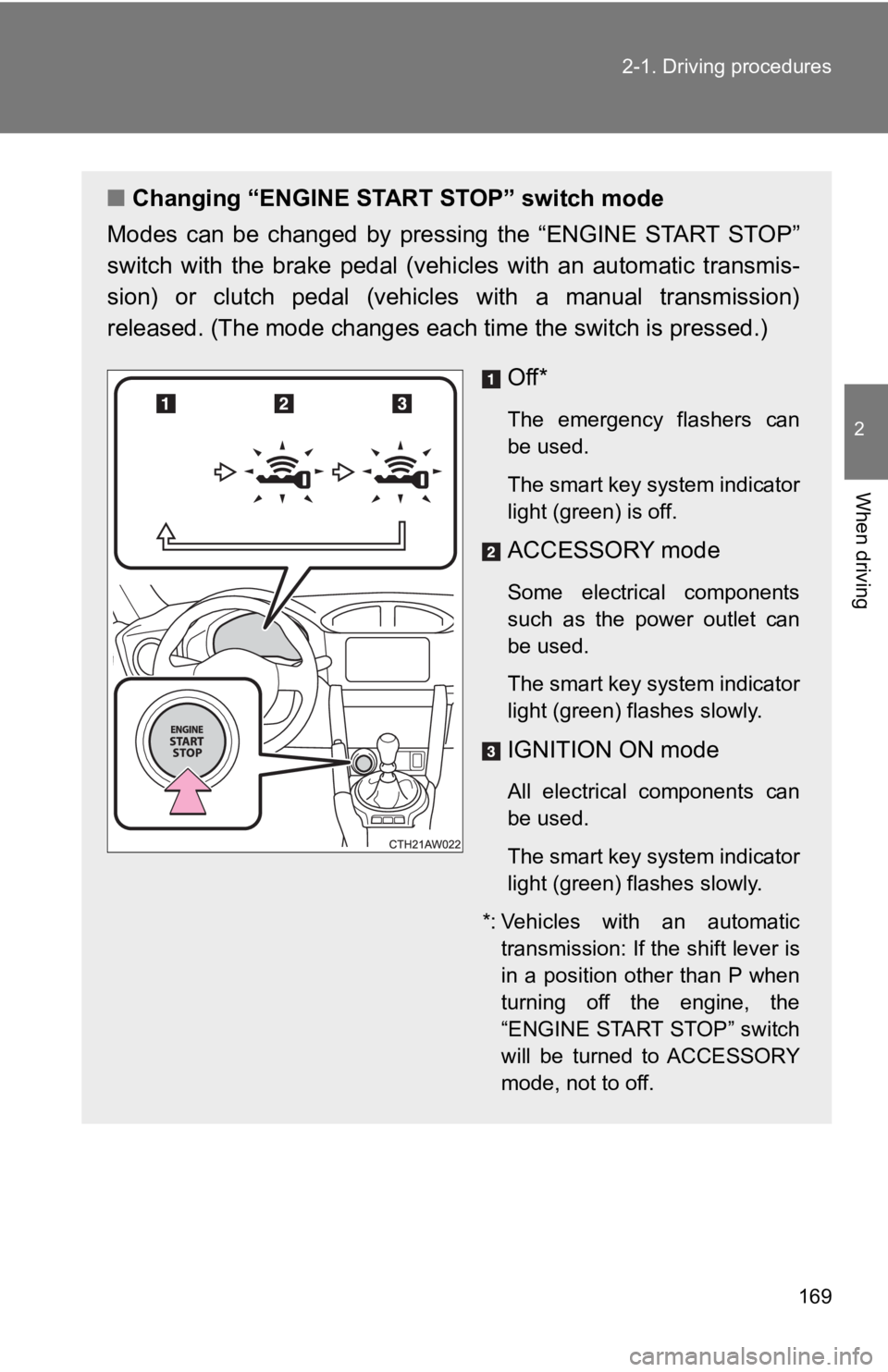
Changing “ENGINE START STOP” switch mode
Modes can be changed by pressing the “ENGINE START STOP”
switch with the brake pedal (vehi cles with an automatic transmis-
sion) or clutch pedal (vehicles with a manual transmission)
released. (The mode changes eac h time the switch is pressed.)
Off*
The emergency flashers can
be used.
The smart key system indicator
light (green) is off.
ACCESSORY mode
Some electrical components
such as the power outlet can
be used.
The smart key system indicator
light (green) flashes slowly.
IGNITION ON mode
All electrical components can
be used.
The smart key system indicator
light (green) flashes slowly.
*: Vehicles with an automatic transmission: If the shift lever is
in a position other than P when
turning off the engine, the
“ENGINE START STOP” switch
will be turned to ACCESSORY
mode, not to off.
Page 170 of 532
170 2-1. Driving procedures
When stopping the engine with the shift lever in a position other
than P (vehicles with an automatic transmission)
If the engine is stopped with the shift lever in a position oth er than P,
the “ENGINE START STOP” switch will not be turned off but inste ad
be turned to ACCESSORY mode. Perform the following procedure to
turn the switch off:
Check that the parking brake is set.
Shift the shift lever to P.
Check that the smart key system indicator light (green)
flashes slowly and then press the “ENGINE START STOP”
switch once.
Check that the smart key system indicator light (green) is off.
■Auto power o ff function
Vehicles with an automatic transmission
If the vehicle is left in ACCESSORY mode for more than 20 minut es or IGNI-
TION ON mode (the engine is not running) for more than an hour with the
shift lever in P, the “ENGINE START STOP” switch will automatic ally turn off.
However, this function cannot entirely prevent battery discharg e. Do not
leave the vehicle with the “ENGINE START STOP” switch in ACCESS ORY
or IGNITION ON mode for long periods of time when the engine is not run-
ning.
Vehicles with a manual transmission
If the vehicle is left in ACCESSORY mode for more than 20 minut es or IGNI-
TION ON mode (the engine is not running) for more than an hour, the
“ENGINE START STOP” switch will automatically turn off. However , this
function cannot entirely prevent battery discharge. Do not leav e the vehicle
with the “ENGINE START STOP” switch in ACCESSORY or IGNITION ON
mode for long periods of time when the engine is not running.
STEP 1
STEP 2
STEP 3
STEP 4
Page 171 of 532
171
2-1. Driving procedures
2
When driving
■
Operation of the “EN GINE START STOP” switch
If the switch is not pressed shortly and firmly, the “ENGINE ST ART STOP”
switch mode may not change or the engine may not start.
■ Electronic key battery depletion
P. 35
■ Conditions affecting operation
P. 31
■ Note for the entry function
P. 32
■ If the engine does not start
The engine immobilizer system may not have been deactivated. ( P. 79)
Contact your Toyota dealer.
■ Steering lock
After turning the “ENGINE START STOP” switch off and opening an d closing
the doors, the steering wheel will be locked due to the steerin g lock function.
Operating the “ENGINE START STOP” switch again automatically cancels
the steering lock.
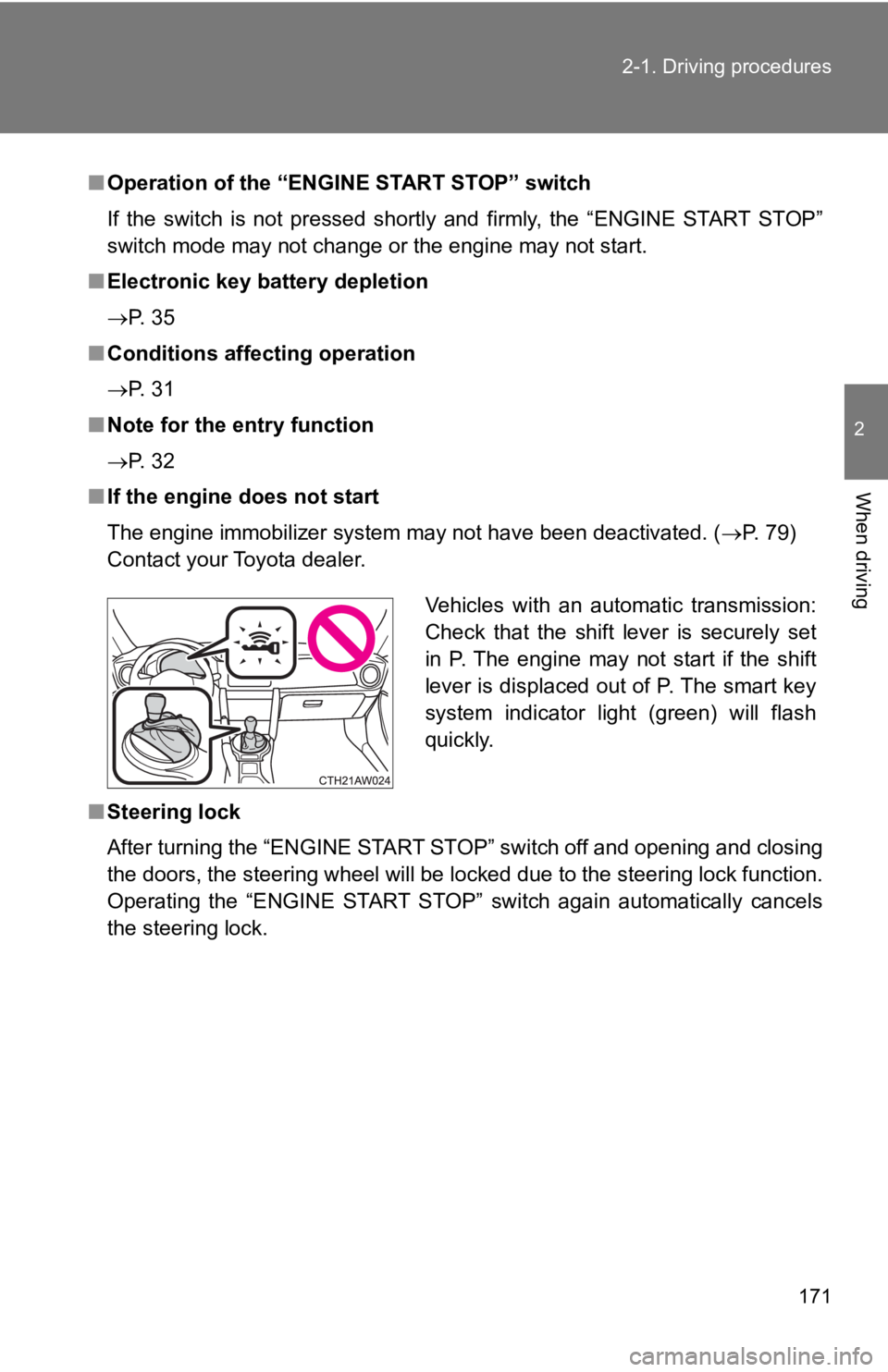
Vehicles with an automatic transmission:
Check that the shift lever is securely set
in P. The engine may not start if the shift
lever is displaced out of P. The smart key
system indicator light (green) will flash
quickly.
Page 172 of 532
172 2-1. Driving procedures
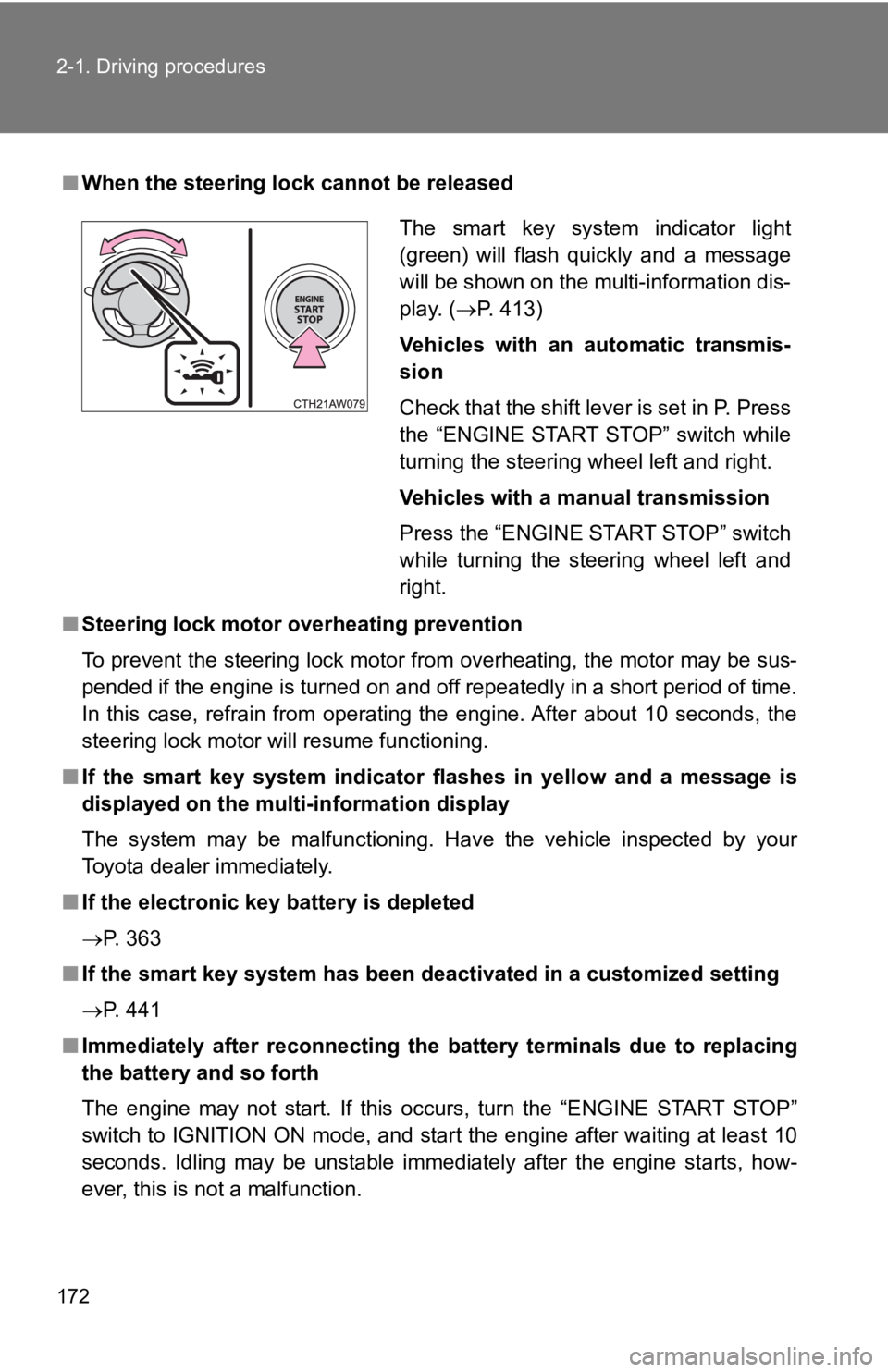
■When the steering lock cannot be released
■ Steering lock motor o verheating prevention
To prevent the steering lock motor from overheating, the motor may be sus-
pended if the engine is turned on and off repeatedly in a short period of time.
In this case, refrain from operating the engine. After about 10 seconds, the
steering lock motor will resume functioning.
■ If the smart key system indicator flashes in yellow and a messa ge is
displayed on the multi-information display
The system may be malfunctioning. Have the vehicle inspected by your
Toyota dealer immediately.
■ If the electronic key battery is depleted
P. 363
■ If the smart key system has been deactivated in a customized se tting
P. 441
■ Immediately after reconnecting th e battery terminals due to replacing
the battery and so forth
The engine may not start. If this occurs, turn the “ENGINE STAR T STOP”
switch to IGNITION ON mode, and start the engine after waiting at least 10
seconds. Idling may be unstable immediately after the engine st arts, how-
ever, this is not a malfunction.
The smart key system indicator light
(green) will flash quickly and a message
will be shown on the multi-information dis-
play. ( P. 413)
Vehicles with an automatic transmis-
sion
Check that the shift lever is set in P. Press
the “ENGINE START STOP” switch while
turning the steering wheel left and right.
Vehicles with a manual transmission
Press the “ENGINE START STOP” switch
while turning the steering wheel left and
right.
Page 174 of 532

174 2-1. Driving procedures
NOTICE
■To prevent battery discharge
●Do not leave the “ENGINE START STOP” switch in ACCESSORY or IGN I-
TION ON mode for long periods of time without the engine runnin g.
● If the smart key system indicator light (green) is illuminated, the “ENGINE
START STOP” switch is not off. When exiting the vehicle, always check
that the “ENGINE START STOP” switch is off.
● Vehicles with an automatic transmission: Do not stop the engine when the
shift lever is in a position other than P. If the engine is sto pped in another
shift lever position, the “ENGINE START STOP” switch will not b e turned
off but instead be turned to ACCESSORY mode. If the vehicle is left in
ACCESSORY mode, battery discharge may occur.
■ When starting the engine
●Do not race a cold engine.
● If the engine becomes difficult to start or stalls frequently, have your vehi-
cle checked by your Toyota dealer immediately.
● Vehicles with an automatic transmission: Do not shift the shift lever while
the starter is operating.
■ Symptoms indicating a malfunction with the “ENGINE START STOP”
switch
If the “ENGINE START STOP” switch seems to be operating somewha t dif-
ferently than usual, such as the switch sticking slightly, there may be a mal-
function. Contact your Toyota dealer immediately.
Page 175 of 532
175
2-1. Driving procedures
2
When driving
Engine (ignition) switch (vehicles without a smart key system)
■Starting the engine
Vehicles with an auto matic transmission
Check that the parking brake is set.
Check that the shift lever is set in P.
Firmly depress the brake pedal.
Turn the engine switch to the “START” position to start the
engine.
Vehicles with a manual transmission Check that the parking brake is set.
Check that the shift lever is set in N.
Firmly depress the clutch pedal.
Turn the engine switch to the “START” position to start the
engine.
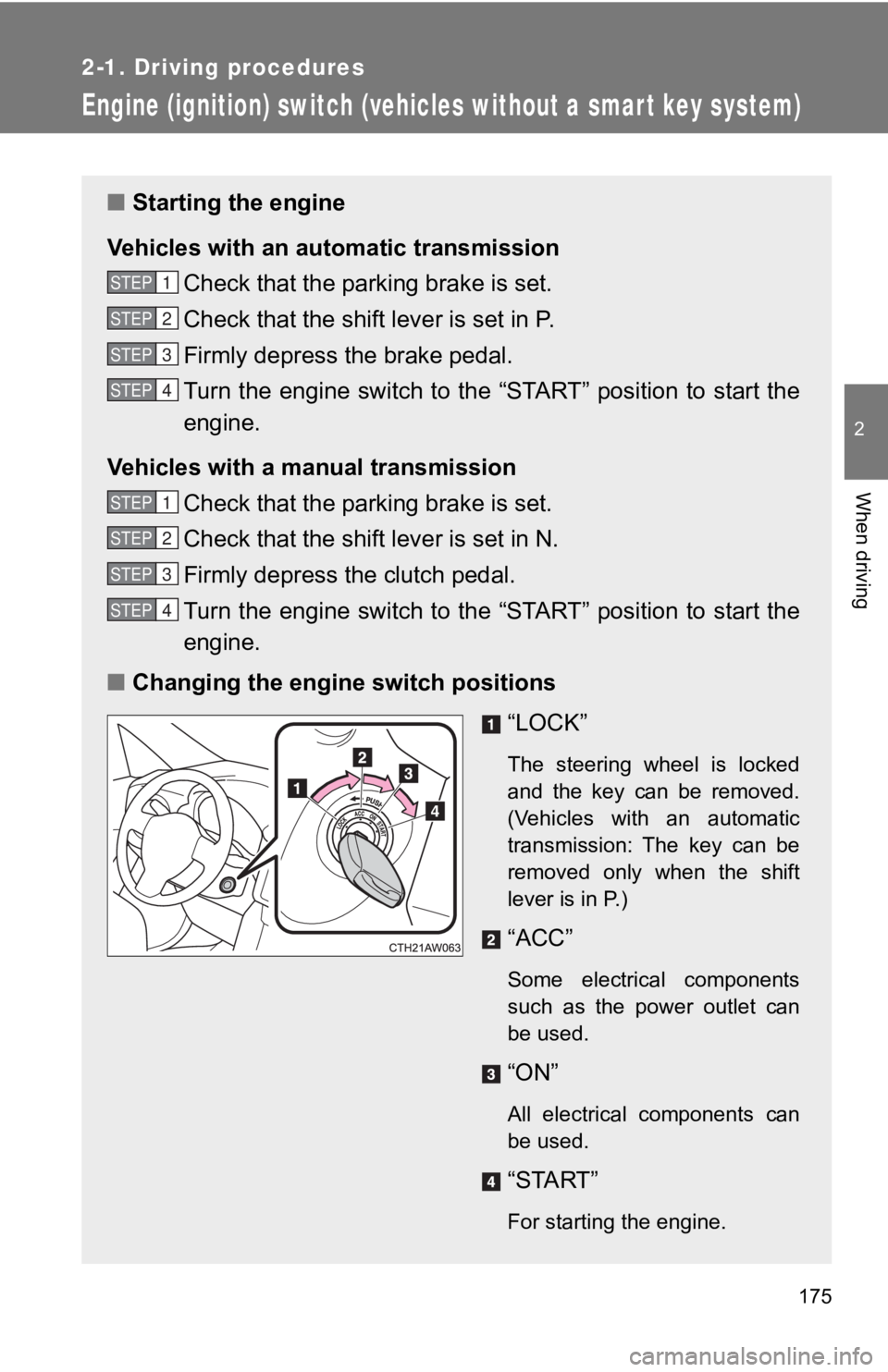
■ Changing the engine switch positions
“LOCK”
The steering wheel is locked
and the key can be removed.
(Vehicles with an automatic
transmission: The key can be
removed only when the shift
lever is in P.)
“ACC”
Some electrical components
such as the power outlet can
be used.
“ON”
All electrical components can
be used.
“START”
For starting the engine.
STEP 1
STEP 2
STEP 3
STEP 4
STEP 1
STEP 2
STEP 3
STEP 4
Page 177 of 532

177
2-1. Driving procedures
2
When driving
WARNING
■
When starting the engine
Always start the engine while sitting in the driver's seat. Do not depress the
accelerator pedal while starting the engine under any circumsta nces.
Doing so may cause an accident resulting in death or serious in jury.
■ Caution when driving
Do not turn the engine switch to the “LOCK” position while driving. If, in an
emergency, you must turn the engine off while the vehicle is mo ving, turn the
engine switch only to the “ACC” position to stop the engine. An accident may
result if the engine is stopped while driving. ( P. 454)
NOTICE
■To prevent battery discharge
Do not leave the engine switch in the “ACC” or “ON” position fo r long periods
of time without the engine running.
■ When starting the engine
●Do not crank the engine for more than 10 seconds at a time. This may
overheat the starter and wiring system.
If the engine does not start, turn the engine switch to the “LOCK” position
and try to start the engine again after waiting for 10 seconds or more.
● Do not race a cold engine.
● If the engine becomes difficult to start or stalls frequently, have your vehi-
cle checked by your Toyota dealer immediately.
● Vehicles with an automatic transmission: Do not shift the shift lever while
the starter is operating.
Page 178 of 532
178
2-1. Driving procedures
Automatic transmission
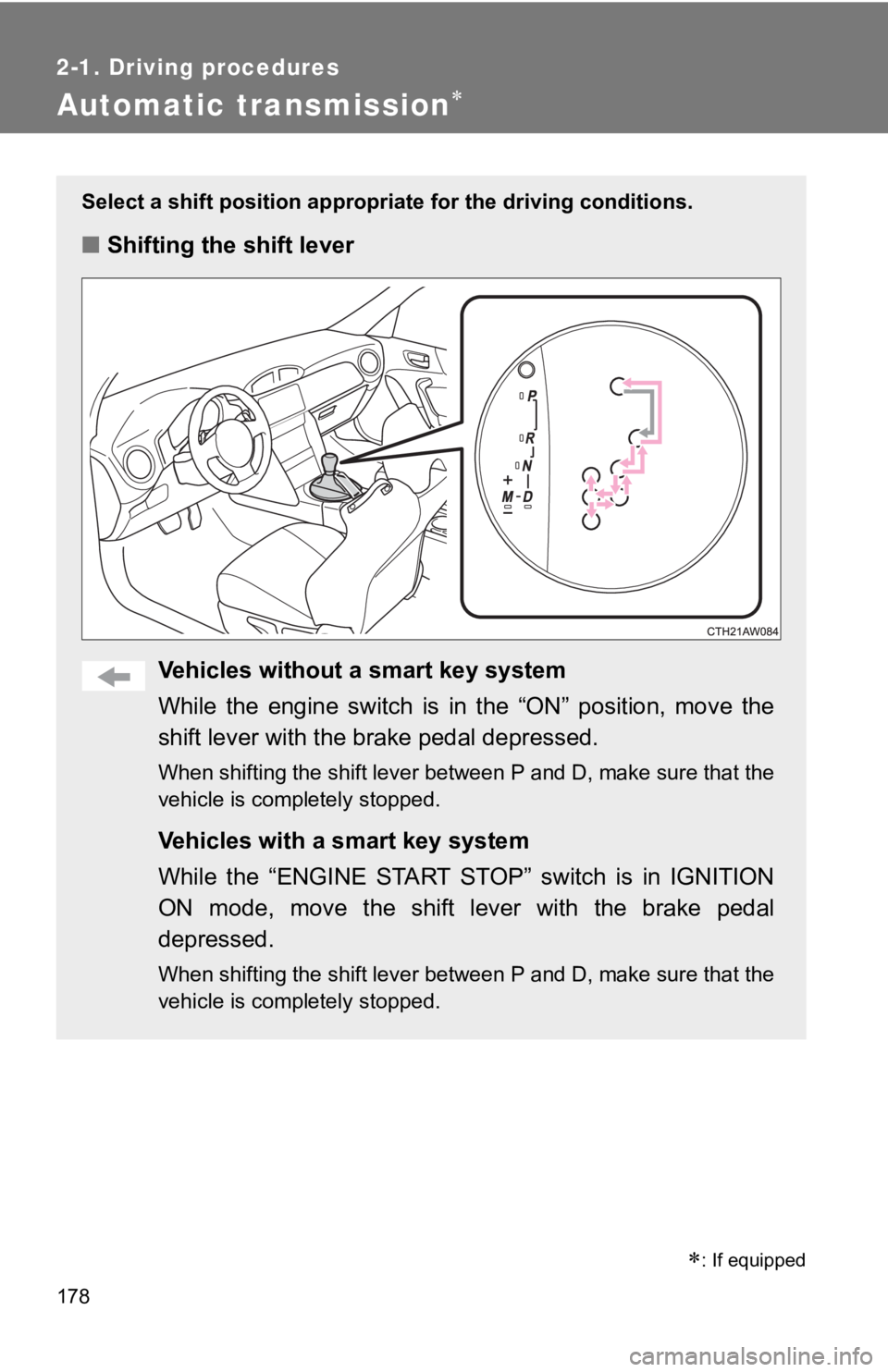
Select a shift position appropriate for the driving conditions.
■Shifting the shift lever
Vehicles without a smart key system
While the engine switch is in the “ON” position, move the
shift lever with the brake pedal depressed.
When shifting the shift lever between P and D, make sure that t he
vehicle is completely stopped.
Vehicles with a smart key system
While the “ENGINE START STOP” switch is in IGNITION
ON mode, move the shift lever with the brake pedal
depressed.
When shifting the shift lever between P and D, make sure that t he
vehicle is completely stopped.
*: If equipped
Page 183 of 532
183
2-1. Driving procedures
2
When driving
■
Automatic gear selection when the vehicle is stopped
When the vehicle is idling at high rpm in order to warm up, and the vehicle is
on a slippery road, the transmission may automatically shift to 2
nd gear for
stopping and starting off.
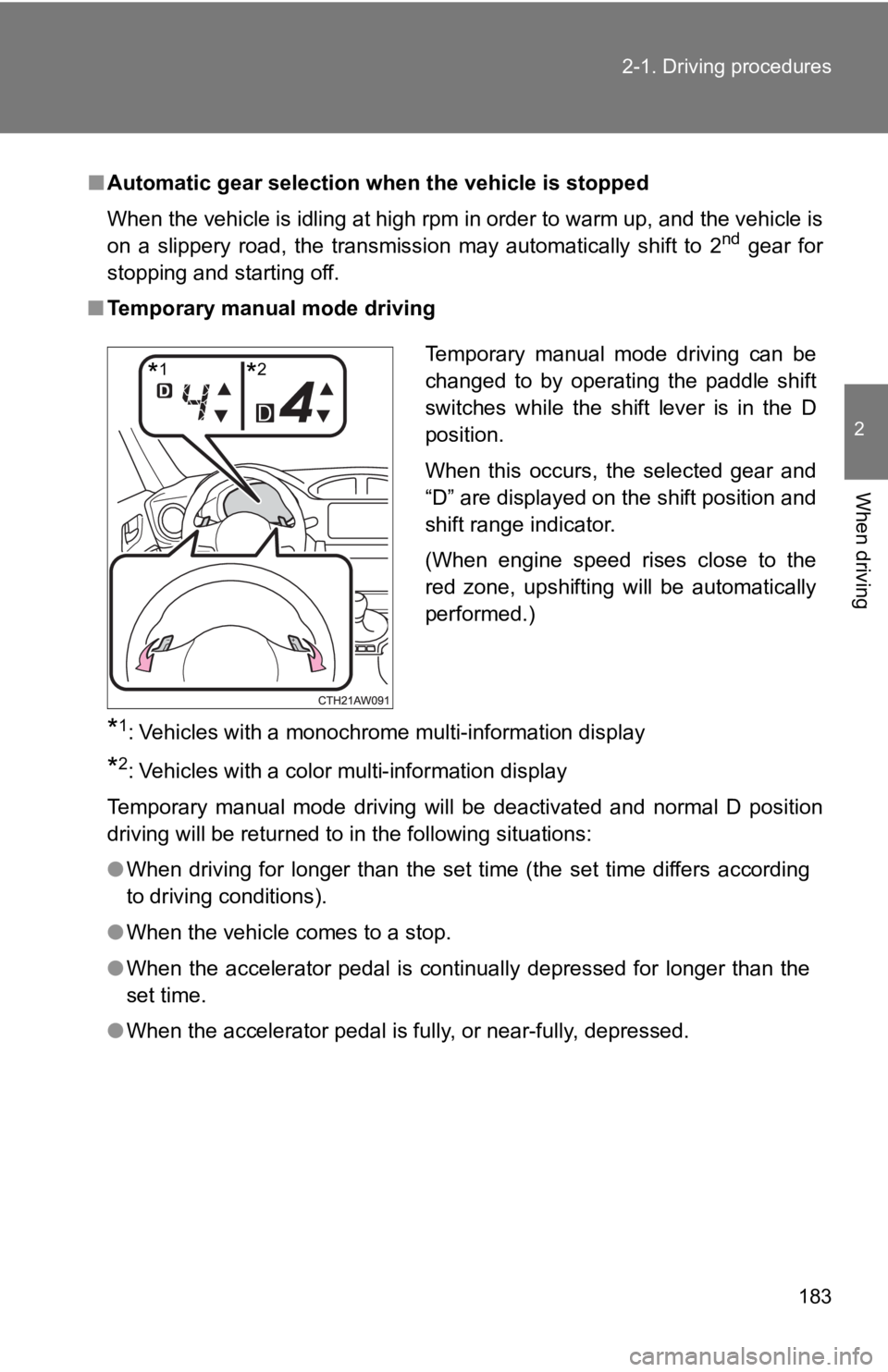
■ Temporary manual mode driving
*1: Vehicles with a monochrome multi-information display
*2: Vehicles with a color multi-information display
Temporary manual mode driving will be deactivated and normal D position
driving will be returned to in the following situations:
● When driving for longer than the set time (the set time differs according
to driving conditions).
● When the vehicle comes to a stop.
● When the accelerator pedal is continually depressed for longer than the
set time.
● When the accelerator pedal is fully, or near-fully, depressed.
Temporary manual mode driving can be
changed to by operating the paddle shift
switches while the shift lever is in the D
position.
When this occurs, the selected gear and
“D” are displayed on the shift position and
shift range indicator.
(When engine speed rises close to the
red zone, upshifting will be automatically
performed.)
*1*2