brake light TOYOTA 86 2018 User Guide
[x] Cancel search | Manufacturer: TOYOTA, Model Year: 2018, Model line: 86, Model: TOYOTA 86 2018Pages: 532, PDF Size: 6.48 MB
Page 170 of 532
170 2-1. Driving procedures
When stopping the engine with the shift lever in a position other
than P (vehicles with an automatic transmission)
If the engine is stopped with the shift lever in a position oth er than P,
the “ENGINE START STOP” switch will not be turned off but inste ad
be turned to ACCESSORY mode. Perform the following procedure to
turn the switch off:
Check that the parking brake is set.
Shift the shift lever to P.
Check that the smart key system indicator light (green)
flashes slowly and then press the “ENGINE START STOP”
switch once.
Check that the smart key system indicator light (green) is off.
■Auto power o ff function
Vehicles with an automatic transmission
If the vehicle is left in ACCESSORY mode for more than 20 minut es or IGNI-
TION ON mode (the engine is not running) for more than an hour with the
shift lever in P, the “ENGINE START STOP” switch will automatic ally turn off.
However, this function cannot entirely prevent battery discharg e. Do not
leave the vehicle with the “ENGINE START STOP” switch in ACCESS ORY
or IGNITION ON mode for long periods of time when the engine is not run-
ning.
Vehicles with a manual transmission
If the vehicle is left in ACCESSORY mode for more than 20 minut es or IGNI-
TION ON mode (the engine is not running) for more than an hour, the
“ENGINE START STOP” switch will automatically turn off. However , this
function cannot entirely prevent battery discharge. Do not leav e the vehicle
with the “ENGINE START STOP” switch in ACCESSORY or IGNITION ON
mode for long periods of time when the engine is not running.
STEP 1
STEP 2
STEP 3
STEP 4
Page 173 of 532

173
2-1. Driving procedures
2
When driving
WARNING
■
When starting the engine
●Always start the engine while sitting in the driver’s seat. Do not depress
the accelerator pedal while starting the engine under any circu mstances.
Doing so may cause an accident resulting in death or serious in jury.
● If the smart key system indicator light flashes in green after the engine has
started, never drive the vehicle. The steering wheel is still l ocked, and it
may result in an accident.
■ Caution while driving
If engine failure occurs while the vehicle is moving, do not lo ck or open the
doors until the vehicle reaches a safe and complete stop. Activ ation of the
steering lock in this circumstance may lead to an accident, res ulting in death
or serious injury.
■ Stopping the engine in an emergency
If you want to stop the engine in an emergency while driving th e vehicle,
press and hold the “ENGINE START STOP” switch for more than 2 s econds,
or press it briefly 3 times or more in succession. ( P. 454)
However, do not touch the “ENGINE START STOP” switch while driv ing
except in an emergency. Turning the engine off while driving wi ll not cause
loss of steering or braking control, but the power assist to these systems will
be lost. This will make it more difficult to steer and brake, s o you should pull
over and stop the vehicle as soon as it is safe to do so.
Page 189 of 532
189
2-1. Driving procedures
2
When driving
Parking brake
■Usage in winter time
P. 261
NOTICE
■Before driving
Fully release the parking brake.
Driving the vehicle with the parking brake set will lead to bra ke components
overheating, which may affect braking performance and increase brake
wear.
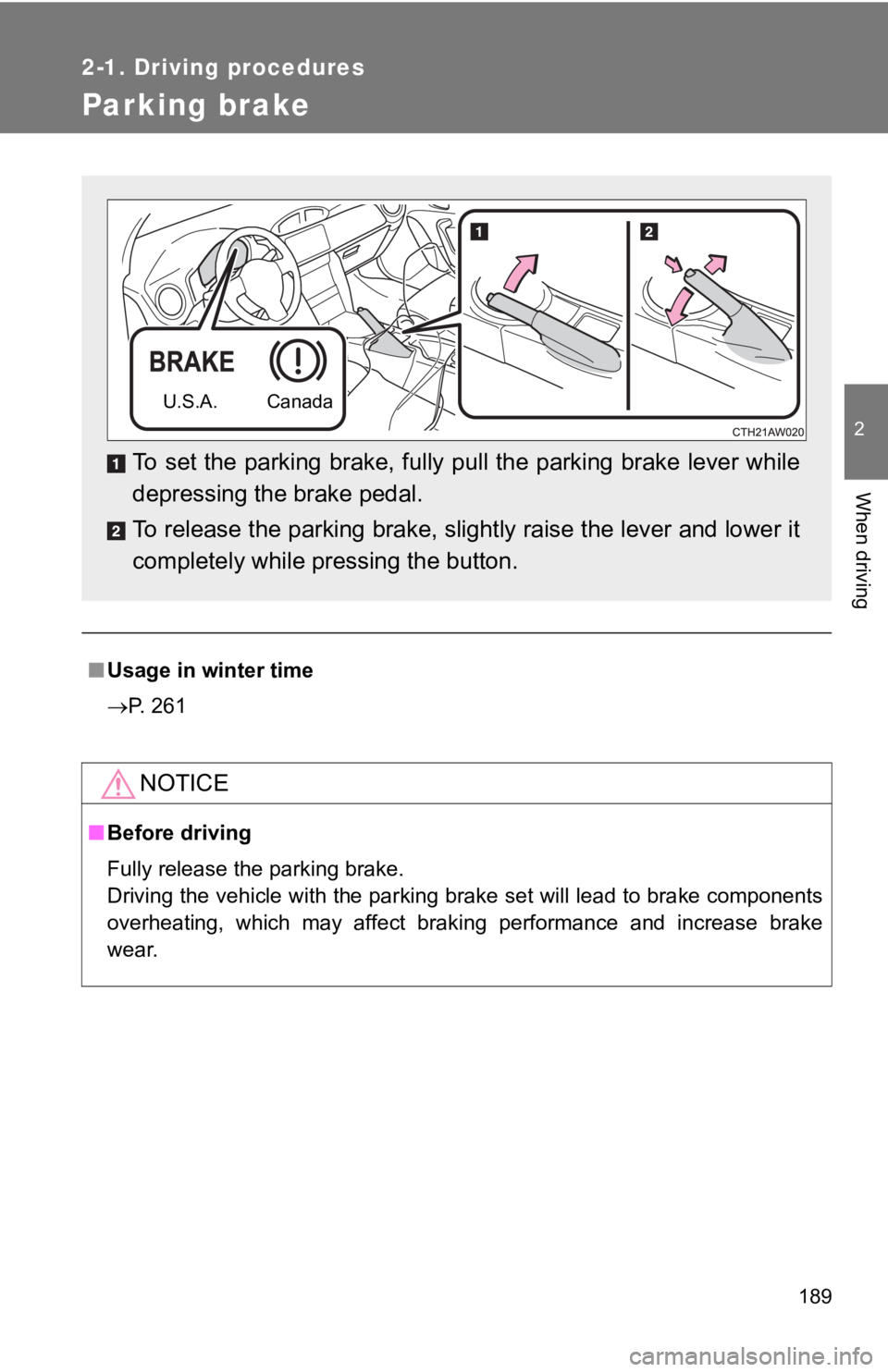
To set the parking brake, fully pull the parking brake lever wh ile
depressing the brake pedal.
To release the parking brake, slightly raise the lever and lowe r it
completely while pressing the button.
U.S.A. Canada
Page 220 of 532

220 2-2. Instrument cluster
■G-force display
●Depending on the vehicle usage conditions, the brake fluid pres sure dis-
play may not reach its maximum reading even though the brake pedal is
fully depressed.
● If a battery terminal is disconnected and reconnected, the stee ring
amount display may be disabled te mporarily. After driving the vehicle for
a while, the display will be enabled.
■ Suspension of the settings display
●The settings cannot be changed while driving. When changing set tings,
park the vehicle in a safe place.
● If a warning message is displayed, operation of the settings di splay will
be suspended.
■ Using the stopwatch
If the engine is stopped while the stopwatch is operating, the stopwatch will
stop and the time up to that point will be recorded.
■ Outside temperature display
●In the following situations, the correct outside temperature ma y not be
displayed.
• When the vehicle is very hot, such as when under the sun.
• When the vehicle is idling or being driven at low speeds such as in a
traffic jam or when the engine is stopped and then restarted immedi-
ately afterward.
• When the actual outside temperature is outside of the indicato r range.
● If “ ” is displayed for approximately 1 minute or more or if the out side
temperature is not displayed, the system may be malfunctioning. Have
the vehicle inspected by your Toyota dealer.
■ Liquid crystal display
Small spots or light spots may appear on the display. This phenomenon is
characteristic of liquid crystal displays, and there is no prob lem continuing to
use the display.
Page 224 of 532

224 2-3. Operating the lights and windshield wipers
■Daytime running light system
●The daytime running lights illuminate using the same lights as the parking
lights and illuminate brighter than the parking lights.
● To make your vehicle more visible to other drivers during dayti me driving,
the daytime running lights turn on automatically when all of th e following
conditions are met. (The daytime running lights are not designe d for use
at night.)
• The engine is running
• The shift lever is shifted out of P (Vehicles with an automati c transmis-
sion)
• The parking brake is released
• The headlight switch is off or in the “AUTO”
* position
*: When the surroundings are bright
The daytime running lights remain on after they illuminate even if the parking
brake is set again.
● When the turn signal indicators are flashing, the daytime runni ng light on
the side that the turn signals are flashing will turn off.
● When the emergency flashers are flashing, both daytime running lights
will turn off.
● Compared to turning on the headlights, the daytime running ligh t system
offers greater durability and consumes less electricity, so it can help
improve fuel economy.
Page 246 of 532
246 2-4. Using other driving systems
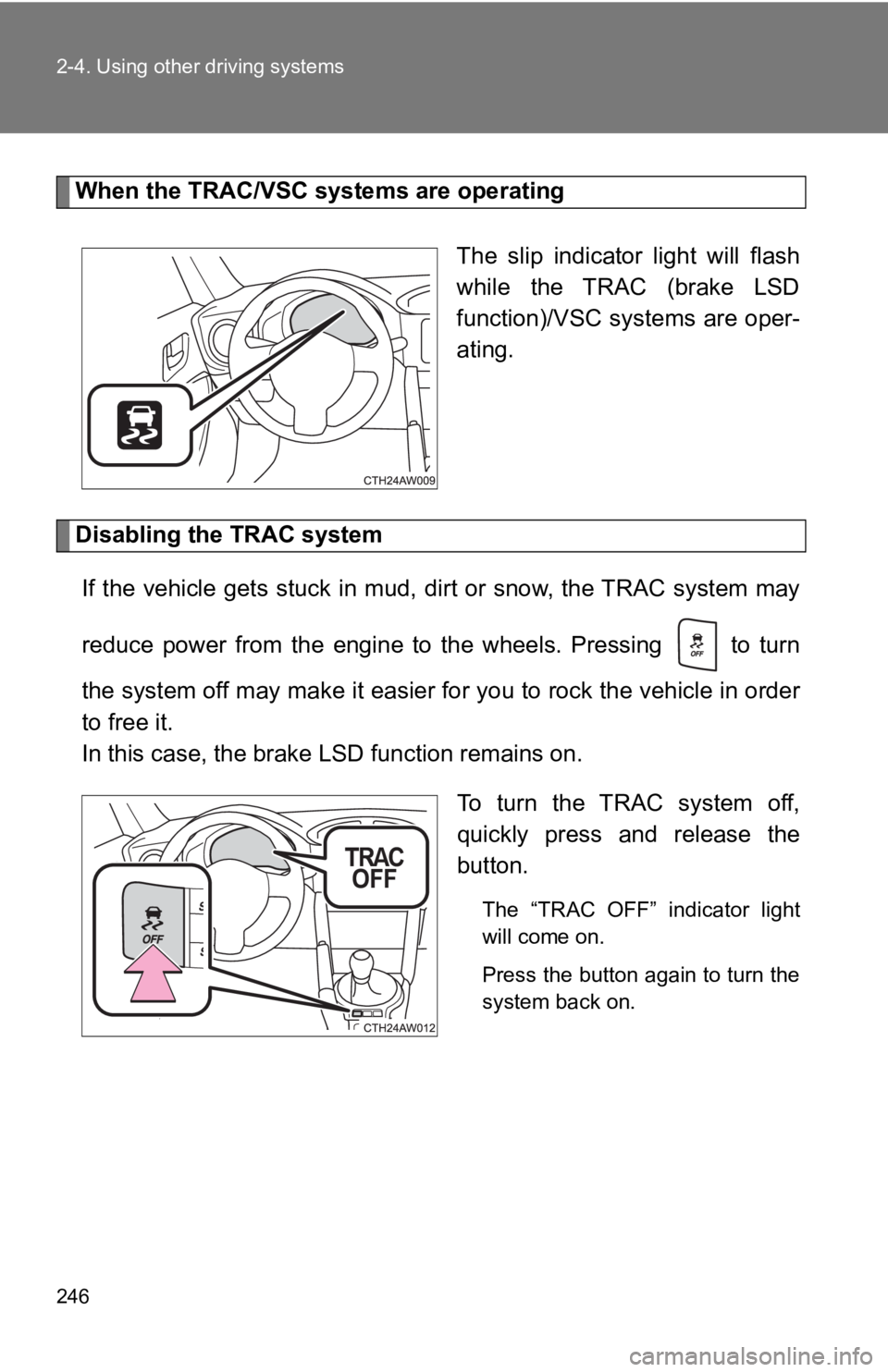
When the TRAC/VSC systems are operatingThe slip indicator light will flash
while the TRAC (brake LSD
function)/VSC systems are oper-
ating.
Disabling the TRAC systemIf the vehicle gets stuck in mud, dirt or snow, the TRAC system may
reduce power from the engine to the wheels. Pressing to turn
the system off may make it easier for you to rock the vehicle i n order
to free it.
In this case, the brake LSD function remains on.
To turn the TRAC system off,
quickly press and release the
button.
The “TRAC OFF” indicator light
will come on.
Press the button again to turn the
system back on.
Page 247 of 532
247
2-4. Using other driving systems
2
When driving
“TRACK” mode
Your vehicle is equipped with two types of control modes to acc om-
modate various driving preferenc es. The control modes can be
selected with the “TRACK” switch. Normal mode allows secure and
smooth normal driving. When the switch is pressed and held for 1
second or more, “TRACK” mode is activated. Control characteristics
such as the VSC and TRAC are adj usted to afford maneuverability
closer to what a driver may desire, while a sense of security i s
retained.
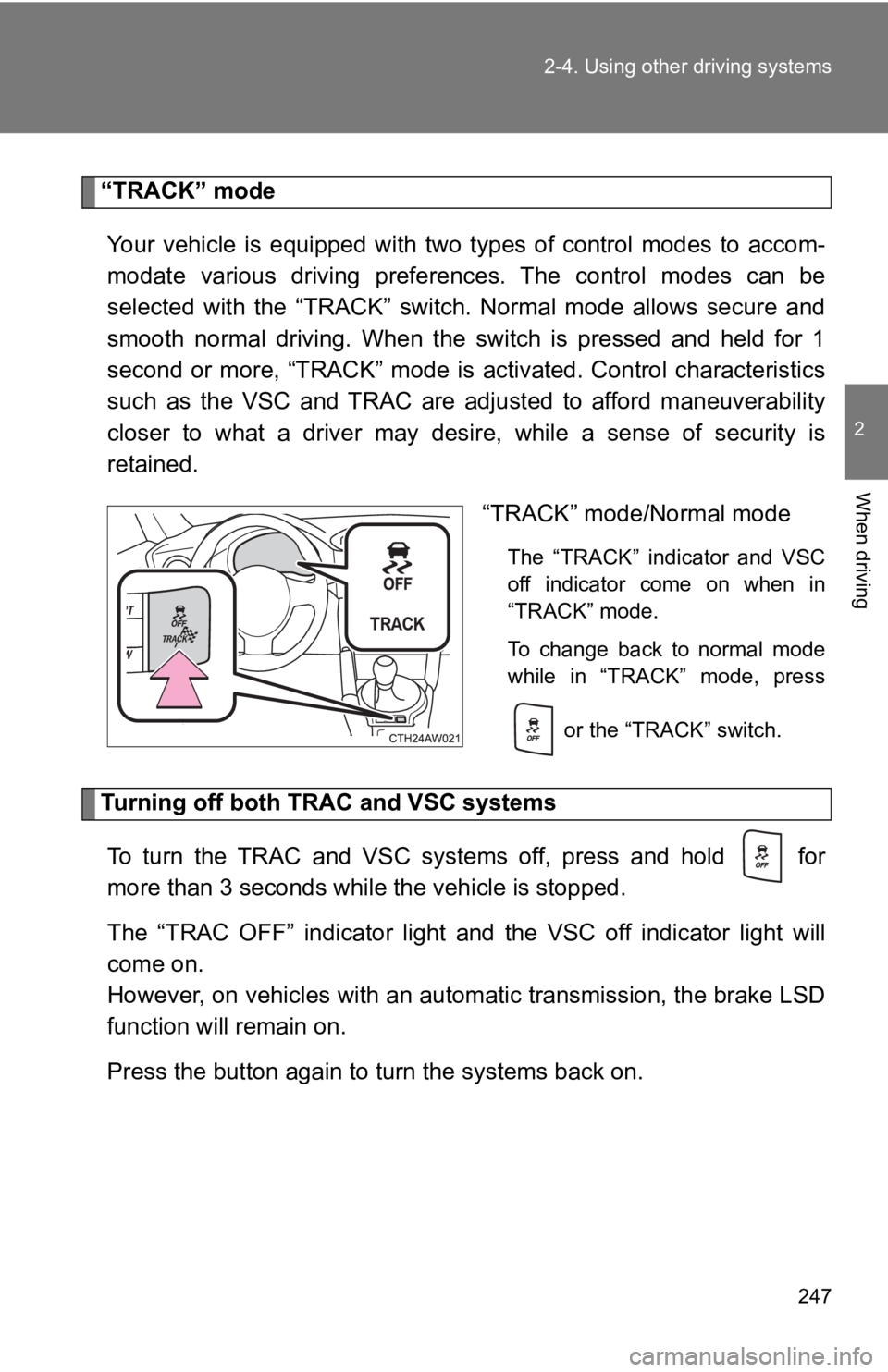
“TRACK” mode/Normal mode
The “TRACK” indicator and VSC
off indicator come on when in
“TRACK” mode.
To change back to normal mode
while in “TRACK” mode, press
or the “TRACK” switch.
Turning off both TR AC and VSC systems
To turn the TRAC and VSC systems off, press and hold for
more than 3 seconds while the vehicle is stopped.
The “TRAC OFF” indicator light and the VSC off indicator light will
come on.
However, on vehicles with an automatic transmission, the brake LSD
function will remain on.
Press the button again to turn the systems back on.
Page 248 of 532
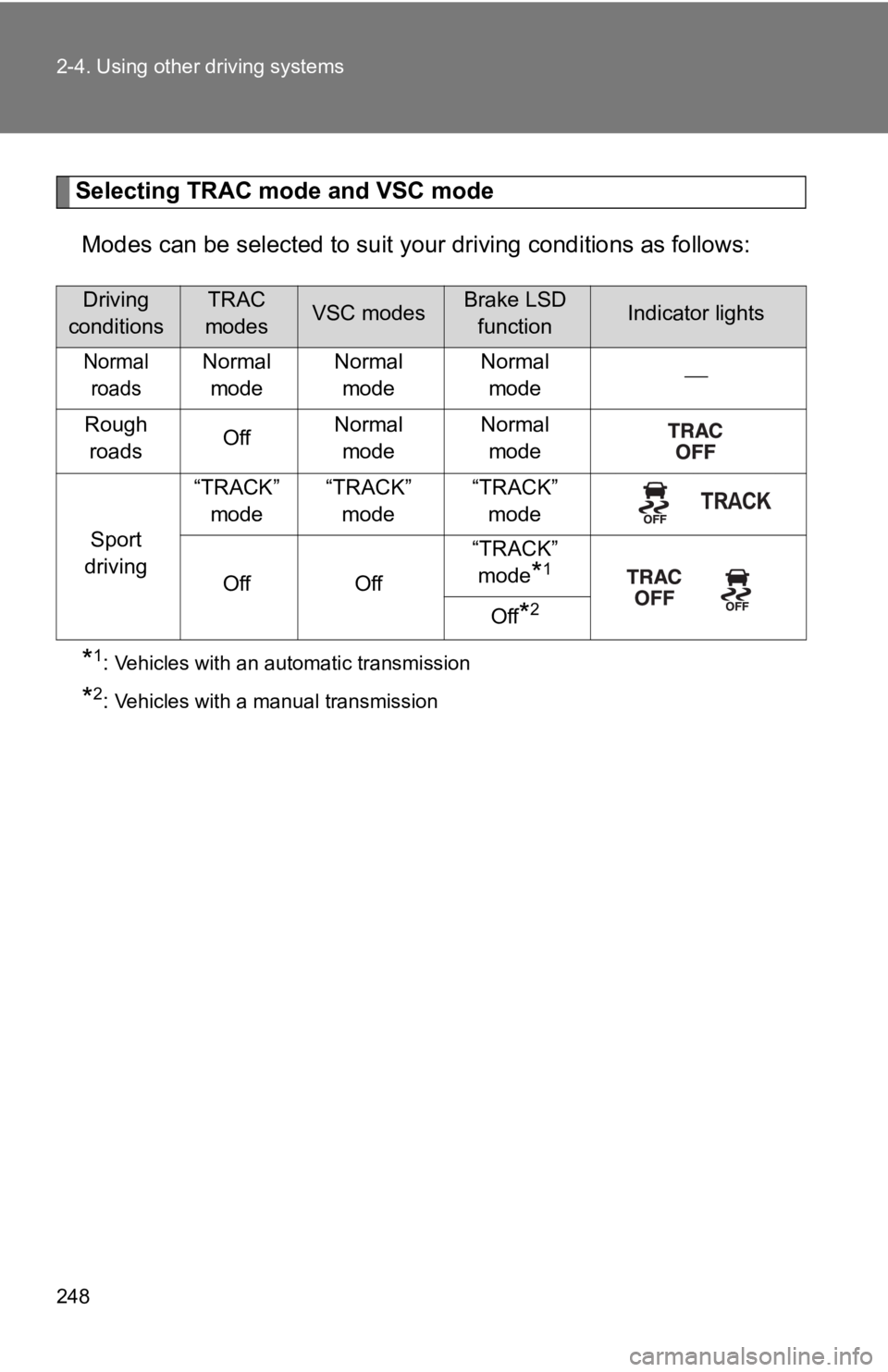
248 2-4. Using other driving systems
Selecting TRAC mode and VSC modeModes can be selected to suit y our driving conditions as follows:
*1: Vehicles with an automatic transmission
*2: Vehicles with a manual transmission
Driving
conditionsTRAC
modesVSC modesBrake LSD functionIndicator lights
Normal roadsNormal mode Normal
mode Normal
mode
Rough roads OffNormal
mode Normal
mode
Sport
driving “TRACK”
mode “TRACK”
mode “TRACK”
mode
Off Off “TRACK”
mode
*1
Off
*2
Page 249 of 532

249
2-4. Using other driving systems
2
When driving
■
Sounds and vibrations caused by the ABS, brake assist, TRAC and
VSC systems
●A sound may be heard from the engine compartment when the brake
pedal is depressed repeatedly, when the engine is started or ju st after the
vehicle begins to move. This sound does not indicate that a malfunction
has occurred in any of these systems.
● Any of the following conditions may occur when the above system s are
operating. None of these indicates that a malfunction has occur red.
• Vibrations may be felt through the vehicle body and steering.
• A motor sound may be heard after the vehicle comes to a stop.
• The brake pedal may pulsate slightly after the ABS is activated.
• The brake pedal may move down slightly after the ABS is activa ted.
■ EPS operation sound
When the steering wheel is operated, a motor sound (whirring so und) may
be heard. This does not indicate a malfunction.
■ Automatic reactivation of TRAC and VSC systems
After turning the TRAC and VSC systems off, the systems will be automati-
cally reactivated in the following situations:
● Vehicles without a smart key system: When the engine switch is turned to
“LOCK” position
● Vehicles with a smart key system: When the “ENGINE START STOP”
switch is turned off
● If only the TRAC system is turned off, the TRAC will turn on when vehicle
speed is more than approximately 31 mph (50 km/h).
If both the TRAC and VSC systems are turned off, automatic reac tivation
will not occur when vehicle speed increases.
Page 251 of 532

251
2-4. Using other driving systems
2
When driving
WARNING
■
TRAC may not operate effectively when
Directional control and power may not be achievable while drivi ng on slip-
pery road surfaces, even if the TRAC system is operating.
Do not drive the vehicle in conditions where stability and powe r may be lost.
■ When the VSC and/or brake LSD function is activated
The slip indicator light flashes. Always drive carefully. Reckl ess driving may
cause an accident. Exercise particular care when the indicator light flashes.
■ When the TRAC/VSC systems are turned off
Be especially careful and drive at a speed appropriate to the r oad condi-
tions. As these are the systems to help ensure vehicle stability and driving
force, do not turn the TRAC/VSC systems off unless necessary.
■ Replacing tires
Make sure that all tires are of the specified size, brand, trea d pattern and
total load capacity. In addition, make sure that the tires are inflated to the
recommended tire inflation pressure level.
The ABS, TRAC and VSC systems will not function correctly if di fferent tires
are installed on the vehicle.
Contact your Toyota dealer for further information when replaci ng tires or
wheels.
■ Handling of tires and suspension
Using tires with any kind of problem or modifying the suspensio n will affect
the driving assist systems, and may cause a system to malfuncti on.