light TOYOTA 86 2018 Workshop Manual
[x] Cancel search | Manufacturer: TOYOTA, Model Year: 2018, Model line: 86, Model: TOYOTA 86 2018Pages: 532, PDF Size: 6.48 MB
Page 181 of 532
181
2-1. Driving procedures
2
When driving
Manual mode driving
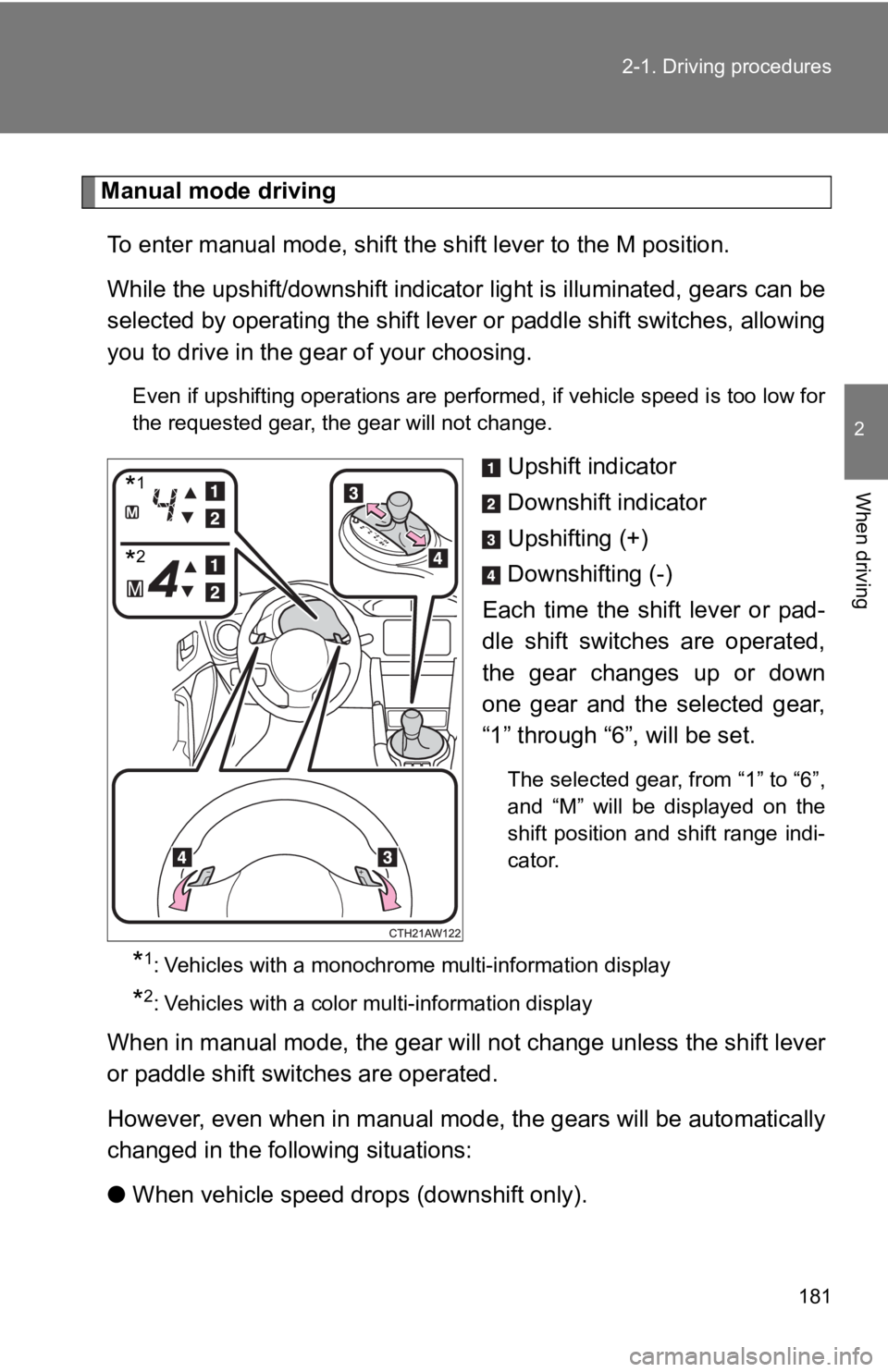
To enter manual mode, shift the s hift lever to the M position.
While the upshift/downshift indicator light is illuminated, gea rs can be
selected by operating the shift l ever or paddle shift switches, allowing
you to drive in the gea r of your choosing.
Even if upshifting operations are performed, if vehicle speed i s too low for
the requested gear, the gear will not change.
Upshift indicator
Downshift indicator
Upshifting (+)
Downshifting (-)
Each time the shift lever or pad-
dle shift switches are operated,
the gear changes up or down
one gear and the selected gear,
“1” through “6 ”, will be set.
The selected gear, from “1” to “6”,
and “M” will be displayed on the
shift position and shift range indi-
cator.
*1: Vehicles with a monochrome multi-information display
*2: Vehicles with a color multi-information display
When in manual mode, the gear will not change unless the shift lever
or paddle shift switches are operated.
However, even when in manual m ode, the gears will be automatically
changed in the following situations:
● When vehicle speed drops (downshift only).
*1
*2
Page 188 of 532
188
2-1. Driving procedures
Tur n signal lever
■Turn signals can be operated when
Vehicles without a smart key system
The engine switch is in the “ON” position.
Vehicles with a smart key system
The “ENGINE START STOP” switch is in IGNITION ON mode.
■ If the indicators flash faster than usual
Check that a light bulb in the turn signal lights has not burne d out.
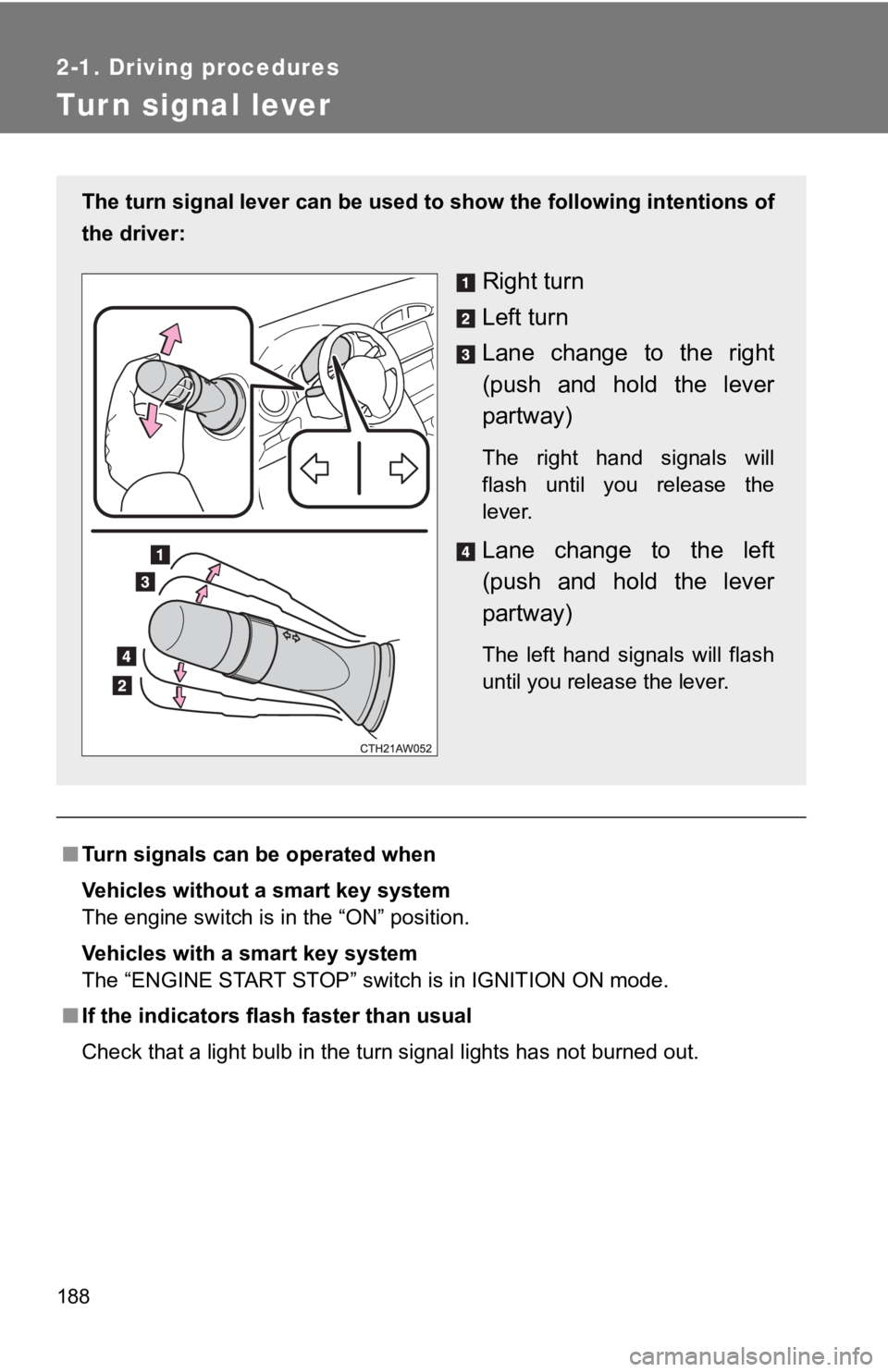
The turn signal lever can be used to show the following intentions of
the driver:
Right turn
Left turn
Lane change to the right
(push and hold the lever
partway)
The right hand signals will
flash until you release the
lever.
Lane change to the left
(push and hold the lever
partway)
The left hand signals will flash
until you release the lever.
Page 189 of 532
189
2-1. Driving procedures
2
When driving
Parking brake
■Usage in winter time
P. 261
NOTICE
■Before driving
Fully release the parking brake.
Driving the vehicle with the parking brake set will lead to bra ke components
overheating, which may affect braking performance and increase brake
wear.
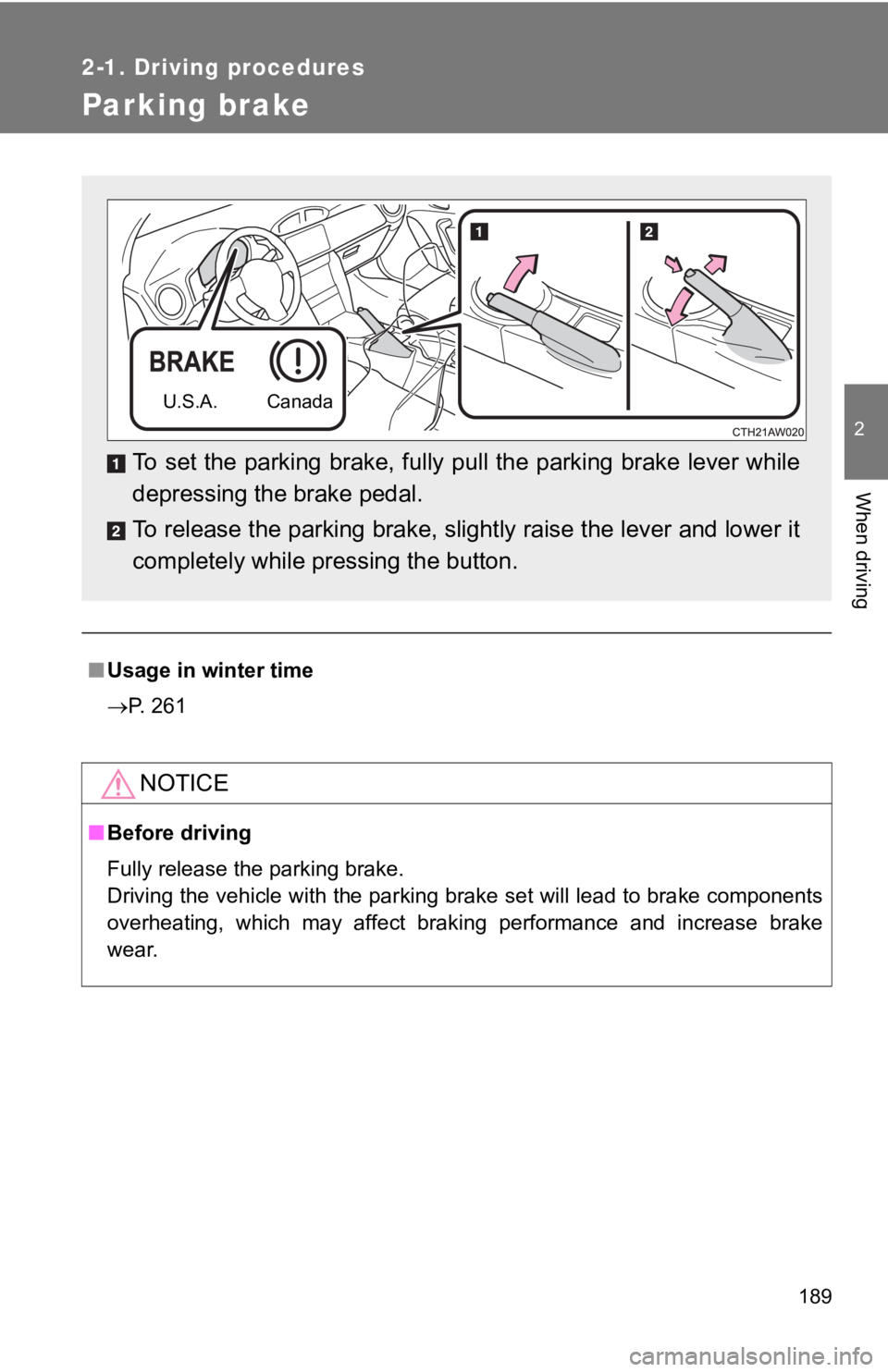
To set the parking brake, fully pull the parking brake lever wh ile
depressing the brake pedal.
To release the parking brake, slightly raise the lever and lowe r it
completely while pressing the button.
U.S.A. Canada
Page 192 of 532
192 2-2. Instrument cluster
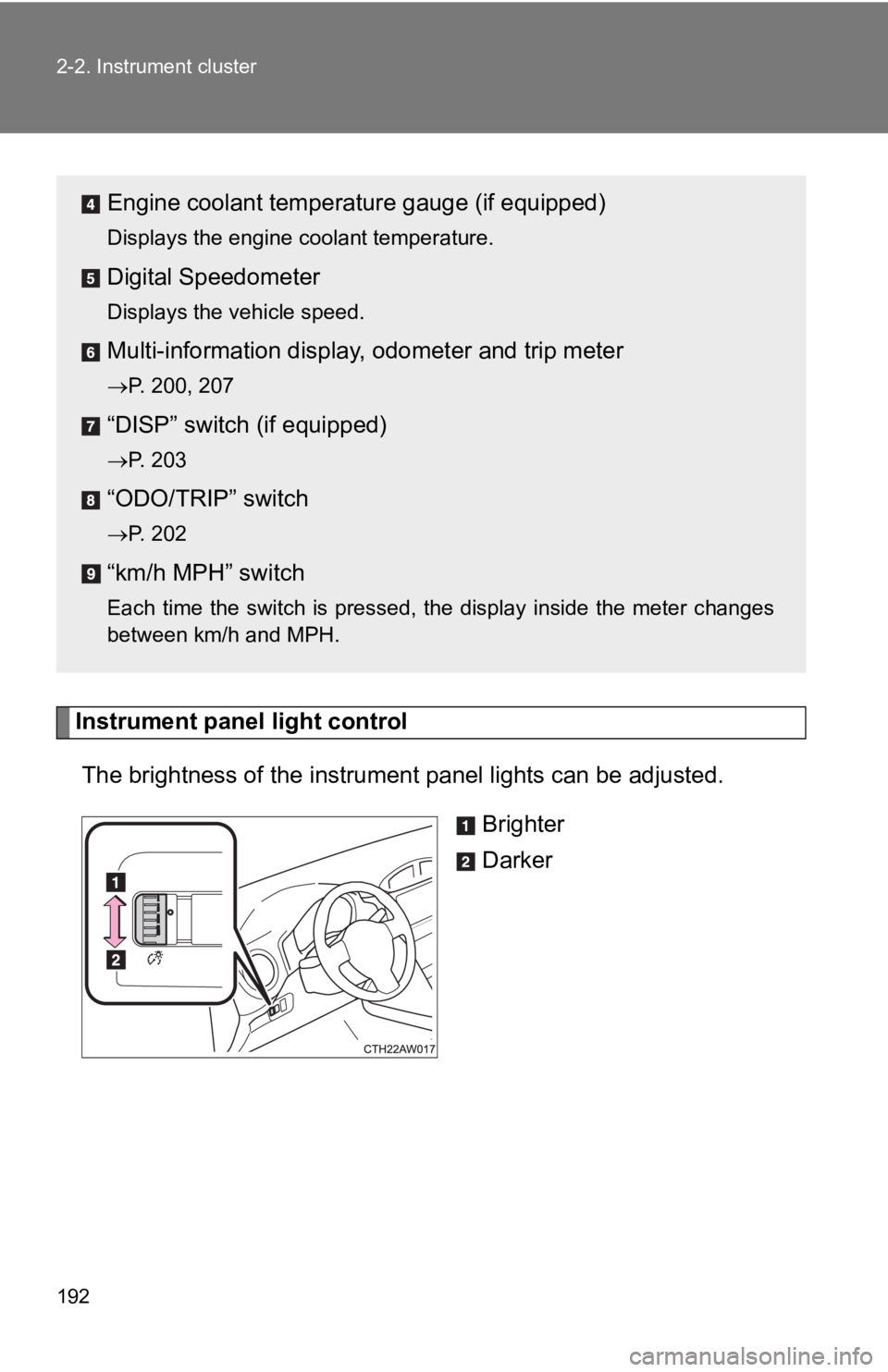
Instrument panel light controlThe brightness of the instrument panel lights can be adjusted.
Brighter
Darker
Engine coolant temperat ure gauge (if equipped)
Displays the engine coolant temperature.
Digital Speedometer
Displays the vehicle speed.
Multi-information display, odometer and trip meter
P. 200, 207
“DISP” switch (if equipped)
P. 203
“ODO/TRIP” switch
P. 202
“km/h MPH” switch
Each time the switch is pressed, the display inside the meter c hanges
between km/h and MPH.
Page 193 of 532
193
2-2. Instrument cluster
2
When driving
■
The meters and display illuminate when
Vehicles without a smart key system
The engine switch is in the “ON” position.
Vehicles with a smart key system
The “ENGINE START STOP” switch is in IGNITION ON mode.
■ The brightness of the i nstrument panel lights
When the parking lights or the headlights turn on, the instrume nt panel lights
will dim. However, when the instrument panel brightness control dial is
turned to the up most position, the instrument panel lights wil l not dim even
when the parking lights or headlights turn on.
NOTICE
■ To prevent damage to the engine and its components
● Do not let the indicator needle of the tachometer enter the red zone, which
indicates the maximum engine speed.
● In the following situations, the engine may be overheating. In this case,
immediately stop the vehicle in a safe place, and check the eng ine after it
has cooled completely. (
P. 449)
• Vehicles with a monochrome multi-information display: The engine coolant temperature gauge enters the red zone
• Vehicles with a color multi-information display: The high engine coolant temperature warning light flashes or illuminates
Page 194 of 532
194
2-2. Instrument cluster
Indicators and warning lights
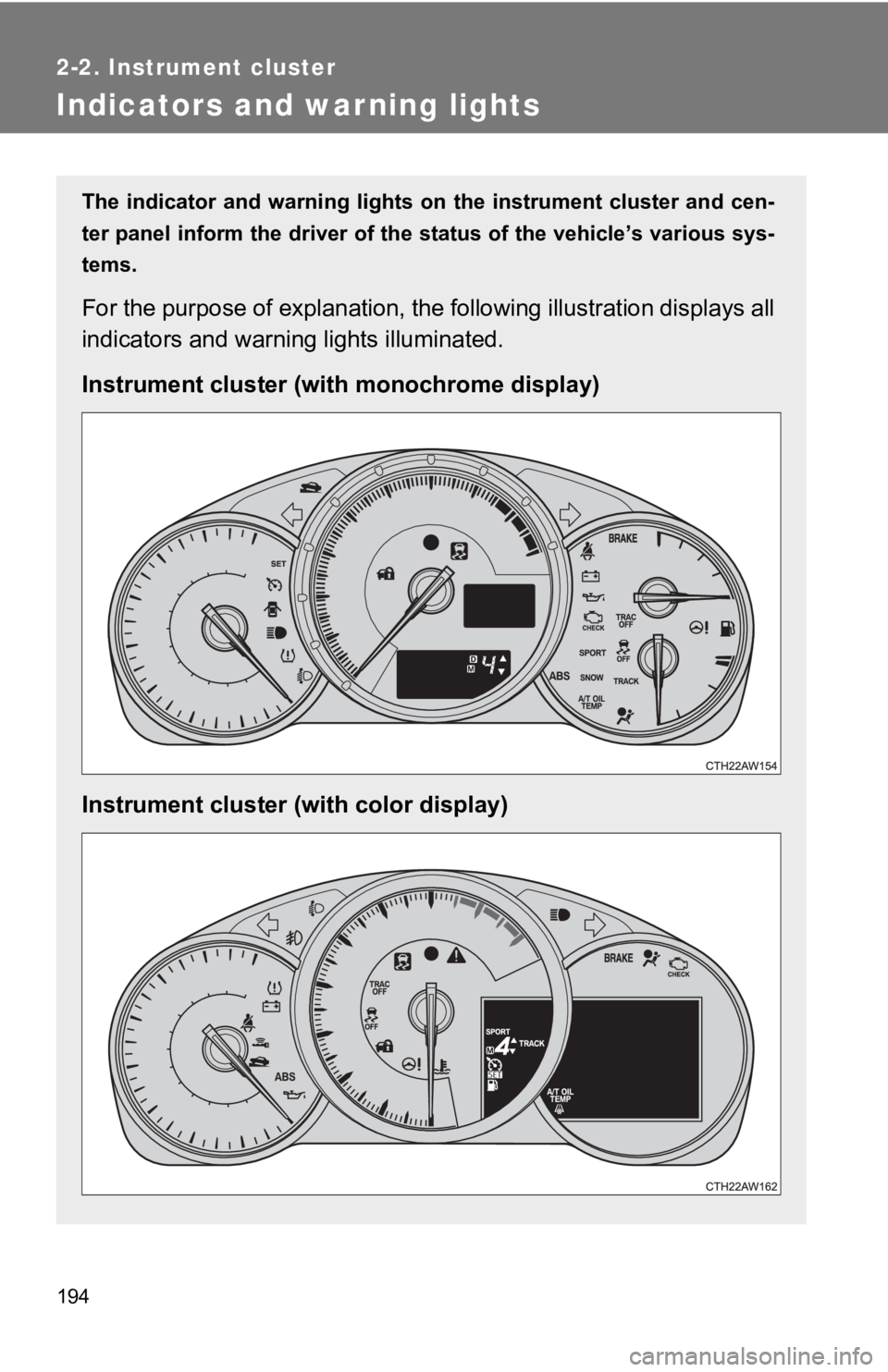
The indicator and warning lights on the instrument cluster and cen-
ter panel inform the driver of the status of the vehicle’s vari ous sys-
tems.
For the purpose of explanation, the following illustration displays all
indicators and warning lights illuminated.
Instrument cluster (with monochrome display)
Instrument cluster (with color display)
Page 196 of 532
196 2-2. Instrument cluster
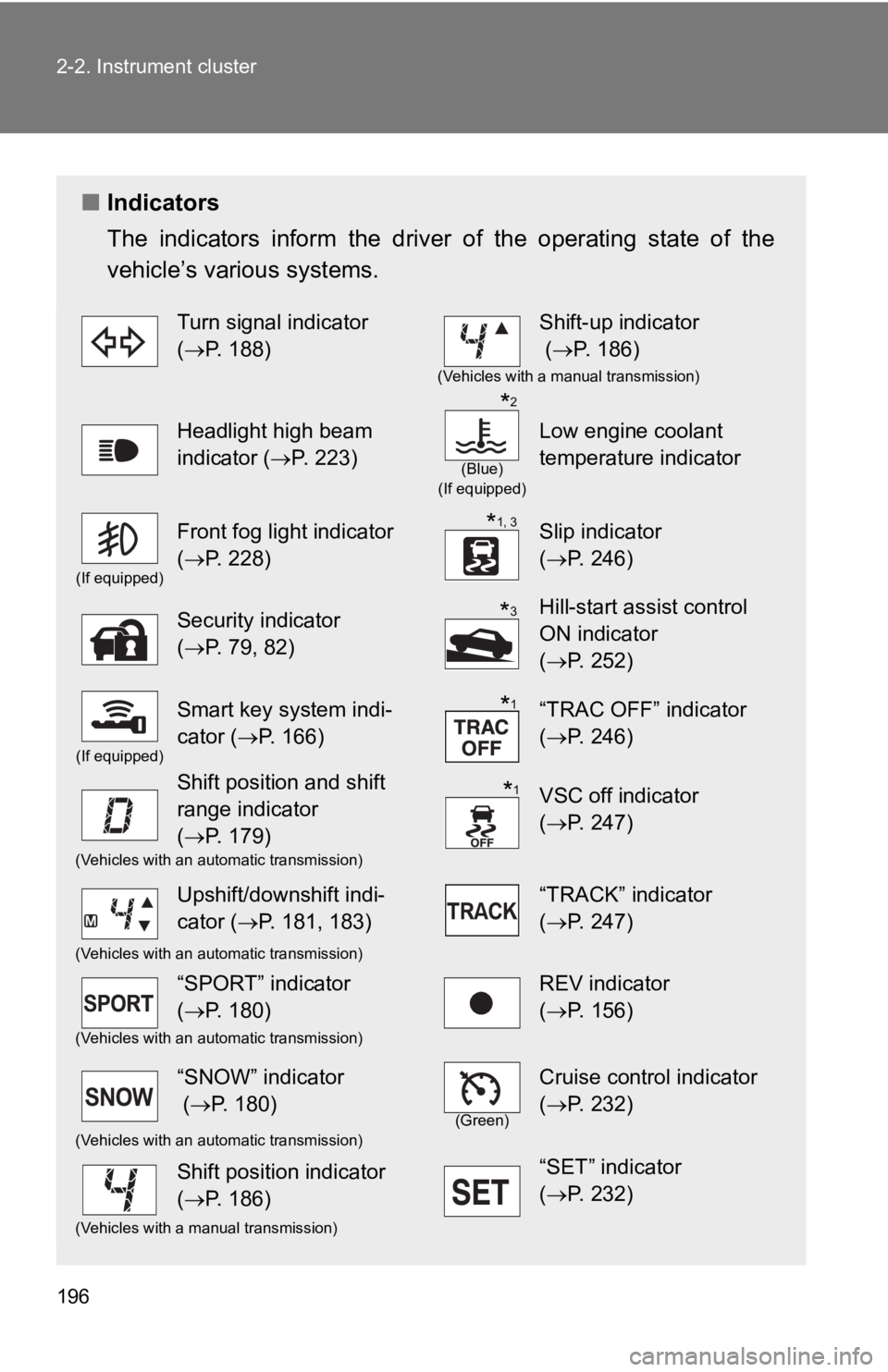
■Indicators
The indicators inform the driv er of the operating state of the
vehicle’s various systems.
Turn signal indicator
( P. 188)Shift-up indicator
( P. 186)
(Vehicles with a manual transmission)
Headlight high beam
indicator ( P. 223)
(Blue)
(If equipped)
Low engine coolant
temperature indicator
(If equipped)
Front fog light indicator
( P. 228)Slip indicator
(P. 246)
Security indicator
(P. 79, 82)Hill-start assist control
ON indicator
(P. 252)
(If equipped)
Smart key system indi-
cator ( P. 166)“TRAC OFF” indicator
(P. 246)
Shift position and shift
range indicator
(P. 179)VSC off indicator
(P. 247)
(Vehicles with an automatic transmission)
Upshift/downshift indi-
cator ( P. 181, 183)“TRACK” indicator
(P. 247)
(Vehicles with an automatic transmission)
“SPORT” indicator
(P. 180)REV indicator
(P. 156)
(Vehicles with an automatic transmission)
“SNOW” indicator
( P. 180)
(Green)
Cruise control indicator
(P. 232)
(Vehicles with an automatic transmission)
Shift position indicator
(P. 186)“SET” indicator
(P. 232)
(Vehicles with a manual transmission)
*2
*1, 3
*3
*1
*1
Page 197 of 532
197
2-2. Instrument cluster
2
When driving
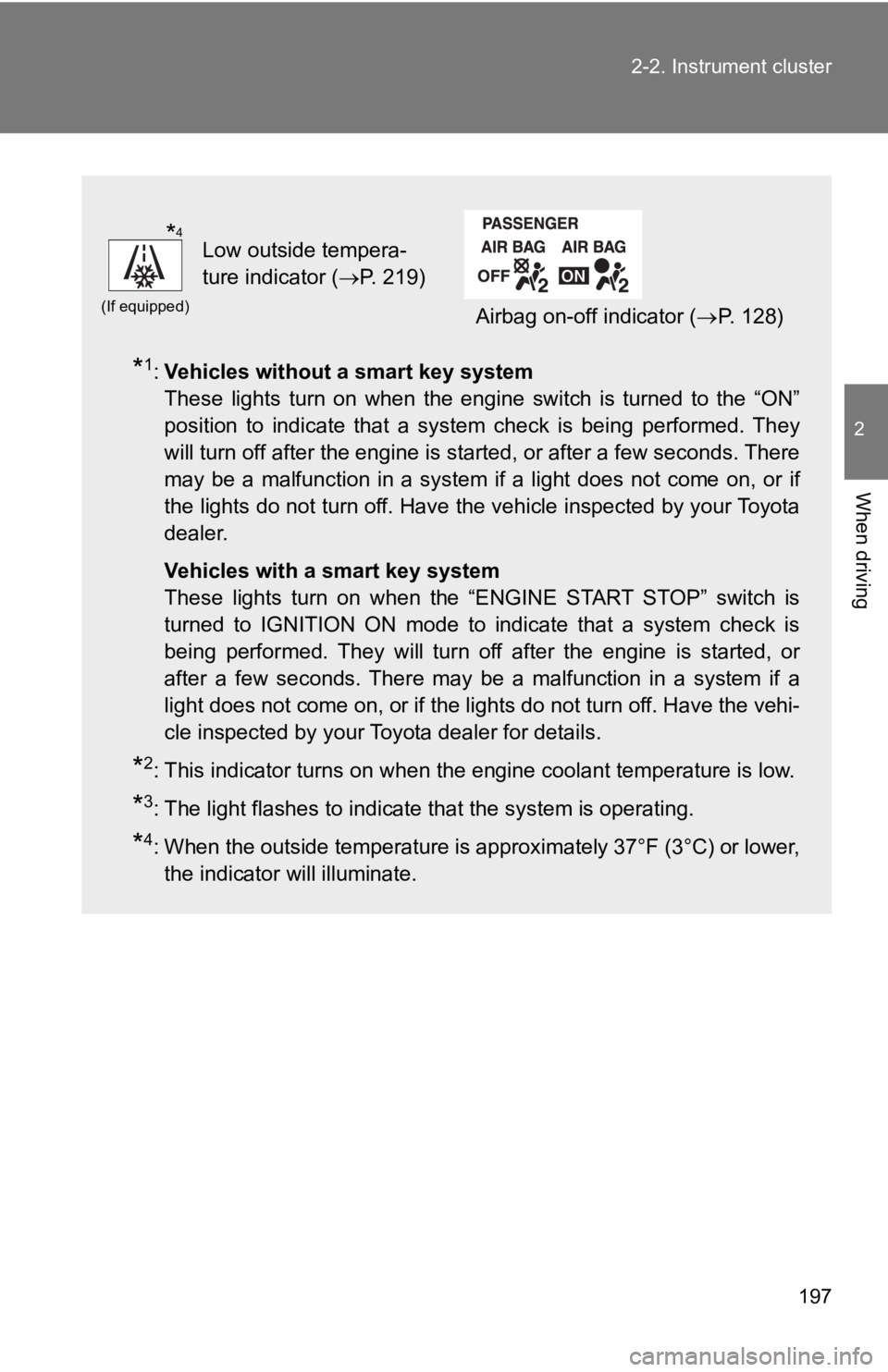
*1:
Vehicles without a smart key system
These lights turn on when the engine switch is turned to the “O N”
position to indicate that a system check is being performed. Th ey
will turn off after the engine is started, or after a few seconds. There
may be a malfunction in a system if a light does not come on, o r if
the lights do not turn off. Have the vehicle inspected by your To y o t a
dealer.
Vehicles with a smart key system
These lights turn on when the “ENGINE START STOP” switch is
turned to IGNITION ON mode to indicate that a system check is
being performed. They will turn off after the engine is started , or
after a few seconds. There may be a malfunction in a system if a
light does not come on, or if the lights do not turn off. Have the vehi-
cle inspected by your Toyota dealer for details.
*2: This indicator turns on when the engine coolant temperature is low.
*3: The light flashes to indicate that the system is operating.
*4: When the outside temperature is approximately 37°F (3°C) or lower,
the indicator will illuminate.
(If equipped)
Low outside tempera-
ture indicator ( P. 219)
Airbag on-off indicator ( P. 128)
*4
Page 198 of 532
198 2-2. Instrument cluster
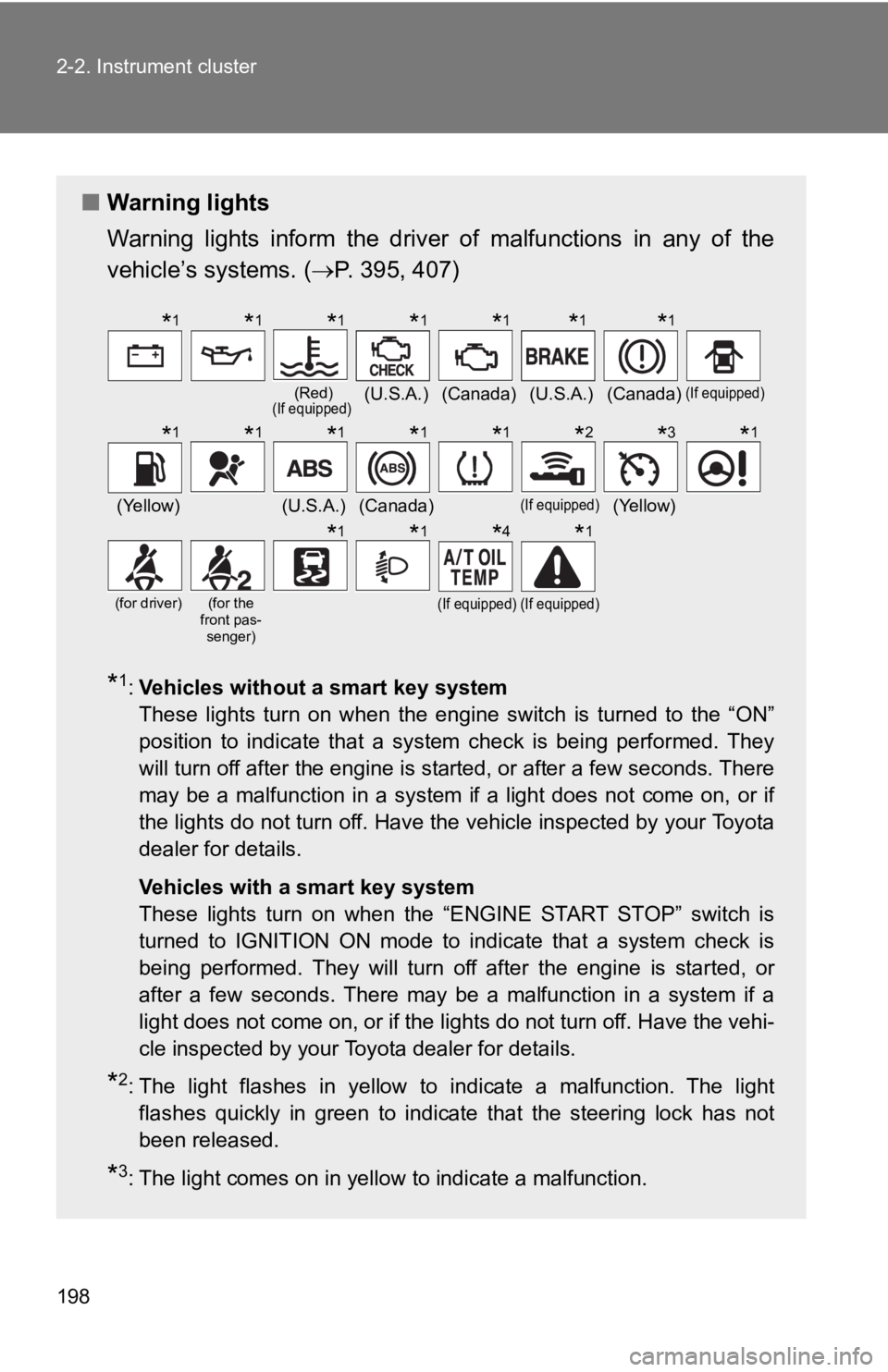
■Warning lights
Warning lights inform the driver of malfunctions in any of the
vehicle’s systems. ( P. 395, 407)
*1:Vehicles without a smart key system
These lights turn on when the engine switch is turned to the “O N”
position to indicate that a system check is being performed. Th ey
will turn off after the engine is started, or after a few seconds. There
may be a malfunction in a system if a light does not come on, o r if
the lights do not turn off. Have the vehicle inspected by your To y o t a
dealer for details.
Vehicles with a smart key system
These lights turn on when the “ENGINE START STOP” switch is
turned to IGNITION ON mode to indicate that a system check is
being performed. They will turn off after the engine is started , or
after a few seconds. There may be a malfunction in a system if a
light does not come on, or if the lights do not turn off. Have the vehi-
cle inspected by your Toyota dealer for details.
*2: The light flashes in yellow to indicate a malfunction. The light flashes quickly in green to indicate that the steering lock has not
been released.
*3: The light comes on in yellow to indicate a malfunction.
(Red)(If equipped)(U.S.A.)(Canada)(U.S.A.)(Canada)(If equipped)
(Yellow)(U.S.A.)(Canada)(If equipped)(Yellow)
(for driver)(for the
front pas- senger)(If equipped)(If equipped)
*1*1*1*1*1*1*1
*1*1*1*1*1*2*3*1
*1*1*4*1
Page 199 of 532
199
2-2. Instrument cluster
2
When driving
WARNING
■
If a safety system warning light does not come on
Should a safety system light such as the ABS and SRS warning li ght not
come on when you start the engine, this could mean that these s ystems are
not available to help protect you in an accident, which could r esult in death
or serious injury. Have the vehicle inspected by your Toyota de aler immedi-
ately if this occurs.
*4: Vehicles with a monochrome multi-information display only: This light turns on when the engine switch is turned to the “ON” pos ition
to indicate that a system check is being performed. It will tur n off
after the engine is started, or after a few seconds. There may be a
malfunction in a system if the light does not come on or turn o ff.
Have the vehicle inspected by your Toyota dealer for details.