engine TOYOTA 86 2019 User Guide
[x] Cancel search | Manufacturer: TOYOTA, Model Year: 2019, Model line: 86, Model: TOYOTA 86 2019Pages: 532, PDF Size: 6.89 MB
Page 31 of 532

311-2. Opening, closing and locking the doors and trunk
1
Before driving ■ Conditions affecting operation
The smart key system uses weak radio waves. In the following si tuations,
the communication between the electronic key and the vehicle ma y be
affected, preventing the smart key system, wireless remote control and
engine immobilizer system from operating properly.
(Way of coping P. 440)
● When the electronic key battery is depleted
● Near a TV tower, electric power plant, gas station, radio stati on, large dis-
play, airport or other facility that generates strong radio wav es or electri-
cal noise
● When the electronic key is in contact with, or is covered by th e following
metallic objects
• Cards to which aluminum foil is attached
• Cigarette boxes that have aluminum foil inside
• Metallic wallets or bags
• Coins
• Hand warmers made of metal
• Media such as CDs and DVDs
● When other wireless keys (that emit radio waves) are being used nearby
● When carrying the electronic key together with the following de vices that
emit radio waves
• A portable radio, cellular phone, cordless phone or other wire less com-
munication device
• Another vehicle's electronic key or a wireless key that emits radio
waves
• Personal computers or personal digital assistants (PDAs)
• Digital audio players
• Portable game systems
● If window tint with a metallic content or metallic objects are attached to
the rear window
● When the electronic key is placed near a battery charger or electronic
devices
Page 32 of 532

321-2. Opening, closing and locking the doors and trunk
■ Notes for the entry function
● Even when the electronic key is within the effective range (detection
areas), the system may not operate properly in the following ca ses:
• The electronic key is too close to the window or outside door handle,
near the ground, or in a high place when the doors are locked o r
unlocked.
• The electronic key is near the ground or in a high place, or t oo close to
the rear bumper center when the trunk is unlocked.
• The electronic key is on the instrument panel, rear shelf or f loor, in the
door pockets or glove box, auxiliary box when the engine is sta rted or
“ENGINE START STOP” switch modes are changed.
● Do not leave the electronic key on top of the instrument panel or near the
door pockets when exiting the vehicle. Depending on the radio w ave
reception conditions, it may be detected by the antenna outside the cabin
and the door will become lockable from the outside, possibly tr apping the
electronic key inside the vehicle.
● As long as the electronic key is within the effective range, th e doors may
be locked or unlocked by anyone.
● Even if the electronic key is not inside the vehicle, it may be possible to
start the engine if the electronic key is near the window.
● The doors may unlock if a large amount of water splashes on the door
handle, such as in the rain or in a car wash when the electroni c key is
within the effective range. (The door will automatically be loc ked after
approximately 60 seconds if the doors are not opened and closed .)
● Gripping the door handle when wearing a glove may not unlock th e door.
● If the wireless remote control is used to lock the doors when t he elec-
tronic key is near the vehicle, there is a possibility that the door may not
be unlocked by the entry function. (Use the wireless remote con trol to
unlock the doors.)
● A sudden approach to the effective range or door handle may prevent the
doors from being unlocked. In this case, return the door handle to the
original position and check that the doors unlock before pullin g the door
handle again.
Page 34 of 532

341-2. Opening, closing and locking the doors and trunk
■ When the vehicle is not dri ven for extended periods
● To prevent theft of the vehicle, do not leave the electronic ke y within 6 ft.
(2 m) of the vehicle.
● The smart key system can be deactivated in advance. ( P. 487)
■ Alarm
Using the smart key system to lock the doors will set the alarm system.
( P. 82)
■ To operate the system properly
● Make sure to carry the electronic key when operating the system . Do not
get the electronic key too close to the vehicle when operating the system
from the outside of the vehicle.
Depending on the position and holding condition of the electron ic key, the
key may not be detected correctly and the system may not operat e prop-
erly. (The alarm may go off accidentally, or the door lock prev ention func-
tion may not operate.)
● Do not leave the electronic key inside the trunk.
The key confinement prevention function may not operate, depend ing on
the location of the key (close to a spare tire, the inside edge of the trunk),
conditions (inside a metal bag, close to metallic objects) and the radio
waves in the surrounding area. ( P. 48)
■ If the smart key system does not operate properly
● Locking and unlocking the doors, unlocking the trunk: Use the m echani-
cal key. ( P. 440)
● Starting the engine: P. 441
Page 35 of 532

351-2. Opening, closing and locking the doors and trunk
1
Before driving ■ Electronic key battery depletion
● The standard battery life is 1 to 2 years.
● If the battery charge becomes low, a buzzer will sound in the c abin and a
message will be displayed on the multi-information display when the
engine is stopped. ( P. 413)
● As the electronic key always receives radio waves, the battery will
become depleted even if the electronic key is not used. The fol lowing
symptoms indicate that the electronic key battery may be depleted.
Replace the battery when necessary. ( P. 363)
• The smart key system or the wireless remote control does not o perate.
• The detection area becomes smaller.
• The LED indicator on the key surface does not turn on.
● To avoid serious deterioration, do not leave the electronic key close to
any of the following electrical appliances that produce a magne tic field:
•TVs
• Personal computers
• Cellular phones, cordless phones and battery chargers
• Recharging cellular phones or cordless phones
• Induction cookers
• Table lamps
■ When the electronic key battery is fully depleted
P. 363
■ If the smart key system has been d eactivated in a customized se tting
● Locking and unlocking the doors, unlocking the trunk: Use the w ireless
remote control or mechanical key. ( P. 38, 440)
● Starting the engine and changing “ENGINE START STOP” switch
modes: P. 4 4 1
● Stopping the engine: P. 443
■ Customization that can be configured at Toyota dealer
Settings (e.g. smart key system) can be changed.
(Customizable features: P. 487)
Page 70 of 532
701-3. Adjustable components (s eats, mirrors, steering wheel)
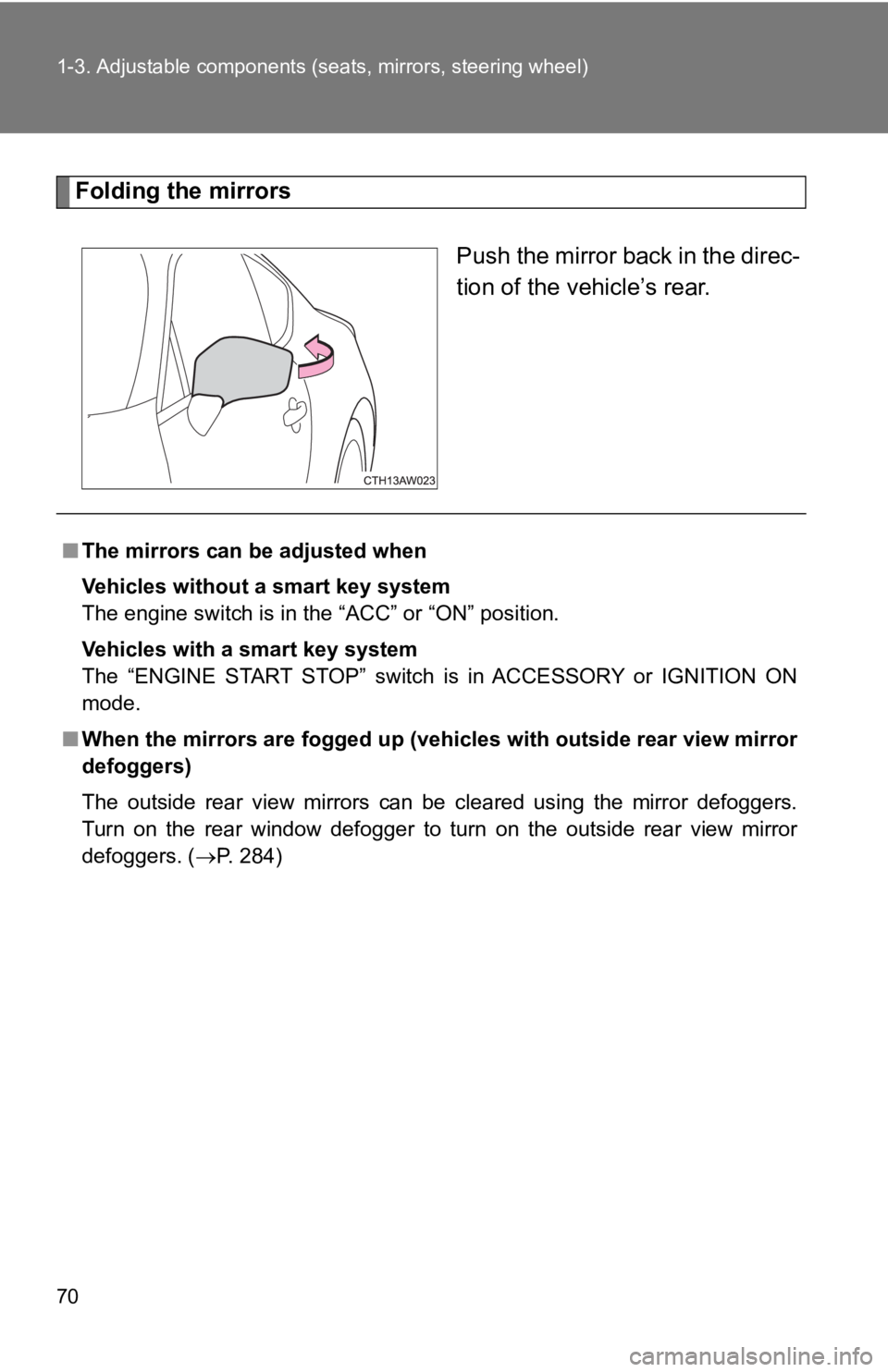
Folding the mirrors
Push the mirror back in the direc-
tion of the vehicle’s rear.
■ The mirrors can be adjusted when
Vehicles without a smart key system
The engine switch is in the “ACC” or “ON” position.
Vehicles with a smart key system
The “ENGINE START STOP” switch is in ACCESSORY or IGNITION ON
mode.
■ When the mirrors are fogged up ( vehicles with outside rear view mirror
defoggers)
The outside rear view mirrors can be cleared using the mirror d efoggers.
Turn on the rear window defogger to turn on the outside rear vi ew mirror
defoggers. ( P. 284)
Page 73 of 532
731-4. Opening and closing the windows
1
Before driving ■ The power windows can be operated when
Vehicles without a smart key system
The engine switch is in the “ON” position.
Vehicles with a smart key system
The “ENGINE START STOP” switch is in IGNITION ON mode.
■ Operating the power windows after turning the engine off
Vehicles without a smart key system
The power windows can be operated for approximately 45 seconds even
after the engine switch is turned to the “ACC” or “LOCK” positi on. They can-
not, however, be operated once either door is opened.
Vehicles with a smart key system
The power windows can be operated for approximately 45 seconds even
after the “ENGINE START STOP” sw itch is turned to ACCESSORY mod e or
turned off. They cannot, however, be operated once either door is opened.
■ Jam protection function
If an object becomes caught between the window and the body, wi ndow
travel is stopped and the window is opened slightly.
■ When the power window does not close normally
If the jam protection function is operating abnormally and a window cannot
be closed, close all the doors and perform the following operat ions using the
power window switch on the relevant door.
Vehicles without a smart key system: After stopping the vehicle , the
engine switch is turned to the “ON” position.
Vehicles with a smart key system: After stopping the vehicle, t he
“ENGINE START STOP” switch is turned to IGNITION ON mode.
Hold the power window switch in the one-touch closing position two
consecutive times.
Hold the power window switch in the one-touch closing position
once again and continue holding for 1 second or more after the win-
dow closes completely.
If you push the power window switch to the opening position whi le the win-
dow is moving, start again from the beginning. If the window continues to
close but then re-open slightly even after performing the above procedure
correctly, have the vehicle inspected by your Toyota dealer. STEP 1
STEP 2
STEP 3
Page 74 of 532

741-4. Opening and closing the windows
WARNING■ Closing the windows
Observe the following precautions.
Failure to do so may result in death or serious injury.
● The driver is responsible for all the power window operations, including the
operation for the passengers. In order to prevent accidental op eration,
especially by a child, do not let a child operate the power win dows. It is
possible for children and other passengers to have body parts c aught in
the power window. Also, when riding with a child, it is recomme nded to use
the window lock switch. ( P. 72)
● Check to make sure that all passengers do not have any part of their body
in a position where it could be caught when a window is being o perated.
● When exiting the vehicle, turn the engine switch (vehicles with out a smart
key system) or the “ENGINE START STOP” switch (vehicles with a smart
key system) off, carry the key and exit the vehicle along with the child.
There may be accidental operation, due to mischief, etc., that may possi-
bly lead to an accident.
■ Jam protection function
● Never use any part of your body to intentionally activate the j am protection
function.
● The jam protection function may not work if something gets caug ht just
before the window fully closes.
Page 75 of 532
75 1
Before driving 1-5. Refueling
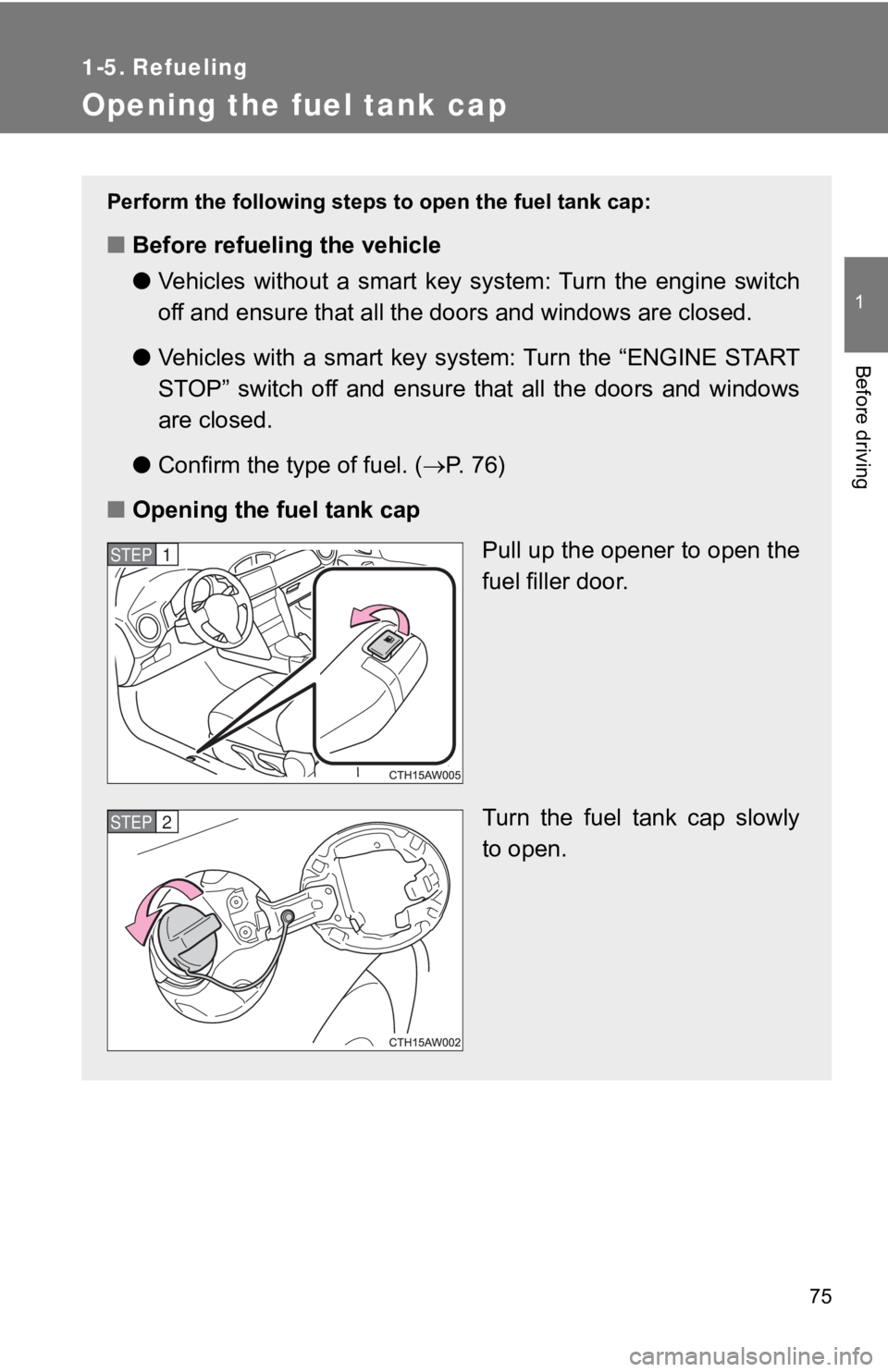
Opening the fuel tank cap Perform the following steps to open the fuel tank cap:
■ Before refueling the vehicle
● Vehicles without a smart key system: Turn the engine switch
off and ensure that all the doo rs and windows are closed.
● Vehicles with a smart key system: Turn the “ENGINE START
STOP” switch off and ensure that all the doors and windows
are closed.
● Confirm the type of fuel. ( P. 7 6 )
■ Opening the fuel tank cap
Pull up the opener to open the
fuel filler door.
Turn the fuel tank cap slowly
to open.STEP 1
STEP 2
Page 76 of 532
761-5. Refueling
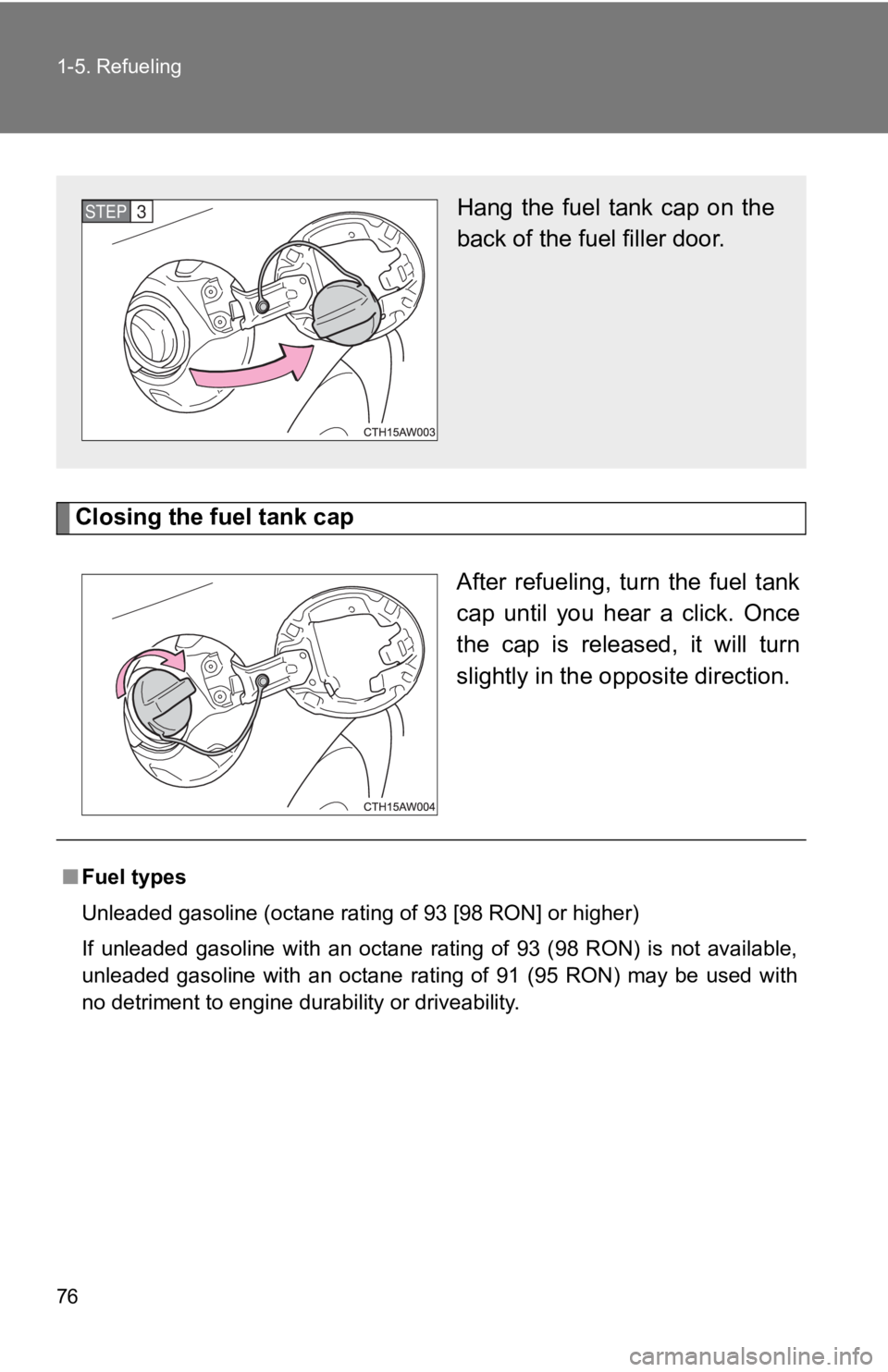
Closing the fuel tank cap
After refueling, turn the fuel tank
cap until you hear a click. Once
the cap is released, it will turn
slightly in the o pposite direction.Hang the fuel tank cap on the
back of the fuel filler door.STEP 3
■ Fuel types
Unleaded gasoline (octane rating of 93 [98 RON] or higher)
If unleaded gasoline with an octane rating of 93 (98 RON) is no t available,
unleaded gasoline with an octane rating of 91 (95 RON) may be u sed with
no detriment to engine durability or driveability.
Page 78 of 532

781-5. Refueling
WARNING■ When refueling
Observe the following precautions to prevent fuel overflowing f rom the fuel
tank:
● Securely insert the fuel nozzle into the fuel filler neck
● Stop filling the tank after the fuel nozzle automatically click s off
● Do not top off the fuel tank
● Observe other precautions that are posted at the service statio n.
● Turn the cap to the right until it clicks to ensure that it is fully tightened. If
the cap is not securely tightened, fuel spillage could occur in the event of
an accident, creating a fire hazard.
■ When replacing the fuel cap
Do not use anything but a genuine Toyota fuel tank cap designed for your
vehicle. Doing so may cause a fire or other incident which may result in
death or serious injury.
NOTICE■ Refueling
● Do not spill fuel during refueling.
Doing so may damage the vehicle, such as causing the emission c ontrol
system to operate abnormally or damaging fuel system components or the
vehicle's painted surface.
● Never add any cleaning agents to the fuel tank. The addition of a cleaning
agent may cause damage to the fuel system.
● Immediately put fuel in the tank whenever the low fuel warning light illumi-
nates. Engine misfires as a result of an empty tank could cause damage to
the engine.