key battery TOYOTA 86 2019 Owner's Manual
[x] Cancel search | Manufacturer: TOYOTA, Model Year: 2019, Model line: 86, Model: TOYOTA 86 2019Pages: 532, PDF Size: 6.89 MB
Page 326 of 532
3264-3. Do-it-yourself maintenance
WARNINGThe engine compartment contains many mechanisms and fluids that may
move suddenly, become hot, or become electrically energized. To avoid death
or serious injury, observe the following precautions.
■ When working on the engine compartment
● Keep hands, clothing, and tools away from the moving fan and en gine
drive belt.
● Be careful not to touch the engine, radiator, exhaust manifold, etc. right
after driving as they may be hot. Oil and other fluids may also be hot.
● Do not leave anything that may burn easily, such as paper or ra gs, in the
engine compartment.
● Do not smoke, cause sparks or expose an open flame to fuel or t he bat-
tery. Fuel and battery fumes are flammable.
● Be extremely cautious when working on the battery. It contains poisonous
and corrosive sulfuric acid.
■ When working near the electric cooling fans or radiator grille
Vehicles without a smart key system: Be sure the engine switch is off. With
the engine switch in the “ON” position, the electric cooling fa ns may auto-
matically start to run if the air conditioning is on and/or the coolant tempera-
ture is high. ( P. 337)
Vehicles with a smart key system: Be sure the “ENGINE START STO P”
switch is off. With the “ENGINE START STOP” switch in IGNITION ON
mode, the electric cooling fans may automatically start to run if the air condi-
tioning is on and/or the coolant temperature is high. ( P. 337)
■ Safety glasses
Wear safety glasses to prevent flying or falling material, flui d spray, etc. from
getting in the eyes.
NOTICE
■ If you remove the air cleaner filter
Driving with the air cleaner filter removed may cause excessive engine wear
due to dirt in the air.
Page 341 of 532
3414-3. Do-it-yourself maintenance
4
Maintenance and care ■ After recharging/reconnecting the battery (vehicles with a smar t key
system)
● Unlocking the doors using the smart key system may not be possi ble
immediately after reconnecting the battery. If this happens, use the wire-
less remote control or the mechanical key to lock/unlock the do ors.
● Start the engine with the “ENGINE START STOP” switch in ACCES-
SORY mode. The engine may not start with the “ENGINE START STOP ”
switch turned off. However, the engine will operate normally from the sec-
ond attempt.
● The “ENGINE START STOP” switch mode is recorded by the vehicle. If
the battery is reconnected, the vehicle will return the “ENGINE START
STOP” switch mode to the status it was in before the battery was discon-
nected. Make sure to turn off the engine before disconnect the battery.
Take extra care when connecting the battery if the “ENGINE STAR T
STOP” switch mode prior to discharge is unknown.
If the engine will not start even after multiple attempts, cont act your Toyota
dealer.
Page 363 of 532
3634-3. Do-it-yourself maintenance
4
Maintenance and care
Wireless remote control/electronic key batter y Replace the battery with a new one if it is depleted.
■ You will need the following items:
● Flathead screwdriver
● Lithium battery CR2016 (vehicles without a smart key sys-
tem), or CR2032 (vehicles with a smart key system)
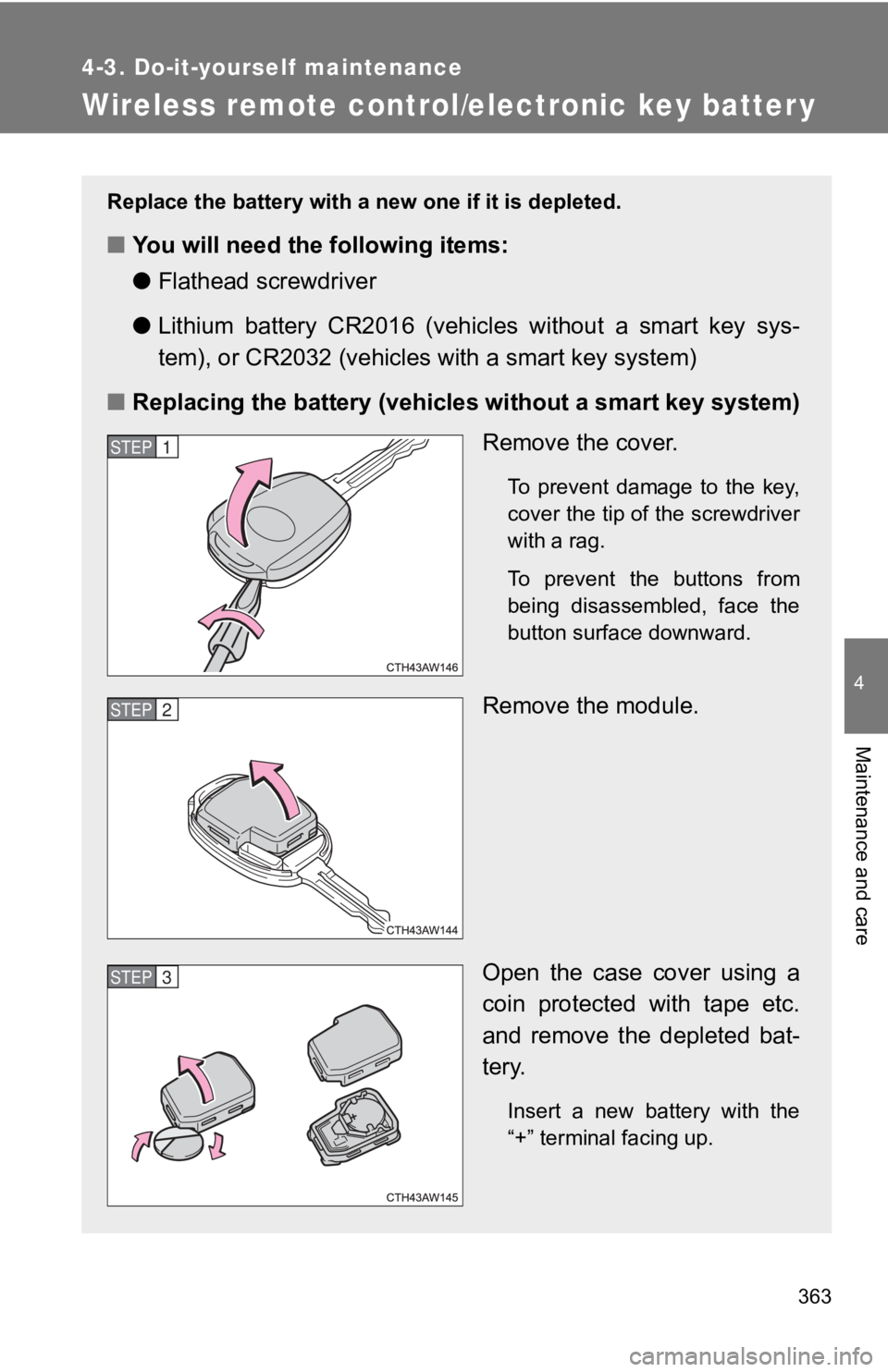
■ Replacing the battery (vehicles without a smart key system)
Remove the cover. To prevent damage to the key,
cover the tip of the screwdriver
with a rag.
To prevent the buttons from
being disassembled, face the
button surface downward.
Remove the module.
Open the case cover using a
coin protected with tape etc.
and remove the depleted bat-
tery.
Insert a new battery with the
“+” terminal facing up.STEP 1
STEP 2
STEP 3
Page 364 of 532
3644-3. Do-it-yourself maintenance
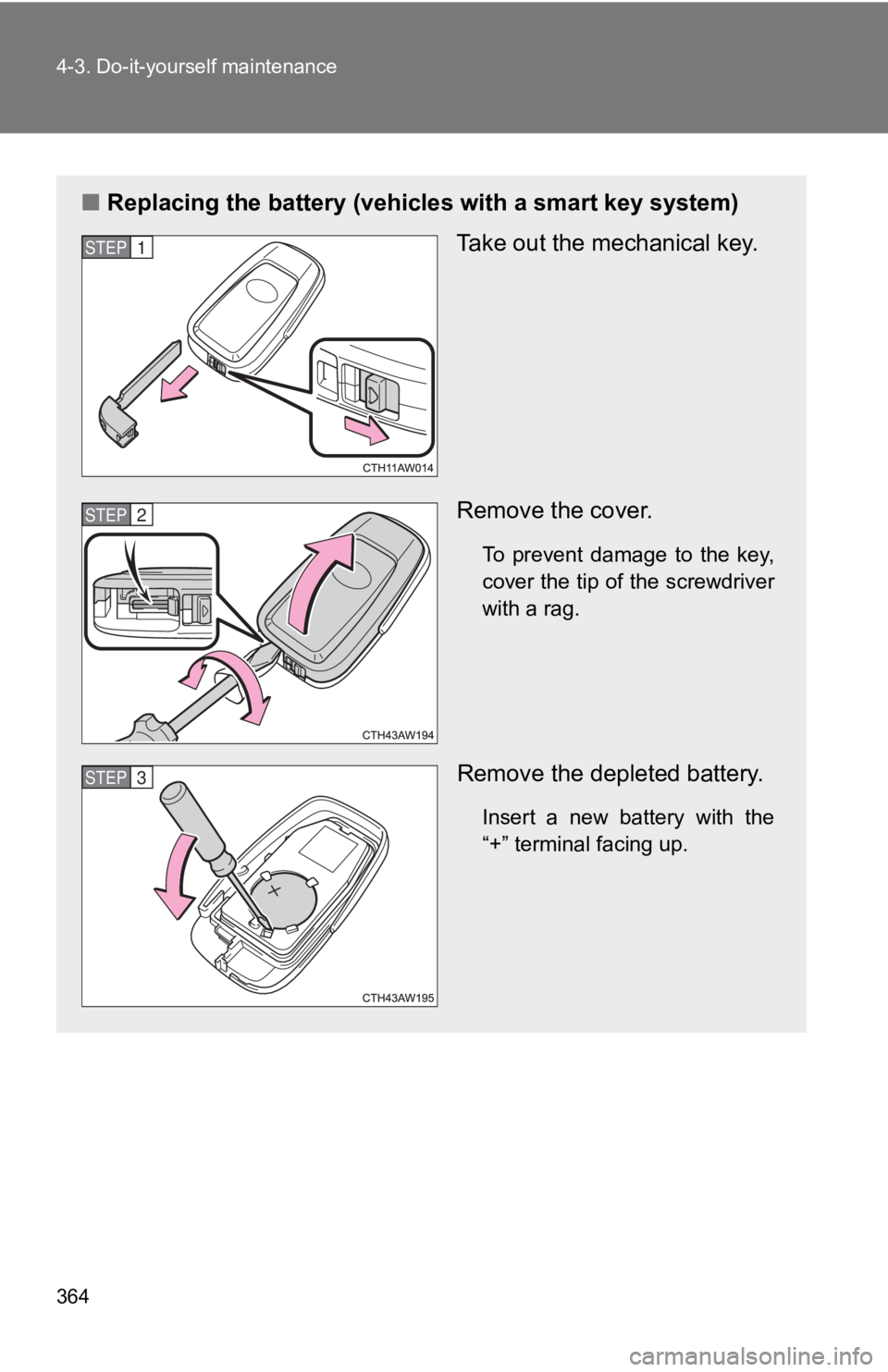
■ Replacing the battery (vehicl es with a smart key system)
Take out the mechanical key.
Remove the cover. To prevent damage to the key,
cover the tip of the screwdriver
with a rag.
Remove the depleted battery. Insert a new battery with the
“+” terminal facing up.STEP 1
STEP 2
STEP 3
Page 365 of 532
3654-3. Do-it-yourself maintenance
4
Maintenance and care ■ Use a CR2016 (vehicles without a smart key system) or CR2032 (v ehi-
cles with a smart key system) lithium battery
● Batteries can be purchased at your Toyota dealer, local electri cal appli-
ance shops or camera stores.
● Replace only with the same or equivalent type recommended by th e
manufacturer.
● Dispose of used batteries according to local laws.
■ If the key battery is depleted
The following symptoms may occur:
● The smart key system (if equipped) and wireless remote control will not
function properly.
● The operational range will be reduced.
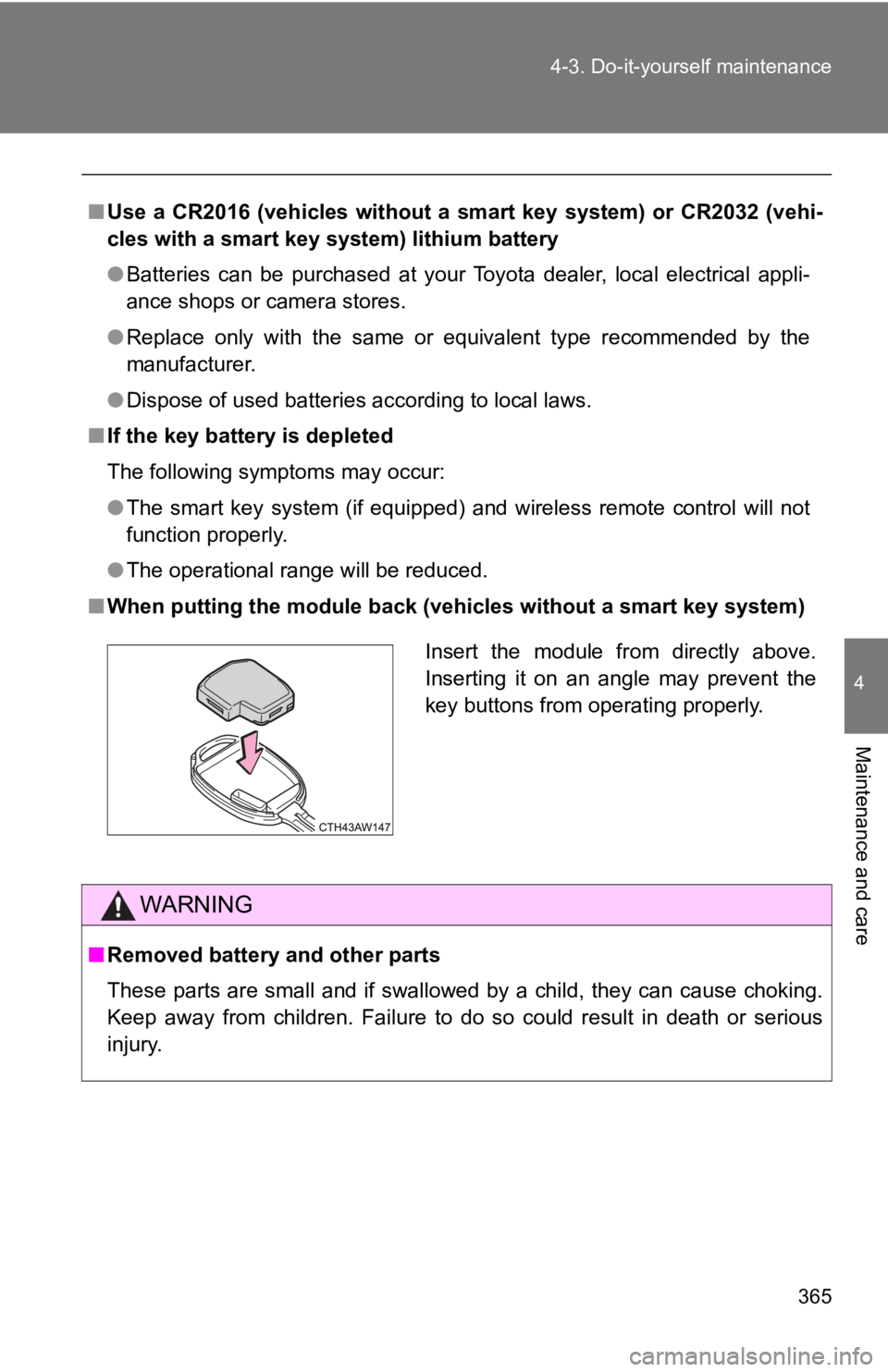
■ When putting the module back ( vehicles without a smart key syst em)
WARNING
■ Removed battery and other parts
These parts are small and if swallowed by a child, they can cau se choking.
Keep away from children. Failure to do so could result in death or serious
injury. Insert the module from directly above.
Inserting it on an angle may prevent the
key buttons from operating properly.
Page 383 of 532
When trouble arises
5
3835-1. Essential information
Emergency flashers ......... 384
If your vehicle needs to
be towed ........................ 385
If you think something
is wrong ......................... 393
Fuel pump shut off
system ........................... 394
5-2. Steps to take in an
emergency
If a warning light turns on
or a warning buzzer
sounds... ........................ 395
If a warning message is
displayed........................ 407
If you have a flat tire......... 424 If the engine will
not start .......................... 435
If the shift lever cannot be
shifted from P................. 438
If you lose your keys ........ 439
If the electronic key does
not operate properly....... 440
If the battery is
discharged ..................... 444
If your vehicle
overheats ....................... 449
If the vehicle becomes
stuck .............................. 452
If your vehicle has to be
stopped in an
emergency ..................... 454
Page 420 of 532
4205-2. Steps to take in an emergency
Power was
turned off due to
the automatic
power off func-
tion. Next time
when
starting
the
engine,
increase
the engine
speed
slightly
and main-
tain that
level for
approxi-
mately 5
minutes to
recharge
the bat-
tery.
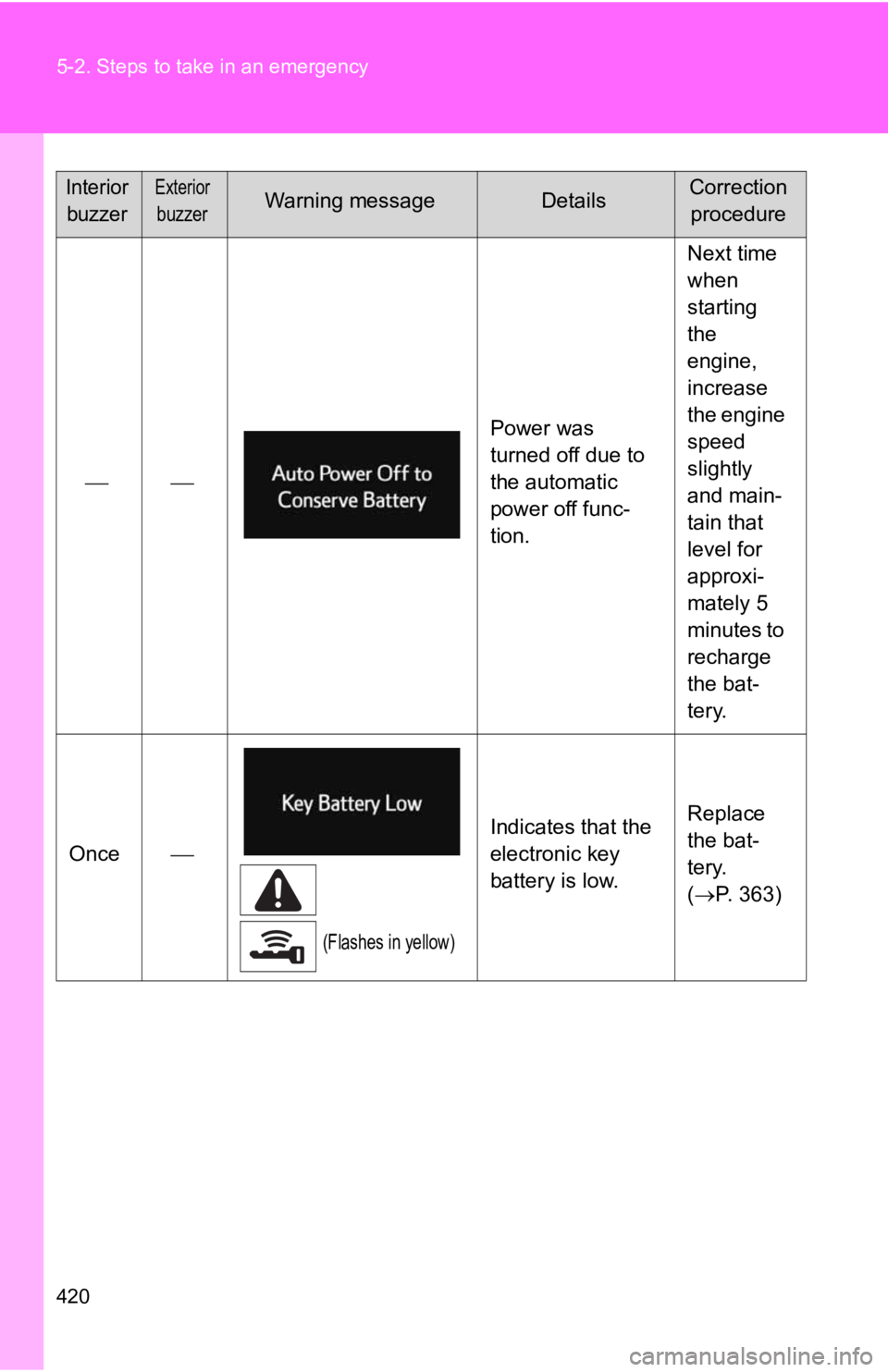
Once
(Flashes in yellow) Indicates that the
electronic key
battery is low. Replace
the bat-
tery.
( P. 363)Interior
buzzer Exterior
buzzer Warning message Details Correction
procedure
Page 435 of 532
5
When trouble arises
4355-2. Steps to take in an emergency
If the engine will not star t If the engine will not start even t hough correct starting proce dures
are being followed ( P. 166, 175), consider each of the following
points.
■ The engine will not start even when the starter motor oper-
ates normally.
One of the following may be the cause of the problem.
● There may not be sufficient fuel in the vehicle’s tank.
Refuel the vehicle.
● The engine may be flooded.
Try to restart the engine once more following correct starting
procedures. ( P. 166, 175)
● There may be a malfunction in t he engine immobilizer system.
( P. 7 9 )
■ The starter motor turns over slowly, the interior lights and
headlights are dim, or the horn does not sound or sounds at
a low volume.
One of the following may be the cause of the problem.
● The battery may be discharged. ( P. 444)
● The battery terminal connections may be loose or corroded.
■ The starter motor does not turn over. (vehicles with a smart
key system)
The engine starting system may be malfunctioning due to an
electrical problem such as an open circuit or a blown fuse. How -
ever, an interim measure is a vailable to start the engine.
( P. 4 3 6 )
Page 436 of 532
4365-2. Steps to take in an emergency
Emergency start function (vehicles with a smart key system)
When the engine does not start, the following steps can be used as
an interim measure to start the engine if the “ENGINE START STO P”
switch is functioning normally:
Vehicles with an auto matic transmission
Set the parking brake.
Put the shift lever in P.
Set the “ENGINE START STOP” switch to ACCESSORY
mode.
Press and hold the “ENGINE START STOP” switch about 15
seconds while depressing the brake pedal firmly.
Even if the engine can be started using the above steps, the sy stem
may be malfunctioning. Have the vehicle checked by your Toyota
dealer.■ The starter motor does not turn over, the interior lights and
headlights do not turn on, o r the horn does not sound.
One of the following may be the cause of the problem.
● One or both of the battery ter minals may be disconnected.
● The battery may be discharged. ( P. 444)
● There may be a malfunction in the steering lock system. (vehi-
cles with a smart key system) Contact your Toyota dealer if the problem cannot be repaired, o r if
repair procedures are unknown.
STEP 1
STEP 2
STEP 3
STEP 4
Page 440 of 532
4405-2. Steps to take in an emergency
If the electronic key does not operate properly (vehicles with a smar t key system)
Unlocking and locking th e doors, unlocking the trunk
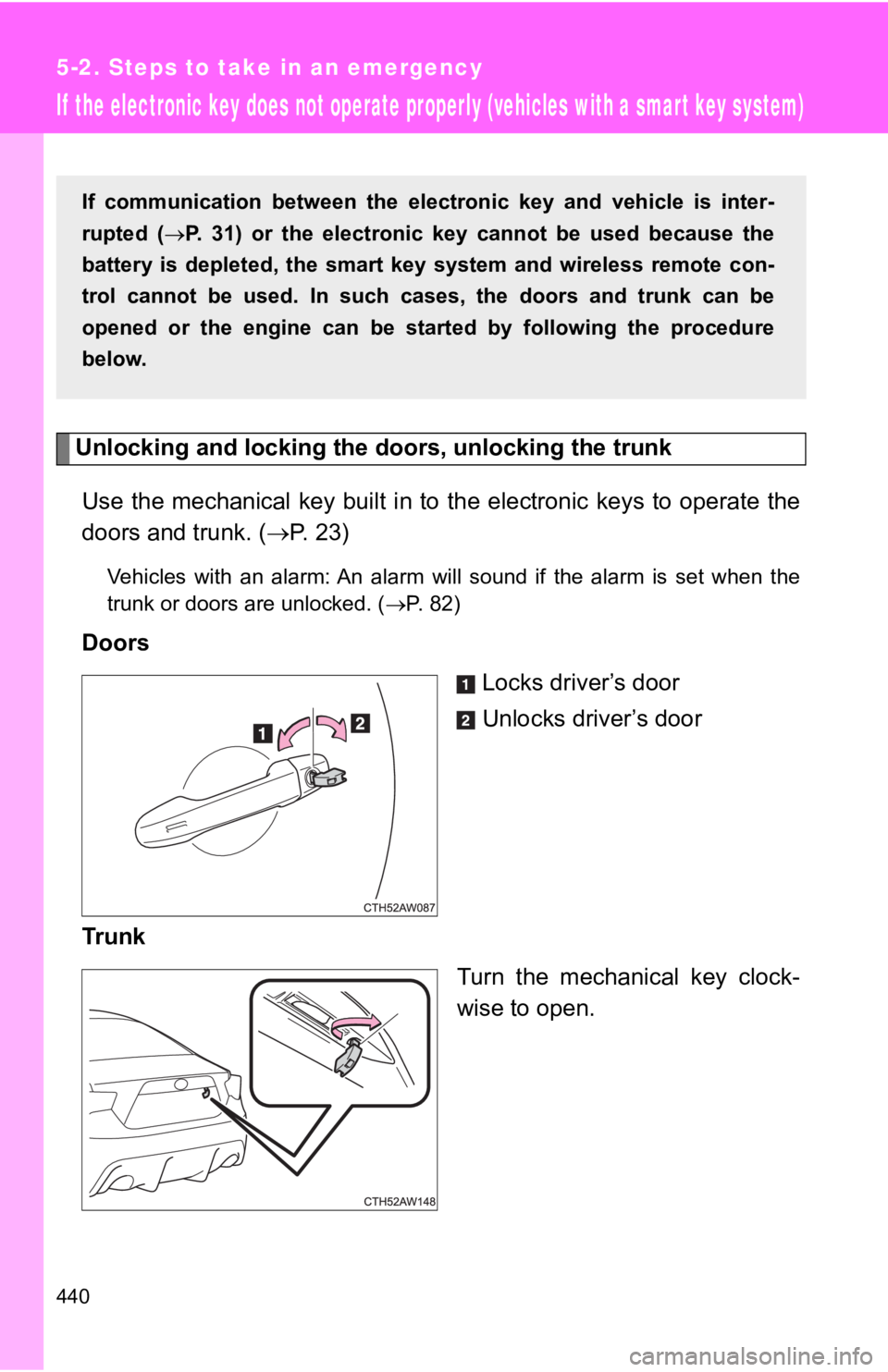
Use the mechanical key built i n to the electronic keys to opera te the
doors and trunk. ( P. 2 3 )Vehicles with an alarm: An alarm will sound if the alarm is set when the
trunk or doors are unlocked. ( P. 82)
Doors
Locks driver’s door
Unlocks driver’s door
Trunk
Turn the mechanical key clock-
wise to open.If communication between the el ectronic key and vehicle is inte r-
rupted ( P. 31) or the electronic key cannot be used because the
battery is depleted, the smart key system and wireless remote c on-
trol cannot be used. In such cases, the doors and trunk can be
opened or the engine can be star ted by following the procedure
below.