engine TOYOTA 86 2019 Manual PDF
[x] Cancel search | Manufacturer: TOYOTA, Model Year: 2019, Model line: 86, Model: TOYOTA 86 2019Pages: 532, PDF Size: 6.89 MB
Page 198 of 532
1982-2. Instrument cluster
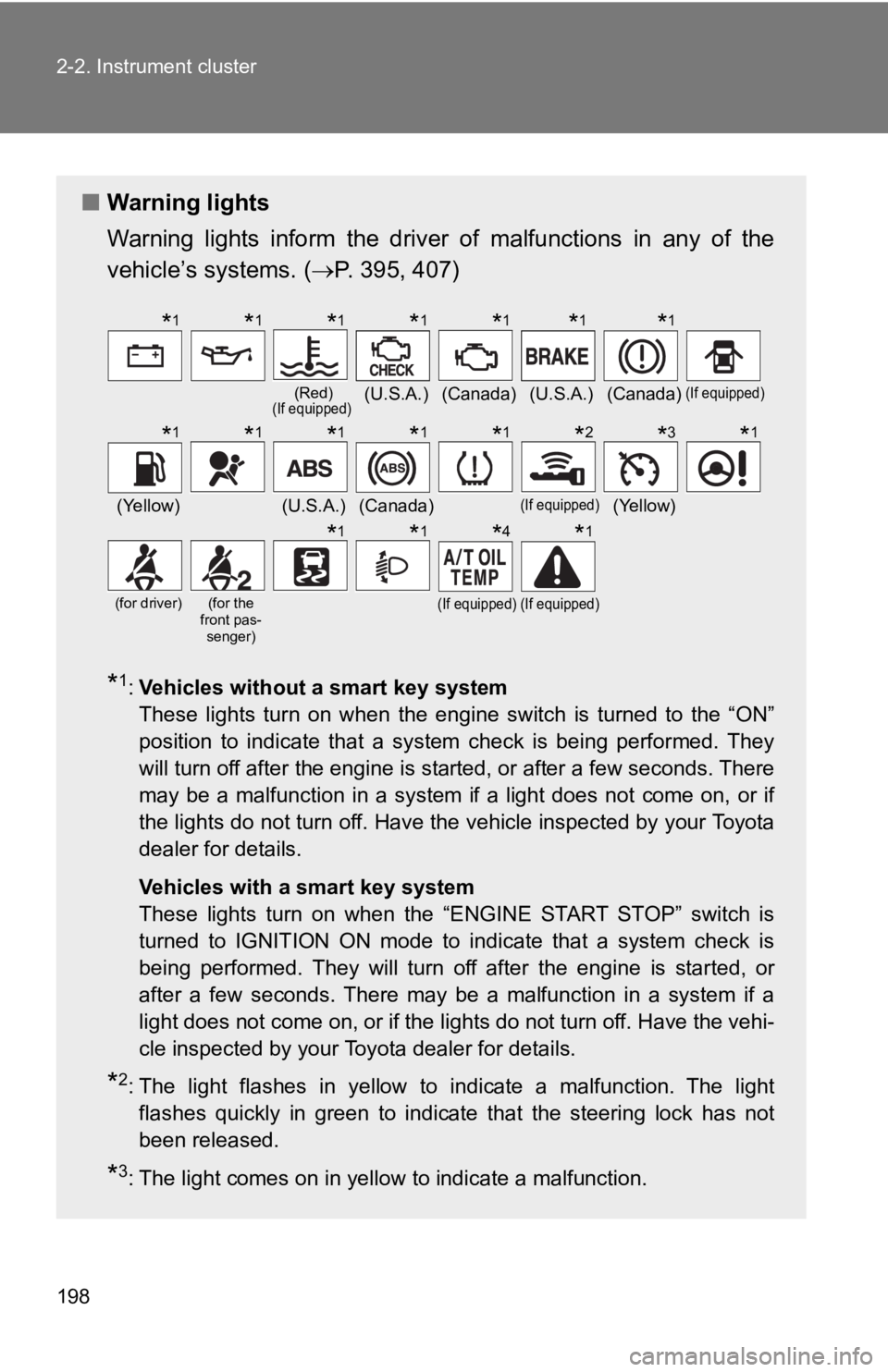
■ Warning lights
Warning lights inform the driver of malfunctions in any of the
vehicle’s systems. ( P. 395, 407)
* 1
: Vehicles without a smart key system
These lights turn on when the engine switch is turned to the “O N”
position to indicate that a system check is being performed. Th ey
will turn off after the engine is started, or after a few secon ds. There
may be a malfunction in a system if a light does not come on, o r if
the lights do not turn off. Have the vehicle inspected by your To y o t a
dealer for details.
Vehicles with a smart key system
These lights turn on when the “ENGINE START STOP” switch is
turned to IGNITION ON mode to indicate that a system check is
being performed. They will turn off after the engine is started , or
after a few seconds. There may be a malfunction in a system if a
light does not come on, or if the lights do not turn off. Have the vehi-
cle inspected by your Toyota dealer for details.
* 2
: The light flashes in yellow to indicate a malfunction. The light
flashes quickly in green to indicate that the steering lock has not
been released.
* 3
: The light comes on in yellow to indicate a malfunction. (Red)
(If equipped)
(U.S.A.) (Canada) (U.S.A.) (Canada) (If equipped)
(Yellow) (U.S.A.) (Canada) (If equipped)
(Yellow)(for driver) (for the
front pas-
senger)
(If equipped) (If equipped)
* 1
* 1
* 1
* 1
* 1
* 1
* 1
* 1
* 1
* 1
* 1
* 1
* 2
* 3
* 1
* 1
* 1
* 4
* 1
Page 199 of 532
1992-2. Instrument cluster
2
When driving
WARNING■ If a safety system warning light does not come on
Should a safety system light such as the ABS and SRS warning li ght not
come on when you start the engine, this could mean that these s ystems are
not available to help protect you in an accident, which could r esult in death
or serious injury. Have the vehicle inspected by your Toyota de aler immedi-
ately if this occurs.* 4
: Vehicles with a monochrome multi-information display only: Thi s
light turns on when the engine switch is turned to the “ON” pos ition
to indicate that a system check is being performed. It will tur n off
after the engine is started, or after a few seconds. There may be a
malfunction in a system if the light does not come on or turn o ff.
Have the vehicle inspected by your Toyota dealer for details.
Page 202 of 532
2022-2. Instrument cluster
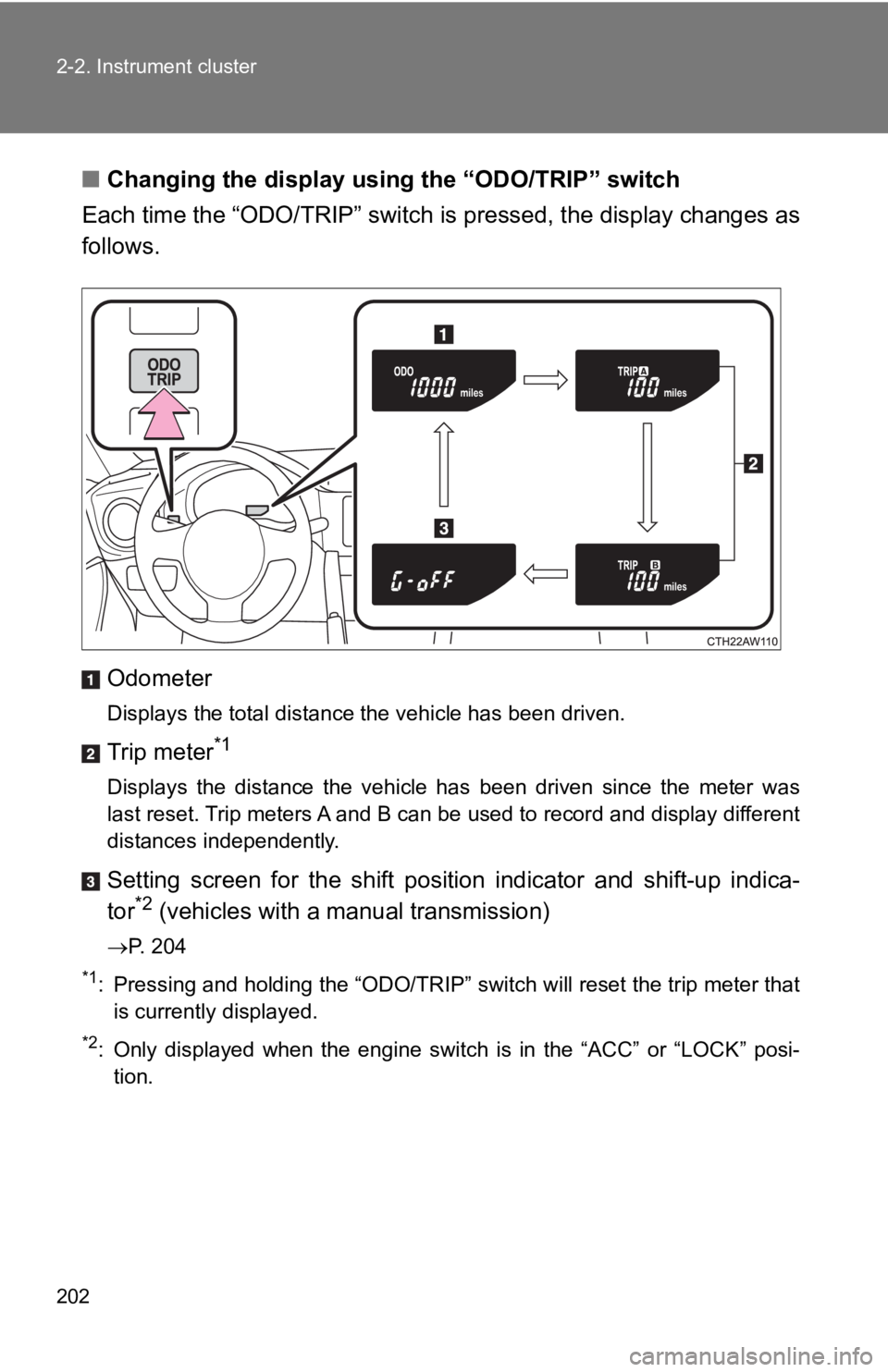
■ Changing the display usi ng the “ODO/TRIP” switch
Each time the “ODO/TRIP” switch is pressed, the display changes as
follows.
Odometer Displays the total distance the vehicle has been driven.
Trip meter *1
Displays the distance the vehicle has been driven since the met er was
last reset. Trip meters A and B can be used to record and display different
distances independently.
Setting screen for the shift position indicator and shift-up in dica-
tor *2
(vehicles with a manual transmission) P. 204*1
: Pressing and holding the “ODO/TRIP” switch will reset the trip meter that
is currently displayed.*2
: Only displayed when the engine switch is in the “ACC” or “LOCK ” posi-
tion.
Page 204 of 532
2042-2. Instrument cluster
Setting the shift position indi cator and shift-up indicator
(vehicles with a manual transmission)
Displaying of the shift position indicator and shift-up indicat or can be
turned on/off.
Press the “ODO/TRIP” switch repeatedly until the setting
screen is displayed. ( P. 202)
Each time the switch is pressed and held, the display changes
between on/off.
“G-on”: Display on
“G-oFF”: Display off
Setting the REV indicator
■ Changing the REV in dicator settings
The engine speed at which the REV indicator turns on at and
whether a buzzer sounds or not w hen the light turns on can be s et.
Engine speed setting range: F rom 2000 to 7400 rpm (r/min)
Press the “DISP” switch repeatedly until the setting screen is
displayed. ( P. 203)
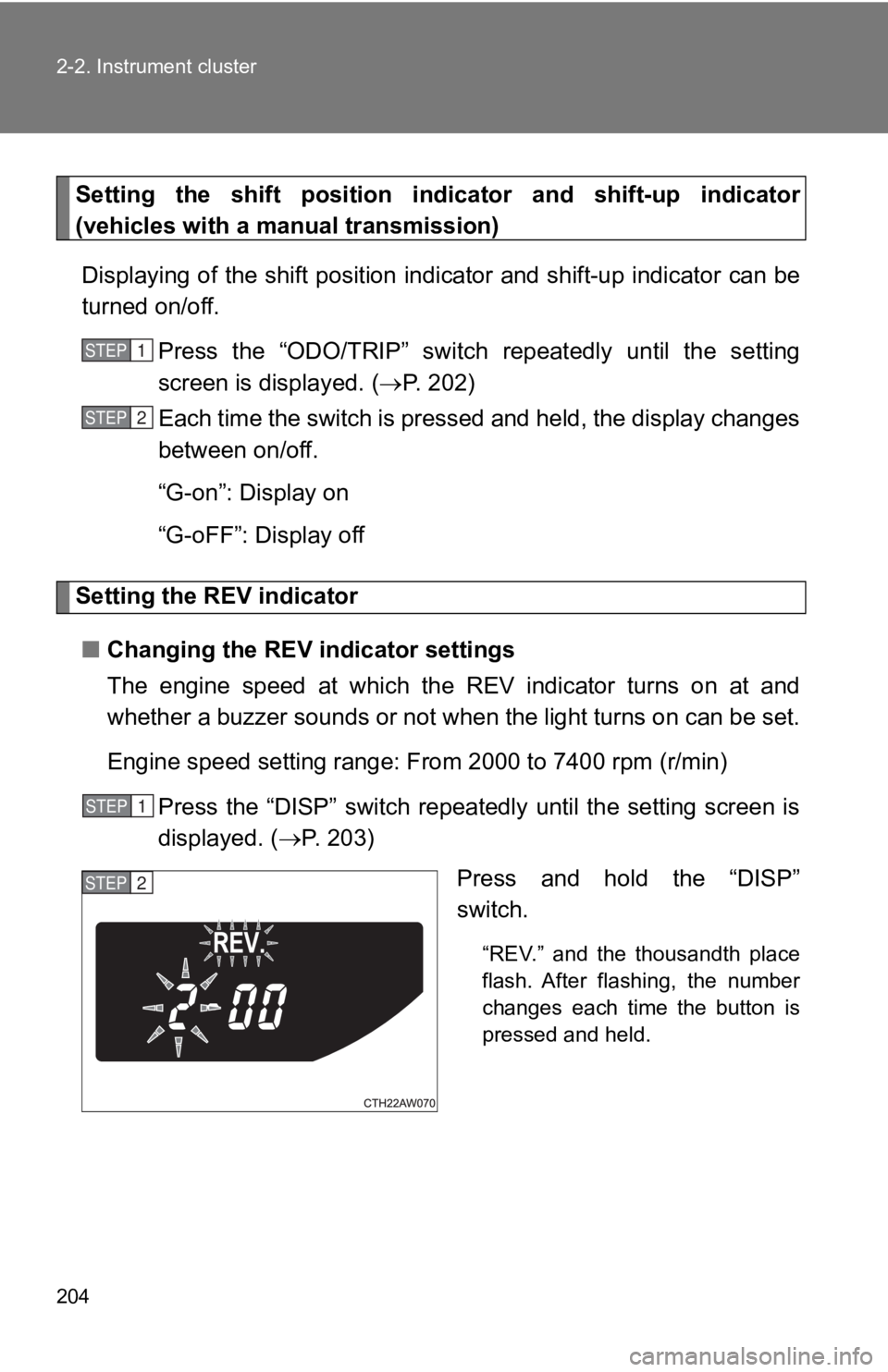
Press and hold the “DISP”
switch. “REV.” and the thousandth place
flash. After flashing, the number
changes each time the button is
pressed and held.STEP 1
STEP 2
STEP 1
STEP 2
Page 205 of 532
2052-2. Instrument cluster
2
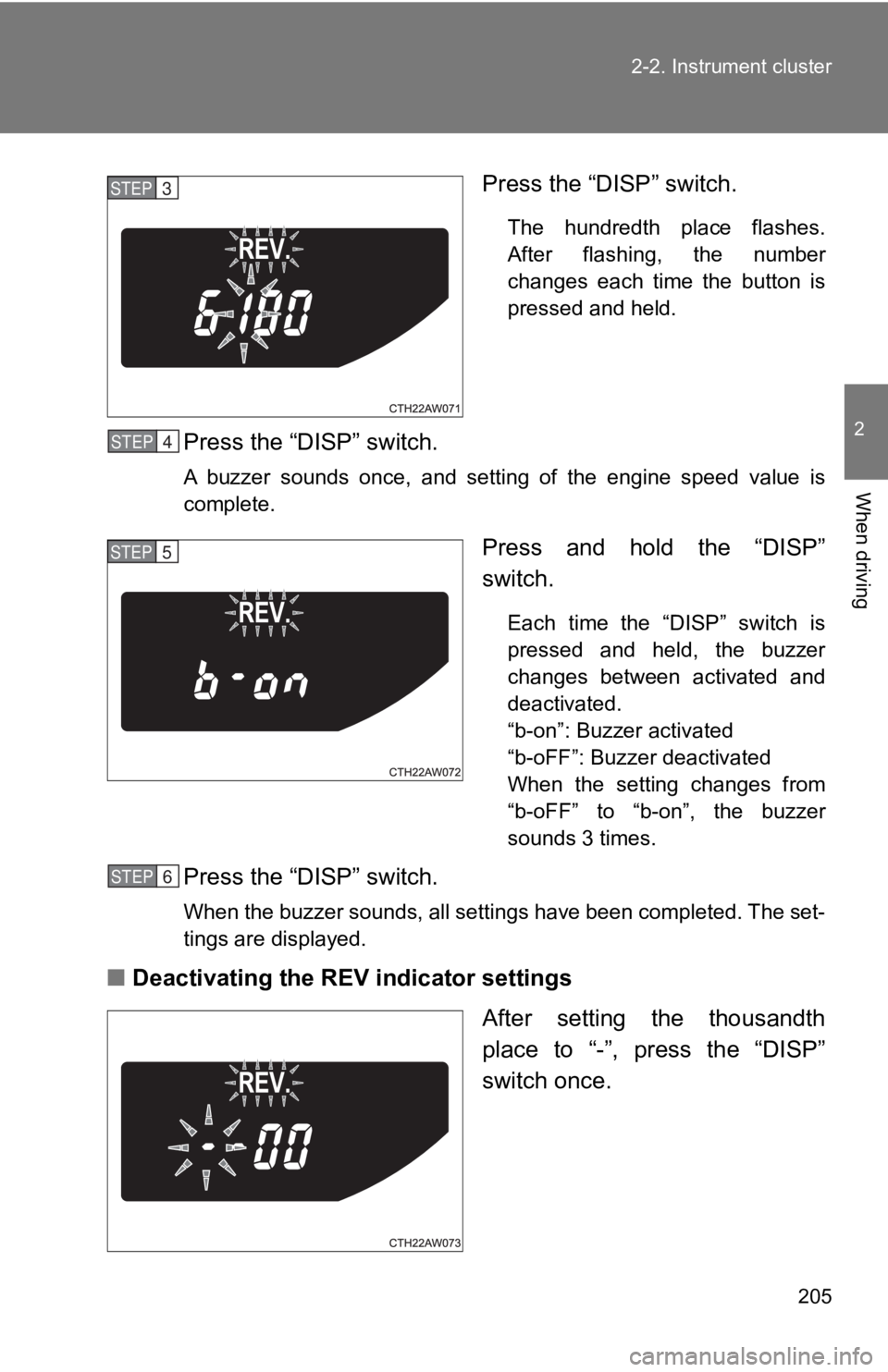
When driving Press the “DISP” switch. The hundredth place flashes.
After flashing, the number
changes each time the button is
pressed and held.
Press the “DISP” switch. A buzzer sounds once, and setting of the engine speed value is
complete.
Press and hold the “DISP”
switch. Each time the “DISP” switch is
pressed and held, the buzzer
changes between activated and
deactivated.
“b-on”: Buzzer activated
“b-oFF”: Buzzer deactivated
When the setting changes from
“b-oFF” to “b-on”, the buzzer
sounds 3 times.
Press the “DISP” switch. When the buzzer sounds, all settings have been completed. The set-
tings are displayed.
■ Deactivating the REV indicator settings
After setting the thousandth
place to “-”, press the “DISP”
switch once.STEP 3
STEP 4
STEP 5
STEP 6
Page 206 of 532

2062-2. Instrument cluster
■ Outside temperature display
● In the following situations, the correct outside temperature ma y not be
displayed.
• When the vehicle is very hot, such as when under the sun.
• When the vehicle is idling or being driven at low speeds such as in a
traffic jam or when the engine is stopped and then restarted immedi-
ately afterward.
• When the actual outside temperature is outside of the indicato r range.
● If “ ” is displayed for approximately 1 minute or more or if the out side
temperature is not displayed, the system may be malfunctioning. Have
the vehicle inspected by your Toyota dealer.
WARNING■ The information displ ay at low temperatures
Allow the interior of the vehicle to warm up before using the liquid crystal
information display. At extremely low temperatures, the informa tion display
monitor may respond slowly, and display changes may be delayed.
For example, there is a lag between the driver's shifting and t he new shift
position number appearing on the display. In this case, wait un til the display
changes and take care not to downshift again, causing rapid and excessive
engine braking and possibly an accident resulting in death or s erious injury.
Page 210 of 532
2102-2. Instrument cluster
Drive information ( )
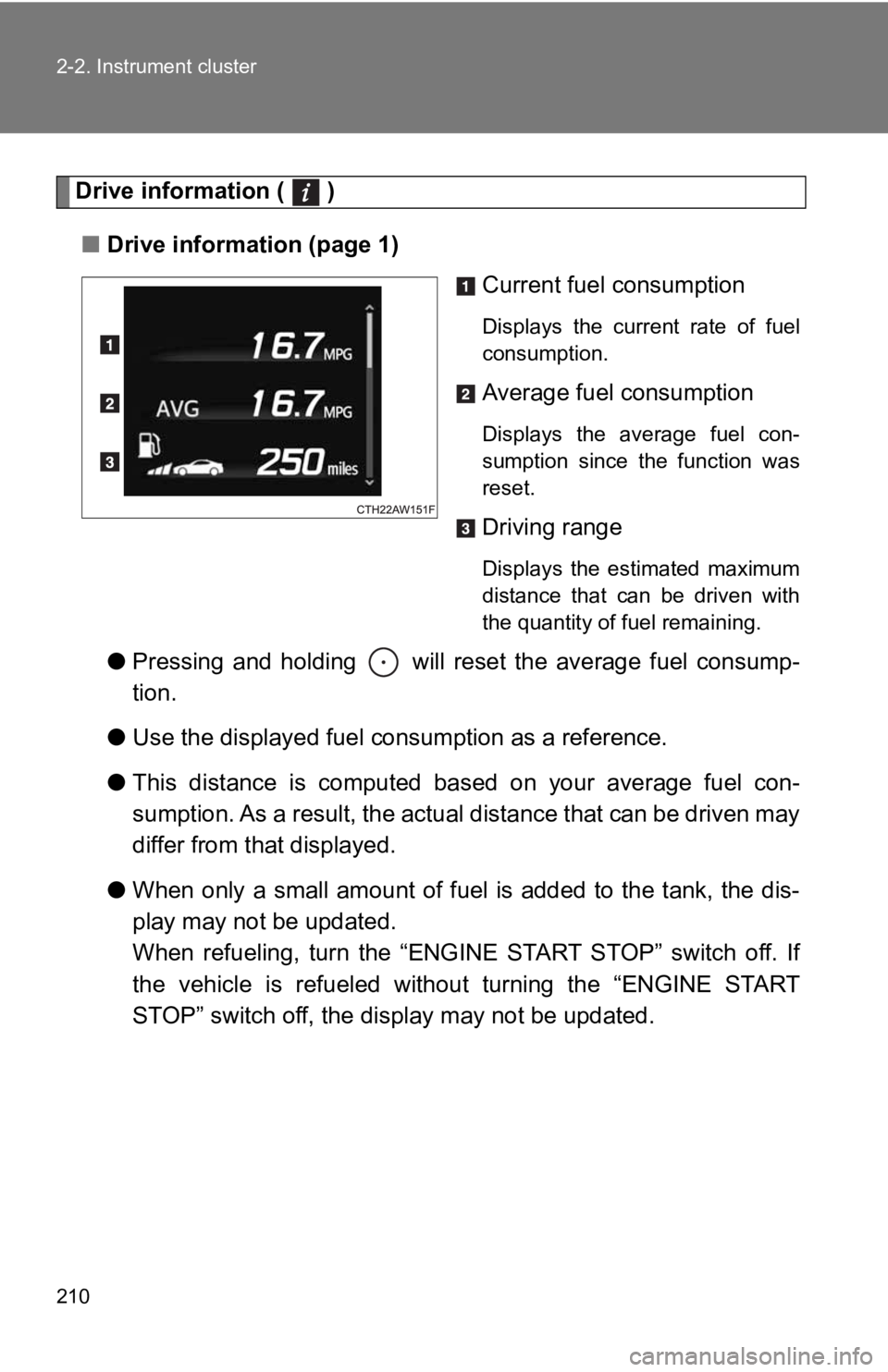
■ Drive information (page 1)
Current fuel consumption Displays the current rate of fuel
consumption.
Average fuel consumption Displays the average fuel con-
sumption since the function was
reset.
Driving range Displays the estimated maximum
distance that can be driven with
the quantity of fuel remaining.
● Pressing and holding will reset the average fuel consump-
tion.
● Use the displayed fuel con sumption as a reference.
● This distance is computed base d on your average fuel con-
sumption. As a result, the actual distance that can be driven m ay
differ from that displayed.
● When only a small amount of fuel is added to the tank, the dis-
play may not be updated.
When refueling, turn the “ENGINE START STOP” switch off. If
the vehicle is refueled withou t turning the “ENGINE START
STOP” switch off, the display may not be updated.
Page 211 of 532
2112-2. Instrument cluster
2
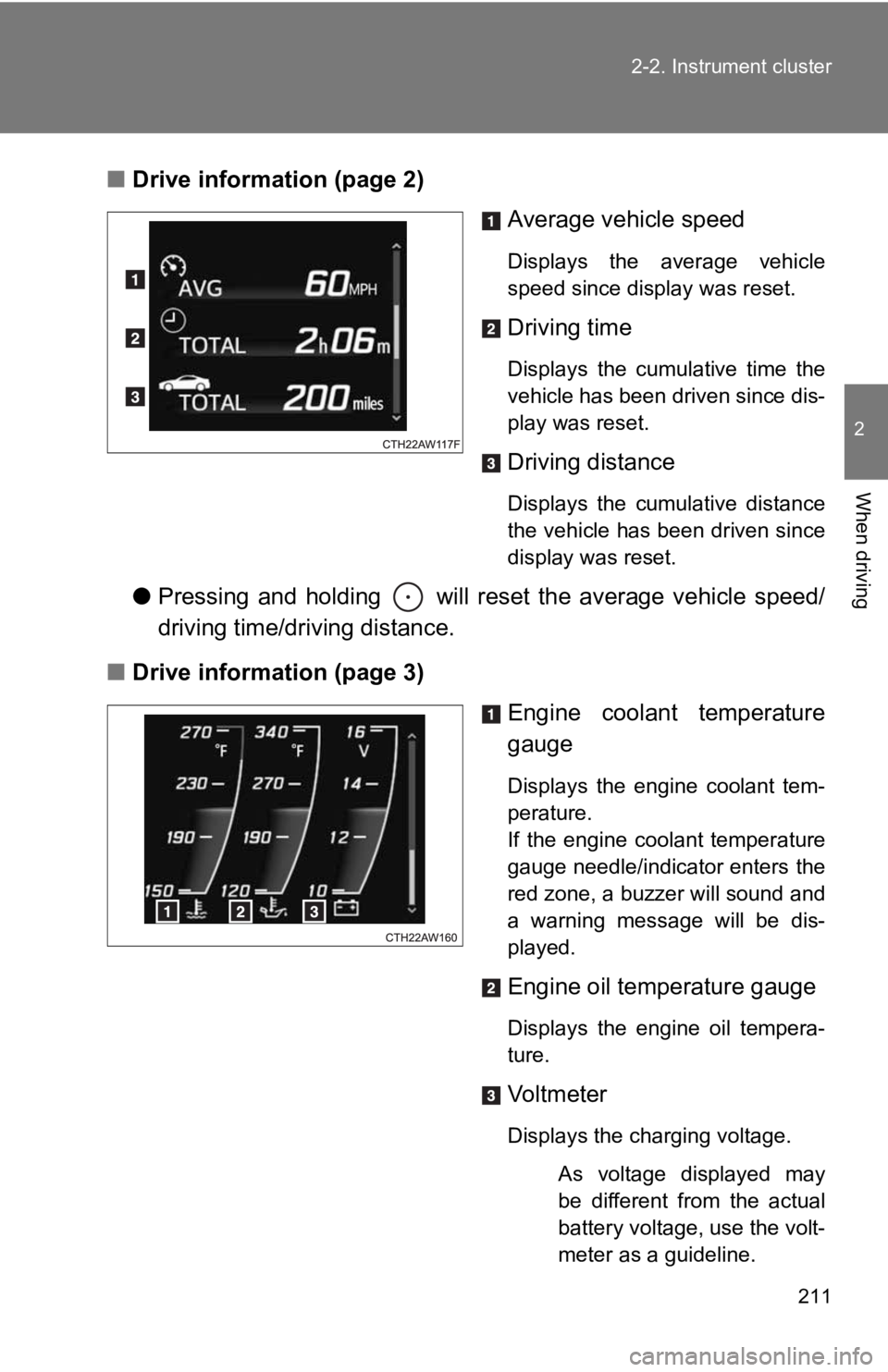
When driving ■ Drive information (page 2)
Average vehicle speed Displays the average vehicle
speed since display was reset.
Driving time Displays the cumulative time the
vehicle has been driven since dis-
play was reset.
Driving distance Displays the cumulative distance
the vehicle has been driven since
display was reset.
● Pressing and holding will reset the average vehicle speed/
driving time/driving distance.
■ Drive information (page 3)
Engine coolant temperature
gauge Displays the engine coolant tem-
perature.
If the engine coolant temperature
gauge needle/indicator enters the
red zone, a buzzer will sound and
a warning message will be dis-
played.
Engine oil temperature gauge
Displays the engine oil tempera-
ture.
Vol tm et er
Displays the charging voltage.
As voltage displayed may
be different from the actual
battery voltage, use the volt-
meter as a guideline.
Page 212 of 532

2122-2. Instrument cluster
● Pressing and holding will turn the range value display on the
engine coolant temperatu re gauge display on/off.
Exclusive content for 86 ( )
■ G-force
Displays lateral G-forces on the vehicle
Also displays, around the periphery of the G-force display, the left and
right steering amount, accelerator pedal input, and brake fluid pres-
sure
The following 2 screens are available for displaying G-force • Normal display screen: Suitable for confirming current lateral G-forces
on the vehicle
• Peak-hold display screen: Suitable for confirming the size and direction
of the maximum lateral G-forces on the vehicle
Page 214 of 532
2142-2. Instrument cluster
Scale of the G-force display The scale of the record of the
maximum G-forces and G-force
ball trace can be changed
between 1.0 G and 0.5 G by
pressing and holding while
the normal display screen is dis-
played.
Accelerator pedal input
Brake fluid pressure
Steering amount If the steering wheel is turned
completely to the left or right, the
bottom side of the gauge on the
corresponding side will be illumi-
nated in red.
This display is intended for use as a guideline. Depending on f actors such as
the road surface condition, temperature and vehicle speed, the display may
not show the actual condition of the vehicle.
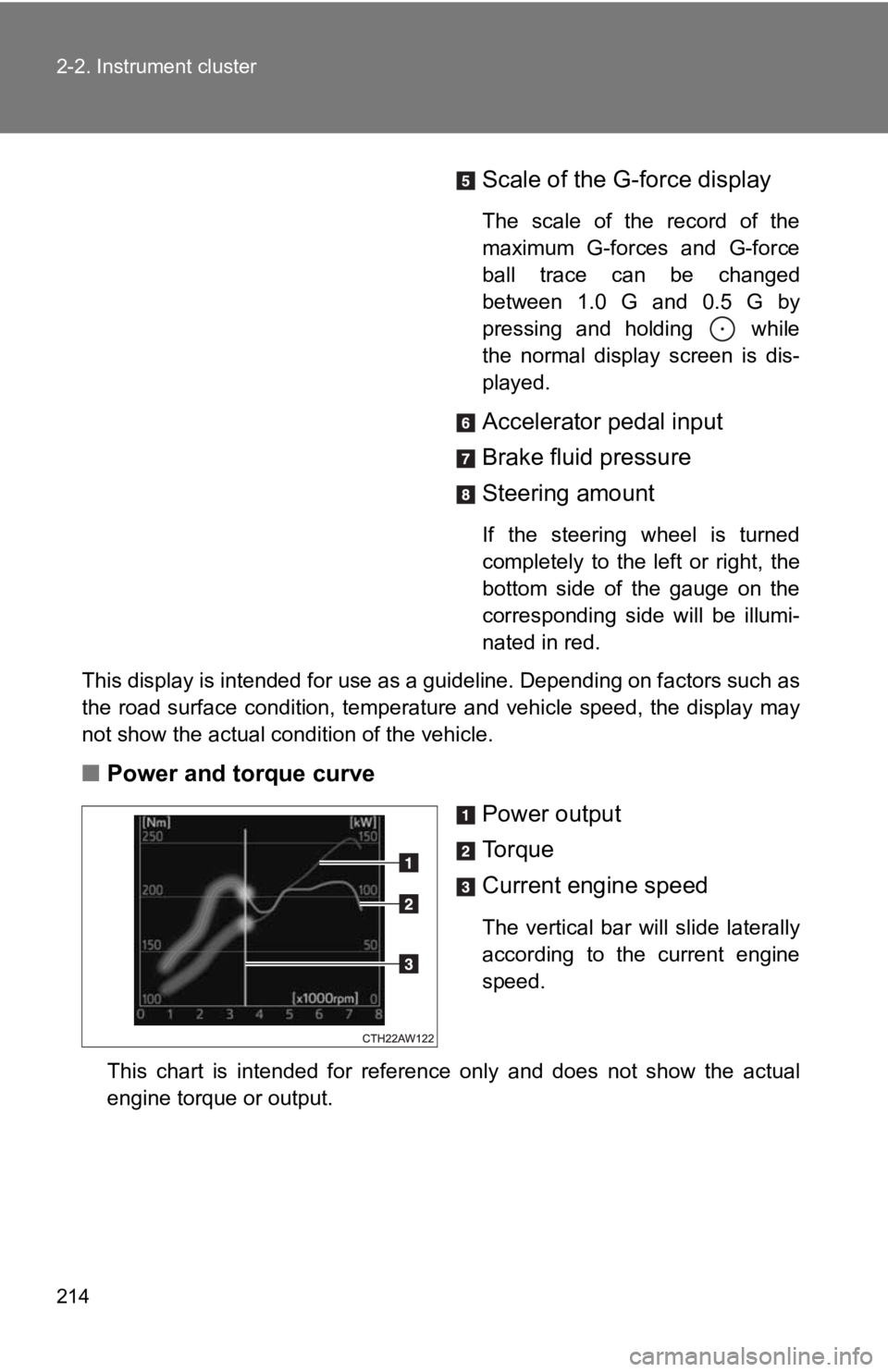
■ Power and torque curve
Power output
To r q u e
Current engine speed The vertical bar will slide laterally
according to the current engine
speed.
This chart is intended for reference only and does not show the actual
engine torque or output.