clutch TOYOTA 86 2020 User Guide
[x] Cancel search | Manufacturer: TOYOTA, Model Year: 2020, Model line: 86, Model: TOYOTA 86 2020Pages: 532, PDF Size: 8 MB
Page 186 of 532
186 2-1. Driving procedures
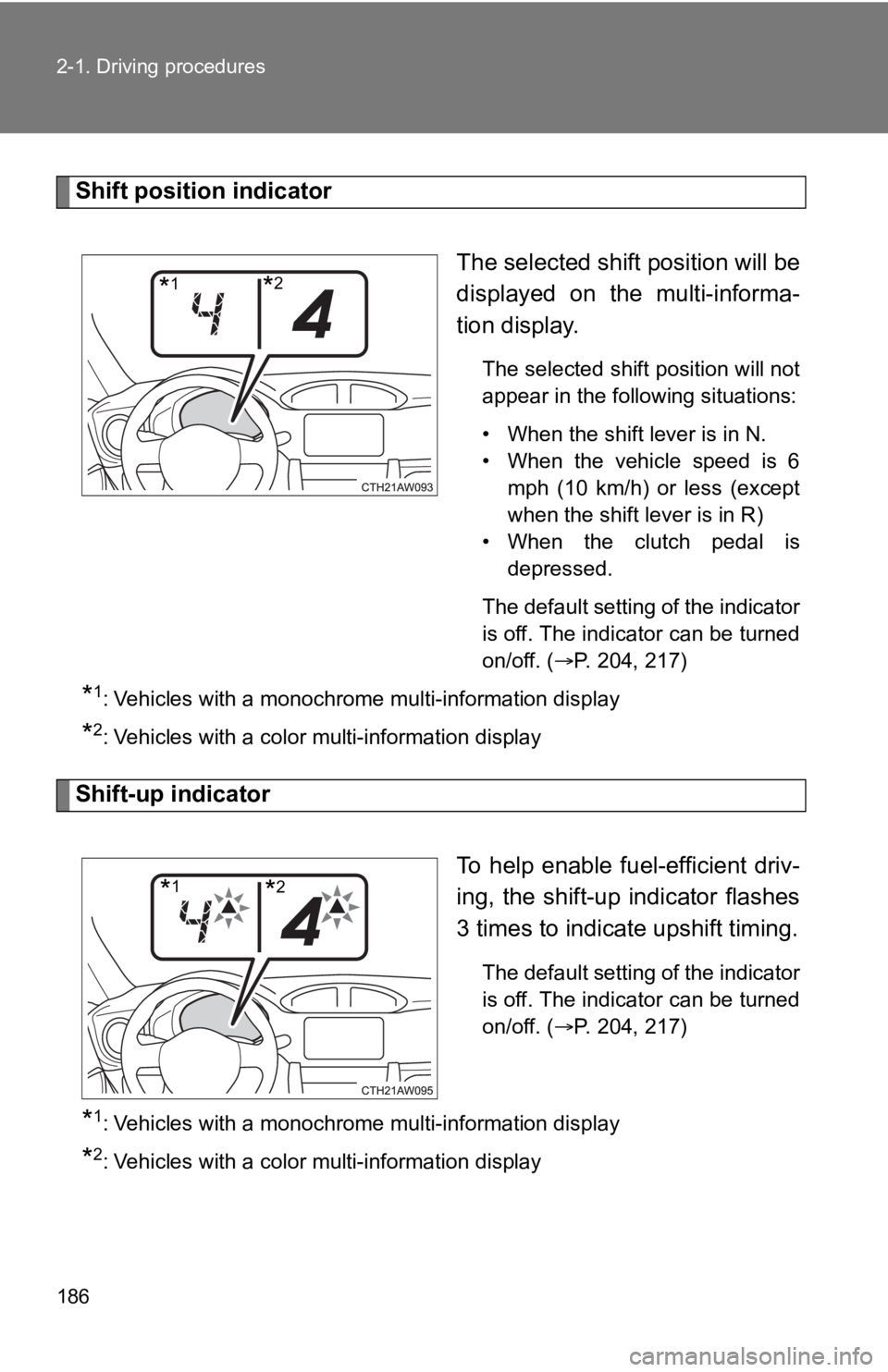
Shift position indicatorThe selected shift position will be
displayed on the multi-informa-
tion display.
The selected shift position will not
appear in the following situations:
• When the shift lever is in N.
• When the vehicle speed is 6mph (10 km/h) or less (except
when the shift lever is in R)
• When the clutch pedal is depressed.
The default setting of the indicator
is off. The indicator can be turned
on/off. (
P. 204, 217)
*1: Vehicles with a monochrome multi-information display
*2: Vehicles with a color multi-information display
Shift-up indicator
To help enable fuel-efficient driv-
ing, the shift-up indicator flashes
3 times to indicate upshift timing.
The default setting of the indicator
is off. The indicator can be turned
on/off. (
P. 204, 217)
*1: Vehicles with a monochrome multi-information display
*2: Vehicles with a color multi-information display
*1*2
*1*2
Page 187 of 532
187
2-1. Driving procedures
2
When driving
NOTICE
■
To prevent damage t o the transmission
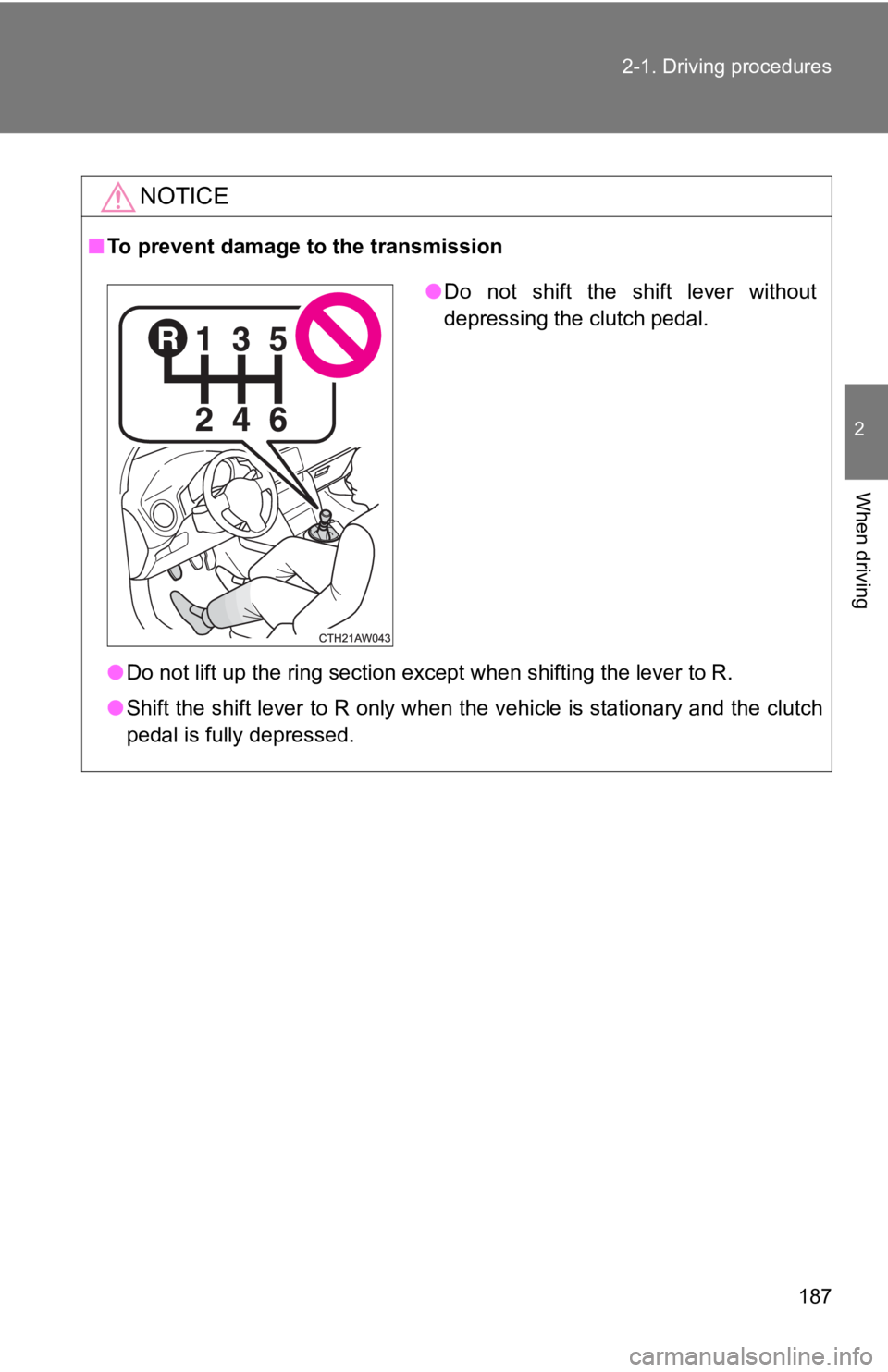
● Do not lift up the ring section except when shifting the lever to R.
● Shift the shift lever to R only when the vehicle is stationary and the clutch
pedal is fully depressed.
● Do not shift the shift lever without
depressing the clutch pedal.
Page 234 of 532
234 2-4. Using other driving systems
■Cruise control can be set when
Vehicles with an automatic transmission
●The shift lever is in D or M and the vehicle is in the 2
nd gear or higher.
● Vehicle speed is above approximately 25 mph (40 km/h).
Vehicles with a manual transmission
● The vehicle is in the 2
nd gear or higher.
● Vehicle speed is above approximately 25 mph (40 km/h).
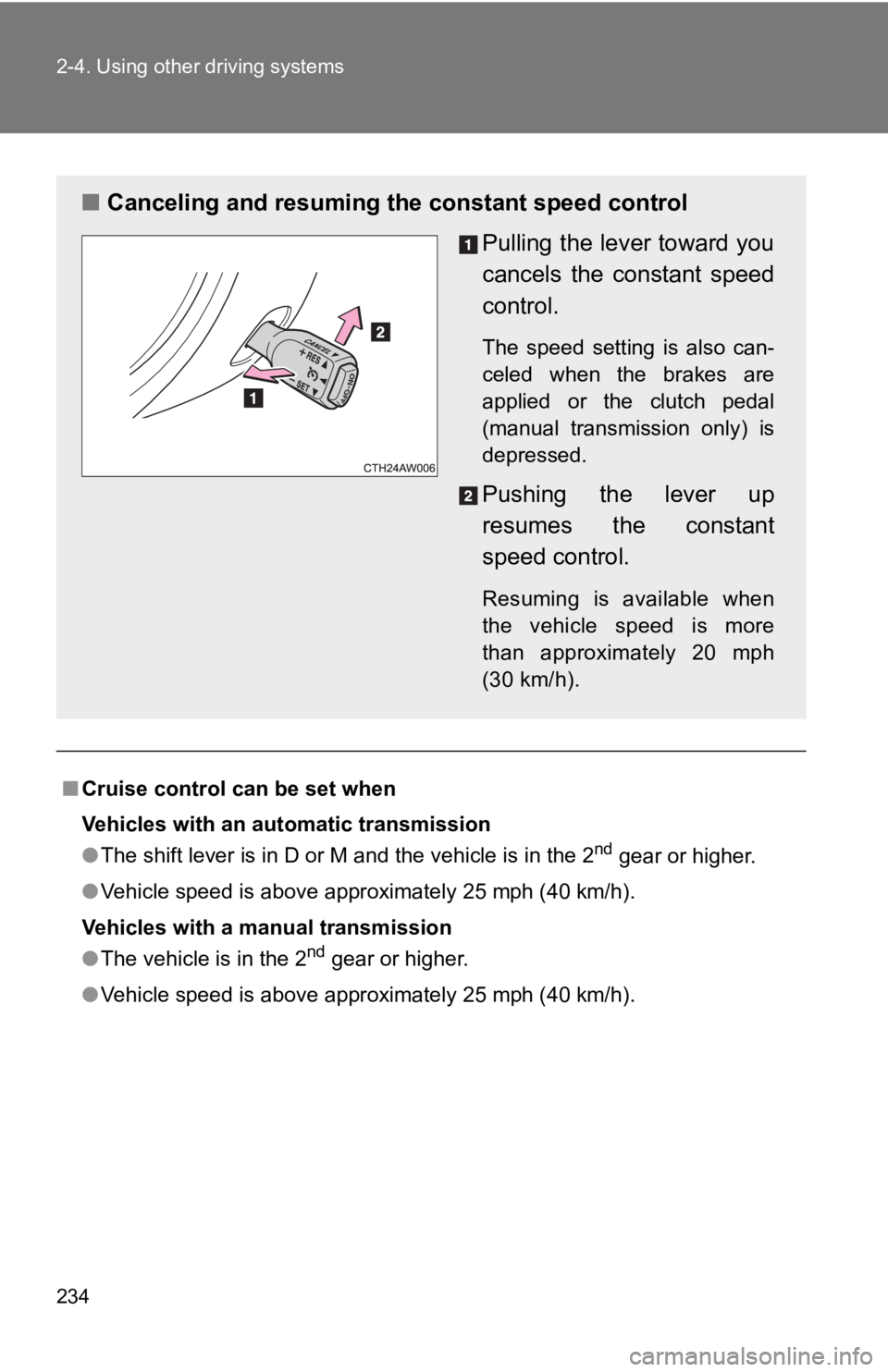
■ Canceling and resuming the constant speed control
Pulling the lever toward you
cancels the constant speed
control.
The speed setting is also can-
celed when the brakes are
applied or the clutch pedal
(manual transmission only) is
depressed.
Pushing the lever up
resumes the constant
speed control.
Resuming is available when
the vehicle speed is more
than approximately 20 mph
(30 km/h).
Page 254 of 532

254 2-4. Using other driving systems
■Operating conditions of hill-start assist control
When the following conditions are met, the hill-start assist co ntrol will oper-
ate:
● Vehicles with an automatic transmission: The shift lever is in D or M
(when starting off forward on while facing uphill) or in R (whe n starting off
backward while facing downhill).
● Vehicles with a manual transmission: The shift lever is in a po sition other
than R (when starting off forward while facing uphill) or in R (when start-
ing off backward while facing downhill).
● The vehicle is stopped.
● The accelerator pedal is not depressed.
● The parking brake is not engaged.
■ Hill-start assist control will not operate when
Hill-start assist control will not operate when any of the following conditions
are met:
●Vehicles with an automatic transmission: The shift lever is in a position
other than D or M (when facing uphill) or in a position other t han R (when
facing downhill).
● Vehicles with a manual transmission: The shift lever is in R (w hen facing
uphill) or in a position other than R (when facing downhill).
● Vehicles with an automatic transmission: The accelerator pedal is
depressed.
● The parking brake is applied.
● Vehicles with a manual transmission: The clutch is engaged.
● Approximately 2 seconds have elapsed since the brake pedal was
released.
● The hill-start assist control ON indicator is not illuminated.
● Vehicles without a smart key system: The engine switch is turne d to the
“ACC” or “LOCK” position.
● Vehicles with a smart key system: The “ENGINE START STOP” switc h is
turned to ACCESSORY mode or turned off.
Page 259 of 532

259
2-5. Driving information
2
When driving
WARNING
■Storage precautions
Observe the following precautions.
Failure to do so may result i
n death or serious injury.
●Stow cargo and luggage in the trunk whenever possible.
●To prevent cargo and luggage from sliding forward during brakin g, do
not stack anything in the enlarged trunk. Keep cargo and luggag e low,
as close to the floor as possible.
●When you fold down the rear seats, long items should not be pla ced
directly behind the front seats.
●Never allow anyone to ride in the enlarged trunk. It is not des igned for
passengers. They should ride in their seats with their seat belts prop-
erly fastened. Otherwise, they are much more likely to suffer d eath or
serious bodily injury, in the event of sudden braking, sudden s werving
or an accident.
●Do not place cargo or luggage in or on the following locations as the
item may get under the clutch, brake or accelerator pedal and p revent
the pedals from being depressed properly, block the driver’s vi sion, or
hit the driver or passengers, causing an accident:
• At the feet of the driver
• On the front passenger or rear seats (when stacking items)
• On the package tray
• On the instrument panel
• On the dashboard
●Secure all items in the occupant compartment, as they may shift and
injure someone during sudden braking, sudden swerving or an acc i-
dent.
■Capacity and distribution
●Do not exceed the maximum axle weight rating or the total vehic le
weight rating.
●Even if the total load of occupant's weight and the cargo load is less
than the total load capacity, do not apply the load unevenly. I mproper
loading may cause deterioration of steering or braking control which
may cause death or serious injury.
Page 321 of 532
321
4-2. Maintenance
4
Maintenance and care
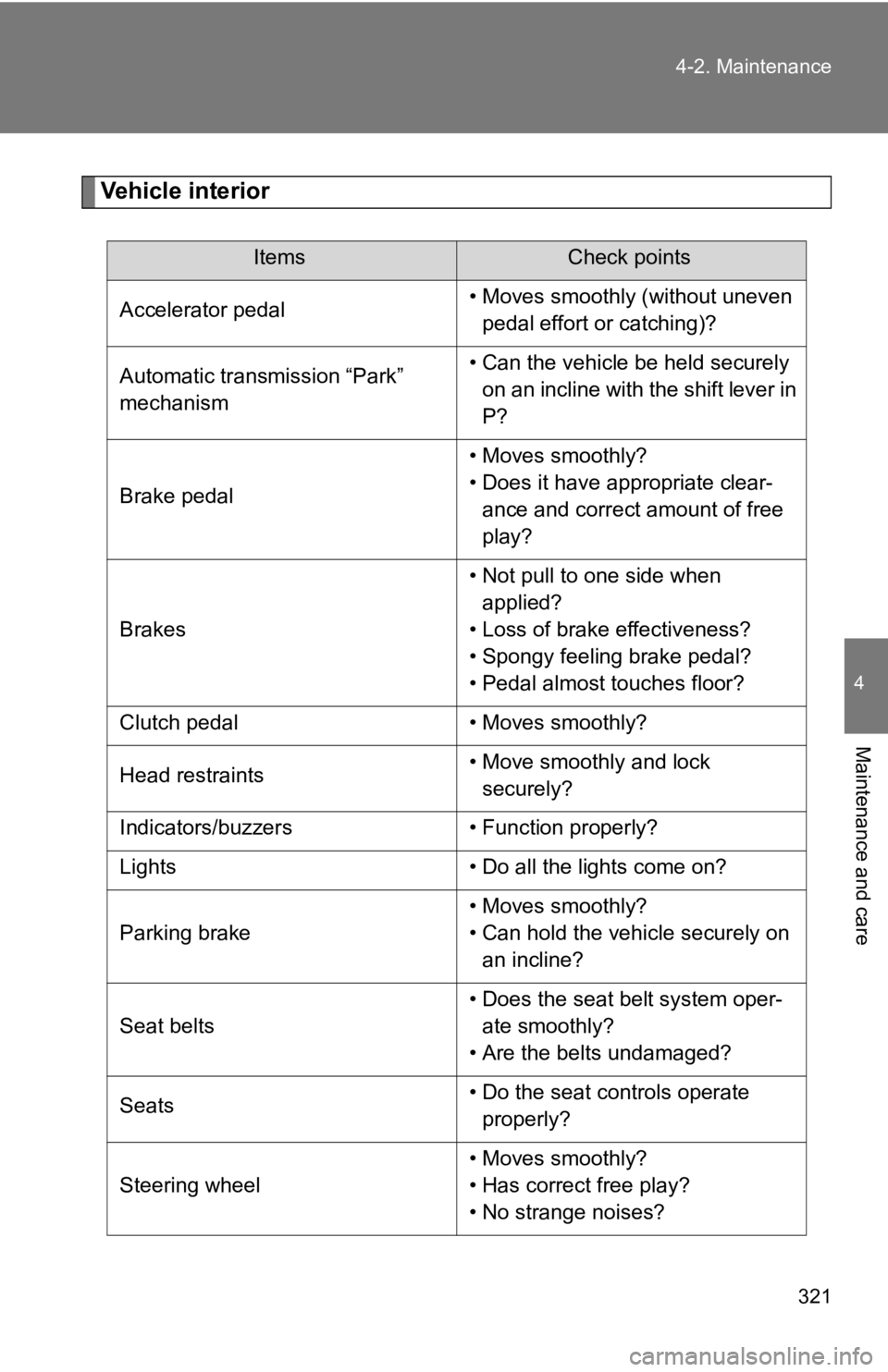
Vehicle interior
ItemsCheck points
Accelerator pedal • Moves smoothly (without uneven
pedal effort or catching)?
Automatic transmission “Park”
mechanism • Can the vehicle be held securely
on an incline with the shift lever in
P?
Brake pedal • Moves smoothly?
• Does it have appropriate clear-
ance and correct amount of free
play?
Brakes • Not pull to one side when
applied?
• Loss of brake effectiveness?
• Spongy feeling brake pedal?
• Pedal almost touches floor?
Clutch pedal • Moves smoothly?
Head restraints • Move smoothly and lock
securely?
Indicators/buzzers • Function properly?
Lights • Do all the lights come on?
Parking brake • Moves smoothly?
• Can hold the vehicle securely on
an incline?
Seat belts • Does the seat belt system oper-
ate smoothly?
• Are the belts undamaged?
Seats • Do the seat controls operate
properly?
Steering wheel • Moves smoothly?
• Has correct free play?
• No strange noises?
Page 420 of 532
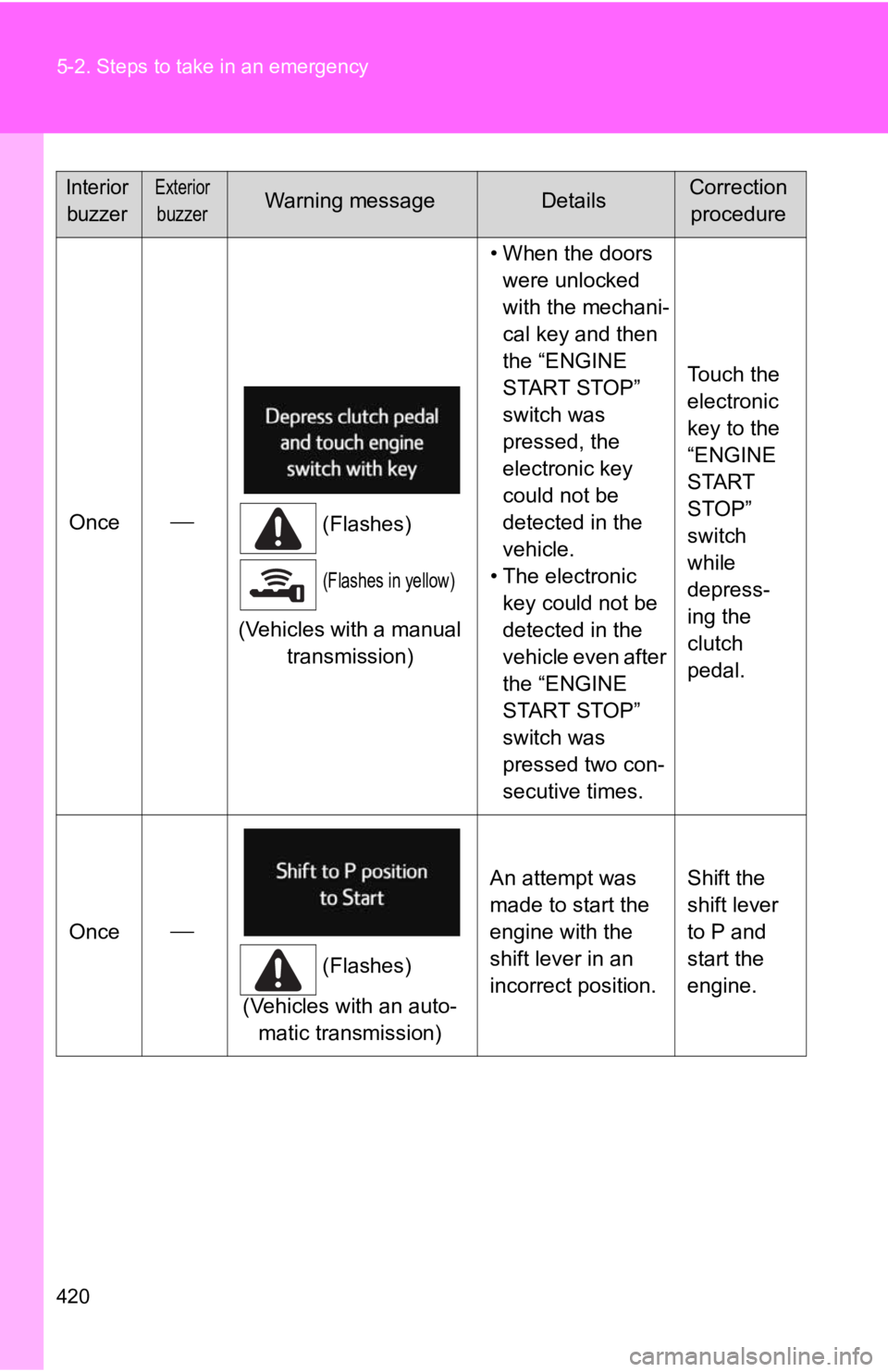
420 5-2. Steps to take in an emergency
Once
(Flashes)
(Flashes in yellow)
(Vehicles with a manual
transmission) • When the doors
were unlocked
with the mechani-
cal key and then
the “ENGINE
START STOP”
switch was
pressed, the
electronic key
could not be
detected in the
vehicle.
• The electronic key could not be
detected in the
vehicle even after
the “ENGINE
START STOP”
switch was
pressed two con-
secutive times. Touch the
electronic
key to the
“ENGINE
START
STOP”
switch
while
depress-
ing the
clutch
pedal.
Once
(Flashes)
(Vehicles with an auto- matic transmission) An attempt was
made to start the
engine with the
shift lever in an
incorrect position.
Shift the
shift lever
to P and
start the
engine.
Interior
buzzerExterior
buzzerWarning messageDetailsCorrection procedure
Page 423 of 532
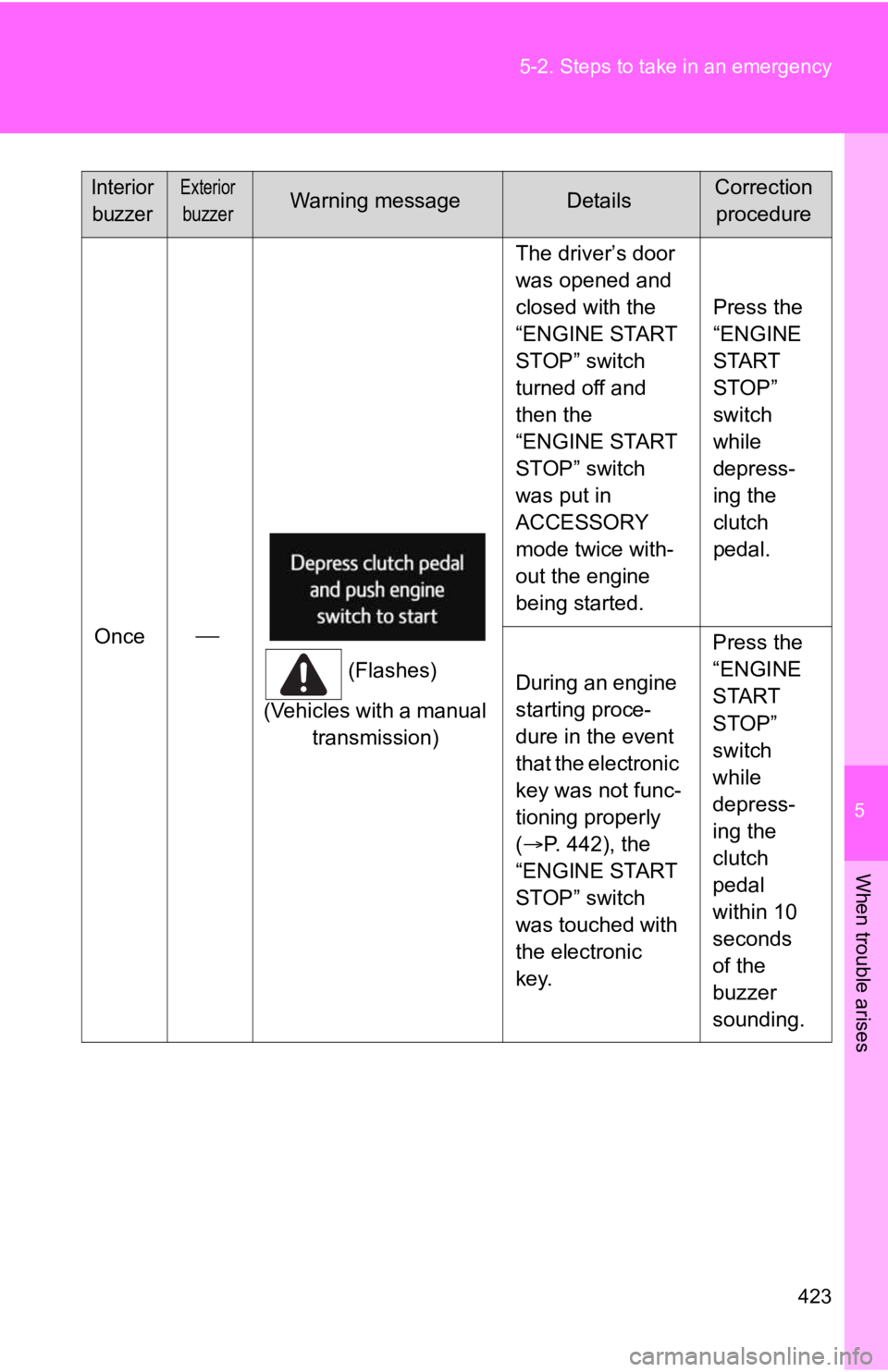
5
When trouble arises
423
5-2. Steps to take in an emergency
Once
(Flashes)
(Vehicles with a manual transmission) The driver’s door
was opened and
closed with the
“ENGINE START
STOP” switch
turned off and
then the
“ENGINE START
STOP” switch
was put in
ACCESSORY
mode twice with-
out the engine
being started.
Press the
“ENGINE
START
STOP”
switch
while
depress-
ing the
clutch
pedal.
During an engine
starting proce-
dure in the event
that the electronic
key was not func-
tioning properly
( P. 442), the
“ENGINE START
STOP” switch
was touched with
the electronic
key. Press the
“ENGINE
START
STOP”
switch
while
depress-
ing the
clutch
pedal
within 10
seconds
of the
buzzer
sounding.
Interior
buzzerExterior
buzzerWarning messageDetailsCorrection procedure
Page 438 of 532

438 5-2. Steps to take in an emergency
Vehicles with a manual transmissionSet the parking brake.
Put the shift lever in N.
Turn the “ENGINE START STOP” switch to ACCESSORY
mode.
Push and hold the “ENGINE START STOP” switch for about
15 seconds while depressing the brake pedal and clutch
pedal firmly.
Even if the engine can be started using the above steps, the system
may be malfunctioning. Have the vehicle checked by your Toyota
dealer.
STEP 1
STEP 2
STEP 3
STEP 4
Page 443 of 532
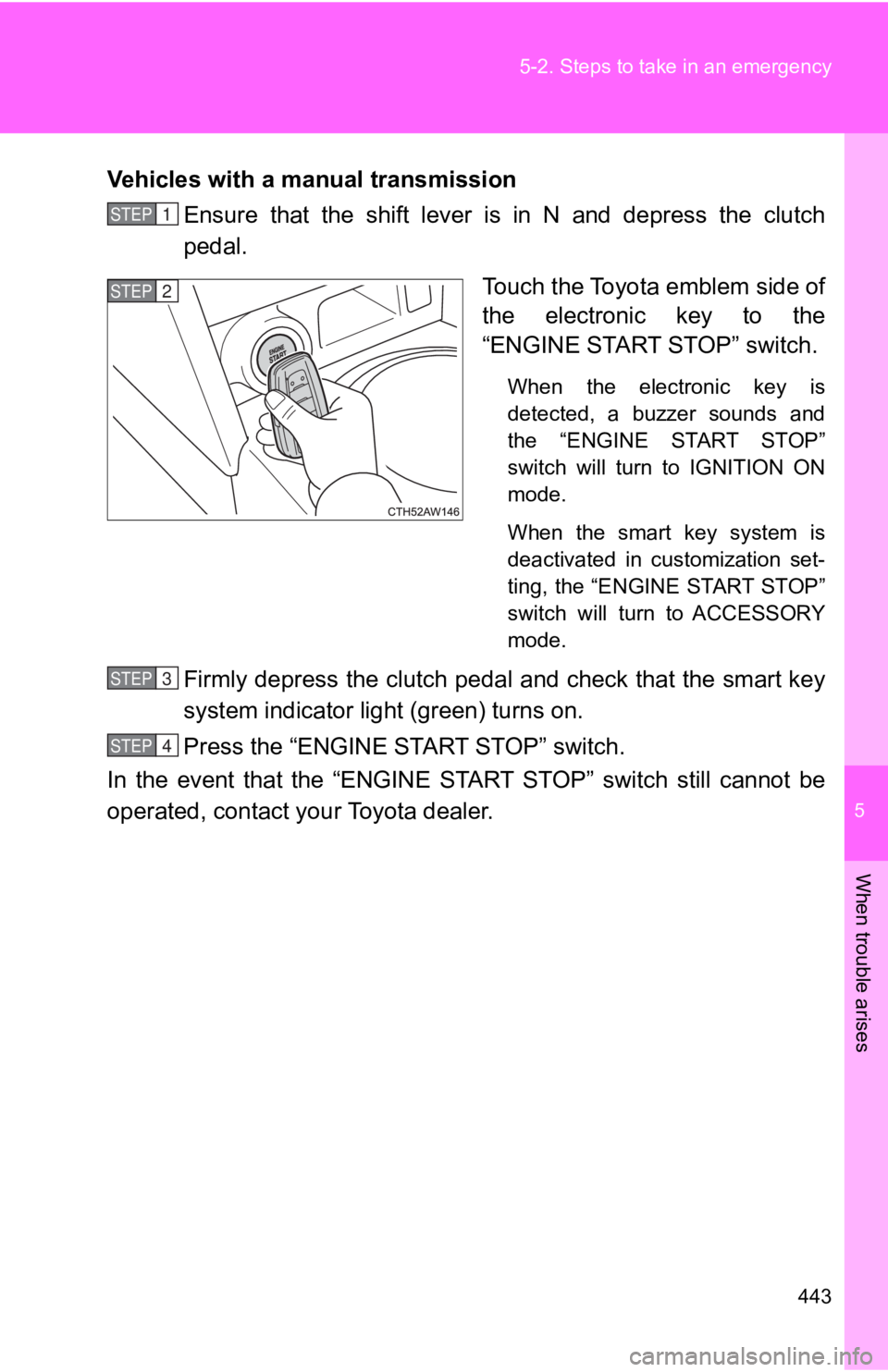
5
When trouble arises
443
5-2. Steps to take in an emergency
Vehicles with a manual transmission
Ensure that the shift lever is in N and depress the clutch
pedal.
Touch the Toyota emblem side of
the electronic key to the
“ENGINE START STOP” switch.
When the electronic key is
detected, a buzzer sounds and
the “ENGINE START STOP”
switch will turn to IGNITION ON
mode.
When the smart key system is
deactivated in customization set-
ting, the “ENGINE START STOP”
switch will turn to ACCESSORY
mode.
Firmly depress the clutch pedal and check that the smart key
system indicator light (green) turns on.
Press the “ENGINE START STOP” switch.
In the event that the “ENGINE START STOP” switch still cannot b e
operated, contact your Toyota dealer.
STEP 1
STEP 2
STEP 3
STEP 4