rear view mirror TOYOTA 86 2020 User Guide
[x] Cancel search | Manufacturer: TOYOTA, Model Year: 2020, Model line: 86, Model: TOYOTA 86 2020Pages: 532, PDF Size: 8 MB
Page 158 of 532

158 2-1. Driving procedures
WARNING
●On vehicles with a manual transmission, do not release the clutch pedal
too quickly. Doing so may propel the vehicle forward, possibly causing an
accident.
● Moving the shift lever to N while the vehicle is moving will di sengage the
engine from the transmission. Engine braking is not available w hen N is
selected.
● During normal driving, do not turn off the engine. Turning the engine off
while driving will not cause loss of steering or braking contro l, but the
power assist to these systems will be lost. This will make it m ore difficult to
steer and brake, so you should pull over and stop the vehicle a s soon as it
is safe to do so.
However, in the event of an emergency, such as if it becomes im possible
to stop the vehicle in the normal way: P. 455
● Use engine braking (downshift) to maintain a safe speed when dr iving
down a steep hill.
Using the brakes continuously may cause the brakes to overheat and lose
effectiveness. ( P. 179, 185)
● Do not adjust the position of the steering wheel, the seat, or the inside or
outside rear view mirrors while driving.
Doing so may result in a loss of vehicle control that can cause accidents,
resulting in death or serious injury.
● Always check that all passengers' arms, heads or other parts of their body
are not outside the vehicle, as this may result in death or ser ious injury.
● Do not drive in excess of the speed limit. Even if the legal speed limit per-
mits it, do not drive over 85 mph (140 km/h) unless your vehicl e has high-
speed capability tires. Driving over 85 mph (140 km/h) may resu lt in tire
failure, loss of control and possible injury. Be sure to consult a tire dealer
to determine whether the tires on your vehicle are high-speed c apability
tires or not before driving at such speeds.
Page 237 of 532
237
2-4. Using other driving systems
2
When driving
Rear view monitor system
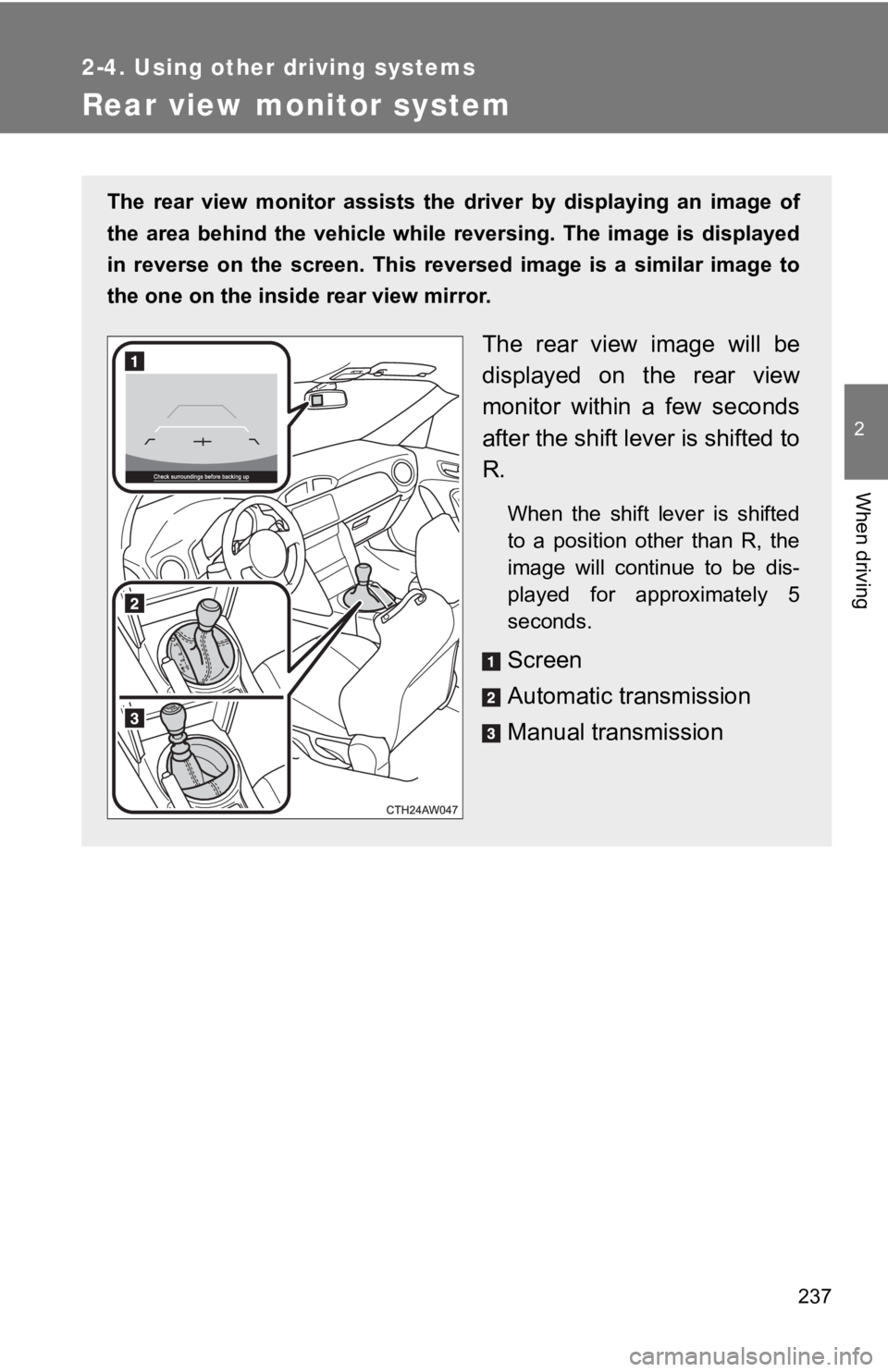
The rear view monitor assists the driver by displaying an image of
the area behind the vehicle while reversing. The image is displ ayed
in reverse on the screen. This reversed image is a similar imag e to
the one on the inside rear view mirror.
The rear view image will be
displayed on the rear view
monitor within a few seconds
after the shift lever is shifted to
R.
When the shift lever is shifted
to a position other than R, the
image will continue to be dis-
played for approximately 5
seconds.
Screen
Automatic transmission
Manual transmission
Page 241 of 532
241
2-4. Using other driving systems
2
When driving
■
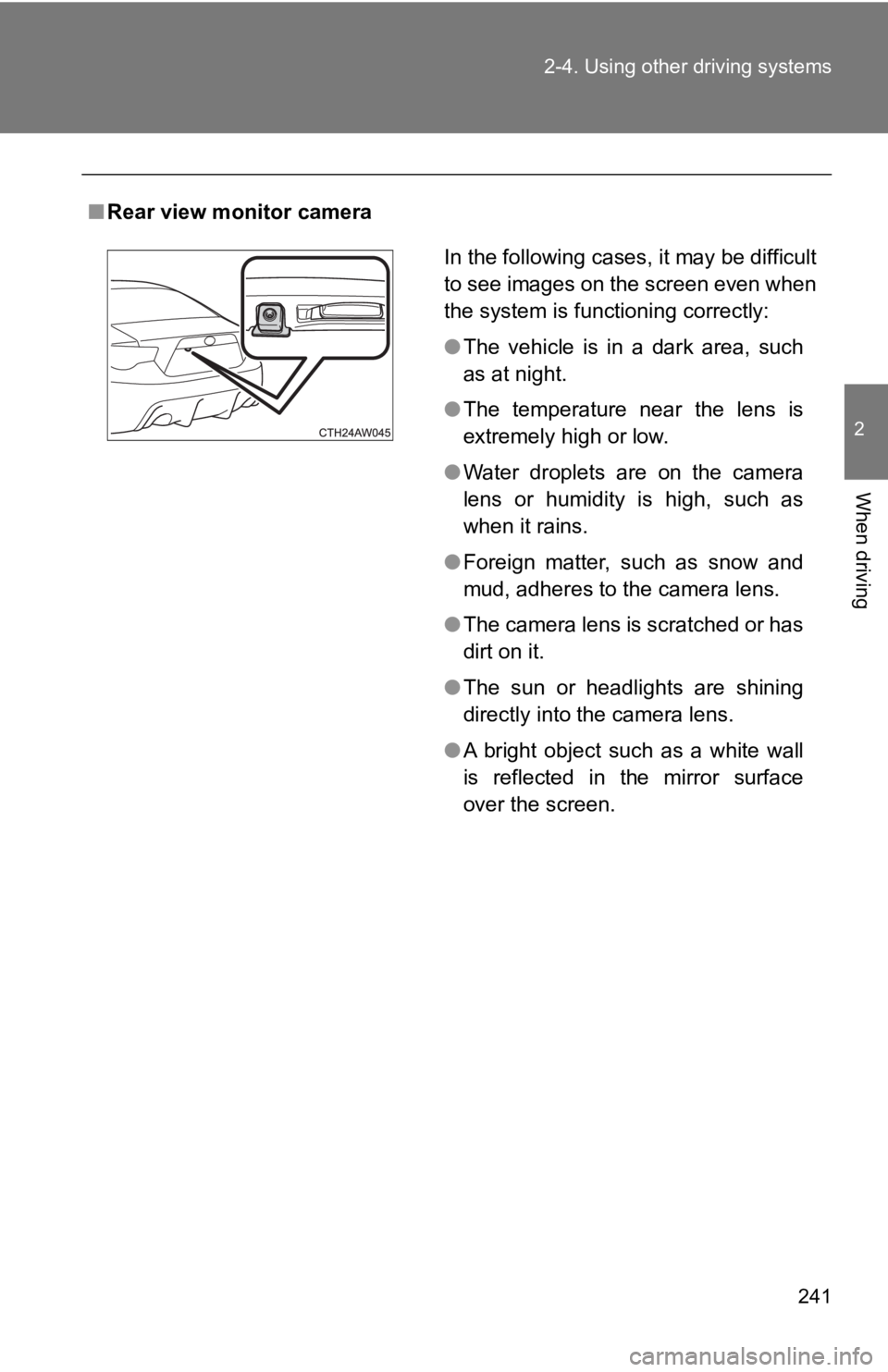
Rear view monitor camera
In the following cases, it may be difficult
to see images on the screen even when
the system is functioning correctly:
●The vehicle is in a dark area, such
as at night.
● The temperature near the lens is
extremely high or low.
● Water droplets are on the camera
lens or humidity is high, such as
when it rains.
● Foreign matter, such as snow and
mud, adheres to the camera lens.
● The camera lens is scratched or has
dirt on it.
● The sun or headlights are shining
directly into the camera lens.
● A bright object such as a white wall
is reflected in the mirror surface
over the screen.
Page 243 of 532
243
2-4. Using other driving systems
2
When driving
WARNING
■
When using the rear view monitor system
Observe the following precautions to avoid an accident that could result in
death or serious injuries.
●The rear view monitor system is a supplement device intended to assist
back up. Never depend solely on the rear view monitor system wh en
reversing. Always check visually and with the mirrors to confir m your
intended path is clear. Use caution just as you would when back ing up any
vehicle.
● The camera has a special lens. Depicted distances between objec ts and
flat surfaces differ from actual distances.
● Always check the vehicle surrounding area, because the guide li nes are
ancillary lines.
● The guide lines are ancillary lines and do not change even if t he steering
wheel is turned.
● Do not use the system if the trunk is open.
■ Conditions which may affect t he rear view monitor system
● If the back of the vehicle has been hit, the camera’s position and mounting
angle may have changed. Have the vehicle inspected by your Toyota
dealer.
● When the outside temperature is low, the displayed image may be come
faint or dark, and moving images will be distorted, or not entirely visible.
● Rapid temperature changes, such as when hot water is poured on the
vehicle in cold weather, may cause the system to function abnor mally.
● If the camera lens is dirty, it cannot transmit a clear image. Rinse with
water and wipe with a soft cloth. If the camera lens is extreme ly dirty, wash
with a mild cleanser and rinse.
● If the tire size is changed, the area displayed on the screen may change.
● Do not do the following. Doing so may scratch the lens, which may have a
negative effect on the image displayed on the screen.
• Rub the camera lens hard
• Use a hard brush to scrub the camera lens
• Scrub the lens with abrasive cleaners
Page 267 of 532
Interior features3
267
3-1. Using the air conditioning system
and defogger
Manual air conditioning system ........................... 268
Automatic air conditioning system ........................... 275
Rear window and outside rear view mirror
defoggers ....................... 284
3-2. Using the audio system Using the AUX/USB port ........................ 286
Steering wheel audio switches ......................... 287
Using the microphone ...... 288
3-3. Using the interior lights Interior lights list ............... 289
• Interior light .................... 290 3-4. Using the storage
features
List of storage features .... 291
• Glove box....................... 292
• Bottle holders ................. 293
• Cup holders/ console tray ................... 294
3-5. Other interior features Sun visors ........................ 296
Vanity mirrors ................... 297
Clock ................................ 298
Power outlets ................... 299
Seat heaters..................... 301
Floor mat .......................... 303
Page 284 of 532
284
3-1. Using the air conditioning system and defogger
Rear window and outside rear view mirror defoggers
The rear window defogger is used to defog the rear window. The out-
side rear view mirror defoggers
* are used to remove frost, dew or
raindrops from the outside rear view mirrors.
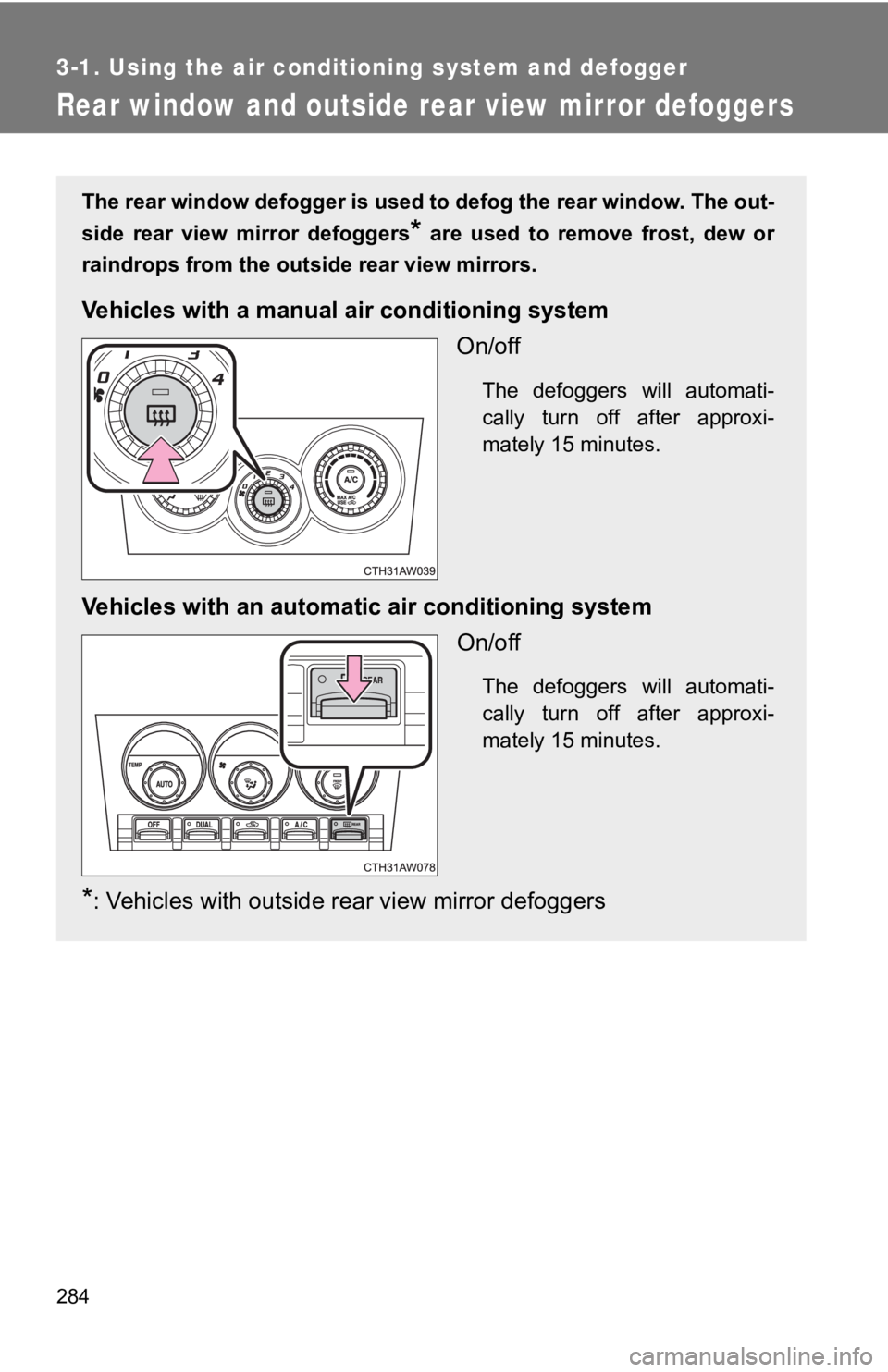
Vehicles with a manua l air conditioning system
On/off
The defoggers will automati-
cally turn off after approxi-
mately 15 minutes.
Vehicles with an automati c air conditioning system
On/off
The defoggers will automati-
cally turn off after approxi-
mately 15 minutes.
*: Vehicles with outside rear view mirror defoggers
Page 285 of 532
285
3-1. Using the air condit
ioning system and defogger
3
Interior features
■The defoggers can b e operated when
Vehicles without a smart key system
The engine switch is in the “ON” position.
Vehicles with a smart key system
The “ENGINE START STOP” switch is in IGNITION ON mode.
■ The outside rear view mirror def oggers (vehicles with outside rear view
mirror defoggers)
Turning the rear window defogger on will turn the outside rear view mirror
defoggers on.
■ When continuous operation is set (vehicles with an automatic air con-
ditioning system)
During continuous operation, the defogger stops operating for 2 minutes
after every 15 minutes of continual operation. Even during the 2 minutes that
operation stops, the operating light remains illuminated. The r ear window
defogger will continue to operate in this cycle until it is tur ned off.
■ Customization that can be config ured at Toyota dealer (vehicles with
an automatic air conditioning system)
The rear window defogger can be set to 15-minute operation or c ontinuous
operation. (Customizable features P. 487)
WARNING
■When the outside rear view mirror defoggers are on (vehicles wi th out-
side rear view mirror defoggers)
Do not touch the outside surface of the rear view mirrors, as they can
become very hot and burn you.
NOTICE
■ To prevent battery discharge
Do not leave the rear window defogger on longer than necessary when the
engine is stopped.
Page 370 of 532
370 4-3. Do-it-yourself maintenance
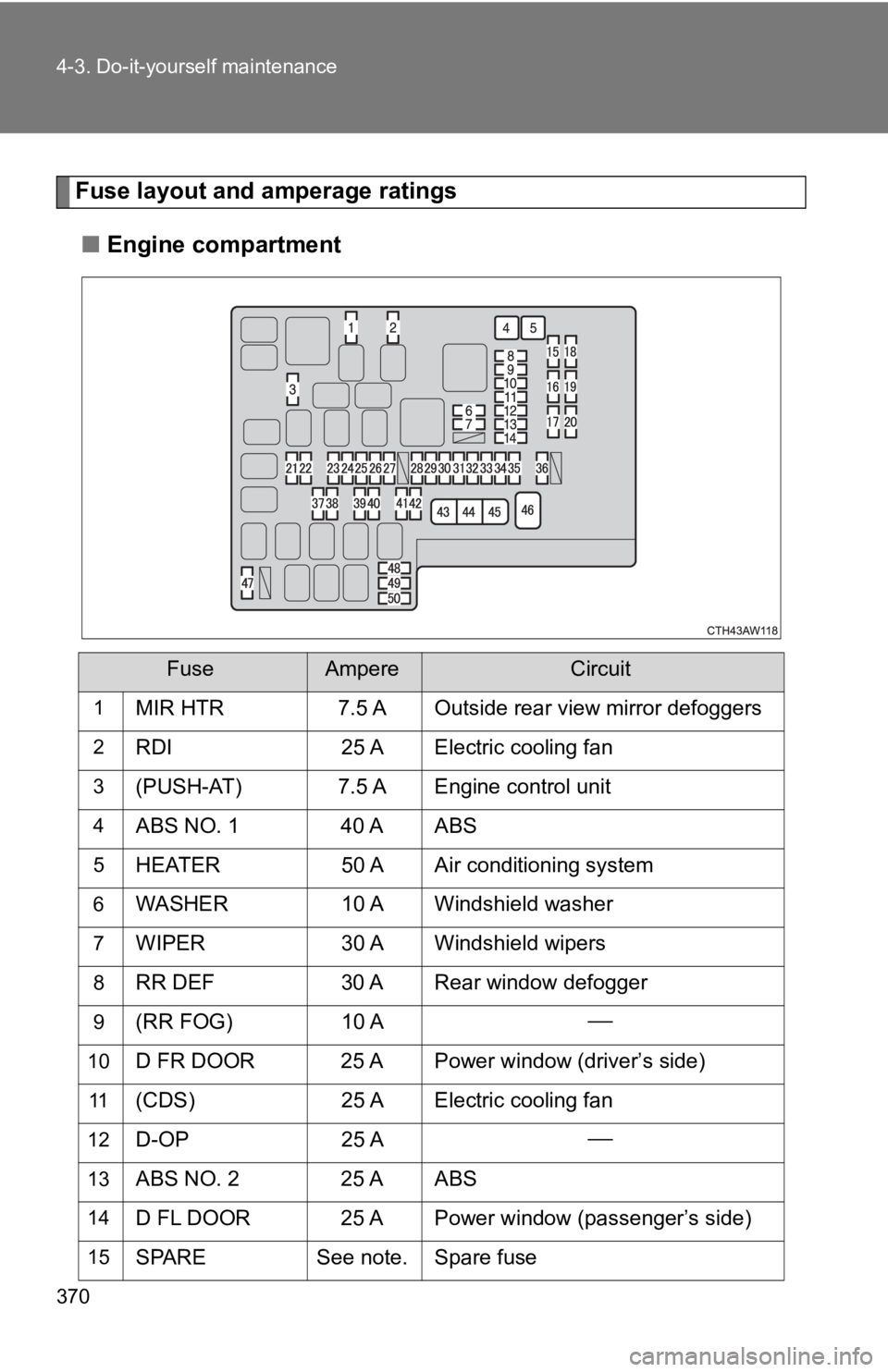
Fuse layout and amperage ratings■ Engine compartment
FuseAmpereCircuit
1MIR HTR 7.5 A Outside rear view mirror defoggers
2RDI 25 A Electric cooling fan
3(PUSH-AT) 7.5 A Engine control unit
4ABS NO. 1 40 A ABS
5HEATER 50 A Air conditioning system
6WASHER10 A Windshield washer
7WIPER30 A Windshield wipers
8RR DEF30 A Rear window defogger
9(RR FOG) 10 A
10D FR DOOR 25 A Power window (driver’s side)
11(CDS)25 A Electric cooling fan
12D-OP 25 A
13ABS NO. 2 25 A ABS
14D FL DOOR 25 A Power window (passenger’s side)
15SPARESee note. Spare fuse
Page 373 of 532
373
4-3. Do-it-yourself maintenance
4
Maintenance and care
■
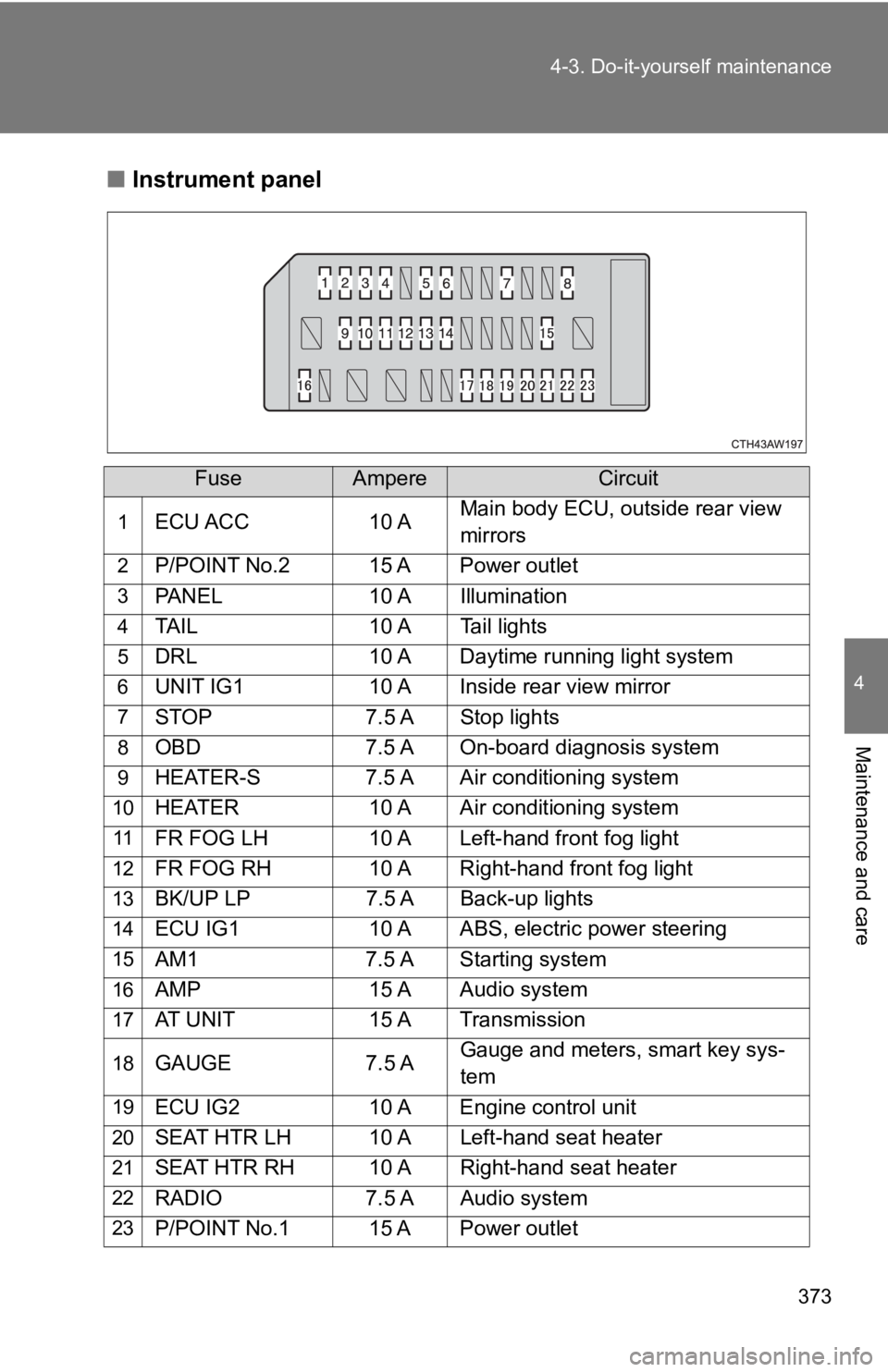
Instrument panel
FuseAmpereCircuit
1ECU ACC 10 AMain body ECU, outside rear view
mirrors
2P/POINT No.2 15 A Power outlet
3PANEL
10 A Illumination
4TAIL10 A Tail lights
5DRL10 A Daytime running light system
6UNIT IG110 A Inside rear view mirror
7STOP7.5 A Stop lights
8OBD7.5 A On-board diagnosis system
9HEATER-S 7.5 A Air conditioning system
10HEATER 10 A Air conditioning system
11FR FOG LH 10 A Left-hand front fog light
12FR FOG RH 10 A Right-hand front fog light
13BK/UP LP7.5 A Back-up lights
14ECU IG1 10 A ABS, electric power steering
15AM17.5 A Starting system
16AMP 15 A Audio system
17AT UNIT 15 A Transmission
18GAUGE7.5 AGauge and meters, smart key sys-
tem
19ECU IG2
10 A Engine control unit
20SEAT HTR LH 10 A Left-hand seat heater
21SEAT HTR RH 10 A Right-hand seat heater
22RADIO7.5 A Audio system
23P/POINT No.1 15 A Power outlet
Page 524 of 532
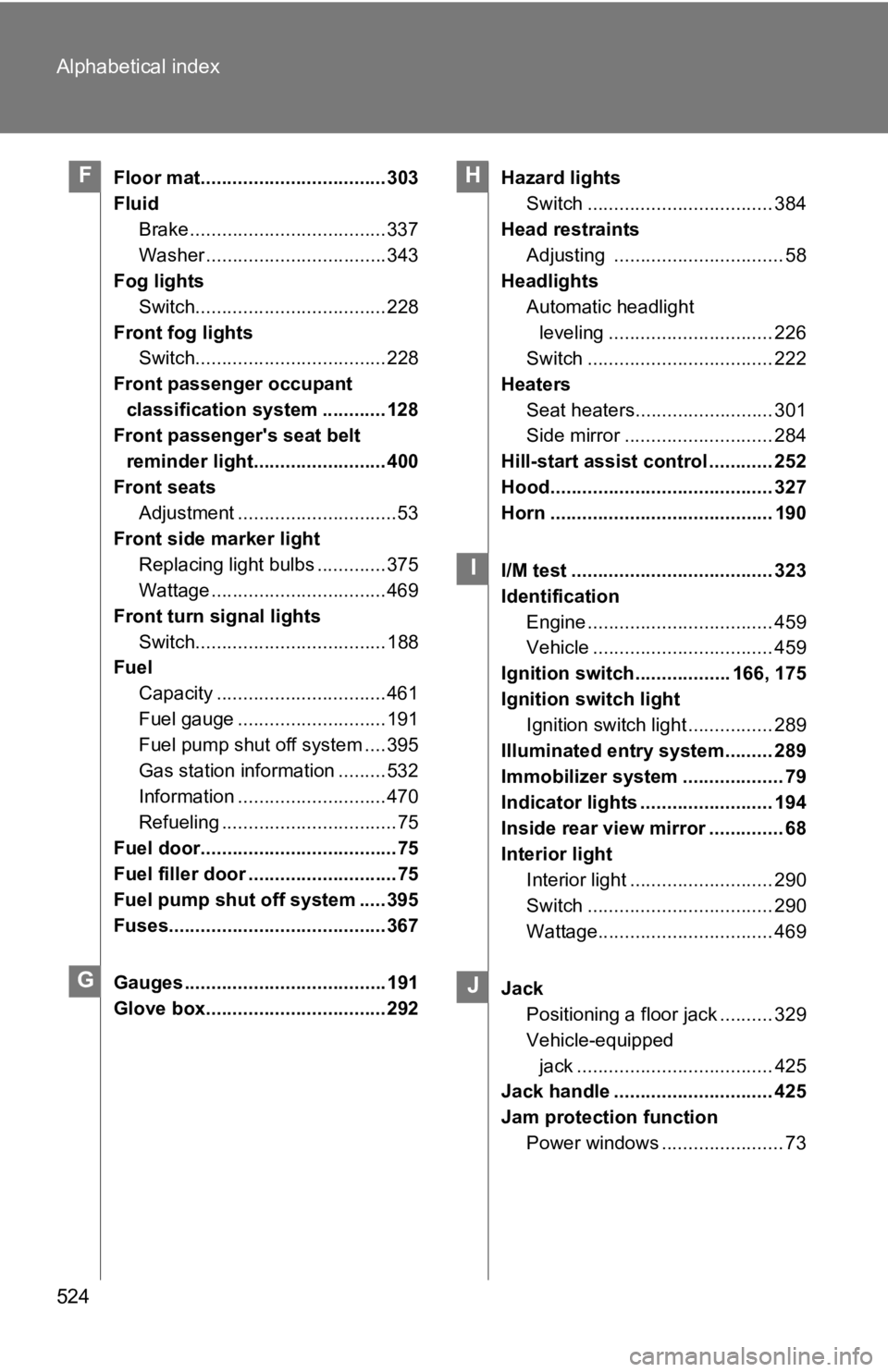
524 Alphabetical index
Floor mat................................... 303
FluidBrake ..................................... 337
Washer .................................. 343
Fog lights
Switch.................................... 228
Front fog lights Switch.................................... 228
Front passenger occupant classification system ............ 128
Front passenger's seat belt
reminder light......................... 400
Front seats Adjustment ..............................53
Front side marker light Replacing light bulbs ............. 375
Wattage ................................. 469
Front turn signal lights Switch.................................... 188
Fuel
Capacity ................................ 461
Fuel gauge ............................ 191
Fuel pump shut off system .... 395
Gas station information ......... 532
Information ............................ 470
Refueling .................................75
Fuel door.....................................75
Fuel filler door ............................75
Fuel pump shut off system ..... 395
Fuses......................................... 367
Gauges ...................................... 191
Glove box.................................. 292 Hazard lights
Switch ................................... 384
Head restraints Adjusting ................................ 58
Headlights
Automatic headlight leveling ............................... 226
Switch ................................... 222
Heaters Seat heaters.......................... 301
Side mirror ............................ 284
Hill-start assist control ............ 252
Hood.......................................... 327
Horn .......................................... 190
I/M test ...................................... 323
Identification Engine ................................... 459
Vehicle .................................. 459
Ignition switch.................. 166, 175
Ignition switch light Ignition switch light ................ 289
Illuminated entry system......... 289
Immobilizer system ................... 79
Indicator lights ......................... 194
Inside rear view mirror .............. 68
Interior light Interior light ........................... 290
Switch ................................... 290
Wattage................................. 469
Jack Positioning a floor jack .......... 329
Vehicle-equipped
jack ..................................... 425
Jack handle .............................. 425
Jam protection function
Power windows ....................... 73F
G
H
I
J