fog light TOYOTA 86 2022 User Guide
[x] Cancel search | Manufacturer: TOYOTA, Model Year: 2022, Model line: 86, Model: TOYOTA 86 2022Pages: 449, PDF Size: 8.5 MB
Page 229 of 449
2294-5. EyeSight
4
Driving
Warning messageCauseAction
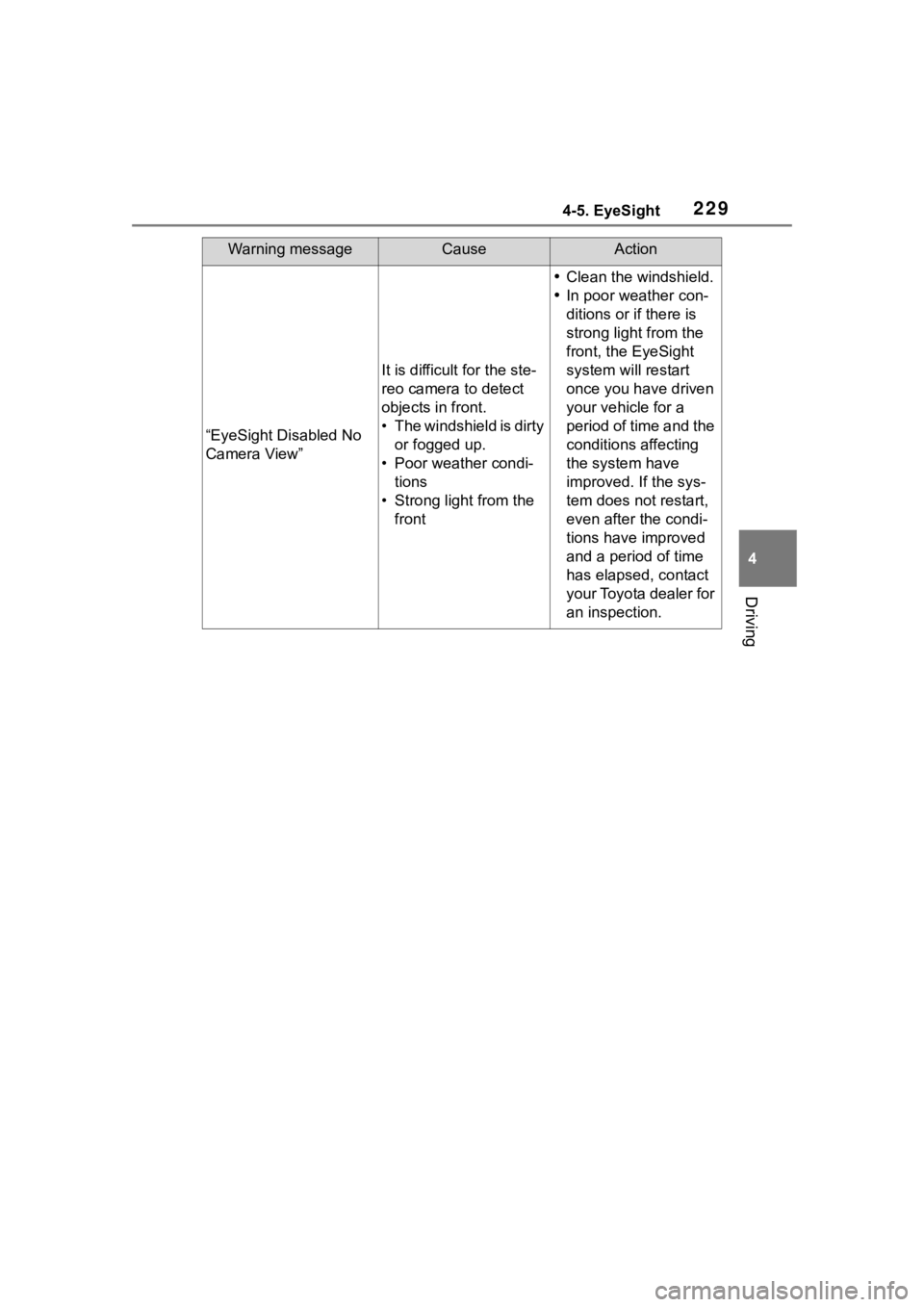
“EyeSight Disabled No
Camera View”
It is difficult for the ste-
reo camera to detect
objects in front.
• The windshield is dirty or fogged up.
• Poor weather condi- tions
• Strong light from the front
Clean the windshield.
In poor weather con-
ditions or if there is
strong light from the
front, the EyeSight
system will restart
once you have driven
your vehicle for a
period of time and the
conditions affecting
the system have
improved. If the sys-
tem does not restart,
even after the condi-
tions have improved
and a period of time
has elapsed, contact
your Toyota dealer for
an inspection.
Page 234 of 449

2344-6. Using other driving systems
The vehicle speed is below 6
mph (10 km/h) even when the
BSD/RCTA OFF indicator
does not appear (except
when reversing).
●In the following cases, the
BSD/RCTA will stop operating and
the BSD/RCTA warning light will
appear.
• When a malfunction occurs in the system, including the BSD/RCTA
approach indicator
●If the BSD/RCTA warning light
appears, exercise proper caution.
( P.237)
●In the following cases, the
BSD/RCTA will temporarily stop
operating (or may stop operating)
and the BSD/RCTA OFF indicator
will appear.
• When the radar sensor becomes significantly misaligned (If the ori-
entation of the r adar sensor is
shifted for any reason, readjust-
ment is required. Have the sensor
adjusted at a Toyota dealer.)
• When a large amount of snow or ice sticks to the rear bumper sur-
face around the radar sensors
• When the vehicle is driven on a snow-covered road or in an envi-
ronment in which there are no
objects around (such as in a des-
ert) for a prolonged period of time
• When the temperature around the
radar sensors increases exces-
sively due to long driving on uphill
grades in the summer, etc.
• When the temperature around the radar sensors becomes extremely
low
• When the vehicle battery voltage lowers
• When the vehicle voltage exceeds
the battery voltage rating
●The BSD/RCTA will resume oper-
ation once these conditions are
corrected, and the BSD/RCTA
OFF indicator will disappear. How-
ever, if the BSD/RCTA OFF indi- cator appears for a prolonged
period of time, have the system
inspected at a Toyota dealer as
soon as possible.
●The detectability o
f the radar sen-
sors is restricted. The BSD/RCTA
detection may be impaired and
the system may not operate prop-
erly under the following condi-
tions.
• When the rear bumper around the
radar sensors is distorted
• When ice, snow or mud adheres to the rear bumper surface around
the radar sensors
• When stickers, etc . are affixed on
the areas of the radar sensors on
the rear bumper
• During adverse weather condi- tions such as ra in, snow or fog
• When driving on wet roads such as snow-covered roads and
through puddles
●The radar sensors may not detect
or may have difficulty detecting
the following vehicles and objects.
• Small motorcycles, bicycles, pedestrians, stationary objects on
the road or ro ad side, etc.
• Vehicles with body shapes that the radar may not reflect (vehicles
with lower body height such as a
trailer with no cargo and sports
cars)
• Vehicles that are not approaching
your vehicle even though they are
in the detection area (either on a
neighboring lane to the rear or
beside your vehicle when revers-
ing) (The system determines the
presence of approaching vehicles
based on data detected by the
radar sensors.)
• Vehicles traveling at significantly
different speeds
• Vehicles driving in parallel at almost the same speed as your
vehicle for a prolonged time
• Oncoming vehicles
• Vehicles in a lane beyond the neighboring lane
• Vehicles travelling at a signifi- cantly lower speed that you are
Page 243 of 449
2434-6. Using other driving systems
4
Driving
temperatures in which the area
near the sonar sensor becomes
too hot or too cold to operate.
• The sonar sensors or the rear bumper near the sonar sensors
are exposed to heavy rain or a
significant amount of water.
• Fog, snow or sandstorm, etc.
• Air is moving rapidly such as when a strong wind is blowing.
●Parts attached to the rear bumper
near the sonar sensor:
• Commercial electronic parts (fog light, fender pole, radio antenna)
or commercial attachment parts
(trailer hitch, bicycle carrier,
bumper guard) are attached.
• Parts that emit high frequency sound, such as a horn or speaker,
are attached.
●Vehicle conditions:
• Ice, snow or mud is adhered to the sonar sensors or the rear bumper
near the sonar sensor.
• The vehicle is significantly inclined.
• The ground clearance is signifi- cantly reduced due to the vehi-
cle’s loading condition, etc.
• When the sonar sensor is mis- aligned due to a collision or an
accident.
●Surrounding environment:
• A cloth banner, flag, hanging branch or railroad crossing bars
are present in the reversing direc-
tion.
• When reversing on a gravel or
grassy area.
• When reversing in an area where objects or walls are adjacent to
the vehicle such as narrow tun-
nels, narrow bridges, narrow
roads or narrow garages.
• Wheel track or hole is present in
the ground of the reversing direc-
tion.
• When reversing over a drainage
cover (grating cover).
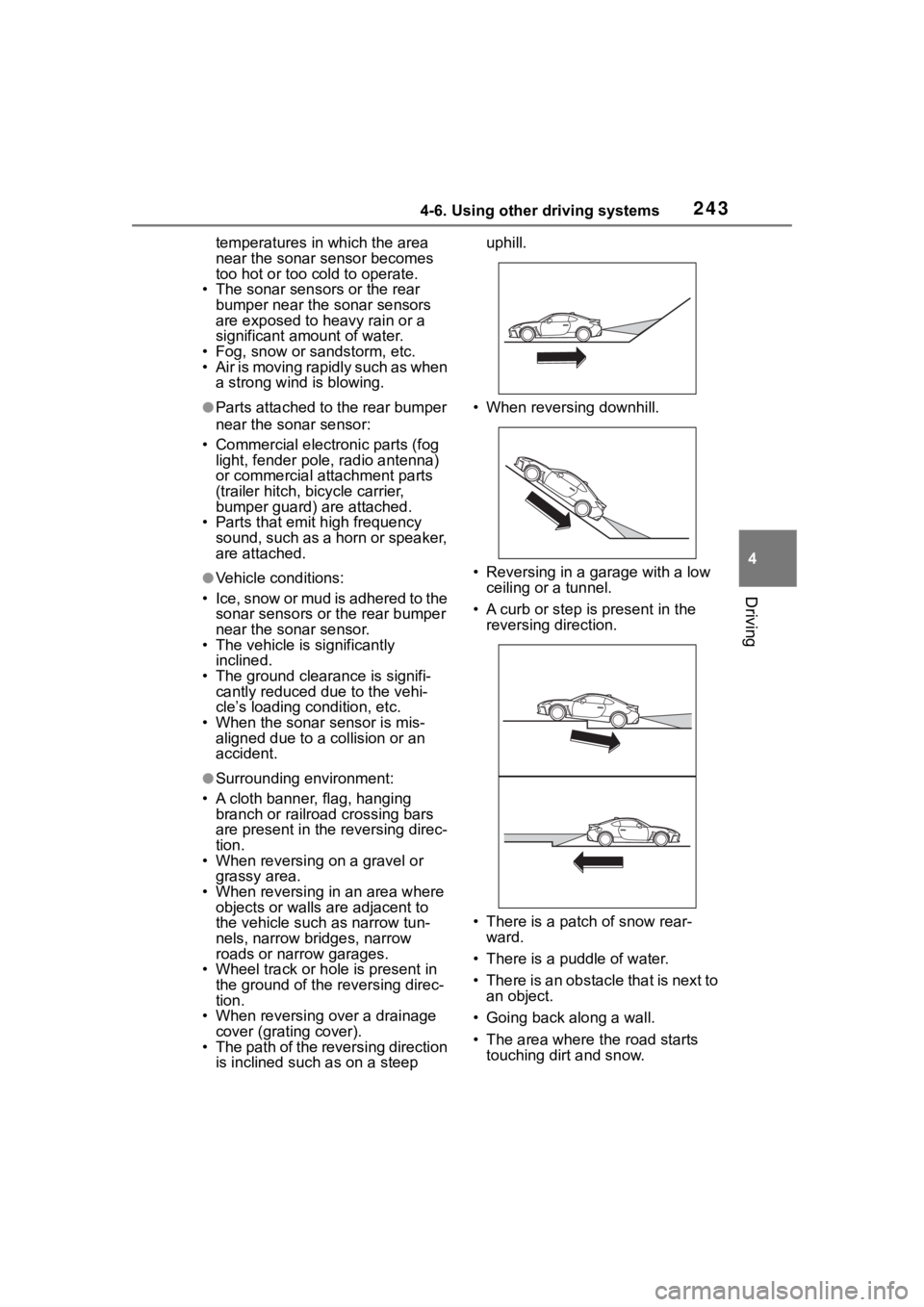
• The path of the reversing direction is inclined such as on a steep uphill.
• When reversing downhill.
• Reversing in a garage with a low ceiling or a tunnel.
• A curb or step is present in the
reversing direction.
• There is a patch of snow rear- ward.
• There is a puddle of water.
• There is an obstacle that is next to an object.
• Going back along a wall.
• The area where the road starts touching dirt and snow.
Page 271 of 449
2715-1. Using the air conditioning system
5
Interior features
■Adjusting the temperature
setting
To adjust the temperature set-
ting, turn the temperature con-
trol switch clockwise (warm) or
counterclockwise (cool).
If “A/C” switch is not pressed, the
system will blow a mbient tempera-
ture air or heated air.
The air conditioning system
switches between individual and
synchronized modes each time
“SYNC” switch is pressed.
Synchronized modes (indicator on):
The left-hand side temperature
control switch can be used to adjust
the temperature for the driver’s and
front passenger’s side. At this time,
operate the right-hand side tem-
perature control switch to enter
individual mode.
Individual modes (indicator off):
The temperature for the driver’s
and front passenger’s side can be
adjusted separately.
■Setting the fan speed
To adjust the fan speed, turn the
fan speed control switch clock-
wise (increase) or counterclock-
wise (decrease).
Pressing the “ON/OFF” switch to
turns off the fan.
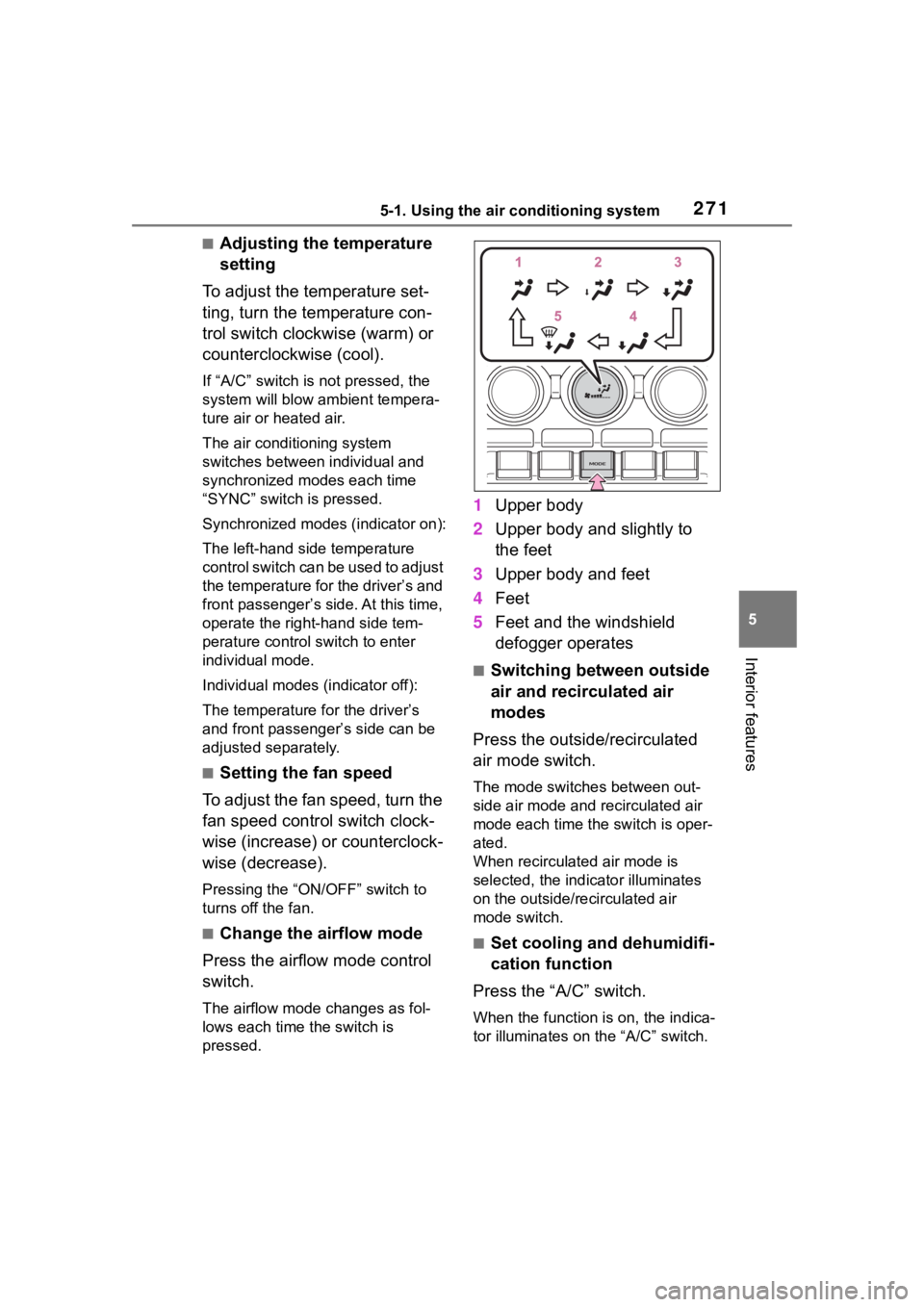
■Change the airflow mode
Press the airflow mode control
switch.
The airflow mode changes as fol-
lows each time the switch is
pressed.
1 Upper body
2 Upper body and slightly to
the feet
3 Upper body and feet
4 Feet
5 Feet and the windshield
defogger operates
■Switching between outside
air and recirculated air
modes
Press the outside/recirculated
air mode switch.
The mode switches between out-
side air mode and recirculated air
mode each time the switch is oper-
ated.
When recirculated air mode is
selected, the indicator illuminates
on the outside/recirculated air
mode switch.
■Set cooling and dehumidifi-
cation function
Press the “A/C” switch.
When the function is on, the indica-
tor illuminates on the “A/C” switch.
Page 274 of 449
2745-1. Using the air conditioning system
operating light remains illuminated.
The rear window defogger will con-
tinue to operate in this cycle until it
is turned off.
■Customization
Some functions can be customized.
( P.400)
1 Press the automatic mode
switch.
2 Adjust the temperature set-
ting.
3 To stop the operation, press
the “ON/OFF” switch.
If the fan speed setting or air
flow modes are operated, the
automatic mode indicator goes
off. However, automatic mode
for functions other than that
operated is maintained.
■Using automatic mode
Fan speed is adjusted automati-
cally according to the temperature
setting and the ambient conditions.
Therefore, the fan may stop for a
while until warm or cool air is ready
to flow immediately after the auto-
matic mode switch pressed.
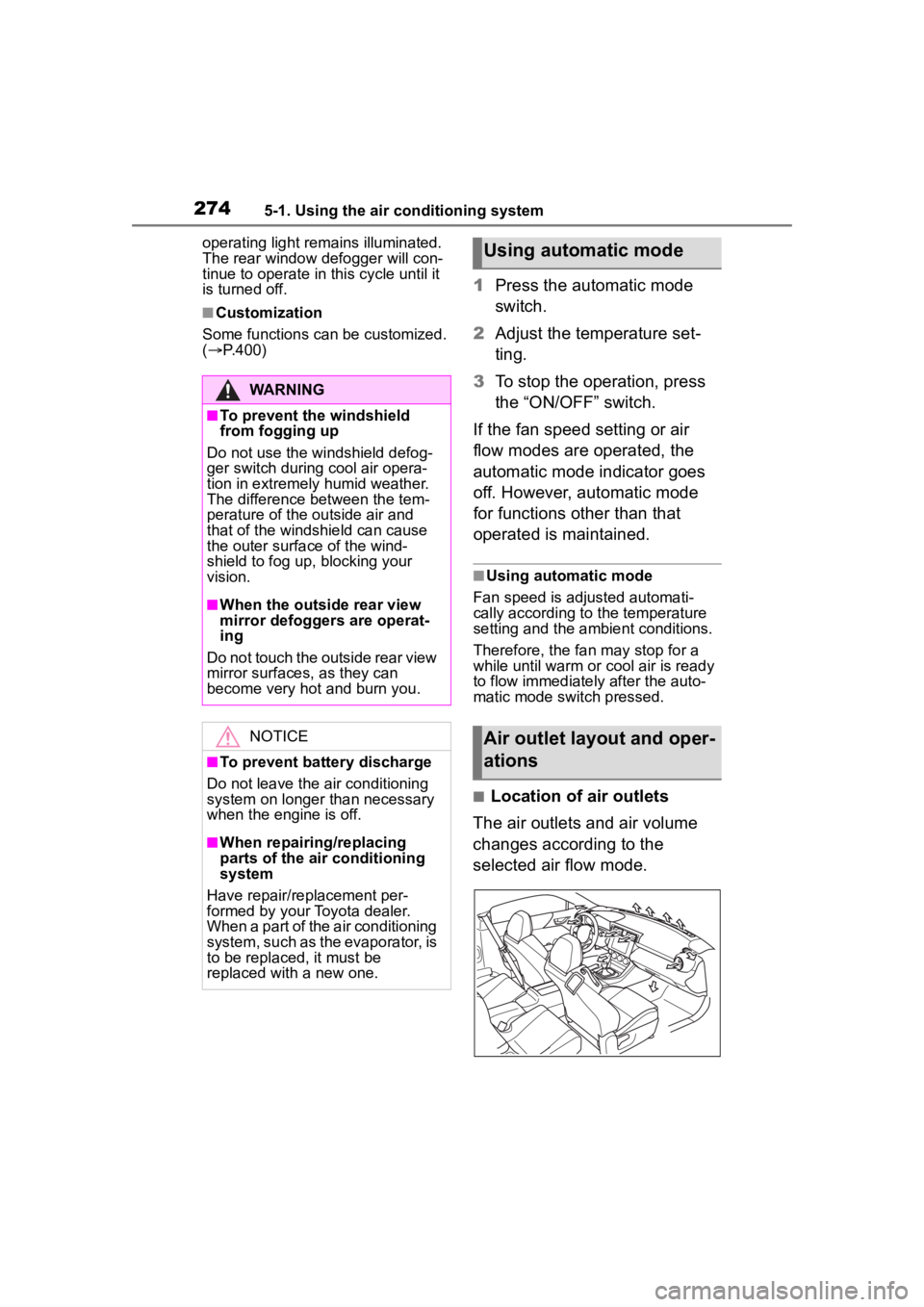
■Location of air outlets
The air outlets and air volume
changes according to the
selected air flow mode.
WARNING
■To prevent the windshield
from fogging up
Do not use the windshield defog-
ger switch during cool air opera-
tion in extremely humid weather.
The difference between the tem-
perature of the outside air and
that of the windshield can cause
the outer surface of the wind-
shield to fog up, blocking your
vision.
■When the outside rear view
mirror defoggers are operat-
ing
Do not touch the outside rear view
mirror surfaces, as they can
become very hot and burn you.
NOTICE
■To prevent battery discharge
Do not leave the air conditioning
system on longer than necessary
when the engine is off.
■When repairing/replacing
parts of the air conditioning
system
Have repair/replacement per-
formed by your Toyota dealer.
When a part of the air conditioning
system, such as the evaporator, is
to be replaced, it must be
replaced with a new one.
Using automatic mode
Air outlet layout and oper-
ations
Page 292 of 449
2926-1. Maintenance and care
Remove dirt and dust using a
vacuum cleaner.
Wipe off any excess dirt and
dust with a soft cloth damp-
ened with diluted detergent.
Use a diluted water solution of
approximately 5% neutral wool
detergent.
Wring out any excess water
from the cloth and thoroughly
wipe off all remaining traces
NOTICE
●Do not use a chemical agent
containing silicone
(highly-polymerized silicon com-
pound) when cleaning any of
the electrical appliances such
as the air conditioning, all
switches and their surrounding
areas.
If silicon (highly-polymerized sil-
icon compound) contacts these
components, it may cause the
electrical appliances to malfunc-
tion.
■Preventing damage to leather
surfaces
Observe the following precautions
to avoid damage to and deteriora-
tion of leather surfaces:
●Remove any dust or dirt from
leather surfaces immediately.
●Do not expose the vehicle to
direct sunlight for extended peri-
ods of time. Park the vehicle in
the shade, especially during
summer.
●Do not place items made of
vinyl, plastic, or containing wax
on the upholstery, as they may
stick to the leather surface if the
vehicle interior heats up signifi-
cantly.
■Water on the floor
Do not wash the vehicle floor with
water.
Vehicle systems such as the
audio system may be damaged if
water comes into contact with
electrical components such as the
audio system above or under the
floor of the vehicle. Water may
also cause the body to rust.
■When cleaning the inside of
the windshield
Do not allow glass cleaner to con-
tact the lens. Also, do not touch
the lens. (
P.174)
■Cleaning the inside of the rear
window
●Do not use glass cleaner to
clean the rear window, as this
may cause damage to the rear
window defogger heater wires.
Use a cloth dampened with
lukewarm water to gently wipe
the window clean. Wipe the win-
dow in strokes running parallel
to the heater wires.
●Be careful not to scratch or
damage the heater wires.
■When cleaning the instrument
panel
When small grains of sand and so
forth have gotten into instrument
panel’s surface and cannot be
wiped away using a cloth, use a
clay bar without adding water.
Forcibly trying to wipe the surface
clean with a brush or sponge may
scratch the surface or fragments
of the cloth may be left in the sur-
face.
Cleaning the leather areas
Page 430 of 449
430Alphabetical Index
Fixed with a seat belt ............. 66
Front passenger occupant clas-sification system ................... 55
Points to remember ................ 63
Riding with children ................ 62
Types of child restraint system installation met hod ............... 65
Using an anchor bracket ........ 72
Child safety Battery precautions ...... 311, 373
Child restraint system............. 65
How your child should wear the seat belt................................ 24
Power window lock switch.... 130
Removed electronic key battery precautions......................... 330
Seat belt precautions ............. 62
Seat heater precautions ....... 276
Trunk precautions................. 107
Cleaning Exterior ................................. 288
Interior .......................... 291, 293
Seat belts ............................. 291
Wheels and wheel ornaments........................................... 288
Clock ................................... 88, 91
Condenser .............................. 308
Console box ............................ 280
Conventional Cruise Control207, 254
Cooling system ...................... 307 Engine overheating .............. 374
Cruise control Adaptive Cruise Control ....... 190
Conventional Cruise Control207, 254
Cup holders ............................ 281
Current fuel consumption ....... 94
Curtain shield airbags ............. 27
Customizable features ........... 400D
Daytime running light system158
Daytime running lights Replacing light bulbs ............334
Defogger Outside rear view mirrors .....272
Rear window.........................272
Windshield ............................272
Dimension ...............................380
Dinghy towing .........................144
Display Driving information .................94
Multi-information display.........93
Display change button .............90
Do-it-yourself maintenance ...296
Door courtesy lights...............277
Door lock Doors ....................................105
Smart key system ................. 111
Wireless remote control........103
Doors Door glasses ........................129
Door lock ..............................105
Open door warning buzzer ...106
Open door warning light .......351
Outside rear view mirrors .....127
Driving Break-in tips .........................133
Correct driving posture ...........21
Driving mode select switch ...257
Procedures ...........................132
Winter drive tips....................265
Driving distance........................94
Driving information ..................94
Driving information display .....94
Driving range ............................94
Driving time ...............................94
E
EDR (Event data recorder) .........7
Page 434 of 449
434Alphabetical Index
General maintenance ........... 296
Maintenance date................. 380
Maintenance requirements... 295
Malfunction indicator lamp.... 349
Manual transmission ............. 153
Master warning light .............. 353
Menu icons ............................... 93
Meter Clock ...................................... 88
Indicators................................ 85
Instrument panel light control . 91
Meters .................................... 88
Multi-information display ........ 93
Settings .................................. 98
Warning lights....................... 348
Warning messages............... 357
Mirrors Inside rear view mirror.......... 126
Outside rear view mirror defog-gers .................................... 272
Outside rear view mirrors ..... 127
Vanity mirrors ....................... 284
Multi-information display......... 93 Audio system-linked display ... 98
Driving information ................. 94
Menu icons ............................. 93
Meter control switches ........... 94
Navigation system-linked display............................................. 98
Pop-up display ....................... 93
Settings .................................. 98
Sport information .................... 96
Tire pressure ........................ 315
Warning messages............... 357
N
Navigation system-linked display ................................................. 98
Noise from under vehicle .......... 5
O
Odometer...................................90
Odometer and trip meter display
Display change button ............90
Display items ..........................91
Oil Engine oil..............................382
Opener Fuel filler door.......................167
Hood .....................................302
Trunk ....................................109
Outside rear view mirrors Adjustment ...........................127
BSD (Blind Spot Detection) ..231
Folding..................................127
Outside rear view mirror defog-gers ....................................272
RCTA function.......................231
Outside temperature ................88
Overheating.............................374
P
Paddle shift switches .....151, 152
Panic mode .............................103
Parking brake Operation..............................156
Parking lights Light switch...........................158
Replacing light bulbs ............334
Power and torque curve...........96
Power outlets ..........................284
Power steering (Electric power steering system) ...................261Warning light.........................350
Power windows Jam protection function ........129
Operation..............................129
Window lock switch ..............130
Pre-Collision Braking System179 Function................................179
Warning message.................357
Page 435 of 449
435Alphabetical Index
Pre-Collision Throttle Manage-ment....................................... 215
R
RAB (Reverse Automatic Brak-ing)......................................... 239
Radiator ................................... 308
RCTA Function ............................... 231
RCTA (Rear Cross Traffic Alert) ............................................... 231
Rear seats ............................... 121
Rear side marker lights Light switch .......................... 158
Rear turn signal lights Replacing light bulbs ............ 334
Turn signal lever ................... 155
Wattage ................................ 387
Rear view camera ................... 249
Rear view mirror Inside rear view mirror.......... 126
Outside rear view mirrors ..... 127
Rear window defogger ........... 272
Refueling Capacity ............................... 381
Fuel types............................. 381
If the fuel filler door cannot be opened ............................... 369
Opening the fuel tank cap .... 167
Replacing Electronic key battery ........... 329
Fuses ................................... 331
Light bulbs ............................ 334
Tires ..................................... 319
REV indicator ............................ 89
Reverse Automatic Braking (RAB) ..................................... 239
S
Safety Connect ......................... 74
Seat belt reminder light . 351, 352 Seat belts...................................23
Automatic Locking Retractor ..25
Child restraint sys tem installation
.............................................65
Cleaning and maintaining the seat belt ..............................291
Emergency Locking Retractor 25
How to wear your seat belt .....24
How your child should wear the seat belt ................................24
Pregnant women, proper seat belt use .................................23
Reminder light and buzzer .351, 352
Seat belt pretensioners ..........25
SRS warning light .................349
Seat heaters ............................276
Seating capacity .....................143
Seats Adjustment ........................... 119
Child seats/child restraint system installation ............................63
Cleaning .......................291, 293
Head restraints .....................123
Properly sitting in the seat ......21
Seat heaters ....... ..................276
Sensor Automatic headlight system .159
BSD (Blind Spot Detection) ..231
Shift lever Automatic transm ission ........149
Manual transmission ............153
Side airbags ..............................27
Side marker lights Light switch...........................158
Replacing light bulbs ............334
Side mirrors Adjustment ...........................127
BSD (Blind Spot Detection) ..231
Folding..................................127
RCTA function.......................231
Page 436 of 449
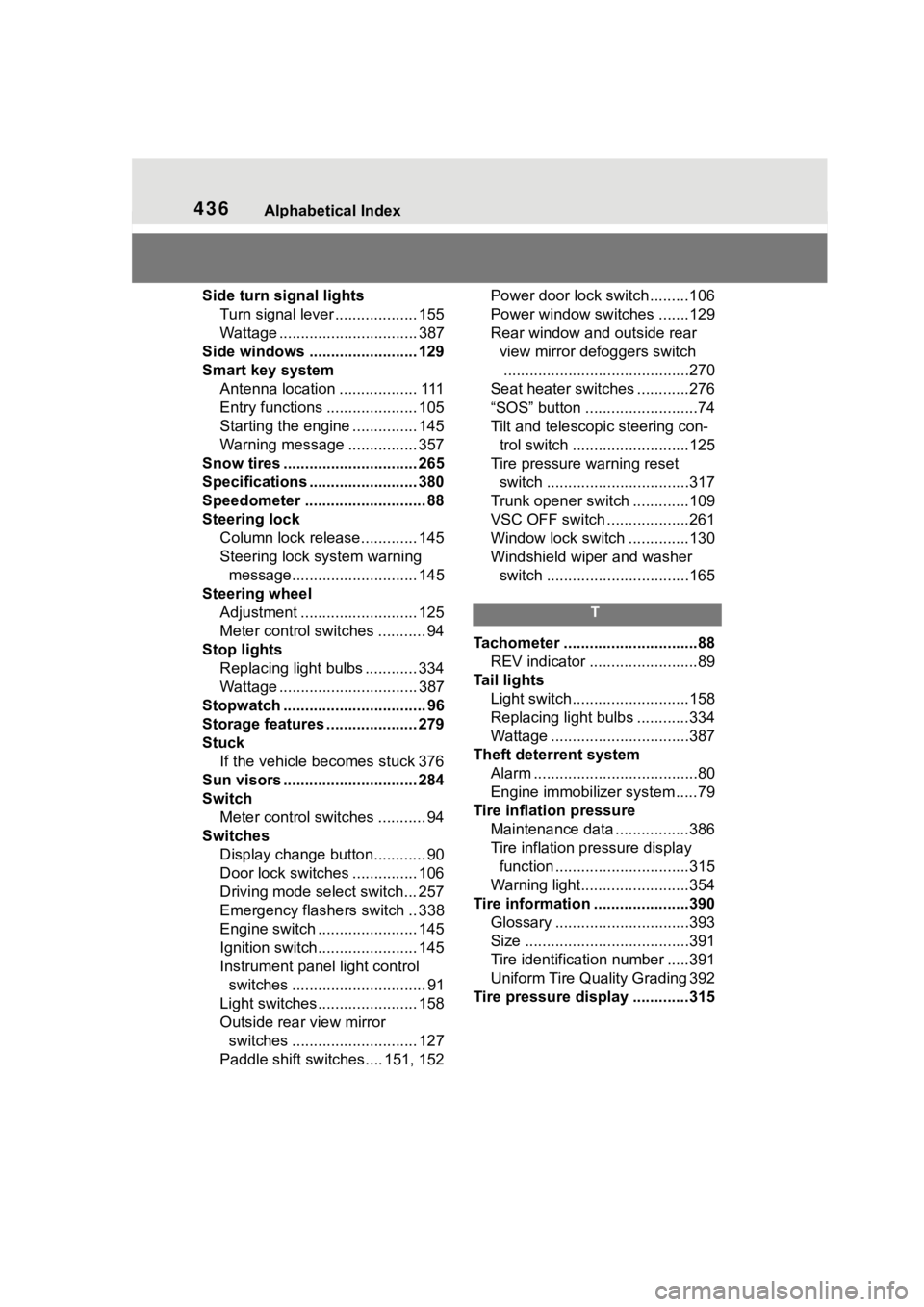
436Alphabetical Index
Side turn signal lightsTurn signal lever ................... 155
Wattage ................................ 387
Side windows ...... ................... 129
Smart key system Antenna location .................. 111
Entry functions ..................... 105
Starting the engine ............... 145
Warning message ................ 357
Snow tires ............................... 265
Specifications ......................... 380
Speedometer ............................ 88
Steering lock Column lock release............. 145
Steering lock system warning message............................. 145
Steering wheel Adjustment ........................... 125
Meter control switches ........... 94
Stop lights Replacing light bulbs ............ 334
Wattage ................................ 387
Stopwatch ................................. 96
Storage features ..................... 279
Stuck If the vehicle becomes stuck 376
Sun visors ............................... 284
Switch Meter control switches ........... 94
Switches Display change button............ 90
Door lock switches ............... 106
Driving mode select switch... 257
Emergency flashers switch .. 338
Engine switch ....................... 145
Ignition switch....................... 145
Instrument panel light control switches ............................... 91
Light switches....................... 158
Outside rear view mirror switches ............................. 127
Paddle shift switches.... 151, 152 Power door lock switch.........106
Power window switches .......129
Rear window and outside rear
view mirror defoggers switch...........................................270
Seat heater switches ............276
“SOS” button ..........................74
Tilt and telescopic steering con- trol switch ...........................125
Tire pressure warning reset switch .................................317
Trunk opener switch .............109
VSC OFF switch ...................261
Window lock switch ..............130
Windshield wiper and washer switch .................................165
T
Tachometer ...............................88 REV indicator .........................89
Tail lights Light switch...........................158
Replacing light bulbs ............334
Wattage ................................387
Theft deterrent system Alarm ......................................80
Engine immobilizer system .....79
Tire inflation pressure Maintenance data .................386
Tire inflation pressure display function ...............................315
Warning light.........................354
Tire information ......................390 Glossary ...............................393
Size ......................................391
Tire identification number .....391
Uniform Tire Quality Grading 392
Tire pressure display .............315