remote control TOYOTA 86 2022 User Guide
[x] Cancel search | Manufacturer: TOYOTA, Model Year: 2022, Model line: 86, Model: TOYOTA 86 2022Pages: 449, PDF Size: 8.5 MB
Page 112 of 449

1123-2. Opening, closing and locking the doors and trunk
●When an exterior alarm sounds
once for 2 seconds
●When an interior alarm sounds
continuously
■Battery-saving function
The battery-saving function will be
activated in order to prevent the
electronic key battery and the vehi-
cle battery from being discharged
while the vehicle is not in operation
for a long time.
●In the following situations, the smart key system
may take some
time to unlock the doors.
• The electronic key has been left
within approximately 6 ft. (2 m) of
the outside of the vehicle for 10
minutes or longer.
• The smart key system has not been used for 5 days or longer.
●If the smart key system has not
been used for 14 days or longer,
the doors cannot be unlocked at
the passenger door. In this case,
take hold of the d river’s door han-
dle, or use the wireless remote
control or mechanical key, to
unlock the doors.
■Electronic Key Battery-Saving
Function
When battery-saving mode is set,
battery depletion is minimized by
stopping the electronic key from
receiving radio waves.
Press twice while pressing and
holding . Confirm that the elec-
tronic key indicator flashes 4 times.
While the battery-saving mode is
set, the smart key system cannot be
used. To cancel the function, press
any of the electronic key buttons.
■Conditions affecting operation
The smart key system uses weak
radio waves. In the following situa-
tions, the communication between
the electronic key and the vehicle
may be affected, preventing the
smart key system, wireless remote
control and engi ne immobilizer sys-
tem from operating properly.
(Ways of coping: P.369)
●When the electronic key battery is
SituationCorrection
procedure
An attempt was
made to lock the
vehicle while a door
was open.Close both
side doors
and lock the
doors again.
SituationCorrection procedure
The trunk was closed
while the electronic
key was still inside
the trunk and both
side doors were
locked.Retrieve the
electronic
key from the
trunk and
close the
trunk lid.
SituationCorrection procedure
The engine switch
was turned to ACC
while the driver’s
door was open (or
the driver’s door was
opened while the
engine switch was in
ACC).
Turn the
engine
switch off
and close
the driver’s
door.
The engine switch
was turned off while
the driver’s door was
open.Close the
driver’s
door.
Page 113 of 449

1133-2. Opening, closing and locking the doors and trunk
3
Before driving
depleted
●Near a TV tower, electric power
plant, gas station, radio station,
large display, airpo rt or other facil-
ity that generates strong radio
waves or electrical noise
●When carrying a portable radio,
cellular phone, cordless phone or
other wireless communication
device
●When the electronic key is in con-
tact with, or is covered by the fol-
lowing metallic objects
• Cards to which al uminum foil is
attached
• Cigarette boxes that have alumi- num foil inside
• Metallic wallets or bags
• Coins
• Hand warmers made of metal
• Media such as CDs and DVDs
●When other wireless keys (that
emit radio waves) are being used
nearby
●When carrying the electronic key
together with the following devices
that emit radio waves
• Another vehicle’s electronic key or
a wireless key that emits radio
waves
• Personal computers or personal
digital assistants (PDAs)
• Digital audio players
• Portable game systems
●If window tint with a metallic con-
tent or metallic objects are
attached to the rear window
●When the electronic key is placed
near a battery charger or elec-
tronic devices
■Note for the entry function
●Even when the electronic key is
within the effective range (detec-
tion areas), the system may not
operate properly in the following
cases:
• The electronic key is too close to the window or outside door han-
dle, near the ground, or in a high
place when the doors are locked or unlocked.
• The electronic key is near the ground or in a high place, or too
close to the rear bumper center
when the trunk is unlocked.
• The electronic key is on the instru-
ment panel, rear package tray or
floor, or in the door pockets or
glove box when the engine is
started or engine switch modes
are changed.
●Do not leave the electronic key on
top of the instrument panel or near
the door pockets when exiting the
vehicle. Depending on the radio
wave reception conditions, it may
be detected by the antenna out-
side the cabin and the doors will
become lockable from the outside,
possibly trapping the electronic
key inside the vehicle.
●As long as the electronic key is
within the effective range, the
doors may be locked or unlocked
by anyone. However, only the
doors detecting the electronic key
can be used to unlock the vehicle.
●Even if the electro nic key is not
inside the vehicle, it may be possi-
ble to start the engine if the elec-
tronic key is near the window.
●The doors may unlock or lock if a
large amount of water splashes on
the door handle, such as in the
rain or in a car wash, when the
electronic key is within the effec-
tive range. (The doors will auto-
matically be locked after
approximately 60 seconds if the
doors are not opened and closed.)
●If the wireless remote control is
used to lock the doors when the
electronic key is near the vehicle,
there is a possib ility that the door
may not be unlocked by the entry
function. (Use the wireless remote
control to unlock the doors.)
●Touching the door lock or unlock
sensor while wearing gloves may
prevent lock or unlock operation.
●When the lock operation is per-
Page 114 of 449

1143-2. Opening, closing and locking the doors and trunk
formed using the lock sensor, rec-
ognition signals will be shown up
to three consecuti ve times. After
this, no recogniti on signals will be
given.
●If the door handle becomes wet
while the electronic key is within
the effective ran ge, the door may
lock and unlock repeatedly. In this
case, follow the fo llowing correc-
tion procedures to wash the vehi-
cle:
• Place the electronic key in a loca- tion 6 ft. (2 m) or more away from
the vehicle. (Take care to ensure
that the key is not stolen.)
• Set the electronic key to bat-
tery-saving mode to disable the
smart key system. ( P. 1 1 2 )
●If the electronic key is inside the
vehicle and a door handle
becomes wet during a car wash, a
message may be shown on the
multi-information display and a
buzzer will sound outside the vehi-
cle. To turn off the alarm, lock both
side doors.
●The lock sensor may not work
properly if it com es into contact
with ice, snow, mud, etc. Clean
the lock sensor and attempt to
operate it again.
●A sudden handle operation or a
handle operation immediately
after entering the effective range
may prevent the doors from being
unlocked. Touch the door unlock
sensor and check that the doors
are unlocked bef ore pulling the
door handle again.
●Unlocking the vehicle may take
more time if another electronic key
is within the effective range.
■When the vehicle is not driven
for extended periods
●To prevent theft of the vehicle, do
not leave the electronic key within
6 ft. (2 m) of the vehicle.
●The smart key system can be
deactivated in advance. ( P. 1 1 5 )
●Setting the electronic key to bat-
tery-saving mode helps to reduce
key battery depletion. ( P. 1 1 2 )
■To operate the system properly
●Make sure to carry the electronic
key when operating the system.
Do not get the electronic key too
close to the vehicle when operat-
ing the system from the outside of
the vehicle.
Depending on the position and hold-
ing condition of the electronic key,
the key may not be detected cor-
rectly and the system may not oper-
ate properly. (The alarm may go off
accidentally, or the door lock pre-
vention function m ay not operate.)
●Do not leave the electronic key
inside the trunk.
The key confinement prevention
function may not operate, depend-
ing on the location of the key (the
inside edge of the Trunk), condi-
tions (inside a metal bag, close to
metallic objects) and the radio
waves in the surrounding area.
( P. 111 )
■If the smart key system does
not operate properly
●Locking and unlocking the doors:
P. 3 6 9
●Starting the engine: P. 3 7 0
■Customization
Some functions can be customized.
( P.400)
■If the smart key system has
been disabled
●Locking and unlocking the doors:
Use the wireless remote control or
mechanical key. ( P.105, 369)
●Starting the engi ne and changing
engine switch modes: P. 3 7 0
●Stopping the engine: P. 1 4 7
Page 115 of 449

1153-2. Opening, closing and locking the doors and trunk
3
Before driving
In the following situations, the
smart key system should be dis-
abled.
When people with implantable
cardiac pacemakers, cardiac
resynchronization therapy
pacemakers or implantable cardioverter defibrillators ride
in the vehicle.
When the vehicle will not be
used for a long time, or the
smart key system is not used.
When storing an electronic
key near or inside the vehicle
cannot be avoided.
When the smart key system is
disabled, use the wireless
remote control to lock and
unlock the doors.
When starting the engine, it will
be necessary to hold the elec-
tronic key near the engine
switch. ( P.370)
■Disabling the smart key
system
The smart key system can be
disabled by opening and closing
the doors or using the wireless
remote control.
Door opening/closing method
1 While sitting in the driver’s
seat, close the door.
2 Press of the door lock
switch.
3 Within 5 seconds of perform-
ing step 2, open the driver’s
door.
4 Within 5 seconds of perform-
ing step 3, press of the
door lock switch 2 times with
the door open.
5 Within 10 seconds of per-
forming step 4, close and
WARNING
■Caution regarding interfer-
ence with electronic devices
●People with implantable car-
diac pacemakers, cardiac
resynchronization ther-
apy-pacemakers or implantable
cardioverter defib rillators should
keep away from the smart key
system antennas. ( P. 1 1 1 )
The radio waves may affect the
operation of such devices. If
necessary, the entry function
can be disabled. Ask your Toy-
ota dealer for details, such as
the frequency of radio waves
and timing of the emitted radio
waves. Then, consult your doc-
tor to see if you should disable
the entry function.
●Users of any electrical medical
device other than implantable
cardiac pacemakers, cardiac
resynchronization ther-
apy-pacemakers or implantable
cardioverter defib rillators should
consult the manufacturer of the
device for information about its
operation under the influence of
radio waves.
Radio waves could have unex-
pected effects on the operation
of such medical devices.
The smart key system can be dis-
abled. ( P. 1 1 5 )
When to disable the smart
key system
Page 116 of 449

1163-2. Opening, closing and locking the doors and trunk
open the driver’s door 2
times.
6 Within 10 seconds of per-
forming step 5, press of
the door lock switch 2 times
with the door open.
7 Within 10 seconds of per-
forming step 6, close and
open the driver’s door 1 time.
8 Within 5 seconds of perform-
ing step 7, close the driver’s
door.
A buzzer will sound for approxi-
mately 2 seconds and the smart
key system will be disabled.
Wireless remote control
method
1 Open the driver’s door and
push the lock lever forward.
2 Press and hold and of
the wireless remote control at
the same time for 5 seconds
or more.
A buzzer will sound for approxi-
mately 2 seconds and the smart
key system will be disabled.
■Enabling the smart key sys-
tem
The smart key system can be
enabled by performing the pro- cedure used to disable it again.
When enabled a buzzer will sound.
■Door opening/closing method
Make sure to firmly press the door
lock switch in steps 4 and 6. If the
switch is pressed for a very short
time, the system m ay not be dis-
abled.
■Wireless remote control
method
To use the wireless remote control
method to disable the smart key
system, it is nece ssary to register a
PIN code for the PIN code smart
entry. ( P. 1 1 7 )
■When enabling the smart key
system
If the method used to disable the
smart key system is unknown, press
the engine switch.
●If the wireless remote control sys-
tem was used, a buzzer inside the
vehicle will sound.
●If the door opening/closing
method was used, the buzzer will
not sound.
■Customization
Some functions can be customized.
( P.400)
NOTICE
■When disabling the smart key
system
When disabling or enabling the
system to accommodate persons
with implantable cardiac pace-
makers, cardiac resynchroniza-
tion therapy pacemakers or
implantable cardioverter def ibrilla-
tors, always use the door open-
ing/closing method. If the wireless
remote control me thod is used,
the system may be enabled acci-
dentally.
Page 117 of 449

1173-2. Opening, closing and locking the doors and trunk
3
Before driving
By registering a 5 digit PIN
code, all of the doors and the
fuel filler door can be unlocked
without an electronic key by
pressing the trunk opener
switch.
■PIN code registration
method
1 Turn the engine switch off.
2 Close all of the doors and the
trunk.
3 Press and hold of the
wireless remote control.
At this time, all of the doors and the
fuel filler door will lock.
4Within 5 seconds of perform-
ing step 3, press and hold
the trunk opener switch.
After 5 seconds or more, a buzzer
will sound.
5Release of the wireless
remote control and the trunk
opener switch.
6 Within 30 seconds after the
buzzer begins sounding,
press of the wireless
remote control.
The buzzer will stop.
7A PIN code can now be reg-
istered. Press the trunk
opener switch the same num-
ber of times as the first digit
of the PIN code.
For example: If registering 32468,
press the switch 3 times.
8Wait for the buzzer to sound
1 time and then press the
switch the same number of
times as for the next digit.
For example: If registering 32468,
press the switch 2 times.
9Repeat step 8 for the remain-
ing digits.
10Within 30 seconds after the buzzer begins sounding
intermittently, perform steps
7 through 9 again to confirm
the PIN code.
Registration is complete and all of
the doors and the fuel filler door will
unlock.
■Unlocking method
Press the trunk opener switch
using the same procedure as
steps 7 through 9.
■PIN code registration
●To prevent theft, the same digit for
all 5 digits and 12345 cannot be
registered as the PIN code. Also,
avoid using the same number as
on your license plate or other sim-
ple codes.
●To use 0 as a digit, press the trunk
opener switch 10 times.
●If a mistake is made during regis-
tration, unlock the doors or trunk
using the wireless remote control
to cancel registration. Then per-
form registration again, starting
from step 1. However, if the mis-
take was made in step 10, a
buzzer will sound and step 10 c a n
be performed again.
●To cle a r t he P IN c od e , p e rfo rm the
registration procedure and enter
22222.
Unlocking the doors
using PIN code smart
entry
Page 118 of 449

1183-2. Opening, closing and locking the doors and trunk
●After registering a new PIN code,
make sure to check that the doors
can be unlocked using the code.
●If the smart key system has been
disabled using the wireless
remote control method, the PIN
code for the PIN code smart entry
cannot be cleared. (P. 1 1 5 )
●In the following cases, perform the
PIN code registration procedure
again.
• If the PIN code has been forgot-
ten.
• When you wish to change the PIN code.
●Make sure to change the PIN
code periodically.
●If the vehicle has been loaned to
another person, make sure that
the PIN code has not been
changed or cleared. If the PIN
code has been changed or
cleared, perform PIN code regis-
tration again.
■Unlocking method
●If an electronic key is within a
detection area, operation of the
smart entry will be given priority.
●I f a m i s t a k e i s m a d e w h i l e e n t e r i n g
the PIN code, wait 5 seconds or
more before performing the proce-
dure again.
●If the incorrect PIN code is
entered 5 times consecutively, a
buzzer will sound for approxi-
mately 2 seconds and operation
will not be possible for 5 minutes.
Page 160 of 449
1604-3. Operating the lights and wipers
when the engine switch is turned off
the battery saving function will oper-
ate and automatically turn off all the
lights after approximately 20 min-
utes.
When any of the fo llowing are per-
formed, the battery -saving function
will be disabled.
●When the engine switch is turned
to ACC or ON
●When the headlight switch is in
the position (U.S.A. only)
●When a door is opened or closed
■Welcome light illumination con-
trol
The headlights and t ail lights auto-
matically turn on at night when the
doors are unlocked using the wire-
less remote control if the light switch
is in the position. The headlights
and tail lights will turn off automati-
cally after approximately 30 sec-
onds.
■Customization
Some functions can be customized.
( P.400)
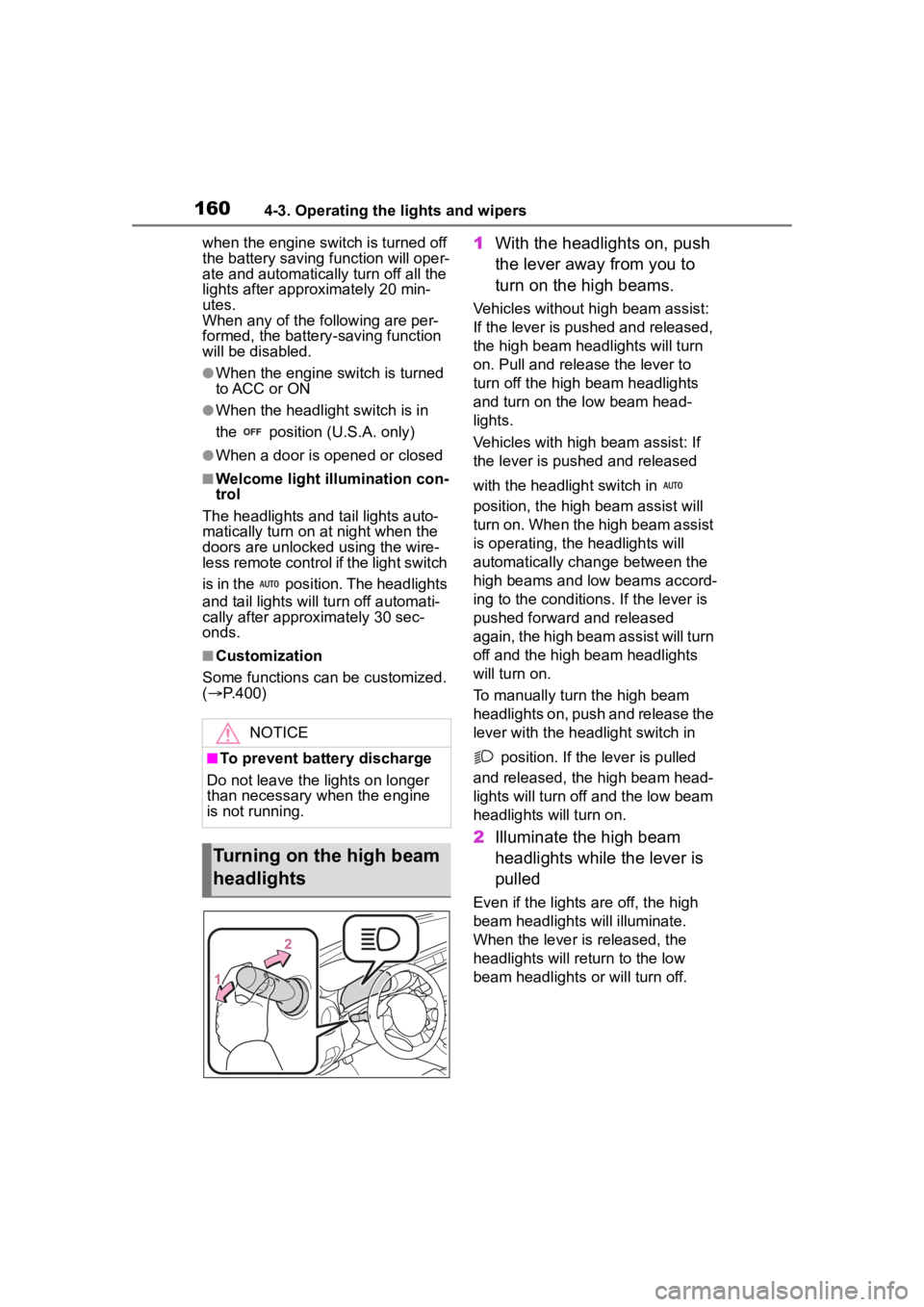
1 With the headlights on, push
the lever away from you to
turn on the high beams.
Vehicles without high beam assist:
If the lever is pushed and released,
the high beam he adlights will turn
on. Pull and releas e the lever to
turn off the high beam headlights
and turn on the low beam head-
lights.
Vehicles with high beam assist: If
the lever is pushed and released
with the headlight switch in
position, the high beam assist will
turn on. When the high beam assist
is operating, the headlights will
automatically change between the
high beams and low beams accord-
ing to the conditio ns. If the lever is
pushed forward and released
again, the high beam assist will turn
off and the high beam headlights
will turn on.
To manually turn the high beam
headlights on, push and release the
lever with the headlight switch in
position. If the lever is pulled
and released, the high beam head-
lights will turn off and the low beam
headlights will turn on.
2 Illuminate the high beam
headlights while the lever is
pulled
Even if the lights are off, the high
beam headlights will illuminate.
When the lever is released, the
headlights will retu rn to the low
beam headlights or will turn off.
NOTICE
■To prevent battery discharge
Do not leave the lights on longer
than necessary when the engine
is not running.
Turning on the high beam
headlights
Page 168 of 449
1684-4. Refueling
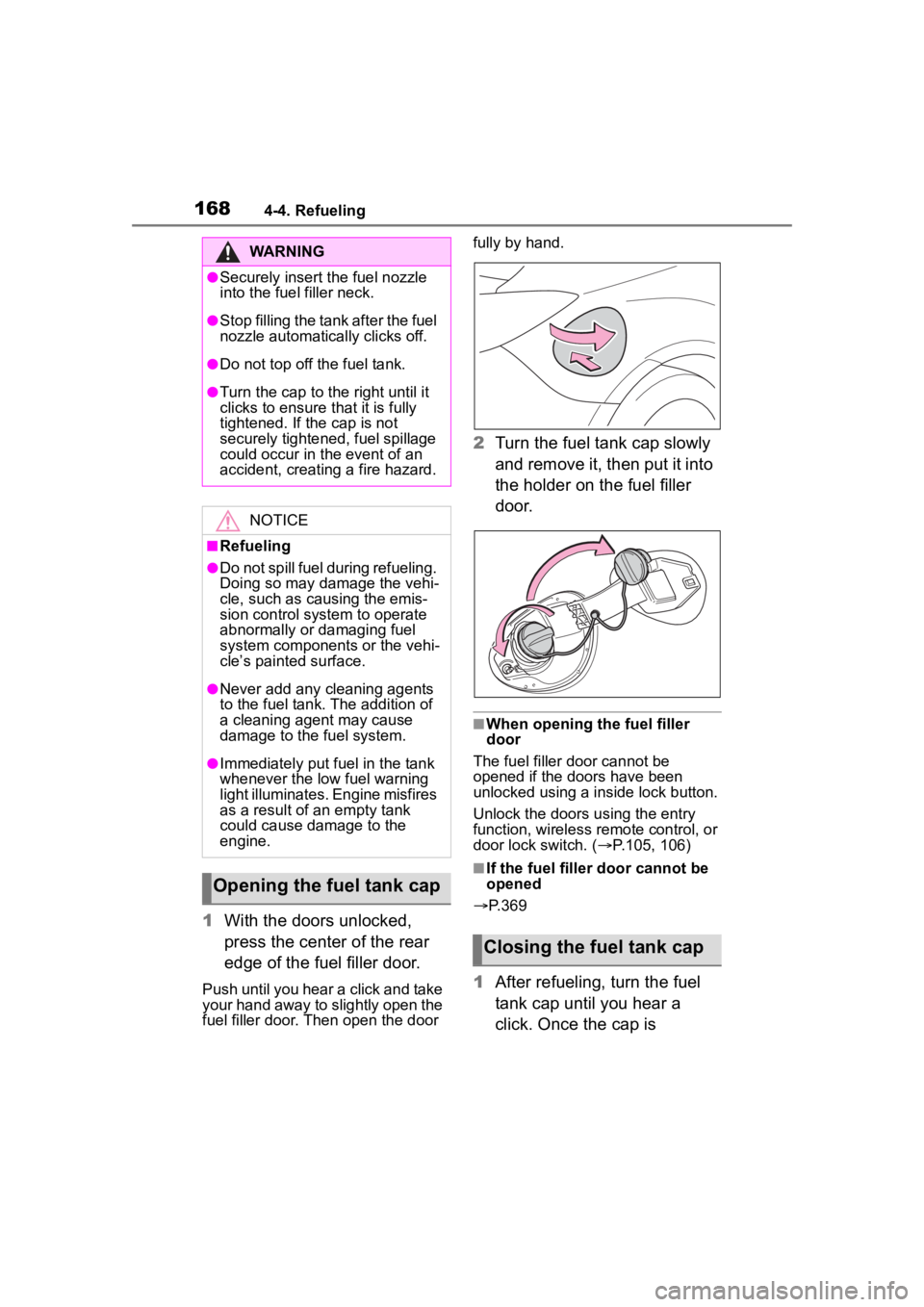
1With the doors unlocked,
press the center of the rear
edge of the fuel filler door.
Push until you hear a click and take
your hand away to slightly open the
fuel filler door. Then open the door fully by hand.
2
Turn the fuel tank cap slowly
and remove it, then put it into
the holder on the fuel filler
door.
■When opening the fuel filler
door
The fuel filler door cannot be
opened if the doo rs have been
unlocked using a inside lock button.
Unlock the doors u sing the entry
function, wireless remote control, or
door lock switch. ( P.105, 106)
■If the fuel filler door cannot be
opened
P.369
1 After refueling, turn the fuel
tank cap until you hear a
click. Once the cap is
WARNING
●Securely insert the fuel nozzle
into the fuel filler neck.
●Stop filling the tank after the fuel
nozzle automatically clicks off.
●Do not top off the fuel tank.
●Turn the cap to the right until it
clicks to ensure that it is fully
tightened. If the cap is not
securely tightened, fuel spillage
could occur in t he event of an
accident, creating a fire hazard.
NOTICE
■Refueling
●Do not spill fuel during refueling.
Doing so may damage the vehi-
cle, such as causing the emis-
sion control system to operate
abnormally or damaging fuel
system components or the vehi-
cle’s painted surface.
●Never add any cleaning agents
to the fuel tank. The addition of
a cleaning agent may cause
damage to the fuel system.
●Immediately put fuel in the tank
whenever the low fuel warning
light illuminates. Engine misfires
as a result of an empty tank
could cause damage to the
engine.
Opening the fuel tank cap
Closing the fuel tank cap
Page 310 of 449
3106-3. Do-it-yourself maintenance
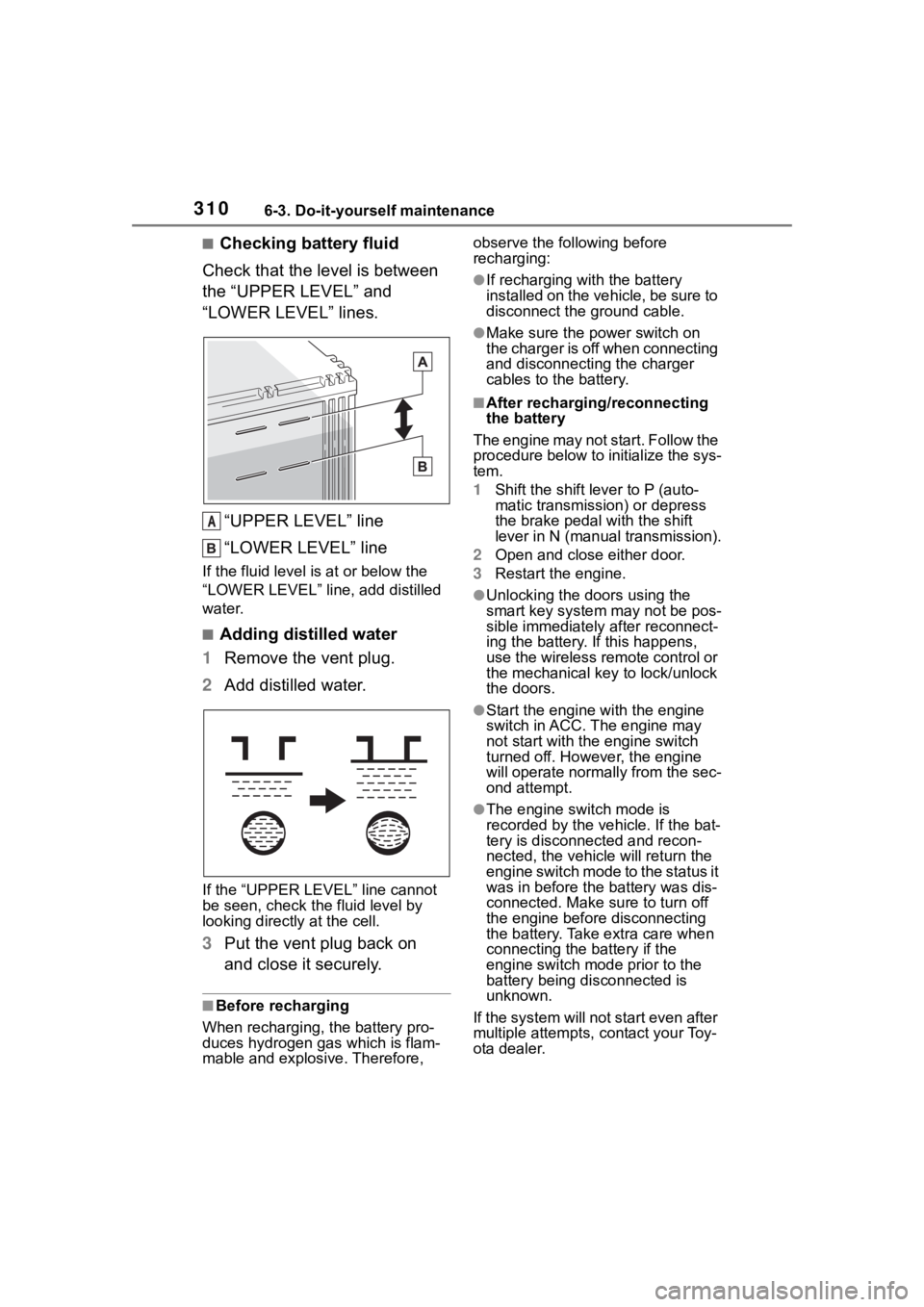
■Checking battery fluid
Check that the level is between
the “UPPER LEVEL” and
“LOWER LEVEL” lines.
“UPPER LEVEL” line
“LOWER LEVEL” line
If the fluid level is at or below the
“LOWER LEVEL” line, add distilled
water.
■Adding distilled water
1 Remove the vent plug.
2 Add distilled water.
If the “UPPER LEVEL ” line cannot
be seen, check the fluid level by
looking directly at the cell.
3 Put the vent plug back on
and close it securely.
■Before recharging
When recharging, t he battery pro-
duces hydrogen ga s which is flam-
mable and explosive. Therefore, observe the following before
recharging:
●If recharging with the battery
installed on the vehicle, be sure to
disconnect the ground cable.
●Make sure the power switch on
the charger is off when connecting
and disconnecting the charger
cables to the battery.
■After recharging/reconnecting
the battery
The engine may not start. Follow the
procedure below to initialize the sys-
tem.
1 Shift the shift lever to P (auto-
matic transmission) or depress
the brake pedal with the shift
lever in N (manual transmission).
2 Open and close either door.
3 Restart the engine.
●Unlocking the doors using the
smart key system may not be pos-
sible immediately after reconnect-
ing the battery. If this happens,
use the wireless remote control or
the mechanical key to lock/unlock
the doors.
●Start the engine with the engine
switch in ACC. T he engine may
not start with th e engine switch
turned off. However, the engine
will operate normally from the sec-
ond attempt.
●The engine switch mode is
recorded by the vehicle. If the bat-
tery is disconnected and recon-
nected, the vehi cle will return the
engine switch mode to the status it
was in before the battery was dis-
connected. Make sure to turn off
the engine before disconnecting
the battery. Take extra care when
connecting the battery if the
engine switch mode prior to the
battery being disconnected is
unknown.
If the system will not start even after
multiple attempts, contact your Toy-
ota dealer.
A