trunk TOYOTA 86 2022 Owner's Manual
[x] Cancel search | Manufacturer: TOYOTA, Model Year: 2022, Model line: 86, Model: TOYOTA 86 2022Pages: 449, PDF Size: 8.5 MB
Page 114 of 449

1143-2. Opening, closing and locking the doors and trunk
formed using the lock sensor, rec-
ognition signals will be shown up
to three consecuti ve times. After
this, no recogniti on signals will be
given.
●If the door handle becomes wet
while the electronic key is within
the effective ran ge, the door may
lock and unlock repeatedly. In this
case, follow the fo llowing correc-
tion procedures to wash the vehi-
cle:
• Place the electronic key in a loca- tion 6 ft. (2 m) or more away from
the vehicle. (Take care to ensure
that the key is not stolen.)
• Set the electronic key to bat-
tery-saving mode to disable the
smart key system. ( P. 1 1 2 )
●If the electronic key is inside the
vehicle and a door handle
becomes wet during a car wash, a
message may be shown on the
multi-information display and a
buzzer will sound outside the vehi-
cle. To turn off the alarm, lock both
side doors.
●The lock sensor may not work
properly if it com es into contact
with ice, snow, mud, etc. Clean
the lock sensor and attempt to
operate it again.
●A sudden handle operation or a
handle operation immediately
after entering the effective range
may prevent the doors from being
unlocked. Touch the door unlock
sensor and check that the doors
are unlocked bef ore pulling the
door handle again.
●Unlocking the vehicle may take
more time if another electronic key
is within the effective range.
■When the vehicle is not driven
for extended periods
●To prevent theft of the vehicle, do
not leave the electronic key within
6 ft. (2 m) of the vehicle.
●The smart key system can be
deactivated in advance. ( P. 1 1 5 )
●Setting the electronic key to bat-
tery-saving mode helps to reduce
key battery depletion. ( P. 1 1 2 )
■To operate the system properly
●Make sure to carry the electronic
key when operating the system.
Do not get the electronic key too
close to the vehicle when operat-
ing the system from the outside of
the vehicle.
Depending on the position and hold-
ing condition of the electronic key,
the key may not be detected cor-
rectly and the system may not oper-
ate properly. (The alarm may go off
accidentally, or the door lock pre-
vention function m ay not operate.)
●Do not leave the electronic key
inside the trunk.
The key confinement prevention
function may not operate, depend-
ing on the location of the key (the
inside edge of the Trunk), condi-
tions (inside a metal bag, close to
metallic objects) and the radio
waves in the surrounding area.
( P. 111 )
■If the smart key system does
not operate properly
●Locking and unlocking the doors:
P. 3 6 9
●Starting the engine: P. 3 7 0
■Customization
Some functions can be customized.
( P.400)
■If the smart key system has
been disabled
●Locking and unlocking the doors:
Use the wireless remote control or
mechanical key. ( P.105, 369)
●Starting the engi ne and changing
engine switch modes: P. 3 7 0
●Stopping the engine: P. 1 4 7
Page 115 of 449

1153-2. Opening, closing and locking the doors and trunk
3
Before driving
In the following situations, the
smart key system should be dis-
abled.
When people with implantable
cardiac pacemakers, cardiac
resynchronization therapy
pacemakers or implantable cardioverter defibrillators ride
in the vehicle.
When the vehicle will not be
used for a long time, or the
smart key system is not used.
When storing an electronic
key near or inside the vehicle
cannot be avoided.
When the smart key system is
disabled, use the wireless
remote control to lock and
unlock the doors.
When starting the engine, it will
be necessary to hold the elec-
tronic key near the engine
switch. ( P.370)
■Disabling the smart key
system
The smart key system can be
disabled by opening and closing
the doors or using the wireless
remote control.
Door opening/closing method
1 While sitting in the driver’s
seat, close the door.
2 Press of the door lock
switch.
3 Within 5 seconds of perform-
ing step 2, open the driver’s
door.
4 Within 5 seconds of perform-
ing step 3, press of the
door lock switch 2 times with
the door open.
5 Within 10 seconds of per-
forming step 4, close and
WARNING
■Caution regarding interfer-
ence with electronic devices
●People with implantable car-
diac pacemakers, cardiac
resynchronization ther-
apy-pacemakers or implantable
cardioverter defib rillators should
keep away from the smart key
system antennas. ( P. 1 1 1 )
The radio waves may affect the
operation of such devices. If
necessary, the entry function
can be disabled. Ask your Toy-
ota dealer for details, such as
the frequency of radio waves
and timing of the emitted radio
waves. Then, consult your doc-
tor to see if you should disable
the entry function.
●Users of any electrical medical
device other than implantable
cardiac pacemakers, cardiac
resynchronization ther-
apy-pacemakers or implantable
cardioverter defib rillators should
consult the manufacturer of the
device for information about its
operation under the influence of
radio waves.
Radio waves could have unex-
pected effects on the operation
of such medical devices.
The smart key system can be dis-
abled. ( P. 1 1 5 )
When to disable the smart
key system
Page 116 of 449

1163-2. Opening, closing and locking the doors and trunk
open the driver’s door 2
times.
6 Within 10 seconds of per-
forming step 5, press of
the door lock switch 2 times
with the door open.
7 Within 10 seconds of per-
forming step 6, close and
open the driver’s door 1 time.
8 Within 5 seconds of perform-
ing step 7, close the driver’s
door.
A buzzer will sound for approxi-
mately 2 seconds and the smart
key system will be disabled.
Wireless remote control
method
1 Open the driver’s door and
push the lock lever forward.
2 Press and hold and of
the wireless remote control at
the same time for 5 seconds
or more.
A buzzer will sound for approxi-
mately 2 seconds and the smart
key system will be disabled.
■Enabling the smart key sys-
tem
The smart key system can be
enabled by performing the pro- cedure used to disable it again.
When enabled a buzzer will sound.
■Door opening/closing method
Make sure to firmly press the door
lock switch in steps 4 and 6. If the
switch is pressed for a very short
time, the system m ay not be dis-
abled.
■Wireless remote control
method
To use the wireless remote control
method to disable the smart key
system, it is nece ssary to register a
PIN code for the PIN code smart
entry. ( P. 1 1 7 )
■When enabling the smart key
system
If the method used to disable the
smart key system is unknown, press
the engine switch.
●If the wireless remote control sys-
tem was used, a buzzer inside the
vehicle will sound.
●If the door opening/closing
method was used, the buzzer will
not sound.
■Customization
Some functions can be customized.
( P.400)
NOTICE
■When disabling the smart key
system
When disabling or enabling the
system to accommodate persons
with implantable cardiac pace-
makers, cardiac resynchroniza-
tion therapy pacemakers or
implantable cardioverter def ibrilla-
tors, always use the door open-
ing/closing method. If the wireless
remote control me thod is used,
the system may be enabled acci-
dentally.
Page 117 of 449

1173-2. Opening, closing and locking the doors and trunk
3
Before driving
By registering a 5 digit PIN
code, all of the doors and the
fuel filler door can be unlocked
without an electronic key by
pressing the trunk opener
switch.
■PIN code registration
method
1 Turn the engine switch off.
2 Close all of the doors and the
trunk.
3 Press and hold of the
wireless remote control.
At this time, all of the doors and the
fuel filler door will lock.
4Within 5 seconds of perform-
ing step 3, press and hold
the trunk opener switch.
After 5 seconds or more, a buzzer
will sound.
5Release of the wireless
remote control and the trunk
opener switch.
6 Within 30 seconds after the
buzzer begins sounding,
press of the wireless
remote control.
The buzzer will stop.
7A PIN code can now be reg-
istered. Press the trunk
opener switch the same num-
ber of times as the first digit
of the PIN code.
For example: If registering 32468,
press the switch 3 times.
8Wait for the buzzer to sound
1 time and then press the
switch the same number of
times as for the next digit.
For example: If registering 32468,
press the switch 2 times.
9Repeat step 8 for the remain-
ing digits.
10Within 30 seconds after the buzzer begins sounding
intermittently, perform steps
7 through 9 again to confirm
the PIN code.
Registration is complete and all of
the doors and the fuel filler door will
unlock.
■Unlocking method
Press the trunk opener switch
using the same procedure as
steps 7 through 9.
■PIN code registration
●To prevent theft, the same digit for
all 5 digits and 12345 cannot be
registered as the PIN code. Also,
avoid using the same number as
on your license plate or other sim-
ple codes.
●To use 0 as a digit, press the trunk
opener switch 10 times.
●If a mistake is made during regis-
tration, unlock the doors or trunk
using the wireless remote control
to cancel registration. Then per-
form registration again, starting
from step 1. However, if the mis-
take was made in step 10, a
buzzer will sound and step 10 c a n
be performed again.
●To cle a r t he P IN c od e , p e rfo rm the
registration procedure and enter
22222.
Unlocking the doors
using PIN code smart
entry
Page 118 of 449

1183-2. Opening, closing and locking the doors and trunk
●After registering a new PIN code,
make sure to check that the doors
can be unlocked using the code.
●If the smart key system has been
disabled using the wireless
remote control method, the PIN
code for the PIN code smart entry
cannot be cleared. (P. 1 1 5 )
●In the following cases, perform the
PIN code registration procedure
again.
• If the PIN code has been forgot-
ten.
• When you wish to change the PIN code.
●Make sure to change the PIN
code periodically.
●If the vehicle has been loaned to
another person, make sure that
the PIN code has not been
changed or cleared. If the PIN
code has been changed or
cleared, perform PIN code regis-
tration again.
■Unlocking method
●If an electronic key is within a
detection area, operation of the
smart entry will be given priority.
●I f a m i s t a k e i s m a d e w h i l e e n t e r i n g
the PIN code, wait 5 seconds or
more before performing the proce-
dure again.
●If the incorrect PIN code is
entered 5 times consecutively, a
buzzer will sound for approxi-
mately 2 seconds and operation
will not be possible for 5 minutes.
Page 121 of 449
1213-3. Adjusting the seats
3
Before driving
1Move the front seats forward.
( P.119)
2 Fold the seatback down.
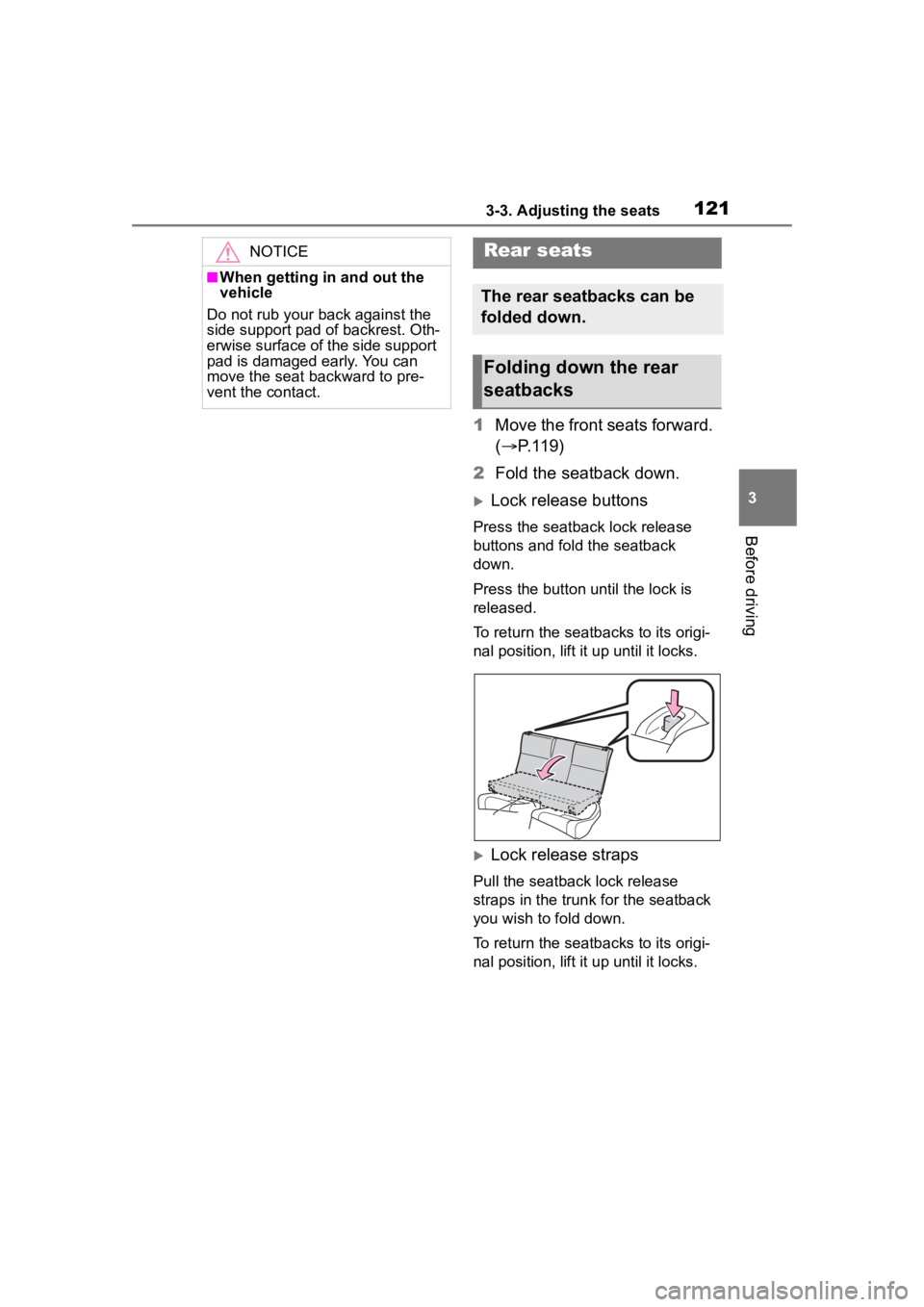
Lock release buttons
Press the seatback lock release
buttons and fold the seatback
down.
Press the button until the lock is
released.
To return the seat backs to its origi-
nal position, lift it up until it locks.
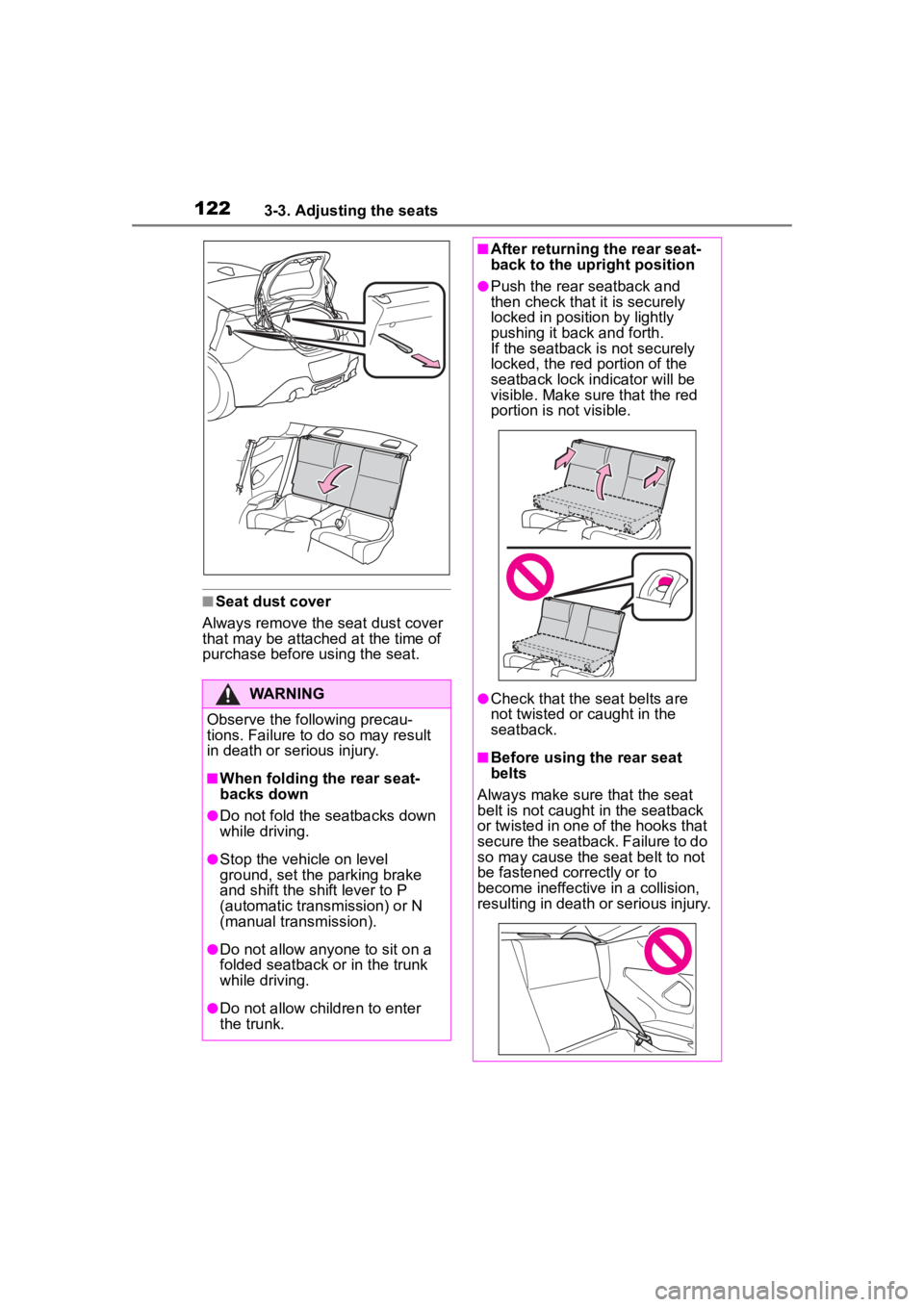
Lock release straps
Pull the seatback lock release
straps in the trunk for the seatback
you wish to fold down.
To return the seat backs to its origi-
nal position, lift it up until it locks.
NOTICE
■When getting in and out the
vehicle
Do not rub your back against the
side support pad of backrest. Oth-
erwise surface of the side support
pad is damaged early. You can
move the seat backward to pre-
vent the contact.
Rear seats
The rear seatbacks can be
folded down.
Folding down the rear
seatbacks
Page 122 of 449
1223-3. Adjusting the seats
■Seat dust cover
Always remove the seat dust cover
that may be attached at the time of
purchase before using the seat.
WARNING
Observe the following precau-
tions. Failure to do so may result
in death or serious injury.
■When folding the rear seat-
backs down
●Do not fold the seatbacks down
while driving.
●Stop the vehicle on level
ground, set the parking brake
and shift the shift lever to P
(automatic transmission) or N
(manual transmission).
●Do not allow anyo ne to sit on a
folded seatback or in the trunk
while driving.
●Do not allow child ren to enter
the trunk.
■After returning the rear seat-
back to the upright position
●Push the rear seatback and
then check that it is securely
locked in position by lightly
pushing it back and forth.
If the seatback is not securely
locked, the red portion of the
seatback lock indicator will be
visible. Make sure that the red
portion is not visible.
●Check that the seat belts are
not twisted or caught in the
seatback.
■Before using the rear seat
belts
Always make sure that the seat
belt is not caught in the seatback
or twisted in one of the hooks that
secure the seatback. Failure to do
so may cause the seat belt to not
be fastened correctly or to
become ineffective in a collision,
resulting in death o r serious injury.
Page 142 of 449
1424-1. Before driving
WARNING
■Things that must not be car-
ried in the trunk
The following things may cause a
fire if loaded in the trunk:
●Receptacles co ntaining gaso-
line
●Aerosol cans
■Storage precautions
Observe the following precau-
tions.
Failure to do so m ay result in
death or serious injury.
●Stow cargo and luggage in the
trunk whenever possible.
●To prevent cargo and luggage
from sliding forward during
braking, do not stack anything in
the enlarged trunk. Keep cargo
and luggage low, as close to the
floor as possible.
●When you fold down the rear
seats, long items should not be
placed directly behind the front
seats.
●Never allow anyone to ride in
the enlarged trunk. It is not
designed for passengers. They
should ride in their seats with
their seat belts properly fas-
tened. Otherwise, they are
much more likely to suffer death
or serious bodily injury, in the
event of sudden braking, sud-
den swerving or an accident.
●Do not place cargo or luggage
in or on the follo wing locations
as the item may get under the
clutch (manual transmission),
brake or accelerator pedal and
prevent the pedals from being
depressed properly, block the
driver’s vision, or hit the driver
or passengers, causing an acci-
dent:
• At the feet of the driver
• On the front passenger or rear seats (when stacking items)
• On the package tray
• On the instrument panel
• On the dashboard
●Secure all items in the occupant
compartment, as they may shift
and injure someone during sud-
den braking, sudden swerving
or an accident.
■Capacity and distribution
●Do not exceed the maximum
axle weight rating or the total
vehicle weight rating.
●Even if the total load of occu-
pant’s weight and the cargo
load is less than the total load
capacity, do not apply the load
unevenly. Improper loading may
cause deterioration of steering
or braking control which may
cause death or serious injury.
Page 194 of 449
1944-5. EyeSight
WARNING
• Following begins from a short following distan ce, such as
when the vehicle in front is a
vehicle that cut into your lane.
• On curved roads, at the start and end of a curve and on
roads with continuous curves
(These conditions make it diffi-
cult for the system to detect
vehicles because they are out-
side the detectable area.)
• On an on-ramp or off-ramp to a freeway, highway, or other
restricted access road (Eye-
Sight Adaptive Cruise Control is
not designed for use in this kind
of driving environment.)
• In an urban or suburban envi- ronment (Adaptive Cruise Con-
trol is not appropriate for use in
these driving areas. Use Adap-
tive Cruise Control only on lim-
ited-access highways.)
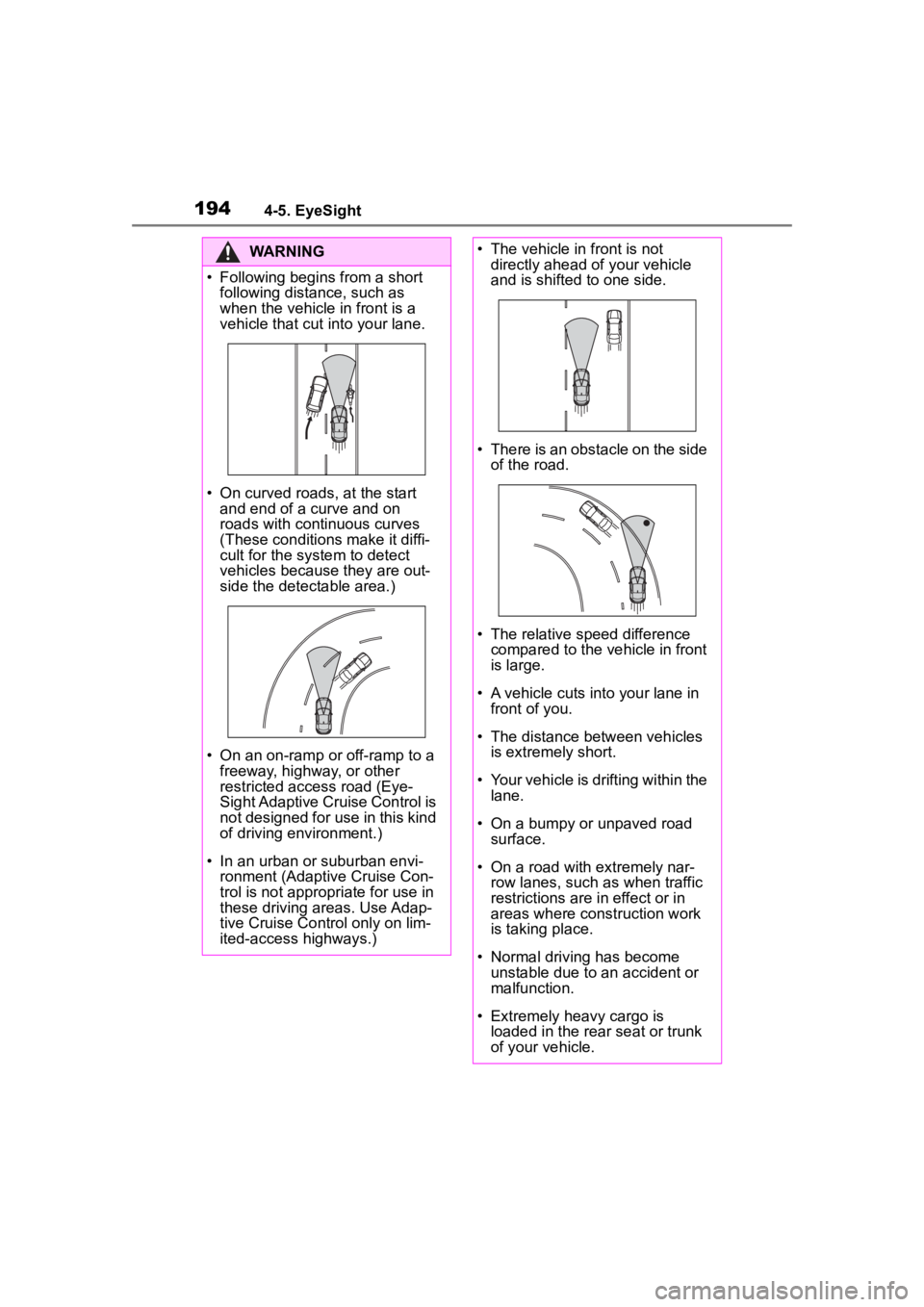
• The vehicle in front is not
directly ahead of your vehicle
and is shifted to one side.
• There is an obstacle on the side of the road.
• The relative speed difference compared to the vehicle in front
is large.
• A vehicle cuts into your lane in front of you.
• The distance between vehicles is extremely short.
• Your vehicle is drifting within the lane.
• On a bumpy or unpaved road surface.
• On a road with extremely nar- row lanes, such as when traffic
restrictions are in effect or in
areas where construction work
is taking place.
• Normal driving has become unstable due to an accident or
malfunction.
• Extremely heavy cargo is loaded in the rear seat or trunk
of your vehicle.
Page 236 of 449

2364-6. Using other driving systems
be changed by operating the
multimedia system screen.
(P.400)
■Safety tips regarding the
BSD/RCTA approach indi-
cator/warning buzzer
In the following cases, opera-
tion of the BSD/RCTA
approach indicator and the
warning buzzer may be
delayed or the system may
fail to issue these warnings.
• When a vehicle moves to the
neighboring lane from a lane next
to the neighboring lane
• When driving on a steep incline or on repeated sharp uphill and
downhill grades
• When going beyond a pass
• When both your vehicle and a vehicle driving on a neighboring
lane are driving o n the far side of
each lane.
• When several narrowly-spaced vehicles are approaching in a row
• In low radius bends (tight bends or when making turns at an inter-
section)
• When there is a difference in height between your lane and the
neighboring lane
• Immediately after the BSD/RCTA is activated by touching
“BSD/RCTA”
• Immediately after the shift lever is shifted to R
• When extremely heavy cargo is loaded in the trunk
During reversing, operation of the BSD/RCTA approach indi-
cator and the warning buzzer
may be delayed or the system
may fail to issue these warn-
ings under the following con-
ditions.
• When backing out of an angled
parking space
• When a large-sized vehicle is parked next to your vehicle (That
vehicle prevents the propagation
of radar waves.)
• When reversing on sloped roads
• When reversing at a high speed
The BSD/RCTA approach
indicator may illuminate when
driving close to solid objects
on the road or road side (such
as guardrails, tunnels and
sidewalls).
When turning at an intersec-
tion in urban areas, or a multi-
lane intersection, the
BSD/RCTA approach indica-
tor may flash.
If a building or a wall exists in
the reversing direction, the
BSD/RCTA approach indica-
tor may flash and the warning
buzzer may sound.