clock TOYOTA 86 2022 Owners Manual
[x] Cancel search | Manufacturer: TOYOTA, Model Year: 2022, Model line: 86, Model: TOYOTA 86 2022Pages: 449, PDF Size: 8.5 MB
Page 88 of 449
882-1. Instrument cluster
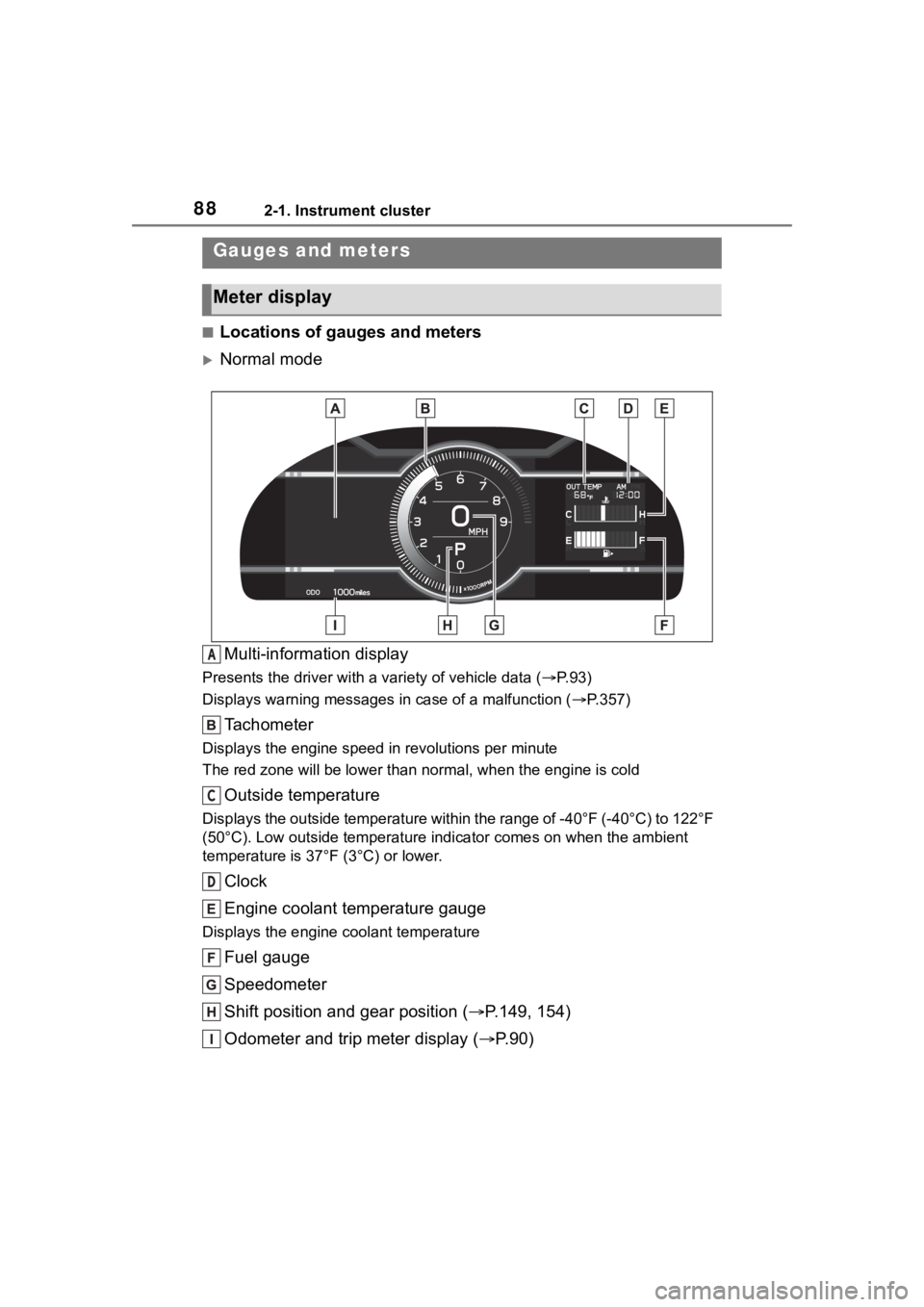
■Locations of gauges and meters
Normal modeMulti-information display
Presents the driver with a variety of vehicle data (P.93)
Displays warning messages in case of a malfunction (P.357)
Tachometer
Displays the engine speed in revolutions per minute
The red zone will be lower than n ormal, when the engine is cold
Outside temperature
Displays the outside temperature within the range of -40°F (-40 °C) to 122°F
(50°C). Low outside temperature indicator comes on when the amb ient
temperature is 37°F (3°C) or lower.
Clock
Engine coolant temperature gauge
Displays the engine c oolant temperature
Fuel gauge
Speedometer
Shift position and gear position ( P.149, 154)
Odometer and trip meter display ( P.90)
Gauges and meters
Meter display
A
C
D
Page 89 of 449
892-1. Instrument cluster
2
Vehicle status information and indicators
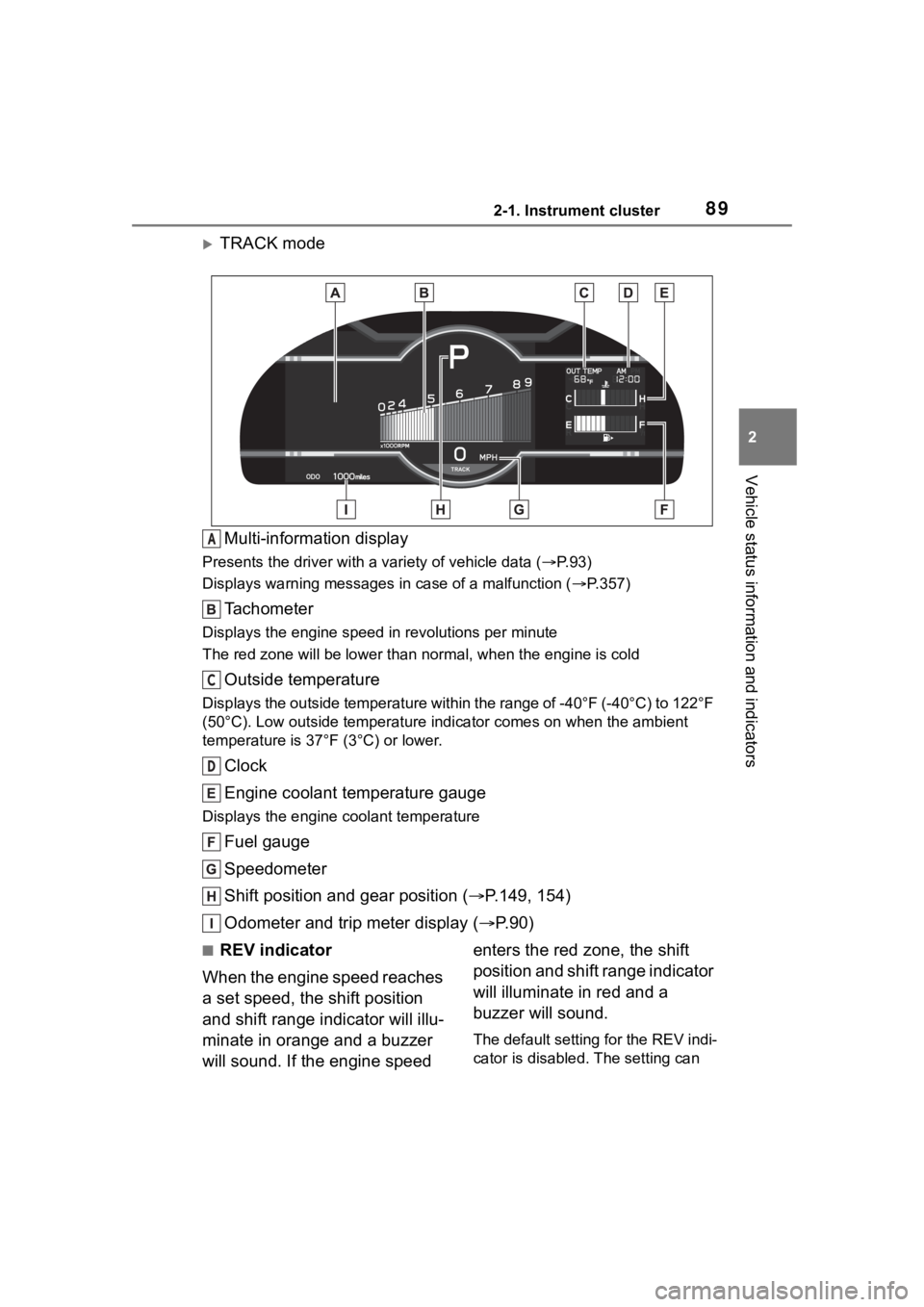
TRACK modeMulti-information display
Presents the driver with a variety of vehicle data (P.93)
Displays warning messages in case of a malfunction (P.357)
Tachometer
Displays the engine speed in revolutions per minute
The red zone will be lower than n ormal, when the engine is cold
Outside temperature
Displays the outside temperature within the range of -40°F (-40 °C) to 122°F
(50°C). Low outside temperature indicator comes on when the amb ient
temperature is 37°F (3°C) or lower.
Clock
Engine coolant temperature gauge
Displays the engine c oolant temperature
Fuel gauge
Speedometer
Shift position and gear position ( P.149, 154)
Odometer and trip meter display ( P.90)
■REV indicator
When the engine speed reaches
a set speed, the shift position
and shift range indicator will illu-
minate in orange and a buzzer
will sound. If the engine speed enters the red zone, the shift
position and shift range indicator
will illuminate in red and a
buzzer will sound.
The default setting for the REV indi-
cator is disabled. The setting can
A
C
D
Page 91 of 449

912-1. Instrument cluster
2
Vehicle status information and indicators
played.
■Display items
Odometer
Displays the total distance the vehi-
cle has been driven.
Trip meter A/Trip meter B
Displays the distan ce the vehicle
has been driven si nce the meter
was last reset. Trip meters A and B
can be used to record and display
different distances independently.
To reset, display the desired trip
meter and press and hold the dis-
play change button.
When the headlights or front
position lights are on, the bright-
ness of the meter and instru-
ment panel lights can be
adjusted using the instrument
panel brightness dial. 1
Brighter
2 Darker
■Instrument panel light bright-
ness adjustment
When the headlights or front posi-
tion lights are turned on, the meter
and instrument pa nel lights will be
dimmed. However, if the instrument
panel brightness dial is set to the
highest position, the lights will not
dim even if the headlights or front
position are turned on.
■Auto dimmer cancel
When the surrounding area is
bright, such as during the day, or if
the lights are turned on before nec-
essary, the automatic dimming func-
tion will be cancelled . In this case,
the brightness cannot be adjusted,
even if the instrument panel bright-
ness dial is turned.
■Customization
Some functions can be customized.
( P.400)
The clocks can be adjusted on
the multimedia system screen.
■Setting the clock to be
adjusted automatically
(vehicles with safety con-
nect)
1 Press .
Changing the instrument
panel light brightness
Adjusting the clock
Page 92 of 449

922-1. Instrument cluster
2Select .
3 Select “General”.
4 Select “Clock”.
5 Select “Time Setting”.
6 Select “AUTO”.
The clock will be set automati-
cally where a GPS signal is
available.
■Setting the clock to be
adjusted automatically
(vehicles without safety
connect)
1 Press .
2 Select .
3 Select “General”.
4 Select “Clock”.
5 Select “Time Setting”.
6 Select “Sync With Phone”.
The clock will be set and
adjusted automatically when a
smartphone is connected via
Bluetooth
®for transferring
phonebook data. For details,
refer to the “MULTIMEDIA
OWNER’S MANUAL”.
■Adjusting the clock manu-
ally
1 Press .
2 Select .
3 Select “General”.
4 Select “Clock”.
5 Select “Time Setting”. 6
Select “Manual” then adjust
the clock.
7 Select “OK”.
■Changing the clock
between 12H/24H format
1 Press .
2 Select .
3 Select “General”.
4 Select “Clock”.
5 Select “12H” or “24H”.
■Clock settings screen
The clock setting screen can also be
displayed by touch ing the clock on
the status bar.
Page 271 of 449
2715-1. Using the air conditioning system
5
Interior features
■Adjusting the temperature
setting
To adjust the temperature set-
ting, turn the temperature con-
trol switch clockwise (warm) or
counterclockwise (cool).
If “A/C” switch is not pressed, the
system will blow a mbient tempera-
ture air or heated air.
The air conditioning system
switches between individual and
synchronized modes each time
“SYNC” switch is pressed.
Synchronized modes (indicator on):
The left-hand side temperature
control switch can be used to adjust
the temperature for the driver’s and
front passenger’s side. At this time,
operate the right-hand side tem-
perature control switch to enter
individual mode.
Individual modes (indicator off):
The temperature for the driver’s
and front passenger’s side can be
adjusted separately.
■Setting the fan speed
To adjust the fan speed, turn the
fan speed control switch clock-
wise (increase) or counterclock-
wise (decrease).
Pressing the “ON/OFF” switch to
turns off the fan.
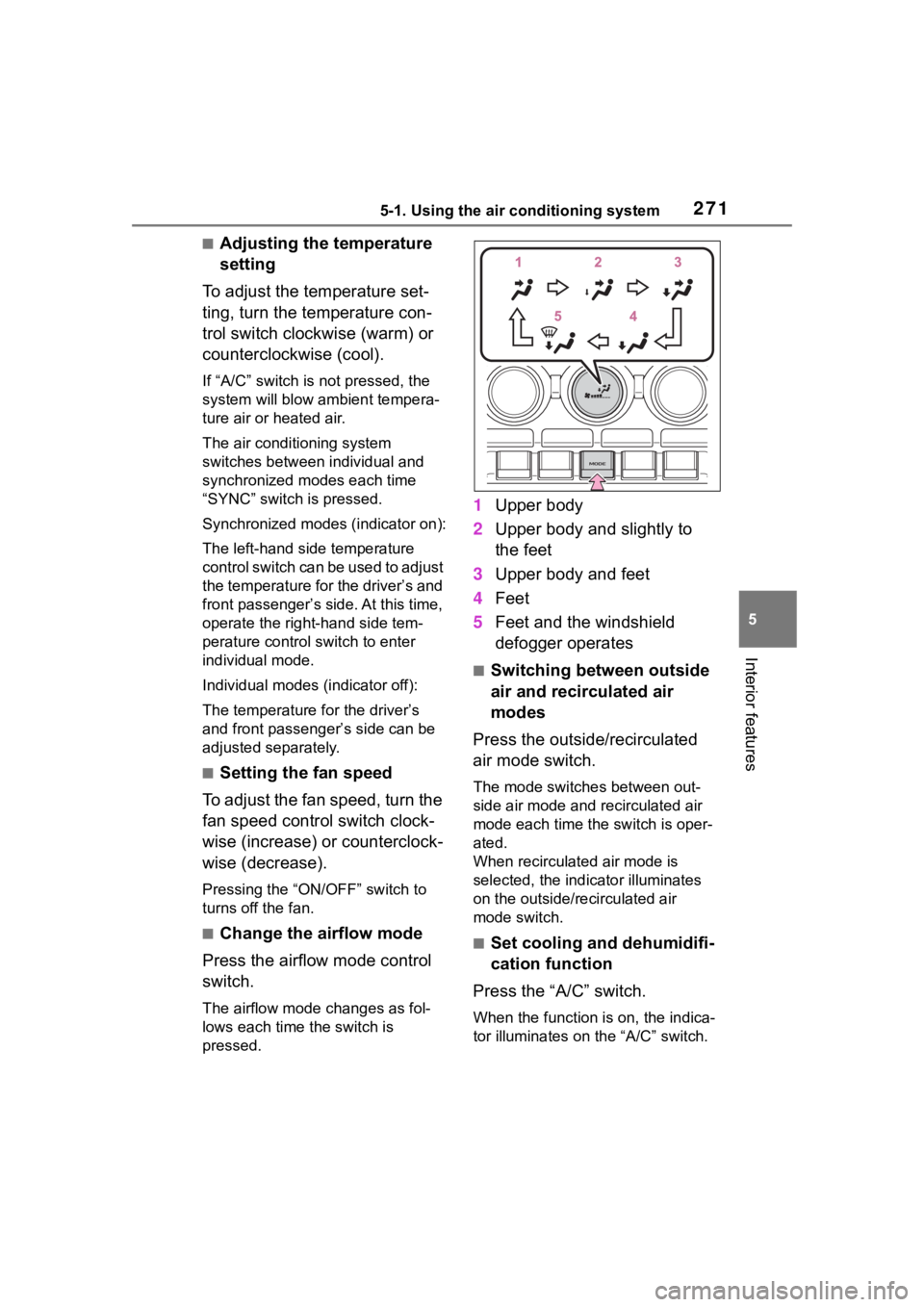
■Change the airflow mode
Press the airflow mode control
switch.
The airflow mode changes as fol-
lows each time the switch is
pressed.
1 Upper body
2 Upper body and slightly to
the feet
3 Upper body and feet
4 Feet
5 Feet and the windshield
defogger operates
■Switching between outside
air and recirculated air
modes
Press the outside/recirculated
air mode switch.
The mode switches between out-
side air mode and recirculated air
mode each time the switch is oper-
ated.
When recirculated air mode is
selected, the indicator illuminates
on the outside/recirculated air
mode switch.
■Set cooling and dehumidifi-
cation function
Press the “A/C” switch.
When the function is on, the indica-
tor illuminates on the “A/C” switch.
Page 306 of 449
3066-3. Do-it-yourself maintenance
■Checking the engine oil
1 Park the vehicle on level
ground. After warming up the
engine and turning it off, wait
more than 5 minutes for the
oil to drain back into the bot-
tom of the engine.
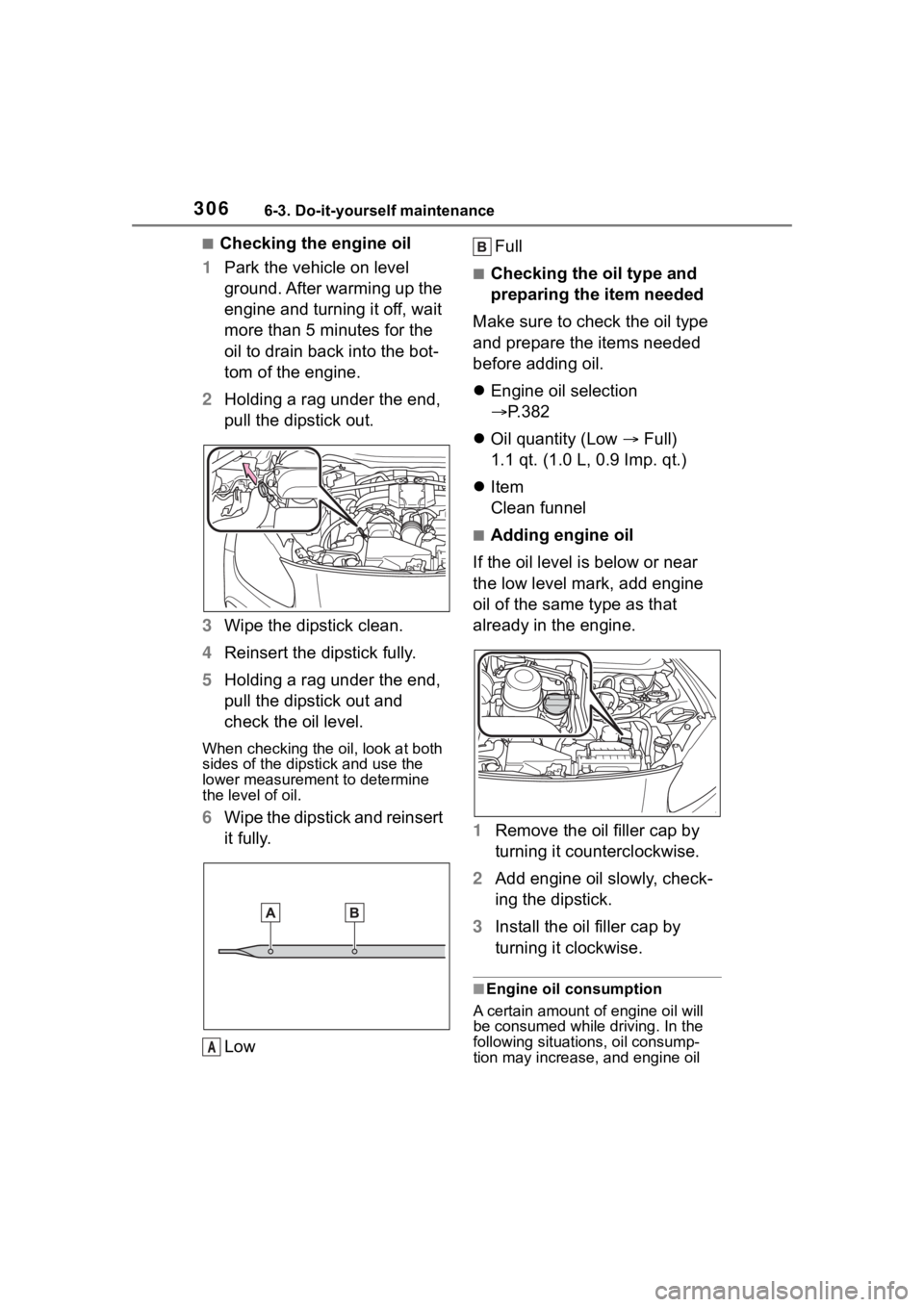
2 Holding a rag under the end,
pull the dipstick out.
3 Wipe the dipstick clean.
4 Reinsert the dipstick fully.
5 Holding a rag under the end,
pull the dipstick out and
check the oil level.
When checking the oil, look at both
sides of the dipstick and use the
lower measurement to determine
the level of oil.
6Wipe the dipstick and reinsert
it fully.
Low Full
■Checking the oil type and
preparing the item needed
Make sure to check the oil type
and prepare the items needed
before adding oil.
Engine oil selection
P.382
Oil quantity (Low Full)
1.1 qt. (1.0 L, 0.9 Imp. qt.)
Item
Clean funnel
■Adding engine oil
If the oil level is below or near
the low level mark, add engine
oil of the same type as that
already in the engine.
1 Remove the oil filler cap by
turning it counterclockwise.
2 Add engine oil slowly, check-
ing the dipstick.
3 Install the oil filler cap by
turning it clockwise.
■Engine oil consumption
A certain amount of engine oil will
be consumed while driving. In the
following situatio ns, oil consump-
tion may increase, and engine oil
A
Page 335 of 449
3356-3. Do-it-yourself maintenance
6
Maintenance and care
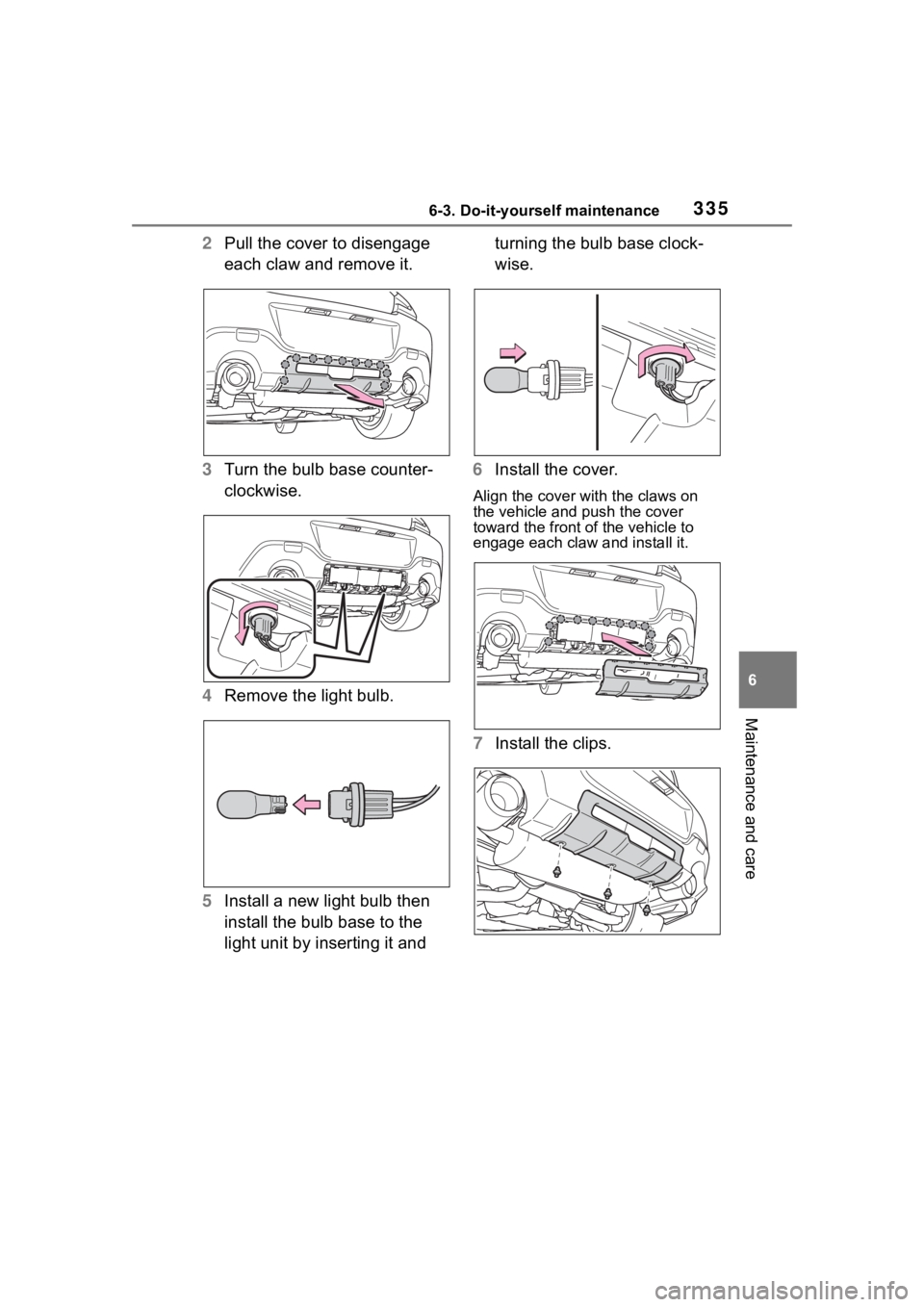
2Pull the cover to disengage
each claw and remove it.
3 Turn the bulb base counter-
clockwise.
4 Remove the light bulb.
5 Install a new light bulb then
install the bulb base to the
light unit by inserting it and turning the bulb base clock-
wise.
6 Install the cover.
Align the cover with the claws on
the vehicle and push the cover
toward the front of the vehicle to
engage each claw and install it.
7 Install the clips.
Page 401 of 449
4018-2. Customization
8
Vehicle specifications
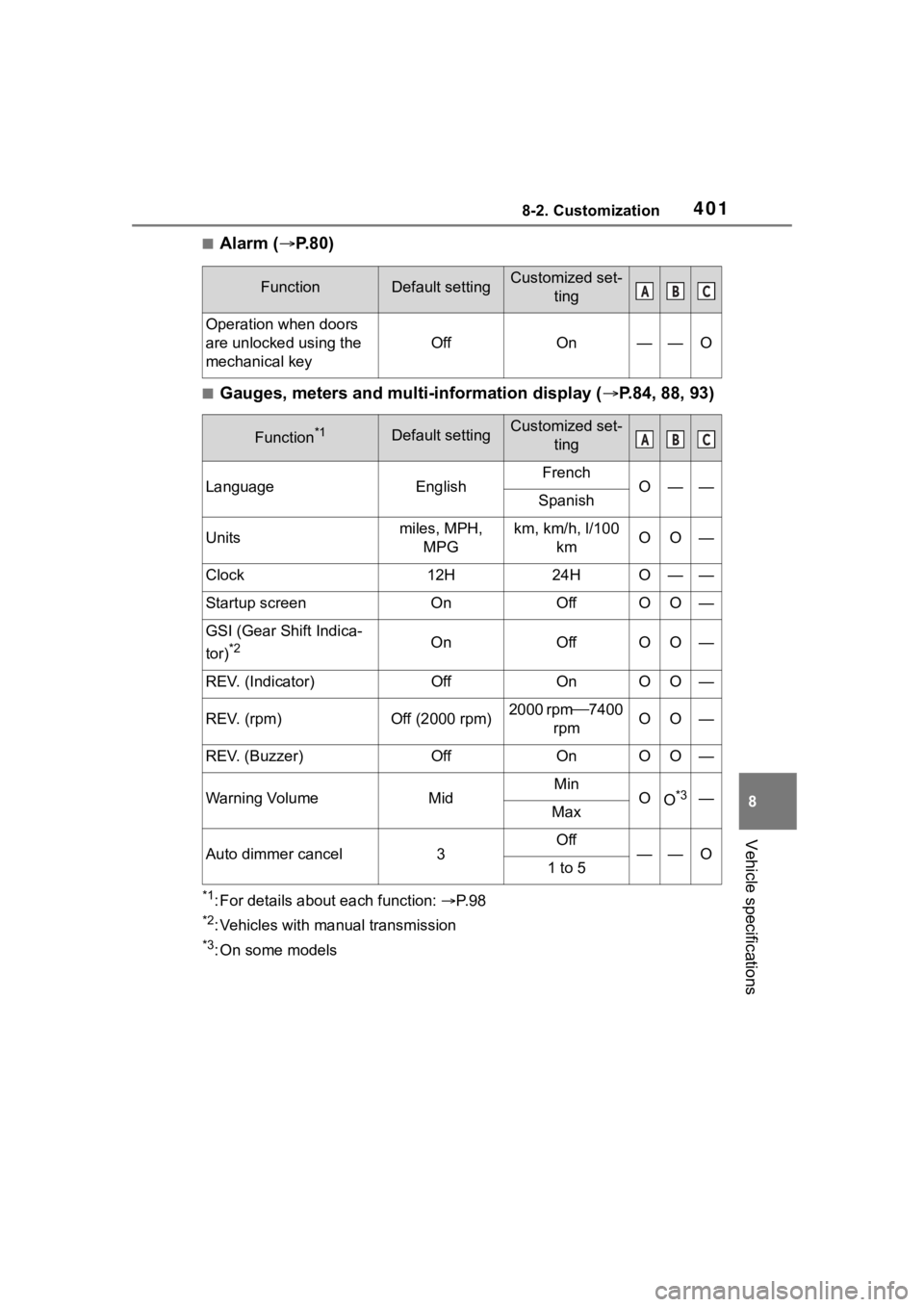
■Alarm (P.80)
■Gauges, meters and multi-information display ( P.84, 88, 93)
*1: For details about each function: P. 9 8
*2: Vehicles with manual transmission
*3: On some models
FunctionDefault settingCustomized set-
ting
Operation when doors
are unlocked using the
mechanical key
OffOn——O
Function*1Default settingCustomized set-ting
LanguageEnglishFrenchO——Spanish
Unitsmiles, MPH, MPGkm, km/h, l/100 kmOO—
Clock12H24HO——
Startup screenOnOffOO—
GSI (Gear Shift Indica-
tor)
*2OnOffOO—
REV. (Indicator)OffOnOO—
REV. (rpm)Off (2000 rpm)2000 rpm 7400
rpmOO—
REV. (Buzzer)OffOnOO—
Warning VolumeMidMinOO*3—Max
Auto dimmer cancel3Off——O1 to 5
ABC
ABC
Page 430 of 449
430Alphabetical Index
Fixed with a seat belt ............. 66
Front passenger occupant clas-sification system ................... 55
Points to remember ................ 63
Riding with children ................ 62
Types of child restraint system installation met hod ............... 65
Using an anchor bracket ........ 72
Child safety Battery precautions ...... 311, 373
Child restraint system............. 65
How your child should wear the seat belt................................ 24
Power window lock switch.... 130
Removed electronic key battery precautions......................... 330
Seat belt precautions ............. 62
Seat heater precautions ....... 276
Trunk precautions................. 107
Cleaning Exterior ................................. 288
Interior .......................... 291, 293
Seat belts ............................. 291
Wheels and wheel ornaments........................................... 288
Clock ................................... 88, 91
Condenser .............................. 308
Console box ............................ 280
Conventional Cruise Control207, 254
Cooling system ...................... 307 Engine overheating .............. 374
Cruise control Adaptive Cruise Control ....... 190
Conventional Cruise Control207, 254
Cup holders ............................ 281
Current fuel consumption ....... 94
Curtain shield airbags ............. 27
Customizable features ........... 400D
Daytime running light system158
Daytime running lights Replacing light bulbs ............334
Defogger Outside rear view mirrors .....272
Rear window.........................272
Windshield ............................272
Dimension ...............................380
Dinghy towing .........................144
Display Driving information .................94
Multi-information display.........93
Display change button .............90
Do-it-yourself maintenance ...296
Door courtesy lights...............277
Door lock Doors ....................................105
Smart key system ................. 111
Wireless remote control........103
Doors Door glasses ........................129
Door lock ..............................105
Open door warning buzzer ...106
Open door warning light .......351
Outside rear view mirrors .....127
Driving Break-in tips .........................133
Correct driving posture ...........21
Driving mode select switch ...257
Procedures ...........................132
Winter drive tips....................265
Driving distance........................94
Driving information ..................94
Driving information display .....94
Driving range ............................94
Driving time ...............................94
E
EDR (Event data recorder) .........7
Page 434 of 449
434Alphabetical Index
General maintenance ........... 296
Maintenance date................. 380
Maintenance requirements... 295
Malfunction indicator lamp.... 349
Manual transmission ............. 153
Master warning light .............. 353
Menu icons ............................... 93
Meter Clock ...................................... 88
Indicators................................ 85
Instrument panel light control . 91
Meters .................................... 88
Multi-information display ........ 93
Settings .................................. 98
Warning lights....................... 348
Warning messages............... 357
Mirrors Inside rear view mirror.......... 126
Outside rear view mirror defog-gers .................................... 272
Outside rear view mirrors ..... 127
Vanity mirrors ....................... 284
Multi-information display......... 93 Audio system-linked display ... 98
Driving information ................. 94
Menu icons ............................. 93
Meter control switches ........... 94
Navigation system-linked display............................................. 98
Pop-up display ....................... 93
Settings .................................. 98
Sport information .................... 96
Tire pressure ........................ 315
Warning messages............... 357
N
Navigation system-linked display ................................................. 98
Noise from under vehicle .......... 5
O
Odometer...................................90
Odometer and trip meter display
Display change button ............90
Display items ..........................91
Oil Engine oil..............................382
Opener Fuel filler door.......................167
Hood .....................................302
Trunk ....................................109
Outside rear view mirrors Adjustment ...........................127
BSD (Blind Spot Detection) ..231
Folding..................................127
Outside rear view mirror defog-gers ....................................272
RCTA function.......................231
Outside temperature ................88
Overheating.............................374
P
Paddle shift switches .....151, 152
Panic mode .............................103
Parking brake Operation..............................156
Parking lights Light switch...........................158
Replacing light bulbs ............334
Power and torque curve...........96
Power outlets ..........................284
Power steering (Electric power steering system) ...................261Warning light.........................350
Power windows Jam protection function ........129
Operation..............................129
Window lock switch ..............130
Pre-Collision Braking System179 Function................................179
Warning message.................357