check engine light TOYOTA 86 2023 User Guide
[x] Cancel search | Manufacturer: TOYOTA, Model Year: 2023, Model line: 86, Model: TOYOTA 86 2023Pages: 449, PDF Size: 8.5 MB
Page 129 of 449
1293-5. Opening, closing the windows
3
Before driving
3-5.Opening, closing the windows
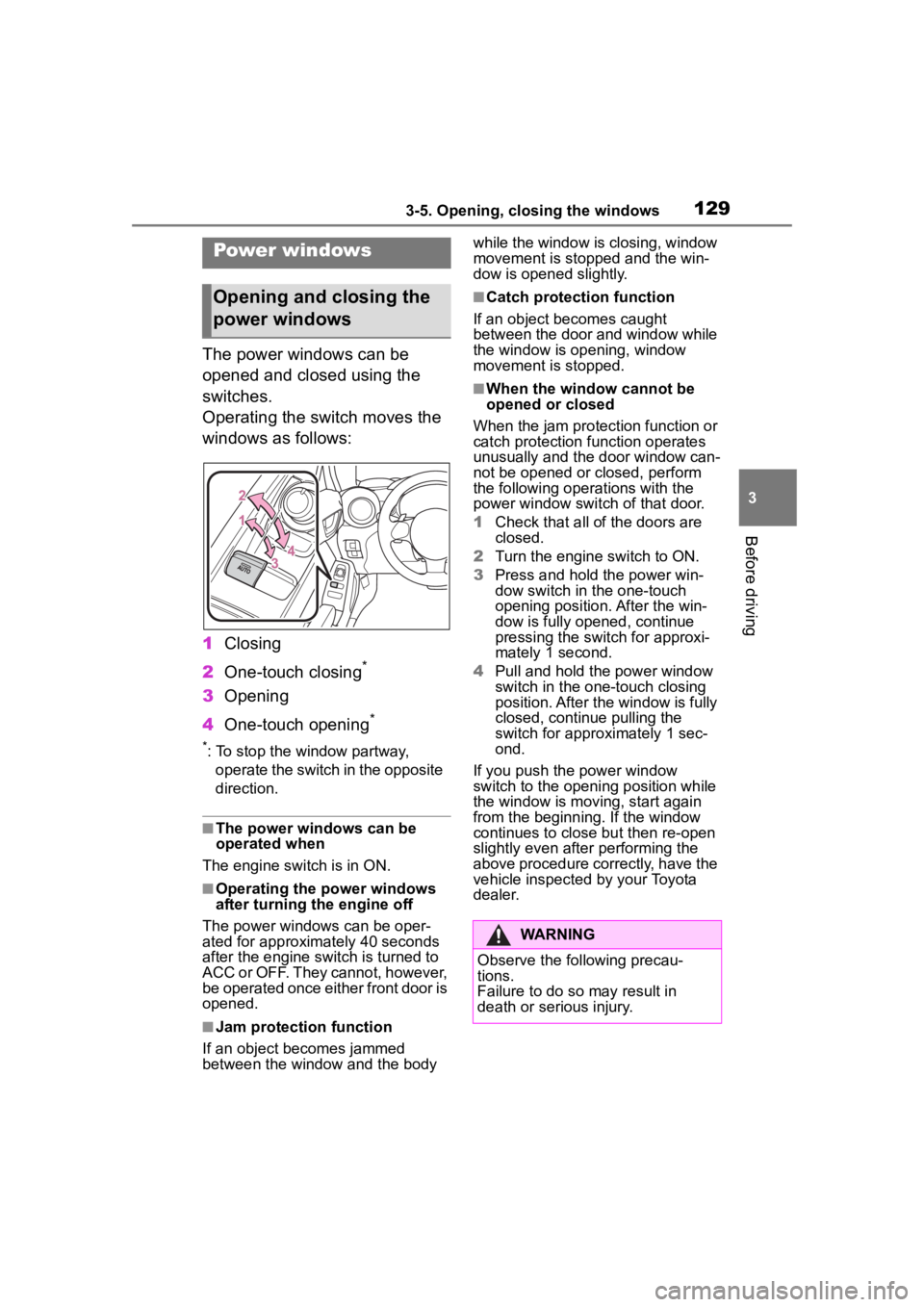
The power windows can be
opened and closed using the
switches.
Operating the switch moves the
windows as follows:
1Closing
2 One-touch closing
*
3Opening
4 One-touch opening
*
*: To stop the window partway,
operate the switch in the opposite
direction.
■The power windows can be
operated when
The engine switch is in ON.
■Operating the power windows
after turning the engine off
The power windows can be oper-
ated for approximately 40 seconds
after the engine switch is turned to
ACC or OFF. They cannot, however,
be operated once either front door is
opened.
■Jam protection function
If an object becomes jammed
between the window and the body while the window is closing, window
movement is stopped and the win-
dow is opened slightly.
■Catch protection function
If an object becomes caught
between the door and window while
the window is opening, window
movement is stopped.
■When the window cannot be
opened or closed
When the jam protection function or
catch protection function operates
unusually and the door window can-
not be opened or closed, perform
the following operations with the
power window switch of that door.
1 Check that all of the doors are
closed.
2 Turn the engine switch to ON.
3 Press and hold the power win-
dow switch in the one-touch
opening position. After the win-
dow is fully opened, continue
pressing the switch for approxi-
mately 1 second.
4 Pull and hold the power window
switch in the on e-touch closing
position. After the window is fully
closed, continue pulling the
switch for appro ximately 1 sec-
ond.
If you push the power window
switch to the openi ng position while
the window is movin g, start again
from the beginning. If the window
continues to close but then re-open
slightly even after performing the
above procedure correctly, have the
vehicle inspected by your Toyota
dealer.
Power windows
Opening and closing the
power windows
WARNING
Observe the following precau-
tions.
Failure to do so may result in
death or serious injury.
Page 133 of 449
1334-1. Before driving
4
Driving
2Set the parking brake.
( P.156)
Check that the park ing brake indi-
cator is illuminated.
3 Shift the shift lever to N.
( P.153)
If parking on a hill, shift the shift
lever to 1 or R and block the wheels
as needed.
4Press the engine switch to
stop the engine.
5 Slowly release the brake
pedal.
6 Lock the door, making sure
that you have the key on your
person.
■Starting off on a steep
uphill
Automatic transmission
1 Make sure that the parking
brake is set and shift the shift
lever to D.
2 Gently depress the accelera-
tor pedal.
3 Release the parking brake.
Manual transmission
1 Make sure that the parking
brake is set and shift the shift
lever to 1.
2 Lightly depress the accelera-
tor pedal at the same time as
gradually releasing the clutch
pedal.
3 Release the parking brake.
■When starting off on an uphill
The hill-start assis t control will acti- vate. (
P.259)
■Driving in the rain
●Drive carefully whe n it is raining,
because visibility will be reduced,
the windows may become
fogged-up, and the road will be
slippery.
●Drive carefully whe n it starts to
rain, because the road surface will
be especially slippery.
●Refrain from hig h speeds when
driving on an expressway in the
rain, because there may be a
layer of water between the tires
and the road surface, preventing
the steering and brakes from
operating properly.
■Engine speed while driving
(vehicles with an automatic
transmission)
In the following conditions, the
engine speed may become high
while driving. This is due to auto-
matic up-shifting control or
down-shifting implementation to
meet driving conditions. It does not
indicate sudden acceleration.
●The vehicle is judged to be driving
uphill or downhill
●When the accele rator pedal is
released
●When driving on curves
●When the brake p edal is firmly
depressed
■Restraining the engine output
(Brake Override System)
When the accelerator and brake
pedals are depressed at the same
time, the engine output may be
restrained.
■New vehicle break-in driving
(the first 1000 miles [1600 km])
The performance a nd long life of
your vehicle are dependent on how
you handle and care for your vehicle
while it is new. Follow these instruc-
tions during the first 1000 miles
(1600 km):
Page 135 of 449
1354-1. Before driving
4
Driving
WARNING
●Do not drive the vehicle over or
stop the vehicle near flammable
materials.
The exhaust system and
exhaust gases can be
extremely hot. These hot parts
may cause a fire if there is any
flammable material nearby.
●Vehicles with a manual trans-
mission: Do not release the
clutch pedal too quickly. Doing
so may propel the vehicle for-
ward, possibly causing an acci-
dent.
●During normal driving, do not
turn off the engine. Turning the
engine off while driving will not
cause loss of steering or brak-
ing control, but the power assist
to these systems will be lost.
This will make it more difficult to
steer and brake, so you should
pull over and stop the vehicle as
soon as it is safe to do so.
However, in the event of an
emergency, such as if it
becomes impossible to stop the
vehicle in the normal way:
P. 3 3 8
●Use engine braking (downshift)
to maintain a safe speed when
driving down a steep hill.
Using the brakes continuously
may cause the brakes to over-
heat and lose effectiveness.
(
P.149, 153)
●Do not adjust the positions of
the steering wheel, the seat, or
the inside or outside rear view
mirrors while driving.
Doing so may result in a loss of
vehicle control.
●Always check that all passen-
gers’ arms, heads or other parts
of their body are not outside the
vehicle.
●Do not drive in excess of the
speed limit. Even if the legal
speed limit permits it, do not
drive over 85 mph (140 km/h)
unless your vehicle has
high-speed capability tires. Driv-
ing over 85 mph (140 km/h)
may result in tire failure, loss of
control and possible injury. Be
sure to consult a tire dealer to
determine whether the tires on
your vehicle are high-speed
capability tires or not before
driving at such speeds.
■When driving on slippery
road surfaces
●Sudden braking, acceleration
and steering may cause tire
slippage and reduce your ability
to control the vehicle.
●Sudden acceleration, engine
braking due to shifting, or
changes in engine speed could
cause the vehicle to skid.
●After driving through a puddle,
lightly depress the brake pedal
to make sure that the brakes
are functioning properly. Wet
brake pads may prevent the
brakes from functioning prop-
erly. If the brakes on only one
side are wet and not functioning
properly, steering control may
be affected.
■When shifting the shift lever
●Vehicles with an automatic
transmission: Do not let the
vehicle roll backward while the
shift lever is in a driving posi-
tion, or roll forw ard while the
shift lever is in R.
Doing so may cause the engine
to stall or lead to poor brake and
steering performance, resulting
in an accident or damage to the
vehicle.
Page 147 of 449
1474-2. Driving procedures
4
Driving
Automatic transmission
1 Stop the vehicle completely.
2 Set the parking brake
( P.156), and shift the shift
lever to P.
Check the parking brake indicator
is illuminated.
3 Press the engine switch.
The engine will stop, and the meter
display will be extinguished.
4Release the brake pedal and
check that “ACCESSORY” or
“IGNITION ON” is not shown
on the meters.
Manual transmission
1 Stop the vehicle completely.
2 Set the parking brake.
( P.156)
Check the parking brake indicator
is illuminated.
3Shift the shift lever to N.
( P.153)
4 Press the engine switch.
The engine will stop, and the meter
display will be extinguished.
5Release the brake pedal and
check that “ACCESSORY” or
“IGNITION ON” is not shown
on the meters.
Modes can be changed by NOTICE
■Symptoms indicating a mal-
function with the engine
switch
If the engine switch seems to be
operating somewh at differently
than usual, such as the switch
sticking slightly, there may be a
malfunction. Contact your Toyota
dealer immediately.
Stopping the engine
WARNING
■Stopping the engine in an
emergency
If you want to stop the engine in
an emergency while driving the
vehicle, press and hold the engine
switch for more than 2 seconds,
or press it briefly 3 times or more
in succession. ( P.338)
However, do not touch the engine
switch while driving except in an
emergency. Turning the engine off
while driving will not cause loss of
steering or braking control, but the
power assist to these systems will
be lost. This will make it more dif-
ficult to steer a nd brake, so you
should pull over and stop the
vehicle as soon as it is safe to do
so.
●If the engine switch is operated
while the vehicle is running, a
warning message will be shown
on the multi-information display
and a buzzer sounds.
●Vehicles with an automatic
transmission: To restart the
engine after performing an
emergency shutdown, shift the
shift lever to N and then press
the engine switch.
●Vehicles with a manual trans-
mission: To restart the engine
after performing an emergency
shutdown, depress the clutch
pedal and then press the engine
switch.
Changing engine switch
modes
Page 156 of 449
1564-2. Driving procedures
turn signal lights will blink 3 times.
■If the turn signals do not
stop flashing after turning
left or right, or if you want
to stop them flashing
Operate the lever in the oppo-
site direction to either position 2
or 3. If you move the lever to
either position 1 or 4, the
selected turn signals will flash.
■Turn signals can be operated
when
The engine switch is in ON.
■If the indicator flashes faster
than usual
Check that a light bulb in the front or
rear turn signal lights has not
burned out.
■If the turn signals stop flashing
before a lane change has been
performed
Operate the lever again.
■Customization
Some functions can be customized.
( P.400)
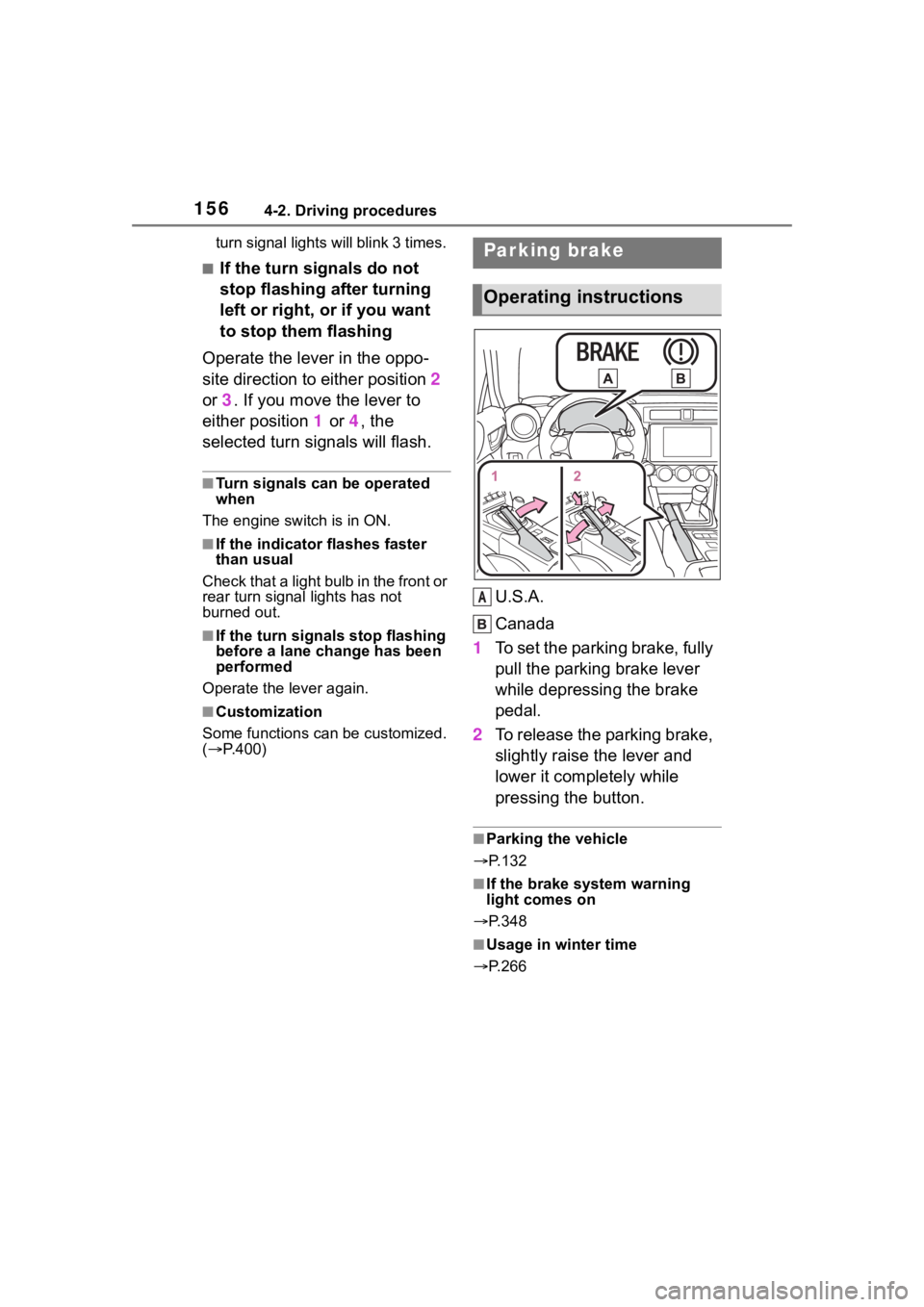
U.S.A.
Canada
1 To set the parking brake, fully
pull the parking brake lever
while depressing the brake
pedal.
2 To release the parking brake,
slightly raise the lever and
lower it completely while
pressing the button.
■Parking the vehicle
P.132
■If the brake system warning
light comes on
P.348
■Usage in winter time
P.266
Parking brake
Operating instructions
A
Page 166 of 449
1664-3. Operating the lights and wipers
■The windshield wiper and
washer can be operated when
The engine switch is in ON.
■If no windshield washer fluid
sprays
Check that the wash er nozzles are
not blocked if there is washer fluid in
the windshield washer fluid reser-
v oi r.
WARNING
■Caution regarding the use of
washer fluid
When it is cold, do not use the
washer fluid until the windshield
becomes warm. The fluid may
freeze on the windshield and
cause low visibility. This may lead
to an accident, resulting in death
or serious injury.
NOTICE
■When the washer fluid tank is
empty
Do not operate the switch continu-
ally as the washer fluid pump may
overheat.
■When a nozzle becomes
blocked
In this case, contact your Toyota
dealer. Do not try to clear it with a
pin or other object. The nozzle will
be damaged.
Page 234 of 449
2344-6. Using other driving systems
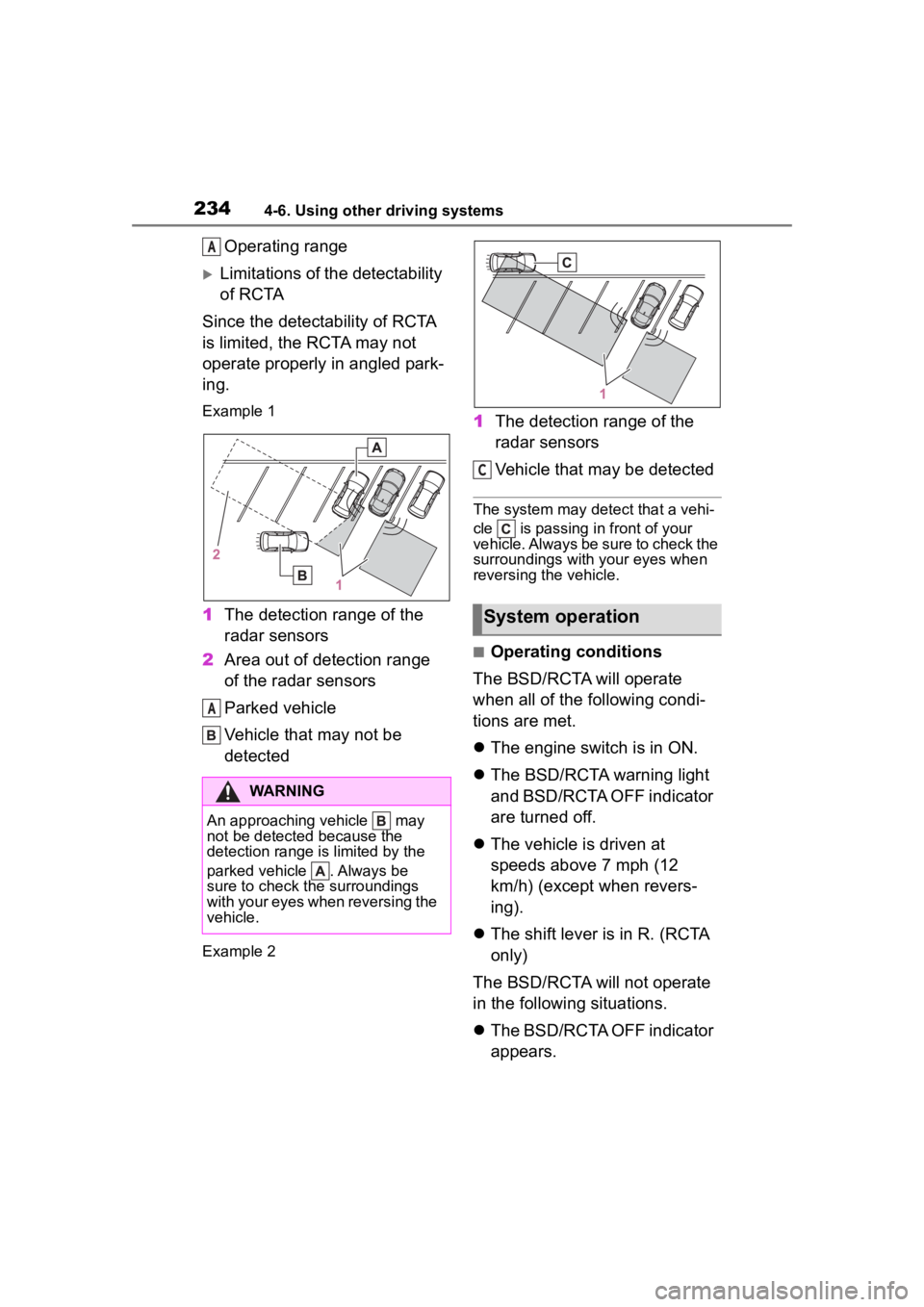
Operating range
Limitations of the detectability
of RCTA
Since the detectability of RCTA
is limited, the RCTA may not
operate properly in angled park-
ing.
Example 1
1 The detection range of the
radar sensors
2 Area out of detection range
of the radar sensors
Parked vehicle
Vehicle that may not be
detected
Example 2
1The detection range of the
radar sensors
Vehicle that may be detected
The system may detect that a vehi-
cle is passing in front of your
vehicle. Always be sure to check the
surroundings with your eyes when
reversing the vehicle.
■Operating conditions
The BSD/RCTA will operate
when all of the following condi-
tions are met.
The engine switch is in ON.
The BSD/RCTA warning light
and BSD/RCTA OFF indicator
are turned off.
The vehicle is driven at
speeds above 7 mph (12
km/h) (except when revers-
ing).
The shift lever is in R. (RCTA
only)
The BSD/RCTA will not operate
in the following situations.
The BSD/RCTA OFF indicator
appears.
WARNING
An approaching vehicle may
not be detected because the
detection range is limited by the
parked vehicle . Always be
sure to check the surroundings
with your eyes when reversing the
vehicle.
A
A
System operation
C
Page 239 of 449
2394-6. Using other driving systems
4
Driving
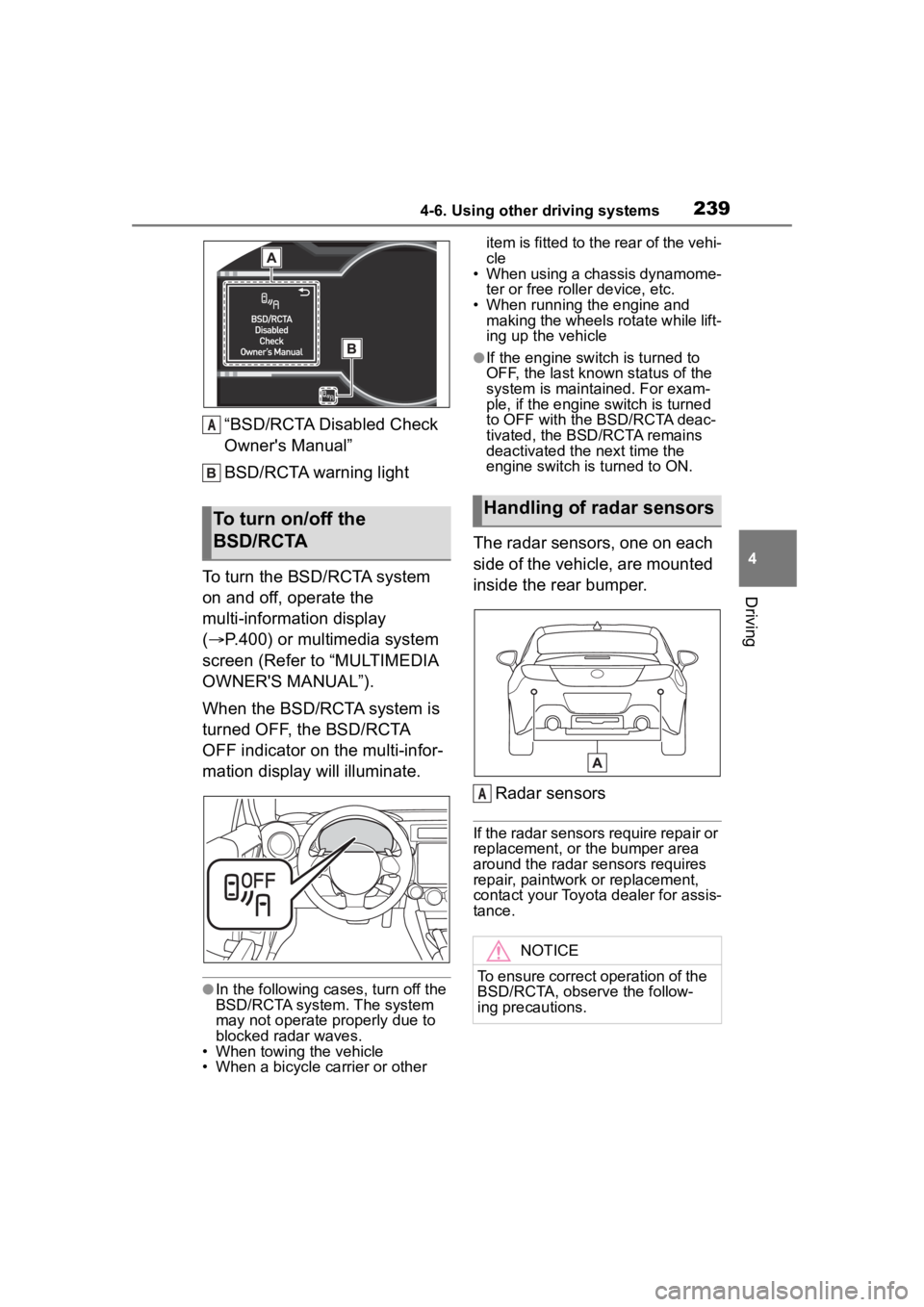
“BSD/RCTA Disabled Check
Owner's Manual”
BSD/RCTA warning light
To turn the BSD/RCTA system
on and off, operate the
multi-information display
( P.400) or multimedia system
screen (Refer to “MULTIMEDIA
OWNER'S MANUAL”).
When the BSD/RCTA system is
turned OFF, the BSD/RCTA
OFF indicator on the multi-infor-
mation display will illuminate.
●In the following cases, turn off the
BSD/RCTA system. The system
may not operate properly due to
blocked radar waves.
• When towing the vehicle
• When a bicycle carrier or other item is fitted to the rear of the vehi-
cle
• When using a chassis dynamome-
ter or free rolle r device, etc.
• When running the engine and making the wheels rotate while lift-
ing up the vehicle
●If the engine switch is turned to
OFF, the last known status of the
system is maintained. For exam-
ple, if the engine switch is turned
to OFF with the BSD/RCTA deac-
tivated, the BSD/RCTA remains
deactivated the next time the
engine switch is turned to ON.
The radar sensors, one on each
side of the vehicle, are mounted
inside the rear bumper.
Radar sensors
If the radar sensors require repair or
replacement, or the bumper area
around the radar sensors requires
repair, paintwork or replacement,
contact your Toyota dealer for assis-
tance.
To turn on/off the
BSD/RCTA
A
Handling of radar sensors
NOTICE
To ensure correct operation of the
BSD/RCTA, observe the follow-
ing precautions.
A
Page 250 of 449
2504-6. Using other driving systems
●Do not wipe the camera with alco-
hol, benzine or paint thinner.
Otherwise, discoloration may
occur. To remove contamination,
wipe the camera with a cloth
moistened with a diluted neutral
detergent. Then wipe it with a soft,
dry cloth.
●When waxing the vehicle, be care-
ful not to apply the wax to the
camera. If it comes in contact with
the camera, moisten a clean cloth
with a diluted neutral detergent to
remove the wax.
●The camera lens has a hard coat-
ing to help prevent scratches.
However, when washing the vehi-
cle or cleaning the camera lens,
be careful not to scratch the cam-
era lens. Do not use a washing
brush directly on the camera lens.
The image quality of the rear view
camera may deteriorate.
●Strong light shined on the camera lens may develop vertical lines
around the light source. This is not
a malfunction.
●Under the fluore
scent light, the
display may flicker. However, this
is not a malfunction.
●The image of the rear view cam-
era may be slightly different from
the actual color of the objects.
●If there is a mal function on the
multimedia system screen, refer to
“MULTIMEDIA OWNER'S MAN-
UAL”.
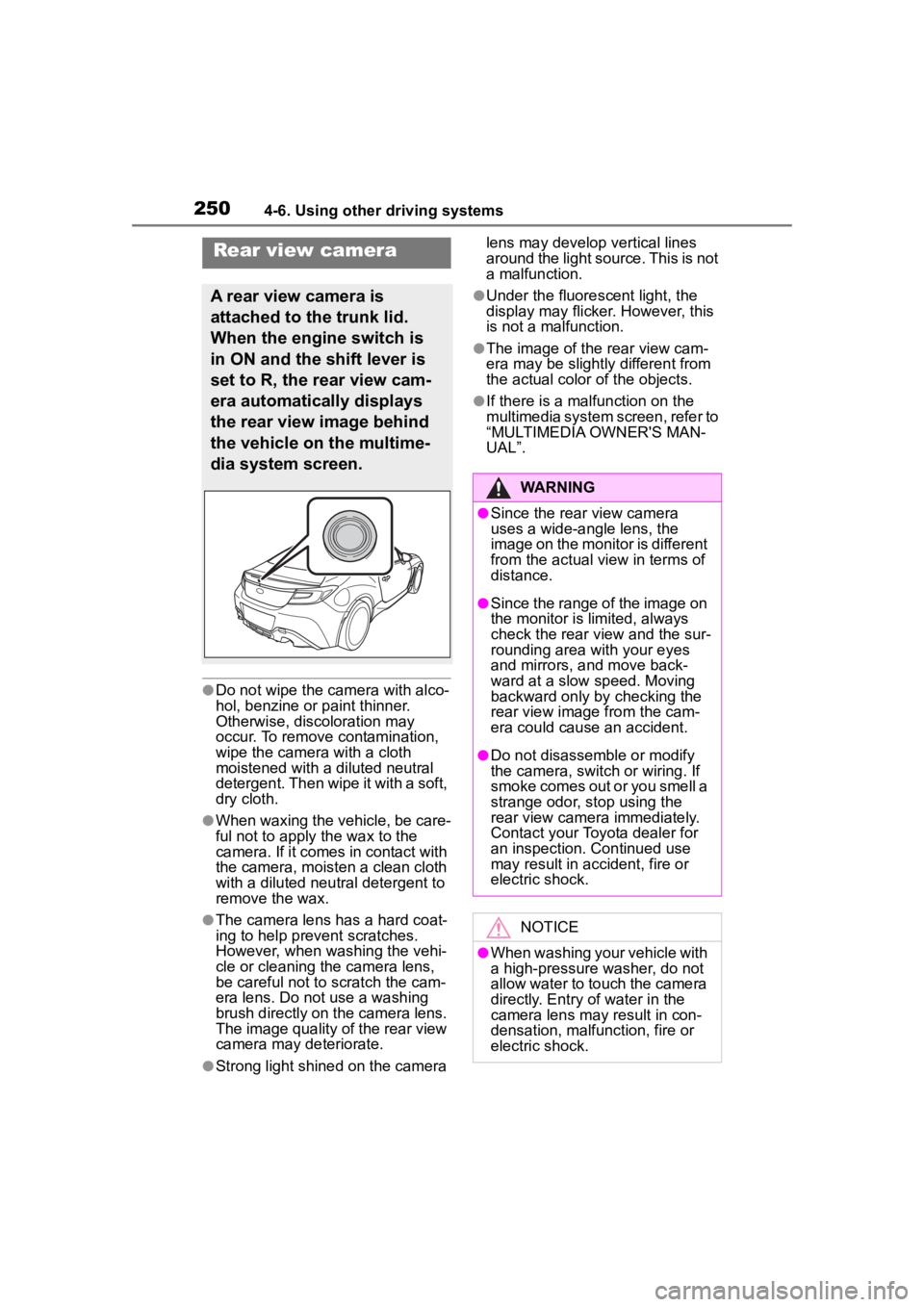
Rear view camera
A rear view camera is
attached to the trunk lid.
When the engine switch is
in ON and the shift lever is
set to R, the rear view cam-
era automatically displays
the rear view image behind
the vehicle on the multime-
dia system screen.
WARNING
●Since the rear view camera
uses a wide-angle lens, the
image on the monitor is different
from the actual view in terms of
distance.
●Since the range of the image on
the monitor is limited, always
check the rear view and the sur-
rounding area with your eyes
and mirrors, and move back-
ward at a slow speed. Moving
backward only by checking the
rear view image from the cam-
era could cause an accident.
●Do not disassemble or modify
the camera, switch or wiring. If
smoke comes out or you smell a
strange odor, stop using the
rear view camera immediately.
Contact your Toyota dealer for
an inspection. Continued use
may result in accident, fire or
electric shock.
NOTICE
●When washing your vehicle with
a high-pressure washer, do not
allow water to touch the camera
directly. Entry of water in the
camera lens may result in con-
densation, malfunction, fire or
electric shock.
Page 260 of 449
2604-6. Using other driving systems
3Start the engine and check
that the ABS warning light
and slip indicator are off.
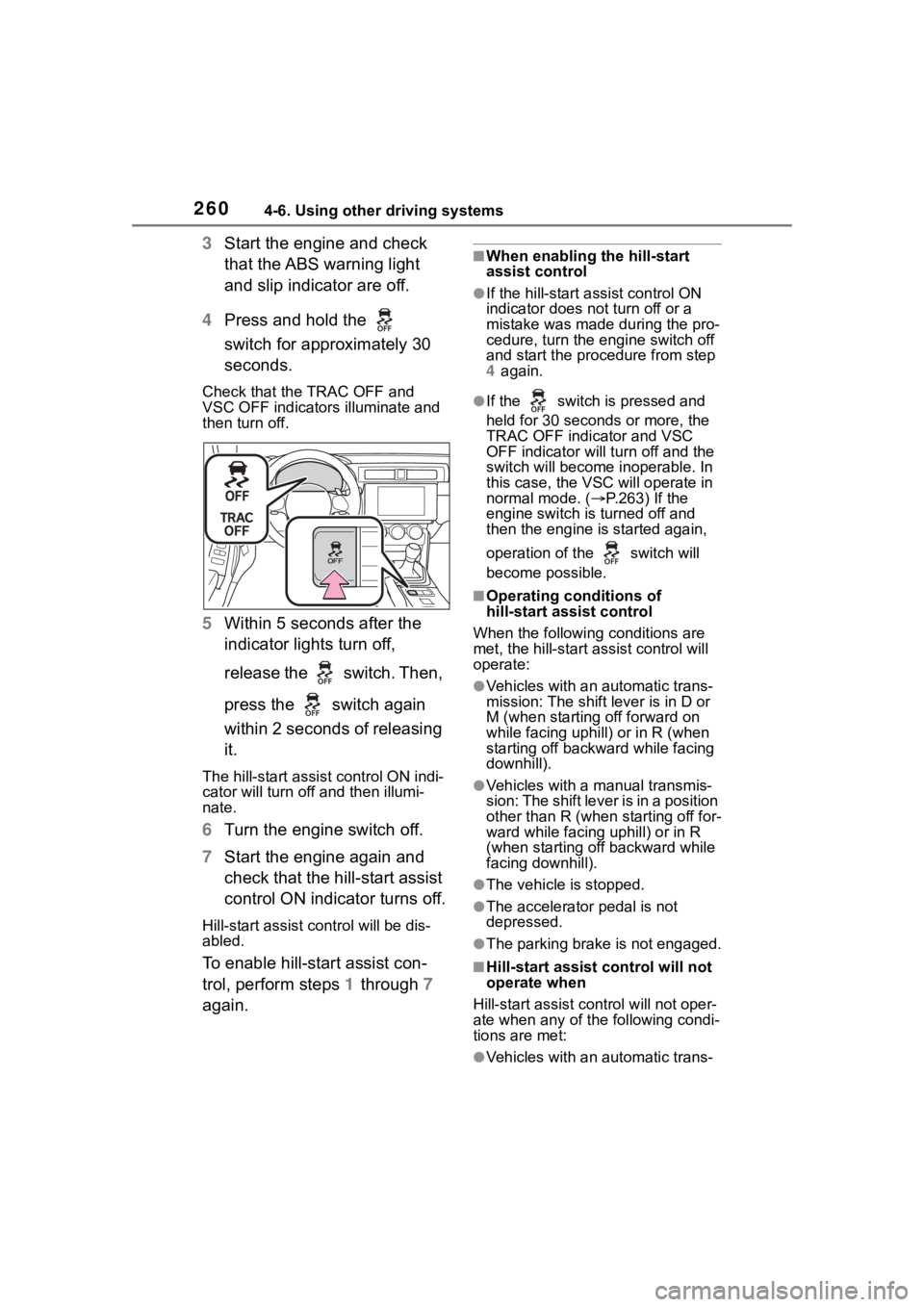
4 Press and hold the
switch for approximately 30
seconds.
Check that the TRAC OFF and
VSC OFF indicators illuminate and
then turn off.
5 Within 5 seconds after the
indicator lights turn off,
release the switch. Then,
press the switch again
within 2 seconds of releasing
it.
The hill-start assis t control ON indi-
cator will turn off and then illumi-
nate.
6 Turn the engine switch off.
7 Start the engine again and
check that the hill-start assist
control ON indicator turns off.
Hill-start assist control will be dis-
abled.
To enable hill-start assist con-
trol, perform steps 1 through 7
again.
■When enabling the hill-start
assist control
●If the hill-start assist control ON
indicator does n ot turn off or a
mistake was made during the pro-
cedure, turn the e ngine switch off
and start the procedure from step
4 again.
●If the switch is pressed and
held for 30 seconds or more, the
TRAC OFF indicator and VSC
OFF indicator will tu rn off and the
switch will become inoperable. In
this case, the VSC will operate in
normal mode. ( P.263) If the
engine switch is turned off and
then the engine is started again,
operation of the switch will
become possible.
■Operating conditions of
hill-start assist control
When the following conditions are
met, the hill-start assist control will
operate:
●Vehicles with an automatic trans-
mission: The shift lever is in D or
M (when starting off forward on
while facing uphill) or in R (when
starting off backward while facing
downhill).
●Vehicles with a manual transmis-
sion: The shift lever is in a position
other than R (when starting off for-
ward while facing uphill) or in R
(when starting off backward while
facing downhill).
●The vehicle is stopped.
●The accelerator pedal is not
depressed.
●The parking brake is not engaged.
■Hill-start assist control will not
operate when
Hill-start assist cont rol will not oper-
ate when any of the following condi-
tions are met:
●Vehicles with an automatic trans-