fuel TOYOTA 86 2023 User Guide
[x] Cancel search | Manufacturer: TOYOTA, Model Year: 2023, Model line: 86, Model: TOYOTA 86 2023Pages: 449, PDF Size: 8.5 MB
Page 88 of 449
882-1. Instrument cluster
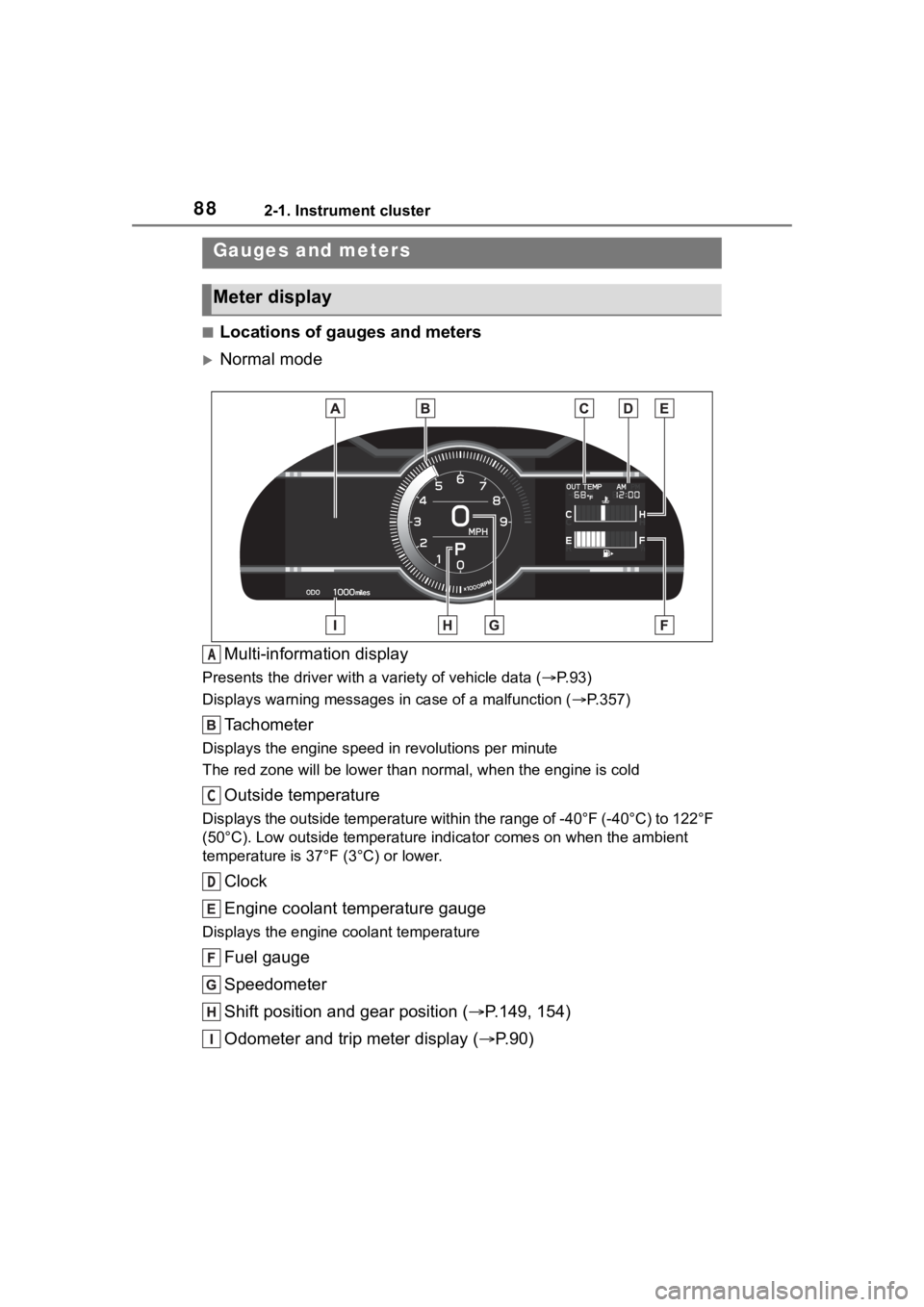
■Locations of gauges and meters
Normal modeMulti-information display
Presents the driver with a variety of vehicle data (P.93)
Displays warning messages in case of a malfunction (P.357)
Tachometer
Displays the engine speed in revolutions per minute
The red zone will be lower than n ormal, when the engine is cold
Outside temperature
Displays the outside temperature within the range of -40°F (-40 °C) to 122°F
(50°C). Low outside temperature indicator comes on when the amb ient
temperature is 37°F (3°C) or lower.
Clock
Engine coolant temperature gauge
Displays the engine c oolant temperature
Fuel gauge
Speedometer
Shift position and gear position ( P.149, 154)
Odometer and trip meter display ( P.90)
Gauges and meters
Meter display
A
C
D
Page 89 of 449
892-1. Instrument cluster
2
Vehicle status information and indicators
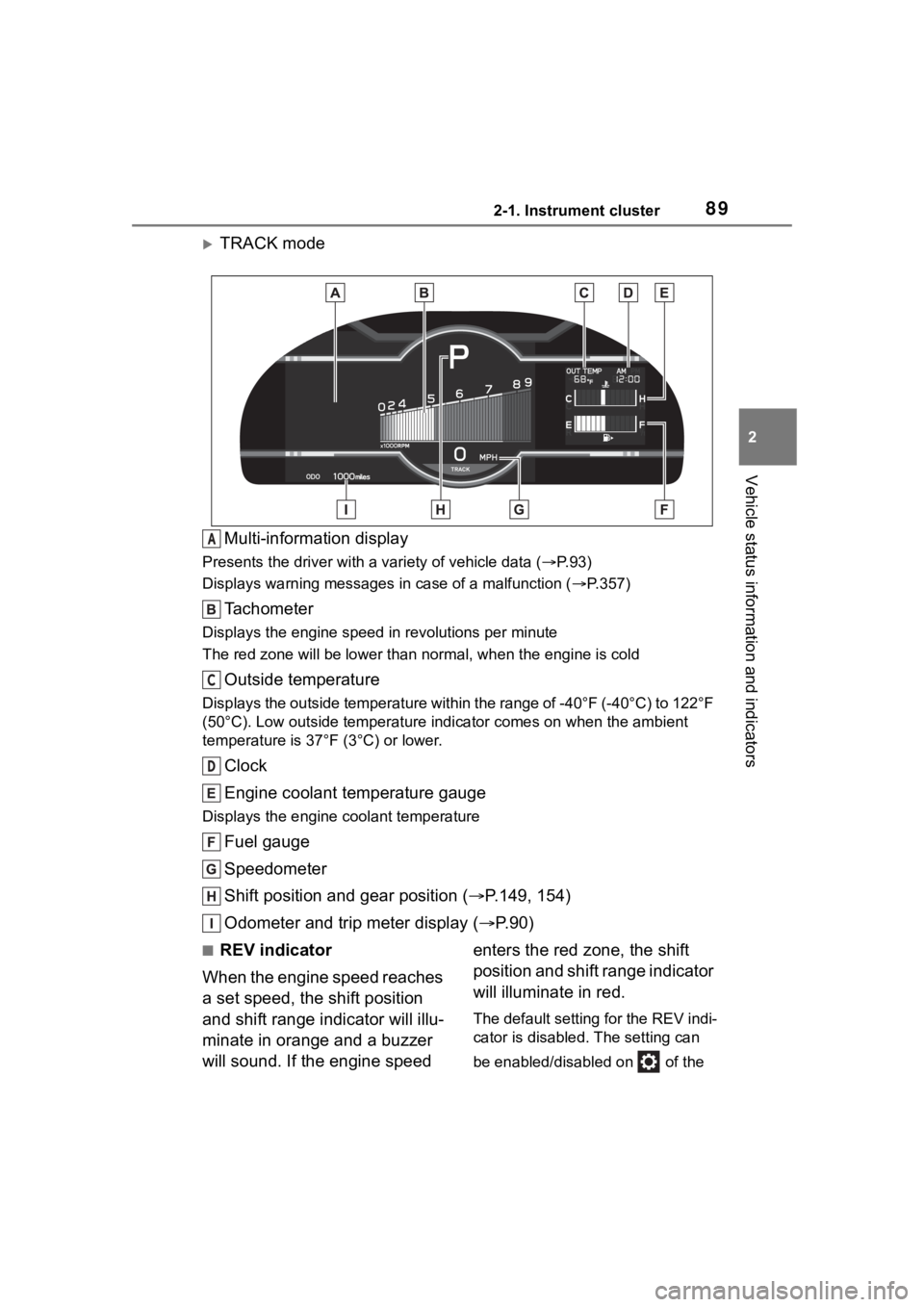
TRACK modeMulti-information display
Presents the driver with a variety of vehicle data (P.93)
Displays warning messages in case of a malfunction (P.357)
Tachometer
Displays the engine speed in revolutions per minute
The red zone will be lower than n ormal, when the engine is cold
Outside temperature
Displays the outside temperature within the range of -40°F (-40 °C) to 122°F
(50°C). Low outside temperature indicator comes on when the amb ient
temperature is 37°F (3°C) or lower.
Clock
Engine coolant temperature gauge
Displays the engine c oolant temperature
Fuel gauge
Speedometer
Shift position and gear position ( P.149, 154)
Odometer and trip meter display ( P.90)
■REV indicator
When the engine speed reaches
a set speed, the shift position
and shift range indicator will illu-
minate in orange and a buzzer
will sound. If the engine speed enters the red zone, the shift
position and shift range indicator
will illuminate in red.
The default setting for the REV indi-
cator is disabled. The setting can
be enabled/disabled on of the
A
C
D
Page 95 of 449
952-1. Instrument cluster
2
Vehicle status information and indicators
Driving information (page 4)
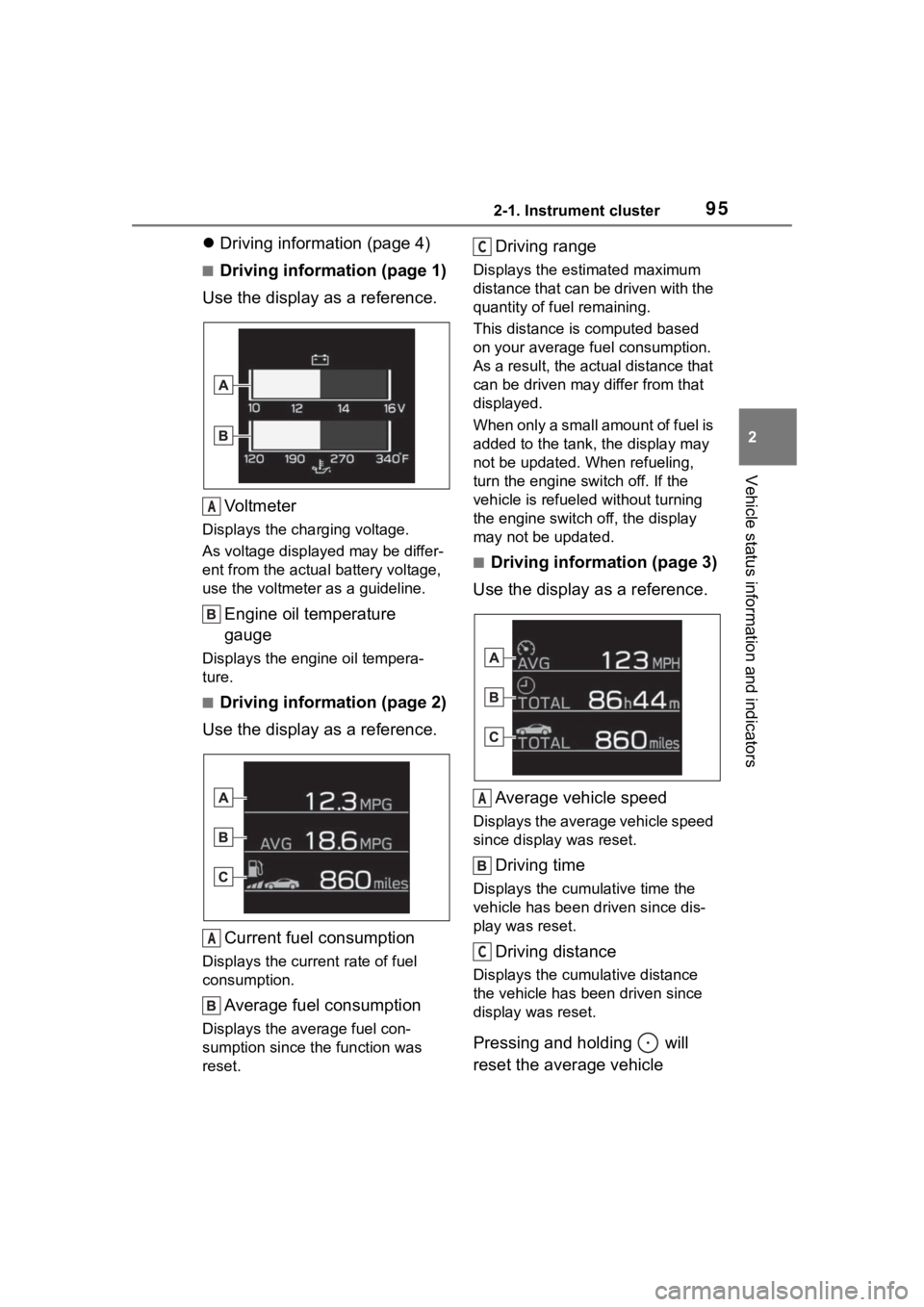
■Driving information (page 1)
Use the display as a reference.
Vo l t m e t e r
Displays the charging voltage.
As voltage display ed may be differ-
ent from the actual battery voltage,
use the voltmeter as a guideline.
Engine oil temperature
gauge
Displays the engine oil tempera-
ture.
■Driving information (page 2)
Use the display as a reference.
Current fuel consumption
Displays the current rate of fuel
consumption.
Average fuel consumption
Displays the average fuel con-
sumption since the function was
reset.
Driving range
Displays the estimated maximum
distance that can be driven with the
quantity of fuel remaining.
This distance is computed based
on your average f uel consumption.
As a result, the actual distance that
can be driven may differ from that
displayed.
When only a small amount of fuel is
added to the tank, the display may
not be updated. When refueling,
turn the engine switch off. If the
vehicle is refueled without turning
the engine switch off, the display
may not be updated.
■Driving information (page 3)
Use the display as a reference.
Average vehicle speed
Displays the average vehicle speed
since display was reset.
Driving time
Displays the cumulative time the
vehicle has been driven since dis-
play was reset.
Driving distance
Displays the cumulative distance
the vehicle has been driven since
display was reset.
Pressing and holding will
reset the average vehicle
A
A
C
A
C
Page 117 of 449
1173-2. Opening, closing and locking the doors and trunk
3
Before driving
By registering a 5 digit PIN
code, all of the doors and the
fuel filler door can be unlocked
without an electronic key by
pressing the trunk opener
switch.
■PIN code registration
method
1 Turn the engine switch off.
2 Close all of the doors and the
trunk.
3 Press and hold of the
wireless remote control.
At this time, all of the doors and the
fuel filler door will lock.
4Within 5 seconds of perform-
ing step 3, press and hold
the trunk opener switch.
After 5 seconds or more, a buzzer
will sound.
5Release of the wireless
remote control and the trunk
opener switch.
6 Within 30 seconds after the
buzzer begins sounding,
press of the wireless
remote control.
The buzzer will stop.
7A PIN code can now be reg-
istered. Press the trunk
opener switch the same num-
ber of times as the first digit
of the PIN code.
For example: If registering 32468,
press the switch 3 times.
8Wait for the buzzer to sound
1 time and then press the
switch the same number of
times as for the next digit.
For example: If registering 32468,
press the switch 2 times.
9Repeat step 8 for the remain-
ing digits.
10Within 30 seconds after the buzzer begins sounding
intermittently, perform steps
7 through 9 again to confirm
the PIN code.
Registration is complete and all of
the doors and the fuel filler door will
unlock.
■Unlocking method
Press the trunk opener switch
using the same procedure as
steps 7 through 9.
■PIN code registration
●To prevent theft, the same digit for
all 5 digits and 12345 cannot be
registered as the PIN code. Also,
avoid using the same number as
on your license plate or other sim-
ple codes.
●To use 0 as a digit, press the trunk
opener switch 10 times.
●If a mistake is made during regis-
tration, unlock the doors or trunk
using the wireless remote control
to cancel registration. Then per-
form registration again, starting
from step 1. However, if the mis-
take was made in step 10, a
buzzer will sound and step 10 c a n
be performed again.
●To cle a r t he P IN c od e , p e rfo rm the
registration procedure and enter
22222.
Unlocking the doors
using PIN code smart
entry
Page 131 of 449
131
4
4
Driving
Driving
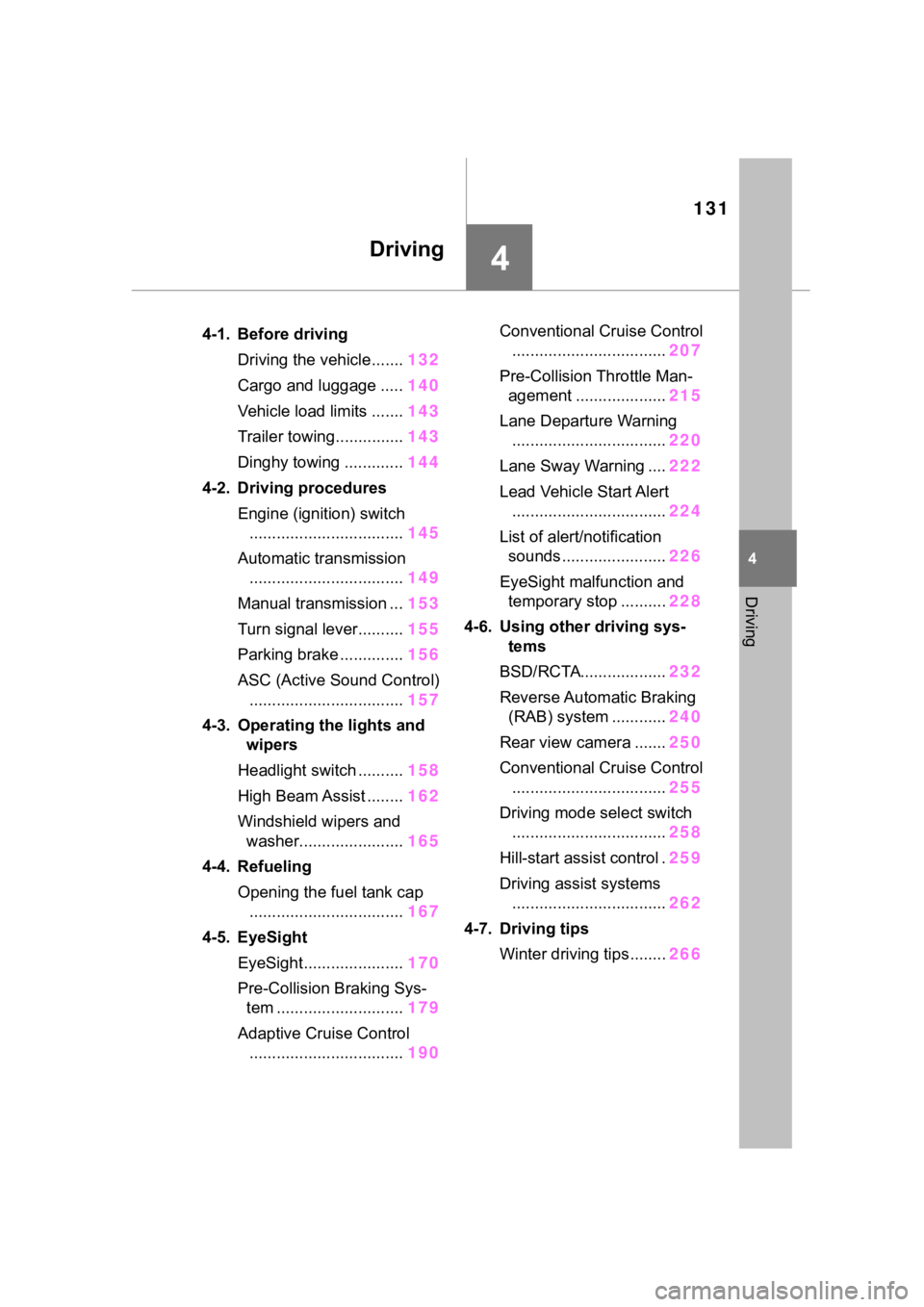
.4-1. Before drivingDriving the vehicle....... 132
Cargo and luggage ..... 140
Vehicle load limits ....... 143
Trailer towing............... 143
Dinghy towing ............. 144
4-2. Driving procedures Engine (ignition) switch.................................. 145
Automatic transmission .................................. 149
Manual transmission ... 153
Turn signal lever.......... 155
Parking brake .............. 156
ASC (Active Sound Control) .................................. 157
4-3. Operating the lights and wipers
Headlight switch .......... 158
High Beam Assist ........ 162
Windshield wipers and washer....................... 165
4-4. Refueling Opening the fuel tank cap.................................. 167
4-5. EyeSight EyeSight...................... 170
Pre-Collision Braking Sys- tem ............................ 179
Adaptive Cruise Control .................................. 190Conventional Cruise Control
.................................. 207
Pre-Collision Throttle Man- agement .................... 215
Lane Departure Warning .................................. 220
Lane Sway Warning .... 222
Lead Vehicle Start Alert .................................. 224
List of alert/notification sounds ......... ..............226
EyeSight malfunction and temporary stop .......... 228
4-6. Using other driving sys- tems
BSD/RCTA................... 232
Reverse Automatic Braking (RAB) system ............ 240
Rear view camera ....... 250
Conventional Cruise Control .................................. 255
Driving mode select switch .................................. 258
Hill-start assist control . 259
Driving assist systems .................................. 262
4-7. Driving tips Winter driving tips........ 266
Page 134 of 449
1344-1. Before driving
●Do not race the engine. And do
not allow the engine speed to
exceed 4000 rpm except in an
emergency.
●Do not drive at one constant
engine or vehicle speed for a long
time, either fast or slow.
●Avoid starting suddenly and rapid
acceleration, except in an emer-
gency.
●Avoid hard braking, except in an
emergency.
The same break-in procedures
should be applied to an over-
hauled engine, newly mounted
engine or when brake pads or
brake linings are replaced with
new ones.
■Drum-in-disc type parking
brake system
Your vehicle has a drum-in-disc type
parking brake system. This type of
brake system needs bedding-down
of the brake shoes periodically or
whenever the parking brake shoes
and/or drum are replaced. Have
your Toyota dealer perform the bed-
ding down operation.
■After the engine starts
For a short time after the engine is
started, in order to ensure emissions
performance, intake and exhaust
noise and vibration may increase,
but this does not indicate a malfunc-
tion.
■Operating your vehicle in a for-
eign country
Comply with the relevant vehicle
registration laws and confirm the
availability of the correct fuel.
( P.381)
WARNING
Observe the following precau-
tions.
Failure to do so m ay result in
death or serious injury.
■When starting the vehicle
(vehicles with an automatic
transmission)
●Always keep your foot on the
brake pedal while stopped with
the engine running. This pre-
vents the vehicle from creeping.
●Firmly depress the brake pedal
because engine speed may
increase immediately after start-
ing the engine, when the air
conditioning system is operat-
ing, when turning the steering
wheel, etc., thereby causing
creeping to become stronger.
Apply the parkin g brake as nec-
essary.
■When driving the vehicle
●Do not drive if you are unfamil-
iar with the location of the brake
and accelerator pedals to avoid
depressing the wrong pedal.
• Accidentally depressing the accelerator pedal instead of the
brake pedal will result in sudden
acceleration that may lead to an
accident.
• When backing up, you may twist your body around, leading to a
difficulty in operating the pedals.
Make sure to operate the pedals
properly.
• Make sure to keep a correct driving posture even when mov-
ing the vehicle only slightly. This
allows you to depress the brake
and accelerator pedals properly.
• Depress the brake pedal using your right foot. Depressing the
brake pedal using your left foot
may delay response in an emer-
gency, resulting in an accident.
Page 149 of 449
1494-2. Driving procedures
4
Driving
than P, the engine switch will not
be turned off but instead be
turned to ACC. Perform the fol-
lowing procedure to turn the
switch off:
1Check that the parking brake
is set.
2 Shift the shift lever to P.
3 Check that “ACCESSORY” is
displayed on the meters and
press the engine switch
shortly and firmly.
4 Check that “ACCESSORY”
or “IGNITION ON” on the
meters are off.
*: If equipped
*1: To improve fuel efficiency and
reduce noise, shift the shift lever
to D for normal driving.
*2: Any gear range can be fixed when driving in Manual mode.
■To protect the a utomatic trans-
mission
If the automatic transmission fluid
temperature is high, “Transmission
Oil Temperature Check Owner's
Manual” will be displayed on the
multi-information display and the
NOTICE
■To prevent battery discharge
Do not stop the engine when the
shift lever is in a position other
than P. If the engin e is stopped in
another shift lever position, the
engine switch will not be turned
off but instead be turned to ACC
mode. If the vehicle is left in ACC,
battery discharge may occur.
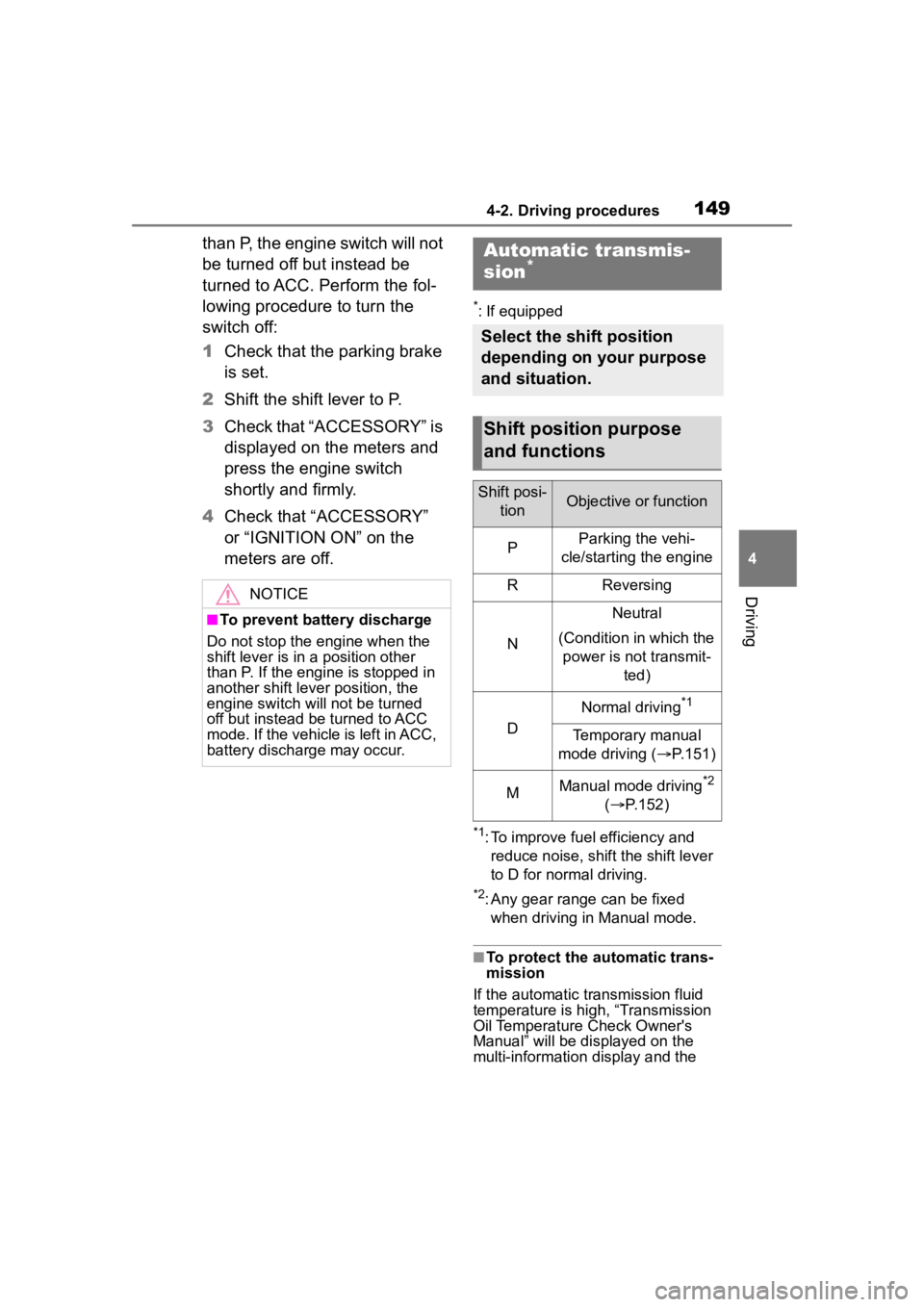
Automatic transmis-
sion*
Select the shift position
depending on your purpose
and situation.
Shift position purpose
and functions
Shift posi-
tionObjective or function
PParking the vehi-
cle/starting the engine
RReversing
N
Neutral
(Condition in which the power is not transmit- ted)
D
Normal driving*1
Temporary manual
mode driving ( P.151)
MManual mode driving*2
( P.152)
Page 155 of 449
1554-2. Driving procedures
4
Driving
■Shift position indicator display
The selected shift position will not
appear in the following situations:
●When the shift lever is in N.
●When the vehicle speed is 6 mph
(10 km/h) or less (except when the
shift lever is in R).
●When the clutch pedal is
depressed.
To help enable fuel-efficient driv-
ing, shift-up indicator illuminate
to indicate upshift timing.
The indicator can be turned on/off.
( P.400)
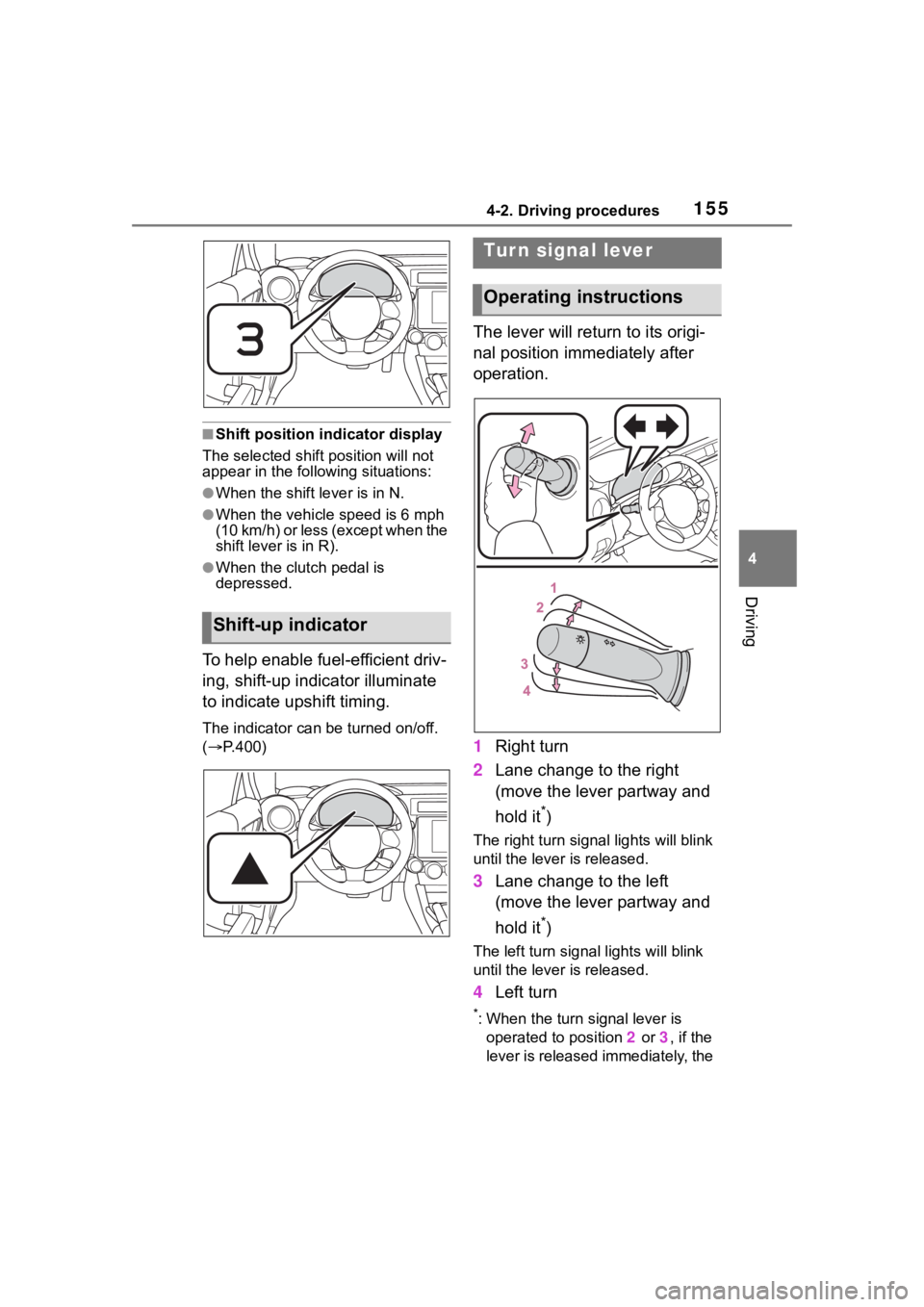
The lever will return to its origi-
nal position immediately after
operation.
1 Right turn
2 Lane change to the right
(move the lever partway and
hold it
*)
The right turn signal lights will blink
until the lever is released.
3Lane change to the left
(move the lever partway and
hold it
*)
The left turn signal lights will blink
until the lever is released.
4Left turn
*: When the turn signal lever is
operated to position 2 or 3, if the
lever is released immediately, the
Shift-up indicator
Tur n signal lever
Operating instructions
Page 159 of 449
1594-3. Operating the lights and wipers
4
Driving
parking lights and illuminate
brighter than the parking lights.
●To make your vehicle more visible
to other drivers during daytime
driving, the daytime running lights
turn on automatically when all of
the following conditions are met.
(The daytime running lights are
not designed for use at night.)
• The engine is running
• The shift lever is shifted out of P (vehicles with an automatic trans-
mission)
• The parking brake is released
• The headlight s witch is in the
(U.S.A. only), or
* position
*: When the surroundings are bright
The daytime running lights remain
on after they illumi nate, even if the
parking brake is set again.
●When the turn signal indicators
are flashing, the daytime running
light on the side that the turn sig-
nals are flashing will turn off.
●When the emergency flashers are
flashing, both daytime running
lights will turn off.
●Compared to turning on the head-
lights, the daytime running light
system offers gr eater durability
and consumes less electricity, so
it can help improve fuel economy.
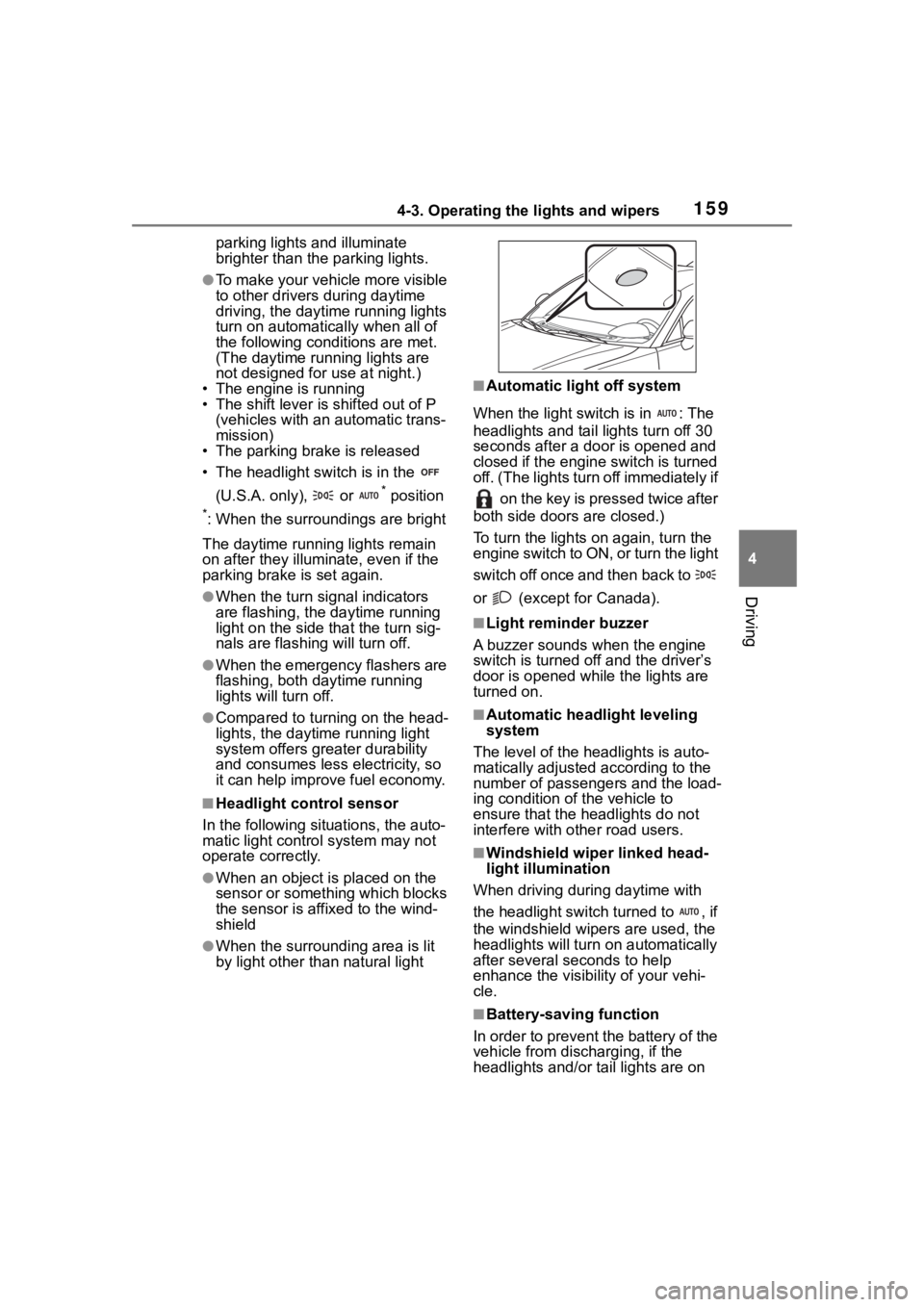
■Headlight control sensor
In the following si tuations, the auto-
matic light control system may not
operate correctly.
●When an object is placed on the
sensor or something which blocks
the sensor is affixed to the wind-
shield
●When the surrounding area is lit
by light other than natural light
■Automatic light off system
When the light switch is in : The
headlights and tail lights turn off 30
seconds after a door is opened and
closed if the engine switch is turned
off. (The lights turn off immediately if on the key is pressed twice after
both side doors are closed.)
To turn the lights on again, turn the
engine switch to ON, or turn the light
switch off once and then back to
or (except for Canada).
■Light reminder buzzer
A buzzer sounds when the engine
switch is turned off and the driver’s
door is opened wh ile the lights are
turned on.
■Automatic headlight leveling
system
The level of the headlights is auto-
matically adjusted according to the
number of passengers and the load-
ing condition of the vehicle to
ensure that the headlights do not
interfere with o ther road users.
■Windshield wiper linked head-
light illumination
When driving during daytime with
the headlight switch turned to , if
the windshield wipers are used, the
headlights will turn o n automatically
after several se conds to help
enhance the visibility of your vehi-
cle.
■Battery-saving function
In order to prevent the battery of the
vehicle from discharging, if the
headlights and/or tail lights are on
Page 167 of 449
1674-4. Refueling
4
Driving
4-4.Refueling
Close both side doors and
windows, and turn the engine
switch off.
Confirm the type of fuel.
■Fuel types
P. 3 8 8
■Fuel tank opening for unleaded
gasoline
To help prevent incorrect fueling,
your vehicle has a fuel tank opening
that only accommodates the spe-
cial nozzle on unle aded fuel pumps.
■If the malfunction indicator
lamp illuminates
The malfunction indicator lamp may
illuminate erroneous ly if refueling is
performed repeatedly when the fuel
tank is nearly full.
Opening the fuel tank
cap
Perform the following steps
to open the fuel tank cap:
Before refueling the vehi-
cle
WARNING
■When refueling the vehicle
Observe the following precautions
while refueling the vehicle. Failure
to do so may result in death or
serious injury.
●Do not handle fuel indoors.
●After exiting the vehicle and
before opening the fuel door,
touch an unpainted metal sur-
face to discharge any static
electricity. It is important to dis-
charge static electricity before
refueling because sparks result-
ing from static electricity can
cause fuel vapors to ignite while
refueling.
●Always hold the grips on the
fuel tank cap and turn it slowly
to remove it.
A whooshing sound may be
heard when the f uel tank cap is
loosened. Wait until the sound
cannot be heard before fully
removing the cap. In hot
weather, pressurized fuel may
spray out the filler neck and
cause injury.
●Do not allow anyone that has
not discharged static electricity
from their body to come close to
an open fuel tank.
●Do not allow anyone to
approach the area of the vehicle
near the fuel f iller pipe while
refueling is in progress.
●Do not inhale vaporized fuel.
Fuel contains substances that
are harmful if inhaled.
●Do not smoke while refueling
the vehicle.
Doing so may cause the fuel to
ignite and cause a fire.
●Do not return to the vehicle or
touch any person or object that
is statically charged.
This may cause static electricity
to build up, resulting in a possi-
ble ignition hazard.
■When refueling
Observe the following precautions
to prevent fuel overflowing from
the fuel tank: